LAIN-mcp
Rust MCP server that gives AI coding agents architectural awareness — persistent knowledge graph, blast radius analysis, co-change detection via git, and local semantic search. No API keys, runs entirely on-premise.
Documentation
Lain
A code graph for coding agents. Lain maps callers, dependencies, symbols, and Git co-changes, then exposes them through the Model Context Protocol (MCP). Before an agent edits a function, it can inspect what depends on it and how the rest of the code reaches it.
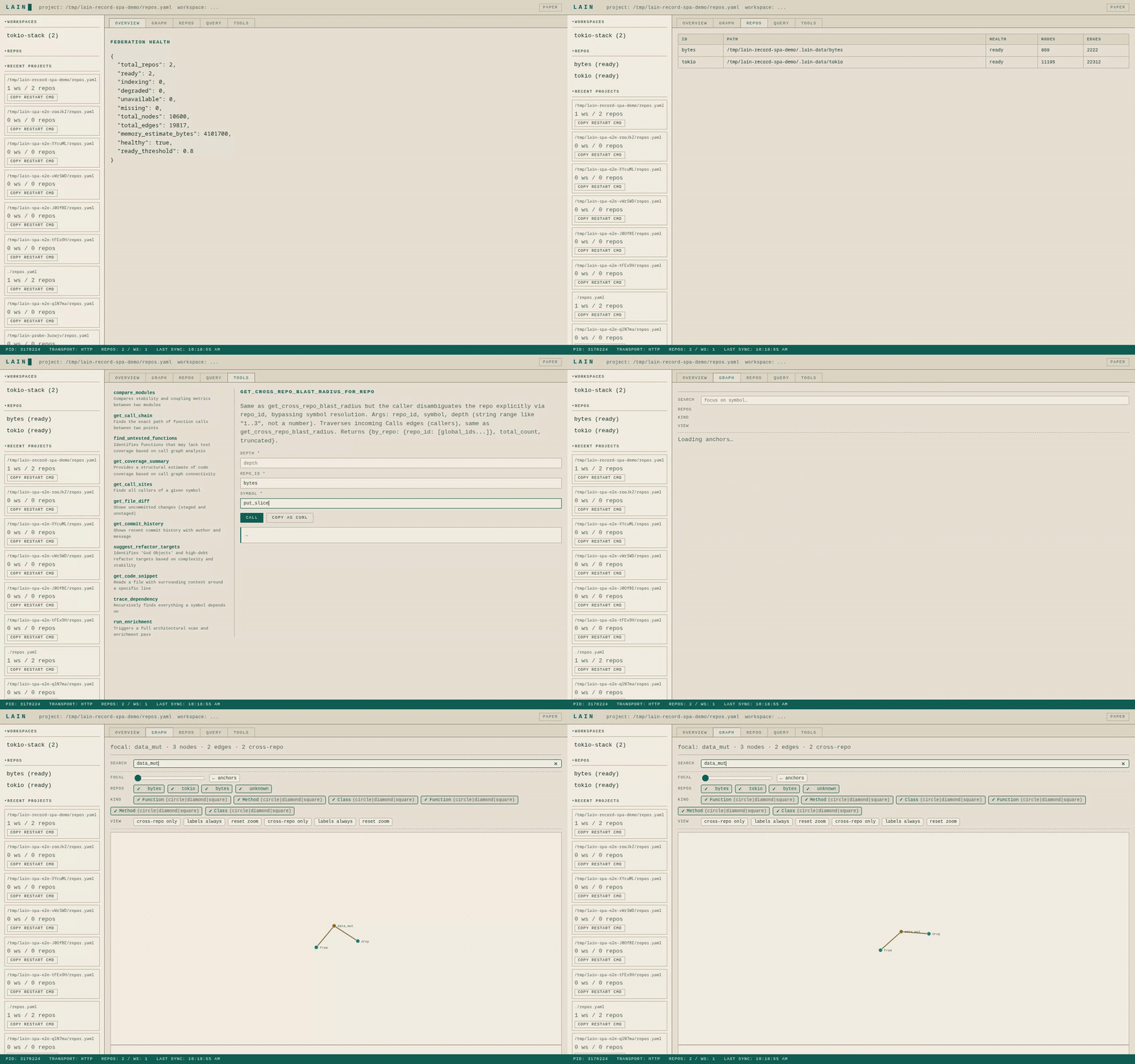
The demo traces a symbol across the bytes and tokio repositories. Agents
query the same graph through MCP; the browser shows what Lain indexed and where
an answer came from.
Ask your agent:
If I change validate_token, what breaks?
Show me the call chain from entry to helper_a.
Which files usually change with auth.rs?
Is another agent already editing this code?
Lain answers with symbol names and source paths from a local index. The index stays on disk between runs, updates when the code changes, and can cover more than one repository. Semantic search is optional; graph queries work without an embedding model.
Install
Using the release installer:
curl -fsSL https://raw.githubusercontent.com/spuentesp/lain/main/install.sh | bash
source ~/.zshrc   # or ~/.bashrc
lain --version
Rust 1.89 or newer is only needed when building from source. The quickstart covers non-interactive installation and the optional local embedding model.
Connect an agent
Run one setup command from the repository you want Lain to index:
lain setup --agent claude-code
lain setup --agent codex
lain setup --agent cursor
lain setup --agent vscode
lain setup --agent continue
Use lain setup --agent generic for another MCP host. It writes this
project-level .mcp.json, with the absolute path of the lain binary that
ran setup as command:
{
  "mcpServers": {
    "lain": {
      "command": "/home/you/.local/bin/lain",
      "args": ["mcp"]
    }
  }
}
Restart the agent after setup. Lain walks up from the agent's working directory
to find .git, builds .lain/graph.bin, and serves the repository over stdio.
No repos.yaml is needed for one repository.
Languages
Parsers for Rust, Python, TypeScript, JavaScript, Go, Java, C, C++, C#, Ruby,
Swift, Kotlin, Scala and PHP are built into the binary, as are the <script>
blocks of Vue and Svelte components. Every one gets definitions and a call
graph with nothing else installed.
Language servers are optional and only add precision. lain setup lists the
languages it found and asks which servers to install; pressing Enter installs
none. Non-interactive runs install none unless you name them:
lain setup --lsp python,go      # just these
lain setup --lsp detected       # every missing one for this repository
lain setup --lsp none
First query
Ask the connected agent:
Use Lain to show the blast radius of validate_token.
Or call the same tool from a terminal:
lain oneshot get_blast_radius validate_token
Use a symbol from your repository in place of validate_token. If the graph
isn't ready or an answer looks stale, run lain doctor.
Multiple repositories
lain repos add bytes https://github.com/tokio-rs/bytes.git
lain repos add tokio https://github.com/tokio-rs/tokio.git
lain workspaces create tokio-stack --members bytes,tokio
lain server --config ./repos.yaml --transport http --port 9999
Open http://localhost:9999 for the Command Center. The server listens on
localhost only; set LAIN_BIND_ADDR=0.0.0.0 (with LAIN_API_KEYS=key1,…)
to expose it on the network. Federation adds
organization-wide search and cross-repository blast-radius queries. The
federation guide covers configuration, source types, and
failure states. After a federation schema upgrade, run lain reindex to
rebuild the on-disk graph from the sources.
Check the graph
From a source checkout:
scripts/demo.sh --quick
The script creates a small repository with a known call graph, starts a real Lain server, and compares the answers with that graph. It exits non-zero when a check fails. A full run also records timings against this repository.
What Lain provides
| Need | Tool or feature |
|---|---|
| See callers before changing a symbol | get_blast_radius, assess_change |
| Trace how two functions connect | get_call_chain |
| Find architectural entry points | find_anchors, list_entry_points |
| Search by name or meaning | find_symbol, search_code |
| Follow a symbol across repositories | get_cross_repo_blast_radius, search_org |
| Keep agents from editing the same code blindly | intents, presence, and advisory file claims |
Static analysis can't prove every dynamic call through a message bus, dependency
injection container, or reflective router. explain_dispatch combines static
callers with convention matches, runtime traces, and Git co-change evidence; an
empty result becomes insufficient_evidence, not a claim that the edit is safe.
Documentation
| Start here | Covers |
|---|---|
| Quickstart | Installation, first query, and first aid |
| User manual | CLI reference, tuning, operation, and troubleshooting |
| Tool guide | MCP tools, arguments, outputs, and limits |
| Skill bundle | Agent-loadable skills and role recipes |
| Federation | Multi-repository configuration and queries |
| Multiplayer | Agent presence, intents, claims, and hooks |
| Architecture | Graph construction and design choices |
| Documentation index | Every maintained document |
Project status




License
MIT — Copyright (c) 2026 spuentesp