Grantex MCP
13-tool MCP server for AI agent authorization. Manage agents, grants, tokens, and audit logs from Claude Desktop, Cursor, or Windsurf. Plus @grantex/mcp-auth for adding OAuth
Documentation
Grantex
Open-Source AI Agent Authorization and Delegated Access
What OAuth 2.0 is to humans, Grantex is to agents.













Docs | Quickstart | Release JSON | LLM Index | Spec | IETF Draft
Ownership: Grantex is owned by Orchestrum Technologies LLP. Inventor and owner: Sanjeev Kumar. Contact: sanjeev@orchestrum.in or mishra.sanjeev@gmail.com.
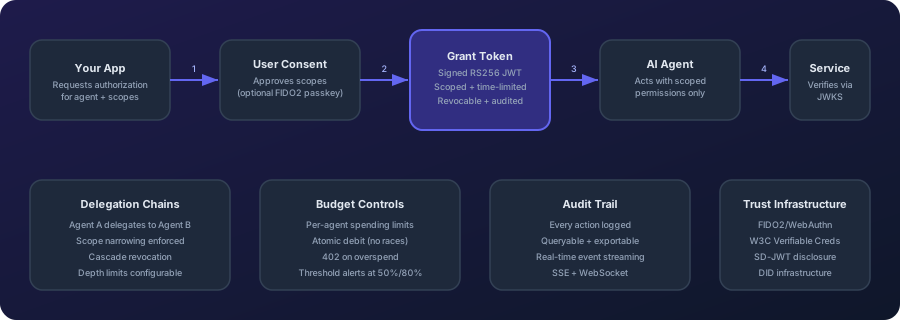
What is Grantex?
Grantex is an open-source delegated authorization protocol and reference implementation for AI agents. It gives each agent a verifiable identity and scoped, time-limited, revocable authority from a human or organization, with multi-agent delegation, service-side verification, and audit records.
Grantex complements OAuth 2.0 and MCP: OAuth handles application and user authorization, MCP connects models to tools, and Grantex proves which agent may perform which action for which principal. Use Grantex when an AI agent acts for a person or organization and a relying service must verify exactly what that agent may do.
Agent Prepaid Wallets and x402 v2
Repository source includes principal-controlled prepaid wallets for AI agents. A principal can assign one or multiple wallets, apply assignment, wallet, agent, shared budget-group, principal, and developer controls, constrain recipients, resource origins, actions, merchants, purposes, projects, and cost centers, require an exact human approval, govern reload velocity, and block one assignment, one wallet, or all wallets available to an agent. Authorizations reserve value atomically in PostgreSQL and are bound to the agent's DPoP OAuth identity and the policy-evaluated semantic context.
@grantex/x402 uses official x402 v2 PAYMENT-REQUIRED,
PAYMENT-SIGNATURE, and PAYMENT-RESPONSE messages. The old simulated
X-Payment-Proof path is not used. sandbox_ledger is implemented end to end;
external custody records deliberately fail closed unless a configured provider
can verify funding and settlement. The source checkout now includes opt-in
Base native USDC EIP-3009 payments with policy-gated signing, verified funding,
durable signature retries and finalized-chain reconciliation. Python 0.5.1
and Go v0.3.0 publish the EVM response and reconciliation APIs; neither adds
an automatic HTTP payment wrapper. Published TypeScript 0.6.0 and x402 0.4.0
include the opt-in automatic Base 402/sign/retry flow. All four releases are
registry verified. See the
Base USDC custody guide, including the limit
that blocking cannot recall an already issued on-chain signature.
import { PrepaidWalletAgentClient } from '@grantex/sdk';
import { createX402Agent } from '@grantex/x402';

const walletAgent = new PrepaidWalletAgentClient({ oauthClient, accessToken });
const x402 = createX402Agent({
  authorizePayment: walletAgent.x402Authorizer,
  // walletId is optional; omit it for policy-based wallet selection.
});

const logicalPaymentId = 'order_01JZ8Y6Q2M4N7P9T';
const response = await x402.fetch('https://merchant.example/paid-resource', {
  // The merchant uses this header to recover a response lost after settlement.
  headers: { 'Idempotency-Key': logicalPaymentId },
  // Grantex uses this option to recover a reservation response lost before settlement.
  idempotencyKey: logicalPaymentId,
});
For side-effecting resources, the merchant must durably cache the business result
under Idempotency-Key. Grantex settlement is idempotent, but a settled payment
authorization cannot be verified or execute protected work a second time.
The OAuth grant must include wallet:spend and the exact merchant action scope
advertised as extra.grantexScope; wallet assignment policy can restrict that
human-approved authority but cannot add to it.
Where Grantex fits
Grantex owns delegated agent identity, semantic spend policy, cross-wallet budgets, exact approvals, atomic reservations, stop controls, and audit. An AgenticOrg deployment or another agent runtime owns orchestration and the human interaction. The wallet issuer or custodian remains responsible for KYC/KYB, AML and sanctions controls, custody, network authorization, MCC/geography/card controls, settlement, FX, refunds, disputes, fraud, and reconciliation. The merchant remains responsible for server-trusted price/payee data, order idempotency, settlement gating, and delivery of the paid result.
See Agent Wallet Governance for the complete responsibility matrix, policy composition, exact approval protocol, and honest residual gap list.
The managed clients are implemented in registry-verified @grantex/sdk@0.6.0,
@grantex/x402@0.4.0, Python grantex==0.5.1, and Go v0.3.0. External
custody, principal notification delivery, and
merchant result idempotency remain operator responsibilities.
See the x402 integration
guide, wallet
lifecycle, and production-readiness
guide.
Self-hosted prepaid-wallet dependencies
Running the auth-service does not provision every dependency needed for a real-money product. Self-hosting operators must explicitly provide and test:
- PostgreSQL migrations
091_agent_prepaid_wallets.sqland092_layered_wallet_spend_controls.sql, backups, restore, and reconciliation for the append-only wallet ledger and policy decisions; - HTTPS ingress for the exact OAuth audience, including
/v1/prepaid-walletsand/v1/prepaid-wallets/**(a static-host404breaks agent wallet access even while the origin service is healthy); - a provider-specific custody, funding, settlement, webhook-deduplication, and
recovery adapter before using
externalwallets; without one, Grantex deliberately returns503 CUSTODY_ADAPTER_UNAVAILABLE; - an SSE/WebSocket notification bridge for reload events when a principal must be notified by email, SMS, Slack, WhatsApp, or another external channel; no built-in wallet-email delivery is claimed;
- a merchant-side durable result cache keyed by the HTTP
Idempotency-Keyfor side effects after settlement; - independent security, provider, reconciliation, incident-response, and applicable legal/regulatory review.
The server deployment and each SDK release are separate. Registry consumers should verify an exact version before installing it rather than inferring availability from repository manifests. The production-readiness guide contains the full hosting checklist and a maintainer-only PowerShell publication runbook.
Supply-chain and license controls
The security workflow audits every tracked npm lockfile, every tracked Python
project and requirements surface, and all three Go modules. Dependabot coverage
is checked against the repository manifests, external GitHub Actions and
container images are pinned to immutable digests, and unreviewed npm license
identifiers fail CI. Run npm run audit:supply-chain and
npm run audit:python locally before a release.
Apache-2.0 covers Grantex source, not third-party dependencies. See
THIRD_PARTY_NOTICES.md for the current
Sharp/libvips LGPL and caniuse-lite CC-BY distribution notes, and the
supply-chain security guide for the
operator checklist. This inventory is an engineering control, not a legal
non-infringement opinion; distributors must review the exact artifacts they
ship.
OAuth Agent Grants Profile
The hosted auth service and repository TypeScript client implement the three
roles in candidate draft-mishra-oauth-agent-grants-03. The tested profile
requires PAR, PKCE S256, DPoP sender constraints, RFC 9207 response issuer
validation, five-minute access tokens, rotating refresh tokens with family
replay revocation, 300-second exact-request recovery when a refresh response is
lost, AES-256-GCM encrypted recovery state with expiry cleanup, same-resource
RFC 8693 attenuation, and RFC 7009 revocation.
| Discovery and endpoints | URL |
|---|---|
| Authorization-server metadata | https://grantex.dev/.well-known/oauth-authorization-server |
| PAR / authorize / token / revoke | https://grantex.dev/oauth/{par,authorize,token,revoke} |
| Implementation guide | docs.grantex.dev/guides/oauth-agent-grants |
| Evidence | Implementation report and 30 behavioral vectors |
Verification completed with 2,138 auth-service tests, 456 TypeScript SDK tests,
and 255 tests across 23 sequential Docker E2E files. This is self-assessed evidence for
the tested Grantex configuration, not independent interoperability
certification, OAuth Working Group adoption, or IETF endorsement. The
updated OAuthAgentClient is published in registry-verified
@grantex/sdk@0.6.0.
Revision -02 remains the current Datatracker publication. Candidate -03
must not be uploaded before 2026-09-09 and requires a fresh explicit approval
after the scheduled final review.
Open Agentic Commerce Protocol (OACP) Authority
Open Agentic Commerce Protocol (OACP) is Grantex's agentic-commerce trust and artifact-authority layer. Grantex governs OACP policy, internal artifact issuance or refusal, verification, and compatibility adapters. AgenticOrg owns buyer and seller AI-agent runtime, merchant self-service onboarding, Shopify connector runtime, future merchant connector setup intent, buyer sessions, channel bridges, OACP cache, and provider-owned capability verification.
Merchant systems such as Shopify, future WooCommerce/ERP sources, POS systems, and provider systems remain the source of record. Provider, bank, POS, and payment rails own mandate, payment, and in-store execution. Grantex signs and verifies artifacts; it is not a merchant connector runtime or a toll booth for every buyer and seller message.
flowchart LR
  merchant[Shopify, future ERP/WooCommerce, POS, provider systems] --> agentic[AgenticOrg buyer and seller runtime]
  agentic -->|redacted authority request| grantex[Grantex OACP authority]
  grantex -->|OACP artifacts or blockers| agentic
  agentic --> buyer[Buyer surfaces]
  agentic -->|capability check or handoff| provider[Pine Labs Plural/P3P, bank/POS/provider rails]
| Area | Current posture |
|---|---|
| Grantex C6Z authority route | Implemented at POST /v1/commerce/oacp/c6z/authority-requests for allowlisted AgenticOrg tenants. |
| Artifact families | 11 internal OACP families are issued or refused with source lineage, TTL, freshness, revocation posture, blocked capabilities, non-sensitive evidence refs, and signature metadata. |
| Protocol adapters | Schema.org, UCP-style, ACP-style, AP2-style, A2A, MCP, and OpenAPI mappings are compatibility mappings derived from OACP artifacts. |
| AgenticOrg runtime | Merchant self-service config, Seller onboarding, Shopify sync, future connector/provider intent capture, cache, buyer Q&A, bridges, and provider capability verification live in AgenticOrg. |
| Payment/order/POS execution | Outside OACP artifact authority. Provider, POS, and merchant systems must execute and confirm; agents must not invent success. |
| Historical Commerce V1 docs | Retained for context, but superseded for the AgenticOrg OACP runtime split. |
Start with the OACP runtime launch closure PRD, OACP authority overview, merchant self-service config boundary, truth inventory, AgenticOrg integration guide, POS bridge boundary, and operator runbook. The older Commerce V1 overview remains historical/contextual and should not be used to imply that Grantex owns AgenticOrg merchant connector runtime.
Current Releases
Grantex components are independently versioned. The protocol specification remains v1.0 Final; SDK, MCP package, and roadmap milestone versions are separate release lines and do not represent a monorepo-wide version.
Current public releases and repository versions, verified 2026-09-15:
| Component | Published version | Repository version | Reproducible install |
|---|---|---|---|
| TypeScript SDK | @grantex/sdk 0.6.0 | 0.6.0 | npm install @grantex/sdk@0.6.0 |
| x402 Payment Protocol | @grantex/x402 0.4.0 | 0.4.0 | npm install @grantex/x402@0.4.0 @grantex/sdk@0.6.0 |
| Python SDK | grantex 0.5.1 | - | python -m pip install grantex==0.5.1 |
| Go SDK | github.com/mishrasanjeev/grantex-go v0.3.0 (Go 1.26.1+) | - | go get github.com/mishrasanjeev/grantex-go@v0.3.0 |
| MCP Authorization Server | @grantex/mcp-auth 2.0.2 | - | npm install @grantex/mcp-auth@2.0.2 @grantex/sdk@0.6.0 |
Known published-package limits: MCP Auth
2.0.2keeps authorization codes in process memory, does not render consent, and has an incomplete Grantex code handoff. See the release-status guide for exact workarounds and deployment boundaries.
Repository development status: the auth service enforces Redis-backed Free/Pro/Enterprise developer budgets of 100/500/2,000 requests per minute on API-key routes handled by the standard auth plugin. Custom-auth quota policy remains open and the managed-service rollout remains independent of SDK publication.
Omit a version pin to install the registry's current latest release. See the release-status documentation, COMPATIBILITY.md for the full package matrix, and CHANGELOG.md for release notes.
- @grantex/gemma: Offline consent bundles and on-device verification examples
- MCP Authorization Server (
@grantex/mcp-auth): Published OAuth 2.1 + PKCE endpoint package; review the documented2.0.2single-process, consent, and token-exchange limitations - MCP Tool Server (
@grantex/mcp): Agent-facing Grantex tools for MCP clients - @grantex/dpdp: DPDP Act 2023 and EU AI Act control mappings
- Trust Registry: Public DID verification registry —
grantex.dev/registry grantex verify: Token inspection CLI — no account needed- Agent CLI Skills: One-command
SKILL.mdinstallation for Hermes, OpenClaw, and portable Agent Skills clients - Anomaly Detection: Four implemented SQL-backed checks, lifecycle APIs, and stored rule/channel configuration; notification delivery requires a host worker
SDK quickstart
npm install @grantex/sdk@0.6.0
import { Grantex, verifyGrantToken } from '@grantex/sdk';
const gx = new Grantex({ apiKey: process.env.GRANTEX_API_KEY });

// 1. Register an agent, then request authorization from a user
const agent = await gx.agents.register({
  name: 'quickstart-agent',
  description: 'Grantex quickstart agent',
  scopes: ['calendar:read', 'email:send'],
});
const auth = await gx.authorize({
  agentId: agent.id,
  userId: 'user-456',
  scopes: ['calendar:read', 'email:send'],
});

// Live mode requires consent at this URL and returns the code to your callback.
// Sandbox or policy auto-approval can return the code immediately.
if (!auth.code) {
  console.log(`Approve access at: ${auth.consentUrl}`);
} else {
  // 2. Exchange the authorization code for a scoped, signed JWT
  const { grantToken } = await gx.tokens.exchange({ code: auth.code, agentId: agent.id });

  // 3. Verify locally using the issuer's published JWKS
  const grant = await verifyGrantToken(grantToken, {
    jwksUri: 'https://api.grantex.dev/.well-known/jwks.json',
  });
  console.log(grant.scopes); // ['calendar:read', 'email:send']
}
python -m pip install grantex==0.5.1               # Python SDK
go get github.com/mishrasanjeev/grantex-go@v0.3.0 # Go SDK (Go 1.26.1+)
npm install @grantex/mcp-auth@2.0.2 @grantex/sdk@0.6.0 # MCP endpoint evaluation
npm install -g @grantex/cli@0.3.0                   # Optional CLI tooling
Hermes, OpenClaw, and any agent CLI
Shell-capable agents use the same JSON-first CLI; no agent-specific SDK is required:
npm install -g @grantex/cli@0.3.0
grantex agent install --target openclaw  # writes ./skills
grantex agent install --target hermes    # writes ~/.hermes/skills/grantex
grantex agent install --target portable  # writes ./.agents/skills
The bundle installs use-grantex-cli for delegated-authorization operations and integrate-grantex for service-boundary implementation work. For a different host, use grantex agent install --dir /path/to/skills. Prefer --env, --file, or --stdin token inputs and keep final enforcement inside the protected service.
29 packages across TypeScript, Python, and Go. Integrations for Anthropic SDK, LangChain, OpenAI Agents SDK, Google ADK, Strands Agents SDK, CrewAI, Vercel AI, AutoGen, MCP, Express.js, FastAPI, and Terraform. Use the compatibility matrix for versions, the changelog for release notes, and GitHub Actions for current CI status. Fully self-hostable. Apache 2.0.
The Problem
AI agents are booking travel, sending emails, deploying code, and spending money — on behalf of real humans. But:
- No scoping — agents get the same access as the key owner
- No consent — users never approve what the agent can do
- No per-agent identity — you know the key was used, but not which agent or why
- No revocation granularity — one agent misbehaves, rotate the key, kill everything
- No delegation control — Agent A calls Agent B? Copy-paste credentials
- No spending limits — an agent with a cloud API key can provision unlimited resources
OAuth and IAM provide essential foundations, but many agent deployments still rely on shared credentials that do not identify the individual agent or encode its delegated authority.
How It Works
Quickstart
1. Register your agent
import { Grantex } from '@grantex/sdk';

const grantex = new Grantex({ apiKey: process.env.GRANTEX_API_KEY });

const agent = await grantex.agents.register({
  name: 'travel-booker',
  description: 'Books flights and hotels on behalf of users',
  scopes: ['calendar:read', 'payments:initiate:max_500', 'email:send'],
});

console.log(agent.did);
// → did:grantex:ag_01HXYZ123abc...
2. Request authorization from a user
const authRequest = await grantex.authorize({
  agentId: agent.id,
  userId: 'user_abc123',       // your app's user identifier
  scopes: ['calendar:read', 'payments:initiate:max_500'],
  expiresIn: '24h',
  redirectUri: 'https://yourapp.com/auth/callback',
});

// Redirect user to authRequest.consentUrl
// Grantex handles the consent UI — plain language, mobile-first
console.log(authRequest.consentUrl);
// → https://consent.grantex.dev/authorize?req=eyJ...
3. Exchange the authorization code for a grant token
// After user approves, your redirectUri receives a `code`.
// Exchange it for a signed grant token (RS256 JWT):
const token = await grantex.tokens.exchange({
  code,                  // from the redirect callback
  agentId: agent.id,
});

console.log(token.grantToken);  // RS256 JWT — pass this to your agent
console.log(token.scopes);      // ['calendar:read', 'payments:initiate:max_500']
console.log(token.grantId);     // 'grnt_01HXYZ...'
console.log(token.refreshToken); // store securely for active-grant rotation
Refresh tokens are single-use and rotate on every accepted refresh. If the
refresh HTTP response is lost after the server commits, retry the same previous
refresh token immediately; Grantex can recover the already-rotated token pair
for five minutes (300 seconds). Refresh does not extend token.expiresAt; after
the grant expires, start a new authorization request.
4. Verify the token and use it
// Verify locally after retrieving the issuer's published JWKS
import { verifyGrantToken } from '@grantex/sdk';

const grant = await verifyGrantToken(token.grantToken, {
  jwksUri: 'https://api.grantex.dev/.well-known/jwks.json',
  requiredScopes: ['calendar:read'],
});
console.log(grant.principalId); // 'user_abc123'
console.log(grant.scopes);     // ['calendar:read', 'payments:initiate:max_500']

// Pass to your agent — it's now authorized
await travelAgent.run({ grantToken: token.grantToken, task: 'Book cheapest flight to Delhi on March 1' });
5. Record the action at the execution boundary
// At the trusted execution boundary: explicitly record the outcome
await grantex.audit.log({
  agentId: agent.id,
  agentDid: agent.did,
  grantId: token.grantId,
  principalId: authRequest.principalId,
  action: 'payment.initiated',
  status: 'success',
  metadata: { amount: 420, currency: 'USD', merchant: 'Air India' },
});
6. Verify a token (service-side)
// In any service that receives agent requests — no Grantex account needed
import { verifyGrantToken } from '@grantex/sdk';

const grant = await verifyGrantToken(token.grantToken, {
  jwksUri: 'https://api.grantex.dev/.well-known/jwks.json',
  requiredScopes: ['payments:initiate'],
});
// Throws if the token is expired, tampered with, has invalid claims, or lacks required scopes.
// Use grantex.tokens.verify(token.grantToken) when you also need current revocation status.
7. Give users control over their permissions
// Generate a short-lived link for the end-user to view & revoke agent access
const session = await grantex.principalSessions.create({
  principalId: 'user_abc123',
  expiresIn: '2h',
});
// Send session.dashboardUrl to the user via email, in-app notification, etc.
// The short-lived session token is carried in the URL fragment, not the query string.
Python SDK
import os

from grantex import Grantex, AuthorizeParams, ExchangeTokenParams

client = Grantex(api_key=os.environ["GRANTEX_API_KEY"])

# Register agent
agent = client.agents.register(
    name="finance-agent",
    scopes=["transactions:read", "payments:initiate:max_100"],
)

# Authorize a user
auth = client.authorize(AuthorizeParams(
    agent_id=agent.id,
    user_id="user_abc123",
    scopes=["transactions:read", "payments:initiate:max_100"],
))
# Redirect user to auth.consent_url — they approve in plain language

# Exchange the authorization code for a grant token
token = client.tokens.exchange(ExchangeTokenParams(code=code, agent_id=agent.id))

# Verify locally after retrieving the issuer's published JWKS
from grantex import verify_grant_token, VerifyGrantTokenOptions

grant = verify_grant_token(token.grant_token, VerifyGrantTokenOptions(
    jwks_uri="https://api.grantex.dev/.well-known/jwks.json",
))
print(grant.scopes)  # ('transactions:read', 'payments:initiate:max_100')

# Log an action
client.audit.log(
    agent_id=agent.id,
    agent_did=agent.did,
    grant_id=token.grant_id,
    principal_id=auth.principal_id,
    action="transaction.read",
    status="success",
    metadata={"account_last4": "4242"},
)
The Grant Token
Grantex tokens are standard JWTs (RS256) extended with agent-specific claims. Any service can verify their signatures locally using the issuer's published JWKS. The provided verifiers retrieve those keys from the configured JWKS URL, so applications should account for network availability, caching, and key rotation:
{
  "iss": "https://grantex.dev",
  "sub": "user_abc123",
  "agt": "did:grantex:ag_01HXYZ123abc",
  "dev": "org_yourcompany",
  "scp": ["calendar:read", "payments:initiate:max_500"],
  "iat": 1709000000,
  "exp": 1709086400,
  "jti": "tok_01HXYZ987xyz",
  "grnt": "grnt_01HXYZ456def"
}
| Claim | Meaning |
|---|---|
sub | The end-user who authorized this agent |
agt | The agent's DID — cryptographically verifiable identity |
dev | The developer org that built the agent |
scp | Exact scopes granted — services should check these |
jti | Unique token ID — used for grant-state and revocation checks |
grnt | Grant record ID — links token to the persisted grant |
aud | Intended audience (optional) — services should reject tokens with a mismatched aud |
Delegation claims (present on sub-agent tokens):
| Claim | Meaning |
|---|---|
parentAgt | DID of the parent agent that spawned this sub-agent |
parentGrnt | Grant ID of the parent grant — full delegation chain is traceable |
delegationDepth | How many hops from the root grant (root = 0) |
Multi-Agent Delegation
Grantex supports multi-agent pipelines where a root agent spawns sub-agents with narrower scopes. Sub-agent tokens carry a full delegation chain that any service can inspect.
// Root agent has a grant for ['calendar:read', 'calendar:write', 'email:send']
// It spawns a sub-agent that only needs calendar read access

const delegated = await grantex.grants.delegate({
  parentGrantToken: rootGrantToken,   // root agent's token
  subAgentId: subAgent.id,            // sub-agent to authorize
  scopes: ['calendar:read'],          // must be ⊆ parent scopes
  expiresIn: '1h',                    // capped at parent token's expiry
});

// delegated.grantToken is a fully signed JWT with:
//   parentAgt, parentGrnt, delegationDepth = 1
# Python equivalent
delegated = grantex.grants.delegate(
    parent_grant_token=root_grant_token,
    sub_agent_id=sub_agent.id,
    scopes=["calendar:read"],
    expires_in="1h",
)
Constraints enforced by the protocol:
- Sub-agent scopes must be a strict subset of the parent's scopes — scope escalation is rejected with 400
- Sub-agent token expiry is
min(parent expiry, requested expiry)— sub-agents can never outlive their parent - Revoking a root grant cascades to all descendant grants atomically
Advanced Features
Enterprise SSO - OIDC and SAML 2.0, plus an LDAP direct-bind preview
Enterprise SSO
Grantex provides OIDC and SAML 2.0 enterprise SSO with multiple identity-provider connections, email-domain routing, enforcement, JIT provisioning, and group-to-scope mapping from identity-provider claims. The LDAP surface is a direct-bind preview: it authenticates a supplied directory identity but does not search directories or retrieve LDAP groups.
Key capabilities:
- Multi-IdP connections - Configure multiple OIDC and SAML 2.0 identity providers per organization; LDAP connection records support the direct-bind preview
- OIDC Discovery + JWKS verification — Automatic endpoint discovery and cryptographic ID token verification
- SAML 2.0 — Full SAML response parsing with certificate-based signature verification
- LDAP / Active Directory preview - Direct-bind authentication only; directory search and LDAP group retrieval are not implemented
- Domain-based routing — Automatically route users to the correct IdP based on their email domain
- JIT provisioning — Auto-create or update principals on first SSO login
- Group-to-scope mapping - Map OIDC or SAML group/role claims to Grantex scopes; this does not retrieve LDAP groups
- SSO enforcement — Require SSO authentication for all users in an organization
- Session management — Track, list, and revoke active SSO sessions
TypeScript
// Create an OIDC connection
const conn = await grantex.sso.createConnection({
  name: 'Okta Production',
  protocol: 'oidc',
  issuerUrl: 'https://mycompany.okta.com',
  clientId: 'your-client-id',
  clientSecret: 'your-client-secret',
  domains: ['mycompany.com'],
  jitProvisioning: true,
  groupAttribute: 'groups',
  groupMappings: { Engineering: ['read', 'write', 'deploy'], Admins: ['admin'] },
  defaultScopes: ['read'],
});

// Create a SAML 2.0 connection
await grantex.sso.createConnection({
  name: 'Azure AD SAML',
  protocol: 'saml',
  idpEntityId: 'https://sts.windows.net/tenant-id/',
  idpSsoUrl: 'https://login.microsoftonline.com/tenant-id/saml2',
  idpCertificate: '-----BEGIN CERTIFICATE-----\n...\n-----END CERTIFICATE-----',
  spEntityId: 'urn:grantex:mycompany',
  spAcsUrl: 'https://myapp.com/sso/callback/saml',
  domains: ['mycompany.com'],
});

// Enforce SSO for the organization
await grantex.sso.setEnforcement({ enforce: true });

// Handle OIDC callback with verified ID token
const result = await grantex.sso.handleOidcCallback({ code, state });
console.log(result.email, result.mappedScopes, result.sessionId);

// List and revoke sessions
const { sessions } = await grantex.sso.listSessions();
await grantex.sso.revokeSession(sessions[0].id);
Python
# Create an OIDC connection
conn = client.sso.create_connection(CreateSsoConnectionParams(
    name="Okta Production",
    protocol="oidc",
    issuer_url="https://mycompany.okta.com",
    client_id="your-client-id",
    client_secret="your-client-secret",
    domains=["mycompany.com"],
    jit_provisioning=True,
    group_attribute="groups",
    group_mappings={"Engineering": ["read", "write", "deploy"]},
))

# Handle OIDC callback
result = client.sso.handle_oidc_callback(SsoOidcCallbackParams(code=code, state=state))
print(result.email, result.mapped_scopes, result.session_id)
CLI
# Create a connection
grantex sso connections create --name "Okta" --protocol oidc \
  --issuer-url https://mycompany.okta.com \
  --client-id $CLIENT_ID --client-secret $CLIENT_SECRET \
  --domains mycompany.com --jit-provisioning

# List connections
grantex sso connections list

# Test connectivity
grantex sso connections test sso_01HXYZ...

# Enforce SSO
grantex sso enforce --enable
FIDO2 / WebAuthn — passkey-based consent verification
FIDO2 / WebAuthn
Grantex supports passkey-based human presence verification using the FIDO2/WebAuthn standard. When enabled, end-users prove they are physically present during the consent flow by authenticating with a passkey (biometric, security key, or platform authenticator). This raises the assurance level of every grant from "user clicked approve" to "user was cryptographically verified."
How It Works
- Developer enables FIDO — Set
fidoRequired: trueon your developer profile viaPATCH /v1/me - User registers a passkey — During the first consent flow, the user registers a FIDO2 credential (fingerprint, Face ID, YubiKey, etc.)
- User authenticates on consent — On subsequent authorization requests, the user completes a WebAuthn assertion challenge instead of a simple button click
- FIDO evidence embedded in grants — The assertion result is recorded in the grant and can be embedded in Verifiable Credentials as cryptographic proof of human presence
SDK Usage
// Enable FIDO for your developer account
await grantex.updateSettings({ fidoRequired: true, fidoRpName: 'My App' });

// Register a passkey for an end-user (called from the browser)
const options = await grantex.webauthn.registerOptions({ principalId: 'user_abc123' });
// Pass options to navigator.credentials.create() in the browser
const credential = await navigator.credentials.create({ publicKey: options });
await grantex.webauthn.registerVerify({ challengeId: options.challengeId, response: credential });

// List and manage credentials
const creds = await grantex.webauthn.listCredentials('user_abc123');
await grantex.webauthn.deleteCredential(credentialId);
# Enable FIDO for your developer account
from grantex import UpdateDeveloperSettingsParams, WebAuthnRegistrationVerifyParams

client.update_settings(UpdateDeveloperSettingsParams(
    fido_required=True,
    fido_rp_name="My App",
))

# Register a passkey (server-side portion)
options = client.webauthn.register_options(principal_id="user_abc123")
# Browser performs navigator.credentials.create() and sends response back
result = client.webauthn.register_verify(WebAuthnRegistrationVerifyParams(
    challenge_id=options.challenge_id,
    response=credential_response,
))

# List and manage credentials
creds = client.webauthn.list_credentials("user_abc123")
client.webauthn.delete_credential(credential_id)
WebAuthn API Endpoints
| Method | Endpoint | Description |
|---|---|---|
POST | /v1/webauthn/register/options | Generate passkey registration options |
POST | /v1/webauthn/register/verify | Verify registration and store credential |
GET | /v1/webauthn/credentials | List WebAuthn credentials for a principal |
DELETE | /v1/webauthn/credentials/:id | Delete a credential |
POST | /v1/webauthn/assert/options | Generate assertion options for consent |
POST | /v1/webauthn/assert/verify | Verify assertion during consent |
PATCH | /v1/me | Update developer settings (FIDO config) |
Verifiable Credentials — W3C VC-JWT issuance and verification
Verifiable Credentials
Grantex can issue W3C Verifiable Credentials (VCs) alongside standard JWTs. While JWTs are optimized for real-time authorization, VCs provide a portable, tamper-evident, standards-based proof of authorization that can be presented to any verifier — including systems outside the Grantex ecosystem.
Why VCs Matter for Agents
In agentic commerce, an agent acting on your behalf needs to prove its authorization to third-party services that may not integrate with Grantex directly. A Verifiable Credential is a self-contained, cryptographically signed document that any party can verify using the issuer's published DID document — no API calls, no accounts, no trust relationships required.
How It Works
When exchanging an authorization code for a grant token, pass credentialFormat: "vc-jwt" to receive a Verifiable Credential alongside the standard grant token:
const result = await grantex.tokens.exchange({
  code,
  agentId: agent.id,
  credentialFormat: 'vc-jwt',   // opt-in to VC issuance
});

console.log(result.grantToken);         // standard RS256 JWT (unchanged)
console.log(result.verifiableCredential); // W3C VC-JWT
result = client.tokens.exchange(ExchangeTokenParams(
    code=code,
    agent_id=agent.id,
    credential_format="vc-jwt",
))

print(result.verifiable_credential)  # W3C VC-JWT
Credential Types
| Type | Description |
|---|---|
AgentGrantCredential | Issued for direct grants — attests that a principal authorized an agent with specific scopes |
DelegatedGrantCredential | Issued for delegated grants — includes the full delegation chain |
Verifying a VC
const verification = await grantex.credentials.verify(vcJwt);
console.log(verification.valid);
console.log(verification.credentialSubject);
console.log(verification.issuer); // "did:web:grantex.dev"
verification = client.credentials.verify(vc_jwt)
print(verification.valid)
print(verification.credential_subject)
Revocation via StatusList2021
Grantex implements the W3C StatusList2021 revocation mechanism. Each credential references a status list entry. When a grant is revoked, the corresponding bit in the status list is flipped, and any verifier checking the credential sees it as revoked.
// Check a specific credential's status
const cred = await grantex.credentials.get(credentialId);
console.log(cred.status); // "active" or "revoked"

// List credentials with filters
const { credentials } = await grantex.credentials.list({
  grantId: 'grnt_01HXYZ...',
  status: 'active',
});
FIDO Evidence in VCs
When FIDO is enabled and the user completes a WebAuthn assertion during consent, the VC includes a fidoEvidence field that cryptographically proves human presence at the time of authorization. This is compatible with the Mastercard Verifiable Intent specification for agentic commerce.
DID Infrastructure
Grantex publishes a W3C DID document at /.well-known/did.json (did:web:grantex.dev). This document contains the public keys used to sign Verifiable Credentials, enabling any party to verify credentials without contacting Grantex:
curl https://api.grantex.dev/.well-known/did.json
Verifiable Credentials API Endpoints
| Method | Endpoint | Description |
|---|---|---|
GET | /v1/credentials/:id | Retrieve a Verifiable Credential |
GET | /v1/credentials | List Verifiable Credentials |
POST | /v1/credentials/verify | Verify a VC-JWT |
GET | /v1/credentials/status/:id | StatusList2021 credential |
GET | /.well-known/did.json | W3C DID document |
MPP Agent Identity — verifiable agent identity for machine payments
MPP Agent Identity
MPP (Machine Payments Protocol) defines HTTP 402 payment flows for software clients. Grantex can attach an AgentPassportCredential based on W3C Verifiable Credentials 2.0 so a configured merchant can verify agent, principal, category, amount-limit, expiry, and delegation claims after obtaining the issuer keys and current status data. The credential carries authorization context; it does not prove that a payment settled, an order was approved, or a provider accepted the transaction.
Why Agent Passports?
A wallet or payment-source identifier may not tell a merchant which internal agent is acting, which principal delegated authority, or which policy limits apply. An agent passport can supply that context when both sides integrate and enforce it.
The current Grantex passport shape uses Ed25519 signatures, a W3C VC 2.0 data model, configured purchase categories, transaction ceilings, expiry, delegation context, and StatusList2021-style status data. A relying merchant must still validate the issuer, refresh keys and status according to its risk policy, enforce the claims at the protected action, and run its own payment, fraud, sanctions, order, and settlement controls.
How It Works
| Step | Who | What |
|---|---|---|
| 1. Issue | Authorized application | Requests an AgentPassportCredential with configured categories, amount ceiling, delegation context, and expiry |
| 2. Store | Agent host | Stores the credential as sensitive authorization material |
| 3. Present | Agent host | Attaches the credential to a supported MPP request when the integration is configured |
| 4. Verify | Merchant service | Verifies signature, issuer, expiry, category, amount, and sufficiently current status data |
| 5. Decide | Merchant and payment systems | Apply merchant policy plus independent payment, order, provider, and settlement checks before execution |
| 6. Record | Each participating system | Records the events it is configured to observe; credential verification alone is not an execution or settlement audit log |
Verification boundary: cached keys can support local signature checks after retrieval. Current revocation requires refreshed status data, and cache policy determines how quickly a relying service observes a change.
Credential Structure
| Field | Description |
|---|---|
id | urn:grantex:passport:<ulid> |
issuer | did:web:grantex.dev |
credentialSubject.id | Agent DID (did:grantex:ag_...) |
credentialSubject.humanPrincipal | DID of the authorizing human |
credentialSubject.organizationDID | Org DID (did:web:<domain>) |
credentialSubject.grantId | Links to underlying Grantex grant |
credentialSubject.allowedMPPCategories | inference, compute, data, storage, search, media, delivery, browser, general |
credentialSubject.maxTransactionAmount | { amount, currency } ceiling per transaction |
credentialSubject.delegationDepth | Inherited from grant delegation chain |
credentialStatus | StatusList2021 revocation entry |
proof | Ed25519Signature2020 |
Issue a Passport
TypeScript:
import { Grantex } from '@grantex/sdk';

const grantex = new Grantex({ apiKey: process.env.GRANTEX_API_KEY });

const passport = await grantex.passports.issue({
  agentId: 'ag_01HXYZ...',
  grantId: 'grnt_01HXYZ...',
  allowedMPPCategories: ['inference', 'compute'],
  maxTransactionAmount: { amount: 50, currency: 'USDC' },
  paymentRails: ['tempo'],
  expiresIn: '24h',
});
// passport.passportId   → "urn:grantex:passport:01HXYZ..."
// passport.encodedCredential → base64url for X-Grantex-Passport header
cURL:
curl -X POST https://api.grantex.dev/v1/passport/issue \
  -H "Authorization: Bearer $GRANTEX_API_KEY" \
  -H "Content-Type: application/json" \
  -d '{
    "agentId": "ag_01HXYZ...",
    "grantId": "grnt_01HXYZ...",
    "allowedMPPCategories": ["inference", "compute"],
    "maxTransactionAmount": { "amount": 50, "currency": "USDC" },
    "expiresIn": "24h"
  }'
Attach to MPP Requests
import { createMppPassportMiddleware } from '@grantex/mpp';

const middleware = createMppPassportMiddleware({ passport });
const enrichedRequest = await middleware(new Request(url, init));
// enrichedRequest now has X-Grantex-Passport header
const response = await fetch(enrichedRequest);
Verify on the Merchant Side
Standalone verification:
import { verifyPassport } from '@grantex/mpp';

const verified = await verifyPassport(encodedCredential, {
  requiredCategories: ['inference'],
  maxAmount: 10,
});
// verified.humanDID        → "did:grantex:user_alice"
// verified.organizationDID → "did:web:acme.com"
// verified.allowedCategories → ["inference", "compute"]
// verified.maxTransactionAmount → { amount: 50, currency: "USDC" }
Express middleware (one-liner):
import { requireAgentPassport } from '@grantex/mpp';

app.use('/api/inference', requireAgentPassport({
  requiredCategories: ['inference'],
  maxAmount: 10,
}));
// req.agentPassport is populated on valid requests
// 403 with typed error code on invalid requests
Trust Registry
Query any organization's verified trust level — no authentication required:
curl https://api.grantex.dev/v1/trust-registry/did:web:grantex.dev
# {"organizationDID":"did:web:grantex.dev","trustLevel":"soc2","domains":["grantex.dev"]}
import { lookupOrgTrust } from '@grantex/mpp';

const record = await lookupOrgTrust('did:web:acme.com');
// record.trustLevel → "verified" | "soc2" | "basic"
// record.verificationMethod → "dns-txt" | "manual" | "soc2"
Revocation
Revoking a passport updates server-side status immediately. Local verifiers observe the change only after an online revocation check or status-data refresh, so cached results can lag:
await grantex.passports.revoke('urn:grantex:passport:01HXYZ...');
// Revocation-aware verification rejects after checking refreshed status data
Error Codes
| Code | HTTP | Description |
|---|---|---|
PASSPORT_EXPIRED | 403 | Credential validUntil has passed |
PASSPORT_REVOKED | 403 | StatusList2021 bit is set |
INVALID_SIGNATURE | 403 | Signature verification failed |
UNTRUSTED_ISSUER | 403 | Issuer DID not in trusted list |
CATEGORY_MISMATCH | 403 | Categories don't cover required service |
AMOUNT_EXCEEDED | 403 | Max amount below required threshold |
MISSING_PASSPORT | 403 | No X-Grantex-Passport header |
MALFORMED_CREDENTIAL | 403 | Invalid base64url or missing VC fields |
MPP Agent Identity API Endpoints
| Method | Endpoint | Auth | Description |
|---|---|---|---|
POST | /v1/passport/issue | API key | Issue AgentPassportCredential |
GET | /v1/passports | API key | List passports (filter by agentId, grantId, status) |
GET | /v1/passport/:id | API key | Retrieve passport by ID |
POST | /v1/passport/:id/revoke | API key | Revoke passport (StatusList2021) |
GET | /v1/trust-registry/:orgDID | None | Look up org trust record (public) |
GET | /v1/trust-registry | API key | List all trust records (admin) |
See packages/mpp/ for full package docs. Demo: grantex.dev/mpp-demo.
SD-JWT Selective Disclosure — privacy-preserving credential presentation
SD-JWT Selective Disclosure
Grantex supports SD-JWT (Selective Disclosure JWT) for privacy-preserving credential presentation. While a standard VC-JWT reveals all claims to every verifier, SD-JWT lets the holder choose exactly which fields to disclose — keeping everything else hidden.
Why SD-JWT?
In agentic commerce, different verifiers need different levels of information. A payment processor needs to know the agent's scopes and budget, but not the principal's identity. A compliance auditor needs the principal and timestamps, but not the scopes. SD-JWT enables minimum-disclosure presentations that satisfy each verifier's requirements without over-sharing.
How It Works
When exchanging an authorization code, pass credentialFormat: "sd-jwt" to receive an SD-JWT credential:
const result = await grantex.tokens.exchange({
  code,
  agentId: agent.id,
  credentialFormat: 'sd-jwt',   // opt-in to SD-JWT issuance
});

console.log(result.grantToken);         // standard RS256 JWT (unchanged)
console.log(result.sdJwt);              // SD-JWT with selective disclosure
result = client.tokens.exchange(ExchangeTokenParams(
    code=code,
    agent_id=agent.id,
    credential_format="sd-jwt",
))

print(result.sd_jwt)  # SD-JWT with selective disclosure
Creating a Presentation
The holder selects which claims to disclose when presenting to a verifier:
const presentation = await grantex.credentials.present({
  sdJwt: result.sdJwt,
  disclosedClaims: ['scopes', 'agentId'],   // only reveal these fields
});

// Send presentation to the verifier — they see scopes and agentId,
// but principalId, developerId, grantId, etc. remain hidden
presentation = client.credentials.present(
    sd_jwt=result.sd_jwt,
    disclosed_claims=["scopes", "agent_id"],
)
SD-JWT Format
An SD-JWT consists of: <issuer-jwt>~<disclosure1>~<disclosure2>~...~
Each disclosure is a base64url-encoded JSON array [salt, claim-name, claim-value]. The verifier can only see claims for which a disclosure is provided.
Disclosable Claims
| Claim | Description |
|---|---|
principalId | The end-user who authorized the grant |
developerId | The developer who owns the agent |
scopes | The authorized scopes |
agentId | The agent's DID |
grantId | The grant record identifier |
issuedAt | When the credential was issued |
expiresAt | When the credential expires |
SD-JWT API Endpoints
| Method | Endpoint | Description |
|---|---|---|
POST | /v1/token | Exchange code for grant token + SD-JWT (with credentialFormat: "sd-jwt") |
POST | /v1/credentials/verify | Verify an SD-JWT presentation |
Budget Controls — per-agent spending limits with atomic debit
Budget Controls
Grantex provides per-grant budget controls that let developers cap how much an agent can spend. Budget allocations are enforced atomically — if a debit would exceed the remaining balance, it fails with a 402 INSUFFICIENT_BUDGET error. Threshold alerts fire at 50% and 80% consumption, and the remaining budget is embedded in grant tokens via the bdg JWT claim.
// Allocate a budget to a grant
const budget = await grantex.budgets.allocate({
  grantId: 'grnt_01HXYZ...',
  amount: 1000,
  currency: 'USD',
});

// Debit against the budget
const debit = await grantex.budgets.debit({
  grantId: 'grnt_01HXYZ...',
  amount: 42.50,
  description: 'Flight booking',
});
console.log(debit.remaining); // 957.50

// Check the current balance
const balance = await grantex.budgets.balance('grnt_01HXYZ...');
console.log(balance.remainingBudget);

// List all budget transactions for a grant
const { transactions } = await grantex.budgets.transactions('grnt_01HXYZ...');
# Allocate a budget to a grant
budget = client.budgets.allocate(
    grant_id="grnt_01HXYZ...",
    amount=1000,
    currency="USD",
)

# Debit against the budget
debit = client.budgets.debit(
    grant_id="grnt_01HXYZ...",
    amount=42.50,
    description="Flight booking",
)
print(debit.remaining)  # 957.50

# Check the current balance
balance = client.budgets.balance("grnt_01HXYZ...")

# List all budget transactions
transactions = client.budgets.transactions("grnt_01HXYZ...")
Budget API Endpoints
| Method | Endpoint | Description |
|---|---|---|
POST | /v1/budget/allocate | Create a budget allocation for a grant |
POST | /v1/budget/debit | Debit against a grant's budget (402 if insufficient) |
GET | /v1/budget/balance/:grantId | Get remaining balance for a grant |
GET | /v1/budget/allocations | List all budget allocations |
GET | /v1/budget/transactions/:grantId | List transactions and total spend for a grant |
Event Streaming — real-time SSE and WebSocket
Event Streaming
Grantex provides real-time event streaming via Server-Sent Events (SSE) and WebSocket. Subscribe to authorization lifecycle events as they happen — grant creation, revocation, token issuance, and budget threshold alerts. Events are published to both webhooks and streaming endpoints, so you can choose push or pull.
// SSE — async generator, automatically reconnects
for await (const event of grantex.events.stream()) {
  console.log(event.type);   // 'grant.created', 'token.issued', etc.
  console.log(event.data);
}

// Convenience wrapper with a callback
grantex.events.subscribe((event) => {
  if (event.type === 'budget.threshold') {
    alert(`Grant ${event.data.grantId} is at ${event.data.percentage}% budget`);
  }
});
# SSE — async generator
async for event in client.events.stream():
    print(event.type)   # 'grant.created', 'grant.revoked', etc.
    print(event.data)

# Convenience wrapper
async def handler(event):
    if event.type == "budget.exhausted":
        await revoke_grant(event.data["grant_id"])

await client.events.subscribe(handler)
Event Types
| Event | Description |
|---|---|
grant.created | A new grant was approved by an end-user |
grant.revoked | A grant was revoked (by user, developer, or cascade) |
token.issued | A grant token was exchanged or refreshed |
budget.threshold | A budget allocation crossed 50% or 80% usage |
budget.exhausted | A budget allocation reached 0 remaining |
Event Streaming API Endpoints
| Method | Endpoint | Description |
|---|---|---|
GET | /v1/events/stream | SSE event stream (Bearer auth) |
GET | /v1/events/ws | WebSocket event stream |
Usage Metering — track API consumption per developer
Usage Metering
Grantex tracks API usage per developer — token exchanges, authorization requests, and verification calls. Use the metering API to monitor consumption, enforce plan limits, and export usage data for billing.
// Get current period usage
const usage = await grantex.usage.current();
console.log(usage.tokenExchanges);
console.log(usage.authorizations);
console.log(usage.totalRequests);

// Get usage history over the last 30 days
const { entries } = await grantex.usage.history({ days: 30 });
entries.forEach((e) => console.log(`${e.date}: ${e.totalRequests} requests`));
# Get current period usage
usage = client.usage.current()
print(usage.token_exchanges)
print(usage.total_requests)

# Get usage history over the last 30 days
history = client.usage.history(days=30)
for entry in history.entries:
    print(f"{entry.date}: {entry.total_requests} requests")
Usage Metering API Endpoints
| Method | Endpoint | Description |
|---|---|---|
GET | /v1/usage | Current period usage for the authenticated developer |
GET | /v1/usage/history?days=N | Daily usage history for the last N days |
Custom Domains — register & verify domains for white-labeling
Custom Domains
Grantex provides domain registration and DNS-based ownership verification so your account is provisioned and ready to host Grantex on your own domain. Today the API covers registration, verification, listing, and deletion; runtime traffic routing through verified domains (consent UI / API endpoints served from your domain) is on the roadmap and currently still served from *.grantex.dev. Track progress in issues.
// Register a custom domain
const domain = await grantex.domains.create({ domain: 'auth.yourapp.com' });
console.log(domain.verificationToken);
// → Add a DNS TXT record: _grantex-verify.auth.yourapp.com = <token>

// Verify the domain after adding the DNS record
const verified = await grantex.domains.verify(domain.id);
console.log(verified.verified); // true

// List all registered domains
const { domains } = await grantex.domains.list();

// Delete a domain
await grantex.domains.delete(domain.id);
# Register a custom domain
domain = client.domains.create(domain="auth.yourapp.com")
print(domain.verification_token)

# Verify after adding DNS TXT record
verified = client.domains.verify(domain.id)
print(verified.verified)  # True

# List all domains
domains = client.domains.list()

# Delete a domain
client.domains.delete(domain.id)
Custom Domains API Endpoints
| Method | Endpoint | Description |
|---|---|---|
POST | /v1/domains | Register a new custom domain |
GET | /v1/domains | List all registered domains |
POST | /v1/domains/:id/verify | Verify domain ownership via DNS TXT |
DELETE | /v1/domains/:id | Remove a custom domain |
Policy-as-Code — OPA and Cedar policy backends
Policy-as-Code
Grantex supports pluggable policy backends for fine-grained authorization decisions. In addition to the built-in policy engine, you can connect OPA (Open Policy Agent) or Cedar to evaluate authorization requests against externally managed policy bundles. Policy bundles can be synced via direct upload or triggered automatically from a git repository webhook.
// Upload a policy bundle
await grantex.policies.sync({
  format: 'opa',           // 'opa' or 'cedar'
  bundle: bundleBuffer,    // policy bundle as Buffer
});

// List policy bundles
const { bundles } = await grantex.policies.bundles();
# Upload a policy bundle
client.policies.sync(
    format="opa",
    bundle=bundle_bytes,
)

# List policy bundles
bundles = client.policies.bundles()
Supported Policy Backends
| Backend | Description | Config |
|---|---|---|
| Builtin | Default rule engine — scope matching + delegation constraints | No config needed |
| OPA | Open Policy Agent — Rego policies evaluated at POST /v1/data/grantex/authz | POLICY_BACKEND=opa, OPA_URL=... |
| Cedar | AWS Cedar — Cedar policies evaluated at POST /v1/is_authorized | POLICY_BACKEND=cedar, CEDAR_URL=... |
Policy-as-Code API Endpoints
| Method | Endpoint | Description |
|---|---|---|
POST | /v1/policies/sync | Upload a policy bundle (OPA or Cedar) |
POST | /v1/policies/sync/webhook | Git webhook trigger for policy sync |
GET | /v1/policies/bundles | List uploaded policy bundles |
DPDP Compliance — India's Digital Personal Data Protection Act 2023
DPDP Act 2023 Compliance
DPDP Act 2023 support includes structured consent records, purpose limitation, data principal rights workflows (access, erasure, grievance), and audit-ready exports. Available in all SDKs and the CLI. This is a technical control mapping, not a legal certification.
// Register a consent notice
const notice = await grantex.dpdp.createConsentNotice({
  noticeId: 'privacy-v1',
  version: '1.0',
  title: 'Data Processing Notice',
  content: 'We process your data for...',
  purposes: [{ code: 'analytics', description: 'Usage analytics' }],
});

// Create a consent record linked to a grant
const record = await grantex.dpdp.createConsentRecord({
  grantId: 'grnt_01HXYZ...',
  dataPrincipalId: 'user@example.com',
  purposes: [{ code: 'analytics', description: 'Usage analytics' }],
  consentNoticeId: 'privacy-v1',
  processingExpiresAt: '2027-01-01T00:00:00Z',
});

// Data principal exercises right to access (DPDP §11)
const { records } = await grantex.dpdp.listPrincipalRecords('user@example.com');

// Withdraw consent — optionally revoke grant and delete data
const withdrawal = await grantex.dpdp.withdrawConsent(record.recordId, {
  reason: 'No longer needed',
  revokeGrant: true,
  deleteProcessedData: true,
});

// File a grievance (DPDP §13(6))
const grievance = await grantex.dpdp.fileGrievance({
  dataPrincipalId: 'user@example.com',
  type: 'data_breach',
  description: 'Unauthorized data access',
});

// Request data erasure (DPDP §11)
const erasure = await grantex.dpdp.requestErasure('user@example.com');

// Generate compliance export
const report = await grantex.dpdp.createExport({
  type: 'dpdp-audit',
  dateFrom: '2026-01-01T00:00:00Z',
  dateTo: '2026-04-01T00:00:00Z',
});
# Python SDK
record = client.dpdp.create_consent_record(CreateConsentRecordParams(
    grant_id="grnt_01HXYZ...",
    data_principal_id="user@example.com",
    purposes=[{"code": "analytics", "description": "Usage analytics"}],
    consent_notice_id="privacy-v1",
    processing_expires_at="2027-01-01T00:00:00Z",
))
records = client.dpdp.list_principal_records("user@example.com")
erasure = client.dpdp.request_erasure("user@example.com")
DPDP API Endpoints
| Method | Endpoint | Description |
|---|---|---|
POST | /v1/dpdp/consent-notices | Register a consent notice |
POST | /v1/dpdp/consent-records | Create a consent record |
GET | /v1/dpdp/consent-records/:id | Get a consent record |
GET | /v1/dpdp/consent-records | List consent records |
POST | /v1/dpdp/consent-records/:id/withdraw | Withdraw consent |
GET | /v1/dpdp/data-principals/:id/records | Right to access (§11) |
POST | /v1/dpdp/data-principals/:id/erasure | Right to erasure (§11) |
POST | /v1/dpdp/grievances | File a grievance (§13(6)) |
GET | /v1/dpdp/grievances/:id | Get grievance status |
POST | /v1/dpdp/exports | Generate compliance export |
GET | /v1/dpdp/exports/:id | Get export data |
Scope Enforcement
Enforce tool-level permissions on any connector — define your own manifests or use the 53 pre-built ones.
Quick Start
from grantex import Grantex, ToolManifest, Permission

grantex = Grantex(api_key="gx_...")

# Define a manifest for any connector — yours, not ours
grantex.load_manifest(ToolManifest(
    connector="my-crm",
    tools={"search": Permission.READ, "create_deal": Permission.WRITE, "delete_account": Permission.DELETE},
))

result = grantex.enforce(grant_token=token, connector="my-crm", tool="delete_account")
# result.allowed = False — "write scope does not permit delete operations"
Permission Hierarchy
| Scope Level | READ tools | WRITE tools | DELETE tools |
|---|---|---|---|
| read | Yes | No | No |
| write | Yes | Yes | No |
| delete | Yes | Yes | Yes |
| admin | Yes | Yes | Yes |
Bring your own manifests: define inline, load from JSON files, load from a directory, or auto-generate from source code via CLI. 53 pre-built manifests included: Salesforce, HubSpot, Jira, Stripe, SAP, S3, Gmail, Slack, GitHub, and 44 more — use as-is or as a starting point.
Framework helpers: wrapTool() wraps LangChain tools with automatic scope enforcement. createGrantexTool() covers TypeScript agent framework helpers including Strands Agents SDK. create_grantex_tool() covers Python OpenAI Agents SDK, Google ADK, and Strands Agents SDK tools. enforceMiddleware() adds one-line enforcement to Express/Fastify routes. FastAPI uses the GrantexEnforcer dependency.
See the Scope Enforcement Guide for full documentation.
Local Development
Use Node.js 24 LTS for repository installs, builds and tests. The upgraded
Vitest 5 toolchain needs Node.js 22.12 or newer; this contributor requirement
is separate from the runtime requirements of an already published SDK.
Use the checked-in lockfiles with npm ci and see CONTRIBUTING.md.
Start the full stack with one command:
git clone https://github.com/mishrasanjeev/grantex.git
cd grantex
docker compose up --build
Two API keys are seeded automatically:
| Key | Mode | Use for |
|---|---|---|
dev-api-key-local | live | full consent flow with redirect |
sandbox-api-key-local | sandbox | skip consent UI — get a code immediately |
Sandbox mode is designed for testing. With a sandbox key, POST /v1/authorize returns a code in the response body — no redirect required:
# Authorize + get code in one step
curl -s -X POST http://localhost:3001/v1/authorize \
  -H "Authorization: Bearer sandbox-api-key-local" \
  -H "Content-Type: application/json" \
  -d '{"agentId":"<id>","principalId":"test-user","scopes":["calendar:read"]}'
# → { ..., "sandbox": true, "code": "01J..." }

# Exchange immediately for a grant token
curl -s -X POST http://localhost:3001/v1/token \
  -H "Authorization: Bearer sandbox-api-key-local" \
  -H "Content-Type: application/json" \
  -d '{"code":"<code>","agentId":"<id>"}'
Developer portal is available at grantex.dev/dashboard — sign up or enter an API key to manage agents, grants, policies, anomalies, compliance exports, and billing from the browser.
For local development, the auth service also serves a lightweight dashboard at http://localhost:3001/dashboard.
See the self-hosting guide for production deployment guidance, or DEPLOYMENT.md for the complete deployment reference (system requirements, environment variables, Docker/Kubernetes/Cloud Run options, security checklist, monitoring). Python dependencies are in requirements.txt.
Why an Open Standard?
Grantex is built as an open protocol, not a closed SaaS product. Here's why that matters:
Model-neutral. Grantex operates at the SDK or protected-service boundary rather than depending on one model provider. The project documents use with OpenAI, Anthropic, Google, Llama, and Mistral models.
Framework-native. First-class integrations for LangChain, AutoGen, CrewAI, OpenAI Agents SDK, Google ADK, Strands Agents SDK, and plain code. Install one package, get Grantex in your existing stack.
Offline-verifiable signatures. Services verify token signatures locally using published JWKS. Applications should plan for JWKS retrieval and key rotation; availability during an issuer outage depends on their verifier's cache behavior.
Compliance-oriented controls. The EU AI Act, GDPR, and emerging US AI regulations will mandate auditable agent actions. Grantex provides technical controls that can support those programs from day one.
Scope Naming Convention
Grantex defines a standard scope format: resource:action[:constraint]
| Scope | Meaning |
|---|---|
calendar:read | Read calendar events |
calendar:write | Create and modify events |
email:send | Send emails on user's behalf |
payments:initiate:max_500 | Initiate payments up to $500 |
files:read | Read user files |
profile:read | Read user profile |
Service providers implement scope definitions for their APIs. Agents declare which scopes they need. Users see plain-language descriptions, never raw scope strings.
Integrations
This table is a source-and-registry status snapshot as of 2026-09-07; the primary SDK rows follow the release snapshot verified 2026-09-15. For integration packages, "Published package" identifies a public package surface; check its registry page and compatibility notes before choosing a version.
| Framework | Package | Install | Status |
|---|---|---|---|
| Gemma 4 (Offline Auth) | @grantex/gemma | npm install @grantex/gemma | Published package |
| Gemma 4 (Python) | grantex-gemma | pip install grantex-gemma | Published package |
| DPDP Compliance | @grantex/dpdp | npm install @grantex/dpdp | Published package |
| Adapters | @grantex/adapters | npm install @grantex/adapters | Published package |
| MCP Tool Server | @grantex/mcp (0.1.10) | npm install @grantex/mcp | Published package |
| MCP Authorization Server | @grantex/mcp-auth (2.0.2) | npm install @grantex/mcp-auth@2.0.2 @grantex/sdk@0.6.0 | Published; single-process evaluation only |
| Gateway | @grantex/gateway | npm install @grantex/gateway | Published package |
| Express.js | @grantex/express | npm install @grantex/express | Published package |
| FastAPI | grantex-fastapi | pip install grantex-fastapi | Published package |
| LangChain | @grantex/langchain | npm install @grantex/langchain | Published package |
| AutoGen / OpenAI | @grantex/autogen | npm install @grantex/autogen | Published package |
| CrewAI | grantex-crewai | pip install grantex-crewai | Published package |
| OpenAI Agents SDK | grantex-openai-agents | pip install grantex-openai-agents | Published package |
| Google ADK | grantex-adk | pip install grantex-adk | Published package |
| Strands Agents SDK (TypeScript) | @grantex/strands | npm install @grantex/strands | Published package |
| Strands Agents SDK (Python) | grantex-strands | pip install grantex-strands | Published package |
| Anthropic SDK | @grantex/anthropic | npm install @grantex/anthropic | Published package |
| Vercel AI SDK | @grantex/vercel-ai | npm install @grantex/vercel-ai | Published package |
| TypeScript SDK | @grantex/sdk (0.6.0) | npm install @grantex/sdk@0.6.0 | Registry-verified published package |
| Python SDK | grantex (0.5.1) | python -m pip install grantex==0.5.1 | Registry-verified published package |
| Go SDK | grantex-go (v0.3.0, Go 1.26.1+) | go get github.com/mishrasanjeev/grantex-go@v0.3.0 | Tag and public Go-proxy verified |
| CLI | @grantex/cli (0.3.0) | npm install -g @grantex/cli@0.3.0 | Registry-verified published package |
| Hermes Agent | @grantex/cli 0.3.0+ + Agent Skills | grantex agent install --target hermes | Published in 0.3.0; no dedicated SDK needed |
| OpenClaw | @grantex/cli 0.3.0+ + Agent Skills | grantex agent install --target openclaw | Published in 0.3.0; no dedicated SDK needed |
| Portable Agent Skills | @grantex/cli 0.3.0+ + SKILL.md | grantex agent install --target portable | Published in 0.3.0 |
| Conformance Suite | @grantex/conformance | npm install -g @grantex/conformance | Published package |
| A2A Bridge (TS) | @grantex/a2a | npm install @grantex/a2a | Published package |
| A2A Bridge (Py) | grantex-a2a | pip install grantex-a2a | Published package |
| Event Destinations | @grantex/destinations | npm install @grantex/destinations | Published package |
| Terraform Provider | terraform-provider-grantex | Source-build evaluation | Source only; public registry lookup returned 404 on September 7, 2026 |
| x402 Payment Protocol | @grantex/x402 (0.4.0) | npm install @grantex/x402@0.4.0 @grantex/sdk@0.6.0 | Registry-verified layered x402 v2 release; external custody remains operator-supplied |
The guarded publish-primary-sdks.yml workflow builds and tests each prepared
version once, then publishes those immutable artifacts. Before it can publish, a
maintainer must configure the protected sdk-release GitHub environment, npm
trusted-publisher records for both npm packages, a PyPI trusted publisher for
grantex, and a narrowly scoped Go-repository release token. A manifest version
bump by itself is not a release.
Community x402 services
- JMT x402 Agent Tools provides paid Base-mainnet tools for search, analysis, market data, filings, company intelligence, and news. Query its discovery endpoint for the current tool catalog and pricing.
Framework Quick Examples
Express.js — grant token verification + scope-based authorization:
import express from 'express';
import { requireGrantToken, requireScopes } from '@grantex/express';

const JWKS_URI = 'https://api.grantex.dev/.well-known/jwks.json';

app.use('/api', requireGrantToken({ jwksUri: JWKS_URI }));
app.get('/api/calendar', requireScopes('calendar:read'), (req, res) => {
  res.json({ principalId: req.grant.principalId, scopes: req.grant.scopes });
});
FastAPI — dependency injection with scope enforcement:
from fastapi import Depends, FastAPI
from grantex import VerifiedGrant
from grantex_fastapi import GrantexAuth, GrantexFastAPIError, grantex_exception_handler

app = FastAPI()
app.add_exception_handler(GrantexFastAPIError, grantex_exception_handler)
grantex = GrantexAuth(jwks_uri="https://api.grantex.dev/.well-known/jwks.json")

@app.get("/api/calendar")
async def calendar(grant: VerifiedGrant = Depends(grantex.scopes("calendar:read"))):
    return {"principalId": grant.principal_id}
LangChain — scope-enforced tools + audit callbacks:
import { createGrantexTool } from '@grantex/langchain';

const tool = createGrantexTool({
  name: 'read_calendar',
  description: 'Read upcoming calendar events',
  grantToken,
  requiredScope: 'calendar:read',
  func: async (input) => JSON.stringify(await getCalendarEvents(input)),
});
// Use with any LangChain agent — signature and scope checked locally using JWKS
Vercel AI SDK — scope checked at construction time:
import { createGrantexTool } from '@grantex/vercel-ai';
import { z } from 'zod';

const tool = createGrantexTool({
  name: 'read_calendar',
  description: 'Read upcoming calendar events',
  parameters: z.object({ date: z.string() }),
  grantToken,
  requiredScope: 'calendar:read',
  execute: async (args) => await getCalendarEvents(args.date),
});
// Use with generateText, streamText, etc.
AutoGen / OpenAI function calling:
import { createGrantexFunction, GrantexFunctionRegistry } from '@grantex/autogen';

const fn = createGrantexFunction({
  name: 'read_calendar',
  description: 'Read upcoming calendar events',
  parameters: { type: 'object', properties: { date: { type: 'string' } }, required: ['date'] },
  grantToken,
  requiredScope: 'calendar:read',
  func: async (args) => await getCalendarEvents(args.date),
});

// Pass fn.definition to OpenAI, call fn.execute() when selected
CrewAI (Python):
from grantex_crewai import GrantexTool

tool = GrantexTool(
    name="read_calendar",
    description="Read upcoming calendar events",
    grant_token=grant_token,
    required_scope="calendar:read",
    func=get_calendar_events,
)
# Use with any CrewAI agent
OpenAI Agents SDK (Python):
from grantex_openai_agents import create_grantex_tool

tool = create_grantex_tool(
    name="read_calendar",
    description="Read upcoming calendar events",
    grant_token=grant_token,
    required_scope="calendar:read",
    func=get_calendar_events,
)
# Returns a FunctionTool — use with any OpenAI Agents SDK agent
Google ADK (Python):
from grantex_adk import create_grantex_tool

read_calendar = create_grantex_tool(
    name="read_calendar",
    description="Read upcoming calendar events",
    grant_token=grant_token,
    required_scope="calendar:read",
    func=get_calendar_events,
)
# Returns a plain function — pass directly to google.adk.Agent(tools=[...])
Strands Agents SDK (Python):
from grantex_strands import create_grantex_tool

read_calendar = create_grantex_tool(
    name="read_calendar",
    description="Read upcoming calendar events",
    grant_token=grant_token,
    required_scope="calendar:read",
    func=get_calendar_events,
)
# Returns a Strands-compatible tool — pass into your Strands agent tools list
CLI (90+ commands, all support --json for AI agent / scripting use):
grantex config set --url https://api.grantex.dev --key YOUR_API_KEY
grantex me                                            # check identity
grantex agents register --name "Bot" --description "..." --scopes email:read
grantex authorize --agent ag_... --principal user@example.com --scopes email:read
grantex tokens exchange --code <code> --agent-id ag_...
grantex tokens verify <jwt>
grantex tokens refresh --refresh-token <token> --agent-id ag_...
grantex grants delegate --grant-token <jwt> --agent-id ag_child... --scopes email:read
grantex budgets allocate --grant-id grnt_... --amount 100
grantex audit list --agent ag_...
grantex grants revoke grnt_...

# DPDP Act 2023 compliance (11 subcommands)
grantex dpdp consent create --grant-id grnt_... --principal-id user@example.com
grantex dpdp consent get <recordId>
grantex dpdp consent list --principal-id user@example.com
grantex dpdp consent withdraw <recordId> --reason "No longer needed"
grantex dpdp notices create --notice-id privacy-v1 --version 1.0 --title "Privacy Notice"
grantex dpdp grievances file --principal-id user@example.com --type violation
grantex dpdp grievances get <grievanceId>
grantex dpdp erasure user@example.com
grantex dpdp exports create --type dpdp-audit --date-from 2026-01-01 --date-to 2026-04-01
grantex dpdp exports get <exportId>
grantex dpdp principal-records user@example.com

# Machine-readable output for scripts and AI coding assistants
grantex --json agents list | jq '.[0].agentId'
Interactive Playground
Try the full Grantex authorization flow live in your browser — no signup required:
Walk through all 7 steps of the protocol: register an agent, authorize, exchange tokens, verify, refresh, revoke, and verify revocation. Uses sandbox mode with your API key.
Examples
| Example | Description | Run |
|---|---|---|
quickstart-ts | Core authorization flow — register, authorize, exchange, verify, audit, revoke | npm start |
quickstart-py | Same flow in Python | python main.py |
nextjs-starter | Interactive Next.js app — full consent UI flow in the browser | npm run dev |
langchain-agent | LangChain agent with scope-enforced tools | npm start |
anthropic-tool-use | Anthropic SDK tool use with scope enforcement | npm start |
vercel-ai-chatbot | Vercel AI SDK chatbot with Grantex tools | npm start |
crewai-agent | CrewAI agent with Grantex authorization | python main.py |
openai-agents | OpenAI Agents SDK integration | python main.py |
google-adk | Google ADK agent with Grantex tools | python main.py |
gateway-proxy | Gateway reverse proxy with YAML config and scope enforcement | npm start |
adapter-google-calendar | GoogleCalendarAdapter with grant token verification | npm start |
multi-agent-delegation | Parent/child delegation with cascade revocation | npm start |
gemma-raspberry-pi | Gemma 4 agent on Raspberry Pi with offline auth | python agent.py |
gemma-android-kotlin | Android Gemma 4 agent with offline verification | Android Studio |
gemma-ios-swift | iOS Gemma 4 agent with CryptoKit verification | swift run |
quickstart-go | Core authorization lifecycle using the Go SDK | go run . |
multi-agent-email-flow | Multi-agent email automation with delegation, enforcement, and cascade revocation | npm start |
audit-dashboard | Audit trail querying, filtering, and hash chain integrity verification | npm start |
token-expiry-refresh | Active-grant refresh rotation, 300-second lost-response recovery, and expired-grant re-authorization | npm start |
x402-agent-demo | DPoP-bound agent uses an assigned prepaid wallet through official x402 v2 with durable idempotency | npm start |
x402-weather-api | Official x402 v2 resource server using Grantex prepaid verify/settle | npm start |
Architecture
┌──────────────────────────────────────────────────────────────────────┐
│                         YOUR APPLICATION                             │
│                                                                      │
│   ┌──────────────┐    ┌──────────────┐    ┌───────────────────────┐ │
│   │  AI Agent    │    │  Grantex SDK │    │  End User Dashboard   │ │
│   │  (any model) │◄──►│  (2 lines)   │    │  (view / revoke)      │ │
│   └──────────────┘    └──────┬───────┘    └───────────────────────┘ │
└──────────────────────────────┼───────────────────────────────────────┘
                               │ HTTPS
                               ▼
┌──────────────────────────────────────────────────────────────────────┐
│                         GRANTEX PROTOCOL                             │
│                                                                      │
│  ┌─────────────┐  ┌──────────────┐  ┌─────────────┐  ┌──────────┐  │
│  │  Identity   │  │     Auth     │  │   Consent   │  │  Audit   │  │
│  │  Service    │  │   Service    │  │     UI      │  │  Chain   │  │
│  │  (DID/JWKS) │  │ (token i/o)  │  │  (hosted)   │  │ (append) │  │
│  └─────────────┘  └──────────────┘  └─────────────┘  └──────────┘  │
└──────────────────────────────────────────────────────────────────────┘
                               │
                               ▼
                ┌──────────────────────────┐
                │  Any Service / API       │
                │  Verifies via JWKS       │
                │  No Grantex dep needed   │
                └──────────────────────────┘
Product Roadmap
The current product roadmap prioritizes a 2026.08 production-trust baseline: durable MCP authorization, primary-SDK parity and release safety, revocation-aware enforcement, plan throughput, and production Commerce consent. Repository progress is recorded under Unreleased; the release-status guide, compatibility matrix, and package-specific documentation remain authoritative for published versions, deployment status, and limitations. The labels below are historical source milestones, not release or production-readiness claims.
| Milestone | Historical scope | Current interpretation |
|---|---|---|
| v0.1 - Foundation | Protocol spec, TypeScript and Python SDKs, auth service, consent UI, audit trail, multi-agent delegation, sandbox mode | Historical source milestone |
| v0.2 - Integrations | LangChain, AutoGen, webhooks, Stripe billing, CLI | Historical source milestone; verify package status |
| v0.3 - Enterprise | CrewAI, Vercel AI, compliance exports, policy engine, SCIM/SSO, anomaly detection | Historical source milestone; feature boundaries vary |
| v1.0 - Stable Protocol | Protocol specification v1.0, security material, SOC 2 readiness mapping, individual IETF Internet-Draft | Protocol v1.0 is final; mappings and the draft are not certifications or IETF endorsement |
| v2.0 - Platform | MCP authorization package, Credential Vault, adapters, webhook delivery log, examples | Historical source milestone; MCP Auth 2.0.2 is single-process evaluation software |
| v2.1 - Enterprise Scale | Event streaming, budget controls, observability, Terraform source, gateway, conformance | Historical source milestone; verify each deployment surface |
| v2.2 - Ecosystem | OPA/Cedar backends, A2A bridge, usage metering, custom-domain registration, policy-as-code | Historical source milestone; custom-domain runtime routing varies |
| v2.3 - Trust and Identity | Passkeys, Verifiable Credentials, SD-JWT, DID infrastructure, status data, intent mappings | Historical source milestone; mappings are not third-party certification |
| v2.4 - Enterprise SSO | OIDC and SAML 2.0 multi-IdP support, JIT provisioning, group mapping, enforcement, sessions, LDAP direct-bind preview | Historical source milestone; LDAP directory search and group retrieval are not implemented |
Contributing
Grantex is open-source and welcomes contributions:
- Report bugs — open a GitHub Issue with reproduction steps
- Propose features — open a GitHub Discussion with your use case
- Build new integrations — add Grantex support to your favorite framework
- Improve docs — better examples, tutorials, and translations
Read CONTRIBUTING.md before submitting a PR.
Standards & Compliance
| OWASP | Covers ASI-01, ASI-03, ASI-05, ASI-10 from the Agentic Security Top 10 (Dec 2025) |
| EU AI Act | Technical control mapping only, not legal advice. Application is phased: transparency rules from Aug 2026, certain high-risk rules from Dec 2027, and product-integrated high-risk rules from Aug 2028 under the political agreement. See the European Commission timeline. |
| NIST AI RMF | Govern 1.1, Map 5.1, Measure 2.5 — repository comment draft; no public submission receipt or endorsement |
| IETF | Active individual Internet-Draft; revision -02 is published. Revision -03 and its self-assessed client/authorization-server/resource-server implementation are under review in docs/ietf-draft/, with no upload before 2026-09-09. This is not independent certification, adoption, or IETF endorsement (Datatracker) |
| AuthZEN | Conformance mapped |
| SOC 2 | Readiness control mapping published; formal third-party attestation not published |
| Protocol Spec | v1.0 Final — frozen, open, Apache 2.0 |
Full compliance matrix: docs.grantex.dev/guides/compliance-matrix
Trusted By
Using Grantex in production? Open a PR to add your company here.
FAQ
Is this just another auth library?
Human identity systems and Grantex solve different layers. Human auth establishes who the person is; Grantex carries the scoped authority that person or organization delegated to a specific agent. Current revocation requires an online state check or synchronized revocation data at the enforcement point.
Why not just use OAuth 2.0?
OAuth 2.0 was designed for "user grants app permission to access their data." Agents introduce new requirements: the agent needs a verifiable identity separate from its creator, grants need to be chainable across multi-agent pipelines, and every autonomous action must be attributable and auditable. We extend OAuth 2.0 concepts but add the agent-specific primitives it lacks.
What about MCP (Model Context Protocol)?
MCP connects clients to tools and resources and defines optional OAuth-based authorization for HTTP transports. Grantex adds agent-specific delegated authority at the tool or service boundary: which agent may perform which action for which principal. The two layers are complementary.
Who owns the standard?
The v1.0 protocol specification is open (Apache 2.0). Grantex is owned by Orchestrum Technologies LLP, and Sanjeev Kumar is listed as inventor and owner. Orchestrum Technologies LLP maintains the reference implementation. Revision -02 is published as an active individual IETF Internet-Draft, and revision -03 is under review; neither publication nor repository implementation is working-group adoption, independent certification, or IETF endorsement.
Can I self-host?
Yes. The reference implementation is fully open-source. Docker Compose deploy in one command. See DEPLOYMENT.md for the complete guide or the self-hosting docs.
License
Protocol specification and SDKs: Apache 2.0
Third-party packages retain their own licenses. Review
THIRD_PARTY_NOTICES.md before redistribution.
Product ownership: Grantex is owned by Orchestrum Technologies LLP. Inventor and owner: Sanjeev Kumar. Ownership contact: sanjeev@orchestrum.in or mishra.sanjeev@gmail.com.