Deskhand
Safe desktop control for AI agents on KDE Plasma (Wayland): OCR click-by-text, human approval for sensitive buttons, a STOP switch, and an invisible background desktop so agents can work while you watch a film or play.
Documentation
Deskhand — let AI agents use your KDE desktop, safely
Türkçe: README.tr.md
Deskhand lets AI agents (Claude Code and other MCP clients) use your KDE Plasma desktop safely — on your screen, or on an invisible second desktop while you watch a movie.
An agent can read windows, click on visible text, type and open apps. Every input is checked against what is actually on screen at that moment. Buy/Pay buttons and payment pages wait for your answer in a dialog the agent cannot reach. It stops the moment you touch the mouse, and one click on STOP halts everything. When you are busy, the work moves to a hidden desktop that can reuse some of your logged-in sessions, so your film or game is never interrupted.
It is a safety layer for well-meaning agents, not a sandbox (see Threat model).
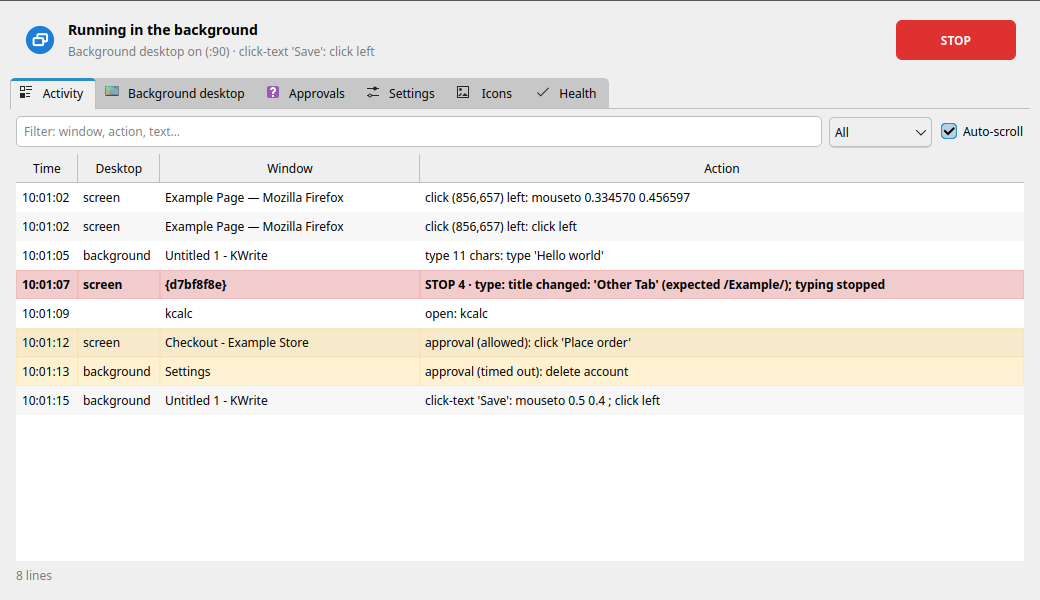
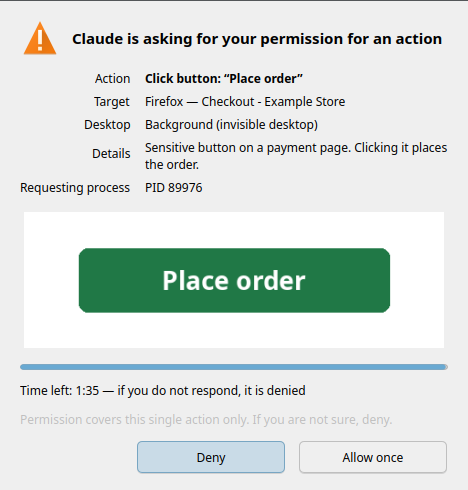
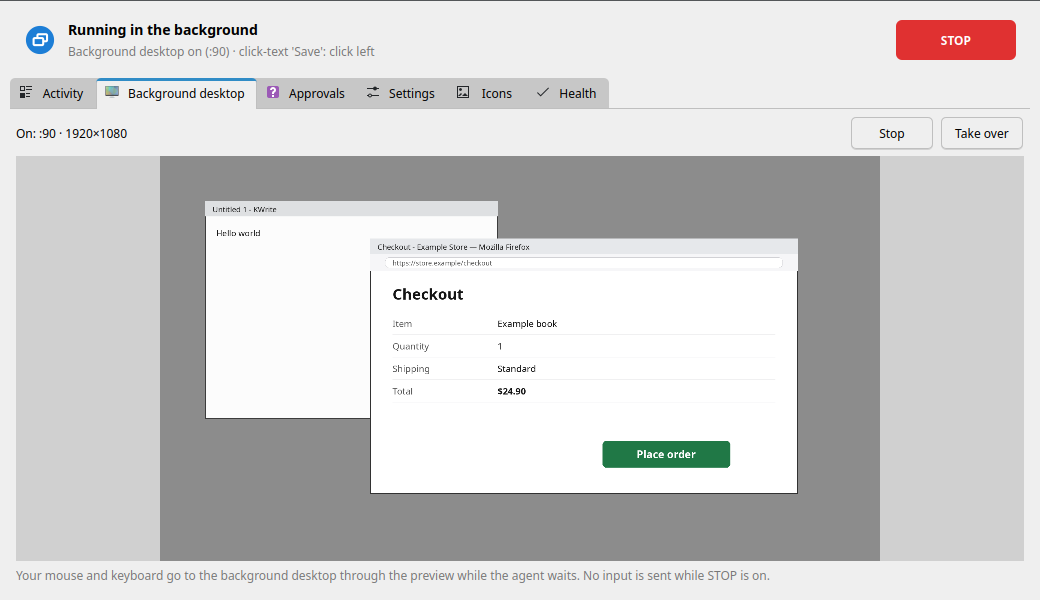

Screenshots are rendered from sample data. The panel's language is Turkish for now; an English UI is planned.
Features
Safety layers
These are enforced in the tool itself, on both desktops, whatever the agent or its permission mode says:
- Forbidden windows. Windows whose title or class matches a pattern in
~/.config/deskhand/yasak-pencereler.txtnever receive input, and their apps are never started (for example an online game whose rules forbid automation, or a password manager). Over MCP they are also blacked out in screenshots and left out of OCR. - Sensitive buttons and payment pages need a human. Buy, Pay, Place order, Authorize, Allow, Delete account (Turkish and English wording) and any click or Enter on a page whose title looks like checkout/payment trigger an approval dialog in the Deskhand panel: Allow once or Deny, with a small picture of the target. Only the panel can write the answer; the dialog itself is a forbidden window, so the agent cannot click it. No answer, timeout or panel not running = denied.
- Window/tab title lock. With
-b PATTERN(CLI) or a window pattern (MCP) the title is re-checked right before every input. If a browser switched tabs, typing stops mid-word. - Human priority. If you are using the mouse or keyboard (Wayland idle notification, no extra permissions), Deskhand waits for 1.5 s of quiet, up to 8 s, then gives up. Keys it is holding are released as soon as you touch anything.
- STOP switch. Panel button, tray menu or an optional global shortcut. While it is on, nothing sends input and held keys are released. An agent may set STOP itself, but it cannot lift a STOP that you set; only the panel can.
- Activity log. Every input is logged (
~/.local/state/deskhand, kept 7 days) and shown live in the panel.
Background desktop
deskhand desktop start starts an invisible desktop: Xvfb + openbox, 1920×1080 by
default, separate from your session.
- Nothing reaches you. No input goes to your screen (the background backend can only talk to its own X display). Apps there get a private D-Bus, so their notifications are captured to a log instead of popping up, and their audio goes to a silent sink. Wayland variables are removed so an app cannot escape to your screen.
- Light. Low CPU/IO priority and a memory cap (systemd scope, 4 GB by default). Starting it takes about 0.2 s; an empty desktop uses about 30 MiB.
- Per-app session policy. Some apps can open there already logged in:
- Firefox: a consistent, one-way snapshot copy of your profile (cookies, logins, site storage for the task's sites). Nothing is ever written back. Sync identity is left out; cookies and saved passwords of banking/payment/government sites (including Turkish banks and e-Devlet) and central login pages (Google, Microsoft) are not copied, so Google/YouTube are not signed in there. Camera, microphone, location and notification permissions are removed from the copy.
- Flatpak apps that do not use the keyring (for example Discord, Spotify): snapshot copy.
- Apps that need the keyring (Chromium family, VS Code) and apps that write to real files (Obsidian vaults) run only on your screen.
- Apps that break with two clients (Telegram, Signal, WhatsApp wrappers, Element, Steam, Thunderbird and similar) are never cloned and never started in the background: the agent is told to wait for you. Mail/sync daemons (KMail/Akonadi, Nextcloud) are never started either.
- The policy is matched on the resolved app (desktop entry, executable, Flatpak id), so a different name or path cannot bypass it; the strictest match wins. Password managers are never started.
- Unknown apps start normally only when they are certainly not running for you (otherwise their
single-instance lock could open the window on your screen); if that cannot be known, the agent
waits. Policy file:
~/.config/deskhand/oturum.toml.
- Watch and take over. The panel shows a live preview. Take over sends your mouse and keyboard into the background desktop while the agent waits.
Busy detection: "Background / My screen / Later"
deskhand busy checks, read-only, whether you are busy: a fullscreen window, a playing
media player (MPRIS), recent keyboard/mouse input, a game or forbidden window, a locked screen.
deskhand decide "task summary" turns that into a decision. If you are not busy, the answer
is my screen. If you are, by default a notification asks Background / My screen / Later
(no answer in 45 s = background). Over a fullscreen film or game it does not interrupt you
at all and goes straight to the background. All of this is configurable in the panel.
Clicking by text (OCR first)
Agents click on what they can read, not on guessed coordinates: click-text <window> "Save".
Tesseract reads Turkish and English. With a graphics card, a second reader (EasyOCR on the GPU)
joins in by itself: it finds coloured web buttons and faint or small text that tesseract misses
(measured: 55/55 test phrases instead of 49/55, ~0.15 s per read). It only adds lines; tesseract's
reading is kept. It is never started while you play a game or watch something full screen, and it
frees the graphics memory after 5 idle minutes. Turkish letters are matched loosely (ş/s, ı/i…) and an
ambiguous match stops instead of guessing. Also available: the accessibility tree (AT-SPI,
click by button name), saved icon templates, colour areas, and screen-recognition flows
for repetitive tasks.
MCP server (12 tools)
deskhand mcp is a stdio MCP server: get_status, choose_desktop, manage_desktop,
screenshot, read_text, find, click, type_text, press_key, scroll, open_app,
run_flow. Screenshots are scaled to 1280 px on the long edge. Coordinates are checked
against a shot_id, so a click on a stale screenshot is refused. There is no "approved" flag
on the MCP surface: sensitive actions always go through the panel.
Monitoring panel and tray
Activity (live log, filter), background desktop (preview, stop, take over), approvals (pending + history), settings (busy behaviour, forbidden windows, STOP shortcut), saved icons and a health check of all dependencies. The tray icon shows idle / on your screen / in the background / STOP, with a badge when an approval is waiting.
How it compares
There are good projects in this space; pick what fits you.
- agent-sh/agent-workspace-linux is the closest: a hidden desktop on six backends (including a native KWin Wayland virtual compositor), keyring and Chrome profile import, app allow-list, a live viewer, 82 tools. It is broader and more portable than Deskhand.
- ahmetadakli/kde-desktop-mcp has the closest safety model on KDE: app allow-list with levels, confirmation list, password-field protection, user-takeover pause, stop shortcut. It works through the accessibility tree.
- agent-sh/computer-use-linux (GNOME-first, many backends), Samthesurf/kwin-mcp (KDE Wayland), alex-oleshkevich/wayland-mcp (niri/wlroots, nested sandbox, local OCR) are other options.
What Deskhand puts together, which we have not seen combined elsewhere:
- Checks based on what is on screen, not only on which app: forbidden windows, sensitive buttons, payment-page detection, title/class lock.
- Busy detection and the Background / My screen / Later loop.
- Session policy per app for the background desktop (copy / wait / never), including the apps that must not run twice.
- Click by visible text with Turkish OCR, also where there is no accessibility tree.
- A Plasma panel: tray, STOP, live preview, take over, human-only approvals.
It is also smaller in scope: KDE Plasma only, one background desktop, no GPU there.
Requirements
- KDE Plasma 6 on Wayland for the foreground (your own screen). The background desktop is an X server (Xvfb), so it runs apps that still support X11 (most do).
- Python 3.11+
- Foreground:
kdotool,dotool,spectacle, access to/dev/uinput - Both:
tesseractwith Turkish and English data - Background:
Xvfb,openbox,python-xlib; recommendedxdotool,pactl(silent audio sink; without it background apps get no audio at all),systemd-run(memory cap) - Python modules: PyQt6, python-xlib, numpy, scipy, pillow, jeepney, mcp ≥ 2.3
- To build the small keyboard-activity helper: a C compiler,
make,pkg-config,wayland(without it, human priority watches only the mouse) - With an AMD or NVIDIA graphics card, for text recognition on the GPU: PyTorch for your card,
torchvision, OpenCV, scikit-image, shapely, pyclipper, and EasyOCR in a small venv with its
models (~100 MB). Without a GPU nothing extra is needed.
install.shchecks all of it and prints the commands - To build the screenshot helper (KWin's screenshot interface, about 8 ms a shot): the same
tools and
libsystemd(part of systemd).install.shbuilds it and registers its desktop entry
Arch / CachyOS:
sudo pacman -S --needed spectacle tesseract tesseract-data-tur tesseract-data-eng \
    xorg-server-xvfb openbox xdotool libpulse python-pyqt6 python-xlib python-numpy \
    python-scipy python-pillow python-jeepney python-mcp base-devel wayland
paru -S kdotool-bin dotool        # AUR (or yay, or by hand)

# with a graphics card (NVIDIA: python-pytorch-opt-cuda instead of -rocm)
sudo pacman -S --needed python-pytorch-opt-rocm python-torchvision python-opencv \
    python-scikit-image python-shapely python-pyclipper
python3 -m venv --system-site-packages ~/.local/share/deskhand/ocr-venv
~/.local/share/deskhand/ocr-venv/bin/python -m pip install --no-deps easyocr python-bidi
cd ~/.local/src/deskhand && ~/.local/share/deskhand/ocr-venv/bin/python -m deskhand.ocr_gpu indir   # models
dotool needs to write to /dev/uinput. Its package installs a udev rule for the input
group, so:
sudo usermod -aG input "$USER"                        # then log out and back in
sudo modprobe uinput                                  # if /dev/uinput does not exist
echo uinput | sudo tee /etc/modules-load.d/uinput.conf   # load it at boot
Developed and tested on CachyOS (Arch) + KDE Plasma 6. Other distributions should work with equivalent packages but are untested.
Install
Clone it anywhere and run the installer as your normal user (not with sudo):
git clone https://github.com/sobelendimm/deskhand.git ~/.local/src/deskhand
cd ~/.local/src/deskhand
./install.sh --dry-run    # see what it will do
./install.sh              # install (safe to re-run)
The installer does not install packages. It lists what is missing and prints the command. It then builds the activity helper and installs:
- the
deskhandcommand in~/.local/bin(points at this folder; if you move the folder, run./install.shagain), - a menu entry and icon,
- panel autostart (tray only) at login, because approvals need the panel running
(
./install.sh --no-autostartto skip).
Nothing is installed system-wide. Update: git pull && ./install.sh. Uninstall:
./uninstall.sh (keeps settings, saved icons and flows) or ./uninstall.sh --purge.
Quick start
deskhand panel                          # monitoring panel + tray
deskhand busy                           # are you busy? (read-only)
deskhand windows firefox                # find windows: id | title | geometry
deskhand read firefox                   # read the window's text with coordinates (OCR)
deskhand -b "Example" click-text firefox "Sign in"     # click visible text, title locked
deskhand --background open firefox --site github.com   # signed-in Firefox on the invisible desktop
deskhand stop                           # STOP: no input from now on
deskhand resume                         # lift a STOP set from the CLI
Cheat sheet (deskhand help shows everything):
| Command | Meaning |
|---|---|
windows <pattern> | find windows |
screenshot <window> | screenshot (window, or ekran = whole screen) |
read <window> [pattern] | read text + coordinates (OCR) |
click-text <window> <text> | click on visible text |
click <window> <x> <y> | click at window coordinates |
type <window> <text> | type text (--secret: not written to the log) |
key <window> <keys> | key or shortcut, e.g. ctrl+s |
scroll <window> [down|up] | scroll |
wait <window> <text> | wait until text appears (--gone: disappears) |
open <app> / open --command "CMD" | start an app and wait for its new window |
tree / click-element | accessibility tree / click an element by name |
desktop start|stop|status | the background desktop |
sessions status|policy|clear | which apps open signed in on the background desktop |
busy · decide "<task>" | busy check · decide where to work |
stop · resume · status | STOP on · off · show |
panel [--tepsi] · mcp | panel (tray only) · MCP server |
Common options: -b/--title PATTERN title lock, -s/--class PATTERN class lock, --background
run on the invisible desktop, --on-my-screen work on your screen even during a game or movie
(only when you said so). The original Turkish command names (bul, metin, metne-tikla, …) and the
ekran command keep working as aliases.
Use with Claude Code (MCP)
Register two entries in user scope (never project scope: desktop control should not
travel with a repository). Claude Code permission rules cannot match tool parameters, so the
desktop split is done by server name:
claude mcp add --scope user --transport stdio deskhand    -- ~/.local/bin/deskhand mcp
claude mcp add --scope user --transport stdio deskhand-bg -- ~/.local/bin/deskhand mcp --desktop background
claude mcp get deskhand        # inside a session: /mcp
| Name | Can touch | Suggested permission |
|---|---|---|
deskhand | your screen and the background desktop (desktop=auto by default) | ask |
deskhand-bg | the background desktop only (foreground requests are refused) | can be more relaxed |
Example ~/.claude/settings.json:
{
  "permissions": {
    "allow": ["mcp__deskhand__get_status", "mcp__deskhand__read_text", "mcp__deskhand__find",
              "mcp__deskhand-bg__get_status", "mcp__deskhand-bg__read_text", "mcp__deskhand-bg__screenshot"],
    "ask":   ["mcp__deskhand__screenshot", "mcp__deskhand__click", "mcp__deskhand__type_text",
              "mcp__deskhand__press_key", "mcp__deskhand__scroll", "mcp__deskhand__open_app",
              "mcp__deskhand__run_flow", "mcp__deskhand__manage_desktop"]
  }
}
Permission prompts are a second layer; Deskhand's own checks run in every permission mode.
The server needs WAYLAND_DISPLAY, DBUS_SESSION_BUS_ADDRESS and XDG_RUNTIME_DIR for the
foreground; if your client starts it with an empty environment, pass them with --env.
A typical session: get_status → (busy?) choose_desktop → manage_desktop start →
open_app → read_text → click(text="Save", verify=true) → type_text → read_text to
check → manage_desktop stop.
Agent usage pattern (CLI)
Ask first, then run every command on the chosen desktop:
deskhand decide "Save the invoice as PDF"
case $? in
    0)  WHERE="" ;;          # my screen
    20) WHERE="--background" ;;    # background desktop
    21) exit 0 ;;            # later: tell the user, do nothing now
esac
deskhand $WHERE open --command "okular ~/invoice.pdf"
Rules for agents: stop on exit codes 10, 12, 13, 15 and 16 and tell the user; read before you click
and verify after; pass --approved only when the user has approved that exact step in the
chat. Without it, Deskhand asks the user in the panel.
Configuration
| Path | Contents |
|---|---|
~/.config/deskhand/yasak-pencereler.txt | forbidden windows (regex per line, title or class) |
~/.config/deskhand/ayarlar.toml | busy behaviour ([karar]: ask / background / wait, timeout, ask over fullscreen) |
~/.config/deskhand/oturum.toml | per-app session policy for the background desktop (merged over the defaults) |
~/.local/share/deskhand/ | saved icons (simgeler/), flows (akislar/) |
~/.local/state/deskhand/ | input log (7 days), captured background notifications |
~/.cache/deskhand/ | screenshots, OCR cache (5 days) |
$XDG_RUNTIME_DIR/deskhand/ | STOP switch, approval requests, background desktop state, session copies (tmpfs, 0700) |
Every directory can be moved with DESKHAND_CONFIG_DIR, DESKHAND_STATE_DIR,
DESKHAND_CACHE_DIR, DESKHAND_DATA_DIR, DESKHAND_RUNTIME_DIR. Other variables:
DESKHAND_HEDEF=on|arka|oto (default desktop), DESKHAND_SANAL_BOYUT=1920x1080 (background
size), DESKHAND_SANAL_BELLEK=4G (memory cap, 0 = off).
Exit codes
| Code | Meaning |
|---|---|
| 0 | done |
| 1 | usage error |
| 2 | point outside the window/screen |
| 3 | window is not active / another window is in front |
| 4 | title or class lock did not match |
| 5 | several matches (give --sira N) |
| 6 | text not found |
| 7 | timeout |
| 8 | window gone or moved |
| 9 | a required tool did not run (dotool, tesseract, Xvfb…) |
| 10 | forbidden window, or a sensitive action without approval |
| 11 | a flow reached an error screen |
| 12 | you are using the computer (human priority) |
| 13 | STOP is on |
| 14 | background desktop not available |
| 15 | you are playing a game or watching a video: your screen is not touched |
| 16 | the app cannot be opened on the background desktop (open on your screen, or keyring-only) |
| 20 / 21 | decide: background / later (0 = your screen) |
Over MCP the same codes appear as [code] name: detail errors.
Known limitations
- No GPU in the background desktop. Xvfb draws in software: WebGL, games and video decoding are slow there.
- Wayland-only apps cannot run in the background (it is X11).
- Keyring apps are foreground-only. Chromium-family browsers, VS Code and anything that keeps its secrets in KWallet/Secret Service do not open logged in on the background desktop.
- One background desktop at a time.
- Xvfb has no auth cookie yet. It listens only on a local socket, but another local user
could connect to it. An
-authcookie is planned. - OCR can misread. Ambiguous matches stop rather than guess, and clicks can be verified,
but small or low-contrast text may be read wrong or not found. A lone web button can be missing
from the full
readlisting; searching for its text (read <window> "<text>",click-text) uses extra readings and finds it. - Approvals need the panel running. If it is closed, every sensitive action is denied.
- Foreground needs Plasma 6 on Wayland (kdotool + KWin scripting).
- The activity log is written in Turkish (the panel shows it translated); messages, help and the panel follow your system language (Turkish or English), or the choice in Settings.
Threat model
Deskhand protects you from an agent's mistakes and from prompt injection (a web page or document telling the agent to buy something or delete an account): the agent has no tool or command that approves its own request or lifts your STOP. It is not a sandbox: an agent that can run arbitrary shell commands as your user could edit files, kill the panel or drive the desktop without Deskhand. Keep shell access behind your client's permission prompts.
Development
for t in tests/test_*.py; do python3 "$t" || break; done
test_mantik, test_ocr, test_ocr_gpu, test_onay, test_oturum, test_entegrasyon, test_mesgul, test_guvenlik,
test_i18n and test_gui (offscreen Qt) need no screen (test_ocr_gpu also runs the real GPU reader
when it is installed and you are not in a game). test_sanal and test_mcp start their own
background desktop; nothing goes to your screen.
Tests redirect every Deskhand directory to a temporary folder and never touch your real
config. The suites in tests/ekranli/ drive your real screen; run them only when you are
not using the computer: tests/ekranli/hepsi.sh runs them all (~15 min; it opens its own Firefox with a
temporary profile, never yours; --insansiz skips the two steps that ask you to click in the approval dialog).
See CONTRIBUTING.md.
License
GPL-3.0-or-later © 2026 sobelendimm.