Cowork
Open-source local-first multi-agent orchestration runtime with native MCP tool calling, automated fallback chains, and real-time dashboard telemetry.
Documentation
🤝 Cowork
One Task Inbox for Claude Code, Codex, Gemini CLI & Hermes Agents
Self-hosted MCP server & Web Dashboard with auto-fallback chains, remote fleet execution, and zero-database storage.






⚡ Quick Start • 💡 Why Cowork? • ⚔️ Competitive Comparison • 📖 Documentation • 🌐 Live Architecture • 🤝 Join as a Remote Agent • ⭐ Star on GitHub
💡 Why Cowork?
You are using Claude Code for development. Two hours into a sprint, you hit the dreaded rate limit:
Error: You have exceeded your current quota. Please wait 4 hours and 12 minutes.
Your workflow stalls. Your terminal hangs. You switch to Gemini CLI or a local Hermes instance, but you lose your entire task state, intermediate patches, and execution context.
Cowork solves this in one command. It is an open-source control plane that connects all your coding agents into one unified task inbox:
- 🔀 Smart Fallback Chains: Route tasks from Claude Code ➔ Hermes ➔ Gemini ➔ Ollama. When an API limits out, Cowork transparently hands the work to the next agent in line.
- 🖥️ Single-Pane-of-Glass Dark Dashboard: Live CPU/GPU/memory thermals, running agent status, interactive calendar routines, and direct artifact downloads.
- 📁 Zero-Database Simplicity: Pure JSON and Markdown on disk. No Postgres, Redis, or SQLite migrations to maintain.
- ⚡ One-Command Remote Workers: Harness GPUs or models across laptops, Mac Studios, and cloud boxes:
COWORK_URL=https://hub:6868 HOST=mac-studio node cowork/deploy/remote-agent-client.mjs - 🎭 285+ Built-in Specialist Personas: Out-of-the-box routing across 19 departments (Frontend, SRE, Security, Penetration Testing, Data Engineering).
⚔️ How Cowork Compares
| Feature | Cowork | CrewAI / AutoGPT | OpenHands | LangGraph |
|---|---|---|---|---|
| Primary Focus | Multi-CLI / Multi-Agent Control Plane | LLM Python Scripts | Headless Dev Container | Graph Logic Framework |
| Supports Claude Code & Hermes Native CLIs | ✅ Native | ❌ No | ❌ No | ❌ No |
| Auto Quota / Rate-Limit Fallback Chains | ✅ Built-in | ❌ Manual | ❌ No | ⚠️ Custom Code |
| Self-Hosted Dark Web UI & Hardware Telemetry | ✅ Instant | ⚠️ Basic | ✅ Web UI | ⚠️ LangSmith (SaaS) |
| Model Context Protocol (MCP) Streamable Server | ✅ First-class | ❌ No | ⚠️ Partial | ❌ Custom |
| Storage Engine | Plain Files / JSON | SQLite/Postgres | Docker Volume | Postgres/Memory |
| Multi-Machine Remote Cluster Joining | ✅ 1-Line Node CLI | ❌ Complex | ❌ Docker swarm | ❌ Complex |
| Pre-loaded Agent Personas | 285+ Personas | 0 (DIY) | 0 (Generalist) | 0 (DIY) |
Jump to: 30-Second Quickstart · Quick Start · Connecting agents · Architecture · Dispatcher · Agents · Vocabulary · Thinking level · MCP tools
⚡ 30-Second Quickstart
Copy-paste these three lines and your agents are on one shared queue:
git clone https://github.com/slashman413/cowork && cd cowork
deploy/install-server.sh    # 1) build & launch the MCP server + dark dashboard (systemd user service)
deploy/install-skill.sh     # 2) wire the Cowork MCP connection into your agent clients
Then open http://localhost:6868 — the dashboard is live: create a task, the dispatcher
routes it across your agent fallback chains, and results plus artifacts land back on the task
card. Running a hub-only container instead? docker run -d -p 6868:6868 -v cowork-data:/data ghcr.io/slashman413/cowork:1.0.1.
Full walkthrough, manual steps and per-client wiring → Quick Start · Connecting agents
Screenshots
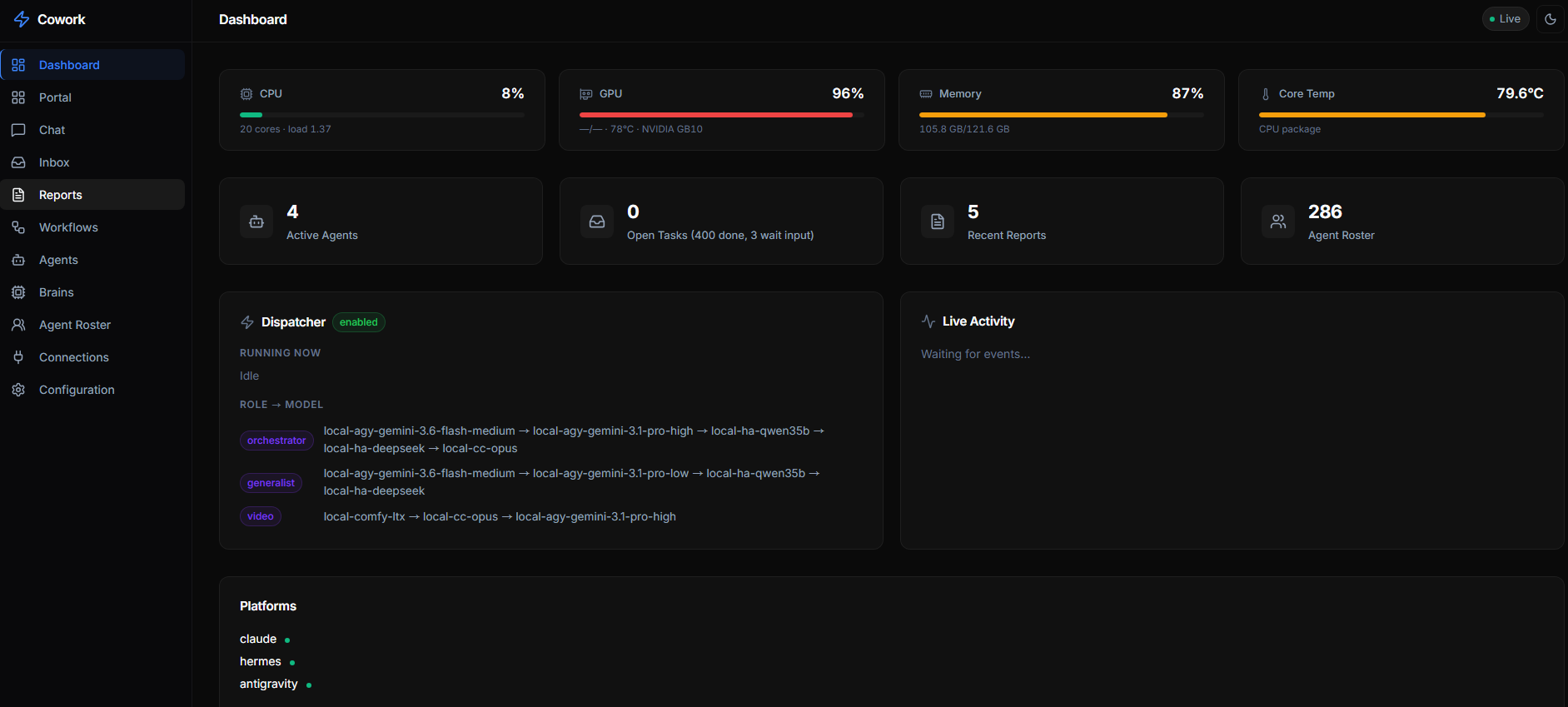
One dark-themed single pane of glass for the whole operation. The Overview shows live host metrics (CPU / GPU / memory / temp), active workers, open tasks and personas, a 7-day quality panel (pass rate, retries, wait-input, timeouts), the latest agent rulings, the dispatcher's role → model chains, and a real-time activity feed.
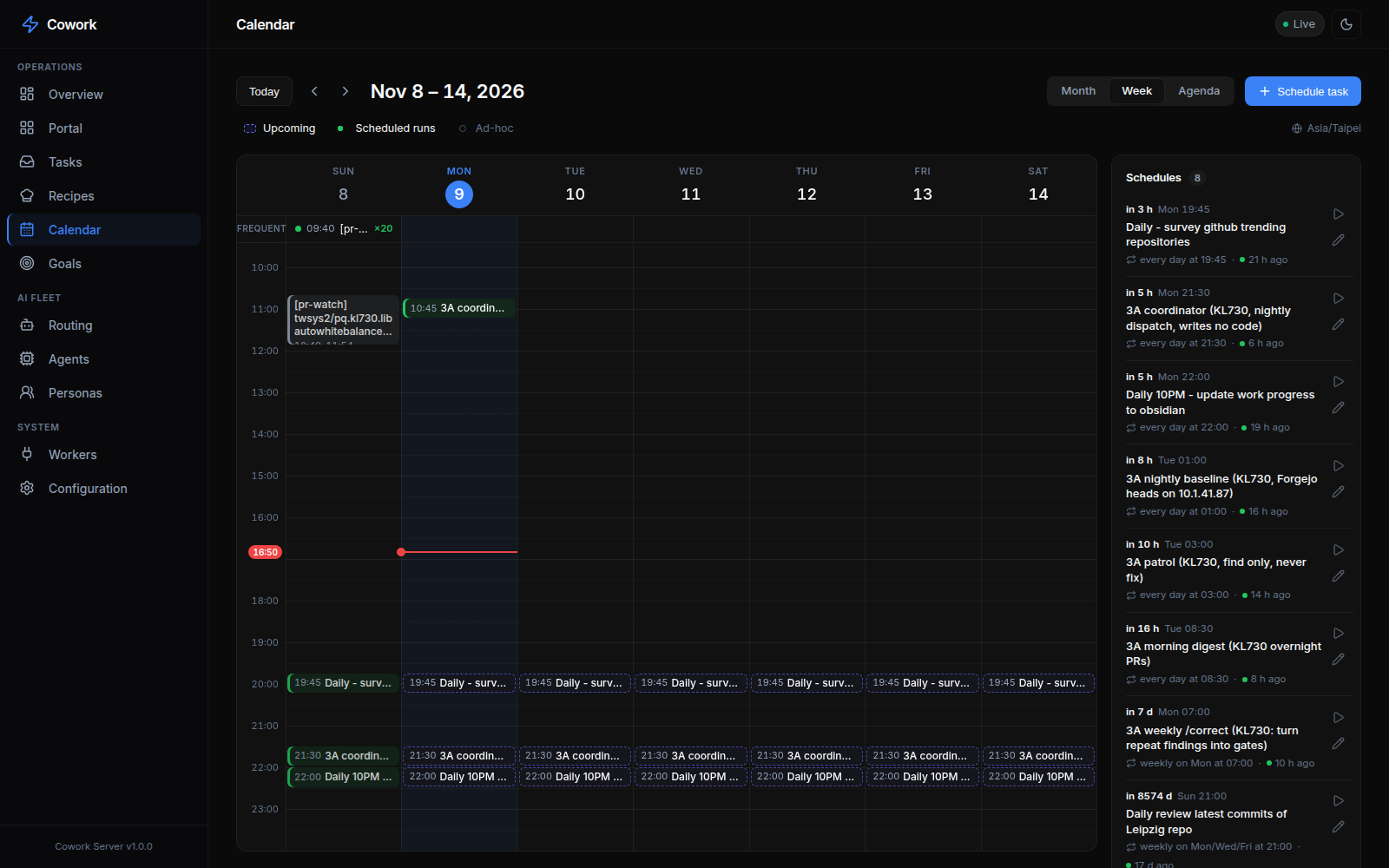
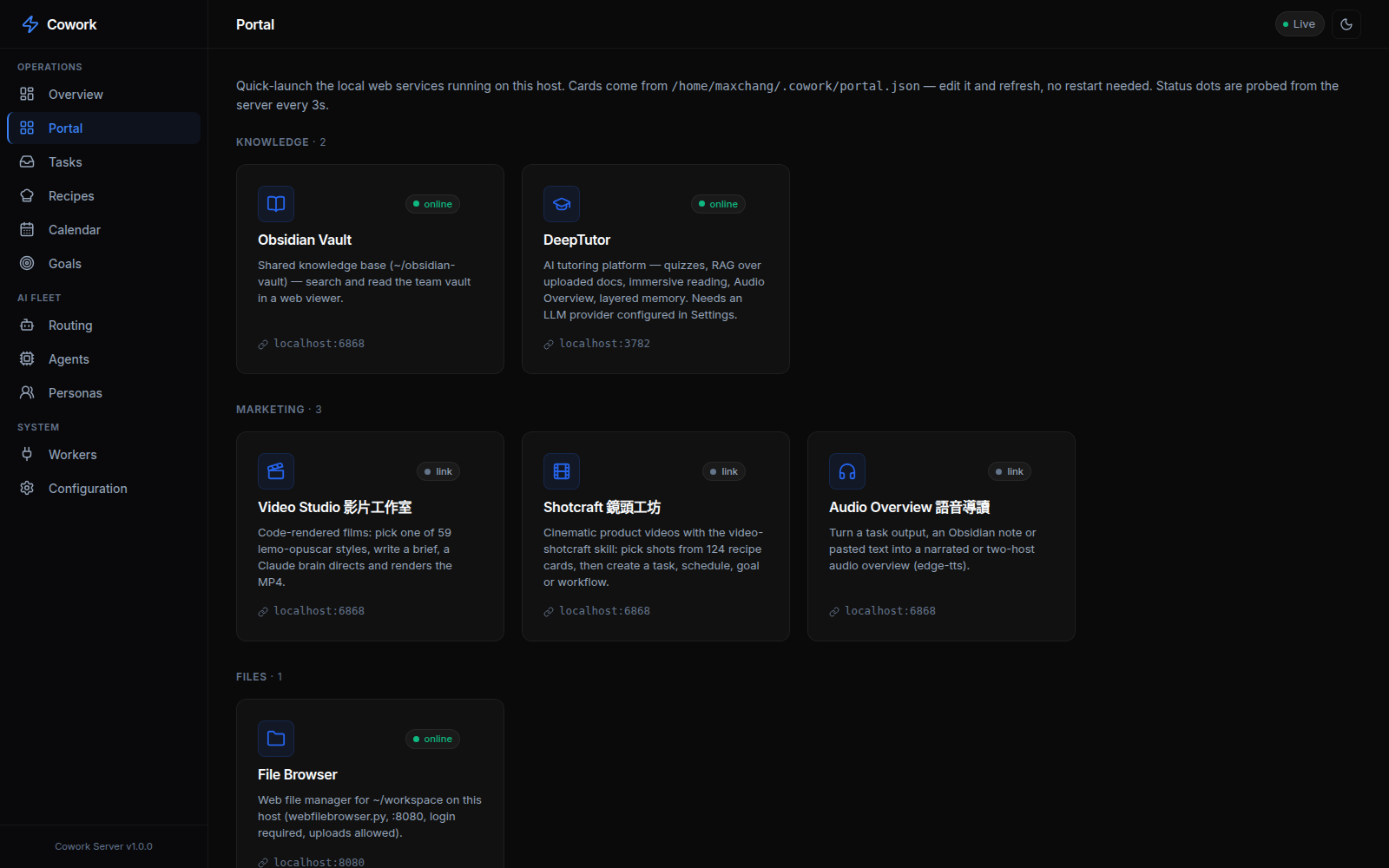
The sidebar groups every view: Operations (Overview, Portal, Tasks, Recipes, Calendar,
Goals), AI Fleet (Routing, Agents) and System (Workers, Configuration). Integrations
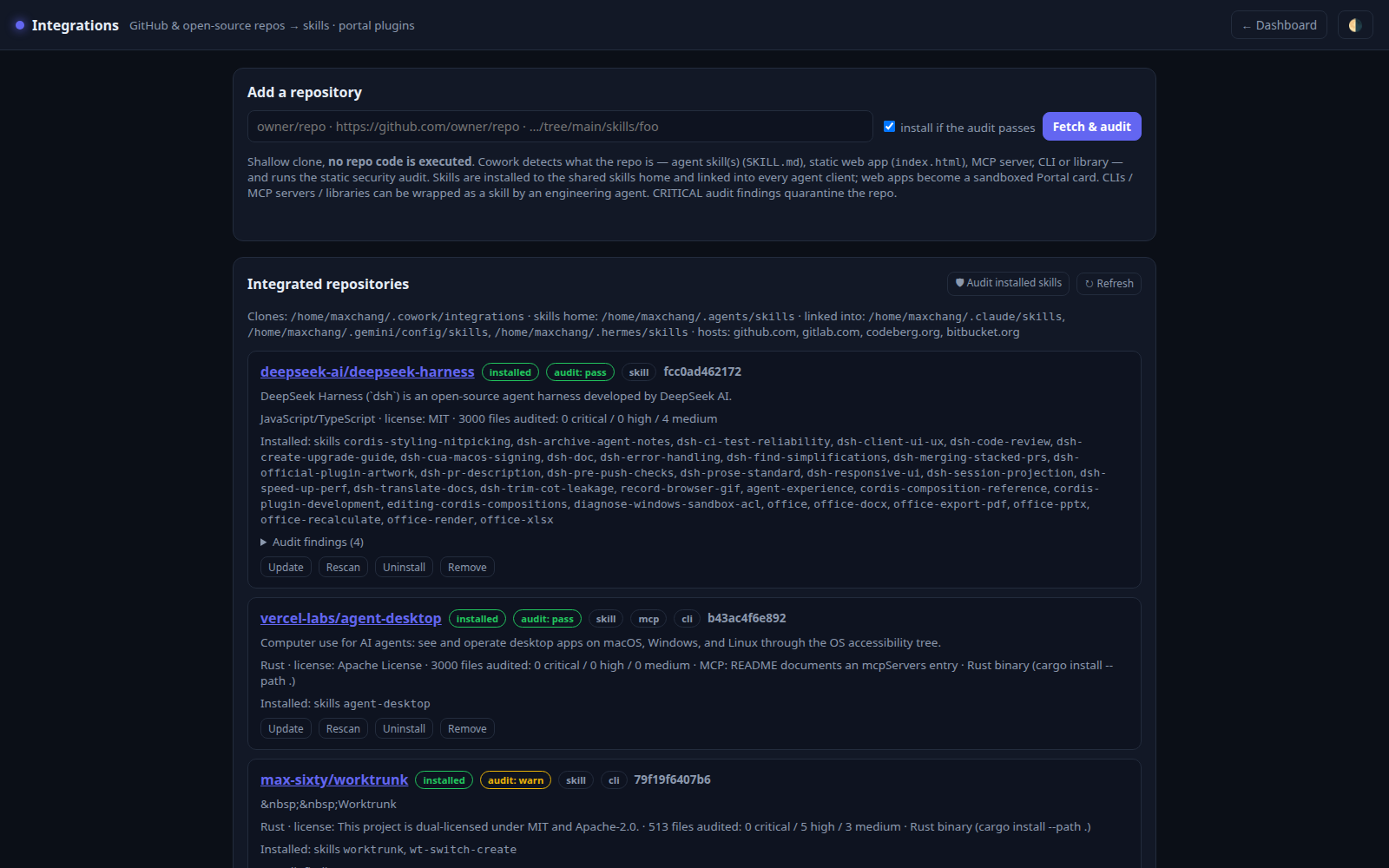
(skills, MCP servers and persona packs) have their own page, /integrations.html.
The Tasks, Routing,
Agents and
Workers views are shown in context throughout this README.
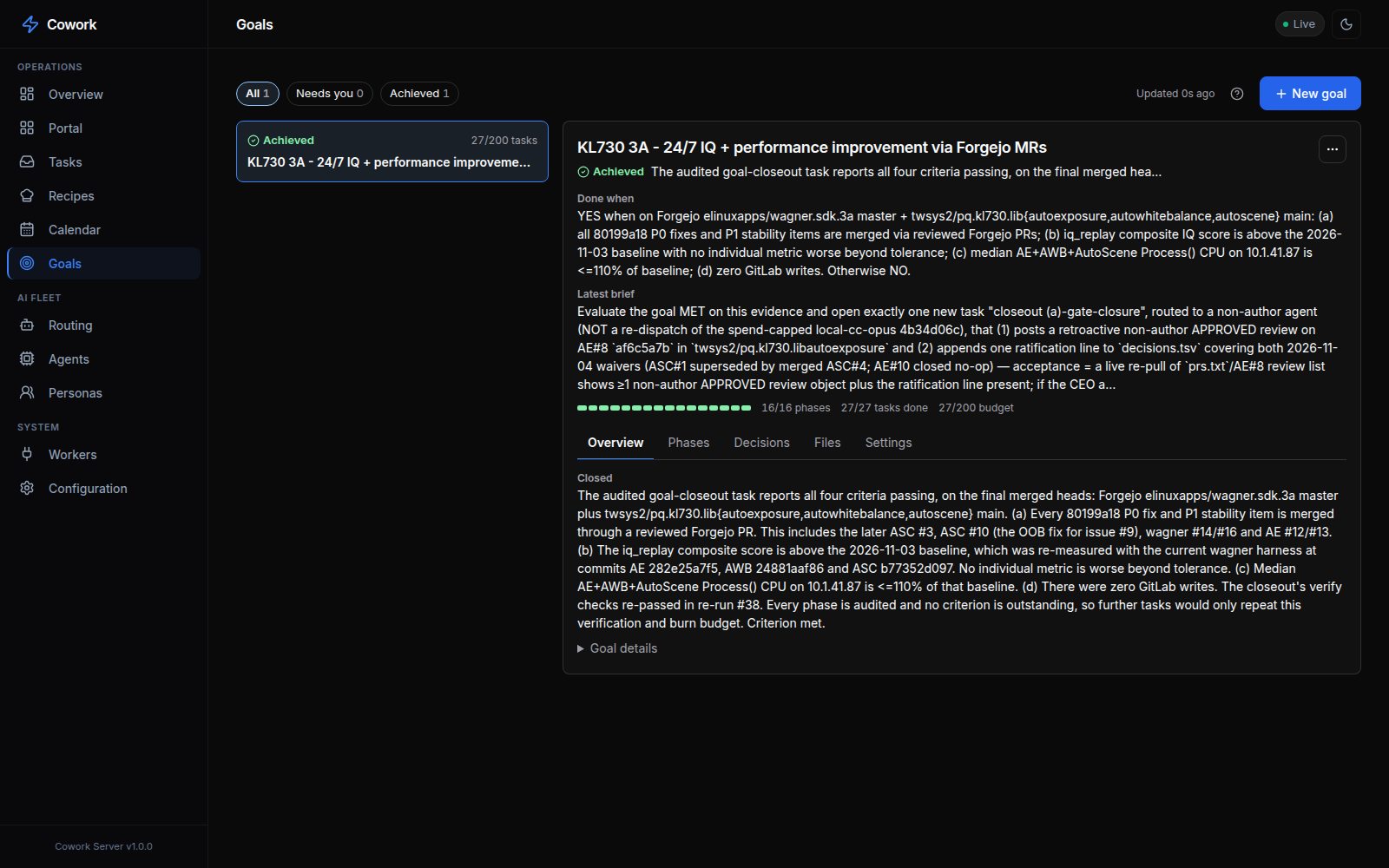
| Calendar — scheduled tasks and recurring routines by week | Goals — long-running goals with phases, decisions and budget |
|---|---|
 |  |
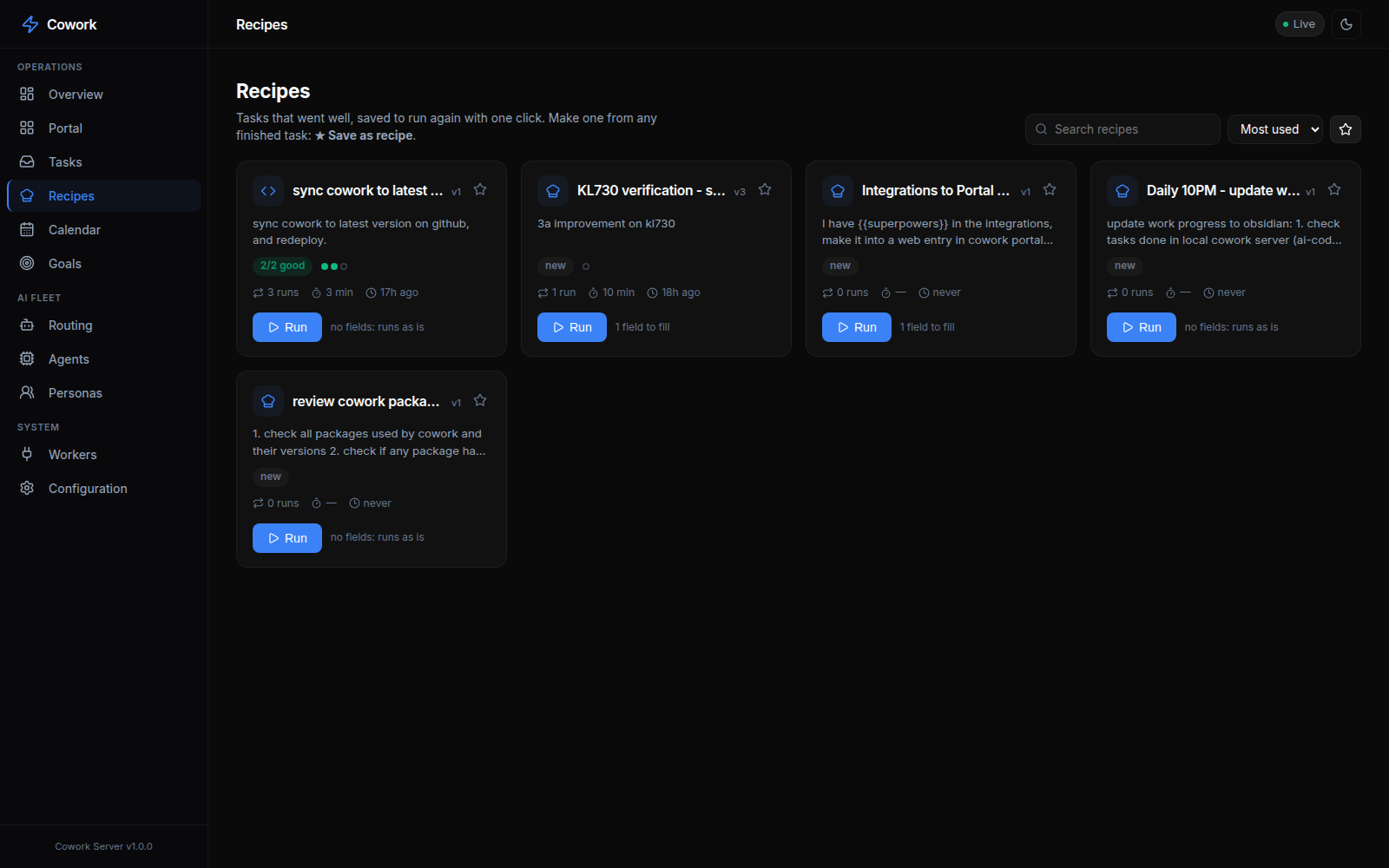
| Recipes — saved tasks you re-run with one click | Integrations — audited git repos installed as skills / MCP / persona packs / portal cards |
 |  |
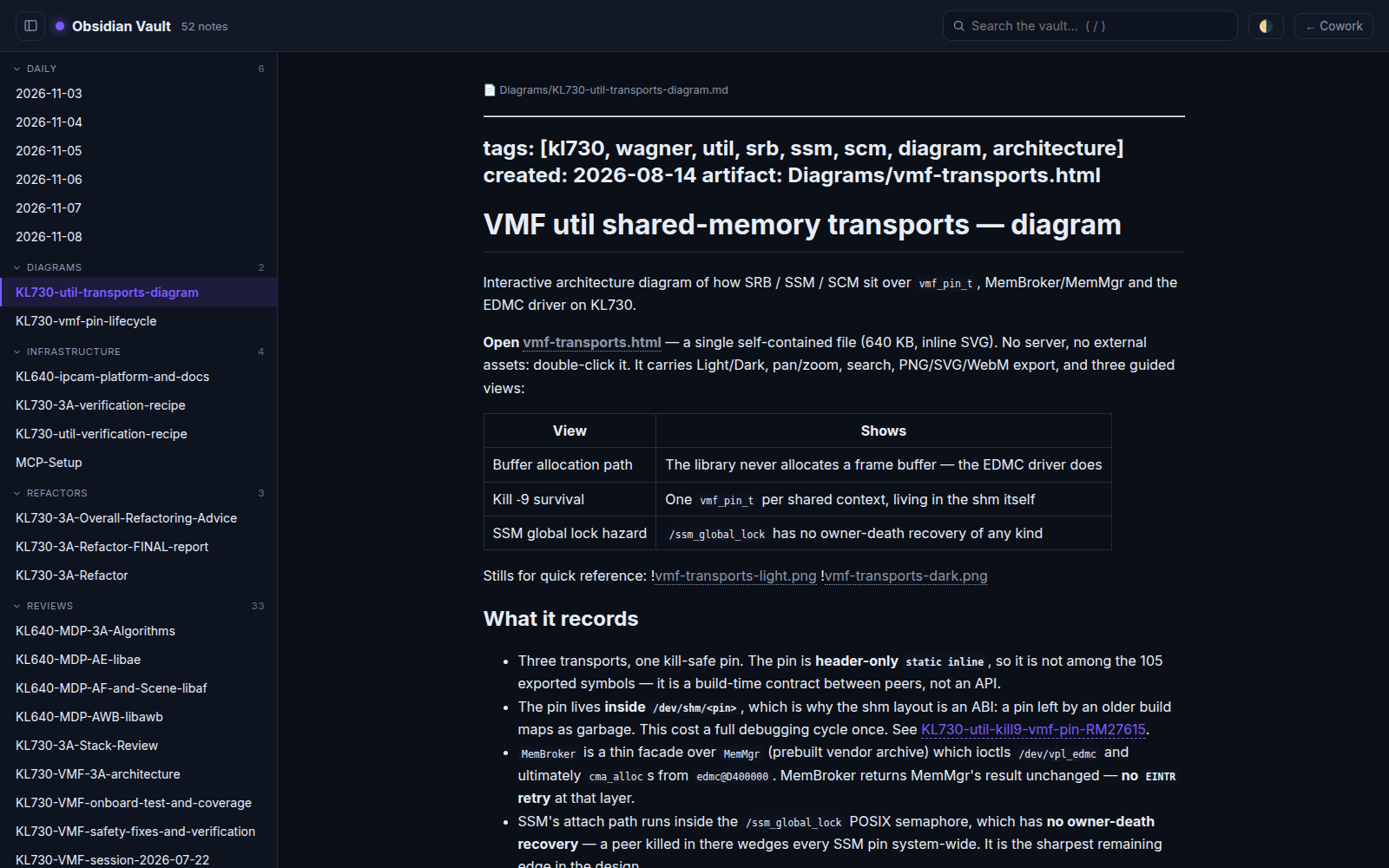
| Portal — one-click launcher for local web services | Obsidian Vault — the shared, readable knowledge base |
 |  |
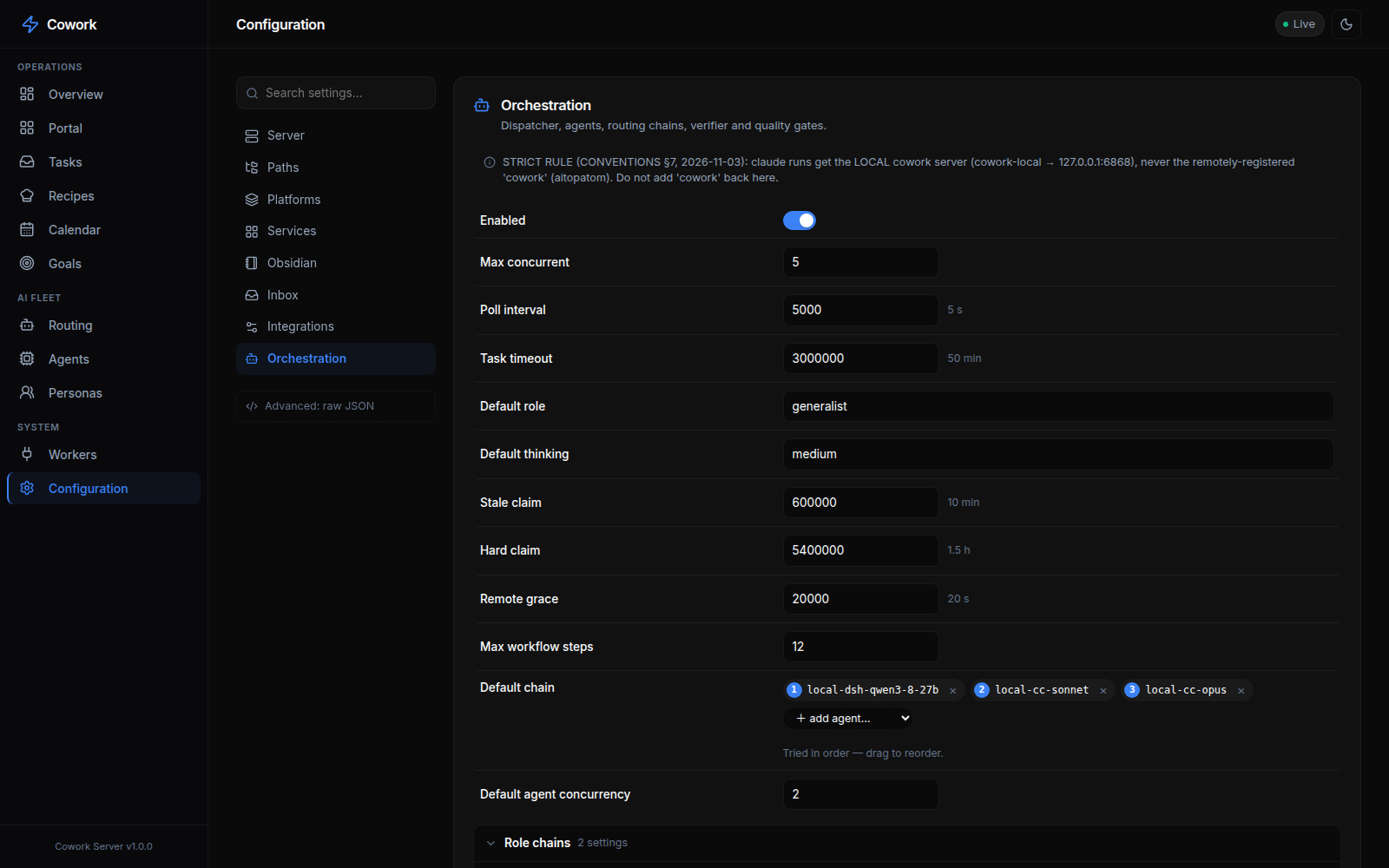
| Configuration — every setting, editable live | |
 |
Supported Platforms
| Platform | Agents | Format |
|---|---|---|
| Claude Code | ~285 | .md with YAML frontmatter |
| Antigravity (AGY) | Built-in + skills | SKILL.md |
| Hermes Agent | 39 skills | SKILL.md + triggers |
| Gemini CLI | Converted from source | .md subagents |
| Copilot | Same as Claude | .md agents |
| Codex | Converted | .toml agents |
| Cursor | Converted | .mdc rules |
| + 7 more | See the agency-agents persona pack | Various formats |
🏗 Architecture
One self-hosted Cowork hub (MCP server + dark web dashboard + task inbox, plain
JSON on disk — no database) sits between all your agent clients and the machines that
run the work. Every task is routed in two stages (division → persona) and then executes
top-to-bottom along an agent fallback chain: local executors on the hub machine,
or remote machines that claim tasks through the remote-agent-client:
flowchart LR
  subgraph clients ["Your agent clients"]
    CC["Claude Code"]
    CX["Codex"]
    GC["Gemini CLI / AGY"]
    HM["Hermes"]
    OTH["any MCP client"]
  end

  subgraph hub ["Cowork hub — one self-hosted node"]
    MCP["MCP server + REST API<br/>Streamable HTTP :6868"]
    INBOX[("Task inbox<br/>plain JSON on disk")]
    DISP["Dispatcher"]
    ROUTE["2-stage LLM router<br/>division then persona, ~285"]
    CHAIN["Agent fallback chain<br/>agent 0 to 1 to 2"]
    DASH["Dark web dashboard<br/>tasks, workers, goals, telemetry"]
  end

  subgraph localm ["Hub machine — local executors"]
    EXC["claude / codex / agy / hermes / ollama"]
  end

  subgraph remotem ["Remote machines — the fleet"]
    RAC["remote-agent-client.mjs<br/>systemd user service"]
    EXR["agent CLIs on that machine"]
  end

  clients -->|"create / claim / complete"| MCP
  MCP --> INBOX
  INBOX --> DISP
  DISP --> ROUTE
  ROUTE --> CHAIN
  CHAIN -->|"local rung"| EXC
  CHAIN -->|"remote rung"| RAC
  RAC --> EXR
  EXC -->|"result + artifacts"| INBOX
  RAC -->|"uploads result + artifacts"| INBOX
  INBOX <--> DASH
- Inbox first: tasks land in a JSON inbox with inputs, status and artifacts; the dispatcher (not a human) does the routing, so the queue never stalls on unassigned work.
- Fallback, not retry: when
chain[0]fails or a remote rung goes unclaimed within the grace window, the task hands over tochain[1]— recording each attempt on the card. - Fleet by convention: any machine that runs
remote-agent-client.mjsshows up live in the Workers view; claims are atomic, so two clients can never double-run a task.
Deeper detail lives in Task Execution — the Dispatcher.
Quick Start
Prerequisites
- Node.js ≥ 20 (tested with v22)
- npm ≥ 10
- Nothing else to clone. Personas and skills are integrations: on first run, once
the server is up, it provisions the default integrations in the background —
msitarzewski/agency-agents(persona pack the router picks from per task),garrytan/gbrain,addyosmani/agent-skills,anthropics/skills,vercel-labs/agent-browser,backnotprop/pstack,pbakaus/impeccable,Nutlope/hallmark,multica-ai/andrej-karpathy-skills. Check them withGET /api/integrations/defaults(or the Integrations page); override the list withintegrations.defaultsin config.
Fast path — two scripts (recommended)
From the repo root, after cloning (the 30-second quickstart above):
# 1. Build + launch the server (installs deps, builds, starts a systemd user service)
deploy/install-server.sh

# 2. Drop the coordination skill + MCP connection into your agent clients on this box
deploy/install-skill.sh            # auto-detects Claude Code / Hermes / Antigravity
install-server.sh generates a systemd unit with this machine's real node path and
working dir (nothing to hand-edit), or pass --foreground to launch in the terminal and
--build-only to stop after building. install-skill.sh copies the right per-client
skill into place and, for Claude Code, merges mcpServers.cowork into ~/.claude.json
non-destructively (add --url http://<host>:6868 for a remote server; --client claude|hermes|agy|all
to target one). The numbered steps below are the same thing, broken out for when you want
to do it by hand.
Container (hub only)
docker run -d -p 6868:6868 -v cowork-data:/data ghcr.io/slashman413/cowork:1.0.1
docker logs <container>   # first start prints the generated API key once
The image (amd64 + arm64) runs the MCP server, dashboard and task inbox with the local
dispatcher off: agents connect to http://<host>:6868/mcp, and machines offer their agents
with deploy/remote-agent-client.mjs (see JOIN-AS-AN-AGENT.md). Config
and all state live in the /data volume. /api and /mcp always require a key: pass your own
with -e COWORK_API_KEY=…, or the server generates one on first start, saves it to
/data/api-key and prints it once. Clients send Authorization: Bearer <key> (the agent client
reads COWORK_API_KEY); open http://<host>:6868/?apiKey=<key> once to log the dashboard in. Images are
built from v* tags by the release workflow on a digest-pinned base.
Once the hub is up, open Integrations (or GET /api/integrations/defaults) to check that the
default persona and skill packs finished provisioning. Until the persona pack is installed, the
router has no personas to pick from.
1. Install Dependencies
cd cowork/server
npm install
2. Configure Settings
Config lives outside the repo. The tracked cowork/config.json is a sanitized
template only. On first run the server copies it to ~/.cowork/config.json —
your real per-server config (host binding, registered agents, chains). Edit that
copy, not the template; the server also persists all live dashboard/API edits there,
so your personal host/agent settings never touch the repo. Override the location with
the COWORK_CONFIG env var.
Edit ~/.cowork/config.json to match your environment:
{
  "server": {
    "port": 6868,          // ← Change the port here
    "host": "0.0.0.0",     // ← Bind address (0.0.0.0 = all interfaces)
    "name": "cowork-mcp",
    "version": "1.0.0",
    "apiKey": null          // ← Set a string to require API key auth (see below for null)
  },
  "paths": {
    "inbox": "./inbox",
    "status": "./.status",
    "decisions": "./decisions",
    "artifacts": "./artifacts",
    "inputs": "./inputs"
  }
}
All paths are relative to
cowork/(the parent ofserver/). Use~for home directory paths (e.g.,~/.claude/agents).
Key Settings
| Setting | Default | Description |
|---|---|---|
server.port | 6868 | HTTP port for MCP endpoint + Web UI |
server.host | 0.0.0.0 | Bind address (127.0.0.1 for local-only) |
server.apiKey | null | API key for /api and /mcp. When null and host is not loopback, a key is generated into api-key beside the config and printed once |
server.allowUnauthenticated | false | Serve a non-loopback host with no key (also COWORK_ALLOW_NO_AUTH=1). Only for a trusted, firewalled network |
server.blockedClients | — | Client denylist enforced regardless of the API key: {ips: [...], names: [...]}. A matching source IP gets 403 on every path; a names substring (case-insensitive) in the User-Agent / X-Cowork-Client header, MCP clientInfo.name, or tool-call identity args (agent_name, agent_id, capabilities, agents[].id) gets 403 on /api//mcp. Matching agents are disabled so tasks stop routing to them. See server/src/core/client-guard.ts |
paths.agencyAgents | unset | Optional. Pins the roster to one local persona checkout; when unset, personas come from every installed persona-pack integration |
integrations.defaults | built-in list | Repos provisioned once on first start (persona pack + skill packs) |
| platforms.*.enabled | true | Enable/disable individual platforms |
| platforms.*.agentsDir | varies | Where platform-specific agents live on disk |
| services.*.enabled | false | Enable/disable service health monitoring |
3. Start the Server
# Development mode (with hot-reload)
cd cowork/server
npm run dev

# Production mode
npm run build
npm start
You should see:
=========================================
 Multi-Agent Cowork MCP Server Started
 HTTP API: http://0.0.0.0:6868/api
 MCP Endpoint: http://0.0.0.0:6868/mcp
 SSE Stream: http://0.0.0.0:6868/api/events
=========================================
4. Open the Dashboard
Open http://localhost:6868 in your browser.
Connecting AI Agents
For programmatic access, wire the MCP connection into your agent clients:
Scripted (recommended): deploy/install-skill.sh installs the cowork coordination
skill and wires the MCP connection for every agent client detected on the box — one command
instead of hand-editing each config:
deploy/install-skill.sh                          # auto-detect all clients, localhost server
deploy/install-skill.sh --client claude          # just Claude Code
deploy/install-skill.sh --client all --url http://cowork-host:6868   # remote server, every client
It drops the per-client skill (canonical copies in deploy/skills/) into the client's live
skill dir and, for Claude Code, merges the mcpServers.cowork entry into ~/.claude.json
without disturbing your other servers. The manual per-client config is below for reference.
Claude Code
Add to your MCP configuration (~/.claude.json or project-level):
{
  "mcpServers": {
    "cowork": {
      "url": "http://localhost:6868/mcp",
      "transport": "streamable-http"
    }
  }
}
Then in Claude Code, the agent can call:
Use the cowork MCP tools: register_agent, create_task, get_roster, etc.
Antigravity (AGY)
Add to your AGY MCP settings:
{
  "mcpServers": {
    "cowork": {
      "url": "http://localhost:6868/mcp"
    }
  }
}
agy quota meter / token refresh. To mint Antigravity access tokens, the usage
probe and deploy/remote-agent-client.mjs need Google OAuth client values. These are
the public values that ship with the agy and Gemini CLIs. They are not committed. Copy
.env.example to ~/.cowork/oauth-clients.env, fill it in, and run
chmod 600. Alternatively, export the same variables in the service environment;
process env takes precedence. If no values are set, the agy meter only works while a
cached CLI access token is still valid.
Hermes Agent
Configure the MCP endpoint in Hermes:
{
  "mcp_endpoints": {
    "cowork": "http://localhost:6868/mcp"
  }
}
Any MCP-Compatible Client
The server speaks standard MCP over Streamable HTTP. Any client that supports
MCP can connect to http://localhost:6868/mcp.
Task Execution — the Dispatcher
The server includes a dispatcher that turns queued tasks into real agent runs.
Output becomes the task result; the full transcript is saved as result.md in the
task's artifacts dir.
Every task lands in the Task Inbox, tagged with the division/agent that ran it and the agent it ran on, with its output artifacts attached and filterable by status (done · in-progress · pending · wait-input · failed).
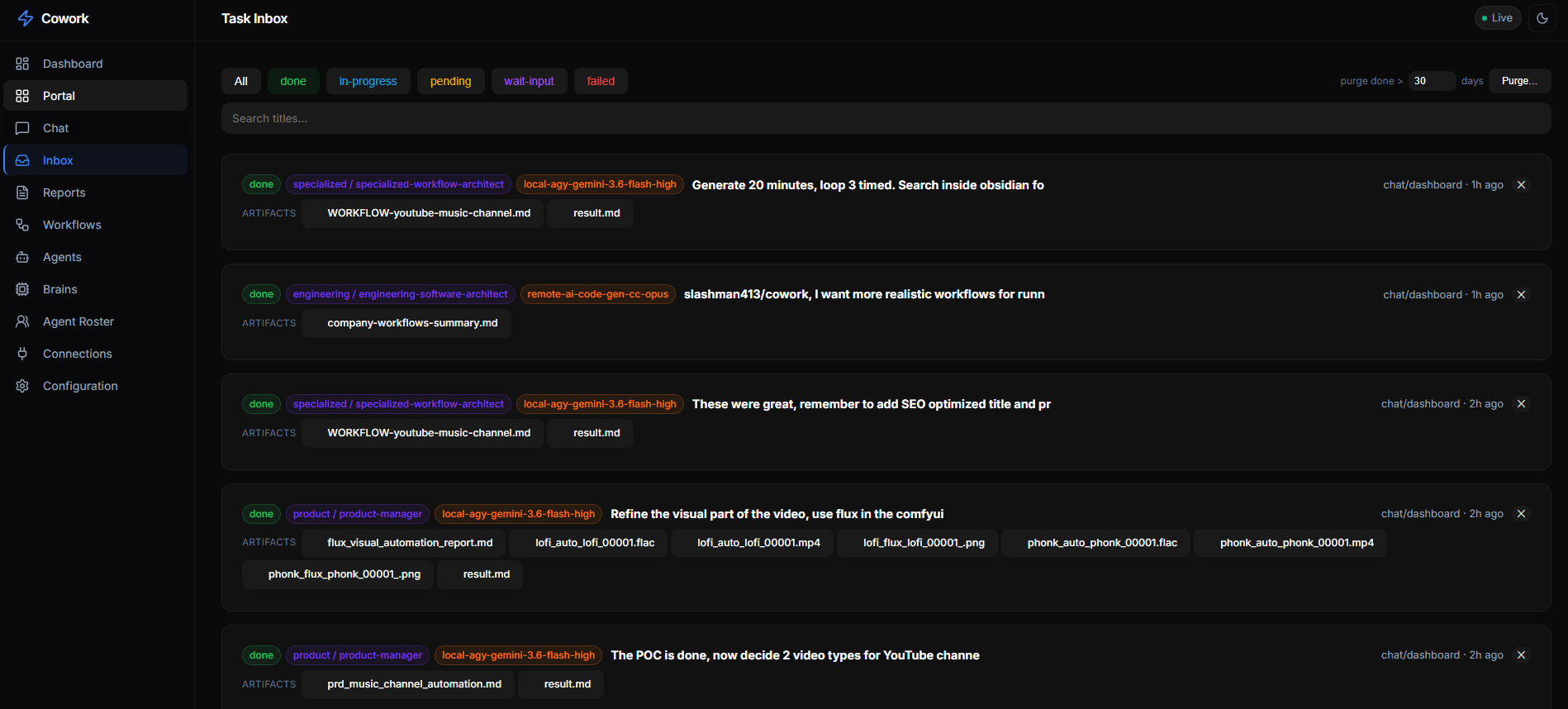
Two-stage routing
An unassigned task is routed in two stages by an orchestrator/classifier agent
(default qwen3.8-27b via Hermes, orchestration.classifier):
- Division — pick 1 of 19 divisions (testing, engineering, security, …). With
orchestration.workRoles.enabledthe same reply also names a work role (mechanical,feature,bug-fix,perf-issue,research,prose,hardest), which sets the task'scontext.tierandcontext.thinkingunless the task set them (thinking is capped byworkRoles.budget: small = medium, medium = high, large = xhigh, unlimited = max). - Persona — pick 1 of ~285 personas in that division. The chosen persona's
.mdfile becomes the system prompt. If the router names no persona (empty reply, classifier off), a keyword matcher (core/persona-match.ts) picks one; if the reply can't be parsed at all, the task goes toclassifier.fallbackRole(generalist).
A persona shapes the prompt only; the agent that runs it comes from the fallback
chain (below). Skip the router by targeting directly: context.persona: "<persona-slug>"
or a special-executor name. Tag a task manual to never auto-execute.
A task pinned to an agent (context.agent) skips agent selection. If that agent runs a
small model (≤ 70B parameters, parsed from the model id, e.g. qwen3.8-27b) and the task
has no persona, the router still runs first so the pinned agent gets a persona. Override
per agent with orchestration.agents.<id>.personaRouting: "always" | "never".
Executors: special roles + personas
- Special executors (
config.json → orchestration.roleChains) — onlyorchestrator,generalist,video; each is{description, agents: [...]}with its own chain.videoruns the ComfyUI LTX pipeline (deploy/video-pipeline.sh; LTX only — never Wan/Hunyuan/SVD). - Personas — the ~285 personas from the installed persona-pack integrations
(default:
msitarzewski/agency-agents, cloned under~/.cowork/integrations/), grouped into 19 divisions. They have no chain of their own: per-division and per-persona chains were removed on 2026-11-13, anddivisionChains/personaChainsin an old config are ignored.
Agent fallback chains (GET /api/chains)
- Global default —
orchestration.defaultChain; drag-reorder in the Routing view (PUT /api/chains/default). - Tier lists —
orchestration.tiers.<mechanical|standard|judgment>(GET /api/chains/tiers,PUT /api/chains/tier/:tier). A task with acontext.tier(set by hand or by its work role) tries its tier's agents first, then the default chain. - Special executors —
orchestration.roleChains.<role>.agents(/api/roles-config/:name).
A chain runs top → bottom: the task runs on chain[0]; on failure the dispatcher
hands over to chain[1], then [2]… recording the failed agent on the task
each attempt, until success or the chain is exhausted. Pin a single task to one
agent with context.agent: "<id>".
The Routing view edits the special-executor chains, the tier lists and the default
chain: drag to reorder or + add agent…. Changes apply live, with no restart.
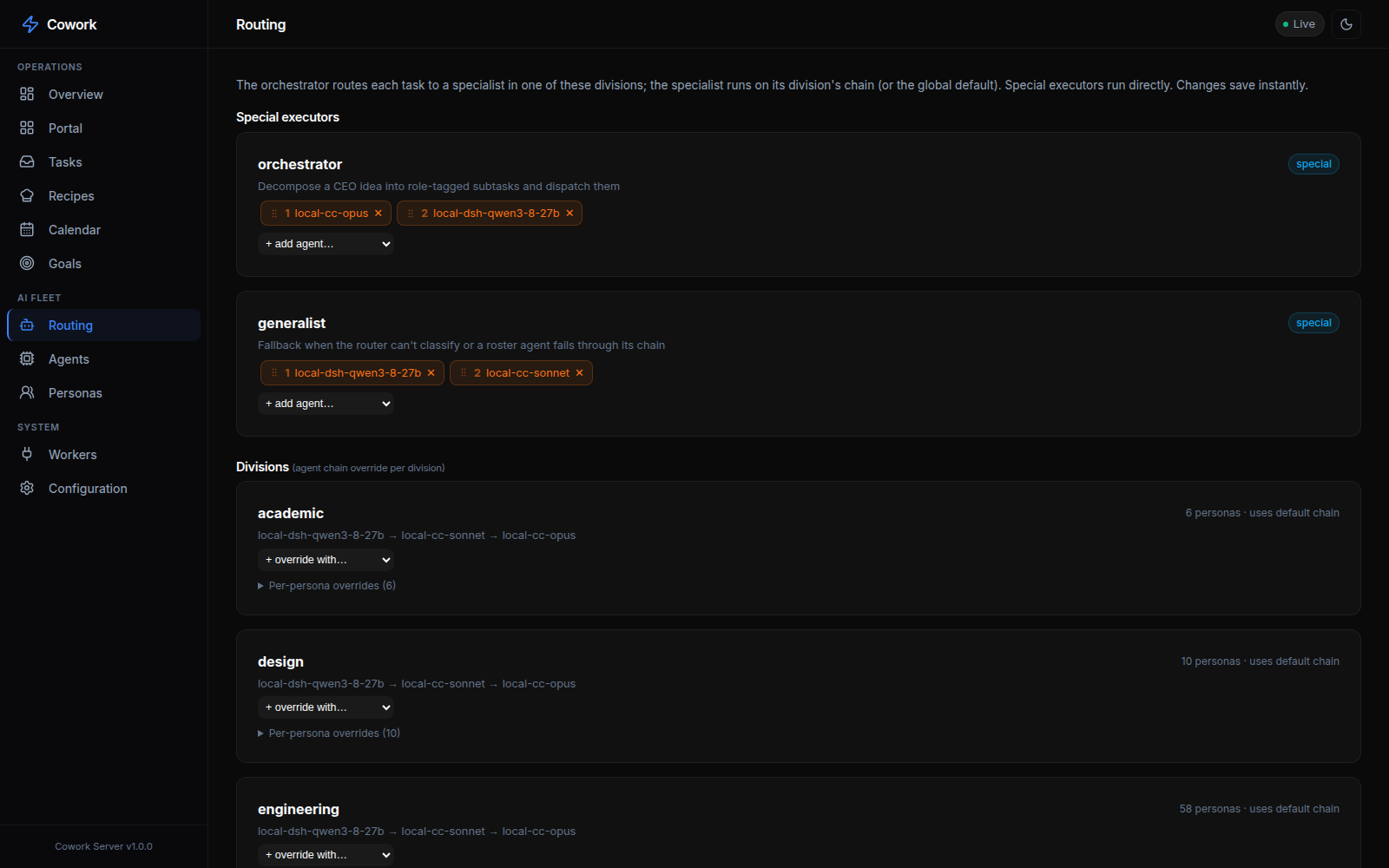
Vocabulary
| Term | Meaning | Where you see it |
|---|---|---|
| Agent | One model on one CLI on one machine: the thing that runs a task. Example: local-cc-opus-5-5. | orchestration.agents, context.agent, /api/agents, Agents page |
| Thinking | How hard an agent reasons on a run. A parameter of the run, never part of an agent id. | context.thinking, agents.<id>.thinking, orchestration.defaultThinking |
| Persona | A roster specialist the run takes on. It shapes the prompt, not the agent choice. Example: engineering-sre. | context.persona, get_roster, persona-pack integrations |
| Work role | The kind of work the router judged a task to be; sets its tier + thinking. Example: bug-fix. | orchestration.workRoles, context.tier |
| Role | A named chain of agents for a built-in job (orchestrator, generalist, video). | orchestration.roleChains, Routing page |
| Worker | A connected client that registers agents and claims their tasks. | /api/workers, Workers page, register_agent |
register_agent, deregister_agent and their agent_id / agent_name arguments keep their names so
connected clients don't break: agent_id is the worker's registration id, not an id from agents.
Thinking level
Agent ids no longer carry a level: local-agy-gemini-3.8-flash replaces the -high, -medium and -low
variants. A run's level comes from the first of these that is set:
- the task's
context.thinking - the agent's
thinking orchestration.defaultThinkingmedium
Levels are low, medium, high, xhigh and max. Set one on the New task, Edit, Re-run, Reassign and
Continue dialogs, per agent on the Agents page, or through the API:
curl -X POST "$COWORK/api/inbox" -H 'Content-Type: application/json' -d '{
  "title": "...", "description": "...", "from": {"platform": "cli", "agent": "me"}, "to": {},
  "context": {"agent": "local-cc-opus-5-5", "thinking": "high"}
}'
curl -X PATCH "$COWORK/api/agents/local-cc-opus-5-5/thinking" -H 'Content-Type: application/json' -d '{"thinking": "high"}'
| exec | How the level is applied |
|---|---|
| claude | --effort <level> |
| codex | -c model_reasoning_effort="<level>" (max runs as xhigh) |
| agy | model slug <model>-<level> (xhigh and max run as high; gpt-oss-120b only has medium) |
| hermes | --reasoning <level>, only when a level was set explicitly (xhigh and max run as high) |
| dsh, ollama, script | no reasoning control, so the level is ignored |
Upgrading from the old naming
A hub upgraded from the brain naming migrates itself: on start, the server detects the old config shape, backs up
the config and state to backups/agent-naming-boot-*.tar.gz next to the config, and runs
scripts/migrate-agent-naming.mjs before loading anything. So git pull && deploy/redeploy.sh is enough. Local
clients still on cowork-local-brain@ keep working under that unit; deploy/cutover-agent-naming.sh moves them to
cowork-local-agent@.
Clients on the old contract keep working: the hub translates their old field names at the door
(server/legacy-aliases.json, read only by server/src/legacy-wire.ts) and answers with agent_aliases so they
can update. GET /api/legacy-wire counts how often that still happens. Once it stays at zero, delete those two files.
Agents — named execution identities (model × platform × location)
config.json → orchestration.agents (GET /api/agents) names each agent a chain
can reference. The Agents view lists every registered agent — its platform
(claude / agy / hermes), underlying model, location, and whether it was
auto-registered by a connecting client — with one-click deregister:
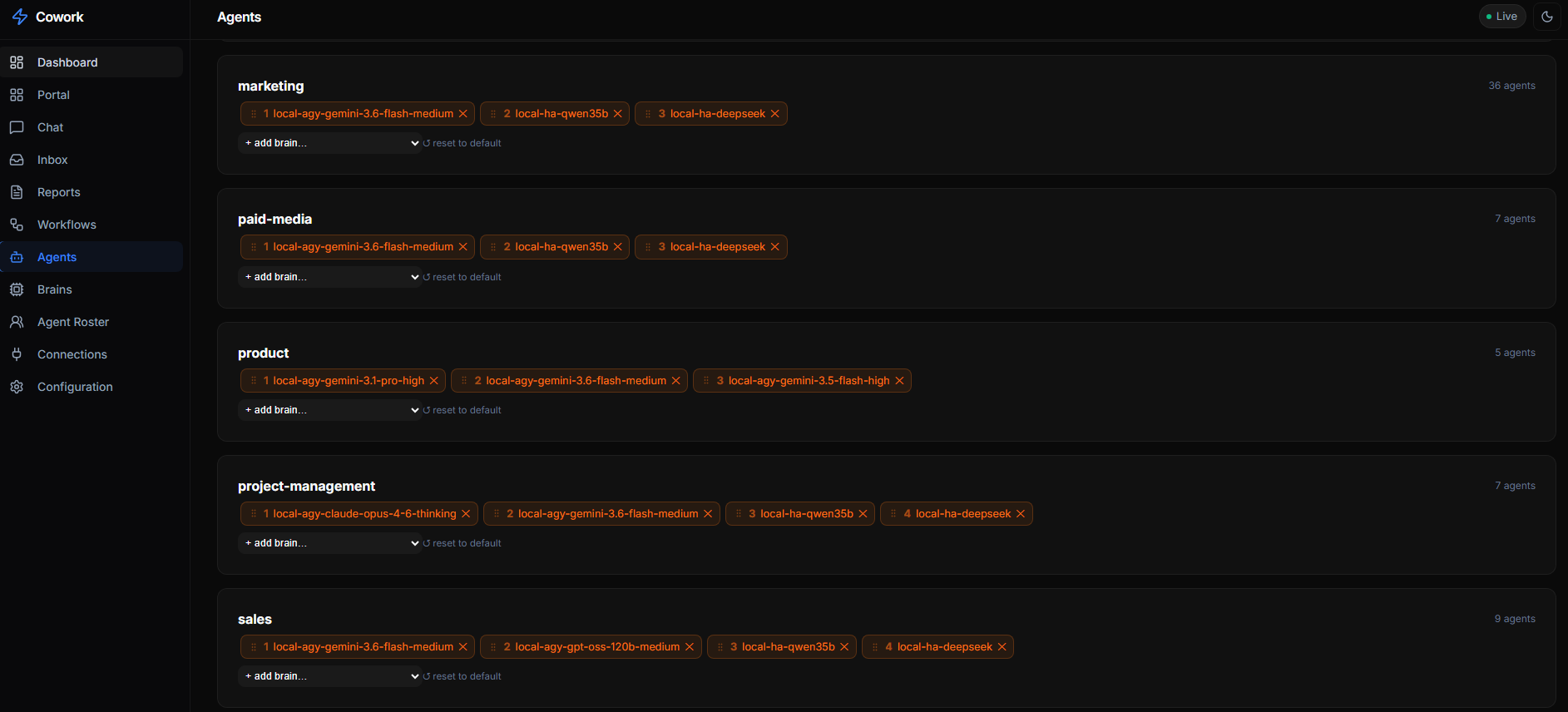
| Alias | Location | Runs |
|---|---|---|
local-hermes-qwen3.8-27b | local | Hermes on that model |
local-dsh-qwen3-8-27b | local | DeepSeek Harness (dsh) on that model |
local-cc-opus-5-5 / -sonnet-5-5 / -fable-5-1 | local | Claude Code on that model |
local-agy-* / local-comfy-ltx | local | Antigravity/Gemini / ComfyUI-LTX video |
local-codex-gpt-6-luna / -gpt-5-6-terra / -gpt-5-6-luna / -default | remote | Codex on this host, claimed by the codex client |
local-script-eval-harness | local | The eval-prompt-change harness (exec: script) |
remote-ai-code-gen-cc-* | remote | Claude Code on the ai-code-gen machine |
remote-<host>-cc-sonnet-5-5 | remote | Claude Code on another machine |
This table is an example. Read the live set with GET /api/agents.
Agent ids carry the model version (local-cc-opus-5-5, not local-cc-opus) so the
model an agent runs is readable from its id; only -default agents, which follow the
account default, are unversioned.
Naming convention — the prefix names the machine, location names the runner.
The local-/remote- id prefix says which machine the agent executes on:
local- = this host (it can see /home/wayne, ~/.priv, the GPU), remote- =
another machine (remote-<host>-…). The separate location field says who
starts it: local = the dispatcher spawns it, remote = a client claims it from
the inbox. The two usually agree, but not always — local-codex-* runs on this
host yet has location: remote because the codex client claims its tasks. Code must
read location, never infer it from the prefix. DeepSeek
agents are retired — any id matching /deepseek/i is scrubbed from the registry on
load (see DENYLISTED_AGENT_RE), so never put deepseek in a new id.
Renamed ids keep working. AGENT_ID_ALIASES in server/src/config.ts (plus an
optional orchestration.agentAliases in config) maps retired ids to their canonical
id. Old ids in an on-disk config, a task's context.agent pin, or a client's
registration all resolve to the canonical agent. A client that still declares an
old id keeps receiving its tasks under that id (clientId on the agent), until it
re-declares the canonical one. Renames (2026-10-07, and codex again on 2026-11-03):
| Retired id | Canonical id |
|---|---|
local-ha-qwen3-8-27b, local-ha-qwen38-27b, local-ha-qwen3.8-27b | local-hermes-qwen3.8-27b |
remote-codex-default / -gpt-5-6-terra / -gpt-5-6-luna / -gpt-6-luna | local-codex-default / -gpt-5-6-terra / -gpt-5-6-luna / -gpt-6-luna (2026-11-03: the prefix names the machine, so the 10-07 local-codex-* → remote-codex-* rename was reversed) |
remote-ai-code-gen-cc-opus / -sonnet / -fable | remote-ai-code-gen-cc-opus-4-8 / -sonnet-5 / -fable-5 |
Local agents the dispatcher spawns here. Remote agents it leaves pending
and publishes the agent id onto the task's context.agent so that machine's
client can discover and claim it (the client filters list_inbox for tasks whose
context.agent is one of its own ids). If no client claims a remote rung within
orchestration.remoteGraceMs (default 60 s), the dispatcher advances to the next
agent in the chain, so a clientless remote rung never stalls a task.
Artifacts work for both: local agents save files to $COWORK_ARTIFACTS_DIR
(the dispatcher collects them from disk); remote agents save to the same env dir
and the client uploads each file via POST /api/artifacts/:taskId/:file.
Either way they land in artifacts/<task-id>/ and become downloadable from the
Inbox. Outputs (the task's final deliverables) go in the outputs/ subfolder
($COWORK_OUTPUTS_DIR; remote clients upload via POST /api/outputs/:taskId/:file)
and get their own OUTPUTS section on the card, after RESULT and before ARTIFACTS.
Input files flow the other way — a person attaches files for the agent to
read. Attach them on any Inbox card ("+ Attach
files"); they are stored under inputs/<task-id>/ and mirrored onto
context.inputFiles. The dispatcher points a local agent at their absolute
paths in the prompt; a remote agent client downloads them (GET /api/inputs/:taskId)
before running and lists their local paths in the prompt. Inputs survive a re-run.
Failed tasks & re-run. When a task exhausts its whole fallback chain (every
agent failed verification) it finishes flagged failed: true. The Inbox groups
these under a red "failed" filter (kept out of the green "done" count) and
offers a confirm-gated ↻ Re-run that resets the task to pending from the top
of its chain (POST /api/inbox/:id/rerun) — preserving its brief and attached inputs.
Auto-registered agents (clients-capability protocol)
A connecting MCP client DECLARES the agents it can run via the register_agent
tool's agents field; the server auto-adds them to the registry (marked dynamic,
owned by that client). One machine can offer several models at once. Auto-registered
agents persist and are removed only by deregister_agent or the Agents view
(never on heartbeat timeout); removal cascades out of the default chain, every
tier list, and every special role. Manage all of this from the dashboard's
Agents and Routing views.
Wiring a remote agent machine
deploy/remote-agent-client.mjs is a zero-dependency (Node 18+) Cowork MCP
client that does exactly that loop. Its header comment documents every env var.
Quickest — run it directly (foreground; good for a first test). One agent:
git clone <cowork-repo-url> cowork   # the git remote your hub was installed from
COWORK_URL=http://<cowork-host>:6868 EXEC=claude MODEL=claude-sonnet-5-5 \
  AGENT_ID=remote-<host>-cc-sonnet-5-5 \
  node cowork/deploy/remote-agent-client.mjs
Several agents from one machine (declares them all; each becomes a targetable agent):
COWORK_URL=http://<cowork-host>:6868 EXEC=claude HOST=<host> \
  AGENTS='[{"id":"remote-<host>-cc-opus-5-5","model":"claude-opus-5-5"},
           {"id":"remote-<host>-cc-sonnet-5-5","model":"claude-sonnet-5-5"}]' \
  node cowork/deploy/remote-agent-client.mjs
As a boot service (recommended for permanent machines):
mkdir -p ~/.config/cowork-remote-agent
cp cowork/deploy/remote-agent-client.env.example ~/.config/cowork-remote-agent/aicodegen.env
# edit: COWORK_URL, AGENTS (or AGENT_ID), EXEC, HOST, COWORK_CLIENT_JS
cp cowork/deploy/cowork-remote-agent@.service ~/.config/systemd/user/
systemctl --user daemon-reload && systemctl --user enable --now cowork-remote-agent@aicodegen
It connects to COWORK_URL/mcp, register_agents (declaring its AGENTS, which
auto-register into the registry), then polls and claims only tasks whose
context.agent is one of its agent ids, runs the matching EXEC/MODEL, and
complete_tasks with its result and uploaded artifacts — appearing in Workers like any other
client. Flexible: the same script serves any agent by changing env only.
Scalable: add machines/agents by adding <name>.env files; claims are atomic
(single-process compare-and-set) so even multiple clients on the same agent id
never double-run a task — first claim wins.
Every connected client shows up live in the Workers view — grouped by platform, listing the agents it offers, its idle/busy state, and a per-session tally of how many tasks each agent has run vs. submitted:
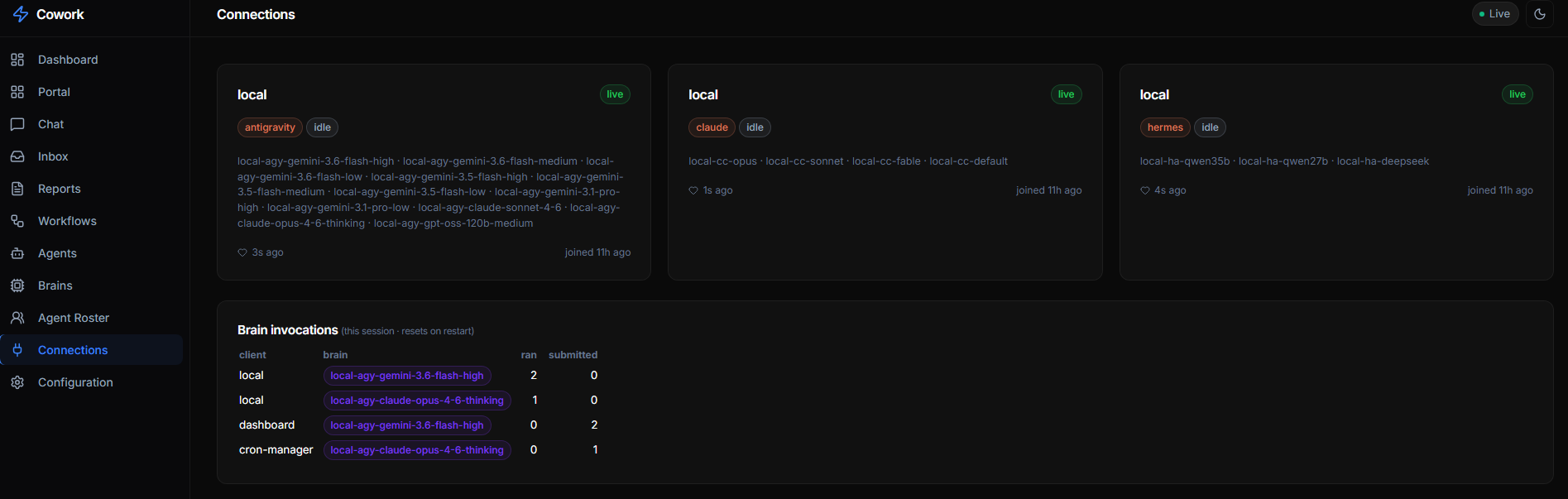
The always-on coordinator agent shown in Workers as cowork/orchestrator
polls the inbox, two-stage-routes unassigned tasks, reclaims orphans, and
dispatches; transient per-task workers appear as e.g.
testing / Workflow Optimizer · local-hermes-qwen3.8-27b or video · local-comfy-ltx
while running.
CEO flow: tell Hermes (e.g. via Discord) an idea → Hermes creates ONE task with
context.persona: "orchestrator" → the orchestrator decomposes it into subtasks via
POST /api/inbox → each subtask is two-stage-routed (persona + work role) and runs on
its tier/default chain → results and artifacts appear live on the dashboard.
LLM classifier — no task left behind
An unassigned task (e.g. a free-text idea filed straight from Discord) no longer
stalls: the dispatcher runs the two-stage LLM router (default qwen3.8-27b
via Hermes, orchestration.classifier in config.json) that reads the task, picks
a division (plus a work role), then a persona, and the task dispatches normally on
its tier/default chain. Tag a task manual to skip both routing and dispatch.
Stale-claim reclaim
orchestration.staleClaimMs (code default 0 = off; the template config.json sets 10 min) reclaims any in-progress task
whose claiming agent has disappeared — a crashed/exited live agent or a
dispatcher killed mid-run — back to pending so the work is retried. A task
still owned by a heartbeating agent is never touched.
Dispatcher status: GET /api/dispatcher. Tune orchestration.maxConcurrent /
taskTimeoutMs / pollIntervalMs / classifier / staleClaimMs in config.
Deployment (systemd) & Remote Access
Easiest — deploy/install-server.sh generates and enables the user service with this
machine's resolved node path and working dir:
deploy/install-server.sh # build + install & start the cowork-mcp user service
Manual equivalent (the tracked deploy/cowork-mcp.service has /home/USER placeholders
you must edit first — the script fills them in for you):
cp deploy/cowork-mcp.service ~/.config/systemd/user/   # then edit the USER/paths inside
systemctl --user daemon-reload
systemctl --user enable --now cowork-mcp
With server.host: "0.0.0.0" the dashboard is reachable from other machines at
http://<host-ip>:6868/ (LAN or Tailscale IP — 0.0.0.0 itself is a bind
address, not a URL). A non-loopback host always requires a key: set server.apiKey
(or COWORK_API_KEY), or use the one generated into api-key beside the config on first
start. Log the dashboard in once with http://<host-ip>:6868/?apiKey=<key> (it sets a
same-site cookie). server.allowUnauthenticated: true opts out; anyone who can reach the port
can then create tasks for your agents.
Moving a running open hub to a key without locking anyone out: set the key and keep
allowUnauthenticated: true. That is soft (migration) mode: a valid key is accepted, a wrong key
gets 401, and keyless requests still pass but are listed at GET /api/auth/keyless (key required).
Give the key to every client (agent clients: COWORK_API_KEY; MCP configs: an
Authorization: Bearer <key> header, e.g. deploy/install-skill.sh --key <key>; dashboards:
/?apiKey=<key> once). Dispatched tasks get COWORK_API_KEY in their env automatically. When
/api/auth/keyless stays empty, drop allowUnauthenticated and restart to enforce.
Switching from HTTP to HTTPS
By default the server listens over plain http://. That is fine over localhost,
but a browser only exposes the microphone (the New-task Dictate speech-to-text
button) in a secure context — https:// or http://localhost. Reach the
dashboard over http://<lan-or-tailscale-ip>:6868 and navigator.mediaDevices is
undefined, so Dictate can't start. Serving over HTTPS fixes it.
When server.tls points at valid cert/key files, Cowork runs a multiplexed dual-protocol listener
on port 6868 that accepts both HTTP and HTTPS simultaneously:
- Localhost in Chrome (
http://localhost:6868/): Chrome and modern browsers natively treathttp://localhostas a W3C-standard Secure Context (window.isSecureContext === true). The New-task Dictate mic button and clipboard work out of the box with zero certificate warnings. - Remote / Mobile on Tailscale (
https://<machine>.tailXXXX.ts.net:6868/): Remote connections use the valid Let's Encrypt TLS certificate provisioned via Tailscale. Chrome shows a verified, trusted green lock. - Automatic IP/Domain HTTP-to-HTTPS Redirection: Requests arriving over plain HTTP for external hostnames or IPs are automatically redirected (302) to the trusted HTTPS domain.
- SNI Fallback: Multi-domain TLS SNI callback routes domain traffic to the trusted certificate and loopback TLS traffic to the local fallback certificate.
Migrate in this order:
-
Obtain or Generate a TLS Certificate:
- Tailscale Let's Encrypt (Recommended, Zero Warnings):
This fetches a genuine Let's Encrypt certificate viadeploy/update-tailscale-cert.shtailscale certand installs it to~/.cowork/tls/cert.pemand~/.cowork/tls/key.pem. - Self-Signed (Alternative):
server/gen-tls-cert.sh ~/.cowork/tls cowork-host 100.64.0.1 cowork.tailXXXX.ts.net
- Tailscale Let's Encrypt (Recommended, Zero Warnings):
-
Point the config at the files. Add a
tlsblock underserverin~/.cowork/config.json(the live config — the repoconfig.jsonis only the default template and ships"tls": null):"server": { "host": "0.0.0.0", "port": 6868, "tls": { "certFile": "~/.cowork/tls/cert.pem", "keyFile": "~/.cowork/tls/key.pem" } }~and repo-relative paths are resolved for you. This is the step most often missed: generating the cert alone does nothing — without this block the server stays onhttp://. -
Restart the server so the new scheme takes effect. A plain
systemctl --user restart cowork-mcprun from inside a task SIGKILLs that task (it is a child of the unit it's restarting), so use the idle-safe redeploy, which waits until no task is in flight:systemd-run --user --collect --unit=cowork-server-redeploy \ deploy/redeploy-server-when-idle.shConfirm it came up:
journalctl --user -u cowork-mcp -n 10 | grep -E 'Trusted HTTPS|Local HTTP|API:' curl -s http://localhost:6868/api/status | jq .uptime -
Accessing the Dashboard in Chrome:
- On the host machine: Open
http://localhost:6868/(Secure Context active, 0 SSL warnings). - From remote devices or mobile: Open
https://<tailscale-domain>:6868/(Trusted Let's Encrypt SSL lock).
- On the host machine: Open
-
Updating Agent Clients and Skills: Run
deploy/install-skill.sh, which automatically detects your Tailscale domain or localhost configuration:deploy/install-skill.sh --client all
Server-side self-dispatch is loopback-optimized — local subtask dispatch runs over
http://localhost:6868through the multiplexed listener, avoiding TLS handshake overhead and certificate hostname mismatch errors entirely.
To roll back, set server.tls to null (or remove the block) and redeploy — the
server returns to http://.
MCP Tools Reference
Once connected, agents have access to these tools:
| Tool | Description |
|---|---|
register_agent | Register this client; optionally DECLARE the agents it can run |
deregister_agent | Remove this client and cascade-remove every agent it registered |
heartbeat | Update status and current task |
get_roster | Search ~285 personas across 19 divisions |
create_task | Create a task for another agent/platform |
claim_task | Claim a pending inbox task |
complete_task | Mark a task as done with results |
list_inbox | List inbox tasks with status/platform filters |
get_dashboard | Get full dashboard data (active workers, inbox stats, etc.) |
create_goal / list_goals / get_goal / update_goal_progress | Long-lived, phase-tracked Goals driven toward a yes/no success criterion |
obsidian_info / obsidian_search / obsidian_read / obsidian_list | Shared Obsidian knowledge base (when a vault is configured) |
integrations | Integrate a git / open-source repository (list, add, install, …) |
Example: Cross-Platform Task Dispatch
You: "Review the auth code in saas-starter"

AGY Agent calls:
  create_task(
    title: "Review auth middleware",
    from_platform: "antigravity",
    from_agent: "self",
    to_platform: "claude",
    to_agent: "engineering-code-reviewer",
    priority: "normal"
  )

→ Task appears in dashboard inbox
→ Claude Code picks it up, runs review
→ Claude calls complete_task(...) with its result + artifacts
→ Result + artifacts appear on the task card
Recipes and Goals — repeatable and long-running work
The declarative Workflows engine (workflows/*.json, /api/workflows*, the
Workflows tab) was removed on 2026-11-02. Its jobs are covered by:
- Recipes — a task saved from a good run, or written from scratch with New recipe,
with
{{fields}}you fill in per run. A recipe carries its agent, thinking level and timebox; the Run sheet can override agent and thinking for one run (POST /api/recipes/:id/runwith{values, agent, thinking, scheduledAt, recurrence}). Recipes don't pin a persona: the router picks one per run. - Goals — a long-lived objective with a yes/no success criterion and phases, driven by
the Achiever loop until it is met (
create_goal,/api/goals). See docs/goals-redesign.md and docs/goal-loop-idiom.md. - Orchestrator decomposition — a task with
context.persona: "orchestrator"splits itself into subtasks throughPOST /api/inbox.
REST API
The Web UI uses these endpoints (also available for scripts/integrations):
| Method | Path | Description |
|---|---|---|
GET | /api/status | Dashboard overview data |
GET | /api/workers | All active workers (id → name) |
GET | /api/connections | Live MCP clients (heartbeat) + per-agent ran/submitted counters |
GET | /api/inbox?status=pending | Inbox tasks (filterable) |
GET | /api/tasks | Same list and filters as /api/inbox, wrapped as {tasks} |
POST | /api/inbox | Create a new task; optional inputs: [{token,name}] attaches uploaded files |
PATCH | /api/inbox/:id | Claim or complete a task |
POST | /api/inbox/:id/rerun | Re-queue a FAILED (chain-exhausted) task — reset to pending from the top of its chain, keep its inputs |
GET/POST | /api/inbox/:id/inputs | List / attach input files to an existing task ({inputs:[{token,name}]}) |
POST | /api/uploads?name=<file> | Stage an uploaded file (raw body) → {token} to pass as a task input |
GET | /api/inputs/:taskId, /:taskId/:file | List / download a task's attached input files |
POST | /api/inbox/:id/pause, /resume (or /api/tasks/pause|resume with {taskId}) | Pause a task (stops a running agent) / resume it with its context intact |
GET | /api/tasks/paused | Paused tasks |
GET | /api/roster?division=engineering | Personas from the installed persona packs (filterable) |
GET | /api/roster-divisions | Personas grouped by division |
GET | /api/dispatcher | Special roles + agents + defaultChain + running |
GET/PUT | /api/chains, /chains/default, /chains/tiers, /chains/tier/:tier | Read/edit the default chain and tier lists |
GET/PUT/DELETE | /api/agents, /api/agents/:id | Agent registry (cascades on delete) |
PATCH | /api/agents/:id/enable, /disable, /thinking | Toggle an agent, set its default thinking level |
GET / PUT/DELETE | /api/roles-config / /api/roles-config/:name | Special-executor chains |
GET/POST | /api/recipes, /api/recipes/:id (PUT/DELETE), /api/recipes/:id/run, /api/recipes/draft-from-task/:taskId | Saved recipes |
GET/POST | /api/goals, /api/goals/:id (PATCH/DELETE), /goals/:id/activate|pause|block, /goals/templates | Goals |
GET | /api/calendar | Scheduled + recurring tasks for the Calendar view |
GET/POST | /api/integrations, /api/integrations/:id/:action, /api/integrations/defaults, /api/integrations/defaults/provision | Integrations (skills, MCP, persona packs); verify / re-run first-run provisioning |
GET/POST | /api/artifacts/:taskId, /:taskId/:file | List/download; POST (raw body) uploads a file from a remote agent |
GET/POST | /api/outputs/:taskId, /:taskId/:file | Same, for the task's outputs/ deliverables |
GET | /api/config | Current configuration |
GET | /api/events | SSE event stream |
Directory Structure
cowork/
├── config.json              # TEMPLATE only — real config at ~/.cowork/config.json
├── README.md                # This file
├── PROTOCOL.md              # Protocol specification
├── JOIN-AS-AN-AGENT.md       # Onboarding for a remote agent client
├── CONVENTIONS.md           # Operating rules injected into every dispatched task
├── layout.json / portal.json # Dashboard nav + widgets / Portal cards (live copies in ~/.cowork/)
├── methods/                 # Playbook cards the sharpener attaches to a task
├── vendor/pstack/           # Vendored pstack skills
├── server/                  # MCP Server + Web UI
│   ├── src/                 # TypeScript source
│   └── public/              # Web UI (HTML/CSS/JS)
├── deploy/                  # systemd units, remote-agent client, presets, skills
├── inbox/                   # Task queue (JSON files, auto-managed)
├── artifacts/               # Per-task OUTPUT files (audio/video/md), downloadable
├── inputs/                  # Per-task INPUT files a person attached for the agent (gitignored)
├── goals/                   # Goal aggregates (runtime, gitignored)
├── decisions/               # Decision log
└── .status/                 # Runtime state (auto-managed)

~/.cowork/
├── config.json              # Real per-server config
├── integrations.json        # Integration registry
└── integrations/            # Cloned integrations, incl. the persona pack(s)
Debugging
MCP Inspector
Test the MCP endpoint with the official inspector:
npx @modelcontextprotocol/inspector http://localhost:6868/mcp
This opens a web UI at http://localhost:6274 where you can browse and test all MCP tools interactively.
curl Examples
# Check server status
curl http://localhost:6868/api/status | jq

# List active workers
curl http://localhost:6868/api/workers | jq

# List pending inbox tasks
curl "http://localhost:6868/api/inbox?status=pending" | jq

# Browse engineering personas
curl "http://localhost:6868/api/roster?division=engineering" | jq

# Watch real-time events
curl -N http://localhost:6868/api/events
Test MCP Tool Calls
# Register a test agent
curl -X POST http://localhost:6868/mcp \
  -H "Content-Type: application/json" \
  -d '{
    "jsonrpc": "2.0",
    "method": "tools/call",
    "params": {
      "name": "register_agent",
      "arguments": {
        "platform": "antigravity",
        "agent_name": "test-agent",
        "current_task": "Testing MCP connection"
      }
    },
    "id": 1
  }'

# Get dashboard data
curl -X POST http://localhost:6868/mcp \
  -H "Content-Type: application/json" \
  -d '{
    "jsonrpc": "2.0",
    "method": "tools/call",
    "params": {
      "name": "get_dashboard",
      "arguments": {}
    },
    "id": 2
  }'
Configuration Reference
Full config.json Example
{
  "server": {
    "port": 6868,
    "host": "0.0.0.0",
    "name": "cowork-mcp",
    "version": "1.0.0",
    "apiKey": null
  },
  "paths": {
    "inbox": "./inbox",
    "status": "./.status",
    "decisions": "./decisions",
    "artifacts": "./artifacts",
    "inputs": "./inputs"
  },
  "platforms": {
    "claude": {
      "enabled": true,
      "agentsDir": "~/.claude/agents",
      "color": "#D97757"
    },
    "hermes": {
      "enabled": true,
      "skillsDir": "../hermes-agent/skills",
      "color": "#7C3AED"
    },
    "antigravity": {
      "enabled": true,
      "skillsDir": "~/.gemini/config/skills",
      "color": "#0EA5E9"
    }
  },
  "inbox": {
    "autoArchiveDays": 30,
    "maxRetries": 3
  }
}
Portal launcher cards live in their own file, portal.json (live copy
~/.cowork/portal.json, hot-reloaded) — see docs/dashboard.md#portal.
Environment-Specific Overrides
The real config is read from ~/.cowork/config.json by default. Point at a
different file with the COWORK_CONFIG env var (and override the port / API key
without editing any file):
COWORK_CONFIG=~/.cowork/config.staging.json COWORK_PORT=6900 npm start
The persona catalog is cached in memory and rescanned at most once per COWORK_ROSTER_TTL_MS
(default 30000). A newly installed or updated persona pack propagates within that window with no
restart;
set 0 to rescan on every query, or a larger value to reduce disk work.
⭐ Why Star Cowork?
GitHub stars tell us which agent integrations (Cursor MCP, Windsurf, Roo-Code, Goose) to build next.
- ⭐ Star now to bookmark this project and receive release alerts when new agent adapters drop.
- 🍴 Fork to run an isolated agent fleet for your team or homelab.
Cowork Pro
Cowork Pro ($59) is the production package: advanced workflows, priority support and lifetime updates. It is also part of the AI Developer Stack Bundle ($79).
License
MIT © 2026 Cowork. The core server, dashboard and remote-agent client are free and open source; Cowork Pro (above) is the separate paid add-on.