Sickle
Remote MCP server that gives Claude, Cursor or Codex every mailbox you own: Gmail, Outlook, iCloud, Fastmail, any IMAP. Scoped OAuth, no send tool.
Hosted MCP Server
npx add-mcp 'https://mcp.sickle.app'Installs into Claude Code, Codex, Cursor and more
Documentation
Give your agent your inbox.All of them.
Sickle connects every mailbox you own — Gmail, Outlook, iCloud, Fastmail, Yahoo, your company’s IMAP server — and hands them to Claude, Codex, Cursor or OpenClaw over MCP.
Works with any MCP client on macOS, Windows or Linux — nothing to install.
Remote. Nothing to install.
Point your agent at a URL, approve the OAuth prompt, done. No binary, no local process, no credentials pasted into a config file.
Go to Settings → Connectors, open the Add menu and choose Add custom connector, then paste the server URL. The same steps work in Claude on the web.
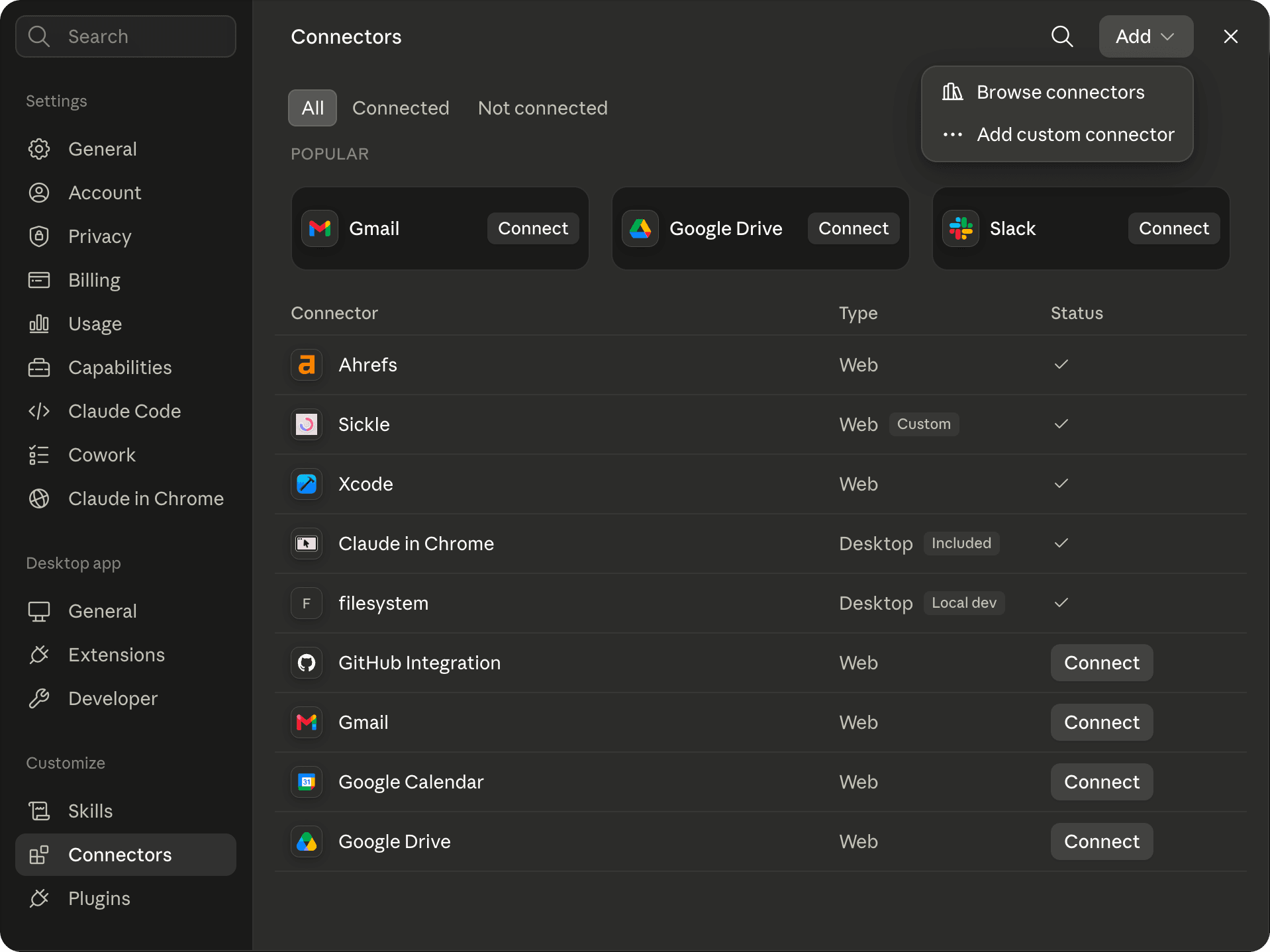 Step-by-step Claude Desktop guide →
Whichever client you use, it opens a Sickle sign-in page and asks you to approve the access it wants. There are no API keys to copy across, and your assistant never receives your mailbox password — only a token you can revoke at any time.
Server status: status.sickle.app · Problems or questions: [email protected]
- Claude DesktopA custom connector in the desktop app and on the web.Read the guide →
- Claude CodeOne command, every project.Read the guide →
- CodexThe CLI, the IDE extension and the desktop app.Read the guide →
- CursorA one-click install link, or mcp.json.Read the guide →
- OpenClawYour self-hosted gateway, in every chat app.Read the guide →
You work the inbox. So does your agent.
Same accounts, same folders. When it archives something it is gone from your mail app, because there is only one mailbox.
New Chat⌘N
Today
- Inbox triage
- Plan the Lisbon offsite
Previous 7 Days
- Summarise the board notes
- Draft a reply to Alex
- Compare flight options
Previous 30 Days
- Rewrite the onboarding email
- Explain the lease break clause
- Dinner for eight, one vegetarian
- Q3 budget variance
Connectors
Sickle2 mailboxes
sickleworkpersonalread · change
Ask anything, or type / for commands
AutoStandardHigh
Every mailbox you own. Including the awkward one.
Gmail and Outlook over OAuth. Everything else with a host, a port and a password. No cap on accounts.
One account.
Your agent sees a slice of your mail and thinks it’s all of it.
One provider.
Fastmail, iCloud, the company server — nothing.
Read-only.
It can tell you about the newsletter. It can’t archive it.
Most email connectors authenticate a single Gmail account. Sickle connects as many mailboxes as you have and hands your agent all of them at once — every provider with an IMAP port, read and change.
GmailOAuth
Outlook / 365OAuth
iCloudapp password
Fastmailapp password
Yahooapp password
Any IMAP hostmanual
Your agent, working your mail.
One job per card, with the tools it calls. Hover one to watch it happen.
Search every mailbox at once.
One question, every account. Results come back with the mailbox they live in.
search_emails · list_accounts
invoice from March
4 results · 2 mailboxes
- Ledgerlywork Invoice LG-0314 · March 2 Apr
- Hopper & Vinepersonal Your March order receipt 31 Mar
- Marta Oyelaranwork Re: March invoice — brand refresh 28 Mar
- Quillbury Bookspersonal Book club · March invoice 3 Mar
Read the whole thread.
Not the preview — the conversation, and the line in it that matters.
read_email_body · read_email
EH
Eleanor Hughes
Here’s v3 with the last redline.
S
You
Legal wants 30 days’ notice.
EH
Eleanor Hughes
Fine by us. Signed copy by Friday?
Tidy as it goes.
Mark, move, archive. It works the same folders you do.
move_email · mark_as_read · list_emails
Archive3
- Eleanor Hughes Re: SOW v3
A scoped key, not your password.
Read, or read and change — granted per client.
email_read · email_change
Your agent wants to use your mail
- Reademail_read
- Changeemail_change
- Sendemail_sendnot requested
move_emailmark_as_readtrash_email
Nothing is permanent.
Trash means your Trash folder. No tool deletes for good.
trash_email
Inbox
Empty
Trash
Empty
EH
Eleanor Hughes
Re: SOW v3 — last redline
Put back
Moved back to Inbox
Revoke any time.
Disconnect a client and its access ends within the hour.
Connected assistants2 connected
- C Claude Desktop read · change Disconnect
- C Cursor access ended Disconnected
- C Codex read · change Disconnect
Before you connect
Email is untrusted input. Anyone can send you a message, and an assistant reading your mail will also read any instructions hidden inside it. Grant email_change only to clients you trust, and review what your assistant proposes before approving it.
How your mailboxes get there without the app.
The connector serves whatever mailboxes your Sickle account holds. You add them on the web, once, and every agent you connect sees all of them.
- 01 The same account your agent will sign in to when you approve it.
- 02 Open Mailboxes, choose Connect mailbox. One dialog, one provider at a time.
- 03 Pick the provider. Gmail and Google Workspace, Outlook, Hotmail and Live sign in with OAuth in your browser. iCloud, Yahoo and Mail.ru take an app password. Anything else takes a host, a port and a password.
- 04 Repeat for the second and the third. There is no cap. An agent that is already connected sees the new mailbox the next time it calls list_accounts — nothing to reconnect.
It comes with a native Mac mail client.
Every mailbox in one window, a colour per account, an email cleaner and Vim keys. Same mailboxes. Whatever the agent archives is gone from the app, because there is only one inbox.
One subscription. No Mac needed.
The connector is included in the same subscription as the Mac app — not a separate add-on — and it works from any OS.
Asked before you ask.
Claude Desktop and Claude on the web, Claude Code, Codex, Cursor, OpenClaw — and any other client that can add a remote MCP server over HTTP.
No — the app is optional, and the connector works from any OS. Sign in at sickle.app and add your mailboxes there: Gmail, Outlook, iCloud, Yahoo or any IMAP server. The connector signs in with the same account, so your agent sees every mailbox you add, on the web or in the app.
Not today — no tool sends mail, so an assistant cannot email anyone on your behalf. You may see an email_send permission on the approval screen; nothing uses it yet. It is granted separately from reading and changing, so if sending arrives it stays yours to allow or refuse.
Your agent never receives your mailbox password — only a token you can revoke. The connector reads from your mail server when your agent asks and passes the result on; it does not keep a copy of your mailbox.
Yes. Anything with an IMAP host, a port and a password.
As many as you have, in one window and through one agent connection. There is no cap on accounts.
Sign in to sickle.app, open Connect AI, and disconnect it under Connected assistants. Access it already holds ends within the hour.
It might. Email is untrusted input, and an assistant reading your mail reads whatever is in it. That is why change is a separate scope, why nothing is irreversible, and why you should review what an assistant proposes before approving it.
The connector is not tied to an OS — it runs on our server, so any agent that can add a remote MCP server can use it, wherever that agent runs. Only the mail app is macOS only.
Yes. One subscription covers the Mac app and the agent connector; the connector is not a separate add-on.