Seekstone
Filesystem-direct MCP server for Obsidian vaults. Reads vault files directly from disk - no Obsidian app or plugins required. 575x smaller payloads than REST-based alternatives.
Documentation

The Obsidian MCP server that needs no plugin, no running Obsidian app — and doesn't blow your context window.
Filesystem-direct · single-digit-ms keyword search · ~26 ms semantic · ~2 KB payloads · 25 tools · macOS · Linux · Windows










| Seekstone | obsidian-mcp-server (#1 by downloads) | REST-proxy servers | |
|---|---|---|---|
| Local REST API plugin | Not needed | Required | Required |
| Obsidian app running | Not needed — works with Obsidian closed | Required | Required |
| Search payload @ 10k notes | 2.0 KB | 47 KB | up to 95 MB |
| Warm search latency @ 10k notes | 5.6 ms | 732 ms (~131× slower) | up to 1,550 ms |
| Structured frontmatter queries | Built-in (query_notes) — property/date/size predicates, answers in a few hundred bytes | JSONLogic via REST | Varies |
Same queries, same committed vaults, 20 runs each, one machine. In-process adapters were re-run on the fixture-v2 vault in September 2026; the REST-proxy rows (rest, obsidian-mcp-server, mcp-obsidian) plus obsidian-mcp and obsidian-mcp-pro are June 2026 captures on fixture v1 — per-row provenance in benchmarks.json, the generated source of truth every number here is checked against in CI — full results across eight servers and three vault sizes below, fully reproducible from the harness.
What is Seekstone?
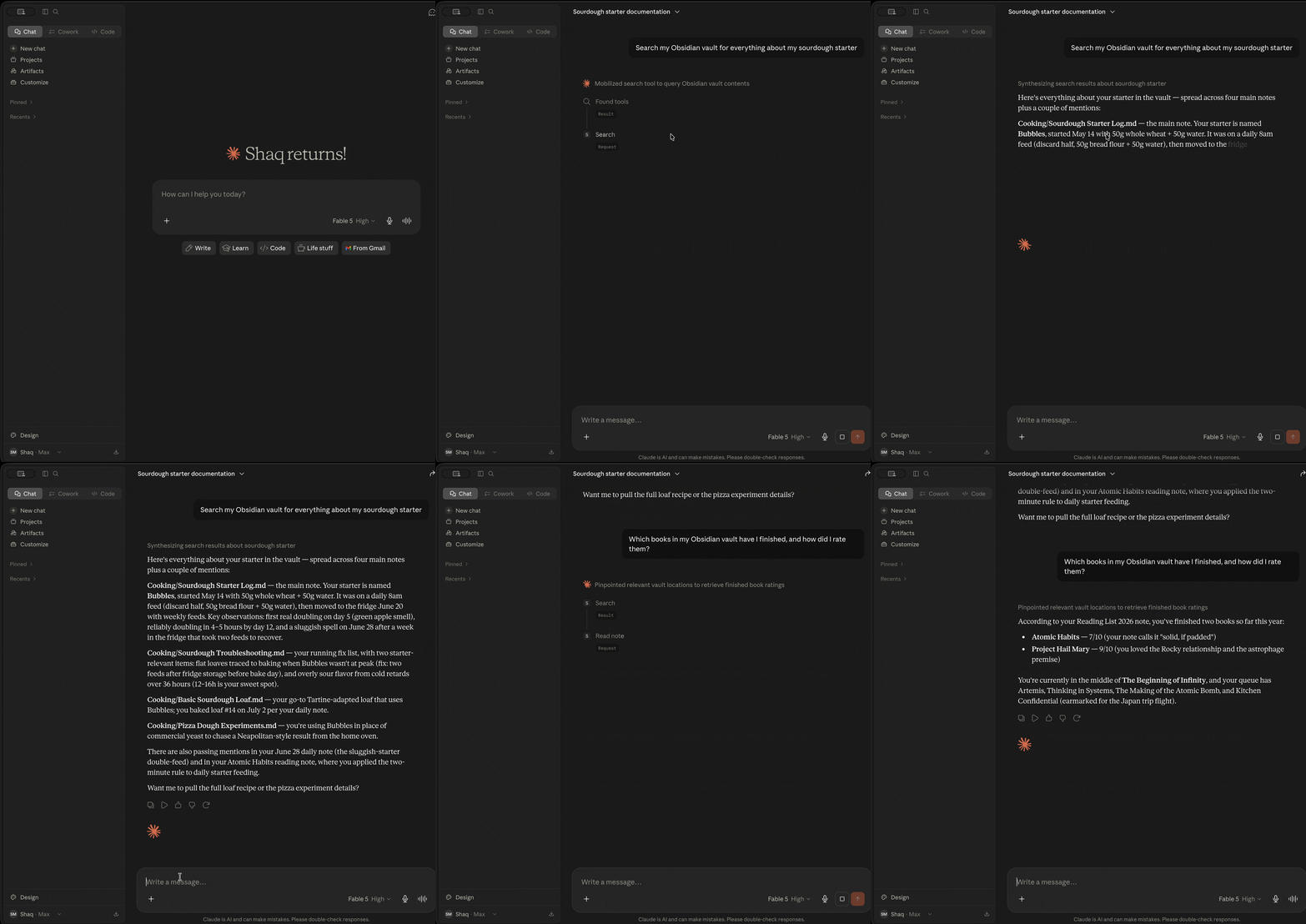
Seekstone is an Obsidian MCP server — it gives Claude (and any Model Context Protocol client) direct read and write access to your Obsidian vault. No Obsidian app needs to be open, no plugins are required, and nothing leaves your machine.
It reads your vault directly from disk rather than routing through the Obsidian Local REST API plugin, and holds a warm full-text index in-process. The practical difference is twofold:
- Speed. Keyword searches return in single-digit milliseconds warm and semantic searches in ~26 ms — up to ~508× faster than every other Obsidian MCP server we benchmarked, because there's no subprocess to spawn and no HTTP round-trip per query.
- Context. A broad search that returns tens of megabytes and millions of tokens via a REST-proxy server returns ~2 KB via Seekstone — up to a ~47,000× reduction that only widens as your vault grows.
Search comes in three modes: ranked full-text search (fuzzy and prefix matching), optional local semantic search (meaning-based, via a small on-device embedding model — opt-in, offline at runtime after a one-time ~30 MB model download), and structured metadata queries — query_notes filters by frontmatter properties (status, due, type, …), tags, folder, modified time, and size, answering questions like "which draft notes changed this week?" in a few hundred bytes instead of a search-and-read loop.
Claude can search and read your entire note library, in milliseconds, without burning most of its context window on a single tool call.
Published on npm as seekstone — install with npx -y seekstone. (Previously also published as obsidian-mcp-seekstone; that alias is deprecated but existing installs keep working.)
Why Seekstone? The numbers.
Most Obsidian MCP servers return full note content for every search hit. On a broad query that's megabytes of text your LLM has to process — most of it irrelevant, all of it burning context window.
Seekstone returns short ranked excerpts instead (~120 characters by default, tunable per query). We benchmarked Seekstone against 7 other Obsidian MCP servers — 8 servers total — across three vault sizes — 1,000 / 5,000 / 10,000 notes (20 runs each). Every number below is fully reproducible: the vaults are committed to this repo (generated from the public-domain 1911 Encyclopædia Britannica), so you can clone it and run the exact same benchmark yourself.
The point of testing three sizes is that this is where the architectures diverge — a real vault only grows.
Search payload — bytes returned per query (context tax; lower is better)
| Server | Architecture | 1k notes | 5k notes | 10k notes |
|---|---|---|---|---|
| 🥇 Seekstone | in-process index | 1.6 KB | 1.8 KB | 2.0 KB |
| mcpvault | fs-direct subprocess | 1.7 KB | 1.9 KB | 2.2 KB |
| obsidian-mcp-rs | fs-direct, per-query scan | 5.4 KB | 5.8 KB | 6.2 KB |
| obsidian-tc | SQLite platform | 4.6 KB | 6.8 KB | 7.3 KB |
| obsidian-mcp-server | REST API | 55 KB | 47 KB | 47 KB |
| obsidian-mcp-pro | fs-direct subprocess | 25 KB | 84 KB | 114 KB |
| obsidian-mcp | fs-direct subprocess | 18 KB | 105 KB | 203 KB |
| mcp-obsidian | REST API | 9.8 MB | 45 MB | 95 MB |
Seekstone stays flat (~2 KB) no matter how big your vault gets, because it always returns ranked excerpts — and it's now the smallest payload of every server tested, edging out mcpvault at all three sizes. The REST-proxy servers return full note content for every match, so they grow with the vault — mcp-obsidian hits 95 MB at 10k notes, and a single broad query (the capital of) averaged 370.9 MB / 97.8 million tokens per call across 20 runs. At 10k notes that's a ~47,000× context-tax difference.
Search latency — warm mean, ms (lower is better)
| Server | 1k notes | 5k notes | 10k notes | vs Seekstone @10k |
|---|---|---|---|---|
| 🥇 Seekstone | 1.0 | 2.8 | 5.6 | — |
| obsidian-mcp-rs | 6.0 | 19 | 36 | ~6× slower |
| obsidian-mcp-pro | 41 | 200 | 407 | ~73× slower |
| obsidian-mcp-server | 82 | 356 | 732 | ~131× slower |
| obsidian-mcp | 78 | 380 | 772 | ~138× slower |
| mcpvault | 90 | 431 | 893 | ~159× slower |
| mcp-obsidian | 164 | 740 | 1,550 | ~277× slower |
| obsidian-tc | 273 | 1,380 | 2,849 | ~508× slower |
Every competitor spawns a subprocess or makes HTTP round-trips per query, and most do work that scales with vault size. Seekstone holds a warm in-process index — no IPC, no network — so keyword search stays in single-digit milliseconds even at 10,000 notes (the shipped semantic pipeline — embed, scan, MaxSim rerank — lands at ~26 ms). And the gap widens with scale: from 1k → 10k notes the competitors slow down 5–10×, while Seekstone barely moves. Even the fastest alternative — obsidian-mcp-rs, which re-scans the vault on every query — is ~6× slower warm at 10k notes with 3× the payload, and the REST-proxy generation runs ~100–280× slower.
Seekstone is the only server in our benchmark set that delivers both ~2 KB payloads and single-digit-ms keyword latency at every vault size — and, as far as we know, the only Obsidian MCP server with published, reproducible benchmarks. The harness, the synthetic vaults, and the full results are open source: see benchmark-scaling.md and the harness. Clone, run, verify.
Install
Choose the method that suits you best.
Using an AI agent? Paste this prompt
If you use Claude Code, Cursor, or another coding agent, you don't need to follow any instructions yourself — paste this prompt and the agent does the install:
Install the seekstone MCP server for this editor. Run
npx -y seekstone init --client code --write(usedesktop,cursor, orvscodefor other clients). It auto-detects my Obsidian vault; if it lists several, ask me which one and re-run with--vault "<path>". Relay any errors to me, then tell me to restart this session so the seekstone tools load.
seekstone init is fully non-interactive — with --write it validates the vault and patches the client config in one shot (Claude Code via claude mcp add, other clients via an additive JSON patch with a timestamped backup).
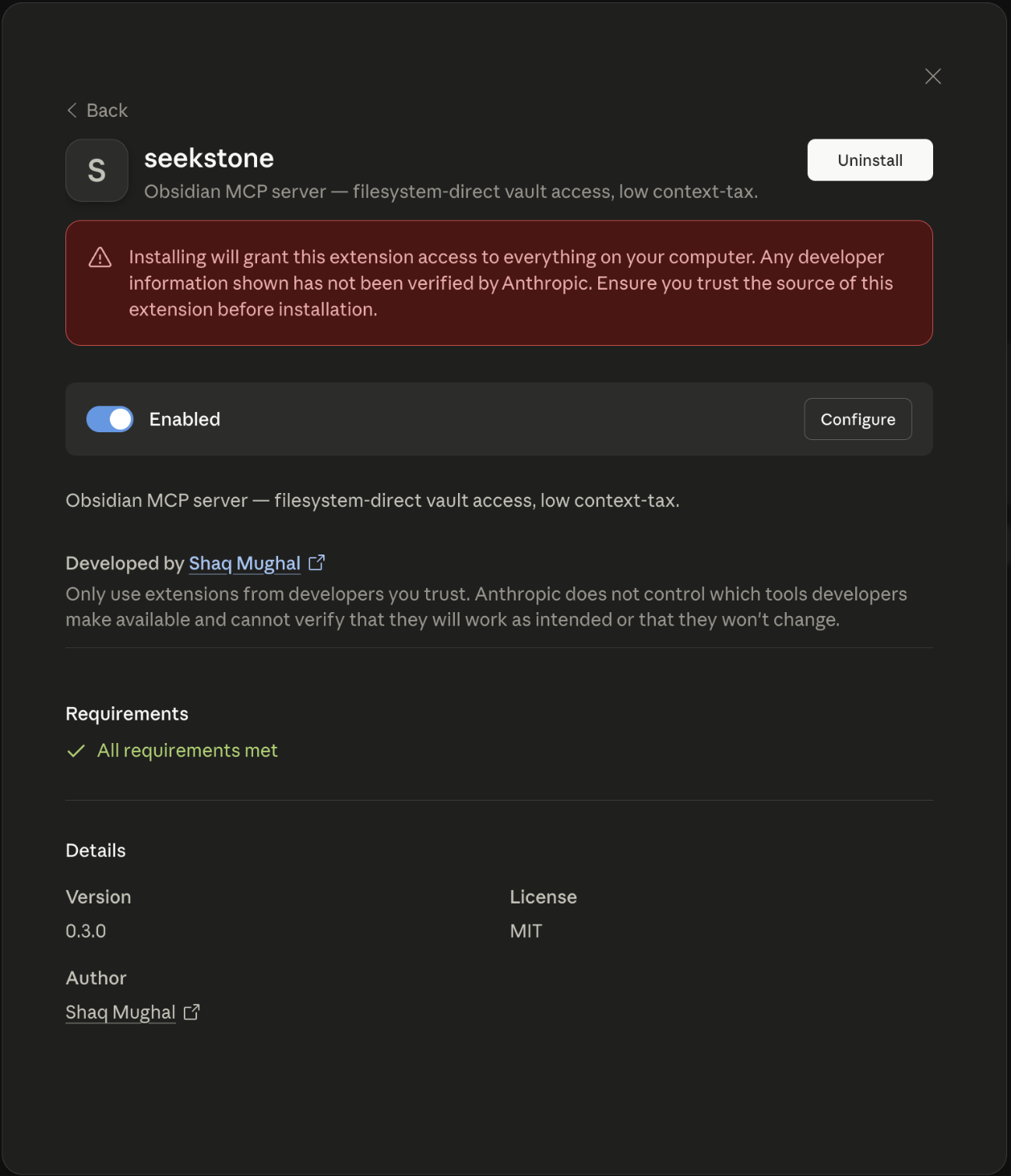
Option 1 — One-click (Claude Desktop, no terminal needed)
- Download
seekstone.mcpb(direct link, always the latest release) - Open it with Claude Desktop — double-click in Finder, or right-click → Open With → Claude Desktop
- Pick your Obsidian vault folder when prompted
You'll know it worked when seekstone appears in Claude's toolbar. No JSON editing, no terminal, no Node.js required.
Want semantic search? Grab seekstone-semantic.mcpb instead — same server with the local embedding model shipped inside the bundle (~28 MB bigger), so meaning-based search works out of the box: still no terminal, and nothing is downloaded at runtime.
Option 2 — Guided setup (recommended for CLI users)
Open Terminal (macOS: Cmd+Space, type "Terminal", press Enter) and run:
npx -y seekstone init
You'll know it worked when Seekstone appears in Claude's toolbar under the plug icon.
Seekstone reads Obsidian's own vault registry to detect your vault, validates it, and either prints the config block to paste or patches Claude Desktop directly:
# Auto-detect vault, print config to paste
npx -y seekstone init

# Auto-detect vault, patch Claude Desktop in place (with backup)
npx -y seekstone init --write

# Specify vault explicitly if you have multiple
npx -y seekstone init --vault "/path/to/vault"

# Auto-configure Claude Code in one step (auto-detects vault, runs claude mcp add)
npx -y seekstone init --client code --write

# Or just print the Claude Code command without running it
npx -y seekstone init --client code
Option 3 — Manual config (Claude Desktop)
Add to claude_desktop_config.json (Settings → Developer → Edit Config):
{
  "mcpServers": {
    "seekstone": {
      "command": "npx",
      "args": ["-y", "seekstone"],
      "env": { "SEEKSTONE_VAULT": "/absolute/path/to/your/vault" }
    }
  }
}
Option 4 — Claude Code
Auto-detects your vault and configures Claude Code in one command:
npx -y seekstone init --client code --write
Or manually, if you prefer to specify the vault path explicitly:
claude mcp add seekstone --env SEEKSTONE_VAULT=/absolute/path/to/your/vault -- npx -y seekstone
Option 5 — Cursor
One-click: — then set SEEKSTONE_VAULT to your vault's absolute path in Cursor's MCP settings (the link installs a placeholder).
Or let the CLI auto-detect your vault and patch ~/.cursor/mcp.json (with a backup):
npx -y seekstone init --client cursor --write
Or add the block manually to ~/.cursor/mcp.json (global) or <project>/.cursor/mcp.json (per-project):
{
  "mcpServers": {
    "seekstone": {
      "command": "npx",
      "args": ["-y", "seekstone"],
      "env": { "SEEKSTONE_VAULT": "/absolute/path/to/your/vault" }
    }
  }
}
Option 6 — VS Code
One-click: SEEKSTONE_VAULT to your vault's absolute path when VS Code opens the server config (the link installs a placeholder).
Or let the CLI auto-detect your vault and write the workspace config (.vscode/mcp.json in the current directory):
npx -y seekstone init --client vscode --write
Or add it from the terminal:
code --add-mcp '{"name":"seekstone","command":"npx","args":["-y","seekstone"],"env":{"SEEKSTONE_VAULT":"/absolute/path/to/your/vault"}}'
Or add the block manually to .vscode/mcp.json (workspace) or via Command Palette → MCP: Open User Configuration (user-global). Note VS Code's two quirks: the top-level key is servers (not mcpServers), and "type": "stdio" is required:
{
  "servers": {
    "seekstone": {
      "type": "stdio",
      "command": "npx",
      "args": ["-y", "seekstone"],
      "env": { "SEEKSTONE_VAULT": "/absolute/path/to/your/vault" }
    }
  }
}
Requires VS Code 1.102+; seekstone appears in Copilot Chat's Agent mode tools picker.
Other MCP clients (Windsurf, Cline, …)
Seekstone is a standard MCP stdio server — any MCP client can run it. Use the same JSON block as above in your client's MCP config (command: npx, args: ["-y", "seekstone"], env SEEKSTONE_VAULT).
After installing, restart the client. On startup Seekstone walks the vault, builds an in-memory full-text index (a few seconds for thousands of notes), and keeps it live as you edit. The 25 tools below are then available to Claude.
Requires Node.js ≥ 22 for the CLI options. The one-click .mcpb bundle has no external requirements.
If Seekstone saves you context, consider ⭐ starring the repo — it helps others find it.
What can Claude do with your vault?
Once Seekstone is connected, you can ask Claude things like:
- "Search my notes for everything about [topic] and give me a summary" — uses
search, returns ranked excerpts, not full files - "Find all notes tagged #project and list their titles" — uses
list_noteswith a tag filter - "What's still open across my daily notes this week?" — uses
list_tasks, returns one compact row per checkbox instead of whole notes;update_taskchecks one off with a single-character edit - "Read just the 'Decisions' section of my [project] note" — uses
read_notewith a section selector, so only that slice enters context - "What links to my [topic] note, and what does it link out to?" — uses
get_backlinksandget_linksto walk your graph - "Append today's standup notes to my daily note" — uses
append_periodic_note, resolving the daily-note path from your vault config (Obsidian doesn't need to be open) - "Fix every occurrence of the old project name in this note" — uses
replace_in_note, with a dry-run preview before it writes - "Add a summary section to the bottom of [note]" — uses
append_note, never touches frontmatter - "Move all notes in /inbox to /archive/[year]" — uses
move_note - "Update the status field in this note's frontmatter to 'done'" — uses
patch_frontmatter, preserves key order and quote style - "Create a new meeting note for today with a standard template" — uses
create_note
Claude never sees your full vault at once — it searches and reads selectively, so even large vaults (10k+ notes) stay within context budget.
Tools
Read
| Tool | Description |
|---|---|
search | Full-text search. Returns ranked excerpts (default ~120 chars, tunable via excerptLength), not full notes. Fuzzy and prefix matching; with SEEKSTONE_SEMANTIC=1, mode: "semantic"/"hybrid" searches by meaning via a local embedding model (nothing leaves your machine). |
query_notes | Structured metadata query. Filter by frontmatter key/value predicates (eq, ne, contains, exists, missing, gt/gte/lt/lte), tag, folder, modified time, and size; sort and select the fields you need. Returns compact rows (path + title by default), not note content. |
context_pack | Answer-ready context for a natural-language question in one call, hard-capped at a byte budget (default 2 KB): ranked excerpts, linked neighbor notes with one-line summaries, and follow-up source paths — replaces a search → read → get_backlinks round-trip loop. Scopable by folder/tag and takes the same mode as search. |
read_note | Read the full content of a note by vault-relative path. Supports returning a single section, block, or line range. |
read_notes | Read up to 20 notes (or sections, blocks, line ranges) in one call under a total byte budget (default 16 KB). Over budget, each note is cut to a fair share and marked truncated; one bad path returns its own error without failing the batch. |
list_notes | List notes, optionally filtered by folder prefix or tag. |
list_tags | List all tags in the vault sorted by usage count (or alphabetically). |
list_tasks | List Markdown checkbox tasks as compact structured rows (path, line, state, text, nearest heading) — vault-wide or filtered by note, folder, tag, state, or modified time. Custom markers (- [/], - [-], …) are first-class single-char states. |
outline_note | Return a note's heading and block structure without its full content — cheap navigation before a targeted read. |
get_backlinks | Find all notes that link to a given note. |
get_links | List all outgoing wikilinks and markdown links from a note. |
resolve_note | Turn a note name, path, or frontmatter alias into its canonical vault path(s) — with provenance per match, all candidates when ambiguous, and did-you-mean suggestions when nothing matches. |
get_periodic_note | Read today's (or any date's) daily, weekly, monthly, quarterly, or yearly note — path resolved from your vault config, no Obsidian required. |
list_writes | Recent writes from the journal — seq, timestamp, tool, touched paths, and whether each is still undoable. Metadata only, never note content. |
Write
| Tool | Description |
|---|---|
create_note | Create a note (optional frontmatter + body); parent directories are created automatically. |
delete_note | Move a note to the vault's .trash/ folder (Obsidian-compatible, restorable). Pass permanent: true to skip the trash — the write journal still lets undo_write restore it. |
move_note | Move or rename a note — wikilinks and markdown links in other notes that point at it are rewritten so nothing breaks (rewriteLinks: false to opt out); destination directories are created automatically. |
rename_heading | Rename a heading in a note — every [[note#heading]] wikilink and embed across the vault is rewritten so references keep working (aliases preserved, fenced code blocks left alone). |
append_note | Append text to a note body without touching frontmatter. |
patch_frontmatter | Set, update, or delete frontmatter keys without reordering existing keys or changing quote style. |
patch_note | Append, prepend, or replace text at a heading or block reference (createIfMissing to add the section) — frontmatter untouched. |
replace_in_note | Find and replace text in the note body — literal or regex, case sensitivity, whole-word matching, optional limit (replaces all occurrences by default), and a dry-run preview. |
append_periodic_note | Append to today's periodic note, creating it from a template if it doesn't yet exist. |
update_task | Set one checkbox's state by path + line (from list_tasks) — rewrites exactly one character, leaving every other byte untouched. An expectText guard refuses if the task text changed since it was listed. |
undo_write | Revert a journaled write: every file it touched goes back to its byte-identical pre-write state (a multi-file move or heading rename is restored whole; a delete is restored even if it was permanent). Defaults to the most recent write; refuses with undo_conflict if a file changed since, unless force: true. The undo is itself journaled — undo_write({ seq }) on the undo entry redoes it. |
Every write tool (append_note, patch_note, patch_frontmatter, replace_in_note, rename_heading, move_note, delete_note, append_periodic_note, update_task, and create_note with overwrite: true) supports optional compare-and-swap: pass the contentHash you got from read_note as prevHash and the call fails cleanly if the note changed underneath you — no silently discarded concurrent edit, no moving or deleting content you haven't seen. Every mutating result returns the new contentHash, so chained edits need no re-reads.
Every write is reversible. Before any write tool changes a byte, it journals the pre-image of every file it is about to touch under <vault>/.seekstone/history/ — content-addressed (identical states are stored once) and fsync'd before the vault write commits. list_writes shows the journal; undo_write restores byte-identically: a multi-file move_note or rename_heading is restored whole (the note and every link rewrite), and a delete_note comes back even if it was permanent. An undo after an external edit is refused with a structured undo_conflict unless you pass force: true — and even then the clobbered state is journaled first, so nothing is ever lost. Undo is itself journaled: repeated default undos walk backwards through the history, and undo_write({ seq }) on an undo entry redoes it. .seekstone/ is excluded from indexing and search like .trash/; add it to your vault's .gitignore. This complements git and Obsidian's File Recovery rather than replacing them — it is the recovery path the agent can drive.
Every write leaves a receipt. Set SEEKSTONE_AUDIT_FILE and every write-tool call — successful or refused — appends one JSON line: tool, vault-relative paths, sha-256 before/after, outcome (ok, hash_conflict, undo_conflict, policy_denied, error), and op metadata such as replacement counts or the .trash/ destination — never note content, frontmatter values, or search queries, so the file is safe to attach to a bug report.
{"v":1,"ts":"2026-08-29T21:02:11.042Z","tool":"replace_in_note","outcome":"ok","durationMs":1.8,"seq":42,"files":[{"path":"notes/a.md","hashBefore":"3f9c…","hashAfter":"b71e…"}],"path":"notes/a.md","replacements":3}
The hashes are the same contentHash values read_note returns, so any record can be checked against the vault; seq is the journal entry the call committed, so a row indexes straight into list_writes / undo_write. Records are appended and fsync'd after the vault write commits, the file rotates to <file>.1 past SEEKSTONE_AUDIT_MAX_SIZE, an unwritable audit path fails boot, and a failed append reports the call as a structured audit_failed error rather than a clean success. A few jq recipes:
jq -r '[.tool, .outcome] | @tsv' audit.jsonl | sort | uniq -c            # session summary by tool + outcome
jq -c 'select(.files[]?.path == "notes/a.md")' audit.jsonl              # history of one note
jq -c 'select(.ts > "2026-08-29T21:00:00Z" and .outcome == "ok")' audit.jsonl   # what changed since a timestamp
Fast and complete. Seekstone is the only Obsidian MCP server in our benchmark set to expose list_tags, outline_note, get_backlinks, and get_links as first-class tools. Four more capabilities set it apart:
-
Local semantic search, fully in-process. With
SEEKSTONE_SEMANTIC=1,searchandcontext_packgainmode: "semantic"and"hybrid"— meaning-based retrieval through a small on-device embedding model (one-timenpx -y seekstone fetch-modeldownload, or theseekstone-semantic.mcpbbundle which ships the model inside; the running server never touches the network), with a MaxSim late-interaction rerank on top since 0.17.0. On our committed 10k-note benchmark vault (150-query golden set, fixture v2), the default model — measured end-to-end through the real search tool — scores 83.3% overall hit@5, 86.7% on the held-out split (vs 34.7% for keyword search alone) at ~26 ms warm p50, and the opt-inpotion-retrieval-32Mmodel (SEEKSTONE_SEMANTIC_MODEL; ~129 MB) reaches 86.7% overall hit@5, 86.7% held-out at ~55 ms. No other server we benchmarked ships offline, zero-native-dependency embeddings — and we measured the alternatives head-to-head on the same golden set, same run, committed dev/holdout split (committed comparison, read-out in COMPETITORS-SHA-322): obsidian-tc's plain Ollama-backed semantic search edges us on the held-out split (90.0% vs our 86.7%) at 169 ms/query and a 30-minute index vs our ~28 s, and its GraphRAG mode scores highest of anything we benchmarked (95.0% held-out), paying for it with seconds-per-query latency (2.9 s p50, 4.2 s p95 — against our 26–55 ms), ~8× the payload (16 KB vs ~2 KB per query), and a second server (Ollama + a 137M-parameter model) you must install and run. We pre-registered a gate to claim the #1 spot (GATE-V2-SHA-316, run on fixture v1) and missed it — that verdict is published with the same prominence a win would have been; no new gate ran on v2, and the same clauses recompute to the same miss. obsidian-mcp-pro could not index the 10k-note vault at all (its JSON vector store exceeds JavaScript's string limit after ~17 minutes of embedding). Pick your trade — the numbers are all committed. -
Periodic notes, filesystem-direct.
get_periodic_noteandappend_periodic_noteresolve daily, weekly, monthly, quarterly, and yearly note paths by reading your vault's own config (.obsidian/daily-notes.jsonand the Periodic Notes plugin) — with Obsidian closed. Every REST-based server can only do this while the app is running. -
Byte-identical frontmatter, guaranteed.
patch_frontmatteredits YAML in place — preserving key order, quote style, and comments — and write-safety is proven byte-for-byte by the test harness. No other server we surveyed makes this guarantee. -
Zero coupling. No Obsidian app, no Local REST API plugin, no plugin-version drift. Just your files on disk.
Configuration
| Variable | Required | Description |
|---|---|---|
SEEKSTONE_VAULT | Yes | Absolute path to your Obsidian vault. |
SEEKSTONE_LOG_LEVEL | No | error | warn | info (default) | debug. |
SEEKSTONE_LOG_FILE | No | Absolute path; when set, JSON-line logs are appended here (size-rotated). |
SEEKSTONE_LOG_MAX_SIZE | No | Log-rotation threshold for SEEKSTONE_LOG_FILE (e.g. 10mb; default 5 MB). |
SEEKSTONE_WATCH_POLL | No | Set to 1 to stat-poll for changes instead of native OS events — slower but reliable on network drives, WSL, and some containers. |
SEEKSTONE_WATCH_POLL_INTERVAL | No | Stat-poll interval in ms (default 10000). Only used with SEEKSTONE_WATCH_POLL=1. Lower = faster pickup of external edits, higher CPU; raise it on slow network/9p mounts. |
SEEKSTONE_READ_ONLY | No | Set to 1 to run read-only: the 11 write tools are unregistered from the tool list entirely (and rejected if called anyway), so the session provably cannot modify your vault. |
SEEKSTONE_WRITE_PATHS | No | Comma-separated vault-relative globs (e.g. journal/**,inbox/*.md). Writes are permitted only under matching paths; the rest of the vault stays read-only. |
SEEKSTONE_HISTORY | No | Set to 0 to disable the write journal (default on). With it on, every write tool stores the pre-image of each file it touches under <vault>/.seekstone/history/ so undo_write can restore it byte-for-byte. |
SEEKSTONE_HISTORY_MAX_SIZE | No | Cap on stored pre-images (e.g. 100mb; default 50 MB). Oldest entries are evicted first and then show undoable: false in list_writes — never silently. |
SEEKSTONE_HISTORY_MAX_ENTRIES | No | Cap on journal entries (default 1000); the oldest are dropped past it. |
SEEKSTONE_AUDIT_FILE | No | Absolute path; off unless set. Appends one JSON-line audit record per write-tool call — ok or refused — with the tool, paths, sha-256 before/after, outcome, and op metadata. Never note content. |
SEEKSTONE_AUDIT_MAX_SIZE | No | Rotate the audit file to <file>.1 past this size (e.g. 10mb; default 10 MB). |
SEEKSTONE_SEMANTIC | No | Set to 1 to enable semantic search (search and context_pack gain mode: "semantic" and "hybrid"). Requires the local embedding model — download it once with npx -y seekstone fetch-model; the running server never touches the network. The seekstone-semantic.mcpb bundle sets this automatically and ships the model inside. |
SEEKSTONE_SEMANTIC_MODEL | No | Which local model to load: potion-base-8M (default, ~30 MB, 256-dim) or potion-retrieval-32M (~129 MB, 512-dim — more accurate on description-style queries at roughly 2× the query latency). Fetch it first with npx -y seekstone fetch-model --model potion-retrieval-32M. |
SEEKSTONE_MODEL_PATH | No | Directory holding the Model2Vec embedding model (default: where fetch-model puts the selected model, under the cache dir). |
SEEKSTONE_CACHE_DIR | No | Cache root for the downloaded model and per-vault embedding caches (default ~/.cache/seekstone). |
SEEKSTONE_BUNDLED_MODEL_DIR | No | Set by the seekstone-semantic.mcpb bundle's manifest — points at the sharded model files shipped inside the extension, which the server reassembles into the model directory at boot (disk-only, verified against the pinned SHA-256 hashes). Not usually set by hand. |
SEEKSTONE_INSTRUCTIONS | No | Path to a file whose contents become the MCP server's instructions string (surfaced to clients alongside the tool list). A relative path resolves against the vault root. Read once at boot, trimmed, capped at 16 KB (truncated with a warning past that). Missing, unreadable, or empty after trim means no instructions — never a boot failure. |
How it works
Seekstone walks the vault with fast-glob, parses each note's frontmatter (byte-aware, so writes can prove the frontmatter region is byte-identical pre- and post-write), and builds a MiniSearch full-text index in memory. Search returns short ranked excerpts rather than whole notes — that excerpt-not-document design is where the context-tax win comes from. A cross-platform file watcher (chokidar) keeps the index current as you edit in Obsidian.
Writes are conservative by design: append_note never touches frontmatter, and patch_frontmatter edits the YAML document in place rather than re-serializing it, preserving key order, quote style, and comments.
It's built to stay up. Seekstone is tested on macOS, Linux, and Windows in CI on every commit, its write tools are hardened against pathological (ReDoS) inputs, and a stray unhandled rejection is logged rather than crashed on — so your long-lived MCP session keeps its warm index instead of dropping out mid-conversation.
For a layer-by-layer tour of the codebase — packages, the server's internals, the end-to-end request flow, and the measurement harness — see docs/ARCHITECTURE.md.
Security & privacy
Seekstone reads — and, via the write tools, modifies — files under SEEKSTONE_VAULT on your local disk. The running server makes no network calls and sends no telemetry (the one network path in the package is the explicit npx -y seekstone fetch-model subcommand — a SHA-256-verified, one-time download of the optional semantic-search model that exits before serving starts; the seekstone-semantic.mcpb bundle skips even that by shipping the model inside and reassembling it from disk at boot, verified against the same pinned hashes). Logs are metadata-only by default (note contents only appear at debug level). Nothing is written outside the vault except an optional log file you configure and, with SEEKSTONE_SEMANTIC=1, the per-vault embedding cache under ~/.cache/seekstone (derived vectors of your notes — never sent anywhere).
The Write-Safety Contract
Giving an AI write access to your notes deserves more than "trust us." Seekstone ships a named, tested contract — docs/WRITE-SAFETY.md — of ten guarantees, each linked to the code that enforces it and the test that proves it, verified byte-by-byte by the harness safety suite in CI on every commit and release: zero network, vault sandbox, byte-identical frontmatter on body edits, atomic writes (no torn files), creates never clobber, recoverable deletes (.trash/), optional compare-and-swap on every write tool, configurable write scoping / read-only mode, a write journal that makes every write reversible (undo_write), and a hash-verifiable audit log — every write call leaves a receipt. The same suite runs headlessly against other FS-direct servers — the comparison table is in the contract.
Frequently asked questions
Does the Obsidian app need to be running? No. Seekstone reads the vault folder directly from disk. Obsidian can be open or closed.
Do I need the Local REST API plugin? No. Seekstone bypasses it entirely — that's the source of the up-to-47,000× payload reduction. No plugins are required.
Which AI clients does it support? Any client that supports the Model Context Protocol (MCP) over stdio — Claude Desktop, Claude Code, Cursor, Windsurf, Continue, and others.
Is it safe to use on my vault?
Seekstone never modifies files except when you explicitly invoke one of its write tools (the ten in the table above — create_note, append_note, patch_note, patch_frontmatter, replace_in_note, move_note, rename_heading, delete_note, append_periodic_note, undo_write). Every one of them journals the pre-image of each file it touches first, so undo_write can put it back byte-for-byte — see the write-journal note above — and with SEEKSTONE_AUDIT_FILE set, every write call leaves a hash-verifiable audit record (refused attempts included). The running server makes no network requests (semantic search's model is fetched once, out-of-band, by the explicit fetch-model subcommand). The vault path is sandboxed — no tool can read or write outside it. And you can tighten it further: SEEKSTONE_READ_ONLY=1 removes the write tools from the session entirely, and SEEKSTONE_WRITE_PATHS restricts writes to the folders you allow (say, only journal/**). Both are enforced at the dispatch layer, not per-tool, so no tool can forget the check.
Does it work on Windows? Yes. Seekstone is tested on macOS, Linux, and Windows in CI on every commit.
Does search handle typos?
Yes, small ones. Keyword search allows one typo per word of 3–7 letters and two for words of 8 or more, so benchamrk still finds "benchmark". One- and two-letter words must match exactly, and swapping two letters counts as two typos. It also matches word prefixes: kuber finds "Kubernetes". The tag filter on search, context_pack, query_notes, and list_notes works like Obsidian's: it ignores case and includes nested tags, so project matches #Project/alpha. A tag no note has returns an unknown_tag error listing the closest existing tags.
What Obsidian vault sizes does it handle? Seekstone has been profiled against vaults with thousands of notes. On the committed 10,000-note benchmark vault, the cold index build takes tens of seconds and process RSS lands under ~100 MB; typical personal vaults index in a few seconds. Semantic mode embeds in the background after boot (~30 s at 10k notes, then cached per-vault so restarts reload in well under a second).
How does seekstone init find my vault automatically?
It reads Obsidian's own vault registry (obsidian.json) — the same file Obsidian uses to track your known vaults. If you have one vault, it's selected automatically. If you have multiple, it lists them and asks you to pick with --vault.
What is the .mcpb file?
An MCP Bundle — a self-contained zip with the server and its manifest. To install: double-click in Finder (or right-click → Open With → Claude Desktop), pick your vault, and you're done. No terminal or Node.js required. Two variants ship with every release: seekstone.mcpb (standard) and seekstone-semantic.mcpb (same server with the local embedding model inside, semantic search on out of the box).
Contributing & development
Contributions welcome. See CONTRIBUTING.md for guidelines, or jump straight in:
npm install                                          # install all workspace deps
npm test                                             # run all tests
npm run lint                                         # biome check
npm run build -w seekstone                           # tsup → dist/
npm run build:mcpb                                   # build seekstone.mcpb bundle

npx vitest run packages/server/src/tools/search.test.ts  # single test file
npx vitest run -t 'parses a typical frontmatter'         # single test by name
npx tsc -p packages/server/tsconfig.json --noEmit        # typecheck
Repository layout
| Package | Purpose |
|---|---|
packages/server | The published seekstone MCP server (25 tools, stdio, MiniSearch index, chokidar watcher). |
packages/core | Shared vault primitives — walk, frontmatter parser, link/tag extractor, outline, percentiles, pmap, and the Model2Vec embedder. Bundled into the server build. |
packages/harness | Profiler + benchmark + write-safety harness (REST vs filesystem) that produced the payload numbers above. Dev-only; not published. |
The server has a real build (tsup → dist/) and is published to npm. The harness is run from source via tsx. Releases are automated — see docs/RELEASING.md.
The measurement harness
The harness exists to reproduce the benchmark numbers that motivated the filesystem-direct design. The default reproduction path (fs/seekstone backends against the committed synthetic vault) needs nothing extra; only the REST-backed backends (rest, mcp-obsidian, obsidian-mcp-server) need Obsidian running with the Local REST API plugin.
export SEEKSTONE_VAULT="/absolute/path/to/your/vault"

npx tsx packages/harness/src/cli.ts profile --vault "$SEEKSTONE_VAULT"
npx tsx packages/harness/src/cli.ts bench \
  --queries packages/harness/queries/default.json \
  --stats reports/vault-stats.json
npx tsx packages/harness/src/cli.ts safety --vault "$SEEKSTONE_VAULT"
Harness env vars: SEEKSTONE_REST_API_KEY (from the Local REST API plugin) and SEEKSTONE_REST_URL (defaults to https://127.0.0.1:27124).
Support
Seekstone is free and open source. If it saves you context (and money), you can buy me a coffee.
License
MIT © Shaq Mughal