Amazon Music MCP
A locally hosted MCP server for interactions between Claude and Amazon Music using browser automation.
Documentation
Amazon Music MCP server
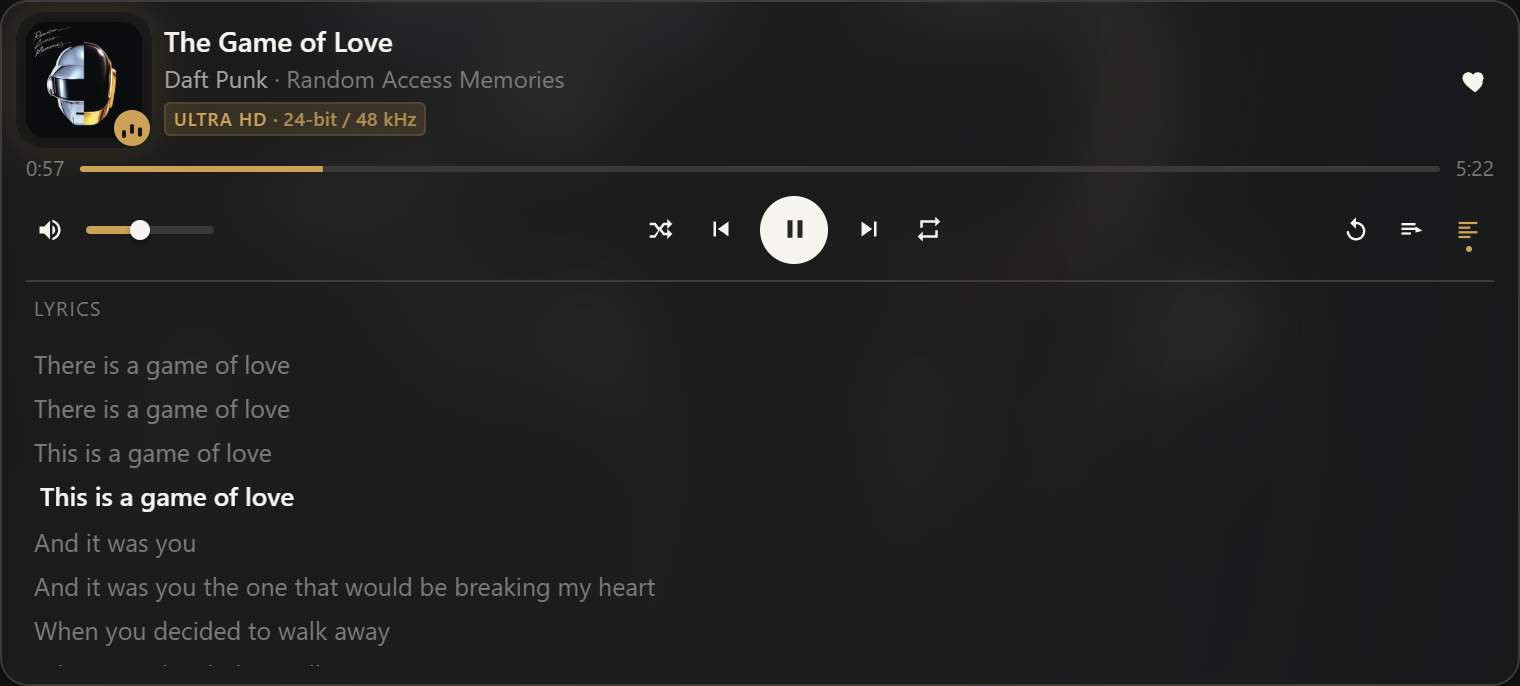
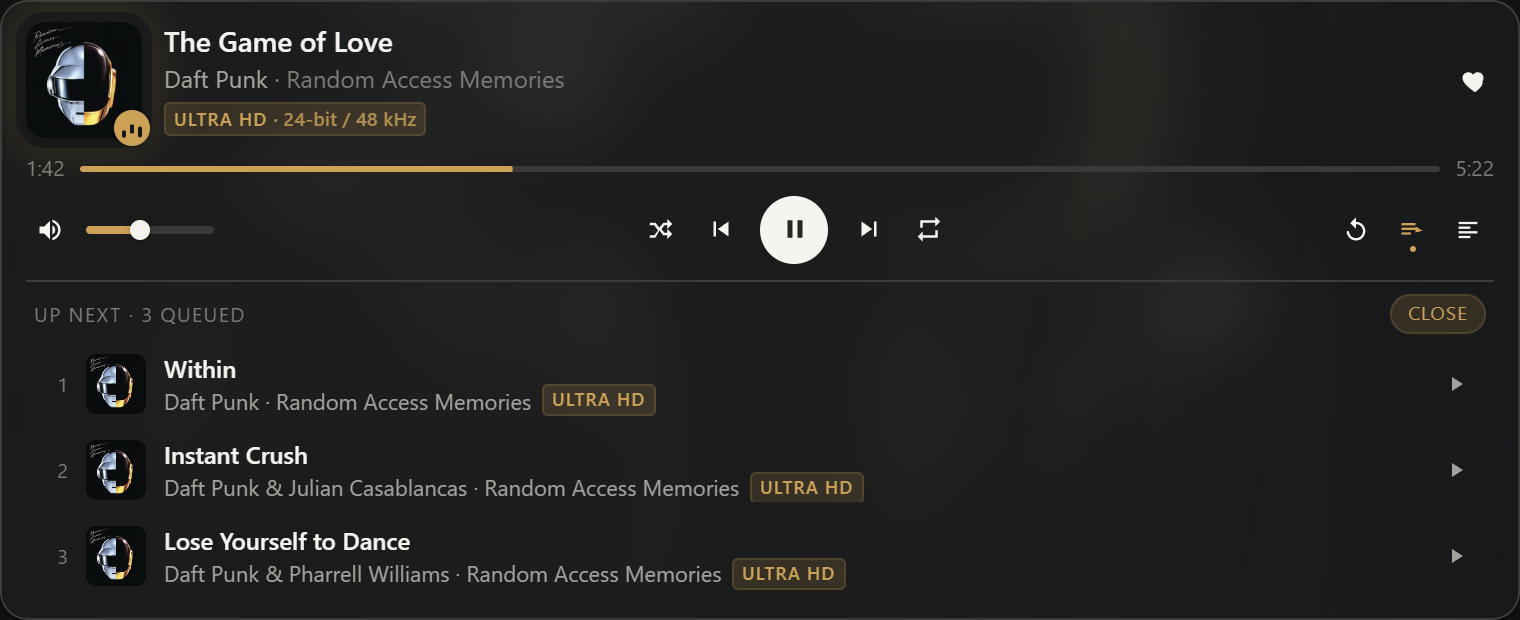
Play, search and control Amazon Music from Claude. Ask for a song and it plays, with a card in the conversation for the transport controls, the queue and synced lyrics.



Amazon Music has no public playback API, so this doesn't use one. It's a Model Context Protocol server that drives the Amazon Music web player in a real Microsoft Edge window, parked off-screen, clicking the same buttons you would.

Not affiliated with Amazon. It automates the web player in your own browser profile, signed in as you. The server never handles your password:
loginputs the Edge window on screen and you sign in yourself, CAPTCHA and 2FA included.
Contents
- Install
- What you can ask for
- The player widget
- Tools
- How it works
- Configuration
- Troubleshooting
- Development
- License
Requirements
Windows, because the off-screen window and taskbar handling are Win32. Microsoft Edge, because Amazon Music streams under Widevine DRM and a bundled Chromium can't decrypt it. An Amazon Music account, with Unlimited if you want the HD and Ultra HD badges to say anything. Node 20 or newer only if you build from source.
Install
Claude Desktop
- Download
amazon-music.mcpbfrom the latest release. - Double-click it, or drag it onto Claude Desktop → Settings → Extensions.
- Restart Claude Desktop.
- Ask Claude to run
login. An Edge window opens on the Amazon sign-in page. - Sign in there, then ask for
hide_window.
Step 4 happens once. The session lives in a private Edge profile from then on.
Installing as an extension is also the only way to get a real connector icon: Claude Desktop
draws a letter avatar for anything listed in claude_desktop_config.json and ignores the
icons a server advertises over MCP.
Other MCP clients
It's an ordinary stdio MCP server, so any client that can run one will work: Claude Code,
Cursor, VS Code, Cline, Continue. Build from source first (below), then point the client at
dist/index.js:
{
  "mcpServers": {
    "amazon-music": {
      "command": "C:\\Program Files\\nodejs\\node.exe",
      "args": ["C:\\Users\\<you>\\.amazon-music-mcp\\build\\dist\\index.js"],
      "env": {
        "AMZ_PROFILE_DIR": "C:\\Users\\<you>\\.amazon-music-mcp\\profile",
        "AMZ_LOG_FILE": "C:\\Users\\<you>\\.amazon-music-mcp\\logs\\server.log"
      }
    }
  }
}
All 30 tools work anywhere. The player card needs MCP Apps support, which at the time of writing means Claude Desktop; elsewhere you get the same information as text. Claude Desktop is the only client I've actually run it in.
Build from source
git clone https://github.com/ShadowsDistant/Amazon-Music-MCP.git
cd Amazon-Music-MCP
powershell -NoProfile -ExecutionPolicy Bypass -File scripts\setup.ps1
powershell -NoProfile -ExecutionPolicy Bypass -File scripts\pack-extension.ps1
setup.ps1 copies the sources to %USERPROFILE%\.amazon-music-mcp\build and runs npm, tsc
and the widget bundler there, so nothing heavy lands in OneDrive. pack-extension.ps1
writes the installable amazon-music.mcpb next to it.
Two optional switches on setup.ps1:
-Install writes the entry into %APPDATA%\Claude\claude_desktop_config.json, keeping a
timestamped backup. Use it only if you want the config-file route instead of the extension.
-Autostart puts a shortcut in your Startup folder that runs a hidden launcher, so the
off-screen Edge is warm before you open anything. Nothing plays until you ask. Remove it
with node "%USERPROFILE%\.amazon-music-mcp\build\scripts\autostart.mjs" --remove.
What you can ask for
Claude picks the tool; you just talk.
| You say | What happens |
|---|---|
| "play get lucky by daft punk" | Searches and plays the best match |
| "play the album Discovery" | Plays the album, not the single |
| "play my running playlist" | Plays one of your own playlists by name |
| "queue up Instant Crush" | Adds it after the current track, no interruption |
| "what's playing?" | Title, artist, album, quality, position |
| "what are the lyrics?" | Full lyrics, and the line being sung |
| "repeat this song" / "repeat this playlist" | Repeat one, or repeat all |
| "turn off autoplay" | Stops Amazon queueing similar tracks after yours |
| "skip" / "pause" / "louder" / "like this" | The obvious thing |
Requests are parsed before they're searched, so "album", "playlist", "station" and
"<title> by <artist>" all steer the result.
The player widget
Every screenshot below is the real card showing a real track. scripts/shots.mjs renders it
from whatever the player is doing at the time.
The colour comes from the album cover, extracted from the artwork in the browser page. The image behind it is Amazon's artist backdrop, not the cover art blown up. Light theme derives the colour again rather than reusing it, because a tint that reads well on a dark card can be invisible on a pale one. Anything you have to read is walked away from the background until it clears 4.5:1 contrast.

The quality badge carries the numbers Amazon reports behind it, so "24-bit / 48 kHz" is what is coming out of the browser now, not what the track could manage on better hardware.
Lyrics follow the song and stop following the moment you scroll them yourself:
Up next reads Amazon's own play queue. Click a row to jump to it.
Tools
⧉ marks the tools that render the player card.
| Tool | Purpose |
|---|---|
status | Is the browser running, are you signed in, what is playing. Never launches Edge. |
login / hide_window / quit_browser | Show the window to sign in, tuck it away, or close Edge. |
player ⧉ | Show the player card. |
now_playing ⧉ | Track, artwork, backdrop, tags, state, position, shuffle/repeat/like, current lyric. |
lyrics | Full lyrics plus the index of the line being sung. |
audio_quality | Bit depth and sample rate for the track, the device and the output. |
set_autoplay {enabled?} | Read or change Amazon's Autoplay setting. |
play ⧉, pause, play_pause, next ⧉, previous ⧉ | Transport. |
set_volume {level} | 0 to 100. |
shuffle {mode?} / repeat {mode} | on/off; off, all, or one. |
search {query, type?, limit?} | Ranked, typed results with hrefs and tags. Runs in the browse tab. |
play_by_query {query, type?} ⧉ | Parse, search, play the best match, return the runners-up. |
play_href {href} ⧉ | Play a specific result, queue row or playlist. |
queue_add {query|href, position?} | Play next or add to queue without interrupting. |
open_url {url} | Open any music.amazon.com page and list what's on it. |
my_playlists / play_playlist {name|href} ⧉ | Your library playlists. |
like / unlike / add_to_playlist {playlist} | Act on the current track. |
queue | Upcoming tracks. |
debug_snapshot {selector?} | Accessibility snapshot, for repairing selectors. |
How it works
The Edge window is real and rendering. It sits at -32000,-32000 with its taskbar button
stripped off by a little Win32 through PowerShell. Minimizing it would be easier, but the
site stops painting its shadow DOM the moment document.visibilityState goes hidden, and a
player that has stopped painting can't be clicked.
Everything runs in a private profile at %USERPROFILE%\.amazon-music-mcp\profile with
extensions and sync off, so your everyday Edge is untouched.
Two tabs, each in its own off-screen window. The player tab owns playback and never
navigates while something is playing. The browse tab takes search, my_playlists and
open_url, so a page load can't cut the music off. Any third tab is closed on the next
attach.
Edge is spawned detached and attached over CDP, so quitting Claude Desktop doesn't stop the music.
The runtime lives in %USERPROFILE%\.amazon-music-mcp rather than %LOCALAPPDATA% for a
specific reason: Claude Desktop ships as an MSIX package, and anything its child processes
write under AppData is redirected into the package's own LocalCache, where the login-time
launcher can't find it.
Speed
A "play X" request takes 1.9 to 2.5 seconds end to end, most of it Amazon searching and buffering. Asking for something already playing answers in about 50 ms. Widget state polls cost 8 to 17 ms, because everything expensive is warmed in the background and served from cache: the artist backdrop, the lyrics, the quality numbers, the volume and the Autoplay setting all arrive a moment after the card first paints rather than holding it up.
Stopping at the end of one song
Amazon's Autoplay setting only stops the queue being extended. Ask for a single track with it off and Amazon still queues similar songs, so playback rolls straight on into music you never asked for.
The fix runs inside the page. The progress slider reports whole seconds only, so the exact end has to be interpolated from the moment it last stepped, and a round trip per poll would leave a second of the next track audible before anything could react. In the page it pauses 0.35 s early instead, which leaves the song you asked for loaded rather than the one after it. Albums, playlists and stations keep playing.
Configuration
| Variable | Default |
|---|---|
AMZ_EDGE_EXE | first existing of the Program Files (x86) / Program Files Edge paths |
AMZ_PROFILE_DIR | %USERPROFILE%\.amazon-music-mcp\profile |
AMZ_CDP_PORT | 9333 |
AMZ_LOG_FILE | unset, stderr only |
Known limits
Search rows carry only the explicit tag. Amazon's search payload has no quality badges at
all; the Ultra HD, HD and Atmos chips exist on the player bar, in the queue and on detail
pages, which is where those tags come from.
Lyrics and the artist backdrop only exist in the full Now Playing View, which has to be shut
for anything row-based to work, since it covers the navbar and the player bar. The server
opens it once per track in the background, takes both, caches them and closes it again. The
synced highlight is live only while that view is open, which the lyrics tool arranges;
otherwise the lines come back with activeIndex: -1.
Troubleshooting
Tools time out or come back empty. Run status. visibility has to be visible. If
it's hidden, because the window got minimized or the screen locked, call hide_window,
which re-normalizes it off-screen.
not_logged_in. Run login, sign in, then hide_window.
A selector stopped matching, because Amazon changed the page. Call debug_snapshot,
optionally with a CSS selector, and fix src/selectors.ts. Every site-specific string in
the project is in that one file.
No sound. Check the Edge window isn't muted (login shows it) and that Widevine loaded,
under edge://components.
"Could not connect to host" in the widget. That client doesn't support MCP Apps. The plain tool results still work.
Edge reappeared in the taskbar. Call hide_window, which re-applies
scripts/taskbar.ps1, or run that script yourself with -ProfileDir.
More than two tabs. The server trims to the player tab plus one browse tab on every
attach. quit_browser followed by any play tool gives a clean restart.
Logs. %USERPROFILE%\.amazon-music-mcp\logs\server.log, and Claude Desktop's own
%APPDATA%\Claude\logs\mcp-server-amazon-music.log. The server never writes to stdout.
Removing it. node "%USERPROFILE%\.amazon-music-mcp\build\scripts\install.mjs" --remove,
and the same for autostart.mjs.
Development
src/index.ts        server bootstrap (stdio), icon + instructions
src/tools.ts        tool schemas, widget resource, error wrapping
src/browser.ts      spawn and attach Edge over CDP, show/hide window, login detection
src/config.ts       paths and the shared Edge command line
src/selectors.ts    every site-specific selector
src/tags.ts         explicit / Ultra HD / HD / Atmos tag parsing
src/accent.ts       album-cover colour extraction, runs in the page, cached per artwork
src/quality.ts      the real bit-depth and sample-rate numbers behind the HD badge
src/singleTrack.ts  the in-page end-of-song stop for single-track requests
src/player.ts       now_playing, transport, volume, shuffle/repeat, like, queue
src/search.ts       query parsing and ranking, play_by_query, play_href, queue_add
src/library.ts      playlists, add_to_playlist
ui/player.html+ts   the MCP App widget, bundled by scripts/build-ui.mjs
Two things about the site are worth knowing before you change anything. Amazon Music is
built from Stencil web components with open shadow roots, so ordinary CSS selectors pierce
them in Playwright and nothing clever is needed. And result rows exist as empty skeletons
before they hydrate, which is why itemReady insists on [primary-text]; match the bare tag
and you'll parse a page of blanks.
Testing without a client
& "C:\Program Files\nodejs\node.exe" "$HOME\.amazon-music-mcp\build\scripts\smoke.mjs" --play
Spawns the server over stdio the way a client does, lists the tools and runs status,
search and debug_snapshot. With --play, and if you're signed in, it also runs
play_by_query, now_playing and pause. Add --quit to close Edge at the end.
Any tool, directly, from a bash-style shell so the JSON survives quoting:
node "$HOME/.amazon-music-mcp/build/scripts/call.mjs" play_by_query '{"query":"get lucky"}' now_playing
node scripts/serve-ui.mjs serves the widget at http://localhost:8765 with no host behind
it. ?demo fills it with a sample track, ?demo&lyrics and ?demo&queue open the panels,
?skeleton shows the loading state, ?accent=r,g,b checks the contrast correction against
an awkward cover, and ?demo&poll re-renders on the poll interval the way a host drives it.
Anything that rebuilds or re-animates under ?demo&poll is a flicker, so watch it with a
MutationObserver rather than by eye.
Every tool logs its duration to stderr. play_by_query breaks that down by phase, and the
waitForTrack and single-track lines say what the player actually did. When playback
misbehaves, read those first.
scripts/shots.mjs [outDir] regenerates the screenshots above from the live player state.
Play something first.
License
GNU General Public License v3.0 or later.
This program is free software: you can redistribute it and modify it under the terms of the GNU General Public License as published by the Free Software Foundation, either version 3 of the License, or (at your option) any later version. It is distributed in the hope that it will be useful, but WITHOUT ANY WARRANTY; without even the implied warranty of MERCHANTABILITY or FITNESS FOR A PARTICULAR PURPOSE. See the license for details.