Compendio MCP
Indexes a project's markdown documentation and exposes it to agents: hybrid natural-language search (BM25 + semantic), a map of the whole doc corpus, and section-level reads, so agents find the right docs without loading entire files into context.
Documentation
Your project's documentation, served to any agent in the fewest possible tokens.
A local RAG retrieval layer exposed as an MCP server. Your agent stops grepping and dumping whole files — it reaches the right paragraph instead.




What it does • Requirements • Quick Start • Configuration • MCP Tools • CLI • How it works • Incremental sync • Multilingual • Full docs
The problem
Your agent doesn't know your documentation. So it does what it can: grep, then cat a 400-line file to answer a question that lived in one paragraph. Three files later the context window is full of noise and the answer is still a guess.
Attaching the whole docs/ folder doesn't fix it — it just moves the waste earlier. Neither does keyword search: nobody writes questions using the exact words the document uses.
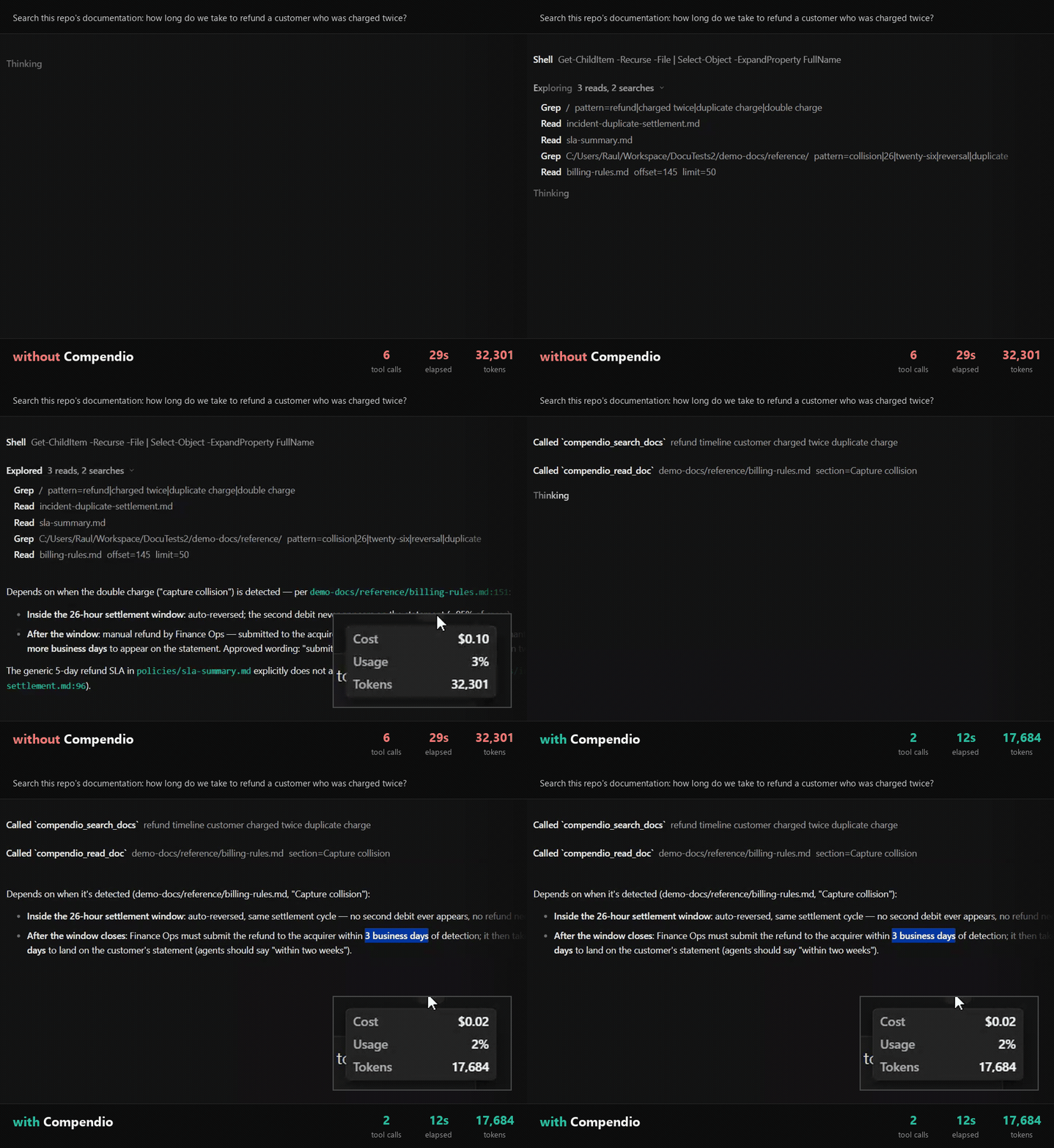
Same question, same model, and both answers are correct — the difference is what it cost to get there.
6 tool calls • 29s • 32,301 tokens → 2 tool calls • 12s • 17,684 tokens.
Figures read from OpenCode's own elapsed label and cost tooltip, on an 81-document corpus.
What Compendio does
Compendio indexes your markdown documentation and gives any AI agent three tools to find and read exactly what it needs.
- 🔍 Hybrid retrieval, not grep — keyword search finds the exact term, semantic search finds the paraphrase. Compendio runs both and merges the results.
- ✂️ Token-frugal by design — orient for ~10 tokens per document, search for a handful of fragments, read a single section. Never the whole corpus.
- 🔒 100% local — one SQLite file, embeddings on CPU, zero network calls at query time. No API keys, no Docker, no services, nothing leaves your machine.
- ♻️ Stays current — a running server picks up your documentation edits on its own. No watcher process, no manual rebuild loop.
- 🗣️ Multilingual — index documentation in any language. The embeddings model is multilingual and search is diacritic-insensitive. See Multilingual.
- 🧩 Zero configuration — works on any folder of
.mdfiles. No required frontmatter, no config file. An optional documentation convention is there if your team already has a taxonomy to enforce.
Requirements
- Node.js ≥ 22.12.
- Nothing else.
Quick start
1. Install it.
npm install -g compendio-mcp
To update an existing installation:
compendio update
2. Register it as an MCP server in your client:
compendio install-mcp <agent>
Supported agents: claude, claude-desktop, cursor, vscode, opencode, codex, zed.
For manual installation or agents not supported by this command (Windsurf, Cline, Gemini CLI), see Manual Installation.
3. Build the index once, from the project root:
compendio index
That's it. With no config file, Compendio auto-discovers top-level folders that contain Markdown files — no hidden docs/ default needed. Add .compendio/ to your .gitignore.
Why this step exists. The server also indexes on startup, so strictly speaking you could skip it — but the first run downloads and caches the embeddings model (tens of MB), and whoever triggers it waits. Running it here pays that cost in your terminal, with a progress bar, instead of inside your agent's first tool call. From then on everything is offline, and the index keeps itself up to date (below).
Windows note. Some MCP clients can't spawn the
compendio.cmdshim directly. If the server fails to start withENOENT, use"command": "npx"with"args": ["compendio-mcp", "serve"].
Configuration
Entirely optional — Compendio works with no config file at all. Create compendio.config.json at your project root only to override what you need:
{
  "docsDir": ["docs"],
  "exclude": ["INDEX.md"],
  "db": ".compendio/compendio.db",
  "embeddings": { "provider": "local", "model": "Xenova/multilingual-e5-small" },
  "chunk": { "minTokens": 100, "maxTokens": 480 },
  "search": { "k": 5 },
  "sync": { "throttleMs": 30000 },
  "convention": {
    "mode": "loose",
    "excludedStatuses": [],
    "frontmatterFields": { "type": "type", "module": "module", "status": "status" }
  }
}
| Key | What it's for |
|---|---|
docsDir | One or more explicit documentation roots, relative to the project root. Always an array — there is no single-string form. Omit it or set [] to use discovery mode |
exclude | Entries to skip when indexing: an exact path, a bare filename (matched anywhere), or a directory prefix (e.g. "adr/superseded" skips everything under it) |
db | Where the SQLite index file is written |
search.k | Default number of fragments returned per search |
chunk | Fragment size bounds, in tokens |
sync.throttleMs | Minimum time between automatic sync passes, in ms (30000 = 30 s). A floor, not a timer — gates only serve's automatic triggers, not a manually-run compendio sync — see Incremental sync |
convention | Optional documentation taxonomy — see below |
Declaring only part of the convention block merges with the defaults field by field; it never wipes the siblings you didn't mention. frontmatterFields maps type/module/status onto non-standard frontmatter keys (e.g. { "status": "estado" } reads a Spanish document's estado: field as status).
Every numeric key (search.k, chunk.minTokens, chunk.maxTokens, sync.throttleMs) is honored only when it is a finite number greater than 0 — search.k must additionally be a whole number. Anything else, including a quoted number like "480", falls back to the default exactly as an absent key would, and the fallback is reported: on stderr for every CLI command, and in docs_overview's response for an MCP client. An unrecognized key under embeddings, chunk or convention.frontmatterFields (a typo such as maxtokens) is reported the same way. A config with nothing wrong reports nothing.
Multiple documentation roots
Declare more than one root to index several folders — adr/, rfcs/, a spec directory — as one searchable corpus:
{ "docsDir": ["docs", "openspec"], "exclude": ["INDEX.md", "openspec/changes/archive"] }
Every document path is prefixed with its root's alias — the directory's own name, so docs/x.md and openspec/specs/y.md both read as the real project-relative path. This holds with a single explicit root and with discovered roots too: openspec/specs/y.md, not specs/y.md. search_docs, docs_overview, read_doc and the generated INDEX.md all use this prefixed shape; passing a path back to read_doc exactly as returned always resolves.
Declared roots may not collide: two roots resolving to the same directory, one nested inside another (in either declaration order), or two roots sharing the same directory name (and therefore the same alias) are all rejected before anything is indexed. A root that is declared but cannot be read (a typo, or a folder only some checkouts have) is reported and skipped — the run continues on the remaining roots, and only throws if every declared root fails. Removing a root from docsDir deletes its documents on the next sync pass, same as deleting the files themselves would.
In discovery mode, Compendio rescans top-level folders on every index, sync, and serve sync pass, selects those with .md files anywhere below them, skips symlinked content and generated/internal folders such as .git, .compendio, node_modules, dist, build, and coverage, and writes INDEX.md at the project root. Discovery fails closed: malformed top-level config JSON, unreadable candidate trees, traversal/read failures, or a previously indexed discovered root that disappears or becomes a symlink/junction before sync abort before mutating the index. A previously indexed root that is still a readable directory is still traversed even after its last Markdown file is deleted, so legitimate deletions are reconciled normally. The symlink checks use lstat/realpath at scan/traversal time, but they are not a kernel-level sandbox; a filesystem race between check and read remains out of scope. --dir <path> (below) is explicit mode: it replaces the whole declared/discovered root set with that one directory and writes INDEX.md inside it.
Works with your SDD framework
Spec-driven development frameworks keep their planning artifacts in Markdown, which is exactly what Compendio indexes. Point docsDir at the folders your framework writes to:
| Framework | Config | Indexes |
|---|---|---|
| Spec Kit | { "docsDir": ["specs", ".specify"] } | Feature specs, plans and tasks under specs/NNN-feature/, plus the constitution at .specify/memory/constitution.md |
| OpenSpec | { "docsDir": ["openspec"] } | openspec/project.md, capability specs and in-flight changes |
| Kiro | { "docsDir": [".kiro"] } | requirements.md/design.md/tasks.md per feature under .kiro/specs/, plus .kiro/steering/ |
| BMAD | { "docsDir": ["docs"] } | PRD, architecture, sharded epics and stories |
| Framework + your own docs | { "docsDir": ["docs", "openspec"] } | Both, as one searchable corpus |
Hidden directories such as .specify/ and .kiro/ are indexed normally, both as declared roots and in discovery mode — dot-prefixed entries inside a root are what gets skipped, not the root itself. So with no config file at all, a Spec Kit or Kiro project already indexes.
Three things worth knowing before you copy a line:
- A root's alias is its directory name, not the path you declared.
.kiro/specsis aliasedspecs, so its documents come back asspecs/auth/design.md. That also means it collides with a top-levelspecs/root and cannot be combined with Spec Kit's — declare.kiroinstead, which is what the table does. - BMAD's output folder is configurable.
docsis the default; BMAD v6 readsoutput_folderfrom its own config, so declare whatever yours is set to. - Templates are noise.
.specify/templates/holds placeholder scaffolding, not project knowledge. Add"exclude": [".specify/templates", ".specify/scripts"]if you would rather they stayed out of search results.
Documentation convention (optional)
Two modes, selected by convention.mode:
loose(default, zero-config) — never rejects a file for missing metadata. The title comes from the first H1 (falling back to a humanized filename), the module is inferred from the folder, andtype/statusare read from frontmatter when present and left absent otherwise.strict(opt-in) — a linter: every document needs an H1 and non-emptytype/module/status, validated against the lists your project declares. Files that fail are skipped and reported, never breaking the run.
{
  "convention": {
    "mode": "strict",
    "types": ["functional", "adr", "api", "qa", "guide"],
    "statuses": ["draft", "current", "deprecated"],
    "excludedStatuses": ["draft", "deprecated"]
  }
}
excludedStatuses hides documents from search by lifecycle state — drafts and deprecated pages stop polluting results. See docs/documentation-convention.md for the full convention this repository's own docs follow.
MCP tools
Designed as progressive disclosure: orient cheaply → search cheaply → read only what is needed.
1. docs_overview() — the corpus map. Counts by type and module, plus one line per document. Roughly 10 tokens per document.
2. search_docs({ query, type?, module?, tags?, k?, include_excluded? }) — the top k fragments (5 by default, at most 2 per document), each with path, section, excerpt and score. type is an open, project-defined string, not a fixed list.
3. read_doc({ path, section? }) — one section, or the whole document. A large document with sections (above ~6,000 estimated tokens) returns a compact outline of its H2/H3 headings instead of the body, so the agent reads only the sections it needs. A path that doesn't exist returns the 3 most similar paths instead of an error, so the agent self-corrects instead of retrying blind.
CLI
| Command | What it does |
|---|---|
compendio serve | Starts the MCP server over stdio |
compendio install-mcp <agent> | Registers compendio-mcp in the specified agent's configuration |
compendio update | Updates compendio-mcp to the latest version from npm |
compendio index | Full rebuild of the index |
compendio sync | Runs one incremental sync pass from the terminal — syncs only the documents whose content changed, with live progress. See Incremental sync |
compendio search "..." | Hybrid search with filters: --type, --module, --tags, -k, --all |
compendio overview | Map of the indexed corpus |
compendio index-md | Generates or updates one combined INDEX.md: project-root INDEX.md in discovery mode, or INDEX.md inside the first explicit/--dir root — one line per document |
compendio eval | Measures retrieval quality against a goldenset |
Global option -C, --root <dir>: project root. Add --lexical to index, sync or search to skip embeddings entirely. --dir <path> on index/index-md replaces the configured docsDir with that one directory — it does not add to it, and the index it produces still has the prefixed path shape (<dirname>/x.md). sync has no --dir: under an incremental pass, dropping a root this way would delete its documents rather than merely skip them (see compendio sync --help).
How it works
docs/**/*.md
     │
     ├─▶ split into fragments at heading boundaries, then bounded to maxTokens
     │
     ├─▶ index each fragment twice ─┬─ full-text (keywords)
     │                              └─ embeddings (meaning)
     │
     └─▶ one file: .compendio/compendio.db
At query time both indexes are searched independently and their rankings are merged with Reciprocal Rank Fusion — a rank-based merge with no weights to tune blindly. The agent gets back the smallest set of relevant fragments.
Compendio is the retrieval half of RAG. It never calls an LLM and generates nothing: it finds the right paragraphs and gets out of the way.
If the embeddings model is unavailable, Compendio doesn't crash — it degrades to keyword-only search and says so in its responses.
Incremental sync
Documentation changes while you work, and Compendio keeps up on its own — or on request. There are four ways the index gets refreshed:
| Trigger | What happens |
|---|---|
Server startup (compendio serve) | One incremental sync pass, started before the transport connects. The first tool call waits for it, so nothing is ever answered against a cold index |
Any MCP tool call (search_docs, docs_overview, read_doc) | One incremental sync pass — but only if 30 s have elapsed since the last one (sync.throttleMs, 30000 by default). Otherwise the call proceeds against the current index |
compendio sync | One incremental sync pass, run manually from the terminal, with live progress. sync.throttleMs does not gate it — every invocation runs a fresh pass regardless of how recently one ran. Recommended to run this if you have added a large number of documents at once. |
compendio index | Full rebuild from scratch: the index is dropped and recreated |
It is not a timer. There is no background interval and no file watcher. Syncing is driven by your agent's tool calls, or by you running compendio sync, and the throttle is a floor between the two automatic triggers, not a schedule: a server nobody is querying does not sync, and a burst of ten calls in one second still triggers at most one pass. Concurrent calls join the pass already running instead of starting a second one.
Each incremental sync pass compares content hashes against what's already indexed, so only new, changed and deleted documents do any work — an unchanged corpus costs nothing. Inside serve, if a pass fails it's logged to stderr and the tool still answers against the current index; compendio sync has no such fallback, so the same failure exits the process non-zero.
When you need the full rebuild. compendio index is the only command that reindexes: it drops and recreates the whole database, and it is the authoritative one. Reach for it after a large restructuring, if you suspect the index has drifted, or — the case that surprises people — after changing chunk.minTokens/chunk.maxTokens. An incremental sync pass, whether automatic or run manually via compendio sync, fingerprints a document by its content hash alone, so a document you haven't edited keeps its old fragment boundaries no matter what the config now says. Only a full reindex (compendio index) applies new chunking to unchanged files — see compendio sync --help for the same caveat at the point you're most likely to need it.
Multilingual
Write your documentation in whatever language your team works in. Compendio doesn't care:
- The contract is English, the corpus doesn't have to be. Tool parameters (
path,type,module,tags,section), response fields and tool descriptions are English, so any agent reads them without friction. That is independent of what language your documents are written in: frontmatter keys are stripped before indexing, and the FTS5 tokenizer carries no language-specific stemmer. - Non-English frontmatter keys map back. If your documents use
estado:instead ofstatus:,convention.frontmatterFieldstranslates them. - Accents are handled properly. Search is diacritic-insensitive, so validación and validacion match. Accent-sensitive search silently loses results.
- The embeddings model is multilingual (
Xenova/multilingual-e5-small), so single-language and mixed-language corpora index and retrieve alike.
The reference corpus and evaluation set shipped in ejemplos/ are Spanish — deliberately, as proof that an English codebase and tool contract retrieve non-English documentation without loss.
How much does semantics add over grep?
Measured with compendio eval on the example corpus (ejemplos/: 11 documents, 29 chunks, no config file — the zero-config path itself) and its goldenset of 22 real questions:
| mode | recall@5 | MRR | failures |
|---|---|---|---|
| hybrid | 1.00 | 0.943 | 0 |
| keyword-only | 0.95 | 0.856 | 1 |
- Keyword search is already strong when the question uses the corpus terminology.
- The gap opens on paraphrases and synonyms: «¿Qué endpoint hay que llamar para crear un lead?» falls out of the top 5 without embeddings, and the semantic leg recovers it. Questions with zero word overlap with the matching document are solved only by semantics.
- Speed: with the model warm, hybrid search answers in 5–20 ms.
compendio eval reproduces this table at any time — it's also the instrument for tuning chunking and k without guessing.
Architecture
Hexagonal: the core knows nothing about SQLite, transformers.js, or the filesystem.
src/
├── domain/            # pure, no dependencies: model, chunking, ranking, convention policy
├── application/       # use cases
├── infrastructure/    # adapters: SQLite, markdown parsing, filesystem, embeddings
├── composition.ts     # composition root — start here to see the whole app
├── cli.ts             # input adapter: commander
└── server.ts          # input adapter: MCP server (stdio)
Every external dependency sits behind a port in src/domain/ports.ts. Swapping the vector store or the embeddings provider is a local change in one adapter, not a rewrite.
Development
npm install
npm run build       # compiles to dist/
npm test            # vitest: domain, adapters and integration
npm run typecheck   # tsc --noEmit
npm run dev -- ...  # CLI without compiling (tsx)
Integration tests use a deterministic embeddings provider (no downloads) against the real ejemplos/ corpus.
Try the CLI against the bundled example corpus without installing the package:
node dist/cli.js --root ejemplos index
node dist/cli.js --root ejemplos search "¿cuándo se considera duplicado un lead?"
This repository ships a .mcp.json that serves the ejemplos/ corpus, so you can try the tools from Claude Code with zero configuration.
License
MIT © Raúl García Barciela