bulhufas
MCP server that ingests project docs once and lets Claude search by meaning instead of reading everything — saving tokens on large codebases
Documentation
bulhufas
RAG-powered project management that captures what PM tools miss.



Getting Started · How It Works · API · Self-Host · Contributing
Why "bulhufas"?
Bulhufas is Brazilian Portuguese slang for "zilch", "diddly-squat", "bupkis" — absolutely nothing.
As in: "How much does Claude know about that decision your team made on WhatsApp last Thursday?" Bulhufas.
"What about that blocker someone mentioned in standup?" Bulhufas.
"And that architecture decision from two sprints ago?" You guessed it. Bulhufas.
Now it knows.
Teams make decisions in Slack, WhatsApp, and meetings — then none of it reaches the PM tool. bulhufas captures raw conversations, extracts structured project artifacts (decisions, action items, blockers, scope changes), and makes them searchable via semantic embeddings.
Single binary. No external dependencies. Embeddings run in-process.
Features
- Conversation to Structure — Paste raw chat, get structured chunks: decisions, action items, blockers, requirements, scope changes
- Agent Memory — Store working, episodic, semantic and procedural memories in isolated namespaces with provenance, confidence, importance and validity windows
- Semantic Search — Find context by meaning, not keywords. "What did we decide about auth?" finds the right chunk even if "auth" isn't in the text
- Compact Recall — Return a bounded context packet with memory IDs and source references so any LLM can recall only what it needs
- CRUD on Knowledge — Update status, add context, archive outdated chunks. Your knowledge base stays current
- Single Binary — One Go binary with embedded vector store (chromem-go) and embedding model (hugot/all-MiniLM-L6-v2). No Ollama, no Docker, no external processes
- Self-Hostable — Deploy anywhere: Coolify, Railway, Hetzner, AWS, GCP. Runs on a 2GB VPS
How It Works
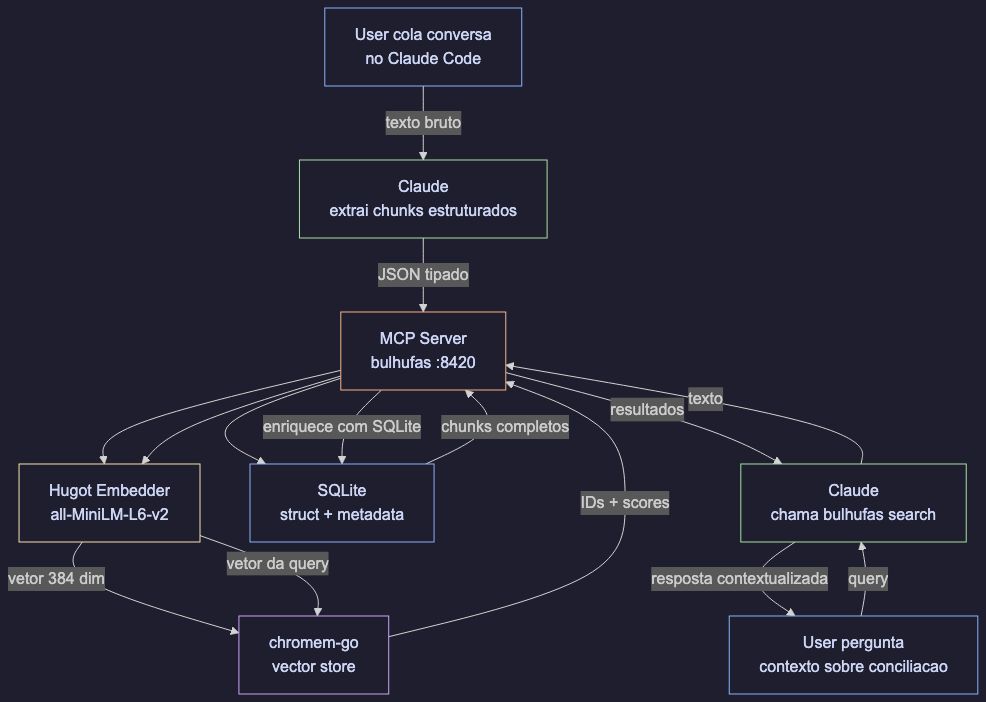
You paste a conversation into your AI assistant
         |
The LLM extracts structured chunks with metadata
         |
bulhufas stores chunks + generates embeddings in-process (hugot)
         |
Later: "what's pending from last week?" -> semantic search returns relevant chunks
What Gets Captured
| Chunk Type | Example |
|---|---|
decision | "We chose WebSockets over polling for real-time updates" |
action_item | "Hugo will create read-only DB credentials by Friday" |
blocker | "Can't deploy until the SSL cert is renewed" |
requirement | "Client needs CSV export for the finance report" |
scope_change | "Auth module expanded to include SSO" |
context | "The legacy API returns XML, not JSON" |
research_finding | "pgvector outperforms pinecone for our dataset size" |
status_update | "Payment integration is live in staging" |
Installation
1. Build from source
# Requires Go 1.22+ with CGO enabled
git clone https://github.com/HugoluizMTB/bulhufas.git
cd bulhufas
make build
2. Add to Claude Code
claude mcp add --transport stdio --scope user bulhufas -- /absolute/path/to/bulhufas/bin/bulhufas --mcp
Replace
/absolute/path/towith the actual path where you cloned the repo. Use--scope userto make it available across all your projects. Use--scope projectto restrict it to the current project only.
3. Restart Claude Code and verify
Run /mcp inside Claude Code. You should see bulhufas connected with 10 tools:
| Tool | Description |
|---|---|
save_conversation | Save a conversation with extracted structured chunks |
remember | Save one scoped memory record with provenance and lifecycle metadata |
search | Semantic search across all stored chunks |
recall | Retrieve a namespace-isolated, token-conscious context packet |
observe_turn | Automatically learn a meaningful turn as episodic memory |
list_chunks | List chunks with optional type/status filters |
update_status | Update chunk status by ID |
delete_chunk | Delete a chunk by ID |
list_actions | List all pending action items |
consolidate_memory | Preview or run episodic-to-semantic/procedural consolidation |
On first run, the embedding model (all-MiniLM-L6-v2, ~80MB) is downloaded automatically to ./data/models/.
Run as HTTP Server (optional)
./bin/bulhufas
Starts an HTTP API on port 8420. Use --mcp flag for MCP stdio mode instead.
Automatic gateway for any OpenAI-compatible LLM
To capture turns automatically in Claude Code without relying on the model calling observe_turn, register the Stop hook in integrations/claude-code-hook.mjs. See docs/claude-code-sessions.md.
For providers that do not support MCP, run the dependency-free memory proxy:
LLM_UPSTREAM_URL=https://api.openai.com \
LLM_UPSTREAM_API_KEY="$OPENAI_API_KEY" \
BULHUFAS_NAMESPACE=project:bulhufas \
make proxy
Point the client at http://127.0.0.1:8421/v1. The proxy recalls scoped memory before each chat completion and captures substantive turns after the response. It works with OpenAI-compatible endpoints such as Ollama, vLLM and LM Studio; see integrations/README.md.
With Docker Compose, use docker compose --profile proxy up -d after setting LLM_UPSTREAM_URL, LLM_UPSTREAM_API_KEY and BULHUFAS_NAMESPACE in the environment.
Environment Variables
| Variable | Default | Description |
|---|---|---|
PORT | 8420 | Server port |
DATA_DIR | ./data | Persistent storage directory (SQLite db, model files, vector index) |
MEMORY_LLM_BASE_URL | unset | OpenAI-compatible /v1 endpoint used for automatic consolidation |
MEMORY_LLM_API_KEY | unset | Optional API key for the consolidation provider |
MEMORY_LLM_MODEL | gpt-4o-mini | Model used by the background memory manager |
MEMORY_CONSOLIDATION_INTERVAL | 15m | Interval for promoting episodic memories when MEMORY_LLM_BASE_URL is set |
MEMORY_NAMESPACE | default | Namespace processed by the automatic consolidator |
BULHUFAS_API_KEY | unset | Optional API key required by HTTP API clients |
BULHUFAS_ALLOWED_NAMESPACE | unset | Optional hard namespace boundary for this server instance |
BULHUFAS_TLS_CERT_FILE | unset | Certificate path; enables HTTPS together with key file |
BULHUFAS_TLS_KEY_FILE | unset | Private key path for HTTPS |
API
Save a conversation with chunks
curl -X POST http://localhost:8420/api/conversations \
  -H "Content-Type: application/json" \
  -d '{
    "source": "whatsapp",
    "summary": "Discussion about database access",
    "participants": ["renan", "hugo"],
    "chunks": [
      {
        "content": "Renan needs read-only access to PostgreSQL",
        "type": "decision",
        "tags": ["infra", "postgres"],
        "people": ["renan"],
        "status": "pending",
        "action_item": "Create read-only credentials"
      }
    ]
  }'
Semantic search
curl -X POST http://localhost:8420/api/search \
  -H "Content-Type: application/json" \
  -d '{"text": "database access", "limit": 5}'
Save and recall agent memory
curl -X POST http://localhost:8420/api/memories \
  -H "Content-Type: application/json" \
  -d '{
    "content": "The payments service uses idempotency keys for retries",
    "memory_kind": "procedural",
    "namespace": "project:bulhufas",
    "source": "architecture-review",
    "source_ref": "meeting:2026-08-01",
    "confidence": 0.95,
    "importance": 0.8,
    "tags": ["payments", "reliability"]
  }'

curl -X POST http://localhost:8420/api/recall \
  -H "Content-Type: application/json" \
  -d '{
    "text": "How should payment retries work?",
    "namespace": "project:bulhufas",
    "memory_kinds": ["semantic", "procedural"],
    "limit": 5,
    "max_chars": 3000
  }'
recall returns both structured results and a bounded context string. Namespaces, project/tenant/session IDs and memory kinds are hard filters, so unrelated agent contexts are not concatenated accidentally.
When MEMORY_LLM_BASE_URL is configured, a background manager periodically consolidates episodic memories into conservative semantic/procedural records. It can also be triggered or previewed explicitly:
curl -X POST http://localhost:8420/api/consolidate \
  -H "Content-Type: application/json" \
  -d '{"namespace":"project:bulhufas","limit":32,"dry_run":true}'
Ambient learning
In normal agent usage, the client can call recall at task start and observe_turn after substantive turns. These are internal tool calls: you do not need to type “remember this” for ordinary learning. The explicit remember, update and delete tools remain available for corrections, promotions, forgetting and exact control. For chat gateways that can forward every message automatically, POST /api/turns provides the same capture path without relying on the model to initiate the call.
List chunks with filters
curl "http://localhost:8420/api/chunks?type=blocker&status=pending"
List pending action items
curl http://localhost:8420/api/actions
Update chunk status
curl -X PATCH http://localhost:8420/api/chunks/{id}/status \
  -H "Content-Type: application/json" \
  -d '{"status": "resolved"}'
Delete a chunk
curl -X DELETE http://localhost:8420/api/chunks/{id}
Health check
curl http://localhost:8420/healthz
Metrics are available at GET /metrics in Prometheus text format. Set BULHUFAS_API_KEY to protect API routes; place the service behind a TLS reverse proxy or set both TLS file variables directly.
Architecture
cmd/server/          -> entrypoint, wires everything together
internal/
  domain/            -> core types: Conversation, Chunk, WorkItem, Relation
  mcp/               -> HTTP server, handlers, request/response logic
  store/             -> persistence interface + SQLite implementation
  vectorstore/       -> embedded vector search via chromem-go
  embedder/          -> in-process embeddings via hugot (all-MiniLM-L6-v2)
scripts/             -> test scripts
macos/BulhufasMac/   -> native macOS app: Dynamic Island + menu bar (GPL-3.0)
All external dependencies are behind interfaces. Swap SQLite for Postgres, or chromem-go for pgvector — without touching business logic.
Stack
| Component | Library | Runs in-process? |
|---|---|---|
| Embedding | hugot + all-MiniLM-L6-v2 (384 dim) | Yes |
| Vector store | chromem-go | Yes |
| Database | SQLite (mattn/go-sqlite3) | Yes |
| HTTP server | Go stdlib net/http | Yes |
| macOS UI | SwiftUI + AppKit NSPanel | Native app |
No Ollama. No Docker. No external databases. One binary.
The local backend is deliberately the first tier of a larger memory design. SQLite/chromem is the default offline store; the native macOS app talks to it over the local HTTP API, while the optional Postgres adapter can use pgvector HNSW plus PostgreSQL full-text search. Vector quantization such as TurboQuant is an optional index optimization and must be validated against recall before enabling it.
The optional PostgreSQL/pgvector adapter is documented in docs/pgvector.md. The deeper LLM and memory research is summarized in docs/research-landscape.md.
Self-Hosting
Binary
CGO_ENABLED=1 GOOS=linux go build -o bulhufas ./cmd/server
scp bulhufas your-server:/opt/bulhufas/
ssh your-server '/opt/bulhufas/bulhufas'
Docker
docker build -t bulhufas .
docker run -d --name bulhufas -p 8420:8420 -v bulhufas-data:/data bulhufas
Docker Compose
git clone https://github.com/HugoluizMTB/bulhufas.git
cd bulhufas
docker compose up -d
Works with Coolify, Railway, Hetzner, AWS, GCP, Oracle Cloud — anything that runs Docker.
Native macOS app
The macOS app has no regular window. It lives in two places: a Dynamic Island that hangs from the notch, and a menu bar panel.
make macos-open
Dynamic Island. Closed, it is exactly the size of the notch and therefore invisible. Hovering opens it; clicking pins it open. When new memories arrive it briefly widens into a sneak peek. The open state shows the active Claude Code session and either recent memories or the session list. On displays without a notch the same shape hangs from the top edge.
Menu bar. A panel with the memory count, capture activity over time, and a breakdown of what was captured by chunk type.
Claude Code sessions. The app lists sessions by reading file metadata from $CLAUDE_CONFIG_DIR/projects, ~/.claude/projects and ~/.claude-pessoal/projects — modification times and file names only. Transcript contents are never opened and no credentials are read. Memory capture itself still happens through the MCP server; see docs/claude-code-sessions.md.
The app defaults to http://127.0.0.1:8420. Set BULHUFAS_URL before launching it to use another local or remote HTTP endpoint. The Homebrew formula is documented in docs/homebrew.md.
License note: the macOS app in
macos/is GPL-3.0, because it contains code derived from Atoll and, through it, boring.notch. The Go server and everything else in this repository stay Apache-2.0 — they are separate programs communicating over a local HTTP API. See macos/NOTICE.
Roadmap
- Core domain types and interfaces
- HTTP API with save/search/update/delete
- SQLite store implementation
- In-process embeddings via hugot (all-MiniLM-L6-v2)
- chromem-go vector store
- Semantic search with SQLite enrichment
- Action items endpoint
- MCP server protocol (stdio transport via mcp-go)
- Docker image
- Native macOS app: Dynamic Island + menu bar
- Claude Code session list from local transcript metadata
- Slack plugin
- Remote MCP via SSE transport
Contributing
See CONTRIBUTING.md for setup instructions, code style, and PR process.
License
Apache License 2.0 — use it freely, even commercially. Patent protection included.
Created by @HugoluizMTB