Outbound OS
Evidence-gated AI email outreach MCP server with local start, check, and approval-gated send tools.
Documentation
Outbound OS
Try the interactive policy demo — no installation or signup
Official MCP Registry: Outbound OS — active listing (v0.2.1). Public OCI package: ghcr.io/recepiohq/outbound-os-mcp:0.2.1. The MCP server is designed for local operation and has no built-in authentication; never publish its HTTP port to the public Internet.
Use it in an AI coding client: Docker + Claude Code / Cursor MCP quickstart — local-only, no mailbox credentials, three actual MCP tools available for inspection.
Change synthetic buyer, mailbox, evidence, duplicate, and approval conditions in your browser. The interface executes the same deterministic gate and draft-preflight modules as the CLI; it makes no outbound API calls and sends no email. A PASS in this demo is not authorization to send a real message. Use Copy scenario link to share the exact synthetic inputs and verdict with another developer; the link never contains real addresses or message data.
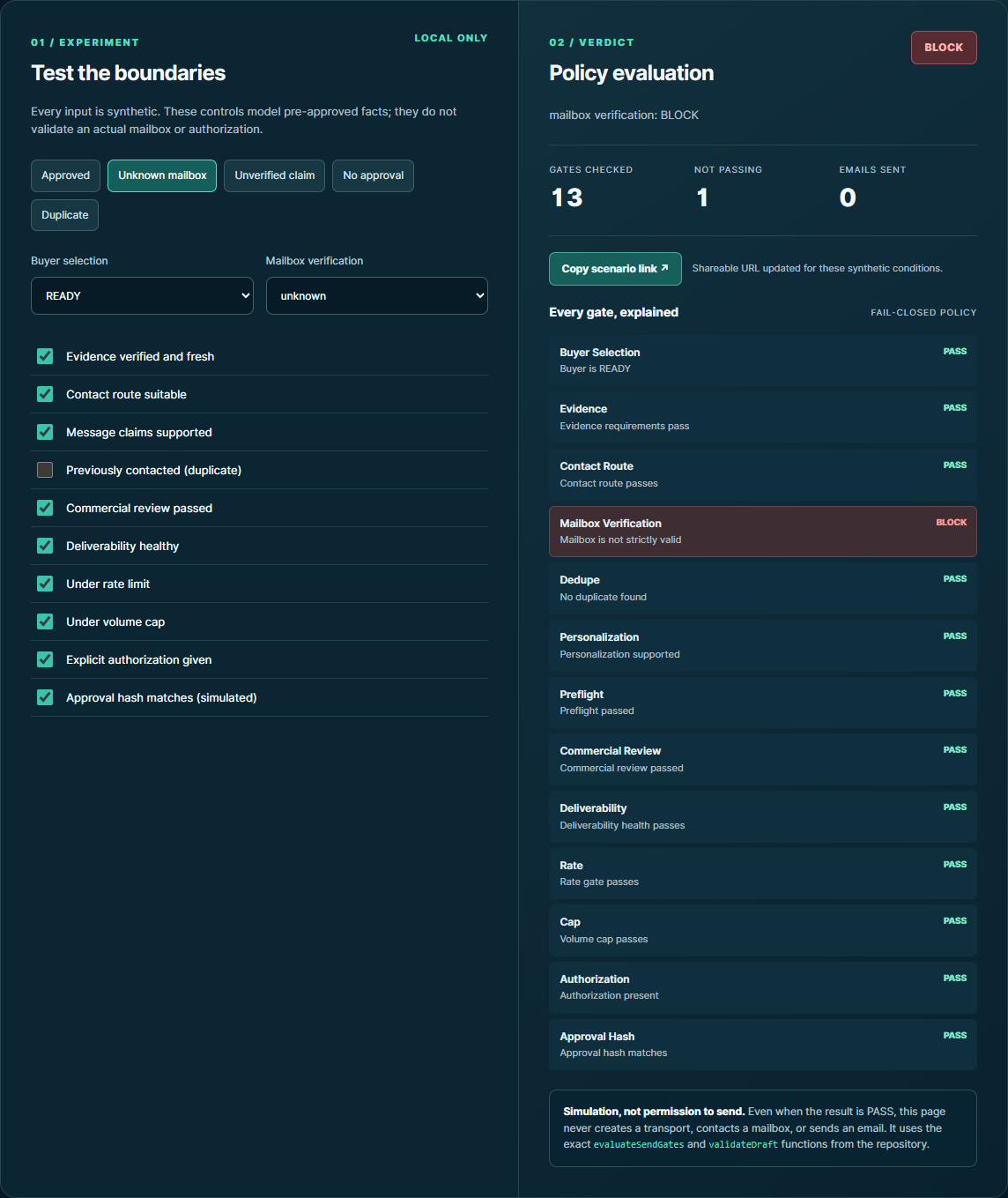
Screenshot from the real browser demo, with synthetic fixtures only.
Most AI outbound tools optimize for sending more. Outbound OS is built to know when not to send.
Start.
Check.
Send.
Those are operator intents, not bypass commands.
Every outbound action still has to pass Buyer Selection, evidence checks, mailbox verification, dedupe, factual preflight, commercial review, deliverability/rate controls, explicit authorization, and an exact approval hash.
Outbound OS is a free, MIT-licensed reference implementation of a decision-gated outbound workflow. It is inspired by the workflow used in the private Zoho MCP operation, but this repository contains no private campaign data, deal state, credentials, or Git history from that project.
Why this exists
A typical outbound stack asks: How do we send more?
Outbound OS starts earlier:
- Is this organization worth contacting?
- Is the evidence strong enough to justify outreach?
- Is the route and mailbox verified?
- Have we contacted the organization already?
- Is every personalized claim supportable?
- Is the exact message still the one that was reviewed and approved?
- Is deliverability healthy enough to send now?
- Did a human reply, making this a deal instead of a cold lead?
A failed hard gate means STOP.
One-command CLI demo — no global installation
Requires Node.js 22+ and npm. This installs the MIT-licensed release archive into npm's temporary cache (not the global package directory) and executes a synthetic comparison of an allowed and a blocked send:
npm exec --yes --package=https://github.com/RecepioHQ/outbound-os/releases/download/v0.2.1/outbound-os-0.2.1.tgz -- outbound-os demo --compare
This exact command was tested on Windows with Node.js 22/npm 10: it returned PASS for the allowed scenario, BLOCK for an unverified mailbox, blocked.transport_calls=0, and live_sent=false. It downloads the package over HTTPS; it does not connect to a real mailbox or transmit an email.
Prefer the live browser demo if you do not have Node.js installed.
Run as an installable CLI
Optional global install from the verified v0.2.1 release
Requirements: Node.js 22+ and npm. This downloads an MIT-licensed archive attached to the official v0.2.1 GitHub Release, not an npm-registry package.
npm install --global https://github.com/RecepioHQ/outbound-os/releases/download/v0.2.1/outbound-os-0.2.1.tgz
outbound-os demo --json
Verification: The published v0.2.1 GitHub Release and its attached archive were tested on Windows; the installed CLI passed its synthetic comparison. For integrity-sensitive use, verify the archive checksum against the release notes before installing.
No email is sent in the demo. Live sending remains off by default and every real send requires approved context and hard-gate checks.
Node.js 22+ and Git are required. The source is MIT licensed. No mailbox credentials, ChatGPT account, or API keys are needed for the offline demo.
Try from source (recommended first run)
git clone https://github.com/RecepioHQ/outbound-os.git
cd outbound-os
npm ci
node bin/outbound-os.js --help
node bin/outbound-os.js demo --json
Optional global command from a local package archive
npm pack
npm install --global ./outbound-os-0.2.1.tgz
outbound-os demo --json
The .tgz is built locally from the checked-out source and should be reviewed before installation. On Windows, use PowerShell with the same commands (or replace ./ with .\\). The archive-install path is verified on Windows with an isolated npm prefix. The project is not claiming publication on the npm registry.
Do not use npm install -g github:RecepioHQ/outbound-os as a recommended path: on one verified Windows/npm 10 installation it produced a dangling junction into npm's temporary Git clone. The packed archive avoids that observed issue.
The demo uses reserved example domains, a mock mailbox and a dry-run transport: no real emails are sent. For real operations, follow provider configuration and security requirements. The start, check and send commands still invoke the existing state, verification and hard-gate code; installing the CLI grants no permission to bypass them.
60-second demo
Compare a permitted dry run with a blocked attempt
The comparison uses real gate evaluation against synthetic fixtures and mock transports. One message satisfies the checks, while a second message has an unknown mailbox verification result and must be blocked before the transport is called.
# In a checkout of the latest source:
npm ci
node bin/outbound-os.js demo --compare
The output includes allowed.send_decision=PASS, blocked.send_decision=BLOCK, a reason from the mailbox_verification gate, and blocked.transport_calls=0. These are synthetic checks, not claims that any real mailbox was verified or any live email was sent.
Requirements: Node.js 22+.
npm install
npm test
npm run demo
The demo is entirely synthetic and makes no network calls. It walks through:
Synthetic buyer
      ↓
Buyer Selection → READY
      ↓
Verified evidence + mailbox + dedupe + review gates
      ↓
Dry-run send → SIMULATED (not a live send)
      ↓
Synthetic human reply
      ↓
Cold eligibility stops
      ↓
Deal Mode → engaged
Example output:
{
  "buyer_state": "READY",
  "send_decision": "PASS",
  "transport_status": "simulated",
  "live_sent": false,
  "cold_eligible_after_reply": false,
  "deal_stage": "engaged"
}
Architecture
flowchart TD
    A[Operator: CLI or ChatGPT/MCP] --> B{Intent}
    B -->|Start| C[Task / Skill Router]
    B -->|Check| D[Mailbox Reconciliation]
    B -->|Send| E[Hard Gate Engine]

    C --> F[Buyer Research]
    F --> G[Buyer Selection]
    G --> H[(Persistent State + Event Ledger)]

    D --> I[Reply / Delivery Classifier]
    I --> H
    I -->|Verified human reply| J[Deal Mode]
    J --> H

    E --> K[Evidence + Contact Route]
    K --> L[Mailbox Verification]
    L --> M[Dedupe]
    M --> N[Factual Preflight]
    N --> O[Commercial Review]
    O --> P[Deliverability / Rate / Cap]
    P --> Q[Authorization + Approval Hash]
    Q -->|PASS| R[Transport]
    R -->|default| S[Dry Run]
    R -->|explicit live opt-in| T[Zoho Adapter]
The model can recommend work, but it cannot override the mechanical gate engine beneath it.
Buyer Selection
The public engine evaluates four evidence-backed dimensions:
- Strategic fit — is there a credible reason the organization should care?
- Commercial-capacity evidence — is there attributable evidence that outreach is commercially justified?
- Decision access — is there a credible route to an appropriate decision maker or official channel?
- Trigger / timing evidence — is there a reason the outreach is timely?
Evidence is explicitly classified as VERIFIED, INFERRED, or UNKNOWN.
UNKNOWN never becomes a positive score just because the system needs more volume.
Results are READY, HOLD, or SKIP, with inspectable reasons.
Hard gates
The default send chain is fail-closed:
| Gate | Failure behavior |
|---|---|
| Buyer Selection | HOLD / BLOCK |
| Evidence quality | BLOCK |
| Contact route | BLOCK |
| Mailbox verification | BLOCK |
| Organization/contact dedupe | BLOCK |
| Factual personalization | BLOCK |
| Preflight | BLOCK |
| Commercial review | BLOCK |
| Deliverability health | BLOCK |
| Rate / volume cap | BLOCK |
| Explicit authorization | HOLD |
| Exact approval hash | BLOCK |
Strict mailbox verification passes only valid. invalid, catch_all, unknown, and error are blocked by default.
Changing the recipient, subject, plain-text body, or HTML after approval invalidates the approval hash.
See docs/hard-gates.md.
Persistent state — not chat memory
Operational state lives outside the conversation:
- append-only JSONL lifecycle ledger;
- derived JSON state projection written atomically;
- organization-level and contact-level dedupe;
- persistent Deal Mode state after a human reply.
By default runtime state is stored under state/, which is excluded from Git. You can override it with OUTBOUND_OS_DATA_DIR.
A new ChatGPT/MCP session can reload the same state instead of reconstructing a deal from conversational memory.
Deal Mode
A verified human reply removes the organization from cold eligibility and creates or updates a deal record containing fields such as:
- latest human reply;
- stage;
- verified facts;
- inferred context;
- unknowns;
- objections;
- pricing context;
- commitments;
- next justified action.
Time alone does not advance a deal stage.
See docs/deal-mode.md.
Skills
The repository separates task discipline instead of relying on one catch-all prompt:
buyer-research— attributable evidence, no invented authority/budget/intent;cold-outreach— verified facts plus all outbound gates;delivery-recovery— permanent-vs-temporary delivery handling;engaged-deal— human-reply workflow and deal context.
The skills guide behavior. They do not bypass the mechanical rules in code.
Zoho Mail adapter
Outbound OS includes a public-safe Zoho Mail adapter built against documented Zoho APIs.
It supports:
- OAuth refresh-token exchange;
- mailbox reads with limited retry on clearly transient read failures;
- conservative normalization of known-contact human replies, common auto-replies, permanent delivery failures, and temporary delays;
- exact approved-message sending;
- no blind retry after an ambiguous send mutation;
- post-send reconciliation by returned message ID.
Unmatched inbox mail is ignored rather than being promoted into a deal.
Live sending is disabled unless all required provider configuration is present and:
OUTBOUND_OS_LIVE_SEND=1
See .env.example and docs/provider-adapters.md.
ChatGPT / MCP
The optional chatgpt/ package exposes the same three intents as MCP tools:
startchecksend
The MCP server binds to 127.0.0.1 by default. That is intentional: mailbox reads expose private data, and sending email creates an irreversible external action.
cd chatgpt
npm install
npm start
For development, use MCP Inspector or a supported private/Secure MCP Tunnel workflow. A remote public MCP deployment must add a proper authentication/authorization boundary before exposing these tools.
chatgpt/plugin-template/ contains a portable Agent Plugins packaging example with an intentionally non-working .example MCP URL.
ChatGPT capabilities vary by plan, workspace, region, admin settings, and action type. Do not assume that ChatGPT Plus alone guarantees custom live write/send actions. The local CLI remains the universal fallback.
See chatgpt/README.md.
CLI
node src/cli.js start --json
node src/cli.js check --json
node src/cli.js send --json
node src/cli.js send --json --input path/to/prepared-send-context.json
--input accepts a prepared JSON context for any intent. send does not mean “send unconditionally”: with no prepared, approved context it fails closed, and the same hard gates run whether the caller is CLI or MCP. The synthetic demo is the easiest way to inspect a complete passing pipeline.
Free software and external costs
Outbound OS itself is MIT-licensed and this project does not charge a SaaS subscription, per-lead credit, or per-sequence fee.
That does not mean the complete operating environment is cost-free. Depending on your setup, you may still pay for:
- ChatGPT or another compatible operator environment;
- Zoho Mail or another mailbox provider;
- mailbox-verification services;
- hosting, OAuth, or other APIs you connect.
There are no claims of unlimited ChatGPT usage or guaranteed reply/revenue improvements.
Release security
Before publication, the project scans for:
- private-project filenames/directories;
- non-synthetic email addresses;
- credential/token/private-key patterns;
- secret-bearing environment files;
- private/internal URLs;
- long provider/message identifiers;
- local absolute user paths;
- private campaign names supplied through a local denylist;
- accidental pre-publication Git history.
Run the contributor scan with:
npm run scan:release
See SECURITY.md.
Current scope
This is a reference implementation, not a hosted multi-tenant SaaS and not a mass-mailing product.
v0.2.1 intentionally does not provide:
- autonomous background/scheduled sending;
- a hosted OAuth service for public multi-user MCP access;
- a built-in third-party mailbox-verification provider account;
- guarantees that every possible DSN/auto-reply format is classified;
- guaranteed replies, pipeline, revenue, or deliverability outcomes.
Use the hard gates as safeguards, not as a substitute for applicable law, provider terms, or responsible outreach practices.
Development
npm test
npm run demo
npm run scan:release
npm run manifest:release
See CONTRIBUTING.md.
License
MIT. See LICENSE.