CRM CSV Preflight (Sales List Rescue)
Detect-only CSV check before CRM import: duplicate, invalid and role emails, blanks, phones, dates.
Hosted MCP Server
npx add-mcp 'https://pureservices.store/mcp'Installs into Claude Code, Codex, Cursor and more
Documentation
CSV Preflight Checker
Check a CRM import file before it hits HubSpot, Salesforce, Pipedrive or Zoho. Drop a CSV and get an instant report on duplicate emails, role & invalid emails, blank required fields, phones not in + country code format, inconsistent country/state values, mixed date formats and encoding problems.
Privacy: the file is read by JavaScript on this page and never sent anywhere. No upload, no account, no tracking of file contents. You can disconnect from the internet after the page loads and it still works.
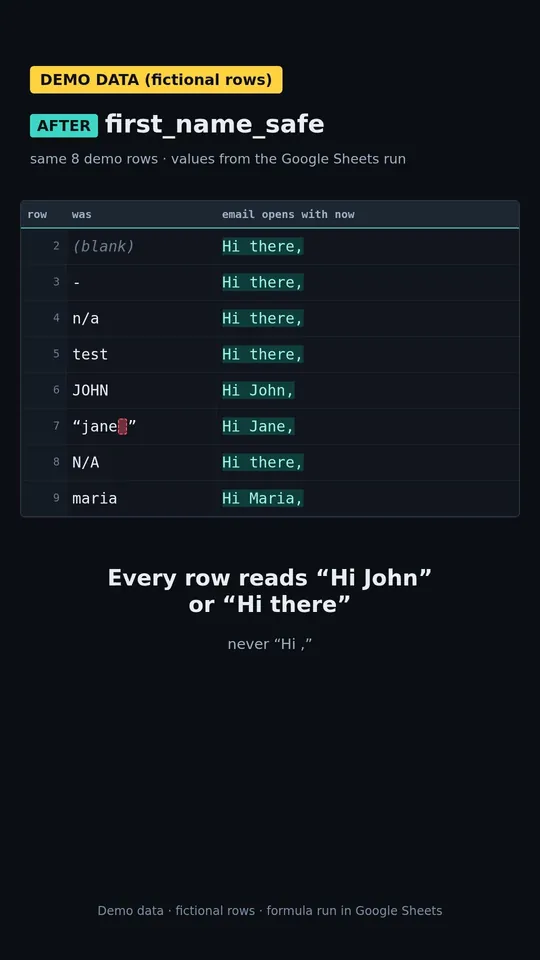
See the fix: blank first names turning into "Hi," in a mail merge (47s, demo data) The video loads from YouTube (privacy-enhanced mode) only after you press play. Watch on YouTube
Drop a CSV here or click to choose a file Tap to choose a CSV
.csv /.tsv /.txt · comma, semicolon, tab or pipe delimited · checked locally
Compare two lists
Pick list A and list B to see which rows are only in A, only in B, or in both. Both files are read in your browser; nothing is uploaded.
How rows are matched: on email first, ignoring spaces and letter case. A row with no email is matched only on exactly the same name, ignoring extra spaces and letter case; those rows are labelled “name match, review” because two different people can share a name. Nothing partial or approximate is matched. Duplicates inside one file are counted, not merged.
How it works
Pay
Pick the size that fits your list and check out on Stripe. Quick Clean is $25 for up to 200 rows.
Email us your CSV (reply to your receipt or send it to slrescue@mail.grokbot.com)
No CRM login, no call, no upload form.
Get it back: 24h (Quick Clean, up to 200 rows), 48h (Intro), 72h (Growth), 5 business days (Bulk)
A clean CSV plus a change log. Over 5,000 rows, the turnaround is scoped in your custom quote.
Use it from your AI assistant (MCP)
The same checks are available as a remote MCP server, so an AI assistant can run them for you. No login.
- Endpoint:
https://pureservices.store/mcp(Streamable HTTP) - Registry name:
store.pureservices/crm-csv-preflight preflight_csv: checks a contact or lead CSV passed as text and reports what it finds. Detection only: it changes nothing and returns no cleaned file.preflight_sample: runs the same checks on the built-in sample CSV (fake placeholder data), so you can see the report format without sending a file.- Limits: up to 500 data rows and 64 KiB of CSV per call.
Unlike this page, the MCP server receives the CSV text your assistant sends. It processes your CSV in memory and doesn't store or log it.
What the checker looks for
Duplicate emails
Case- and whitespace-insensitive matching, so Ana@Acme.com and ana@acme.com count as one contact. Most CRMs dedupe on email at import, so these rows either merge or get skipped.
Invalid & role emails
Syntax errors (missing @, spaces, double dots, no TLD) and shared inboxes like info@, sales@, support@, noreply@ that rarely belong to a person.
The free checker flags role addresses like info@ for you to review; the paid cleanup doesn't flag or remove them.
Blank required fields
You choose which columns are required. Whitespace-only cells and placeholders like N/A, null, - count as blank.
Phone format (+ country code)
A phone passes when it is written as +, country code and number, digits only, 7 to 15 digits (e.g. +14155550123). Also catches Excel scientific notation like 1.41555E+10.
Country / state drift
US, USA, United States in one column break picklists, routing and reports. Same for CA vs California.
Mixed dates & encoding
Columns mixing 2024-03-05, 03/05/2024 and 5 Mar 2024; broken characters like José; non-UTF-8 files, stray control characters and ragged rows.
See it on a Salesforce error: "Required fields are missing: [LastName]" means at least one row has a blank required column. The checker lists those rows with line numbers; it doesn't fill them for you.
SAMPLE DATA: the file in the video is fictitious. The video loads from YouTube (privacy-enhanced mode) only when you scroll to it. Not affiliated with Salesforce.
FAQ
Is my file uploaded?
No. The page uses the browser's FileReader API. Parsing and checks run on your device; nothing is sent to pureservices.store or anyone else.
Does it verify that emails exist?
No. It checks syntax and patterns only — it does not ping mail servers. Treat "valid syntax" as "worth importing", not "will deliver".
How big a file can it handle?
It depends on your device's memory; typical exports of tens of thousands of rows check in seconds on a laptop.
Does it fix the file?
It reports problems and gives fix steps. If you'd rather hand off the duplicates, the $25 Quick Clean (up to 200 rows, back within 24 hours) merges same-email duplicates, flags possible duplicates for your review, logs every change by row and returns your original file. Phone, country and role-email items stay in your report as fix steps. Want a written diagnosis first? See the $29 CRM Hygiene Scorecard, or the CSV cleanup service.
What if the cleaned file isn't right?
If the file isn't what we promised, we fix it once for free within 48 hours. If it still isn't right, you get your money back for the part we couldn't deliver. If we're late, you choose a full refund or a free rush job.
What happens to my data?
This checker reads your file in your browser and never uploads it. If you buy a cleanup, the file you email us is used only for your job and deleted after delivery on request (see Anonymous aggregate statistics). We never log in to your CRM.
Anonymous aggregate statistics. After a cleanup we keep a small record of counts about your file: rows in and out, duplicates merged, rows flagged for review, which fields were present, and the CRM you told us it's for. This record contains no contact data, names, emails, company names, domains, file names or cell values, and it isn't deleted when your file is deleted. We only publish these counts combined with at least 19 other lists (and at least 5 different customers), so no single customer can be identified. To opt out, reply 'opt out' to your delivery email and we'll delete your record.
Rather have us clean it?
Quick Clean: up to 200 rows back within 24 hours as a clean CSV plus a change log of every edit, with same-email duplicates merged, possible duplicates flagged, invalid, missing and personal emails flagged, ALL CAPS or all-lowercase names re-cased, US phones formatted and extra spaces trimmed. $25, and it credits toward a larger pack within 14 days.
What you get back
- Every change is logged with its original row number.
- Possible duplicates are flagged for your review, never blind-merged; same-email duplicates are merged and listed in the change log.
- Your original file is returned alongside the cleaned one.
Bigger list? Intro $99 (up to 500 rows, 48h), Growth $299 (501 to 2,000, 72h), Bulk $499 (2,001 to 5,000, 5 business days).
Your $25 Quick Clean counts toward any bigger cleanup within 14 days.
Quick Clean, Intro, Growth and Bulk: If the file isn't what we promised, we fix it once for free within 48 hours. If it still isn't right, you get your money back for the part we couldn't deliver. If we're late, you choose a full refund or a free rush job.