Process Street MCP Server
officialProcess Street MCP Server. Connect AI agents to workflows, tasks, runs, datasets, and form fields via a hosted OAuth endpoint. Trigger compliance checklists, complete approvals, and pull audit-grade operational data. Works with Claude, Cursor, ChatGPT, Windsurf, Cline, and any MCP-compatible client. SOC 2, HIPAA, GDPR.
What can you do with Process Street MCP?
- Create and assign workflow runs — Ask your assistant to start a new run of a workflow and assign it to a specific person.
- Analyze workflow bottlenecks — Find recent workflow runs and identify where incomplete tasks are causing delays.
- Search and update data set records — Query records like active vendors and mark them for review based on criteria.
- Generate reports and summaries — Pull Process Street data and have your assistant produce concise summaries or reports.
- Manage tasks and runs — Create, update, and assign tasks and workflow runs directly from your AI chat.
Hosted MCP Server
npx add-mcp 'https://mcp.process.st'Installs into Claude Code, Codex, Cursor and more
Documentation
Using Process Street’s MCP Server
OK: Other clients section
Process Street offers a Model Context Protocol (MCP) server, accessible via app integration, which allows AI assistants and other applications to access your workflows, workflow runs, tasks, users, and data sets from outside the Process Street platform.
This server provides a way to interact with your Process Street organization through various AI platforms and tools that support MCP.
Most MCP clients can connect automatically using Dynamic Client Registration (DCR), so no client ID or secret is required. Clients that don’t support DCR can still connect using a Process Street API key.
With this server, Process Street customers can:
- Access Process Street data from compatible AI applications
- Create and manage workflows runs & assign tasks
- Generate reports and summaries based on Process Street data
- Analyze Process Street data and get AI-powered suggestions
Example requests users could make from outside Process Street using the MCP:
- “Create a new run of the Quarterly Access Review workflow and assign it to the compliance manager [[email protected]], if it’s not already been assigned to someone”
- “Find the most recent Client Onboarding workflow runs and show me where there are bottlenecks from incomplete tasks”
- “Search Data Set records for active vendors and, if they haven’t been reviewed in the past 6 months, mark them as Review”
The MCP server supports most Process Street API endpoints as tools.
The MCP server uses your Process Street login credentials to access it, including organizations with SAML SSO enabled.
Admins, Builders and Users can use the MCP server and can only interact with resources they have permissions to.
Requirements
A compatible MCP client, including:
- Claude (claude.ai)
- ChatGPT (Business, Enterprise, and Edu plans for full access; Pro plans are limited to read-only actions)
- Microsoft Copilot Studio
- VS Code
- Cursor
- Claude Code
- Gemini CLI
- Or any other application that has implemented an MCP client
How to set up the MCP
Claude
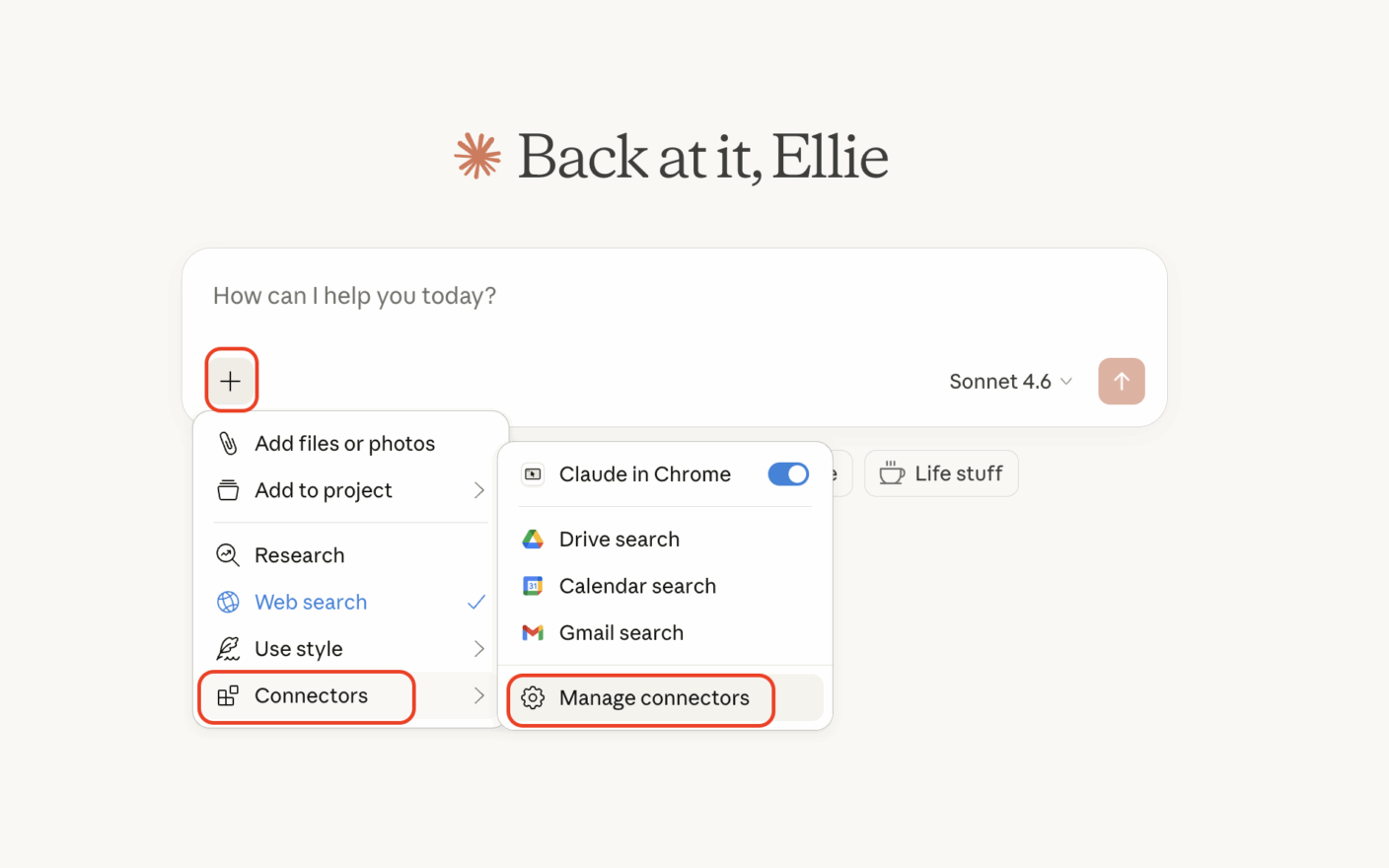
- Log in to Process Street (If you are part of more than one organization, be sure to switch to the one you’d like to connect the MCP with)
- Log in to Claude
- Click the + button in your chat
- Select Connectors, then select Manage connectors
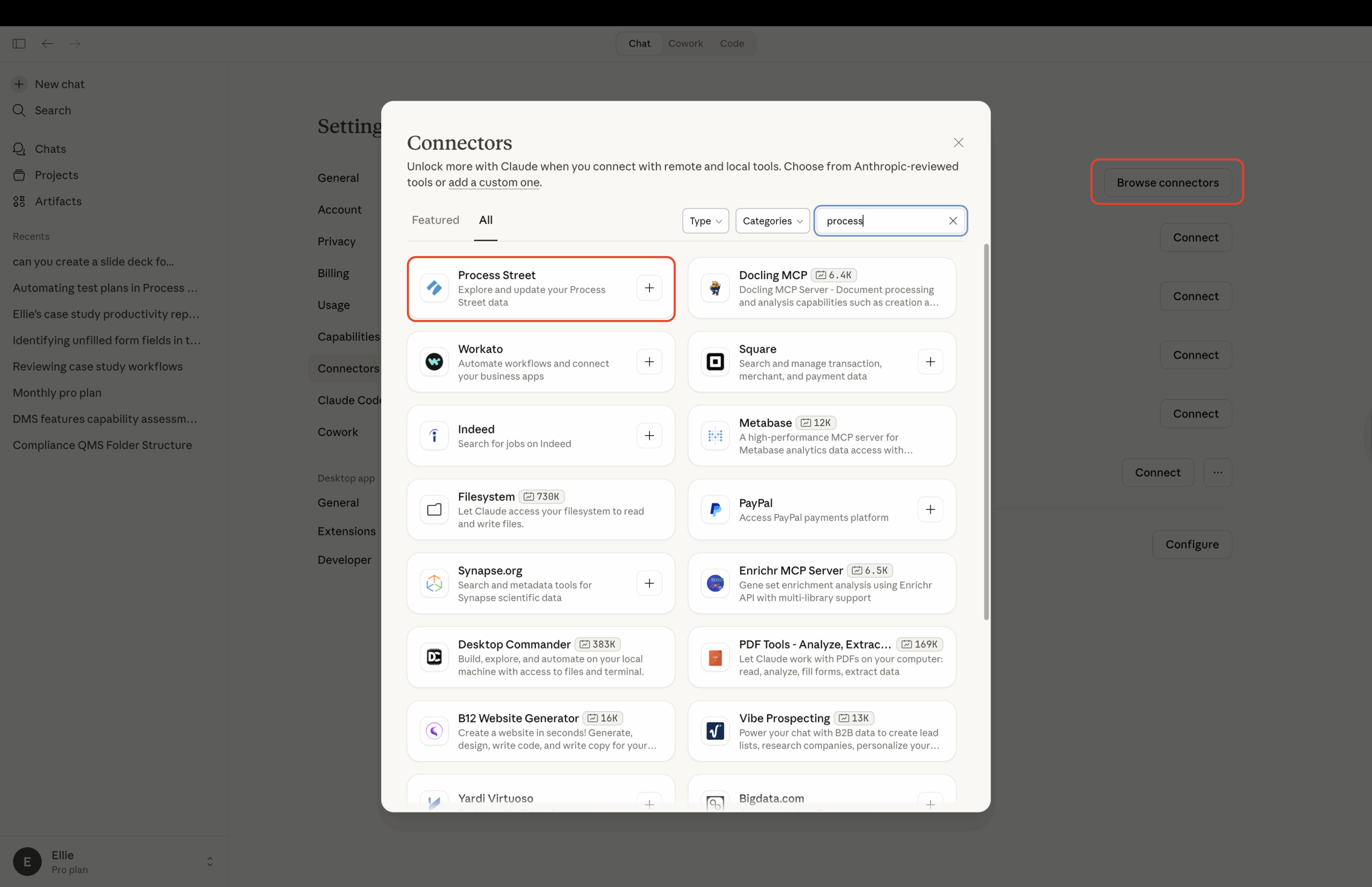
- Select Browse Connectors, then type Process Street into the search box
- Click the + button to sign in with your Process Street credentials
- Authorize the app and open Claude to finish
ChatGPT
Note: ChatGPT Business, Enterprise, and Edu plans support full MCP access, including creating runs and updating tasks. Pro plans can connect with read-only access. On Business plans, only workspace admins and owners can add custom apps. On ChatGPT Enterprise and Edu, your ChatGPT admin may need to give you developer mode access first.
- Log in to Process Street (if you are part of more than one organization, switch to the one you’d like to connect the MCP with)
- In ChatGPT, go to Settings → Apps → Advanced settings and turn on Developer mode
- Go to Settings → Apps → Create and enter the Process Street MCP server URL:
https://mcp.process.st/ - Set authentication to OAuth and leave the registration method on Dynamic Client Registration. You don’t need a client ID or secret.
- Click Scan Tools, then sign in with your Process Street credentials and approve access
- Click Create. Process Street appears under Enabled Apps, and its tools are available in your ChatGPT conversations.
Tip: ChatGPT usually asks you to confirm before running actions that modify data in Process Street (such as creating runs or updating tasks). Read-only actions like viewing workflows or pulling reports usually run without a confirmation prompt. Exact behavior depends on your ChatGPT app permissions.
Microsoft Copilot Studio
- Log in to Process Street (If you are part of more than one organization, be sure to switch to the one you’d like to connect the MCP with)
- Log in to Copilot Studio
- Create an Agent
- Add a tool, select Model Context Protocol and search for Process Street MCP Server
- Create a new connection
- Complete authentication
- Publish your Agent
- Connect the channels you’d like to connect the MCP with
Authorizing access
Each time you connect an MCP client (through Claude, ChatGPT, or Copilot Studio), Process Street displays an authorization screen. This screen shows the name of the application requesting access, the permissions (scopes) it needs, and the redirect URI, so you can confirm you recognize the application before granting access.
Click Approve to grant the application access to your Process Street data, or Cancel to deny the request. Canceling returns you to the connecting application without granting access.
Reviewing and disconnecting connected applications
After authorizing an application, you can review and manage all your connected applications from your personal settings.
- Click your avatar or profile photo in the top-right corner, then select My Profile
- Click the Apps tab
The Apps tab lists every OAuth-connected application across all organizations you belong to. Each row shows the application’s name, its redirect destination, the permissions (scopes) it has, and when it was connected and last active.
The redirect destination appears directly below the application’s name and tells you where the application sends you after authentication. Web-based applications show their registered domain (for example, “claude.ai”), while local applications show “An app on your computer.” If an application has multiple destinations, they appear on one line separated by commas. This helps you tell apart applications that share the same display name — a legitimate client shows a domain you recognize, while an unrecognized domain is a sign to disconnect it.
To disconnect an application, click Disconnect next to it, then confirm in the dialog. Once disconnected, the application can no longer obtain new access tokens. Any access it already has through previously issued tokens may remain valid for up to one hour.
If no applications have been authorized yet, the tab shows an empty state.
Connected applications that have not been active for 90 days are automatically disabled. When this happens, the application’s registration is removed and it disappears from the Apps tab — no manual disconnection needed. If you want to use that application again, reconnect it through the normal setup flow (DCR-supporting clients re-register automatically). This keeps your Apps list current without requiring you to prune old connections yourself.
Other clients
Process Street’s MCP server works with any application that supports the Model Context Protocol.
Connect with Dynamic Client Registration (recommended)
If your client supports OAuth with Dynamic Client Registration, point it to the MCP server URL and the client handles registration automatically:
- Add
https://mcp.process.st/as a remote MCP server in your client - When prompted for a registration method, choose Dynamic Client Registration (usually the default)
- Leave the client ID and client secret empty
- Sign in with your Process Street credentials and approve access
This method works with VS Code, Cursor, Claude Code, Gemini CLI, and most other modern MCP clients.
Note: Some clients, such as Gemini Enterprise, don’t support DCR and require the API key method below instead.
Connect with an API key
For clients that don’t support OAuth or DCR, add Process Street as a remote MCP server and authenticate with a bearer token, using a Process Street API key as the token.
You’ll need two things:
- The MCP server URL:
https://mcp.process.st/ - A Process Street API key. Admins can generate one from the integrations page in the organization manager. See Process Street API for details, and Restricted API keys if you want to limit what the key can do.
Then add an Authorization: Bearer YOUR_API_KEY header to your client’s MCP configuration. Two common examples follow. Treat your API key like a password.
VS Code
Tip: VS Code supports Dynamic Client Registration. Instead of the API key configuration below, add Process Street as a remote MCP server, choose Dynamic Client Registration when prompted, and leave the client ID and secret empty. VS Code handles the OAuth flow automatically.
If you prefer to connect with an API key, add the server to .vscode/mcp.json in your workspace, or open your user configuration with the MCP: Open User Configuration command. Using an input keeps the key out of the file: VS Code prompts for it once and stores it securely.
{
  "servers": {
    "process-street": {
      "type": "http",
      "url": "https://mcp.process.st/",
      "headers": {
        "Authorization": "Bearer ${input:ps-api-key}"
      }
    }
  },
  "inputs": [
    {
      "id": "ps-api-key",
      "type": "promptString",
      "description": "Process Street API key",
      "password": true
    }
  ]
}
Cursor
Tip: Cursor supports Dynamic Client Registration. Instead of the API key configuration below, add Process Street as a remote MCP server, choose Dynamic Client Registration when prompted, and leave the client ID and secret empty.
If you prefer to connect with an API key, add the server to ~/.cursor/mcp.json (available in every project) or .cursor/mcp.json (for a single project), then replace YOUR_API_KEY with your Process Street API key.
{
  "mcpServers": {
    "process-street": {
      "url": "https://mcp.process.st/",
      "headers": {
        "Authorization": "Bearer YOUR_API_KEY"
      }
    }
  }
}
The same pattern, a remote MCP server with an Authorization: Bearer header, works for any other MCP client that supports remote servers but not Dynamic Client Registration.
If you’re using an MCP client that we don’t already support and need a hand, reach out to our support team.
- Learn the 5 stages of process building in our Getting started guide
- Watch helpful videos and webinars on our YouTube channel
- Learn about Process AI
- Collect info with Forms
- Organize data with Data Sets
- Document information and policies with Pages
- Get inspired by our Blog
Jump to section
Discover Process Street
Use Process Street to make your team processes fun, fast and faultless. We'll help you transform your team's static checklists into powerful interactive workflows!
Learn more about Process Street
[
YouTube videos
Deep dive into Process Street with our YouTube video series.
](https://www.youtube.com/channel/UCzQ7wReQLxZV-NndyXByfwQ "Process Street YouTube channel")[
Join a webinar
Effectively record, replicate, and replace your workflow!
](https://us02web.zoom.us/webinar/register/WN_NcqMImSlRCy5B4dv8Vig6Q "Join a webinar")[
See latest releases
Catch up on the latest releases and enhancements.
](https://www.process.st/help/blog/ "See latest releases")[
Join the community
Share with others about how you are using the app day to day.
](https://community.process.st/ "Join the community")