Pluga
Connect your AI Agents to automation workflows as if by magic
Documentation

Pluga Features
MCP Trigger apps automatically just by talking to your AI
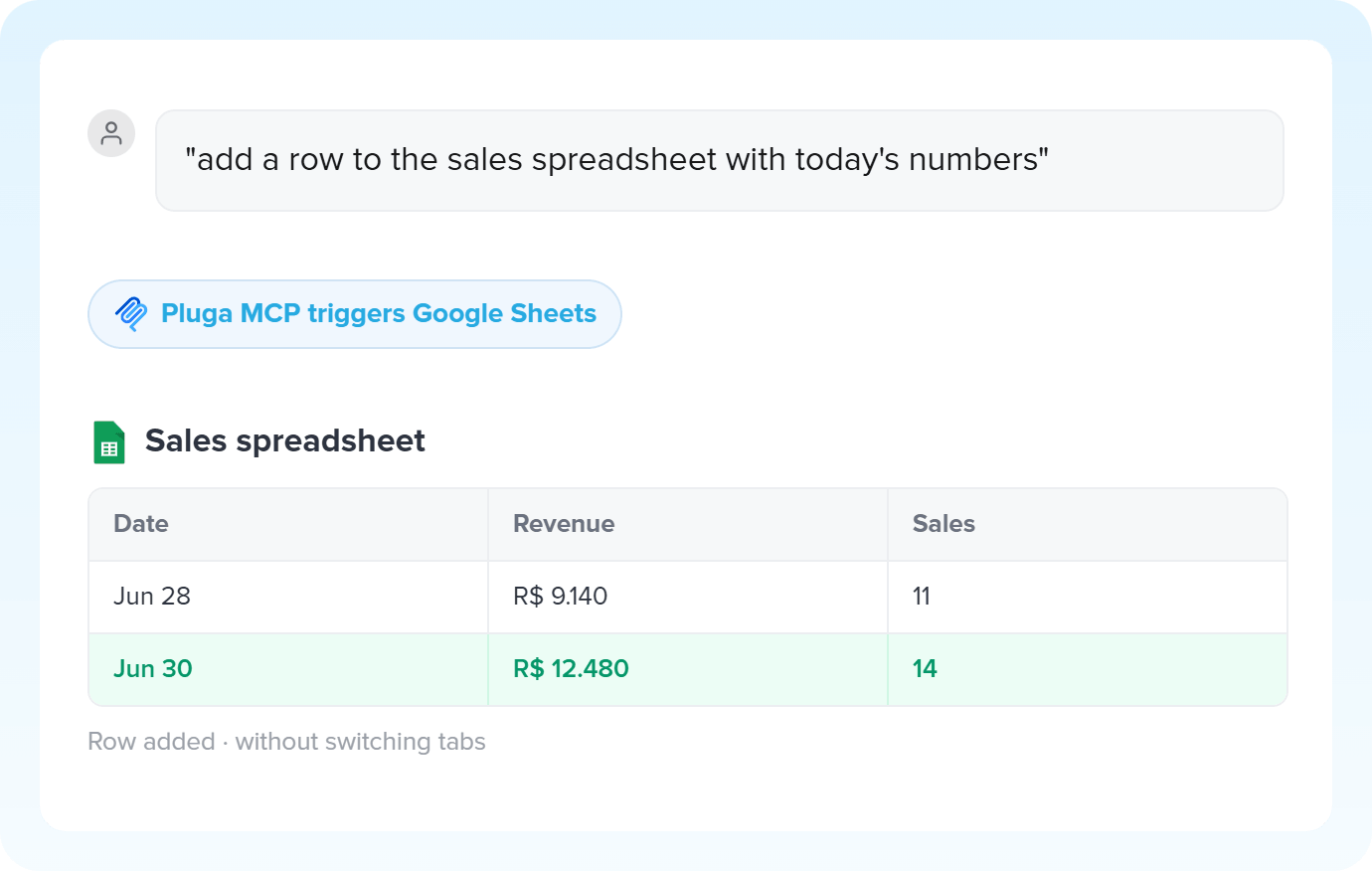
MCP connects ChatGPT, Claude, and other AI assistants to your Pluga apps. Retrieve data and perform actions across your connected tools directly from your conversation using natural language.
1. Trigger MCP

2. Action Google Sheets
Start in minutes
Ready-made templates with MCP
Pre-configured flows with MCP, ready to activate in a few clicks.
PREMIUM Retrieve supplier information with AI via MCP and update the supplier record in BlingAutomate PREMIUM
 Ask AI to summarize a prospect informations and create a lead in Kommo with the full context using MCPAutomate PREMIUM
 Ask AI to evaluate a prospect and create an opportunity directly in Omie CRM via MCPAutomate PREMIUM
 Ask AI to generate a daily summary and send it to your team via Telegram Bot using MCPAutomate PREMIUM Ask AI to retrieve information from rows in Google Sheets using MCPAutomate
MCP in practice
How different teams use MCP in everyday automations.
-
Start the day with a briefing ready to goProductivity
Ask AI to open your calendar, read your emails, and check the deals that moved forward in the CRM. In a few seconds, you get a prioritized summary of your day, with no need to open five tabs. Automate my daily briefing
-
Multiple apps, a single promptOperations
Checking stock, updating a record in the ERP, notifying the team: you describe it all in a single command and Pluga's MCP triggers each app in sequence - all in natural language. Run actions with MCP
-
Customer context straight in the AISupport
A customer reaches out and you ask AI to pull their purchase history and order status. MCP queries everything across the connected apps and already logs the ticket with the full context. Resolve tickets with MCP
-
Bugs and tasks loggedEngineering
The MCP URL is unique. You can create different automations behind it, each with its own destination app, and choose which action to trigger right from the chat with your AI. Create tasks with Pluga MCP
All automations with MCP

RD Station CRM
Google Sheets

HubSpot

Pipedrive

PipeRun

Agendor
Omie CRM

ActiveCampaign

Google Docs
Kommo

RD Station Marketing

NectarCRM

Gmail

Moskit CRM

Whapi

Nibo

Olist

MemberKit

Trello

Omie ERP

Ramper Marketing

Ramper Pipeline

Zendesk
Telegram Bot

Z-API

Evolution API

flwchat

Notion

ClickUp

monday.com

Excel

Microsoft Outlook

Slack

Microsoft Teams

WhatsApp Business API

Bitrix24
Bling

Blip

E-goi

Google Contacts

Intercom

Leadlovers

Mailchimp

Manychat

Mautic

Meets

Asaas

Ploomes

Hotmart

Conta Azul

Pipefy

Vindi Recorrência

iugu

Airtable

Webhooks

Twilio

Adobe Commerce 2.X (Magento)

Sympla

WooCommerce

Loja Integrada

Pagar.me

Superlógica Assinaturas

Todoist

Reportei

Shopify

Clicksign

Mercado Pago

SendGrid

Adobe Commerce 1.X (Magento)

vhsys

Squarespace

Discord

Bom Controle

Jira Software Cloud

Asana

Facebook Custom Audiences

Google Calendar

Webflow

Zenvia Canais

ZapSign

PayPal

PagBank

Nuvemshop (Tiendanube)

Yampi

Kiwify

Eventbrite

Stripe

Vindi Pagamentos

JivoChat

Typeform

Granatum Financeiro

Google Forms

Tally

Gravity Forms

Calendly

Facebook Lead Ads

RD Station CRM (legado)

Zoho CRM

Eduzz

Linkedin Lead Ads

eNotas

Mandrill

Jotform

TikTok Ads

NFe.io

Google Lead Form

Mercado Livre

Google Drive

Kobana

ChatGPT

Instagram Business

Google Gemini

Supabase

Bkper

Lovable

Facebook Pages

Claude (Anthropic)

Agendador

Kit de IA

SendPulse

Code

Loop

Agentes de IA

Roteador

Classificação por IA

HTTP Request

Extração por IA

Resumo por IA

Delay

Facebook Ads Insights

Formatador

Interruptor
Tradução por IA

Guru

Mercos
Trusted by over 10.000 companies










Possibilities with MCP on Pluga
Available triggers with MCP
The trigger is the event on MCP that automatically starts the flow on Pluga, firing one or more actions.
Triggers This is the activity that happens in the source app which will trigger an action in the destination apps.Actions This is the task performed in the destination app. However, there are no actions available with MCP to automate.
Premium Trigger
New MCP tool call
New MCP tool call on Pluga MCP
When you need it
- Trigger any connected app without leaving your conversation with AI
- Turn a natural language instruction into a structured action
- Use data generated by AI as input for your automation
- Connect your AI agent to the apps integrated with Pluga
Combines well with
+2
See info Information from MCP that can be used and sent to other apps.
AI generated data
How it works
How to integrate with MCP
1. Trigger MCP New MCP tool call
2. Action Target app Perform an action…
Works even better with
Boost MCP with other workflow features
Combine multiple resources to build even smarter workflows with MCP.
Formatador
The Formatter standardizes dates, numbers, and text as they pass through your automation, formatting everything automatically. Data leaves one app and arrives in the next in the expected format.
Roteador
The Router lets you create conditional paths within a single workflow. You define the criteria, and Pluga routes the execution to the right path based on the captured data.
Webhooks
Webhooks bridge the systems you use, including those that aren’t yet available in Pluga’s app library. They send and receive data through a unique URL using POST, GET, PUT, PATCH, and DELETE requests.
Frequently Asked Questions
Everything you need to know to get started with MCP on Pluga.
-
What is MCP and what is it for?
MCP is a feature that connects your favorite AI assistant (like ChatGPT, Claude or Gemini) directly to Pluga's integration catalog. It lets you trigger apps and run tasks using just natural language, right from your AI's chat window, with no need to switch tabs.
-
Does MCP work as a Trigger or an Action in my automation?
MCP works exclusively as a Trigger (New MCP tool call). It's always the source of your flow: the event starts when you give a command in the AI chat, and Pluga takes care of running the Action on the destination app you chose (like Google Sheets or Trello).
-
How does data from the conversation fill in the correct fields on the destination app?
When setting up your automation on Pluga, you do the mapping, saying where each piece of information should go. The data comes straight from the AI's response. So the more context and detail you provide in your chat command, the more accurate the information sent to your app will be.
-
Do I need to know how to code to use MCP with my AI?
No! The big advantage is that you turn everyday loose instructions into structured processes with no code required. Pluga offers ready-made templates you can activate in a few clicks.
-
Can I create more than one automation using the same chat?
Yes. The URL generated by MCP is unique, which means you can create different automations running behind it. During the conversation with your AI, you decide which action to trigger based on the command you write.
-
Which apps can I trigger by talking to AI?
You can connect MCP to more than 136 apps available in Pluga's hub.
Ready to automate with MCP? Join +10 thousand companies

{"@context":"https://schema.org","@graph":[{"@type":"BreadcrumbList","itemListElement":[{"@type":"ListItem","position":1,"name":"Pluga","item":"https://pluga.co/"},{"@type":"ListItem","position":2,"name":"Apps","item":"https://pluga.co/en/apps/"},{"@type":"ListItem","position":3,"name":"MCP","item":"https://pluga.co/en/apps/pluga-mcp/integration/"}]},{"@type":"SoftwareApplication","name":"MCP","applicationCategory":"BusinessApplication","applicationSubCategory":"developertools","operatingSystem":"Web","description":"MCP connects ChatGPT, Claude, and other AI assistants to your Pluga apps. Retrieve data and perform actions across your connected tools directly from your conversation using natural language.","url":"https://pluga.co/en/apps/pluga-mcp/integration/","image":"https://assets.pluga.co/apps/icons/pluga_mcp/pluga_mcp-icon.svg","offers":{"@type":"Offer","price":"0","priceCurrency":"USD","description":"Integrate MCP with over 136 apps using Pluga","url":"https://pluga.co/en/apps/pluga-mcp/integration/","seller":{"@id":"https://pluga.co/#organization"}},"featureList":["Trigger: New MCP tool call"],"isPartOf":{"@id":"https://pluga.co/#software"}},{"@type":"SoftwareApplication","@id":"https://pluga.co/#software","name":"Pluga","url":"https://pluga.co/"},{"@type":"Service","name":"MCP Integration via Pluga","description":"Automate your processes by connecting MCP to over 136 apps without code. Create triggers, actions, and automated flows without developers.","url":"https://pluga.co/en/apps/pluga-mcp/integration/","serviceType":"Software Integration and Automation","category":"Automation Software","areaServed":{"@type":"Country","name":"Brazil"},"provider":{"@id":"https://pluga.co/#organization"},"offers":{"@type":"Offer","price":"0","priceCurrency":"USD","description":"Free plan available. Paid plans starting at $17/month.","url":"https://pluga.co/en/pricing/"},"hasOfferCatalog":{"@type":"OfferCatalog","name":"Automations with MCP","numberOfItems":136}},{"@type":"FAQPage","mainEntity":[{"@type":"Question","name":"What is MCP and what is it for?","acceptedAnswer":{"@type":"Answer","text":"MCP is a feature that connects your favorite AI assistant (like ChatGPT, Claude or Gemini) directly to Pluga's integration catalog. It lets you trigger apps and run tasks using just natural language, right from your AI's chat window, with no need to switch tabs."}},{"@type":"Question","name":"Does MCP work as a Trigger or an Action in my automation?","acceptedAnswer":{"@type":"Answer","text":"MCP works exclusively as a Trigger (New MCP tool call). It's always the source of your flow: the event starts when you give a command in the AI chat, and Pluga takes care of running the Action on the destination app you chose (like Google Sheets or Trello)."}},{"@type":"Question","name":"How does data from the conversation fill in the correct fields on the destination app?","acceptedAnswer":{"@type":"Answer","text":"When setting up your automation on Pluga, you do the mapping, saying where each piece of information should go. The data comes straight from the AI's response. So the more context and detail you provide in your chat command, the more accurate the information sent to your app will be."}},{"@type":"Question","name":"Do I need to know how to code to use MCP with my AI?","acceptedAnswer":{"@type":"Answer","text":"No! The big advantage is that you turn everyday loose instructions into structured processes with no code required. Pluga offers ready-made templates you can activate in a few clicks."}},{"@type":"Question","name":"Can I create more than one automation using the same chat?","acceptedAnswer":{"@type":"Answer","text":"Yes. The URL generated by MCP is unique, which means you can create different automations running behind it. During the conversation with your AI, you decide which action to trigger based on the command you write."}},{"@type":"Question","name":"Which apps can I trigger by talking to AI?","acceptedAnswer":{"@type":"Answer","text":"You can connect MCP to more than 136 apps available in Pluga's hub."}}]},{"@type":"ItemList","name":"Apps that integrate with MCP on Pluga","description":"List of apps that integrate with MCP via Pluga with ready-to-use automations","url":"https://pluga.co/en/apps/pluga-mcp/integration/","numberOfItems":46,"itemListElement":[{"@type":"ListItem","position":1,"name":"Integration MCP + RD Station CRM","url":"https://pluga.co/en/apps/pluga-mcp/integration/rd-station-crm/"},{"@type":"ListItem","position":2,"name":"Integration MCP + Google Sheets","url":"https://pluga.co/en/apps/pluga-mcp/integration/google-sheets/"},{"@type":"ListItem","position":3,"name":"Integration MCP + HubSpot","url":"https://pluga.co/en/apps/pluga-mcp/integration/hubspot-crm/"},{"@type":"ListItem","position":4,"name":"Integration MCP + Pipedrive","url":"https://pluga.co/en/apps/pluga-mcp/integration/pipedrive/"},{"@type":"ListItem","position":5,"name":"Integration MCP + PipeRun","url":"https://pluga.co/en/apps/pluga-mcp/integration/piperun/"},{"@type":"ListItem","position":6,"name":"Integration MCP + Agendor","url":"https://pluga.co/en/apps/pluga-mcp/integration/agendor/"},{"@type":"ListItem","position":7,"name":"Integration MCP + Omie CRM","url":"https://pluga.co/en/apps/pluga-mcp/integration/omie-crm/"},{"@type":"ListItem","position":8,"name":"Integration MCP + ActiveCampaign","url":"https://pluga.co/en/apps/pluga-mcp/integration/active-campaign/"},{"@type":"ListItem","position":9,"name":"Integration MCP + Google Docs","url":"https://pluga.co/en/apps/pluga-mcp/integration/google-docs/"},{"@type":"ListItem","position":10,"name":"Integration MCP + Kommo","url":"https://pluga.co/en/apps/pluga-mcp/integration/kommo/"},{"@type":"ListItem","position":11,"name":"Integration MCP + RD Station Marketing","url":"https://pluga.co/en/apps/pluga-mcp/integration/rd-station/"},{"@type":"ListItem","position":12,"name":"Integration MCP + NectarCRM","url":"https://pluga.co/en/apps/pluga-mcp/integration/nectar-crm/"},{"@type":"ListItem","position":13,"name":"Integration MCP + Gmail","url":"https://pluga.co/en/apps/pluga-mcp/integration/gmail/"},{"@type":"ListItem","position":14,"name":"Integration MCP + Moskit CRM","url":"https://pluga.co/en/apps/pluga-mcp/integration/moskit/"},{"@type":"ListItem","position":15,"name":"Integration MCP + Whapi","url":"https://pluga.co/en/apps/pluga-mcp/integration/whapi/"},{"@type":"ListItem","position":16,"name":"Integration MCP + Nibo","url":"https://pluga.co/en/apps/pluga-mcp/integration/nibo/"},{"@type":"ListItem","position":17,"name":"Integration MCP + Olist","url":"https://pluga.co/en/apps/pluga-mcp/integration/tinyerp/"},{"@type":"ListItem","position":18,"name":"Integration MCP + MemberKit","url":"https://pluga.co/en/apps/pluga-mcp/integration/memberkit/"},{"@type":"ListItem","position":19,"name":"Integration MCP + Trello","url":"https://pluga.co/en/apps/pluga-mcp/integration/trello/"},{"@type":"ListItem","position":20,"name":"Integration MCP + Omie ERP","url":"https://pluga.co/en/apps/pluga-mcp/integration/omie/"},{"@type":"ListItem","position":21,"name":"Integration MCP + Ramper Marketing","url":"https://pluga.co/en/apps/pluga-mcp/integration/lahar/"},{"@type":"ListItem","position":22,"name":"Integration MCP + Ramper Pipeline","url":"https://pluga.co/en/apps/pluga-mcp/integration/linkseller/"},{"@type":"ListItem","position":23,"name":"Integration MCP + Zendesk","url":"https://pluga.co/en/apps/pluga-mcp/integration/zendesk/"},{"@type":"ListItem","position":24,"name":"Integration MCP + Telegram Bot","url":"https://pluga.co/en/apps/pluga-mcp/integration/telegram-bot/"},{"@type":"ListItem","position":25,"name":"Integration MCP + Z-API","url":"https://pluga.co/en/apps/pluga-mcp/integration/z-api/"},{"@type":"ListItem","position":26,"name":"Integration MCP + Evolution API","url":"https://pluga.co/en/apps/pluga-mcp/integration/evolution-api/"},{"@type":"ListItem","position":27,"name":"Integration MCP + flwchat","url":"https://pluga.co/en/apps/pluga-mcp/integration/flwchat/"},{"@type":"ListItem","position":28,"name":"Integration MCP + Notion","url":"https://pluga.co/en/apps/pluga-mcp/integration/notion/"},{"@type":"ListItem","position":29,"name":"Integration MCP + ClickUp","url":"https://pluga.co/en/apps/pluga-mcp/integration/clickup/"},{"@type":"ListItem","position":30,"name":"Integration MCP + monday.com","url":"https://pluga.co/en/apps/pluga-mcp/integration/monday-com/"},{"@type":"ListItem","position":31,"name":"Integration MCP + Excel","url":"https://pluga.co/en/apps/pluga-mcp/integration/excel/"},{"@type":"ListItem","position":32,"name":"Integration MCP + Microsoft Outlook","url":"https://pluga.co/en/apps/pluga-mcp/integration/outlook/"},{"@type":"ListItem","position":33,"name":"Integration MCP + Slack","url":"https://pluga.co/en/apps/pluga-mcp/integration/slack/"},{"@type":"ListItem","position":34,"name":"Integration MCP + Microsoft Teams","url":"https://pluga.co/en/apps/pluga-mcp/integration/microsoft-teams/"},{"@type":"ListItem","position":35,"name":"Integration MCP + WhatsApp Business API","url":"https://pluga.co/en/apps/pluga-mcp/integration/whatsapp-business/"},{"@type":"ListItem","position":36,"name":"Integration MCP + Bitrix24","url":"https://pluga.co/en/apps/pluga-mcp/integration/bitrix24/"},{"@type":"ListItem","position":37,"name":"Integration MCP + Bling","url":"https://pluga.co/en/apps/pluga-mcp/integration/bling/"},{"@type":"ListItem","position":38,"name":"Integration MCP + Blip","url":"https://pluga.co/en/apps/pluga-mcp/integration/blip/"},{"@type":"ListItem","position":39,"name":"Integration MCP + E-goi","url":"https://pluga.co/en/apps/pluga-mcp/integration/egoi/"},{"@type":"ListItem","position":40,"name":"Integration MCP + Google Contacts","url":"https://pluga.co/en/apps/pluga-mcp/integration/google-contacts/"},{"@type":"ListItem","position":41,"name":"Integration MCP + Intercom","url":"https://pluga.co/en/apps/pluga-mcp/integration/intercom/"},{"@type":"ListItem","position":42,"name":"Integration MCP + Leadlovers","url":"https://pluga.co/en/apps/pluga-mcp/integration/leadlovers/"},{"@type":"ListItem","position":43,"name":"Integration MCP + Mailchimp","url":"https://pluga.co/en/apps/pluga-mcp/integration/mailchimp/"},{"@type":"ListItem","position":44,"name":"Integration MCP + Manychat","url":"https://pluga.co/en/apps/pluga-mcp/integration/manychat/"},{"@type":"ListItem","position":45,"name":"Integration MCP + Mautic","url":"https://pluga.co/en/apps/pluga-mcp/integration/mautic/"},{"@type":"ListItem","position":46,"name":"Integration MCP + Meets","url":"https://pluga.co/en/apps/pluga-mcp/integration/meets/"}]}]}
{
  "@context": "https://schema.org",
  "@type": "Organization",
  "@id": "https://pluga.co/#organization",
  "name": "Pluga",
  "url": "https://pluga.co/",
  "logo": {
    "@type": "ImageObject",
    "url": "https://assets.pluga.co/site/images/branding/png/logo-pluga-26-main.png"
  },
  "address": {
    "@type": "PostalAddress",
    "streetAddress": "Av. Nossa Sra. de Copacabana, 330",
    "addressLocality": "Rio de Janeiro",
    "addressRegion": "RJ",
    "postalCode": "22020-001",
    "addressCountry": "BR"
  },
  "contactPoint": {
    "@type": "ContactPoint",
    "contactType": "customer support",
    "availableLanguage": ["Portuguese", "English", "Spanish"],
    "url": "https://wa.me/5521993291014"
  },
  "sameAs": [
    "https://www.facebook.com/pluga.co/",
    "https://twitter.com/plugaco",
    "https://www.instagram.com/pluga.co/",
    "https://www.youtube.com/@Plugaco",
    "https://www.linkedin.com/company/pluga"
  ]
}