open.video MCP
AI-powered video platform management — upload videos, manage channels, track analytics, and organize playlists through any MCP-compatible AI client
Documentation
Give your AI agentsfull control of your video platform
Upload videos, manage channels, track analytics, and organize playlists — all through natural language. One MCP server, any AI client.
Upload & manageVideos, metadata, embed codes
Instant operationsBatch process, no scripts
Any AI clientClaude, Cursor, Windsurf
Full analyticsViews, engagement, status
Capabilities
Everything your AI needs to run your video operations
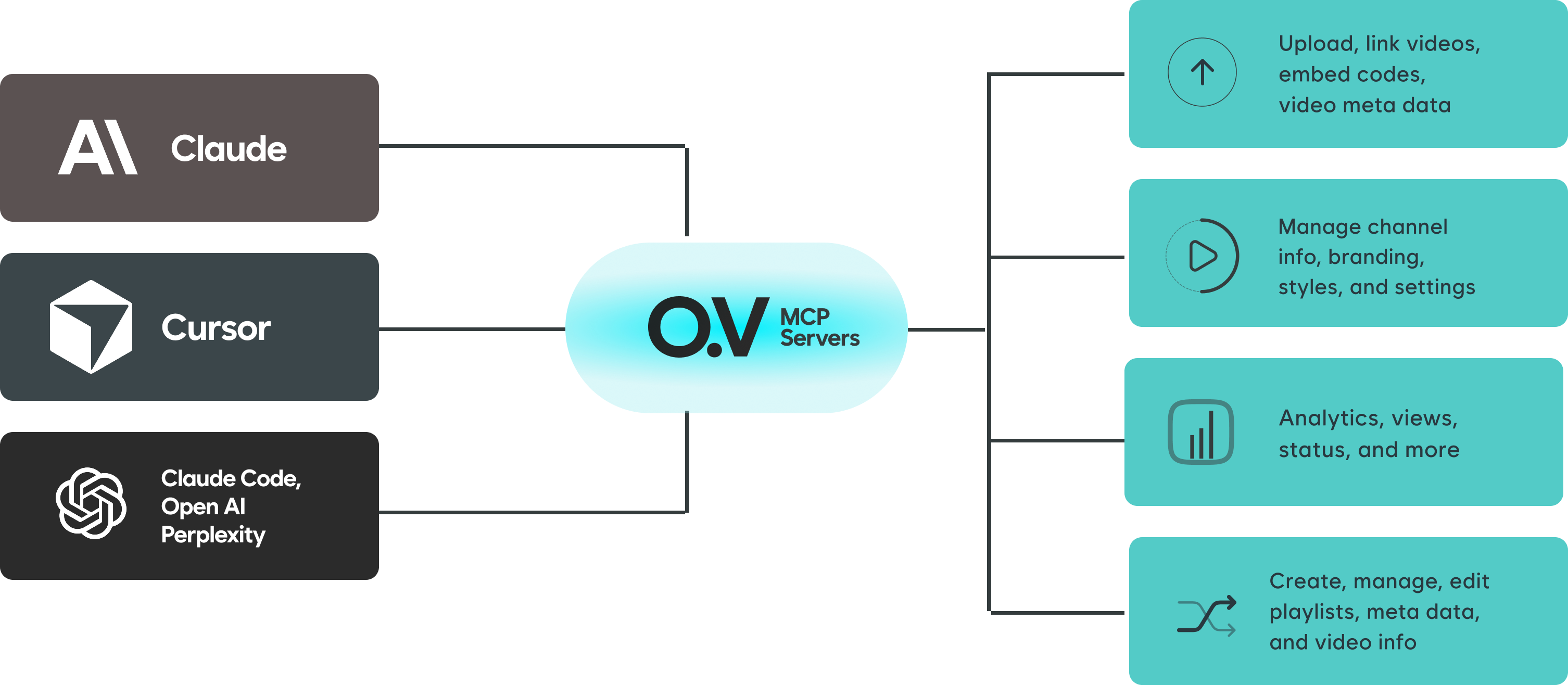
Upload, link, and manage video content
Upload local video files, link external URLs, generate embed codes, and manage all video metadata — titles, descriptions, tags, thumbnails, and visibility settings.
- Upload local files with the Upload Helper
- Link external video URLs
- Generate and manage embed codes
- Edit titles, descriptions, and tags
Architecture
One server connects any AI client to your entire video platform
The open.video MCP server sits between your AI tools and your publishing account. Claude, Cursor, Windsurf, or any MCP-compatible client gets instant access through a single authenticated connection.
OAuth authenticationSecure browser-based sign-in with scoped tokens
No API keys requiredTokens are scoped per-upload by the remote server
Remote-firstCloud-hosted server, nothing to install locally
Setup
Connect in under 2 minutes
Choose your AI client and follow the steps. No API keys needed.
Add the open.video MCP server to your MCP config file.
Add this to your MCP config:
{
  "mcpServers": {
    "open-video": {
      "url": "https://mcp.open.video/mcp"
    }
  }
}
For local file uploads, add the Upload Helper as a second server:
{
  "mcpServers": {
    "open-video": {
      "url": "https://mcp.open.video/mcp"
    },
    "open-video-upload": {
      "command": "npx",
      "args": ["-y", "open-video-upload-helper"]
    }
  }
}
3
Call list_channels to verify the connection and complete sign-in.
Tools
Available MCP tools
A growing set of tools to manage every aspect of your video platform.
Videos
upload_video Upload a local video file with metadata
link_video Link an external video URL to your channel
get_embed_code Generate an embed code for any video
update_video Update title, description, tags, and settings
delete_video Remove a video from your channel
list_videos List and filter videos on your channel
Channels
list_channels List all channels on your account
get_channel Get detailed channel information
update_channel Update channel info and settings
upload_channel_image Upload branding images for your channel
Analytics
get_analytics Fetch views, engagement, and performance metrics
get_video_status Check processing and publish status
Playlists
create_playlist Create a new playlist
update_playlist Edit playlist metadata and ordering
add_to_playlist Add videos to a playlist
list_playlists List all playlists on your channel
LLM Skill
Teach any AI how to use Open.Video
Open.Video
LLM Skill
Download the Open.Video skill file and upload it to your LLM of choice to unlock deep expertise on how to use every Open.Video feature — including MCP integrations, video search, AI summaries, and more.
skill.md — works with any LLM file upload
Create your open.video channel
Sign up for an open.video account, create your channel, and connect it to your AI workflow in minutes. No credit card required.