Olbrain Alchemist
Build, test and publish AI agents from Claude Code, Codex, Cursor or Antigravity; the server checks every step and refuses out-of-order ones with a fix.
Hosted MCP Server
npx add-mcp 'https://alchemist.olbrain.com/mcp/'Installs into Claude Code, Codex, Cursor and more
Documentation

Alchemist
OLBRAIN · AGENT BUILDER
Describe an AI agent in plain words. Your coding agent builds it, tests it and puts it live.
Chat agents, automatic jobs and teams of agents on website chat, WhatsApp, Shopify, Microsoft Teams and your phone number,
built from Claude Code, Codex, Cursor, Antigravity, GitHub Copilot or claude.ai.










Quick start · Why · Install · How a build works · Capabilities · Tools · Privacy · Docs
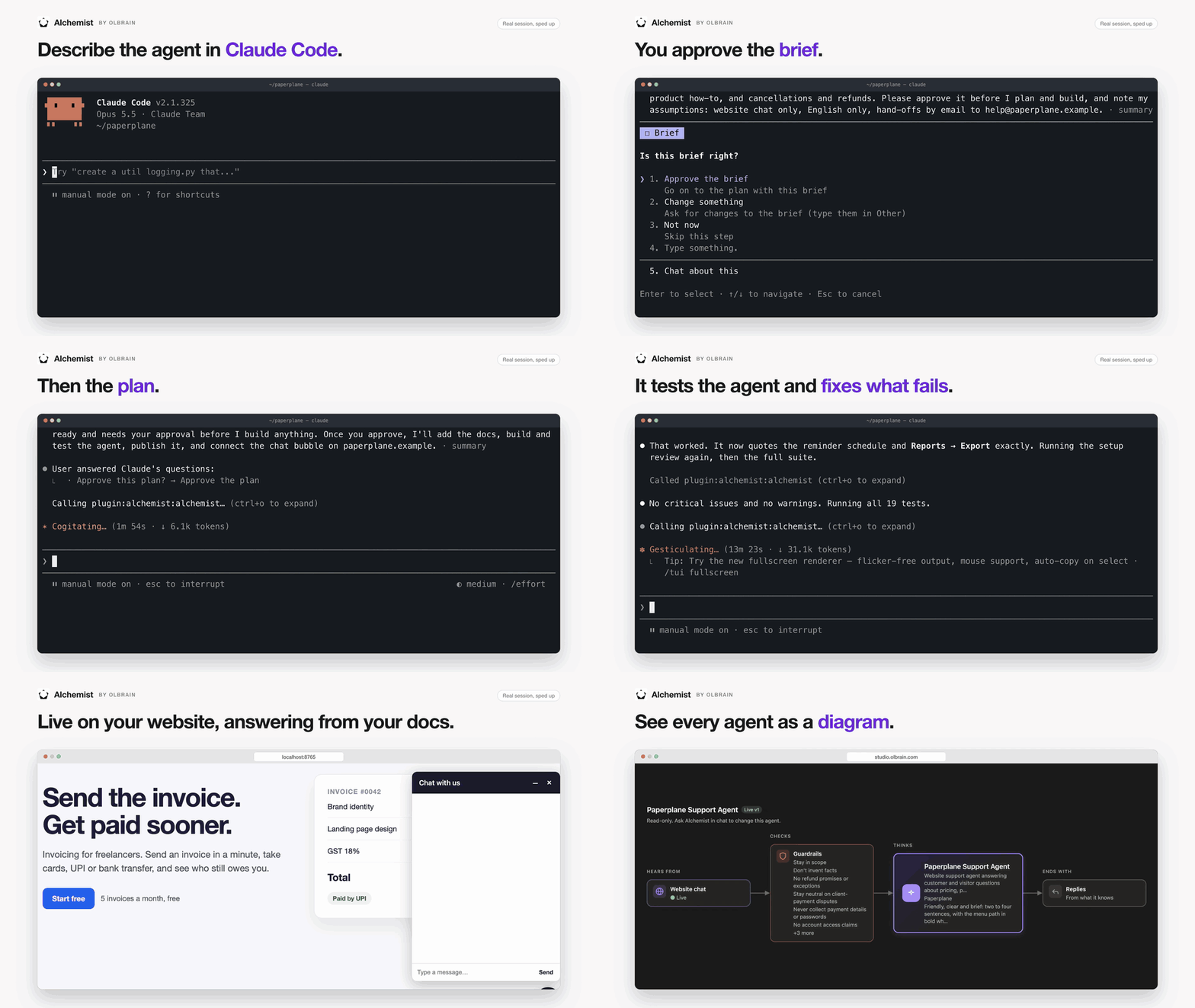
A real session, sped up: from one sentence to a tested support agent live on a website.
Quick start
In Claude Code:
/plugin marketplace add Olbrain/alchemist-plugin
/plugin install alchemist@alchemist
Run /mcp, pick alchemist and sign in (new to Olbrain? choose Create account). Then ask:
Use Alchemist to build a chat agent for our website that answers pricing questions
from our FAQ and hands refunds to support@acme.com.
Other apps: Codex · Cursor · Antigravity · GitHub Copilot · claude.ai
Why Alchemist
- Real agents, not demos. Chat agents, jobs that run on a schedule, a webhook, an email or a new file, and teams of agents that hand each question to the right specialist. They answer on website chat, WhatsApp, Shopify storefront chat, Microsoft Teams and your phone number.
- Built from your project. Start your coding agent in the folder with your docs, site or code. It drafts the brief, plan and tests from what's there and asks only for what it can't find.
- Tested before they ship. Your coding agent writes the tests; Alchemist runs them on the draft and grades them. A job gets a live run on a real input before it publishes.
- Checked at every step. Brief, plan, build, test, publish: Alchemist hands out one stage at a time and refuses a step taken out of order.
- You stay in charge. Nothing goes live without an approval card. You decide which cards Claude answers for you; anything that can't be undone always needs your own yes.
- Open plugin. The skills, commands and the agent canvas in this repo are MIT licensed: read them, copy them, improve them.
Every agent runs on Olbrain and stays visible in Noesis, Olbrain's console, where your team can open, review and change it.

Olbrain's own front door, built with Alchemist: one team of agents on WhatsApp and website chat.
Install
Claude Code
/plugin marketplace add Olbrain/alchemist-plugin
/plugin install alchemist@alchemist
Then run /mcp, pick alchemist and sign in with your Olbrain account. New to Olbrain?
Choose Create account on the sign-in page.
Stop Claude Code asking each time it checks on a build
Claude Code asks before every tool call. To stop it asking each time Claude checks on a
build, allow these five tools once under /permissions (they read; alchemist_state also
marks the build's news as seen, and Claude shows it to you):
mcp__plugin_alchemist_alchemist__whoami, mcp__plugin_alchemist_alchemist__alchemist_builds,
mcp__plugin_alchemist_alchemist__alchemist_build,
mcp__plugin_alchemist_alchemist__alchemist_capabilities and
mcp__plugin_alchemist_alchemist__alchemist_state. Leave the rest asking, including
alchemist_do and alchemist_answer: they take build steps, answer cards or change your
organisation.
To see an agent drawn in a pane beside the chat, also install the canvas:
/plugin install alchemist-canvas@alchemist
It draws the agent whenever Claude shows it, and redraws it when a publish or make-live
card arrives, with new, changed and removed parts marked. /agent-canvas opens the pane
when the terminal is too narrow for it to open by itself. It needs a Claude Code build
with plugin panes; older builds and Codex skip it.
Codex
Install Olbrain Alchemist from the OpenAI plugin directory, which serves Codex and ChatGPT: chatgpt.com/plugins/plugin_asdk_app_6ae0b1249a888191ac551144ac1819fb. It brings the Alchemist skills and connects the MCP server. Sign in with your Olbrain account when asked. The directory can be a release behind this repository while OpenAI reviews one.
Or connect the server by hand:
codex mcp add alchemist --url https://alchemist.olbrain.com/mcp/
codex mcp login alchemist
With the server added by hand, you can copy the plugins/alchemist/skills/alchemist folder to
~/.agents/skills/alchemist so Codex follows the same workflow as Claude, including when to
continue a build and when to start a new one. Without it, the server's own instructions carry
the same rule. A copied skill does not update itself: copy it again after each release.
Antigravity
agy plugin install https://github.com/Olbrain/alchemist-plugin/tree/main/plugins/alchemist
Or in the Antigravity app: Customizations → Plugins → Install from URL with the same URL.
This installs the Alchemist skills and connects the MCP server. Sign in with your Olbrain
account when Antigravity asks; if it doesn't, open /plugin, expand alchemist under
Installed and choose Sign in.
The canvas is Claude Code only.
Cursor
Install Olbrain Alchemist from the Cursor plugin directory:
cursor.directory/plugins/alchemist. Sign in with
your Olbrain account when Cursor asks, or from the alchemist row in Customize.
A team admin can also add this repository in Dashboard → Plugins & MCPs → Import from Repo
(https://github.com/Olbrain/alchemist-plugin).
The canvas is Claude Code only.
GitHub Copilot
copilot plugin marketplace add Olbrain/alchemist-plugin
copilot plugin install alchemist@alchemist
This installs the Alchemist skills and connects the MCP server in Copilot CLI. Ask Copilot to use Alchemist and sign in with your Olbrain account when the browser opens. The canvas is Claude Code only.
claude.ai and Claude Code on the web
Add a custom connector with the URL https://alchemist.olbrain.com/mcp/
(Customize → Connectors → Add custom connector; on Team and Enterprise plans an owner adds it
under Organization settings → Connectors). Then click Connect and sign in.
If Alchemist saves you time, a ⭐ on this repo helps other people find it.
How a build works
| Stage | What happens | Your call |
|---|---|---|
01 Brief | Your coding agent drafts what you asked for (who the agent serves, what it does, what it must not do) from your words and your project; Alchemist checks it. | Approve or change it |
02 Plan | Your coding agent drafts the agents, steps, channels and tools; Alchemist checks it. | Approve or change it |
03 Build | Alchemist builds the agent, connects its tools and knowledge, and reviews the setup for gaps and contradictions. | Sign in to tools or add keys when a card asks |
04 Test | Your coding agent writes the tests; Alchemist checks them, runs them on the draft and grades them. A job gets a live run on a real input first. | Run the live test, or not yet |
05 Publish | The tested version is published, with a 30-day free trial for a new agent. | Publish, or not yet |
06 Go live | Embed code, API and SDK steps, or the channel it answers on. | You run the commands |
Alchemist gives one stage at a time and refuses a step taken out of order. Builds started in
Noesis, and plugin builds while Olbrain moves accounts over, are still planned by Alchemist's
own model through the alchemist tool; the skill switches by itself.
On a build Claude plans, each agent has a budget: six passes per fix round, a stop after three passes in a row without a gain, four failed compiles and 120 draft test runs. When a build reaches one, Claude shows the best result so far and asks whether to continue (two more passes). A stronger model usually gets a build through its tests first time.
Before Alchemist publishes an agent, makes it live, merges agents or changes how one behaves,
it stops with an approval card. You decide how many of these Claude answers for you:
tell it in the chat, or put it in your CLAUDE.md, AGENTS.md or GEMINI.md, for example "Approve
plans and tests yourself; ask me before publishing." If you haven't said, Claude answers
every card itself in auto mode (Codex: running without approvals; Antigravity: set to proceed
without asking) and asks you otherwise.
It still asks for what only you can do, like sharing a Drive folder or a browser step.
On a build Claude plans, removing an agent, forgetting a customer, renaming or moving an
agent, changing a job's email address, and publishing despite failing tests always need your
own yes. Claude Code shows the card in its own dialog for you to confirm (type the agent's
name for anything that can't be undone); other apps give you a link to answer it in the
browser. If Claude Code gives you a link instead, run /mcp and reconnect Alchemist.
If Claude Code blocks an answer, answer the card on its build page, or allow the tool with
/permissions: mcp__plugin_alchemist_alchemist__alchemist_answer when installed as the plugin,
mcp__claude_ai_Alchemist__alchemist_answer when added as a claude.ai connector.
Use it
- Ask in plain words: "Use Alchemist to build an agent that answers questions about our pricing and hands refunds to a person."
/alchemist:build <what the agent should do>starts a build./alchemist:statusshows your account, organisation, builds and any cards waiting on you.- "Pick up my support agent build": Claude finds your build by name and carries on. Builds are private to you; a teammate changes your published agent in a new build of their own. Anything waiting on you comes first, and Claude doesn't start a duplicate.
- "Put my support agent on my website" or "call my intake job when our signup form is sent": Claude adds the chat snippet, or a server route that calls the agent, to your project. It never puts your API key in browser code.
- "Show me my support agent": Claude draws it as a read-only diagram (example below).
- "What can Alchemist do?" or "Can it answer calls on our phone number?": Claude checks the live capability list before saying yes or no.
- "Where is my ticket TKT-…?" or "Raise a ticket: our webhook job didn't run": Alchemist handles your Olbrain support tickets in the same session.

A chat agent's diagram: where it hears from, what it checks, what it consults and how it ends.
Best practices
Also on docs.olbrain.com.
-
Say who it serves and where it stops. Name who the agent talks to, what it does, what it must never do and when it hands over to a person. Add a few questions real customers ask: they become its tests.
Use Alchemist to build a chat agent for our website visitors. It answers pricing and delivery questions from our FAQ, never promises discounts, and hands refunds to support@acme.com. Customers often ask: "Do you deliver on Sundays?" and "Can I change my order after paying?" -
Build from your project. Start Claude Code or Codex in the folder that holds your docs, site or code. Your coding agent drafts the brief, plan and tests from it, and asks you only for what it can't find.
-
Decide which cards Claude answers. Put the rule in
CLAUDE.md,AGENTS.mdorGEMINI.md(see How a build works). Removing an agent, forgetting a customer and publishing despite failing tests always need your own yes: in Claude Code's dialog, or in the browser. -
Continue a build; don't start another. Say "pick up my support agent build"; a card waiting on you comes first.
still_runningis not an error: don't send the request again. To change a published agent, ask for the change: customers keep the live version until the new one is tested and published. -
Ask before ruling something out. "Can Alchemist …?" checks the live capability list. Charts in the chat, PowerPoint, PDF, Word and Excel files, and a job's multi-sheet Excel workbook are built in. What really can't be built yet, Alchemist reports to the Olbrain team itself.
-
Give a job a real input. Share one real example of what starts it (a webhook body, an email, a file): its live test runs on it before you publish. Say whether a list is one piece of work or many: a report or workbook from a whole list is one run, each invoice in an email is a run of its own. A job that does nothing with its input fails its test.
-
Let the tests drive fixes. Fix what a failing test shows, then test again. Don't start a new build to reset a budget; a stronger model usually gets through first time.
-
Keep keys out of the chat. Cards collect keys, passwords and signing secrets in the browser. If one is pasted into the chat, rotate it. Keep your Olbrain Access Key on your server, never in browser code.
-
Read errors by their code, not their words (Error codes).
service_unavailableis an outage on Olbrain's side: the build is kept, so wait, then say "continue".insufficient_credits: top up, then continue. -
Review it once it's live. "Review how my support agent did this week": Alchemist reads real conversations, groups what went wrong, turns failures into tests and proves a fix on them before you publish it.
Capabilities
Ask Claude "What can Alchemist do?" for the full, current list: it reads
alchemist_capabilities live, so it is never out of date.
You don't pick a type of agent. Describe the work; Alchemist decides.
| Agent | What it is |
|---|---|
| Chat agent | One person talks to it, turn by turn, in chat or by voice. |
| Automatic job | Runs by itself with nobody talking to it. Steps can wait hours or days, stop for a named person's approval (with reminders), call APIs and tools, and notify people. |
| Team of agents | One front door hands each question to the specialist that owns it, and can start automatic jobs. Customers reach it on website chat or WhatsApp. |
| Research agent | A person asks for a report in Noesis; it researches the sources and emails the report. A scheduled job can run it too. |
A job starts on a schedule, a webhook (Stripe, Shopify, GitHub and other signed senders), an email, a team's front door, or a new file in a Google Drive, cloud storage bucket, Dropbox or OneDrive folder. Agents answer on website chat, WhatsApp, Shopify storefront chat, your phone number and Microsoft Teams. They use tools from Olbrain's connector catalog, any REST API or your own MCP server, and answer from their knowledge files. Every agent gets a setup review and tests before it publishes. Anything Alchemist can't build yet goes to the Olbrain team as a request, with an id you can follow up on.
Commands and tools
2 slash commands and 16 MCP tools
| Command | What it does |
|---|---|
/alchemist:build <description> | Start a build |
/alchemist:status | Your account, organisation, builds and waiting cards |
| Tool | What it does |
|---|---|
whoami | Who you are signed in as, and your organisations |
create_org | Create an organisation and make it active |
select_org | Switch your active organisation (everywhere you are signed in) |
list_members | Who is in your organisation |
alchemist | Start a build or add your words to one; on builds Alchemist's own model runs, one builder turn |
alchemist_state | Where a build stands: its stage, the steps allowed next, waiting cards, budget and news. Marks the news it returns as seen |
alchemist_do | Take one allowed build step (write the brief, build, write tests, run them, raise a card) |
alchemist_answer | Send your choice on an approval card |
alchemist_builds | List your builds, each with a state (running, needs you, stale, in progress, inactive, completed, published, archived, idle) and a readable label |
alchemist_build | One build: its plan, agents, waiting cards and next step; with wait, follows a running turn and says what Alchemist, Cortex and Synapse did |
alchemist_edit_build | Rename a build, or archive it (and bring it back), with an optional reason |
alchemist_rate_build | Rate how a build session went (up or down, with an optional comment) |
alchemist_stop | Stop the turn a build is running |
alchemist_connect | Put a live agent on your website or call it from your code |
alchemist_capabilities | What Alchemist can build and do, read live |
alchemist_show_agent | One agent, or one of its published versions, as a read-only diagram |
Inviting people and joining an organisation happen in Noesis. Every build can also be opened there.
Error codes
For anyone calling the MCP server from their own client
A failed tool call has isError set. Its structuredContent, and its text as JSON, is one envelope:
{"error": {"code": "service_unavailable", "message": "Alchemist is unavailable right now. …", "retryable": true, "reference": "ab12cd34"}}
Branch on code. Show message to the user. reference (on Olbrain failures) finds the call in our logs.
| Code | Meaning | What to do | Retryable |
|---|---|---|---|
invalid_input | An argument is missing or malformed | Fix it; don't resend as is | no |
not_found | No such build, agent, card or organisation for this user | Re-read the build or list | no |
conflict | Clashes with the current state (an op_id reused, a name taken) | Re-read, then change the call | no |
forbidden | The user's role doesn't allow it | An owner or admin changes it in Noesis | no |
no_organisation | No organisation selected | create_org or select_org | no |
limit_reached | An account limit (organisations per user) | Tell the user | no |
insufficient_credits | Out of Alchemist credits | Show the message and its link, then stop | no |
session_ended | The Olbrain sign-in ended | Sign in to Alchemist again | no |
unauthorized | No signed-in user on the call | Sign in | no |
unknown_tool | No tool by that name | Use a listed tool | no |
rate_limited | Too many calls | Wait, then call once more | yes |
service_unavailable | Olbrain or its model provider failed; nothing the user did | Tell the user; don't retry in a loop | yes, later |
internal_error | A bug in Alchemist | Give the user the reference | no |
The same names are used inside results that succeed as calls:
- A build's
errors[]({code, message}):service_unavailable,insufficient_credits(withtopup_url),too_many_turns(three builds already running),stream_dropped(follow the build withalchemist_build; the turn may still be running),stream_failed. - A step's
op(alchemist_do,alchemist_answer):statusisdone,refusedorbusy. A refused step was never run:reasonis the code andfixsays what to do first. A step that ran but failed isdonewith aresultof{ok: false, error, hint}:erroris the code andhintsays what to fix. Either way, retry once after fixing it, never unchanged.provider_unavailablemeans the same asservice_unavailable. - Statuses, not errors:
still_runningandqueued(follow withalchemist_buildwait),busy(wait, then send the same call with the sameop_id),already_started(thatrequest_idalready made the build).
Privacy and security
- Every tool call goes to
https://alchemist.olbrain.com, which acts as you in Olbrain. It keeps your Olbrain sign-in encrypted so you stay signed in; remove the connection to end it. - Keys and passwords for tools never pass through the chat. Approval cards collect them into your organisation's vault.
- Nothing goes live, merges or changes behaviour without an approval card. You answer it, or Claude does where you have let it: in auto mode it answers every card unless you tell it otherwise (see How a build works). What can't be undone, and publishing despite failing tests, always needs your own yes. Outside auto mode, Claude Code also asks your permission before sending each answer.
- Draft test runs, probes and compiles are counted per developer per day, to keep builds within their budget. Pricing does not change.
- Once an agent is live, its go-live steps call Olbrain's agent API at
https://webhook.olbrain.comwith your organisation's API key — to test it, upload a file for a job, start a job, or from the server route Claude adds to your app. You run those commands yourself, and the key stays in your own environment.
Olbrain's privacy policy and terms.
Contributing
Found a bug, or asked for an agent Alchemist couldn't build?
Open an issue. Pull requests to the
skills, commands and canvas are welcome; python3 scripts/check_manifests.py must pass.
If this plugin is useful to you, star the repo: it's how other developers find it.
Links
olbrain.com · Noesis · Docs · Developers · Support
Licence
This plugin (its skills, commands and manifests) is MIT licensed. The Alchemist service it connects to at alchemist.olbrain.com is not part of it: using the service is covered by Olbrain's terms.