Codex Cursor Subagent Plugin
Local Codex plugin that delegates tasks to an authenticated local Cursor Agent via ACP; not a hosted MCP service.
Documentation
Codex and Claude Code Cursor Subagent Plugin
Use Cursor Agent as an interactive subagent from Codex or Claude Code. Delegate code investigation, reviews, planning, and implementation without manually moving prompts and results between applications.
The plugin launches your installed Cursor Agent through ACP and exposes its interactive session through MCP. You can follow progress, answer questions, review plans, and continue with follow-up tasks.
Contents
- Demo
- Requirements
- Cursor Agent setup
- Install in Codex
- Install in Claude Code
- Usage
- Permissions and scope
- Development
Demo
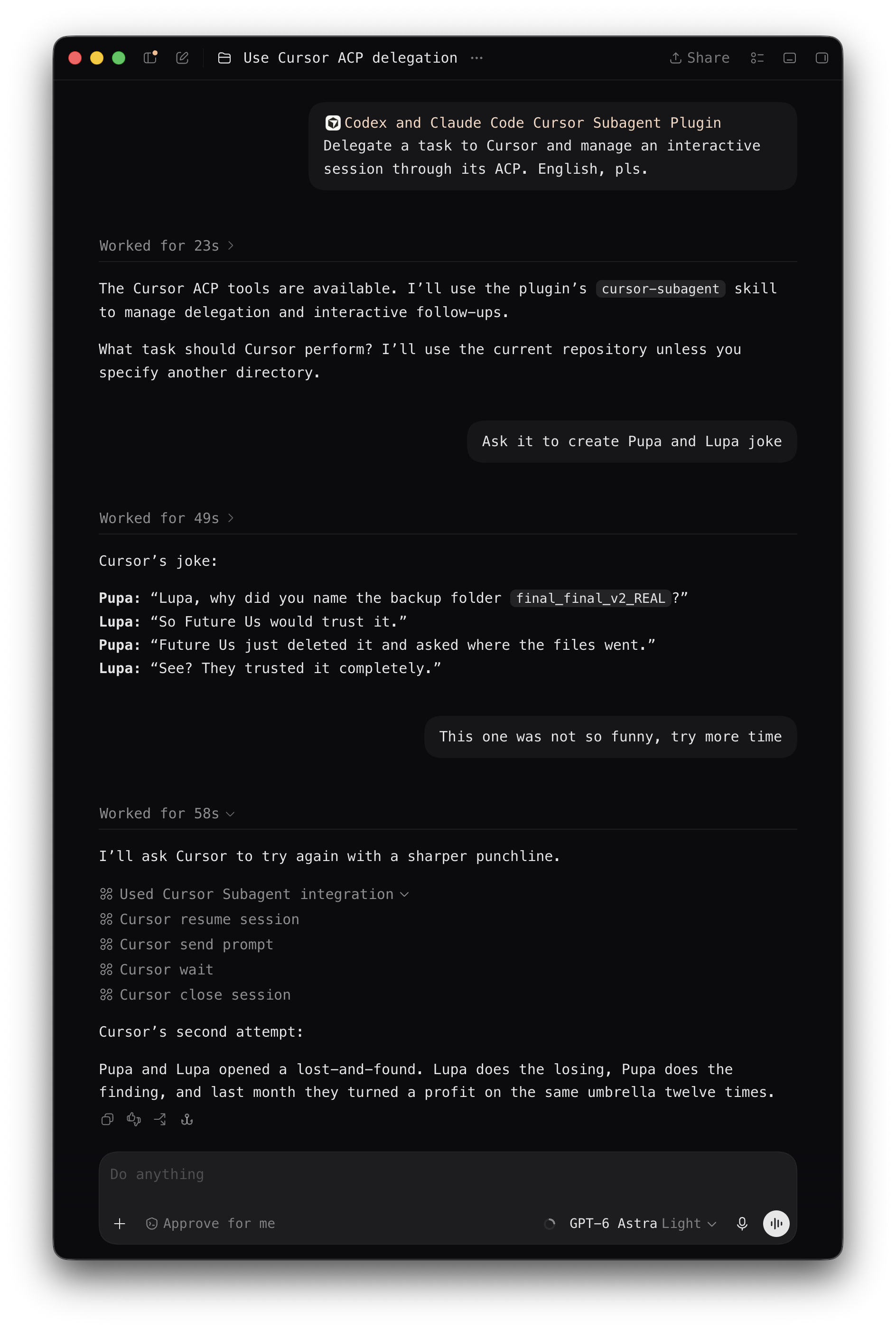
Delegating a task to Cursor from Codex, then resuming the ACP session for a follow-up request:
Requirements
- runtime and portable installation: Node.js 18+;
- Cursor Agent (
cursor-agent) installed and authenticated before using the plugin (see Cursor Agent setup below); - Codex with local plugin/MCP support, or Claude Code with plugin support.
Cursor Agent setup
Install the CLI
The plugin does not install Cursor Agent or sign you in. Install and authenticate it under the same OS user and in the environment where Codex or Claude Code runs. Follow the official Cursor CLI installation guide. On macOS, Linux, or WSL:
curl https://cursor.com/install -fsS | bash
export PATH="$HOME/.local/bin:$PATH"
cursor-agent --version
Keep ~/.local/bin on the host application's PATH, or set
CURSOR_AGENT_COMMAND to the absolute Agent executable path. The installer
provides the current CLI. The plugin has been tested with Cursor Agent
2026.08.25-3e8eec8. Newer versions are expected to work if they preserve the
required ACP interface, but have not yet been verified. The plugin checks ACP
compatibility at startup without requiring an exact Cursor version.
Configure API key authentication
Before using the plugin, create an API key in the
Cursor dashboard. Configure
~/.cursor/auth.json under the same OS user that runs Codex or Claude Code.
The file must contain only the apiKey field, with no other fields:
{
  "apiKey": "YOUR_CURSOR_API_KEY"
}
Verify authentication using the file-backed credential store:
AGENT_CLI_CREDENTIAL_STORE=file cursor-agent status --format json
Confirm that the status command reports you as authenticated before starting a
delegated task. Both plugin configurations set AGENT_CLI_CREDENTIAL_STORE=file,
so use that same setting for status. On macOS this selects file storage instead
of Keychain; a previous Keychain login does not replace this setup.
The official Cursor authentication guide explains authentication and status checks. The file-store environment variable is an option of the supported Cursor Agent version used by this plugin; it is not documented on that page.
Install in Codex
See the official Codex plugin installation guide.
For this repository, run these commands in your terminal with the Codex CLI
available on PATH:
codex plugin marketplace add arikon/agents-cursor-subagent-plugin --ref main
codex plugin add agents-cursor-subagent-plugin@agents-cursor-subagent-plugin
The first command registers a GitHub repository as a marketplace; the second installs the plugin from its marketplace snapshot. Check the configured marketplaces and installed plugins with:
codex plugin marketplace list --json
codex plugin list --json
Start a new Codex task after installing the plugin so Codex loads its skills
and MCP server. You can also open /plugins inside Codex CLI to inspect the
configured marketplace and installed plugin.
Update the Codex plugin
Refresh the marketplace snapshot, then reinstall the cached plugin:
codex plugin marketplace upgrade agents-cursor-subagent-plugin
codex plugin remove agents-cursor-subagent-plugin@agents-cursor-subagent-plugin
codex plugin add agents-cursor-subagent-plugin@agents-cursor-subagent-plugin
Start a new Codex task only after the final plugin add succeeds.
Breaking update: cursor_wait
This release removes after_event_id and after_progress_revision from
cursor_wait. Before updating, finish or close every delegated Cursor session
and stop the MCP process. Then run the update commands above and start a new
Codex task so that it loads the matching installed skill and tools. Replacing
plugin files while an old task is open does not update that task's MCP process.
To roll back, use the previous plugin revision, repeat the same close/restart boundary, and open another new task. Do not combine an old skill with the new runtime, or the new skill with the old runtime.
Install in Claude Code
See the official Claude Code plugin installation guide
and CLI command reference.
The same GitHub repository is a Claude Code marketplace. It requires node and
an authenticated Cursor Agent available as cursor-agent in PATH; set
CURSOR_AGENT_COMMAND in the Claude Code environment only when the command has
a non-standard location.
claude plugin marketplace add arikon/agents-cursor-subagent-plugin
claude plugin install agents-cursor-subagent-plugin@agents-cursor-subagent-plugin --scope user
claude plugin list --json
Run these commands in your terminal. --scope user makes the plugin available
to you across projects; use --scope project to share the plugin declaration
with a repository instead. The Claude Code plugin is named agents-cursor-subagent-plugin,
and its marketplace is named agents-cursor-subagent-plugin.
Restart Claude Code after installation to load the plugin. In an existing
session, /reload-plugins also applies plugin changes; use /plugin to inspect
installed plugins.
Update the Claude Code plugin
Refresh the marketplace and installed plugin after a new Git revision, then restart Claude Code to load the updated MCP server:
claude plugin marketplace update agents-cursor-subagent-plugin
claude plugin update agents-cursor-subagent-plugin@agents-cursor-subagent-plugin
Installing the plugin only makes the existing cursor_* MCP tools and
cursor-subagent skill available. It does not approve Cursor actions: questions,
plans, and out-of-scope, destructive, external, or credential-related permission
requests still require the same explicit authority as in Codex.
Usage
Ask the host assistant to delegate a bounded task to Cursor, for example:
Ask Cursor to review
src/parser.tsfor correctness without changing files.
The bundled cursor-subagent skill guides the assistant through delegation, permissions, follow-ups, and cleanup.
Modes
| Mode | Use it for |
|---|---|
ask | Read-only investigation, questions, diagnosis, and code review. |
plan | Preparing a plan for approval. |
agent | Implementation within the changes you authorized. |
MCP tools
| Task | Tools |
|---|---|
| Delegate and follow progress | cursor_delegate, cursor_wait |
| Respond to pending requests | cursor_answer_question, cursor_answer_plan, cursor_answer_permission |
| Continue work between turns | cursor_send_prompt, cursor_set_mode |
| Read longer results | cursor_read_result |
| Resume or close a session | cursor_resume_session, cursor_close_session |
| Advanced diagnosis and recovery | cursor_start_session, cursor_session_status, cursor_cancel |
cursor_wait observes one addressed turn with session_id, turn_id, and an
optional timeout_ms. It returns the current pending request immediately, a
repeatable terminal result while retained, or a timeout snapshot with a bounded
progress excerpt. It does not require event or progress cursors.
Follow-ups and resume
Continue a completed turn with cursor_send_prompt while its session is live.
A follow-up supplied during an active turn waits for that turn to finish;
the plugin cannot steer a running turn. Any outcome other than a completed turn
requires a new user decision before continuing.
Use cursor_resume_session to attempt to reopen a retained Cursor conversation
after its local session has closed or expired.
A successful resume does not prove that earlier context was restored. Include the context and constraints needed for the next task. For a review, supply the baseline or snapshot together with the new changes; if that evidence is missing, report the review as unverifiable.
Reading complete results
Completed turns include an 8 KB result preview. The runtime retains the full
result up to 1 MiB; larger results fail with terminal_result_limit.
When result.truncated:true, use cursor_read_result from offset zero, following
each next_offset until eof. Read the complete result before reporting it,
sending a follow-up, or closing the session.
Workspace and session settings
Prefer the cwd of a separate verified worktree for tasks that may change files
or run concurrently. A canonical checkout is allowed when the user authorized
the changes and accepts the coordination risk.
For read-only work, select ask and restrict reads and searches to the
authorized scope. Select agent before making authorized changes. Switch modes
with cursor_set_mode only between turns.
To change model, effort, fast, or plugin_dirs, close the idle session and
immediately resume it with the retained Cursor conversation ID and new settings.
These launch settings cannot change in place.
Use a nonempty base-model name without [ or ]. The optional effort value
must be a nonempty token matching [A-Za-z0-9._-]+.
Close the session when the delegated workflow finishes, is abandoned, or fails irrecoverably.
Permissions and scope
The local transport is Codex or Claude Code → MCP plugin → Cursor ACP (stdio JSON-RPC).
By default the plugin launches Cursor with sandboxing enabled and Smart Auto
(--auto-review), so Cursor may automatically run tool calls that it classifies
as safe. Questions, plans, and approval requests remain pending until answered.
The Git-marketplace configuration suppresses Codex-side MCP prompts. The portable release canary uses the adapter's default elicitation path. These transport settings do not expand the authority granted by the user.
In agent mode, Cursor can create or replace regular UTF-8 files anywhere inside
the selected cwd. The plugin's scope checks are not an OS sandbox or an exact
per-action policy engine.
For write-capable tasks and reviews narrower than the checkout, the host
assistant includes AUTHORIZED_ACTIONS and NO_SCOPE_EXPANSION in the delegated
prompt. These clauses communicate the task boundary; they do not add runtime
enforcement. The bundled skill provides the exact prompt format.
The plugin uses no file-based IPC and exposes only its documented MCP controls. Version-specific adapters and golden fixtures define the underlying CLI and protocol details.
Development
See the development guide for verification commands, portable installation, behavior acceptance, and version-specific adapter migration.