Gherkio

Gherkio lets you describe HTTP-based integration tests as declarative YAML scenarios. Define requests, assertions, variable extractions, and orchestration. all in a simple, human-readable format that stays maintainable over time.

Gherkio — Declarative Integration Testing Platform
Write API integration tests in YAML. No imperative code required.

Gherkio lets you describe HTTP-based integration tests as declarative YAML scenarios. Define requests, assertions, variable extractions, and orchestration — all in a simple, human-readable format that stays maintainable over time.


Features

  • Declarative YAML DSL — Describe test scenarios, not implementation
  • HTTP Request Execution — POST, GET, PUT, DELETE with full header/body support
  • Multipart Form-Data & File Uploads — Native support for file uploads with automatic boundary handling and content-type metadata
  • Rich Assertion Engine — Status codes, field matching, type validation, and more
  • Advanced Matchersuuid, email, datetime, uri, string, number, boolean, array, object, null, true, false, empty, ipv4, ipv6, base64, mac, and string matchers (contains, startsWith, endsWith, regex) plus numeric comparisons (gt, gte, lt, lte)
  • Collection Matcherscount(path) for array length, all(path) for element-wise assertions
  • Variable Interpolation — Pass values between steps with $var / ${var} syntax
  • JWT Auto-Decoding — Automatically decode and assert JWT claims from responses
  • Scenario Composition — Reuse scenarios with use: for test orchestration
  • Timing Assertions — Enforce step durations (e.g. timing.duration: lte 500ms)
  • Request Timeout — Configure per-request HTTP client timeout (e.g. timeout: 60s)
  • Request Retries — Handle eventual consistency with configurable attempts, intervals, backoff strategies (linear, exponential), and status code conditions.
  • Environment Management — Switch between local, staging, production with a flag
  • Sensitive Field Masking — Tokens, passwords, and secrets are masked in output
  • Outbound Request Sandboxing (SSRF Prevention) — Restrict API client connection scopes with wildcard domain matching, precedence blocklists, and automated DNS-level private subnet checks.
  • Dynamic Parameterized Generators — Dynamic UUIDs, ULIDs, timestamps, date offsets (e.g. +14d), and cryptographic digests (hash/hmac) generated dynamically per step.
  • Contextual Diagnostics — Failed assertions show available fields and full response body
  • Setup & Teardown — Pre-condition and post-condition steps (teardown always runs, even on failure)
  • Test Organization with Tags — Filter tests by tags with --tag flag (AND logic)
  • Dry-Run Mode — Preview expanded requests without executing HTTP calls with --dry-run
  • Parallel Execution — Run tests concurrently with --parallel flag
  • Test Validation — Lint test files without running them with gherkio validate
  • Verbose Variable Preview — See resolved variables in --verbose output
  • Negative Assertions — Assert field absence (not exists) or schema mismatch (schema: not <name>)
  • Multi-Account Credentials — Run the same tests against multiple accounts with --account or --all-accounts

Editor Autocomplete

Gherkio comes with a built-in JSON Schema generator to provide full IDE autocomplete, validation, and hover documentation for your YAML test files.

Generate the schema in your project root:

gherkio schema > .gherkio-schema.json

VSCode Setup

  1. Install the YAML Extension by Red Hat.
  2. Add this to your workspace settings.json:
{
  "yaml.schemas": {
    "./.gherkio-schema.json": [".gherkio/tests/**/*.yaml"]
  }
}

Inline Alternative (Any Editor) Add this comment to the very top of your test file:

# yaml-language-server: $schema=../../.gherkio-schema.json

Installation

From source

git clone https://github.com/muhfaris/gherkio.git
cd gherkio
go build -o gherkio .
sudo mv gherkio /usr/local/bin/

Using install script

curl -fsSL https://raw.githubusercontent.com/muhfaris/gherkio/main/install.sh | sudo bash

Quick Start

1. Scaffold a project

gherkio init

This creates the .gherkio/ directory structure:

.gherkio/
├── config.yaml                # Project configuration
├── credentials/               # Account credentials per environment
│   └── local.yaml             # Default credentials (DummyJSON test user)
├── environments/
│   └── local.yaml             # Default environment (DummyJSON)
├── tests/
│   └── example/
│       └── login.yaml         # Example test
├── reports/                   # Generated output — safe to .gitignore
│   ├── latest/
│   └── archive/
└── schemas/

Tip: .gherkio/reports/ contains runtime-generated HTML/JSON reports. It's safe to add to .gitignore — it doesn't affect go test ./... or any project functionality. Reports are regenerated on the next gherkio run --report.

AI Integration

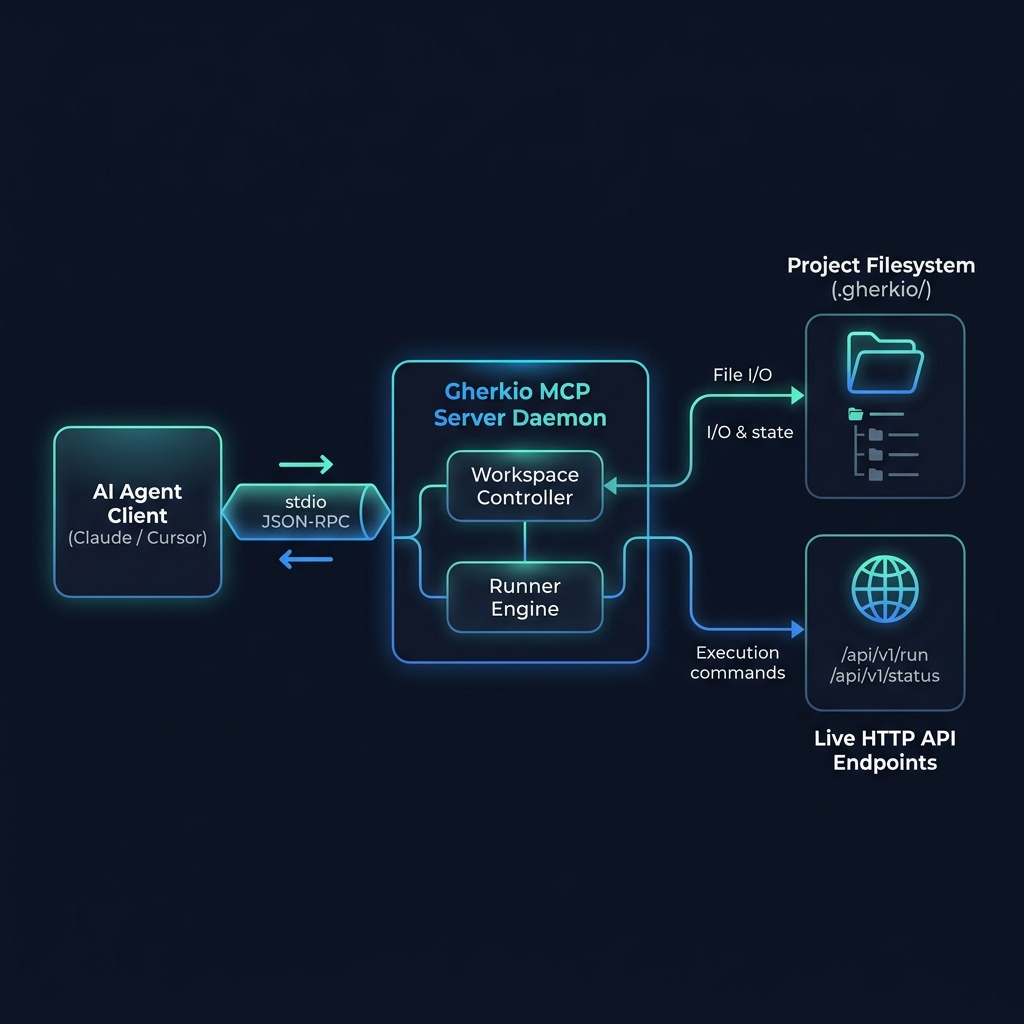
Gherkio ships with a built-in MCP server so AI coding assistants (Claude, Cursor, VS Code, Neovim) can create, run, and manage tests directly through natural language.

2. Run the example test

gherkio run example/login.yaml

3. Run with verbose output

gherkio run example/login.yaml --verbose

Or use the shorthand:

gherkio run example/login.yaml -v

4. Run with a specific environment

gherkio run example/login.yaml --env staging

Writing Tests

Basic scenario

scenario: User login

steps:
  - request:
      method: POST
      url: /auth/login
      body:
        email: [email protected]
        password: secret

    expect:
      status: 200
      body.token: exists
      jwt.role: admin

    save:
      token: body.token

Multi-step with variable interpolation

scenario: Get user profile

steps:
  - request:
      method: POST
      url: /auth/login
      body:
        email: [email protected]
        password: secret

    expect:
      status: 200
      body.accessToken: exists

    save:
      auth_token: body.accessToken

  - request:
      method: GET
      url: /api/user/profile
      headers:
        Authorization: "Bearer $auth_token"

    expect:
      status: 200
      body.name: exists

Variables can be used in URLs, headers, and request bodies with $var or ${var} syntax. Default values are supported: ${var:default_value}.

Environment Variables

Gherkio automatically reads host environment variables that start with the prefix GHERKIO_ (case-sensitive) and injects them into the test scope. This is useful for securely passing API keys, secrets, or dynamic URLs in CI/CD pipelines without hardcoding them in YAML scenarios or credentials files.

Example:

export GHERKIO_MY_SECRET="super-secret-token"
gherkio run tests/api.yaml

In your test file:

steps:
  - request:
      method: GET
      url: /secure-data
      headers:
        Authorization: "Bearer $GHERKIO_MY_SECRET"

To protect against leakage of local machine variables, Gherkio strictly ignores any host environment variables that do not start with the GHERKIO_ prefix.

File Upload (Multipart Form-Data)

Gherkio supports multipart/form-data requests for file uploads with automatic boundary handling and content-type detection.

Simple syntax (string path):

scenario: Upload user avatar

steps:
  - request:
      method: POST
      url: /users/profile/avatar
      multipart:
        fields:
          username: "$randomString(8, 'alpha')"
          role: "$accounts.alpha.role"
        files:
          avatar: "fixtures/avatar.png"

Advanced syntax (with contentType and filename):

scenario: Upload document

steps:
  - request:
      method: POST
      url: /documents/upload
      multipart:
        fields:
          description: "Annual report 2026"
        files:
          document:
            path: "fixtures/report.pdf"
            contentType: "application/pdf"
            filename: "annual-report-2026.pdf"

File path resolution:

  1. Project root — Relative to .gherkio/ directory (e.g., fixtures/avatar.png)
  2. Fixtures fallback./fixtures/avatar.png if only filename provided
  3. Sibling fixturestests/fixtures/avatar.png relative to test file

Using named services

scenario: Cross-service test

steps:
  - request:
      service: auth
      method: POST
      url: /login
      body:
        email: [email protected]
        password: secret

    expect:
      status: 200
      body.token: exists

Services are defined in your environment file:

baseUrl: https://api.example.com
services:
  auth:
    baseUrl: http://localhost:3001
  payments:
    baseUrl: https://payments.example.com

Timing assertions

- request:
    method: GET
    url: /api/health

  expect:
    status: 200

  timing:
    max: 500ms    # Shorthand: enforces timing.duration: lte 500ms

Request timeout

Override the default 30-second HTTP client timeout for slow endpoints:

- request:
    method: GET
    url: /slow-endpoint

  expect:
    status: 200

  timeout: 60s   # Wait up to 60 seconds for response

Use 0s for no timeout (unlimited wait). Invalid timeout values fall back to 30 seconds.

Request Retries

Easily handle eventual consistency (e.g., polling until an order is confirmed) without writing imperative loops.

scenario: Wait for order confirmation

steps:
  - request:
      method: GET
      url: /orders/$orderId

    retry:
      attempts: 5           # Max number of attempts
      interval: 1000        # Base wait interval (ms)
      backoff: exponential  # 'constant', 'linear', or 'exponential' (with jitter)
      maxDuration: 15s      # Total timeout
      onStatus: [404, 202]  # Only retry if these HTTP status codes are returned

    expect:
      status: 200
      body.status: confirmed

Parameterized Generators

Gherkio supports a robust set of parameterized generators and string transformers directly inside variable interpolations. These generators are evaluated dynamically for each individual step iteration, guaranteeing fresh data (e.g. unique UUIDs, random emails, or timestamps) for every API request.

Example:

steps:
  - request:
      method: POST
      url: /users
      body:
        id: "$uuid()"
        email: "$randomEmail('test-')"
        phone: "$randomPhone('+62')"
        created: "$timestamp()"
        formattedDate: "$dateOffset('+14d')" # Adds 14 days to the current date/time
        description: "$toUpper('new user')"

Supported Generators:

  • $uuid() and $ulid(): Generates high-entropy unique identifiers.
  • $timestamp() and $timestampMs(): Returns the current UNIX timestamp (seconds/milliseconds).
  • $dateNow(): Returns the current UTC time in RFC3339 format.
  • $dateOffset(offset): Offsets the current UTC time by a duration (e.g. +14d, -2h, +30m, +1s).
  • $randomString(length, [charset]): Generates a random string of a given length. Charset can be 'alpha', 'numeric', 'alphanumeric', or a custom string of characters (e.g. 'abc').
  • $randomEmail([prefix]): Generates a random email address.
  • $randomPhone([prefix]): Generates a random phone number.
  • $base64(value) / $base64Decode(value): Base64 encoding/decoding.
  • $urlencode(value) / $urldecode(value): URL escaping/unescaping.
  • $toLower(value) / $toUpper(value) / $trim(value): Case folding and whitespace trimming.
  • $hash(algo, value): Generates a hash (e.g. sha256, sha1, md5) of the value.
  • $hmac(algo, key, value): Generates a key-hashed HMAC signature (e.g. sha256, sha1, md5).

Outbound Request Sandboxing

To enforce strict security constraints inside multi-tenant environments, CI/CD runners, or shared developer spaces, Gherkio includes outbound network sandboxing to guard against Server-Side Request Forgery (SSRF) and credential leakage.

Configure sandboxing in your .gherkio/config.yaml:

security:
  sandboxing:
    # Set to true to restrict request scopes to allowed domains.
    enabled: true
    # Allowed domains pattern matching (supports wildcards, empty allows all).
    allowedDomains:
      - "*.api.dummyjson.com"
      - "localhost:*"
      - "127.0.0.1:*"
    # Domains that are explicitly blocked even if they would match allowed lists.
    blockedDomains:
      - "*.malicious.com"
      - "untrusted.org"
    # Block local loopback, link-local, and RFC1918 private subnets.
    blockPrivateSubnets: true

Security Guardrails:

  1. DNS Rebinding Protection: The sandboxing engine resolves target hostnames via DNS (net.LookupIP) prior to request initialization, blocking domain resolution to prohibited IP targets even if the original request hostname appeared harmless.
  2. Subnet Restrictions: If blockPrivateSubnets is enabled, loopback ranges (e.g. 127.0.0.1, ::1), link-local metadata endpoints (e.g. AWS 169.254.169.254), and RFC1918 private subnets are permanently blocked.
  3. Precedence Rules: The blocklist takes total precedence over allowlist matches.
  4. Early Validation in Dry-Run: Network validation rules are run even under --dry-run modes, reporting policy violations early without triggering physical HTTP requests.

Multi-Account Credentials

Run the same test scenarios against multiple accounts without duplicating test files or environment files.

Credentials file

Credentials live in .gherkio/credentials/<env>.yaml, matching the active environment:

# .gherkio/credentials/staging.yaml
accounts:
  alpha:
    username: [email protected]
    password: alpha-secret
    role: admin

  beta:
    username: [email protected]
    password: beta-secret
    role: viewer

Account fields (username, password, role, plus any extras) are injected as variables ($username, $password, $role) — they work exactly like save:d variables in URLs, headers, and request bodies.

Usage

# Run with a specific account
gherkio run tests/login.yaml --env staging --account alpha

# Run against ALL accounts
gherkio run tests/login.yaml --env staging --all-accounts

How it works

scenario: Staging login

steps:
  - request:
      method: POST
      url: /auth/login
      body:
        username: $username       # Injected from credentials
        password: $password       # Injected from credentials

    expect:
      status: 200
      body.accessToken: exists

    save:
      token: body.accessToken     # Overrides credential vars if same name

Edge cases

  • No credentials file — Test runs normally, no variables injected
  • 1 account, no flag — Auto-used (no need to type --account every time)
  • 2+ accounts, no flag — Prints a hint and runs without credentials
  • --account with missing file — Warning printed, flag ignored
  • --account with nonexistent name — Error with available accounts listed
  • Passwords — Automatically masked in output (along with other sensitive fields)

Setup & Teardown

Pre-condition and post-condition steps that run before/after the main test steps. Teardown always runs — even if setup or steps fail — ensuring cleanup.

scenario: Create and verify order

setup:
  - request:
      method: POST
      url: /products/add
      headers:
        Content-Type: application/json
      body:
        title: "Test Product"
        price: 99.99

    expect:
      status: 201
      body.id: exists

    save:
      productId: body.id

steps:
  - request:
      method: GET
      url: /products/$productId

    expect:
      status: 200
      body.title: "Test Product"

teardown:
  - request:
      method: DELETE
      url: /products/1

    expect:
      status: 200
      body.isDeleted: true

Key behaviors:

  • Setup runs first. If setup fails, main steps are skipped, but teardown still runs.
  • Teardown always runs, regardless of pass/fail in setup or steps.
  • Teardown failures are logged but do NOT affect the scenario pass/fail result.
  • Variables from setup are available to both main steps and teardown steps.

Assertions

Basic assertions

expect:
  status: 200                             # HTTP status code
  body.name: Emily                        # Equality check
  body.accessToken: exists                # Field existence
  headers.content-type: application/json  # Response header
  jwt.role: admin                         # Decoded JWT claim

Type matchers

Validate the type or format of a field:

expect:
  body.id: uuid            # Valid UUID format (v4)
  body.email: email        # Valid email format
  body.createdAt: datetime # RFC3339 / ISO8601 datetime (e.g. 2026-05-21T12:00:00Z)
  body.avatar: uri         # Valid URI format (e.g. https://example.com/avatar.png)
  body.name: string        # String type
  body.count: number       # Numeric type (int, float, json.Number)
  body.isActive: boolean   # Boolean type
  body.tags: array         # Array type
  body.meta: object        # Object type (map)
  body.nullField: null     # Null value
  body.flag: true          # Boolean true
  body.completed: false    # Boolean false

String matchers (case-sensitive)

expect:
  body.name: contains Laptop     # Substring match
  body.slug: startsWith item-    # Prefix match
  body.status: endsWith ed       # Suffix match
  body.code: regex ^[A-Z]{3}$    # Regex pattern match
  body.price: gt 100          # Greater than (numeric)
  body.count: gte 0           # Greater than or equal (numeric)
  body.temp: lt 40            # Less than (numeric)
  body.rating: lte 5          # Less than or equal (numeric)

Format matchers

expect:
  body.ip: ipv4              # Valid IPv4 address (e.g. 192.168.1.1)
  body.ipv6: ipv6            # Valid IPv6 address (e.g. ::1)
  body.token: base64         # Valid base64 encoded string
  body.macAddr: mac           # Valid MAC address (e.g. aa:bb:cc:dd:ee:ff)
  body.emptyField: empty      # String, array, or object is empty/null```

### Collection matchers

```yaml
expect:
  count(body.items): 3              # Array has exactly 3 items
  all(body.items.status): active    # All elements have status "active"
  all(body.items.price): number     # All elements are numbers
  all(body.items.email): email      # All elements are valid emails

Negative assertions

Assert that a field does not exist, or that a schema does not match:

expect:
  body.deletedAt: not exists          # Field must NOT be present
  headers.x-deprecated: not exists    # Header must NOT be present
  jwt.expired: not exists             # JWT claim must NOT be present
  schema: not example/login-response  # Response must NOT match this schema

Use cases:

  • Verify a field is absent after soft delete (body.deletedAt: not exists)
  • Confirm a deprecated header is no longer sent (headers.x-api-version: not exists)
  • Ensure a schema mismatch is intentional (schema: not example/login-response)

Schema assertions

Validate the entire response structure against a reusable schema file. Schemas live in .gherkio/schemas/ and are organized by domain.

expect:
  status: 200
  schema: example/login-response    # Validates full response shape

Instead of asserting every field individually:

expect:
  status: 200
  body.id: exists
  body.name: exists
  body.email: exists

You can define a schema once and reuse it across tests:

# .gherkio/schemas/example/user-response.yaml
type: object
required:
  - id
  - username
  - email
properties:
  id:
    type: integer
  username:
    type: string
  email:
    type: string
    format: email
  firstName:
    type: string
  lastName:
    type: string
  gender:
    type: string
  image:
    type: string

Then use it in any test:

expect:
  status: 200
  schema: example/user-response

Schema assertions can be mixed with individual assertions:

expect:
  status: 200
  schema: example/user-response        # Shape validation
  body.customFlag: true                 # Extra assertion beyond schema

Supported schema rules:

RuleExampleDescription
typetype: stringValidates type (string, integer, number, boolean, array, object, null)
requiredrequired: [id, name]Fields that must exist with non-null values
propertiesproperties: { ... }Field-level validation (recursive)
itemsitems: { type: string }Array item validation
formatformat: emailFormat validation (email, uuid, datetime, uri)
enumenum: [admin, user]Allowed values
patternpattern: "^[A-Z]"Regex pattern
minLength / maxLengthminLength: 1String length bounds
minimum / maximumminimum: 0Numeric bounds
minItems / maxItemsmaxItems: 100Array length bounds
nullabletype: string, nullable: trueAllows null values

Schema file resolution:

  1. schema: users/user-response.gherkio/schemas/users/user-response.yaml
  2. schema: login-response.gherkio/schemas/login-response.yaml
  3. Falls back to .yml extension if .yaml not found

Scenario Composition (use-steps)

Reuse scenarios across tests:

scenario: Admin workflow

steps:
  - use: auth/login.yaml              # Executes the login scenario

  - request:
      method: POST
      url: /api/admin/users
      headers:
        Authorization: "Bearer $accessToken"
      body:
        name: New User
        role: viewer

    expect:
      status: 201
      body.id: exists

Configuration

.gherkio/config.yaml

project:
  name: "my-api"
  version: "1.0.0"

environments:
  default: local
  path: .gherkio/environments

tests:
  path: .gherkio/tests

security:
  mask:
    enabled: true
    # Override default sensitive fields or add custom ones
    fields:
      - mySecretKey

Sensitive field masking

By default, the following fields are masked in console output: token, accessToken, access_token, refreshToken, refresh_token, password, secret, clientSecret, client_secret, apiKey, api_key, authorization. Matching is case-insensitive.

security:
  mask:
    enabled: true
    fields:
      - customSecret     # Add custom fields
      # Leave empty to use built-in defaults

CLI Reference

CommandDescription
gherkio initScaffold a new .gherkio/ project
gherkio run <test-file>Execute a test scenario
gherkio run <test-file> --env <name>Run with a specific environment
gherkio run <test-file> --verboseShow full request/response payloads
gherkio run <test-file> -vShorthand for --verbose
gherkio run <test-file> --account <name>Run with a specific account from credentials
gherkio run <test-file> --all-accountsRun against all accounts in the credentials file
gherkio run --report json --report-rawUnmasked JSON report
gherkio run --tag <tag>Filter tests by tag (AND logic)
gherkio run --parallel <N>Run tests concurrently
gherkio run --dry-runPreview without HTTP execution
gherkio run --step <N>Run a single step (0-indexed)
gherkio run --section <name>Run all steps in a section (setup, steps, teardown)
gherkio run --line <N>Run the step at a specific line number
gherkio run <directory>/Run all tests in a subdirectory
gherkio validateLint test files statically
gherkio schemaGenerate JSON Schema for YAML autocomplete
gherkio schema --type <type>Generate schema for a specific type (test, config, environment, etc.)
gherkio schema --listList available schema types
gherkio convertBidirectional cURL ↔ Gherkio YAML conversion
gherkio mcpStart MCP server for AI tool integration — see docs/mcp.md

Test file resolution

  1. Absolute path (e.g. /home/user/tests/login.yaml) — used as-is
  2. Relative path (e.g. ./tests/login.yaml) — resolved from cwd
  3. Project path (e.g. example/login.yaml) — resolved relative to .gherkio/tests/

CLI Output

Summary mode (default)

✗ login example

1. POST https://dummyjson.com/auth/login
   ✗ failed
   ✓ status = 200
   ✓ body.accessToken exists
   ✗ body.username = emily
       └─ got: emilys

Response:
Status: 400

Body:
{
  "message": "Invalid credentials"
}

✗ FAIL
3 passed, 1 failed, 4 total
Duration: 388ms

Verbose mode (--verbose)

Shows full request and response payloads, including headers and bodies (with sensitive fields masked).


Path Syntax

PrefixUsed InDescription
body.<field>expect / saveResponse JSON body field (canonical)
headers.<name>expect / saveResponse header
statusexpect onlyHTTP status code (use expect.status)
jwt.<claim>expect / saveDecoded JWT claim (auto-decoded from body.token or body.accessToken)
timing.durationexpect (lte <duration>)Step duration must be ≤ max (e.g. lte 500ms)

Project Status

FeatureStatus
Core runner (HTTP, assertions, saves)
Variable interpolation ($var, ${var}, ${var:default})
Multipart form-data & file uploads
Type matchers (uuid, email, datetime, uri, string, number, boolean, array, object, null, true, false)
String matchers (contains, startsWith, endsWith, regex)
Numeric comparison matchers (gt, gte, lt, lte)
Format matchers (ipv4, ipv6, base64, mac, empty)
Collection matchers (count, all)
Negative assertions (not exists, schema: not)
JWT auto-decoding
Schema validation (YAML schemas)
Timing assertions
Request timeout
Request retries (backoff strategies, onStatus)
Scenario composition (use: steps)
Outbound Request Sandboxing & SSRF Prevention
Parameterized Generators ($uuid, $timestamp, crypto, fake data)
Setup & Teardown blocks
Contextual failure UX
Sensitive field masking
Multiple environments
Multi-Account Credentials (--account, --all-accounts)
Reporting (HTML, JSON)
Editor autocomplete (gherkio schema)
cURL ↔ DSL conversion (gherkio convert)
Step runner (gherkio run --step/--line)
Section runner (gherkio run --section)
Tags filter (gherkio run --tag)
Parallel execution (gherkio run --parallel)
Dry-run mode (gherkio run --dry-run)
Test validation (gherkio validate)
Verbose variable preview
JSON Schema generation (all YAML types)
MCP Server (AI tool integration)
Go unit tests
CI/CD (GitHub Actions)

Development

Prerequisites

  • Go 1.25+

Build and run

go build -o gherkio .                   # Build binary
go run . run <test-file>                # Run without building
go run . run <test-file> --verbose      # Run with full payloads
go run . run <test-file> -v             # Shorthand
go run . init                           # Scaffold project
go test ./...                           # Run unit tests

Golden file snapshots

Printer output tests use golden file snapshots for byte-exact comparison:

# Normal run — compares output against golden files
go test ./internal/runner/

# After intentionally changing printer output — regenerate golden files
go test ./internal/runner/ -update

Project structure

gherkio/
├── main.go                      # Entry point
├── cmd/                         # CLI commands
│   ├── root.go                  # Base cobra command
│   ├── init.go                  # `gherkio init`
│   └── run.go                   # `gherkio run`
├── internal/
│   ├── model/                   # YAML data models
│   │   ├── test.go              # Test scenario structs
│   │   ├── config.go            # Project configuration
│   │   ├── environment.go       # Environment structs
│   │   ├── schema.go            # Schema definition struct
│   │   └── credentials.go       # Credentials & Account structs
│   ├── report/                  # HTML/JSON reporting engine
│   │   ├── html.go              # HTML rendering logic
│   │   ├── json.go              # JSON rendering logic
│   │   ├── helpers.go           # cURL generation, RequestID extraction
│   │   ├── template.html        # Embedded HTML template
│   │   └── types.go             # Report data structs
│   └── runner/                  # Execution engine
│       ├── runner.go            # Orchestrator
│       ├── credentials.go       # Credentials loader & variable injection
│       ├── executor.go          # HTTP client, assertions, path resolution
│       ├── executor_test.go     # Tests: resolvePath, evaluateAssertion, timing
│       ├── interpolator.go      # Variable interpolation
│       ├── matchers.go          # Advanced matchers (uuid, email, contains, etc.)
│       ├── matchers_test.go     # Tests: all matchers with pass/fail cases
│       ├── printer.go           # Console output
│       ├── printer_test.go      # Tests: golden file snapshots
│       ├── config.go            # Config file loader
│       ├── schema.go            # Schema file loader
│       ├── validator.go         # Schema validation engine
│       ├── validator_test.go    # Tests: schema validation
│       └── testdata/            # Golden files for snapshot testing
├── docs/                        # Documentation
│   ├── prd.md                   # Product requirements
│   ├── rfcs/                    # RFC proposals (1-11)
│   ├── handoffs/                # Agent handoff documents
│   └── note.md                  # Dev notes
├── llm-map.txt                  # AI context map
├── .goreleaser.yml              # GoReleaser config
├── install.sh                   # Installation script
├── example/                     # Example test files
└── .gherkio/                    # Default project scaffold

Philosophy

Gherkio is built on a simple principle:

Integration testing should describe what behavior to orchestrate, not how to implement it.

  • Declarative-first — Tests describe behavior, not implementation
  • Readability matters — Scenarios should be readable after 1-2 years
  • Observability — Every execution produces structured results
  • Constrained DSL — No loops, no branching, no arbitrary code in the DSL

License

MIT © 2026 Muhammad Faris

Related Servers