Vulnerability Exposure
Checks public IPs, domains, CVE IDs and software versions for confirmed vulnerabilities: NVD version ranges, CISA KEV, EPSS, distro backports, Shodan and published exploits. Runs locally; every API key is optional.
Documentation
Vulnerability Exposure MCP



An MCP server that checks public IPs, domains, CVEs and software versions for confirmed vulnerabilities and exposure. A CVE only counts as affecting a version when NVD's version ranges confirm it; everything else is listed for review, so related or vendor-wide CVEs are never reported as yours.
It's the MCP version of Vulnerability Exposure Analyzer. The app needs a Cohere key to run its own agent; this one doesn't need any LLM key, because the model in your MCP client calls the tools and writes the report.
It runs locally over stdio, so it works with clients that launch local MCP servers: Claude Desktop, Claude Code, Cursor, Windsurf, VS Code, LM Studio and similar. Web-only clients such as ChatGPT and claude.ai connectors only accept remote (HTTPS) servers; this server is not hosted, because a public deployment would need its own authentication to keep your API keys from being used by anyone.
Give it a public IP, a domain, a CVE ID (CVE-2026-111497) or a product and version (PHP 8.3.10, OpenSSH 8.9p1 Ubuntu-3ubuntu0.6), and it pulls evidence from NVD, CISA KEV, FIRST EPSS, Exploit-DB, OSV.dev, Shodan, VirusTotal, AbuseIPDB, Spamhaus, GreyNoise, SANS ISC, the internet registries and certificate transparency logs.
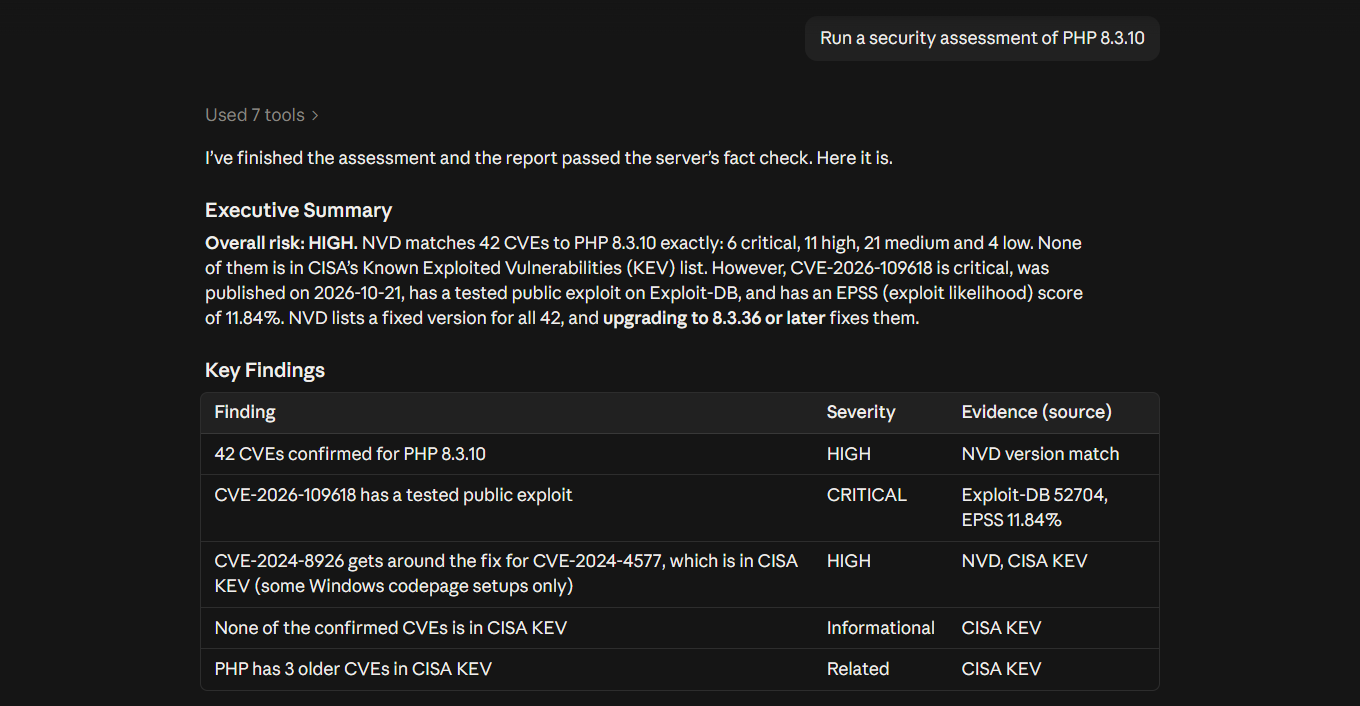
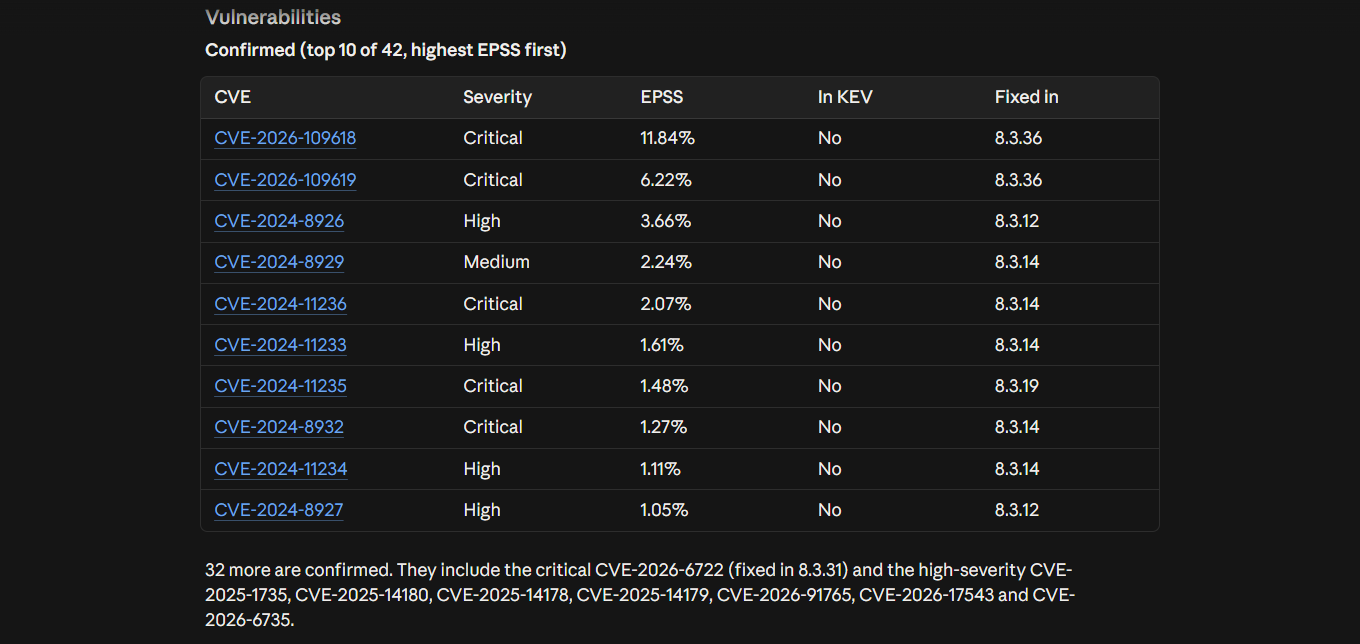
It keeps everything that makes the original app's reports reliable:
- The same analyst rules as the app's system prompt. The server's instructions are a short summary, since clients cut long ones short;
investigate_targetreturns the full rules and report format asanalyst_guide. - Baseline lookups run in code, so reputation and exposure checks never depend on the model remembering them.
- Analysis depth (Quick Scan, Standard, Comprehensive, Expert) sets the tool-call budget, per-service caps and how much detail each result keeps. The model can't override these limits.
- Key facts computed from the data, not the model, including the CISA KEV split into confirmed for this target and related, so the numbers are the same whichever model runs it.
- Fresher and more accurate than NVD alone: Ubuntu and Debian packages are checked against the distro's own fix data, so backported fixes count; recent CVEs NVD hasn't analysed are listed for review; and for packages such as Next.js, React and Django, GitHub advisories fill gaps before NVD has them. Each CVE carries its patch status and whether exploit code is published.
- One investigation per
investigation_id: a random handle returned byinvestigate_target, so several chats sharing one server process never mix evidence.
How this differs
Most CVE servers search NVD by keyword or product and hand back every match, so a report on nginx 1.30.0 can list CVEs that were fixed years earlier. This one:
- Checks the exact version. A CVE is confirmed only when NVD's version ranges include that version, and for an Ubuntu or Debian package, CVEs the distro fixed by backport are ruled out. Keyword and product-level matches are listed separately as related.
- Combines the context a fix decision needs. One call returns CISA KEV status, EPSS, the minimum safe version, published exploits and patch status, instead of the model stitching together separate lookups.
- Checks the report, not just the data.
check_reportflags a draft that cites a CVE no tool returned, calls a related CVE confirmed, or gets a fix version or exploit claim wrong, before you see it. - Says what it didn't check. Every report lists the sources that weren't checked (a missing key, a failed lookup), so a missing result is never presented as a clean one.
What it doesn't do
- No scanning. It never connects to the target. Everything comes from public databases and the target's DNS records, so it can't find services that Shodan hasn't seen or vulnerabilities in software it isn't told about.
- Public targets only. Private, local and reserved IPs and local hostnames are refused.
- No authenticated or internal checks. It can't see installed packages, configuration or anything behind a login. For that, use a scanner on the host.
- No exploitation or remediation. It reports what's published about a target and what to upgrade to. It doesn't test exploits or change anything.
- It's only as current as its sources. CVEs that NVD hasn't analysed yet can't be version-confirmed; they're listed for review instead.
Tools
| Tool | What it does | Key needed |
|---|---|---|
investigate_target | Start here. Classifies the target, sets the depth, runs the baseline lookups, returns an investigation_id and next steps | depends on target |
version_specific_vulnerability_check | CVEs NVD confirms affect this exact version, ranked by KEV, EPSS and CVSS, with each one's patch status, any published exploit (Exploit-DB) and the minimum safe version. For packages such as Next.js, React, Express and Django it also adds GitHub advisories NVD doesn't have yet | none (NVD key optional) |
distro_patch_check | Whether an Ubuntu or Debian package (e.g. openssh 8.9p1-3ubuntu0.6 from an SSH banner) already has each CVE fixed by a backport, from the distro's own data | none |
nvd_lookup | Full NVD record for one CVE, with KEV and EPSS | none |
cisa_kev_check | CVE IDs or product names against CISA's Known Exploited Vulnerabilities | none |
cve_search | Keyword search of recent NVD CVEs | none |
resolve_domain | DNS A/AAAA lookup | none |
shodan_search | Open ports, services, versions, hosting. Without a key: Shodan's free InternetDB (ports, software and CVEs, no banners) | SHODAN_API_KEY for full results |
ip_owner | Who an IP's network is registered to, from the regional internet registry (RDAP) | none |
threat_lists_check | Spamhaus DROP (hijacked or criminal networks) and GreyNoise (internet scanners), with SANS ISC as the fallback when GreyNoise can't answer | none (GREYNOISE_API_KEY optional) |
subdomains | Hostnames under a domain from certificate transparency logs (crt.sh, or Cert Spotter as a fallback) | none |
virustotal_check | Reputation from VirusTotal engines | VIRUSTOTAL_API_KEY |
abuseipdb_check | Abuse reports and confidence score | ABUSEIPDB_API_KEY |
get_key_facts | Facts and the CISA KEV confirmed/related split, computed from this investigation's results | none |
check_report | Checks a draft report against the investigation's data, with no model involved, and lists CVE IDs, versions, EPSS figures and claims (end-of-life, no patch, internet-facing) that no lookup supports | none |
check_api_keys | Which keys are set (never their values) and where to get the rest | none |
There's also a security_assessment prompt (target + depth) that loads the analyst rules and the workflow: investigate_target → pass its investigation_id to each lookup → get_key_facts → draft the report →
check_report → fix what it flags. Lookups also work on their own without an id: they get Standard result sizes and the hourly cap below, but no tool-call budget, and they aren't counted in any investigation's key facts.
| Depth | Tool calls | Calls per Shodan/VirusTotal/AbuseIPDB |
|---|---|---|
| Quick Scan | 8 | 1 |
| Standard Analysis (default) | 15 | 2 |
| Comprehensive Investigation | 25 | 4 |
| Expert Deep Dive | 40 | 6 |
All tools are read-only. Private, reserved and cloud-metadata IPs are refused.
What each tool sends, and where
No tool ever contacts the target. Every lookup asks a public data source about the target, so the target's own servers never see a request from you. Those services do see what you looked up and your IP address (and your key, if you use one).
| Tool | What it sends | Sent to |
|---|---|---|
resolve_domain | The domain | Your normal DNS resolver |
shodan_search | The IP | Shodan with a key, or Shodan InternetDB without one |
virustotal_check | The IP or domain | VirusTotal |
abuseipdb_check | The IP | AbuseIPDB |
ip_owner | The IP | IANA, then the regional internet registry (RDAP) |
threat_lists_check | The IP | GreyNoise, or SANS ISC when GreyNoise can't answer. Spamhaus DROP is downloaded whole, so the IP isn't sent to Spamhaus |
subdomains | The domain | crt.sh, or Cert Spotter when crt.sh is down |
version_specific_vulnerability_check | The software name and version | NVD, plus OSV.dev for framework packages such as Next.js or Django |
distro_patch_check | The package name and version | OSV.dev |
nvd_lookup, cve_search | A CVE ID or search term | NVD (Shodan CVEDB if NVD is down) |
| CVE enrichment inside the tools above | CVE IDs only | FIRST (EPSS). The CISA KEV catalog and the Exploit-DB index are downloaded whole, so nothing is sent to them |
investigate_target | Runs the lookups that fit the target, as above | |
get_key_facts, check_report, check_api_keys | Nothing | Run on your machine |
Install
Requires Python 3.11+. Setup is three steps: install, optionally store your keys, connect your AI client.
The simplest way is uv, which runs the server straight from PyPI with nothing to set up:
uvx vulnerability-exposure-mcp keys status
Or install it with pip (pip install vulnerability-exposure-mcp) and use the vulnerability-exposure-mcp command the same way. To run from source instead, see From source below.
Free keys: Shodan, VirusTotal, AbuseIPDB, NVD (optional, raises the rate limit), GreyNoise (optional; GreyNoise only gives keys to accounts made with a work email, not Gmail or similar. Without one it allows 10 lookups a day, and SANS ISC covers the rest). CVE and software checks work with no keys at all. IP and domain checks also run without keys, using Shodan's free InternetDB, the internet registries, Spamhaus DROP and GreyNoise; the report then lists VirusTotal and AbuseIPDB as not checked.
Store your keys securely
Keys can live in your operating system's credential store (Windows Credential Manager, macOS Keychain, or the Secret Service on Linux) instead of a config file. Run this in your own terminal; the key is typed into a hidden prompt and goes straight to the store:
uvx vulnerability-exposure-mcp keys set shodan
Do the same for virustotal, abuseipdb, nvd and greynoise as needed. keys status shows which are stored (never their values) and keys delete NAME removes one. With keys stored this way, leave the env block below empty. An environment variable, if set, takes precedence over a stored key.
Servers, Docker containers and other headless Linux systems usually have no credential store. There keys set says so, and keys go in the env block instead.
Connect a client
Pass keys through the client's env block, not the command line.
Claude Desktop
Download vulnerability-exposure-mcp-<version>.mcpb from the latest release and open it: Claude Desktop installs it and asks for your (optional) keys in a form. Or add the JSON config below.
Claude Code
Store your keys first (see above), so none go on the command line, then run:
claude mcp add vulnerability-exposure -- uvx vulnerability-exposure-mcp
Start a new Claude Code session afterwards: MCP servers load when a session starts.
Or install it as a plugin, which asks for each (optional) key in a masked prompt and keeps it in your credential store:
/plugin marketplace add MRFrazer25/Vulnerability-Exposure-MCP
/plugin install vulnerability-exposure@vulnerability-exposure
Cursor, Windsurf, VS Code, Claude Desktop and other JSON-configured clients
Add this to the client's MCP config (in Claude Desktop: Settings → Developer → Edit Config), then restart the client. With keys stored in the credential store, leave the env values empty or remove the block.
{
  "mcpServers": {
    "vulnerability-exposure": {
      "command": "uvx",
      "args": ["vulnerability-exposure-mcp"],
      "env": {
        "SHODAN_API_KEY": "",
        "VIRUSTOTAL_API_KEY": "",
        "ABUSEIPDB_API_KEY": "",
        "NVD_API_KEY": "",
        "GREYNOISE_API_KEY": ""
      }
    }
  }
}
(VS Code uses "servers" instead of "mcpServers" in .vscode/mcp.json.)
Docker
Build the image once with docker build -t vulnerability-exposure-mcp ., then point the client at it. Containers have no credential store, so keys go in env; listing them as bare -e names passes their values through without putting them on the command line:
{
  "mcpServers": {
    "vulnerability-exposure": {
      "command": "docker",
      "args": ["run", "-i", "--rm", "-e", "SHODAN_API_KEY", "-e", "VIRUSTOTAL_API_KEY", "-e", "ABUSEIPDB_API_KEY",
               "-e", "NVD_API_KEY", "-e", "GREYNOISE_API_KEY", "vulnerability-exposure-mcp"],
      "env": {
        "SHODAN_API_KEY": "",
        "VIRUSTOTAL_API_KEY": "",
        "ABUSEIPDB_API_KEY": "",
        "NVD_API_KEY": "",
        "GREYNOISE_API_KEY": ""
      }
    }
  }
}
From source
git clone https://github.com/MRFrazer25/Vulnerability-Exposure-MCP.git
cd Vulnerability-Exposure-MCP
python -m venv .venv
.venv/Scripts/python -m pip install -e .   # macOS/Linux: .venv/bin/python
Then use .venv/Scripts/python -m vulnerability_exposure_mcp (on macOS or Linux, .venv/bin/python) wherever the steps above say uvx vulnerability-exposure-mcp, with the full path to that Python in client configs, for example "command": "C:/path/to/Vulnerability-Exposure-MCP/.venv/Scripts/python.exe", "args": ["-m", "vulnerability_exposure_mcp"].
Then ask: "Run a security assessment of PHP 8.3.10" or use the security_assessment prompt.
Settings
| Variable | Default | Meaning |
|---|---|---|
VULN_EXPOSURE_QUOTA_PER_HOUR | 20 | Max calls per hour to each of Shodan, VirusTotal and AbuseIPDB across all investigations, on top of the per-depth caps |
VULN_EXPOSURE_LOG_LEVEL | WARNING | Log level (logs go to stderr) |
Repeating an identical call in the same investigation returns the earlier result without spending quota. Large results are trimmed to about 15,000 characters.
Security notes
- Tool results contain third-party text (banners, hostnames, CVE descriptions). They're returned as data, the server's instructions tell the model never to follow instructions found in them, and instruction-like text in banners, hostnames and registry records is replaced with
[instruction-like text removed]before the model sees it. Still, use a client that shows you tool calls. check_reportchecks a draft report against the investigation's data in code, and lists IDs, versions, EPSS figures and claims no lookup supports.- To be alerted if any MCP server's tool descriptions change after you approve them (tool poisoning), you can run it behind Trail of Bits' mcp-context-protector.
- Keys are read from the environment or the OS credential store on each call, never logged, and redacted from error messages. Targets are not logged either, and failures are logged without tracebacks.
- Failed lookups are returned as tool errors (
isError), and every tool is marked read-only. - The server speaks stdio only, so it runs on your machine and only your client can reach it.
- Nothing is stored on disk and there's no telemetry. Targets are sent only to the data provider each lookup uses; see PRIVACY.md for what each one receives.
- Every push and pull request runs the tests and pip-audit against known-vulnerable dependencies. Dependencies are pinned and updated by Dependabot. See SECURITY.md to report a problem.
Responsible use
For legitimate security research, defensive security and education only. Only investigate systems you own or are authorized to assess, and follow each data provider's terms of service. Automated findings can be wrong; verify before acting.
Data sources and terms
Lookups use your own accounts and keys, so each provider's terms apply to you directly.
| Source | Used for | Terms to know |
|---|---|---|
| Shodan | Open ports, services, versions | Uses your own Shodan account and key. Without one, InternetDB is free for non-commercial use |
| Regional internet registries (RDAP) | Who an IP's network is registered to | Public registry data, found through IANA's RDAP bootstrap |
| Spamhaus DROP | Hijacked or criminal networks | Free; credit Spamhaus when you use it. Downloaded at most once a day, as Spamhaus asks |
| GreyNoise | Internet scanners and known business services | Community API: 10 lookups a day without a key; keys need a work-email account |
| crt.sh, Cert Spotter | Subdomains from certificate transparency logs | Free public search; Cert Spotter allows a few keyless lookups an hour for personal use |
| Shodan CVEDB | CVE details when NVD can't be reached | Free for non-commercial use |
| SANS ISC (DShield) | Attack reports for an IP when GreyNoise can't answer | Free and keyless; data is CC BY-NC-SA 4.0 (non-commercial), and SANS asks for contact details in the user agent |
| Exploit-DB | Whether exploit code is published for a CVE | Its index is downloaded at most once a day; GPL-2.0-or-later |
| GitHub Advisory Database and the PyPA Advisory Database via OSV.dev | Advisories for npm, PyPI, Maven and RubyGems packages before NVD has them | Free, no key; data is CC BY 4.0 |
| VirusTotal | Reputation from security engines | The free public API allows 4 lookups a minute and 500 a day, and must not be used in commercial products or services |
| AbuseIPDB | Abuse reports for IPs | Free plans are for non-commercial personal projects; don't republish its data |
| NVD (NIST) | CVE details and affected versions | Public data; free API key optional |
| CISA KEV | Known exploited vulnerabilities | Public US government data |
| FIRST EPSS | Exploitation probability | Published freely by FIRST's EPSS SIG |
| OSV.dev | Ubuntu and Debian fixes for installed packages | Free, no key; the data comes from each distro's security team (Ubuntu's is CC BY-SA 4.0) |
Several free tiers are for non-commercial use only: VirusTotal, AbuseIPDB, and Shodan's InternetDB and CVEDB. If you use this at work or in a paid product, get plans that allow commercial use.
This product uses data from the NVD API but is not endorsed or certified by the NVD.
Spamhaus DROP data is (c) The Spamhaus Project. Package advisories are from the GitHub Advisory Database (CC BY 4.0), the PyPA Advisory Database (CC BY 4.0) and Ubuntu's security notices (CC BY-SA 4.0, (c) Canonical), all via OSV.dev; SANS ISC data is CC BY-NC-SA 4.0. CVE® is a registered trademark of The MITRE Corporation.
Vulnerability Exposure MCP is an independent project. It is not affiliated with, endorsed by or sponsored by Shodan, VirusTotal (Google), AbuseIPDB, NIST, CISA, FIRST, MITRE, Spamhaus, GreyNoise, SANS, OffSec (Exploit-DB), GitHub, Google (OSV.dev), Sectigo (crt.sh), SSLMate (Cert Spotter) or the internet registries. Their names are used only to say which services it works with.
Tests
.venv/Scripts/python -m pip install -e ".[dev]"
.venv/Scripts/python -m pytest -q
License
MIT