GSC Wizard MCP
Your AI assistant can query Search Console analytics
Documentation
This server implements the Model Context Protocol. Once connected, your AI assistant can query Search Console analytics, inspect URLs, manage topic clusters and content groups, use Google Inspection API, submit URLs to IndexNow, read Bing Webmaster Tools data, and more, all scoped to your own account.
All you need to connect: an MCP API key, free for every GSC Wizard account. Create one at tool.gscwizard.com/account/api-keys. Keys look like gscw_live_... and are shown only once at creation.
Why analysis runs server-side
Most SEO and analytics MCP servers hand the raw rows back to the model: thousands of query/page records streamed into the context window for the LLM to crunch. Language models are not built for arithmetic over large tables. They are slow at it, they burn tokens doing it, and they make mistakes (dropped rows, miscounted sums, hallucinated totals) that are hard to catch.
GSC Wizard does the opposite. Every analysis (CTR curves, decay detection, cannibalization, opportunity scoring, path breakdowns, ranking changes, full SEO reports) is computed in server-side Python and SQL, against the data warehouse, before anything reaches the model. The tool returns the finished result, not the raw input.
What that gets you
- Far fewer tokens. A single tool call returns a compact, finished answer instead of tens of thousands of rows the model has to read, hold in context, and pay for.
- Much faster. Aggregations run on the warehouse in milliseconds. The model spends its time reasoning about the result, not grinding through a spreadsheet one token at a time.
- Not prone to errors. The math is deterministic. Numbers come from real queries, so there is no risk of the model miscounting or inventing totals.
- Bigger datasets in scope. Because the heavy lifting never enters the context window, the server can analyze months of data and millions of rows that would never fit in a prompt.
The model still does what it is good at: interpreting the findings, spotting the story, and recommending what to do next. The crunching just happens where it belongs.
Endpoint
Streamable HTTP
https://mcp.gscwizard.com/mcp
Two ways to authenticate, both tied to your GSC Wizard account:
- API key (header): send
Authorization: Bearer gscw_live_.... Best for config-file clients (Claude Code, Cursor, VS Code, Windsurf). - OAuth 2.1 (sign-in): clients that support remote OAuth (ChatGPT, the Claude web/app Connectors UI, the native Claude Desktop connector) discover it automatically and walk you through a Google sign-in and consent screen. No key to copy or store.
In clients that render rich tool output (such as ChatGPT), summary tools like get_site_summary, query_top_queries, query_top_pages, get_ranking_changes, list_sites, and generate_seo_report display an interactive, theme-aware card/table view. Other clients receive the same data as JSON.
Connect a client
The server speaks Streamable HTTP, so any client that supports remote MCP servers can connect. The config-file clients below (Claude Code, Cursor, VS Code, Windsurf) authenticate with an API-key header: replace gscw_live_... with your key. Clients that support remote OAuth (ChatGPT, the Claude web/app Connectors UI, the native Claude Desktop connector) instead just need the URL and will sign you in: see the OAuth note in each section.
Claude Code
claude mcp add --transport http gsc-wizard \
  https://mcp.gscwizard.com/mcp \
  --header "Authorization: Bearer gscw_live_..."
Claude Desktop
Easiest (OAuth, no Node): Settings → Connectors → Add custom connector, enter https://mcp.gscwizard.com/mcp as the URL, and leave the OAuth fields blank. Claude registers itself automatically, opens a Google sign-in and consent screen, and connects. Nothing to copy or store.
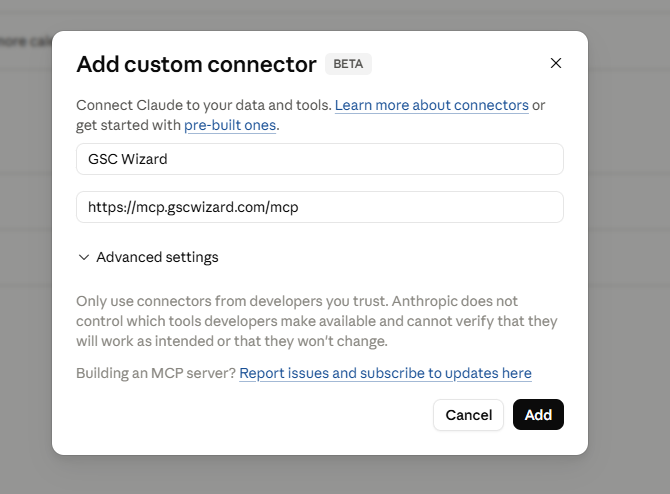
Add custom connector: paste the URL, leave the OAuth fields blank.
Alternative (static API key): Claude Desktop's config file launches only local (stdio) servers, so pasting a "type": "http" entry is rejected as invalid. To use an API key instead of OAuth, bridge the remote server through mcp-remote (requires Node.js). Settings → Developer → Edit Config, then add:
{
  "mcpServers": {
    "gsc-wizard": {
      "command": "npx",
      "args": [
        "-y", "mcp-remote",
        "https://mcp.gscwizard.com/mcp",
        "--header", "Authorization:${AUTH_HEADER}"
      ],
      "env": { "AUTH_HEADER": "Bearer gscw_live_..." }
    }
  }
}
The key goes in env rather than inline because mcp-remote splits each --header value on spaces, so Authorization:${AUTH_HEADER} is written without a space. On Windows, if npx fails to launch, set "command": "cmd" and prepend "/c", "npx" to args. Quit and reopen Claude Desktop fully after saving.
Cursor
Add to ~/.cursor/mcp.json (global) or .cursor/mcp.json in a project:
{
  "mcpServers": {
    "gsc-wizard": {
      "url": "https://mcp.gscwizard.com/mcp",
      "headers": {
        "Authorization": "Bearer gscw_live_..."
      }
    }
  }
}
VS Code (GitHub Copilot agent mode)
Add to .vscode/mcp.json in your workspace (or run the MCP: Add Server command). VS Code uses servers, not mcpServers, and can prompt for the key so it stays out of source control:
{
  "inputs": [
    { "id": "gscw-key", "type": "promptString", "description": "GSC Wizard MCP key", "password": true }
  ],
  "servers": {
    "gsc-wizard": {
      "type": "http",
      "url": "https://mcp.gscwizard.com/mcp",
      "headers": {
        "Authorization": "Bearer ${input:gscw-key}"
      }
    }
  }
}
Windsurf
Add to ~/.codeium/windsurf/mcp_config.json. Windsurf uses serverUrl for remote servers:
{
  "mcpServers": {
    "gsc-wizard": {
      "serverUrl": "https://mcp.gscwizard.com/mcp",
      "headers": {
        "Authorization": "Bearer gscw_live_..."
      }
    }
  }
}
ChatGPT
Custom connectors need ChatGPT Plus, Pro, Business, Enterprise or Edu; they are not available on Free or Go. (The GSC Wizard ChatGPT app is the route for those plans: it needs no developer mode. A GSC Wizard subscription or trial applies either way.) Custom MCP servers live under Settings → Apps (developer mode, formerly "Connectors"). Enable Developer mode, add an app, and enter https://mcp.gscwizard.com/mcp as the Server URL. ChatGPT uses OAuth 2.1: it registers itself, then opens the GSC Wizard sign-in and consent screen. Leave the OAuth client ID/secret fields blank (the server supports dynamic client registration). There is no API-key field, which is expected: ChatGPT cannot present static bearer tokens, so it uses OAuth.
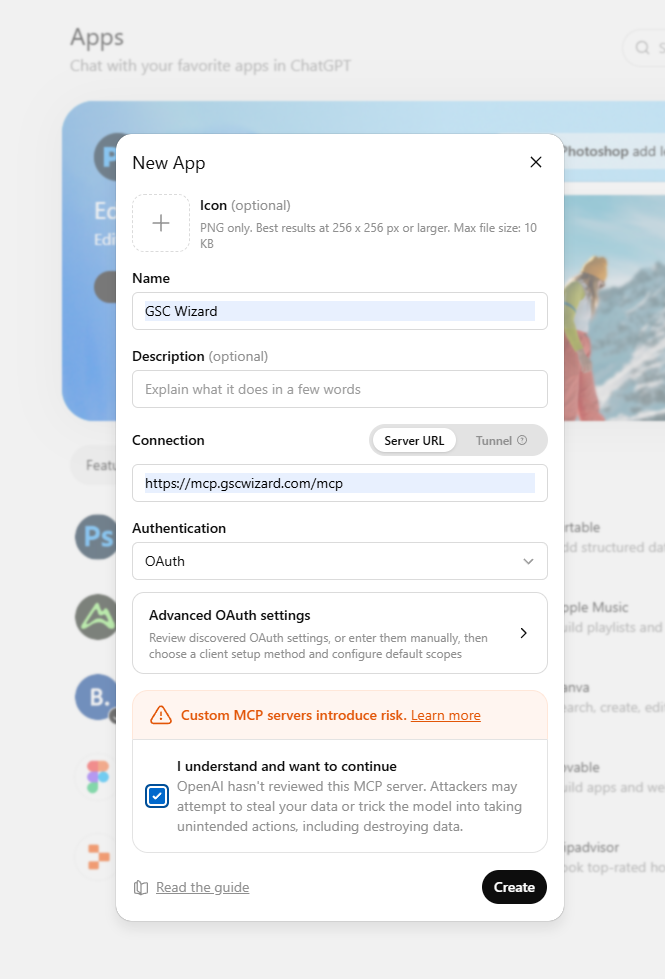
New App (Developer mode): Server URL + Authentication “OAuth”; client ID/secret left blank.
Programmatic access also works through the OpenAI Responses API, which accepts a remote MCP tool with a headers object, so there you can pass Authorization: Bearer gscw_live_... directly. Note that ChatGPT's built-in Deep Research connectors only call search and fetch tools; full tool access is via developer-mode apps and the Responses API.
Any other MCP client
Point it at the Streamable HTTP endpoint and send your key as a bearer token:
URL:    https://mcp.gscwizard.com/mcp
Header: Authorization: Bearer gscw_live_...
Key names vary between clients (for example transport vs type, url vs serverUrl), but the URL and bearer header stay the same. Check your client's MCP docs if the keys above are not recognized.
Authentication and scopes
Each API key carries a scope, chosen when you create it:
- Read only: query data and run reports. Cannot add, edit, or delete anything.
- Read & write: everything read keys can do, plus mutations (add sites, submit IndexNow, manage clusters, and so on). Every mutation is audit-logged.
MCP tools require an active subscription or a running free trial. Creating new API keys needs the same; existing keys can always be revoked from the API keys page, where revocation takes effect immediately.
Rate limits
Tool calls are rate limited per account to protect your Search Console quota and keep the service responsive. Two windows apply at once, and a call must fit within both. The MCP transports (assistants such as Claude and ChatGPT) and the REST API each get their own budget, so a dashboard refreshing over REST cannot lock you out of your assistant session:
| Window | MCP (assistants) | REST API (/v1) |
|---|---|---|
| Per minute | 60 tool calls | 180 tool calls |
| Per hour | 1,000 tool calls | 2,000 tool calls |
The REST minute window is the wider of the two because REST traffic is bursty by construction: a Data Studio dashboard refreshes every chart independently and concurrently, so a page arrives as one spike and then goes quiet. The hour window is what still bounds sustained load.
Within a surface the limit is shared across every key and session on your account, so opening more sessions does not raise it. Only tool invocations (tools/call) count: protocol handshakes such as initialize and tools/list are free, and a batched request that invokes several tools counts as one call per tool. A few expensive tools count for more than one call each.
When you exceed a window over REST the server returns HTTP 429 with a Retry-After header giving the seconds until the window resets, and a JSON body: { "error": { "code": "rate_limited", "message": "Rate limit exceeded (minute window). Retry after 42s." } }. Pause for Retry-After seconds and retry. Over MCP the same condition comes back as a tool error carrying that message, which most clients surface as a transient error you can simply re-run.
These limits are separate from Google's own quotas. URL Inspection tools (inspect_url, bulk_inspect_urls, check_tracked_url_now) also draw on the daily ~2,000-inspection-per-property quota you share with the GSC Wizard UI.
Tools
The server exposes 126 tools. You normally just ask your assistant in natural language ("show my top queries last month for example.com") and it picks the right tool and fills the arguments. The JSON under each tool below shows the argument shape, so you can see what each one accepts. Dates use YYYY-MM-DD and are optional on every tool that takes a date range: omit startDate / endDate and the server uses the most recent settled window automatically (never pass null or the string "null"). siteUrl is a value returned by list_sites (a URL prefix like https://example.com/ or a domain property like sc-domain:example.com).
Date ranges are optional. Every tool that takes a date range treats startDate and endDate as optional: omit them and the server analyzes the last 28 days Search Console has settled (its data lags ~2-3 days). Pass one end or both to narrow the window; the comparison tools (get_ranking_changes, find_decaying_content) default the baseline to the same-length period immediately before the current one. You never need to know today's date, and you should never send null or the string "null" for a date.
Where the numbers come from. The search-analytics tools (query_search_analytics, query_top_queries, query_top_pages, query_countries, query_devices, get_site_summary, get_query_performance, get_page_performance) and the analysis-report tools (get_ranking_changes, find_decaying_content, get_decay_overview, analyze_cannibalization, analyze_ctr_curve, find_page_poaching_opportunities, score_opportunities, breakdown_by_path, analyze_sampling_impact, get_sitemap_performance, get_cross_site_summary, get_tag_group_view) read from the GSC Wizard data warehouse when it has your property: that gives you longer history and no Search Console sampling. Otherwise they fall back to the live Search Console API automatically. Every response includes a dataSource field set to clickhouse or api so you always know which one answered. Warehouse responses also include a settledThrough date and a freshness note: warehouse data settles ~2 days behind real-time, so for the most recent day or two the live API is the better source. Requests that need the searchAppearance dimension, the googleNews type, three or more distinct dimensions, or pagination always use the live API.
Source maturity. The eight search-analytics data tools (query_search_analytics, query_top_queries, query_top_pages, query_countries, query_devices, get_site_summary, get_query_performance, get_page_performance) return a dataMaturity block on both the warehouse and the live-API path, and every response carries a top-level settledThrough. Search Console has no native settled-through field, so the server runs one small date-grouped probe with dataState: "all" over the last ten days, keeps the API's raw metadata.firstIncompleteDate, and derives settledThrough as the calendar day immediately before it. Both dates are on Search Console's own basis, Pacific time (dateBasis: "America/Los_Angeles"); probe records the exact request so the boundary can be reproduced. The lookup fails closed: when the API returns no usable firstIncompleteDate, both dates are null and source is "unavailable" with a note. Never infer a settlement date from the last returned row, since zero-activity days are omitted from row data. On warehouse responses settledThrough is the earlier of the ingest cutoff (dataMaturity.warehouseCutoff) and the API boundary. The GA4 report tools (get_ga4_overview, query_ga4_report, get_ga4_ecommerce, get_ga4_key_events, get_ga4_llm_traffic, get_ga4_error_pages, query_ga4_custom_dimensions) return the property's IANA reporting zone as timeZone, taken from the Data API's response metadata (falling back to the Admin API property record), which is the basis of every GA4 date they return. All of this uses the existing read-only webmasters.readonly and analytics.readonly scopes.
Metric units. Every ctr field returned by any tool is a percentage from 0 to 100 (a 2.34% click-through rate is 2.34, not 0.0234) — the same on the warehouse path, the live Search Console path, and the Bing tools. Differences between two CTRs (ctrPoints, ctrDelta, the deltas map on analyze_ctr_curve) are in percentage points. position is an impressions-weighted average where lower is better. GA4 rate metrics are the exception and keep the Data API's own units: bounceRate and engagementRate are 0-1 fractions.
Bing Webmaster Tools. The list_bing_sites and get_bing_* tools read the Bing side of organic search (Bing, Yahoo, DuckDuckGo) live from the Bing Webmaster API. They use the Bing Webmaster API key stored on the property's connected Google account in GSC Wizard, so they need no separate connection here: if no key is set up, the tool returns notConfigured: true with a hint instead of an error. Bing exposes roughly the last 6 months per endpoint, so omitting the date range returns everything Bing has (not a settled-window default like the Search Console tools).
Yandex Webmaster. The list_yandex_sites and get_yandex_* tools read the Yandex side of organic search live from the Yandex Webmaster API, which matters mainly for Russian, Turkish, Kazakh, Belarusian and Uzbek traffic. They use the Yandex connection on the property owner's GSC Wizard account, so they need no separate connection here: with nothing connected the tool returns notConfigured: true with a hint instead of an error. Two limits are worth knowing before you quote a number. Yandex publishes only its top 3,000 queries from the past week and serves at most 500 per request, so any total you derive from query rows is a floor rather than a complete figure; and Yandex has no query-by-page report, no country dimension and no CTR metric, so CTR is calculated from impressions and clicks. Yandex positions are measured differently from Google's and should not be averaged together with them.
Reads 94
list_sites read
List Search Console properties connected to the account.
{}
No arguments. Start here to get the siteUrl values the other tools expect. Each property carries a <code>permissionLevel</code> and a <code>readable</code> flag; <code>readable: false</code> means the property is listed in Search Console but not verified, so Google refuses all data for it until the user verifies it.
get_account_info read
Profile, connected Google accounts, and subscription state.
{}
No arguments.
generate_seo_report read
Runs the whole analysis suite for a property in one call and returns a complete, self-contained HTML report (overview, top queries/pages, countries & devices, CTR curve, opportunities, ranking changes, decay, cannibalization, sections, coverage, sitemaps). Much faster than calling each tool separately.
{
  "siteUrl": "sc-domain:example.com",
  "days": 28,
  "format": "html"
}
days defaults to 28 (7-180). format: "html" (default, ready-to-open report) or "json" (raw data bundle). includeSitemap defaults to true.
query_search_analytics read
Ad-hoc searchAnalytics.query against a property. The most flexible read tool.
{
  "siteUrl": "sc-domain:example.com",
  "startDate": "2026-05-01",
  "endDate": "2026-05-28",
  "dimensions": [
    "query",
    "page"
  ],
  "rowLimit": 1000,
  "filters": [
    {
      "dimension": "country",
      "operator": "equals",
      "expression": "usa"
    }
  ]
}
startDate/endDate, dimensions, rowLimit (defaults to 1000, uncapped; the live-API path auto-paginates past 25000), searchType, startRow, and filters are all optional. Omit the dates for the last 28 settled days.
get_site_summary read
Totals for a window plus a prior-period comparison.
{
  "siteUrl": "sc-domain:example.com",
  "days": 28
}
days defaults to 28 (max 180) and counts back from the latest settled date. Pass startDate and/or endDate for an explicit window instead: a date you supply always wins, and days only sizes an edge you leave out. The comparison is always the same-length window immediately before the one you asked for.
inspect_url read
Run the URL Inspection API for one URL and persist the result to history.
{
  "siteUrl": "sc-domain:example.com",
  "inspectionUrl": "https://example.com/blog/post"
}
get_inspection_quota read
Remaining URL inspections available today for a property.
{
  "siteUrl": "sc-domain:example.com"
}
list_saved_filters read
Saved filter presets, optionally restricted to one property.
{
  "siteUrl": "sc-domain:example.com"
}
siteUrl is optional; omit it to list every saved filter on the account.
list_topic_clusters read
Topic clusters defined for a property.
{
  "siteUrl": "sc-domain:example.com"
}
list_content_groups read
Content groups and their URL-matching rules for a property.
{
  "siteUrl": "sc-domain:example.com"
}
get_filter_options read
Which brand, content-group and topic-cluster filters the report tools accept on a property.
{
  "siteUrl": "sc-domain:example.com"
}
Pass the results to get_site_summary, query_top_queries, query_top_pages, query_countries or query_devices as brand, contentGroupId or topicClusterId.
list_sitemaps read
Sitemaps submitted to Search Console for a property.
{
  "siteUrl": "sc-domain:example.com"
}
list_url_inspections read
Persisted URL inspection history (paginated).
{
  "siteUrl": "sc-domain:example.com",
  "urlContains": "/blog/",
  "limit": 100,
  "offset": 0
}
urlContains is optional; limit defaults to 100 (max 500). The history is not capped: follow pagination.nextOffset to retrieve every stored inspection, e.g. a bulk run of several hundred URLs. Set latestPerUrl: true to keep only the newest result per URL.
query_top_queries read
Top search queries by clicks for a date range.
{
  "siteUrl": "sc-domain:example.com",
  "startDate": "2026-05-01",
  "endDate": "2026-05-28",
  "limit": 100
}
limit defaults to 100, uncapped (pull the whole property if you want); searchType defaults to "web". startDate/endDate are optional: omit them for the last 28 settled days.
query_top_pages read
Top landing pages by clicks for a date range.
{
  "siteUrl": "sc-domain:example.com",
  "startDate": "2026-05-01",
  "endDate": "2026-05-28",
  "limit": 100
}
limit defaults to 100, uncapped (pull the whole property if you want); searchType defaults to "web". startDate/endDate are optional: omit them for the last 28 settled days.
query_countries read
Per-country clicks/impressions breakdown.
{
  "siteUrl": "sc-domain:example.com",
  "startDate": "2026-05-01",
  "endDate": "2026-05-28",
  "limit": 100
}
limit defaults to 100, uncapped. startDate/endDate are optional: omit them for the last 28 settled days.
query_devices read
DESKTOP / MOBILE / TABLET split for a date range.
{
  "siteUrl": "sc-domain:example.com",
  "startDate": "2026-05-01",
  "endDate": "2026-05-28"
}
startDate/endDate are optional: omit them for the last 28 settled days.
list_annotations read
Chart annotations (platform, account, or property scope).
{
  "siteUrl": "sc-domain:example.com",
  "startDate": "2026-01-01",
  "endDate": "2026-05-28"
}
All fields optional; omit siteUrl for account-wide annotations.
list_algo_updates read
Confirmed Google ranking updates from the status feed.
{
  "startDate": "2026-01-01",
  "endDate": "2026-05-28"
}
Both dates optional; omit for the full history.
list_indexnow_submissions read
IndexNow submission history for a property.
{
  "siteUrl": "sc-domain:example.com",
  "limit": 100
}
limit defaults to 100 (max 500). Batches that were refused before sending (a missing key file) are deliberately absent: they were never submitted.
get_page_performance read
Daily clicks/impressions/CTR/position for a single URL.
{
  "siteUrl": "sc-domain:example.com",
  "pageUrl": "https://example.com/blog/post",
  "startDate": "2026-05-01",
  "endDate": "2026-05-28"
}
get_query_performance read
Daily metrics for a single query, optionally on one URL.
{
  "siteUrl": "sc-domain:example.com",
  "query": "seo tools",
  "pageUrl": "https://example.com/blog/post",
  "startDate": "2026-05-01",
  "endDate": "2026-05-28"
}
pageUrl is optional; omit it to measure the query site-wide.
get_ranking_changes read
New, lost, improved, and declined queries (or pages) between two periods.
{
  "siteUrl": "sc-domain:example.com",
  "startDate": "2026-05-01",
  "endDate": "2026-05-28",
  "comparisonStartDate": "2026-04-01",
  "comparisonEndDate": "2026-04-28",
  "dimension": "query",
  "limit": 50
}
dimension is "query" or "page" (default query); limit is per bucket, default 50, max 10000. counts gives the full size of each bucket before the limit, measured within the top scanLimit rows by clicks per period.
find_decaying_content read
Queries or pages losing clicks vs a baseline period, bucketed severe / moderate / mild.
{
  "siteUrl": "sc-domain:example.com",
  "startDate": "2026-05-01",
  "endDate": "2026-05-28",
  "comparisonStartDate": "2026-02-01",
  "comparisonEndDate": "2026-02-28",
  "dimension": "page",
  "minImpressions": 100
}
start/end is the recent period; comparison* is the earlier baseline. dimension defaults to "page".
get_decay_overview read
Per-query or per-page matrix of clicks/impressions/position broken down by month or week (the app's Query Decay / Content Decay heatmap).
{
  "siteUrl": "sc-domain:example.com",
  "dimension": "query",
  "granularity": "month",
  "metric": "clicks",
  "months": 16,
  "limit": 50
}
Defaults to the last 16 complete months. granularity "month" or "week"; metric clicks/impressions/position/ctr. Each row has a `values` array aligned to `periods`. Pass startDate/endDate to override the window.
analyze_cannibalization read
Queries where two or more pages compete, scored by impression-split entropy.
{
  "siteUrl": "sc-domain:example.com",
  "startDate": "2026-05-01",
  "endDate": "2026-05-28",
  "minImpressions": 10
}
minImpressions defaults to 10; limit defaults to 100, uncapped.
analyze_ctr_curve read
Actual CTR by position bucket (1-20) vs industry benchmarks (AWR, AWR 2026 study with and without AI Overviews, First Page Sage, Sistrix, Backlinko).
{
  "siteUrl": "sc-domain:example.com",
  "startDate": "2026-05-01",
  "endDate": "2026-05-28",
  "minImpressions": 10,
  "benchmarkSource": "all"
}
benchmarkSource: awr | awr2026 | awrAio | firstPageSage | sistrix | backlinko | all (default all). awr2026 and awrAio are the 2026 Advanced Web Ranking study, organic vs SERPs carrying an AI Overview; the gap between them is the AI Overview click tax. CTR values are percentages (0-100) and deltas are percentage points; a negative delta means the bucket underperforms that benchmark.
find_page_poaching_opportunities read
Queries ranking just outside the top, with estimated click upside if pushed to a target position.
{
  "siteUrl": "sc-domain:example.com",
  "startDate": "2026-05-01",
  "endDate": "2026-05-28",
  "minPosition": 4,
  "maxPosition": 20,
  "targetPosition": 3,
  "fallbackBenchmark": "awr"
}
Click upside uses the property's OWN CTR curve at targetPosition; fallbackBenchmark (awr | awr2026 | awrAio | firstPageSage | sistrix | backlinko, default awr) is used only where the site has no data. Response reports targetCtr and ctrSource ("own" or the benchmark key). Position band and target are tunable; limit defaults to 100, uncapped.
score_opportunities read
Impression-weighted opportunity score favoring high-impression queries near the top of page two.
{
  "siteUrl": "sc-domain:example.com",
  "startDate": "2026-05-01",
  "endDate": "2026-05-28",
  "minImpressions": 10
}
Considers positions 3-30; limit defaults to 100, uncapped.
breakdown_by_path read
Aggregates page performance by host + first folder segment(s).
{
  "siteUrl": "sc-domain:example.com",
  "startDate": "2026-05-01",
  "endDate": "2026-05-28",
  "depth": 1
}
depth (1-4) controls how many path segments form each group; limit defaults to 100, uncapped.
analyze_sampling_impact read
Estimates the share of clicks/impressions GSC hides via anonymization (query and page dimensions).
{
  "siteUrl": "sc-domain:example.com",
  "startDate": "2026-05-01",
  "endDate": "2026-05-28"
}
Only the live-API path reveals true sampling; the warehouse is unsampled (see the response note).
get_sitemap_performance read
Fetches a sitemap, extracts its URLs, and joins each with GSC clicks/impressions/position.
{
  "siteUrl": "sc-domain:example.com",
  "sitemapUrl": "https://example.com/sitemap.xml",
  "startDate": "2026-05-01",
  "endDate": "2026-05-28",
  "maxUrls": 500
}
The sitemap host must belong to the property. One level of sitemap-index expansion; maxUrls caps the join (defaults to 500, uncapped).
get_cross_site_summary read
Last-N-days clicks/impressions across all your properties (optionally one tag), with per-site totals.
{
  "days": 28,
  "tag": "client-a"
}
tag is optional; days defaults to 28 (max 180); maxSites is optional with no hard cap: omit it to include ALL matched properties, or pass a number to cap how many are processed.
list_tags read
Every tag on the account (global + property tags) with the number of properties carrying each.
{
  "includeSites": false
}
includeSites defaults to false; set true to also list the property URLs under each tag.
get_tag_group_view read
Aggregated cross-site report for all properties carrying a tag (the /group/tag dashboard): totals + comparison, daily trend, per-site totals, and merged top queries/pages/countries/devices.
{
  "tag": "client-a",
  "days": 28,
  "dimensions": [
    "query",
    "page",
    "country",
    "device"
  ],
  "limit": 100
}
days defaults to 28 (max 180); searchType defaults to "web"; dimensions defaults to all four; limit defaults to 100 (max 1000); maxSites is optional with no hard cap: omit it to include ALL tagged properties, or pass a number to cap.
get_indexing_tracker read
Indexing Tracker config and a status summary (indexed / not-indexed / pending / errors / warnings).
{
  "siteUrl": "sc-domain:example.com"
}
Returns tracker: null when no tracker is configured for the property.
list_tracked_urls read
Paginated list of tracked URLs with their latest indexing status, filterable and searchable.
{
  "siteUrl": "sc-domain:example.com",
  "filter": "warnings",
  "search": "/blog/",
  "page": 1,
  "pageSize": 50
}
filter: all | indexed | not_indexed | pending | errors | warnings. pageSize max 1000 (default 50); page is one-based.
get_indexing_tracker_report read
Indexing health report: score, coverage breakdown, crawl freshness, lost and newly-indexed pages.
{
  "siteUrl": "sc-domain:example.com",
  "days": 30
}
days defaults to 30 (max 90).
list_ga4_properties read
Every Google Analytics 4 property your connected Google accounts can read, and which GSC Wizard sites each is linked to.
{}
No arguments. connected: false means the Google Analytics consent has not been granted in the GSC Wizard app yet. linkedSiteUrls covers only the sites of the GSC Wizard account the connection is authenticated as (returned as account), so a property linked from another account of yours shows an empty list.
get_ga4_overview read
GA4 traffic summary (sessions, users, engagement rate, key events, and more) for the GA4 property linked to a site, always with a previous-period comparison.
{
  "siteUrl": "sc-domain:example.com",
  "includeTimeseries": false
}
GA4 must be linked to the site in the GSC Wizard app; otherwise a notConfigured explanation is returned, naming in account which GSC Wizard account it was resolved against (links are per account). Dates and the comparison window are optional; includeTimeseries adds daily points.
query_ga4_report read
One GA4 dimension breakdown per call: channel, sourceMedium, page, landingPage, country, device, or event, each with its own metric set.
{
  "siteUrl": "sc-domain:example.com",
  "dimension": "landingPage",
  "limit": 25
}
GA4 must be linked to the site in the GSC Wizard app. filters and a comparison range are optional; limit defaults to 50 (max 1000).
get_ga4_ecommerce read
GA4 ecommerce performance: revenue/transactions summary plus channel, source, page, landing-page, and product breakdowns.
{
  "siteUrl": "sc-domain:example.com",
  "limit": 25
}
GA4 must be linked to the site in the GSC Wizard app. hasEcommerce is false when the property shows no ecommerce activity; revenue is in the property currency (currencyCode).
get_ga4_llm_traffic read
Sessions, engagement, conversions and revenue referred by ChatGPT, Perplexity, Copilot, Gemini, Claude and other AI assistants, with their share of total traffic.
{
  "siteUrl": "sc-domain:example.com",
  "includeDailySplit": false,
  "limit": 25
}
GA4 must be linked to the site in the GSC Wizard app. Google AI Overviews traffic carries no distinct referrer and is NOT included. includeDailySplit adds a per-assistant daily sessions series.
get_ga4_key_events read
Segments GA4 on ONE key event (conversion): totals, conversion rates, and per channel/source/landing page/page/country/device breakdowns.
{
  "siteUrl": "sc-domain:example.com",
  "keyEvent": "form_submit",
  "limit": 25
}
GA4 must be linked to the site in the GSC Wizard app. Omit keyEvent to auto-pick the most active one; the response lists every available key event name.
list_ga4_custom_dimensions read
The custom dimensions and custom metrics registered on the site's GA4 property: the event parameters and user properties it collects on top of the standard GA4 fields.
{
  "siteUrl": "sc-domain:example.com"
}
GA4 must be linked to the site in the GSC Wizard app. Each entry carries the apiName (e.g. customEvent:source_format) that query_ga4_custom_dimensions takes. An event parameter that is not registered in GA4 Admin > Custom definitions cannot be reported on at all, so call this before guessing a name. Item-scoped definitions are listed with queryable: false.
query_ga4_custom_dimensions read
Breaks GA4 traffic down by one of your own registered custom dimensions, optionally crossed with a second one: which parameter value led to which.
{
  "siteUrl": "sc-domain:example.com",
  "dimension": "customEvent:source_path",
  "secondaryDimension": "customEvent:target_path",
  "filters": {
    "event": [
      "internal_link_click"
    ]
  },
  "limit": 50
}
GA4 must be linked to the site in the GSC Wizard app. Names come from list_ga4_custom_dimensions; an unregistered one is rejected rather than answered with an empty report. Rows carry key (primary value), secondary (the crossed value) and eventCount / sessions / activeUsers / keyEvents. valueFilters drill into one value; customMetrics adds registered custom metrics as columns.
get_blended_landing_pages read
Joins Search Console (clicks, impressions, CTR, position) with GA4 (sessions, bounce rate, key events, revenue) per landing page.
{
  "siteUrl": "sc-domain:example.com",
  "organicOnly": true,
  "limit": 50,
  "dateGranularity": "none"
}
GA4 must be linked to the site in the GSC Wizard app. organicOnly (default true) limits GA4 metrics to google / organic sessions so both sides describe the same traffic. dateGranularity ("day" / "week" / "month") returns a time series instead of one aggregate: every row carries the period start as date, limit applies per period, and the prev* fields compare each period against the one before it (so it cannot be combined with an explicit comparison range).
get_query_value_attribution read
Estimates GA4 sessions, key events, and revenue per Search Console query via proportional click share over the query→page→landing-page join.
{
  "siteUrl": "sc-domain:example.com",
  "organicOnly": true,
  "limit": 1000,
  "dateGranularity": "none"
}
GA4 must be linked to the site in the GSC Wizard app. Estimates, not measured revenue: page-level click-share attribution; matchedClickShare reports coverage; estRevenue only when the GA4 property records revenue. dateGranularity ("day" / "week" / "month") returns a time series instead of one aggregate — the way to chart estimated revenue from non-branded queries month by month — with every row carrying the period start as date and limit applying per period.
list_bing_sites read
List the sites verified in your linked Bing Webmaster Tools account.
{}
No arguments. Returns notConfigured: true when no Bing Webmaster API key is set up in the GSC Wizard app.
get_bing_traffic_stats read
Daily Bing clicks and impressions for a property (roughly the last 6 months).
{
  "siteUrl": "sc-domain:example.com",
  "startDate": "2026-05-01",
  "endDate": "2026-05-28"
}
startDate/endDate optional; omit both for everything Bing has (~6 months).
get_bing_query_stats read
Top Bing search queries for a property (clicks, impressions, CTR, position).
{
  "siteUrl": "sc-domain:example.com",
  "startDate": "2026-05-01",
  "endDate": "2026-05-28",
  "limit": 100
}
Dates optional (omit for ~6 months); limit defaults to 100, uncapped.
get_bing_page_stats read
Top Bing landing pages for a property (clicks, impressions, CTR, position).
{
  "siteUrl": "sc-domain:example.com",
  "startDate": "2026-05-01",
  "endDate": "2026-05-28",
  "limit": 100
}
Dates optional (omit for ~6 months); limit defaults to 100, uncapped.
get_bing_query_page_stats read
Bing query + landing-page pairs for a property (which query drives each page).
{
  "siteUrl": "sc-domain:example.com",
  "startDate": "2026-05-01",
  "endDate": "2026-05-28",
  "limit": 100,
  "seedLimit": 25
}
Dates optional (omit for ~6 months); limit defaults to 100, uncapped. Bing has no endpoint that returns query+page combinations, so pairs are assembled with one request per top page — seedLimit (default 25, max 100) sets how many pages are expanded, and truncated: true means Bing had more. Pass query to pair from a single search term instead (the pages that ranked for it).
get_bing_page_queries read
The Bing search queries that led to ONE landing page — the per-page keyword view, and the drill-down after get_bing_page_stats.
{
  "siteUrl": "sc-domain:example.com",
  "page": "https://example.com/blog/post/",
  "startDate": "2026-05-01",
  "endDate": "2026-05-28",
  "limit": 100
}
page is required and must match Bing exactly (full URL, including scheme, www and trailing slash) — take it from get_bing_page_stats. Dates optional; limit defaults to 100.
get_bing_query_page_trend read
Daily clicks, impressions, CTR and average position for ONE exact query + landing-page pair on Bing.
{
  "siteUrl": "sc-domain:example.com",
  "query": "example query",
  "page": "https://example.com/blog/post/",
  "startDate": "2026-05-01",
  "endDate": "2026-05-28"
}
query and page are both required and must match Bing exactly — take the pair verbatim from get_bing_query_page_stats or get_bing_page_queries. The only Bing endpoint with a true pair-level position. Dates optional (omit for ~6 months).
get_bing_crawl_stats read
Bing's daily crawl stats: pages crawled/indexed, inbound links, and response-code breakdown.
{
  "siteUrl": "sc-domain:example.com",
  "startDate": "2026-05-01",
  "endDate": "2026-05-28"
}
startDate/endDate optional; omit both for everything Bing has (~6 months).
get_bing_crawl_issues read
URLs where Bing found crawl issues (4xx/5xx, redirects, robots blocks, malware), with decoded labels.
{
  "siteUrl": "sc-domain:example.com",
  "limit": 200
}
limit defaults to 200, uncapped; results are ordered by inbound-link count.
get_bing_link_counts read
Inbound (backlink) counts per URL recorded by Bing, paginated (~100 rows per page).
{
  "siteUrl": "sc-domain:example.com",
  "page": 0
}
page defaults to 0; the response includes totalPages so you can paginate.
get_bing_keyword_stats read
Bing's historical impression volume for a single keyword (weekly), plus broad-match impressions.
{
  "keyword": "seo tools",
  "country": "us",
  "language": "en-US"
}
Marketplace demand data, not tied to a property (no siteUrl). country defaults to "us", language to "en-US".
get_bing_feeds read
Sitemaps/feeds submitted to Bing for a property, with decoded status, type, dates and URL counts.
{
  "siteUrl": "sc-domain:example.com"
}
get_bing_url_submission_quota read
Remaining Bing URL-submission quota (daily and monthly) for a property.
{
  "siteUrl": "sc-domain:example.com"
}
list_yandex_sites read
List the sites in your linked Yandex Webmaster account, with verification status and canonical mirror.
{}
No arguments. Returns notConfigured: true when no Yandex account is connected in the GSC Wizard app.
get_yandex_site_summary read
Yandex's site quality index (SQI), pages in search, excluded pages and open site problems for a property.
{
  "siteUrl": "sc-domain:example.com"
}
get_yandex_query_stats read
Yandex search queries for a property (impressions, clicks, derived CTR, average impression and clicked position).
{
  "siteUrl": "sc-domain:example.com",
  "orderBy": "TOTAL_SHOWS",
  "deviceType": "ALL",
  "limit": 500
}
Yandex exposes only its top 3,000 queries from the past week (500 per request), so totals are a floor, not a complete figure. Yandex publishes no CTR metric, so CTR is derived. There is no query-by-page report in the Yandex API. MOBILE_AND_TABLET overlaps MOBILE and TABLET - never sum them.
get_yandex_indexing_history read
Yandex crawl response codes by day, pages in Yandex search, and the pages that appeared in or were removed from search.
{
  "siteUrl": "sc-domain:example.com",
  "startDate": "2026-05-01",
  "endDate": "2026-05-28"
}
Dates optional. The appeared/removed series has no Google Search Console equivalent.
detect_anomalies read
Flags statistically anomalous days (spikes/drops) for a metric, scored by severity.
{
  "siteUrl": "sc-domain:example.com",
  "metric": "clicks",
  "days": 90,
  "sensitivity": 3.5
}
metric: clicks | impressions | ctr | position (default clicks). days >= 21 (default 90). Lower sensitivity = more anomalies.
detect_change_points read
Finds dates where clicks or impressions shifted to a new sustained level (step changes).
{
  "siteUrl": "sc-domain:example.com",
  "metric": "clicks",
  "days": 180,
  "sensitivity": 2
}
metric: clicks | impressions. days >= 14 (default 180). Reports before/after means and % change.
forecast_traffic read
Projects future clicks/impressions via seasonal decomposition + an auto-selected trendline.
{
  "siteUrl": "sc-domain:example.com",
  "metric": "clicks",
  "granularity": "weekly",
  "forecastPeriods": 26
}
Weekly needs >= 13 weeks, monthly >= 6 months. Optional growthRate, cvr + aov (for revenue), trendlineType.
get_longtail_clusters read
Segments pages into Head / Chunky Middle / Long Tail tiers by elbow detection on cumulative clicks.
{
  "siteUrl": "sc-domain:example.com",
  "preset": "default",
  "pagesPerCluster": 10
}
preset: default | content | ecommerce | small_site | enterprise. Optional sensitivity and includeZeroClicks.
get_core_web_vitals read
Chrome UX Report field data: weekly Core Web Vitals (LCP, INP, CLS) + FCP/TTFB with ratings and regressions, plus Chrome's experimental ad metrics where the site carries ads.
{
  "siteUrl": "sc-domain:example.com",
  "formFactor": "ALL"
}
Needs a CrUX API key configured in the app. Pass a `url` to measure a single page; formFactor: ALL | PHONE | DESKTOP | TABLET. `adMetrics` (ad count/density/CPU/network weight) is p75-only and unrated — CrUX publishes no targets for it — and is absent when Chrome detected no ads.
list_experiments read
Lists the SEO experiments (split tests) defined for a property, with their URL groups.
{
  "siteUrl": "sc-domain:example.com",
  "includeArchived": false
}
get_experiment_results read
Scores one experiment: control vs variant click growth with a significance test, uplift CI, and winner.
{
  "siteUrl": "sc-domain:example.com",
  "experimentId": "00000000-0000-0000-0000-000000000000",
  "confidenceLevel": 0.95
}
Group 0 is the control. The comparison window defaults to the prior same-length period.
compare_migration read
Before/after A-vs-B comparison for a migration: daily trend, per-side totals, query/page winners & losers.
{
  "mode": "cross-property",
  "siteUrl": "sc-domain:old.com",
  "siteUrlB": "sc-domain:new.com",
  "limit": 50
}
mode: cross-property (siteUrl + siteUrlB) | two-urls (urlPrefixA + urlPrefixB) | regex (regexA + regexB). Both sides share one date window.
audit_onpage_seo read
Crawls pages and runs a technical on-page audit per URL (indexability, titles, canonical, links, structured data, issues).
{
  "siteUrl": "sc-domain:example.com",
  "maxUrls": 10
}
Pass explicit `urls` (must belong to the property) or omit to audit top pages by impressions. Fetches each page live; keep the count modest.
get_content_group_performance read
Measures your saved content groups: clicks, impressions, CTR, average position, page count and share of clicks per group, plus an "uncategorized" bucket. Pass groupId to drill into the top pages of one group.
{
  "siteUrl": "sc-domain:example.com",
  "startDate": "2026-01-01",
  "endDate": "2026-01-31"
}
Groups are created in the app or with create_content_group. On the warehouse path the totals cover EVERY page of the property, not just the top N. Matching is first-match-wins in the saved order of the groups.
get_topic_cluster_performance read
Measures your saved topic clusters over queries: clicks, impressions, CTR, average position, matched query count and share of clicks per cluster, plus an "unclustered" bucket. Pass clusterId to drill into the top queries of one cluster.
{
  "siteUrl": "sc-domain:example.com",
  "startDate": "2026-01-01",
  "endDate": "2026-01-31"
}
Clusters may OVERLAP: a query matching two clusters counts fully in both, so cluster totals do not sum to the property total (overlappingQueries reports how many are double-counted).
get_branded_performance read
Splits a property into branded and non-branded search: totals, branded share of clicks, a daily trend for both sides, and the top queries on each side.
{
  "siteUrl": "sc-domain:example.com",
  "startDate": "2026-01-01",
  "endDate": "2026-01-31",
  "limit": 25
}
Driven by the branded keywords saved on the property (set them with update_site). A keyword wrapped in slashes, like /acme?corp/, is a regex; otherwise it is a case-insensitive substring. Returns notConfigured when none are set.
get_position_distribution read
Slices a property by where it ranks, in 1-3 / 4-10 / 11-20 / 21+ bands: impressions and clicks per band over the range, or the count of distinct queries ranking in each band day by day.
{
  "siteUrl": "sc-domain:example.com",
  "granularity": "period",
  "dimension": "query"
}
granularity: "period" (default, bucket totals) or "daily" (distinct queries per band per day, always keyed on query). Positions are impression-weighted averages, so a row sits in exactly one band.
get_ga4_error_pages read
GA4 error pages for the property linked to a site, broken down by page title AND URL: sessions, page views, active users and bounce rate.
{
  "siteUrl": "sc-domain:example.com",
  "startDate": "2026-01-01",
  "endDate": "2026-01-31"
}
GA4 has no native 404 signal, so error pages are matched against the page-title patterns saved for the site in the app. Pass titleFilters (e.g. [{ operator: "contains", value: "404" }]) to override them for one call.
list_shared_reports read
Lists the shareable reports saved on your account, each with its view URL and the clients currently granted access.
{
  "limit": 50
}
Use it to find a reportId for manage_report_access or delete_shared_report, or to audit who can see which report.
list_report_clients read
Lists the client contacts on your account: the people who can be granted access to a shareable report.
{
  "limit": 100
}
A client is an email address plus an optional name; they sign in with it to view reports shared with them.
list_migration_redirects read
Lists the saved redirect mappings (old URL to new URL) behind the Migration Compare workflow, grouped by the A/B property pair and label they belong to.
{
  "summaryOnly": true
}
Filter with label / siteUrlA / siteUrlB. summaryOnly returns just the per-migration counts, which is the right call on a large mapping.
get_indexnow_settings read
Reports whether IndexNow is set up for a property: whether a key is configured, and whether the key file is actually reachable on the site.
{
  "siteUrl": "sc-domain:example.com"
}
Both halves have to be true before engines accept anything. keyFileVerified is the live check: false means the file is genuinely missing or holds the wrong key, and keyFileUrl then names the exact file to publish; null means the probe was inconclusive (a timeout or a bot rule), which is not a failure. The full key is never returned as a field, and keyFileUrl is withheld when everything is already verified. Check here first when a submission fails.
analyze_query_shapes read
Classifies queries by shape to surface AI Overviews / AI Mode fingerprints: bare replies, pivot follow-ups, conversational questions, tracker probes, agent harnesses.
{
  "siteUrl": "sc-domain:example.com",
  "examplesPerBucket": 10
}
Heuristic pattern matching in 27 languages; it judges how a query looks, not what the searcher meant. Pass buckets: ["reply_artefact","pivot_follow_up","conversational_question"] for just the AI-conversation shapes.
get_query_shape_trend read
Monthly (or weekly) clicks + impressions split into AI-shaped vs conventional queries, with the AI-shaped share of each metric.
{
  "siteUrl": "sc-domain:example.com",
  "months": 12,
  "granularity": "month"
}
Answers "are AI Mode / AI Overviews queries growing on this site?". Defaults to the last 12 complete months (max 16, GSC retention).
get_merchant_listings_performance read
Search Console performance for one search appearance (default MERCHANT_LISTINGS): the appearance inventory, a daily timeline, and the top product pages behind it.
{
  "siteUrl": "sc-domain:example.com",
  "appearance": "MERCHANT_LISTINGS",
  "limit": 25
}
Always live Search Console API: search appearance is never warehoused and cannot be grouped with another dimension, only filtered on. It counts enriched product results in web Search only, so it does not reconcile with Merchant Center free-listing numbers, which also cover the Shopping tab, Images, Lens, YouTube and Maps. Shopping is in limited release: the tool is enabled for allowlisted accounts only while the feature is staged, and does not appear in tools/list for other accounts.
list_gmc_accounts read
Every Google Merchant Center account your connected Google accounts can read, and which GSC Wizard sites each is linked to.
{
  "siteUrl": "sc-domain:example.com"
}
siteUrl is optional and only adds the linkedAccountId for that property. connected: false means the Merchant Center consent has not been granted in the GSC Wizard app yet. isAdvanced: true marks a multi-client parent, which cannot be reported on directly: link one of its sub-accounts. Shopping is in limited release: the tool is enabled for allowlisted accounts only while the feature is staged, and does not appear in tools/list for other accounts.
get_organic_shopping_performance read
Organic (free listing) product performance from the linked Merchant Center account: daily clicks / impressions / conversions plus the top offers, groupable by brand, category or product type.
{
  "siteUrl": "sc-domain:example.com",
  "groupBy": "offer",
  "limit": 25
}
Covers every free surface (Shopping tab, Search, Images, Lens, YouTube, Maps), so it does not reconcile with the web-Search-only merchant listings numbers from get_merchant_listings_performance. Conversions need a Merchant Center conversion source. Organic excludes YouTube affiliate traffic from 1 July 2026 onward. Shopping is in limited release: the tool is enabled for allowlisted accounts only while the feature is staged, and does not appear in tools/list for other accounts.
get_product_listing_status read
Free-listing eligibility and item issues per product, sorted by click potential: which products are invisible in free listings, and why.
{
  "siteUrl": "sc-domain:example.com",
  "onlyProblems": true,
  "limit": 25
}
clickPotentialRank 1 is the product Google expects the most clicks from, so a disapproved product ranked low in number is the most expensive problem. topIssueResolution MERCHANT_ACTION needs a feed or site fix; PENDING_PROCESSING clears on its own. Shopping is in limited release: the tool is enabled for allowlisted accounts only while the feature is staged, and does not appear in tools/list for other accounts.
get_gmc_competitors read
Merchant Center competitive visibility for one country / category / traffic-source cell: daily competitor rows with a per-domain roll-up, a per-domain window aggregate (top_merchant), or your visibility trend against the category benchmark.
{
  "siteUrl": "sc-domain:example.com",
  "view": "competitor",
  "countryCode": "US",
  "categoryId": "166",
  "trafficSource": "ORGANIC",
  "limit": 50
}
countryCode and categoryId are both required: the Merchant API answers one cell per request. relativeVisibility, adsOrganicRatio, pageOverlapRate, higherPositionRate and both trends are 0-1 fractions (0.12 = 12%), not the 0-100 ctr percentage; the trends are relative to the start of the window. Shopping is in limited release: the tool is enabled for allowlisted accounts only while the feature is staged, and does not appear in tools/list for other accounts.
get_gmc_pricing_insights read
Merchant Center price competitiveness and sale-price suggestions joined per product: your price against the market benchmark (priceGapFraction) and Google's suggested price with the predicted impressions / clicks / conversions change.
{
  "siteUrl": "sc-domain:example.com",
  "sort": "opportunity",
  "limit": 100
}
Both views are dateless snapshots of the current catalog; snapshotDate is the UTC day of the call. predicted*ChangeFraction, priceGapFraction and suggestedChangeFraction are 0-1 fractions (0.12 = +12%), not the 0-100 ctr percentage. Benchmarks need valid GTINs and suggestions need conversion reporting, so an empty result usually means "not eligible". Shopping is in limited release: the tool is enabled for allowlisted accounts only while the feature is staged, and does not appear in tools/list for other accounts.
get_gmc_best_sellers read
Google's best sellers ranking for one country from Merchant Center: top product clusters or brands per category with rank, previous rank, relative demand and, for clusters, a demandGap flag when you do not stock a ranked cluster.
{
  "siteUrl": "sc-domain:example.com",
  "view": "product_cluster",
  "granularity": "WEEKLY",
  "countryCode": "US",
  "limit": 100
}
Omit reportDate for the newest published report (reports lag up to two weeks) and read reportDate back; a WEEKLY date must be a Monday, a MONTHLY one the 1st. inventoryStatus ignores the report country, so demandGap is an account-wide signal. Shopping is in limited release: the tool is enabled for allowlisted accounts only while the feature is staged, and does not appear in tools/list for other accounts.
get_feed_audit_results read
Results of the Merchant Center feed audit: the latest run (or one runDate) with its status, Feed Score (0-100, split into feed and page planes), failure counts by severity, per-check applicable / failed / passed counts with pass rates, crawl coverage, and the score history of earlier runs.
{
  "siteUrl": "sc-domain:example.com",
  "limit": 100
}
coverage, passRate and failRate are 0-1 fractions (0.12 = 12%), not the 0-100 ctr percentage. checkKey narrows the checks list; the per-offer issue rows behind checkKey or severity live in the ClickHouse warehouse this server cannot read, so those calls answer issuesAvailable: false and point at the Feed Audit report in the app. run: null means no audit has run yet. Shopping is in limited release: the tool is enabled for allowlisted accounts only while the feature is staged, and does not appear in tools/list for other accounts.
get_gmc_title_hygiene read
Title and description hygiene of the linked Merchant Center catalog: title and description length histograms, missing descriptions, mean and median title length, duplicate-title groups, offers repeating a word, and the most frequent title words with brand tokens flagged.
{
  "siteUrl": "sc-domain:example.com",
  "limit": 2000,
  "topWords": 50
}
A catalog snapshot with no date range, computed over the first `limit` products of the live products list (default 2000, max 5000); truncated: true means the catalog had more and the summary describes a sample. topWords[].share is a 0-1 fraction of the sampled offers, not the 0-100 ctr percentage; lengths are in characters, CJK titles included (cjkNote). The feed-versus-page title diff lives only in the app report. Shopping is in limited release: the tool is enabled for allowlisted accounts only while the feature is staged, and does not appear in tools/list for other accounts.
Mutations 32
Require a read & write key. All mutations are recorded in an append-only audit log.
add_site write
Register a GSC property in GSC Wizard. The property must already exist in your Search Console account.
{
  "siteUrl": "sc-domain:example.com",
  "tags": [
    "client-a"
  ]
}
tags are optional.
create_gsc_property write
Create new URL-prefix properties in Google Search Console (e.g. folder-level properties) and register them in GSC Wizard. Auto-verified if the parent domain is owned. Use add_site instead for properties that already exist in GSC.
{
  "parentSiteUrl": "sc-domain:example.com",
  "propertyUrls": [
    "https://example.com/blog/",
    "https://example.com/docs/"
  ]
}
parentSiteUrl must be an existing registered property whose Google account owns the domain. register defaults to true; up to 50 URLs.
update_site write
Edit tags, branded keywords, sitemap URLs, or the crawl rate on a registered property.
{
  "siteUrl": "sc-domain:example.com",
  "tags": [
    "client-a",
    "priority"
  ],
  "brandedKeywords": [
    "example",
    "example brand"
  ],
  "sitemapUrls": [
    "https://example.com/sitemap.xml"
  ],
  "crawlMaxConcurrency": 2,
  "crawlMinDelayMs": 1000
}
Pass only the fields you want to change. crawlMaxConcurrency (1-10) and crawlMinDelayMs (0-60000) cap how fast GSC Wizard crawls this site in the on-page audit, the link crawler and the feed audit; lower them if the site answers 429. Pass null for either to go back to the app default. The minimum delay composes with robots.txt Crawl-delay, whichever is longer.
manage_tags write
Create, assign, unassign, rename, or delete property tags across the account (the tag side of the /group/tag dashboard).
{
  "action": "assign",
  "tag": "client-a",
  "siteUrls": [
    "sc-domain:example.com",
    "https://example.org/"
  ]
}
action: create | assign | unassign | rename | delete. siteUrls is required for assign/unassign; newName is required for rename. rename and delete apply across every property and the global tag list.
delete_site write
Unregister a property. Cascades to its clusters, groups, filters, inspections, and annotations.
{
  "siteUrl": "sc-domain:example.com",
  "confirm": true
}
confirm must be true; this is irreversible.
create_topic_cluster write
Create a topic cluster of keywords on a property.
{
  "siteUrl": "sc-domain:example.com",
  "name": "Pricing",
  "keywords": [
    "pricing",
    "cost",
    "plans"
  ]
}
Idempotent: an existing name returns that cluster with alreadyExisted: true, not an error.
delete_topic_cluster write
Delete a topic cluster by id.
{
  "clusterId": "00000000-0000-0000-0000-000000000000"
}
create_content_group write
Create a content group partition. Rules match URLs by prefix / contains / regex / equals.
{
  "siteUrl": "sc-domain:example.com",
  "name": "Blog",
  "rules": [
    {
      "type": "prefix",
      "value": "https://example.com/blog/"
    }
  ]
}
color and description are optional; up to 50 rules.
delete_content_group write
Delete a content group by id.
{
  "groupId": "00000000-0000-0000-0000-000000000000"
}
create_saved_filter write
Save a reusable filter preset for a property.
{
  "siteUrl": "sc-domain:example.com",
  "name": "Non-branded, mobile",
  "filters": [
    {
      "dimension": "device",
      "operator": "equals",
      "value": "MOBILE"
    },
    {
      "dimension": "branded",
      "operator": "equals",
      "value": "non_branded"
    }
  ]
}
filters is the list of filter rows the dashboard stores, in the shape list_saved_filters returns. filterLogic is "and" (default) or "or".
delete_saved_filter write
Delete a saved filter by id.
{
  "filterId": "00000000-0000-0000-0000-000000000000"
}
create_annotation write
Add a chart annotation on a date (e.g. a release or campaign marker).
{
  "siteUrl": "sc-domain:example.com",
  "eventDate": "2026-05-15",
  "label": "Site redesign launched",
  "description": "New template rolled out across the blog.",
  "color": "#2563eb"
}
Omit siteUrl for an account-wide annotation; description, category, color optional.
delete_annotation write
Delete a chart annotation by id.
{
  "annotationId": "00000000-0000-0000-0000-000000000000"
}
submit_indexnow_urls write
Submit up to 100 URLs to IndexNow for the property, after checking the key file is in place.
{
  "siteUrl": "sc-domain:example.com",
  "urls": [
    "https://example.com/new-page",
    "https://example.com/updated-page"
  ]
}
The key file is probed per host BEFORE anything is sent. When it is definitely missing or wrong the batch is not sent at all, outcome is setup_incomplete and the message names the file to publish; nothing is written to history, because a batch that was never sent is not a submission. An inconclusive probe (timeout, bot rule) never blocks. outcome is one of submitted, pending_key_validation, rejected (IndexNow refused everything that was sent) or setup_incomplete, and a mixed batch reports both halves in the message. Otherwise the usual 202 means "accepted, key validation pending", not delivered: engines fetch your {key}.txt afterwards and discard the batch without further notice if it is unreachable. Each submission carries a status and an accepted flag, and submitted counts only what IndexNow accepted.
submit_sitemap write
Submit (or re-submit) an already-published sitemap URL to Search Console for the property.
{
  "siteUrl": "sc-domain:example.com",
  "sitemapUrls": [
    "https://example.com/sitemap_index.xml"
  ]
}
Registers an existing sitemap with Google — it never generates or hosts one, so the file must already be published at that URL (WordPress/Yoast, your CMS, your build). Each URL must be on the property host or a subdomain. Up to 20 per call, idempotent, and it queues a download rather than indexing anything. Needs full Search Console access (webmasters, not webmasters.readonly). Every accepted submission is read back with list_sitemaps so the result shows what Google actually recorded; warnings, errors and indexed counts only appear once Google has downloaded the file.
bulk_inspect_urls write
Inspect a list of URLs sequentially and persist each result.
{
  "siteUrl": "sc-domain:example.com",
  "urls": [
    "https://example.com/a",
    "https://example.com/b"
  ]
}
Counts against the daily 2,000-inspection/property quota (shared with the UI); stops and reports skipped URLs once the cap is hit. Pass up to 25 URLs per call; larger sets belong in add_tracked_urls, which the Indexing Tracker inspects in the background.
add_tracked_urls write
Add URLs to the Indexing Tracker (creates the tracker if needed). Up to 1,800 URLs per property.
{
  "siteUrl": "sc-domain:example.com",
  "urls": [
    "https://example.com/page-1",
    "https://example.com/page-2"
  ]
}
URLs must belong to the property. New URLs start as "pending"; the hourly cron or check_tracked_url_now inspects them.
remove_tracked_urls write
Remove URLs from the Indexing Tracker.
{
  "siteUrl": "sc-domain:example.com",
  "urls": [
    "https://example.com/page-1"
  ]
}
check_tracked_url_now write
Run an immediate URL Inspection for up to 10 tracked URLs and update their status and history.
{
  "siteUrl": "sc-domain:example.com",
  "urls": [
    "https://example.com/page-1"
  ]
}
Counts against the daily 2,000-inspection/property quota; returns a quota message when exhausted.
update_content_group write
Edit an existing content group: its name, description, colour, or matching rules.
{
  "groupId": "00000000-0000-0000-0000-000000000000",
  "name": "Blog"
}
Only the fields you pass change. Passing rules REPLACES the whole rule list, so read the current rules with list_content_groups first if you mean to add one.
update_topic_cluster write
Edit the name or keyword list of a topic cluster.
{
  "clusterId": "00000000-0000-0000-0000-000000000000",
  "keywords": [
    "seo audit"
  ],
  "mode": "add"
}
mode: "replace" (default, swaps the list), "add" (merges in, deduplicated case-insensitively) or "remove" (deletes the listed keywords).
update_saved_filter write
Rename a saved filter preset and/or replace its filter payload.
{
  "filterId": "00000000-0000-0000-0000-000000000000",
  "name": "Blog, non-branded"
}
The filter rows are replaced wholesale, not merged; read the current rows with list_saved_filters first. Pass filterLogic alongside them, or the preset resets to "and".
update_annotation write
Edit a chart annotation you own: its date, label, description, category or colour.
{
  "annotationId": "00000000-0000-0000-0000-000000000000",
  "label": "Redesign launched"
}
Scope cannot be changed (an account-wide annotation cannot be moved onto a property); delete it and create a new one instead.
create_shared_report write
Save a table of rows as a shareable report and get its URL. Pass the rows from another tool plus the columns describing which fields to show.
{
  "title": "Top queries - January",
  "rows": [
    {
      "query": "seo tools",
      "clicks": 120,
      "impressions": 3400
    }
  ],
  "columns": [
    {
      "key": "query",
      "label": "Query",
      "type": "text"
    },
    {
      "key": "clicks",
      "label": "Clicks",
      "type": "number"
    }
  ]
}
STEP 1 OF 3: the URL opens for nobody (not even you) until access is granted. Then create_report_client, then manage_report_access. Up to 50 reports per account.
delete_shared_report write
Permanently delete a saved shareable report and every client grant on it.
{
  "reportId": "00000000-0000-0000-0000-000000000000"
}
Breaks the shared link for anyone who still has it. Find the id with list_shared_reports.
create_report_client write
Add a client contact (an email address plus an optional name) that shareable reports can then be granted to.
{
  "email": "client@example.com",
  "name": "Example Ltd"
}
Sends no email and grants no access on its own. Adding an address that already exists returns the existing client rather than failing.
manage_report_access write
Grant or revoke client access to a saved shareable report. This is what makes a report openable at all.
{
  "reportId": "00000000-0000-0000-0000-000000000000",
  "action": "grant",
  "clientIds": [
    "00000000-0000-0000-0000-000000000000"
  ]
}
Does NOT send a notification email. Pass the client the report URL (they sign in with their email and the app mails them a login link), or send it from Account > Shared Reports in the app, which has a per-client Resend button.
set_dashboard_visibility write
Show or hide registered properties on your GSC Wizard dashboard. Visibility is also what makes a property usable by the other MCP tools.
{
  "siteUrls": [
    "sc-domain:example.com"
  ],
  "visible": true
}
Showing a property consumes a dashboard slot from your plan and is refused when the limit is reached. Hiding one deletes no data. ClickHouse-synced properties are always shown and consume no slot.
add_migration_redirects write
Save redirect mappings (old URL to new URL) for a site migration, tied to the source property A and target property B.
{
  "siteUrlA": "sc-domain:old.com",
  "siteUrlB": "sc-domain:new.com",
  "redirects": [
    {
      "fromUrl": "https://old.com/a",
      "toUrl": "https://new.com/a"
    }
  ],
  "label": "2026-replatform"
}
Rows are APPENDED, never deduplicated against what is already stored, so re-sending the same list stores it twice. Up to 10,000 rows per call.
delete_migration_redirects write
Delete saved redirect mappings, narrowed by label and/or the A/B property pair.
{
  "label": "2026-replatform"
}
Deleting EVERY mapping on the account requires confirmDeleteAll: true. Preview what would go with list_migration_redirects using the same filters first.
update_indexnow_settings write
Set, rotate or clear the IndexNow API key for a property.
{
  "siteUrl": "sc-domain:example.com",
  "indexnowApiKey": "a1b2c3d4e5f6a7b8c9d0"
}
The key must be 8-128 characters of letters, digits and hyphens, AND published at https://your-domain/<key>.txt, or submissions are rejected. Pass clear: true to remove it.
run_feed_audit write
Queue a Merchant Center feed audit for a property: 21 deterministic checks over the synced catalog plus a crawl of the product pages on the owner-approved hosts, scored 0-100. Returns a job handle (runDate), never the results.
{
  "siteUrl": "sc-domain:example.com",
  "force": false
}
Enqueues only; the audit runs in the GSC Wizard app worker and a large catalog can take hours to crawl. enqueued: false with a skipReason means a run for today already exists or one completed inside the 28-day cadence (force: true overrides the cadence, never the one-per-day rule). Follow it with get_feed_audit_results. Shopping is in limited release: the tool is enabled for allowlisted accounts only while the feature is staged, and does not appear in tools/list for other accounts.
Calling a tool directly (curl)
Most users never need this; clients handle the JSON-RPC for you. But to test a tool by hand, POST a tools/call request to the endpoint (after the SDK has opened a session):
curl -X POST https://mcp.gscwizard.com/mcp \
  -H "Authorization: Bearer gscw_live_..." \
  -H "Content-Type: application/json" \
  -d '{
    "jsonrpc": "2.0",
    "id": 1,
    "method": "tools/call",
    "params": {
      "name": "query_top_queries",
      "arguments": {
        "siteUrl": "sc-domain:example.com",
        "startDate": "2026-05-01",
        "endDate": "2026-05-28",
        "limit": 10
      }
    }
  }'
Troubleshooting
- 401 unauthorized: the
Authorization: Bearerheader is missing, malformed, or the key has been revoked or expired. - A mutation tool is missing or refused: your key is read-only. Create a new read & write key.
- 429 rate limit exceeded: tool calls are capped per account at 60/minute and 1,000/hour over MCP, and 180/minute and 2,000/hour over the REST API, metered separately. The REST response includes a
Retry-Afterheader (seconds); pause and retry after it elapses. Protocol handshakes do not count toward the limit. - Health check:
GET https://mcp.gscwizard.com/healthreturns{ "ok": true }when the server is up.