Obsidian MCP Server
Self-hosted MCP server for Obsidian: semantic + full-text search, wikilink graph, note CRUD, OAuth, and a self-describing vault guide.
Documentation
Obsidian MCP Server




A memory system for your AI agents — stored as plain markdown you can open in Obsidian.
A self-hosted Model Context Protocol server that gives every agent you connect a durable, shared place to remember things. The storage isn't a vector database you can't see into: it's a folder of markdown files in your Obsidian vault, backed by full-text and semantic search and by your own wikilink graph. Obsidian is the human window onto it — open a note, read exactly what an agent wrote about you, correct it, delete it, or take the whole folder somewhere else. Self-describing, too — agents read what you read, link what you link, and pick up your folder layout, frontmatter schema, and tag conventions on the first call instead of being briefed from scratch every session.
To be precise about the scope: what the server supplies is MCP-accessible storage, keyword and semantic search, and graph operations over markdown notes, for whatever MCP clients you connect. The agents direct their own reads and writes. There is no automatic extraction, consolidation, or decay pipeline running behind them — an agent remembers something because it wrote a note, and forgets it because someone deleted one.
Stack: Python 3.12, FastAPI, PostgreSQL with pgvector. Pluggable
embeddings (Ollama bge-m3, or OpenAI text-embedding-3-{small,large}).
Contents
- Why this exists
- A session at the keyboard
- A session away from the keyboard
- What's in the box
- vs. other Obsidian MCP servers
- Who this is for
- Control panel
- Quick start
- Upgrading
- Cost expectations
- The self-describing vault
- Multi-user mode
- Configuration
- Architecture
- Project layout
- Development
- Security notes
Why this exists
There are three things going on here, and they're more interesting together than apart.
1. Agent memory that you can actually read
If you let an agent run for a while, it needs memory. Most setups solve this with an opaque vector store, a SQLite blob, or a managed "memory" service that you can't see into. That works until you want to know what the agent thinks it knows about you, or you need to correct something, or you want to understand why it just made a weird suggestion.
This server gives you a different deal. Agent memory lives as markdown files in your vault. Folder structure, file names, frontmatter, all visible. You can open the file in Obsidian and read it. You can edit it. You can delete it. You can grep it. The agent's "memory" is a human-auditable artifact that sits in the same place as your own notes, with the same tools available.
The home lab is the use case that sold me on this. My vault has notes on the rack, the network, and every Home Assistant integration. I can say "set up a night-light mode in the master bathroom, 1% after 11pm" and a sysadmin agent finds the right config, makes the change, and updates the doc in the same pass. Six months later when I've forgotten how it works, the answer is in the vault, not buried in some chat history I can't search.
The semantic search and wikilink graph still work over that material, so retrieval is fast and conceptual. But the substrate is files you own, not a black box.
2. A shared memory layer between you and your agents
The other half runs the other way: the vault isn't only the agents' memory, it's mine. I think of my Obsidian vault as my exocortex. The "big me" that includes notes, calendars, scripts, search, and AI assistants is substantially more capable than the "small me" of the biological brain alone. It's also where I do most of my thinking, because writing something down is itself a form of thought.
The problem is that until recently, the vault was passive. I had to go find things. Agents that wanted to help me had to be briefed from scratch every session, and they had no way to see what I'd already written about a topic.
This server fixes that. Now the same vault feeds my own daily writing and any agent I plug into it. The agent reads what I read, links what I link, follows the same wikilinks, sees the same frontmatter. When I write a project note on Sunday, my Monday-morning briefing agent already knows about it. When the agent leaves notes from a research session, they show up in my normal Obsidian search.
A concrete version of this: I'll spend a session in Claude Code on a project, wrap up, push the commits, and then just say "update Obsidian." The agent reads the vault guide, figures out where project notes live in my structure, picks the right format and frontmatter, and leaves a session log I can later roll into a status report. No path-passing, no telling it what to write — the conventions are already in the vault, and it follows them.
That's the exocortex idea made concrete: one place that holds context, and both the human and the agents reading and writing into it on the same terms.
3. The vault follows you
The thing that still surprises me is that this is internet-facing. Same vault, same notes, reachable from anywhere I happen to be talking to an agent — Claude in a browser tab, Claude on my phone on the train, an n8n workflow firing on a schedule, a Claude Code session on whatever laptop is in front of me. All behind OAuth or a bearer key, all hitting the same source of truth.
So when I hear an interesting podcast on a commute and want to think out loud about it with Claude on my phone, the agent isn't starting cold. It can pull up what I've already written on adjacent topics, surface a note I half-finished six months ago, and at the end of the conversation suggest updates and write them in. The vault doesn't have to be near me to be the thing I'm working in. (A session away from the keyboard walks through exactly one of these.)
A session at the keyboard
To make the abstract concrete, a short transcript from a real session. Tool calls inline; the user types in plain English and the agent picks the right tool.
you  > find anything I've written about why retrieval-augmented
       chat is hard

claude
  → semantic_search(query="why retrieval-augmented chat is hard")
    • 2025-12-03 - RAG failure modes.md
    • 2025-10-18 - Chunking tradeoffs.md
    • 2024-06-22 - Vector recall vs precision.md

  the closest hit is your December note on RAG failure modes. let
  me see what it's connected to.

  → get_neighborhood(path="2025-12-03 - RAG failure modes.md",
                     depth=1)
    8 connected notes. notable ones:
    • "Hybrid search" — a re-ranking design you sketched but
      didn't ship
    • "Out-of-distribution queries" — a half-finished draft from
      October
    • "Embedding model choice" — links to bge-m3, your current
      model

  you have three connected pieces here: a failure-modes catalog,
  an unshipped hybrid-search sketch, and an abandoned O-O-D draft.
  want me to summarize all three together, or pull up the draft
  so you can decide whether to finish it?

you  > pull up the draft, and tag it #revisit-2026 in frontmatter
       while you're there

claude
  → read_note(path="2025-10-18 - OOD queries (draft).md")
  → set_frontmatter(
      path="2025-10-18 - OOD queries (draft).md",
      updates={"tags": ["draft", "rag", "revisit-2026"]}
    )

  here's the draft, and the tag is on. you stopped right before
  the section on confidence thresholds; the open question you
  left yourself was…
Two things to notice. First, the agent didn't need to be told what
folder to look in or what tools to use — it picked them. Second, the
write at the end is structured (set_frontmatter mutating YAML, not
a regex over the file body), so the note round-trips cleanly. The
self-describing vault and the wikilink graph are doing the work that
makes this feel natural.
A session away from the keyboard
The transcript above is the easy case: I'm at a desk, I can see what the agent is doing, and Obsidian is one alt-tab away. The session that actually changed how I think about this server had none of that.
I was out walking with a health podcast in my ears — a long one, two people who clearly disagreed with each other, an hour of it. I had my phone and no intention of going home to a laptop. So I pulled the episode's transcript, handed it to Claude on my phone, and we talked it through while I kept walking: what the actual claim was, which parts I already had notes on, where it cut against something I'd decided months ago and written down at the time.
The agent had the vault the whole way. It surfaced what I'd already written on the topic, flagged that two dates in an older note were wrong, and asked whether a decision I'd recorded last year still stood given what the episode argued. By the time I got back it had written all of it in: the health-related decisions I'd actually landed on during the walk, the date corrections in the old note, a couple of new notes on the episode itself — and, because the conversation kept circling back to it, a durable note on how I decide which experts to trust on medical questions in the first place. That last one is the artifact I keep returning to. It wasn't about the episode at all; it was the reasoning underneath a whole class of decisions, and it now sits in the vault where the next agent will find it.
I never opened Obsidian. Not on the walk, not when I got home. The whole session — retrieval, argument, correction, and the writing that came out of it — went through an agent, and the vault is simply where it landed. Obsidian is how I check the work afterwards, not how the work gets done. That inversion is most of the reason this project looks the way it does.
What's in the box
The server exposes 25 MCP tools across five families, plus the auth and ops layer around them.
Search and discovery
keyword_search(query, folder?, tags?, frontmatter?, limit=20), full-text via PostgreSQLtsvector; the text-search config(s) are configurable viaFTS_CONFIGS(see Full-text search language(s))semantic_search(query, folder?, tags?, frontmatter?, limit=15), vector similarity via pgvector, one preview chunk per notelist_notes(folder?, limit=50), sorted by modified timeget_recent(folder?, limit=20), recently changedget_tags(limit=50), tag and countget_vault_guide(), the Obsidian primer plus this vault'sCLAUDE.md, served live
Read and write
read_note(path, section?, offset=0, limit?)returns a structured result —path,title,tags,frontmatter_yamland a JSONfrontmatterview,heading(section reads),content, and truncation as data (truncated,offset,next_offset,total_chars,outline,notice). Bounded byMAX_READ_RESPONSE_CHARS(default 40,000) — see Response size limits.section=<heading>returns one section's body instead of the whole note;offsetcontinues a truncated read.create_note(path, content), atomic write, refuses overwriteedit_note(path, …)with four mutually exclusive modes: full replace (default),append=True,find=…(with optionalreplace_all), orsection=<heading>(ATX headings, supportsParent/Childpath-style and#Nordinal disambiguation).dry_run=Truereturns a unified diff without writing. Legacy clients may useoperation="append";operation="replace"explicitly selects full replace.move_note(from_path, to_path, rewrite_links=False), relocates and optionally rewrites incoming[[Old]],[[Old|alias]],[[Old#anchor]],![[Old]], and[[folder/Old]]references in source notesdelete_note(path, permanent=False), soft-delete to.trash/<YYYYMMDD-HHMMSS>-<basename>-<8 hex>by default, via a single non-replacing rename, so it never overwrites an existing trash entry (a filesystem that cannot do that rename makes the soft delete refuse with a named error rather than fall back).permanent=Trueunlinks.set_frontmatter(path, updates, remove?), structured YAML mutation. Body is byte-identical when only frontmatter changes.
File access (non-markdown)
Raw read/write/browse of arbitrary vault files (PDFs, images, skill assets, data files) — distinct peers to the note tools, which stay markdown-only. Pure byte transport: no server-side PDF/text extraction, no embedding or indexing of non-markdown files.
read_file(path, encoding="auto", offset=0, limit?), returns text-like files as text, images as an inline image block that renders in-client, and other binaries as a base64 string.text/base64force the form. Refuses files overMAX_FILE_READ_BYTES(default 10 MB); text results are additionally bounded byMAX_READ_RESPONSE_CHARSand continue viaoffset.hash_only=Truereturns the whole file'scontent_hashwithout content; base64 results include that hash in their header. Text results remain plain text.write_file(path, content, encoding="base64", overwrite=False), lands a file in the vault; base64 for binary,textfor UTF-8. No-clobber by default, auto-creates parent dirs, atomic write. Capped atMAX_FILE_WRITE_BYTES(default 25 MB).list_files(folder=".", pattern="*", recursive=False, limit=200),ls-style browse of files and subdirectories with size and mtime, glob-filterable and result-capped.delete_file(path, permanent=False), soft-deletes a non-markdown file to.trash/<YYYYMMDD-HHMMSS>-<basename>-<8 hex>with a single atomic rename. Refuses markdown (that isdelete_note), directories, and symlinks.
All four reuse the path-traversal guard and exclude any path with a
component starting with . (dot-directories and dot-files)
(.obsidian, .git, .trash, …), matching the indexer's visibility
rule.
Guarding edits against stale reads
Pass a read's content_hash as expected_hash when editing, updating
frontmatter, moving or deleting a note, overwriting a raw file, or deleting
a raw file. The canonical token is sha256:<64 lowercase hex>, computed
over the complete raw file bytes; a section or truncated read_note still
returns the whole-file hash. For raw files, use read_file(hash_only=True)
or the base64 header. Do not hash the returned text yourself.
A stale token refuses the operation before mutation, with a final
MCP-REFUSAL JSON line naming stale_precondition and the current hash.
Re-read and reconsider the edit before retrying. Moves bind the source
note only; moves and deletes still allow an in-place edit after their
preflight comparison. Overwrites retain their separate in-call byte check.
Successful publishing writes report a new hash when available.
The argument is optional by default. WRITE_PRECONDITION_REQUIRED=true
requires it on the supported destructive calls; enable this only after
clients supply tokens. Creation is exempt and refuses a supplied token
as no_incumbent. Files above their read cap cannot be guarded.
File transfer
No MCP client can hand a tool the bytes of a file the user is looking
at, so write_file is only usable when the agent already has the
content. These tools close that gap with short-lived capability links,
redeemed over the public /transfer/* routes.
request_upload(path, overwrite=False, expires_in?), mints a single-use link bound to exactly one destination path. The human opens it, picks a file, and it lands atpath— nothing else can be written with it.check_upload(upload_id), reportspending/uploading/completed(with path, size, sha256 and MIME) /unknown(a stream started and the server never recorded how it ended — read the path before re-minting) /revoked(the credential or vault root changed under the link) /expired, scoped to the identity that minted it.request_download(path, expires_in?), mints a link the human can save one vault file from. Usable more than once until it expires, and bound to the file's exact bytes at mint time.import_from_url(url, path, overwrite=False), fetches a public https asset straight into the vault under an explicit outbound deny policy (no private, loopback, link-local, metadata or tunnelled addresses, in any spelling, re-checked at every redirect).
The token travels in the URL fragment, which browsers never send, so
no server-generated request target or access log contains it. Uploads
are claimed before a body byte is read, published atomically with
no-clobber semantics, and bound at mint time to the file state they
were minted against — a link cannot silently undo an edit made while it
was waiting. MCP_HOSTNAME or BASE_URL must be set; without a public
origin the mint tools refuse rather than emit a localhost link.
Wikilink graph
get_backlinks(path, limit=50), notes linking TOpathget_links(path), outgoing links, both resolved and danglingget_neighborhood(path, depth=1, limit=50), undirected BFS over the resolved-link graph, capped at depth ≤ 5 and limit ≤ 200find_related(path, limit=10), semantic neighbors via averaged chunk embeddings and pgvector cosine distance, deduped per notefind_orphans(folder?, limit=50), notes with zero in or out resolved links
Auth and ops
- API keys with the
omcp_prefix, stored as SHA-256 hashes, withreadandreadwritepermission scopes. Write tools refuse on read-only keys. - OAuth 2.0 PKCE (S256) flow for public and confidential clients, including ChatGPT, Claude Desktop, and claude.ai. Dynamic registration defaults to both vault permission levels; the user chooses the actual grant on the consent screen.
- Control panel (Jinja2, hand-written CSS, vendored Chart.js, nonce-based CSP) for keys, usage logs, indexer status, embedding-provider info, and a danger-zone reset.
- Every tool call is logged to
usage_logswith name, params (truncated to 200 chars), duration, response size, and the calling credential's name — recorded at call time, so the audit trail survives deleting the key or OAuth client it describes. /healthis unauthenticated and returnsstatusplus two capability fields:transfer_mount_check_available(the kernel supports the mount check transfer writes need) andvault_named_staging_fallback_active(a write has actually staged under a name on this process).
Every write — note tools, write_file, uploads and imports — stages
the new bytes in a temporary inode, fsyncs them, and only then
publishes. Creation publishes with a kernel-atomic hard link that
refuses to clobber; move_note and the soft delete publish with a
single non-replacing rename; an overwrite is a same-directory rename
onto the destination. The destination directory (and any directory the
call created) is fsynced afterwards, so a crash mid-write can neither
truncate a note nor lose one the server reported as written.
Staging happens in an unnamed inode wherever the filesystem supports
one, so no temporary name is ever visible in the vault. On a mount that
refuses that (some NFS exports do), those writes refuse with an error
naming VAULT_ALLOW_NAMED_STAGING_FALLBACK; setting that flag takes
named staging back on both write paths as a declared, weaker guarantee.
See System requirements.
vs. other Obsidian MCP servers
There are several existing MCP servers for Obsidian, and most of them solve a different problem than this one. The lightweight ones are glue over Obsidian's Local REST API plugin or the filesystem: they let an agent reach the files, but don't build any infrastructure of their own. They're great if "I just want Claude to read my notes" is the goal and you keep Obsidian running locally.
This server is on the other end of the spectrum: a real backend with a persistent index, semantic retrieval, a wikilink graph, OAuth, and an admin UI. The cost is Postgres and Docker. The benefit is everything you can build on top of that.
| This server | MarkusPfundstein/mcp-obsidian | StevenStavrakis/obsidian-mcp | jacksteamdev/obsidian-mcp-tools | |
|---|---|---|---|---|
| Persistent index (Postgres) | ✅ | — | — | — |
| Semantic search (vectors) | ✅ | — | — | — |
| Wikilink graph queries | ✅ | — | — | partial |
| Runs without Obsidian open | ✅ | — | ✅ | — |
| OAuth 2.0 client flow | ✅ | — | — | — |
| Multi-user / per-user vaults | ✅ | — | — | — |
| Admin UI + usage logs | ✅ | — | — | — |
| Atomic writes + dry-run diffs | ✅ | — | — | — |
| Setup tax | Postgres + Docker | Obsidian + REST plugin | Python only | Obsidian plugin |
Comparison reflects each project's documented features at time of writing; verify the specifics before betting on them.
vs. hosted memory systems
The comparison that matters more, now that most of my vault traffic is agents rather than me, is against memory as a service: your agent calls an API, the service stores what it's told, and it hands back what it judges relevant later. mem0, Zep and Letta are the names people usually reach for. What follows is about that architecture — memory behind a service boundary — not about any one product's current feature list, which moves faster than a README can track.
The difference is where the memory lives and who can open it.
- Readability. When memory sits behind a service API, reading it
means whatever endpoint or console the service exposes, in whatever
shape it stores. Here the memory is the artifact:
Health/2026-08 - Trusting expertise.md, in a folder, in your editor, ingrep. There's no gap between what the agent stored and what you can look at. - Shared with you, and between agents. A memory service is generally scoped to an application and its users; the human's own writing is a different system. Here it's one corpus. I write into it by hand, and every connected client — Claude Desktop, Claude Code, Claude on the phone, an n8n workflow — reads and writes the same files on the same terms. A note I type on Sunday is context for an agent on Monday with no import step.
- Portability. The exit path from a folder of markdown is
cp -r. No export format, no migration script, no question about what you'd be left holding if a project stopped being maintained. That's a property of files, not something this server does for you. - Self-description. The rules live in the corpus rather than in
client config.
CLAUDE.mdat the vault root tells every agent, on its first call, where things go and what frontmatter they carry, so conventions are versioned next to the notes they govern.
What the hosted shape buys you in exchange is real, and worth saying plainly. There's no Postgres to run, no pgvector version to keep current, no container to babysit — you get a memory layer by adding a dependency, which is a genuinely better trade for most people. And systems in that class typically do work this server deliberately doesn't attempt: pulling facts out of a conversation automatically, reconciling ones that contradict each other, and scoring relevance or decaying old memories so they stop crowding out new ones. Here an agent remembers something because it decided to write a note, and the judgment about what's worth keeping is the agent's, not the server's. If you want memory that curates itself, that's a fair reason to pick the other shape.
vs. an agent with raw file access
The other baseline isn't an MCP server at all: point Claude Code, a
generic filesystem MCP, or any agent with file tools straight at the
vault folder. That works — until a write goes wrong. An agent
rewriting a whole file from its memory of an earlier read will
eventually clobber a note, follow a symlink somewhere it shouldn't,
or "tidy up" your .obsidian config. Nothing in a raw file API
pushes back. This server's write path is shaped by exactly that kind
of incident, and it assumes the caller will eventually do something
wrong:
- Targeted edits instead of rewrites.
edit_notecan address a find-string or a single section rather than replacing the file, anddry_run=Truereturns the unified diff before anything lands.set_frontmattermutates YAML structurally and leaves the body byte-identical. - No-clobber defaults.
create_noteandwrite_filerefuse to overwrite an existing file; replacing one is an explicit opt-in. - Atomic writes. Content is staged and renamed into place against a descriptor opened at validation time — a note is never left half-written, and the file that gets replaced is the file that was checked.
- Reversible deletes.
delete_noteanddelete_filesoft-delete into.trash/with a non-replacing rename;permanent=Trueis the explicit escape hatch, not the default. - Kernel-proved containment. Paths resolve under the vault root
via
openat2(RESOLVE_BENEATH | RESOLVE_NO_SYMLINKS | RESOLVE_NO_MAGICLINKS), writes refuse a symlink as the final component, and dot-directories (.obsidian,.git,.trash) are out of reach of every tool. - Bounded responses. Reads are capped and truncation is data
(
truncated,next_offset, an outline) rather than silent loss, so one huge note can't flood an agent's context into a bad edit. - An audit trail. Every call is attributed to a key and logged; the control panel shows who touched what, and when.
When an agent misbehaves through this server you get a refused call,
a diff, a trash entry, and a usage-log line. When it misbehaves with
raw file access you get whatever git diff can recover — if the
vault was in git at all.
Who this is for
- Homelab folks who already run Postgres and Docker, or are happy to spin them up. The setup tax is the price of admission for the semantic and graph layers.
- People who keep an opinionated vault — task placement logic, frontmatter schemas, tag taxonomy — and want agents to follow those conventions on the first call instead of being briefed every session.
- Anyone running more than one MCP client (Claude Desktop, Claude Code, Claude in a browser, n8n) against the same notes and tired of re-explaining the vault to each.
- Folks who want agent memory to live as plain markdown files they can read, edit, grep, and version-control, not in an opaque vector store or a managed memory service.
Who this isn't for
- "I just want Claude to read my notes" with the lightest possible setup. Use one of the filesystem-glue projects above; you don't need this.
- Anyone unwilling to run a database. There is no SQLite fallback; pgvector is doing real work, and a managed Postgres with pgvector support is part of the stack.
- People who want a turnkey hosted product. This is a self-hosted server you run yourself.
Control panel
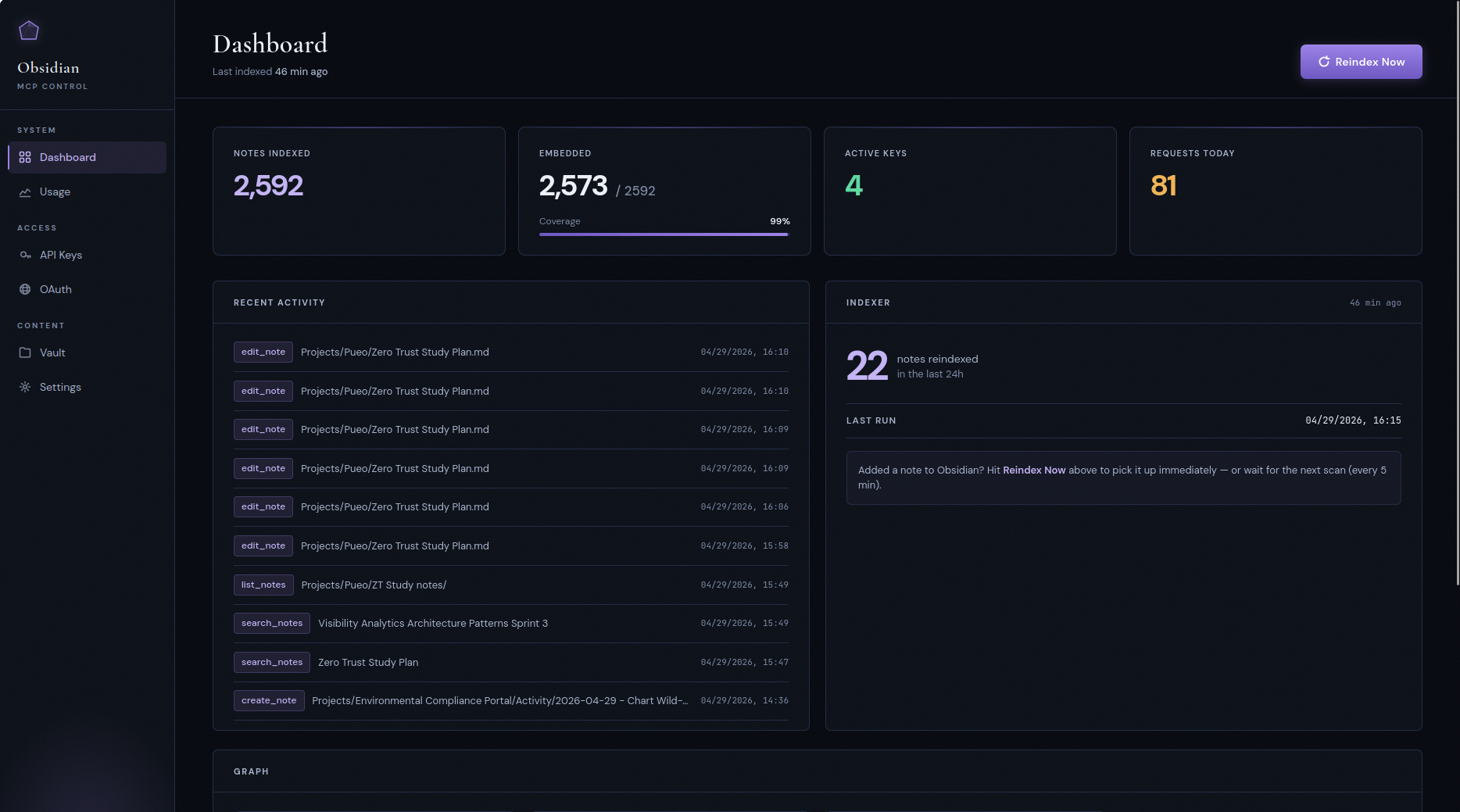
The server ships with a built-in admin UI for the parts of operations that are easier to look at than to query: minting keys, watching the indexer, eyeballing tool-call traffic, and resetting embeddings when you switch providers.
Usage
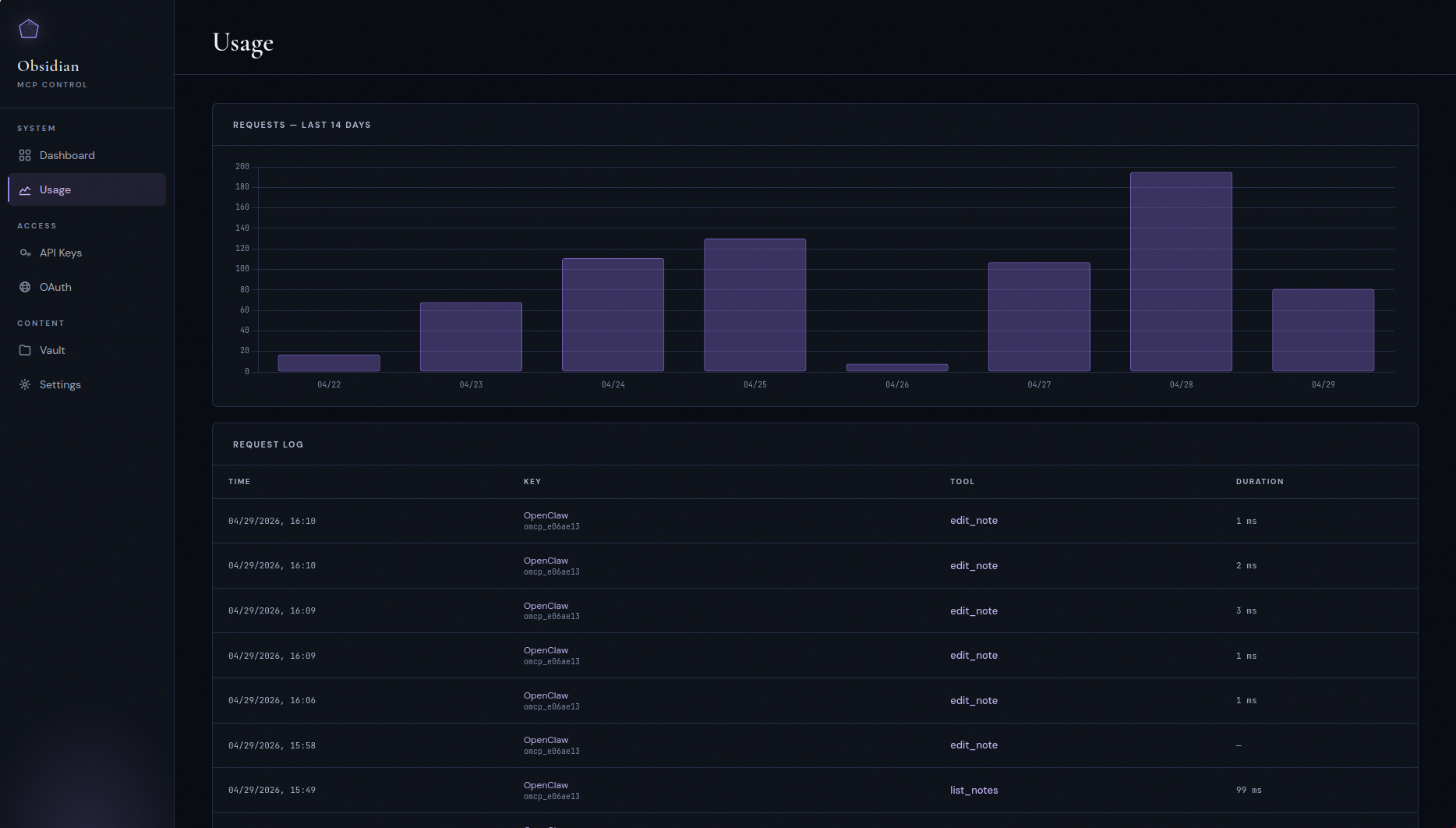
Per-tool-call audit log with a 14-day request histogram. Every MCP call is recorded with the calling key, tool name, duration, and response size — useful for noticing a misbehaving agent burning tokens on something it shouldn't.
API keys and OAuth clients
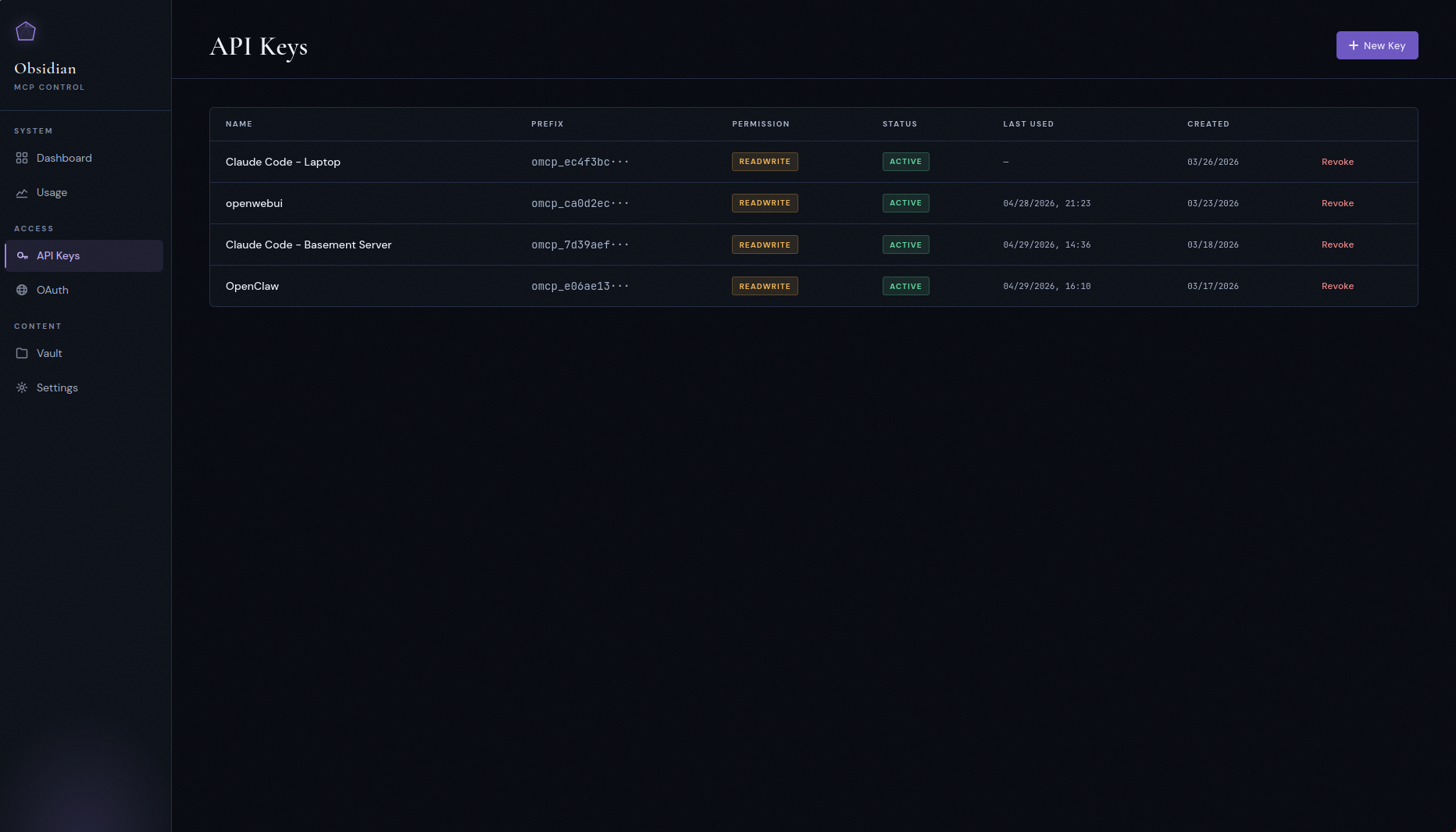
Bearer keys with read / readwrite scopes for API clients, and a
separate OAuth 2.0 PKCE flow for clients like ChatGPT, Claude Desktop,
and claude.ai that expect a proper authorization-code dance. The OAuth
server supports public (none) and confidential (client_secret_post)
token-endpoint authentication plus refresh tokens.
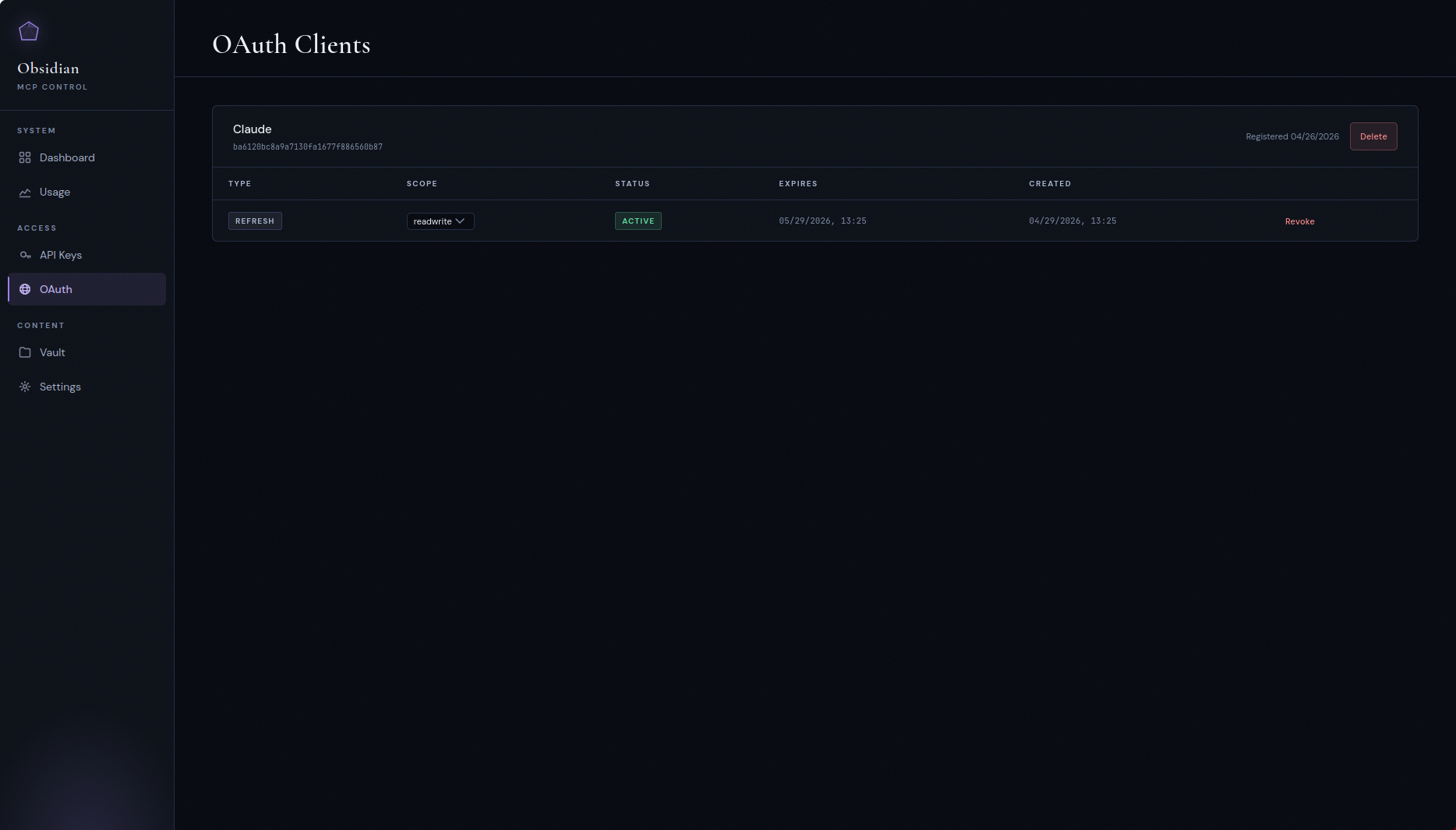
Each client's page lists its grants — one row per /authorize approval,
not per token — with a Revoke control and a permission select per grant,
so revoking really ends the session instead of leaving a refresh token
to mint a replacement. Revoked and expired rows stay listed, dimmed, for
a week.
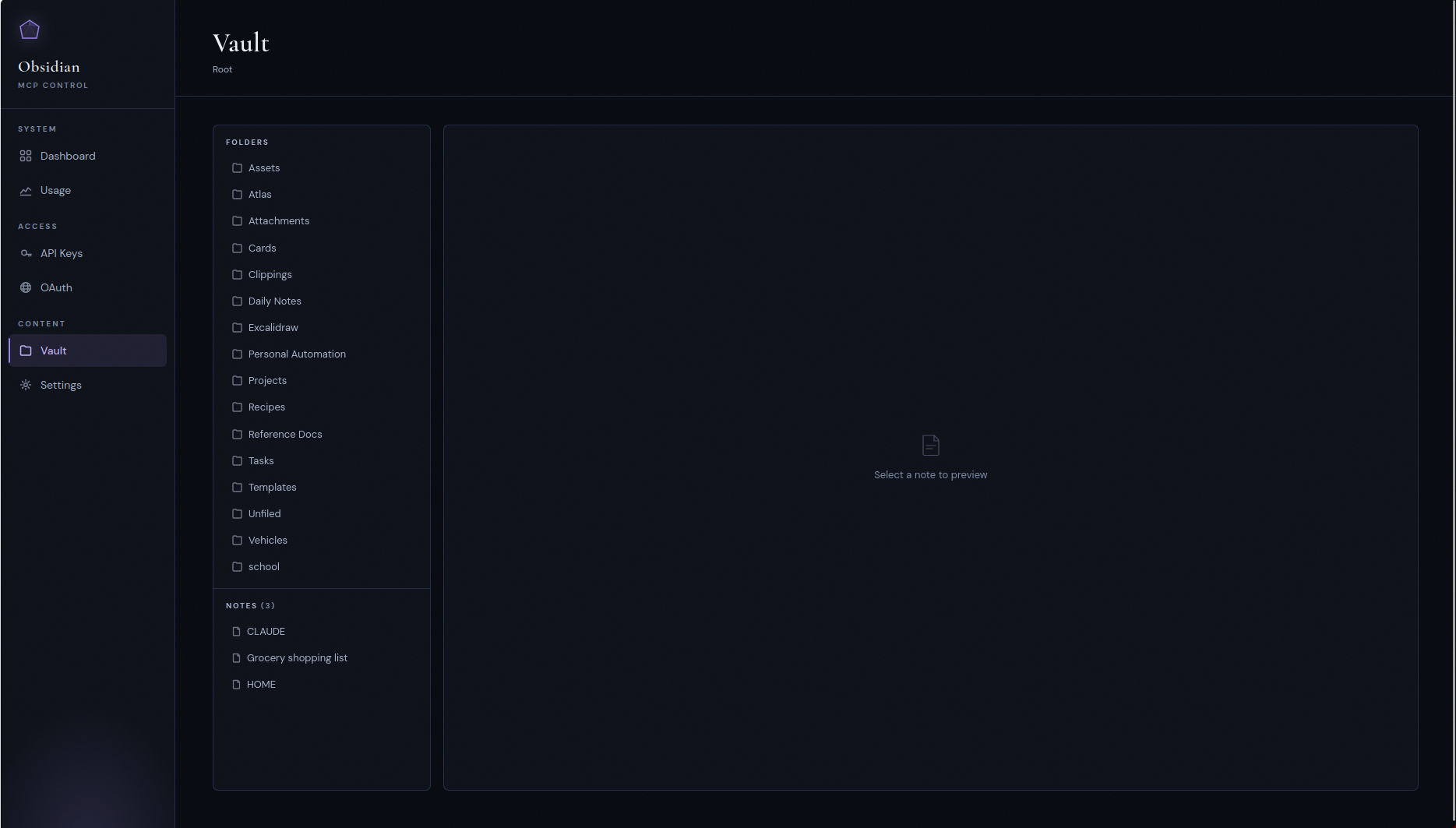
Vault browser
A read-only file tree of the mounted vault, mostly for sanity-checking that the container sees what you think it sees.
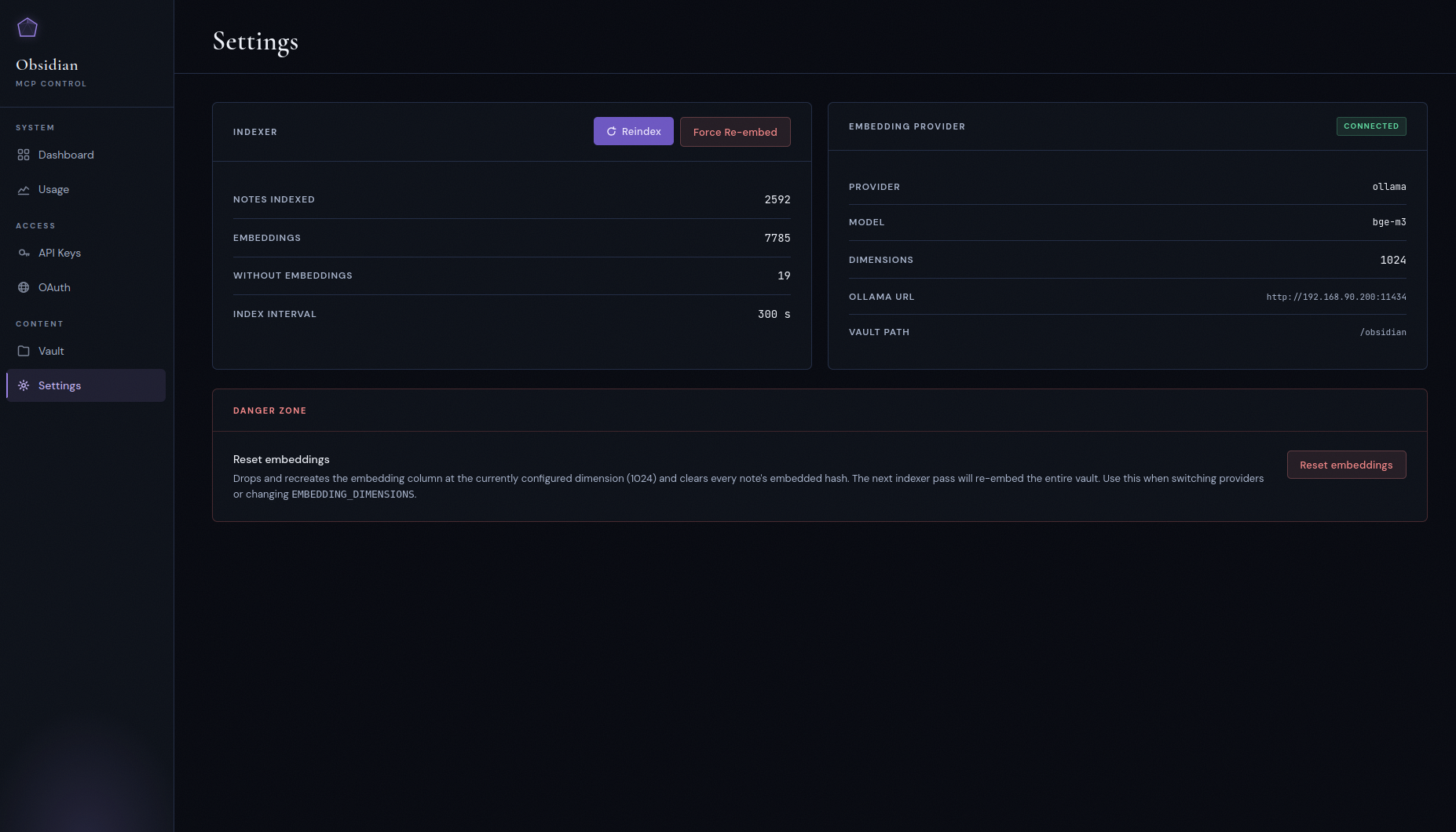
Settings
Indexer status, current embedding provider and model, vault path, and the danger zone: Reset embeddings (drops and recreates the embeddings column at the configured dimension — use it when switching providers) and Force re-embed (keeps the column, clears every note's embedded-content hash so the next pass re-embeds the vault). Both pause the indexer while they run.
The dashboard separates two things that used to be conflated: Last
run is the indexer's own heartbeat — the last pass that completed,
whether or not anything had changed — and Last change detected is
the newest indexed_at on any note. A quiet vault makes the second one
old while the indexer is perfectly healthy.
Quick start
Deploying on a VPS from scratch? See
DEPLOYMENT.mdfor the full walkthrough: Postgres setup, Caddy and TLS, vault sync via Nextcloud, and the gotchas that bite first-time deploys. Running Kubernetes? Seedocs/deployment-kubernetes.mdand the kustomize manifests indeploy/kubernetes/.
The bundled Caddy configuration fails closed on /admin, /api, and
/authorize; replace its placeholder basic-auth hash before starting it.
Prerequisites
- Docker and Docker Compose
- A PostgreSQL 16 instance reachable from the container, with
pgvector0.8.0 or newer installed - Either an Ollama instance running
bge-m3, or an OpenAI API key. Anything that speaks the OpenAI embeddings protocol works (Azure OpenAI, OpenRouter, Together, etc.). - Linux, kernel 5.6 or newer (see below)
System requirements
The server checks these at startup and tells you which one failed rather than misbehaving later.
Linux kernel ≥ 5.6. Every directory below the vault root is opened
with a single openat2(RESOLVE_BENEATH | RESOLVE_NO_SYMLINKS | RESOLVE_NO_MAGICLINKS), which is what makes the kernel — not the
application — prove that a write stayed inside the vault. There is no
fallback: on an older kernel, or under a container seccomp profile that
blocks openat2, the server logs the reason and exits non-zero.
Kernel ≥ 5.8 for file transfer. statx()'s STATX_MNT_ID is how a
publication refuses a destination that sits on a different mount than
the staging directory (a nested bind mount under the vault root would
otherwise fail only after a whole upload body had streamed). Below 5.8
the server logs one warning and starts: request_upload,
import_from_url and PUT /transfer/upload refuse, and everything else
— reads, note writes, search, downloads, the panel, OAuth — is
unaffected. /health reports it as transfer_mount_check_available.
pgvector ≥ 0.8.0. Filtered semantic search needs
hnsw.iterative_scan, which landed in 0.8.0. An older extension accepts
the setting as an unknown placeholder and silently runs a plan that
drops post-filter candidates — silently worse search results — so the
server exits instead. Fix with ALTER EXTENSION vector UPDATE or a
newer database image.
Filesystem. Case-sensitive and non-normalising (ext4, xfs, and the
usual bind mounts). It must support hard links within the vault root and
renameat2(RENAME_NOREPLACE); without those, note creation, move_note
and the soft delete refuse with a named error rather than degrading to a
publish that can clobber. O_TMPFILE is wanted but optional: where it
is unavailable, set VAULT_ALLOW_NAMED_STAGING_FALLBACK=true to accept
named staging instead (see Configuration). macOS and
Windows hosts are out of scope; run the container on a Linux VM.
1. Clone, configure, point at your vault
git clone https://github.com/maxkuminov/obsidian-mcp.git
cd obsidian-mcp
cp .env.example .env
$EDITOR .env
In docker-compose.yml, point the /obsidian volume at your vault:
volumes:
  - /path/to/your/vault:/obsidian
2. Pick an embedding backend
Option A, OpenAI (zero local infra):
EMBEDDING_PROVIDER=openai
OPENAI_API_KEY=sk-...
EMBEDDING_DIMENSIONS=1024
OPENAI_EMBEDDING_MODEL=text-embedding-3-small
The server validates OPENAI_API_KEY at startup and refuses to boot
if it's missing.
Option B, Ollama (self-hosted, GPU recommended):
EMBEDDING_PROVIDER=ollama
OLLAMA_URL=http://your-ollama-host:11434
EMBEDDING_ALLOW_PLAINTEXT=true
EMBEDDING_MODEL=bge-m3
EMBEDDING_DIMENSIONS=1024
This is the default. Omitting EMBEDDING_PROVIDER falls back to
Ollama.
The embedding URL must be https, or http to a loopback host
(localhost, 127.x, ::1). Plaintext http to any other host —
another container such as http://ollama:11434 included — refuses to
start unless EMBEDDING_ALLOW_PLAINTEXT=true acknowledges that chunks
and queries cross that hop unencrypted. .env.example ships with it
set for that reason; drop it once the endpoint is https (use
EMBEDDING_CA_FILE for an internal CA). Inside a container, localhost
is the container itself, so an Ollama on the Docker host still needs
the override.
3. Deploy
make init       # data dirs and .env from template (skip if you've already edited)
make db-init    # create database, user, and pgvector extension
make deploy     # build, push to local registry, run migrations, recreate container
The first deploy backfills the index, the wikilink graph, and the
embeddings. For a 2 to 3k-note vault on Ollama with a GPU this takes
a few minutes. On text-embedding-3-small it's seconds.
4. Connect a client
Mint an API key in the control panel, then point your MCP client at:
URL:  https://obsidian-mcp.<your-domain>/mcp
Auth: Bearer omcp_...
For Claude Desktop, add to claude_desktop_config.json:
{
  "mcpServers": {
    "obsidian": {
      "url": "https://obsidian-mcp.<your-domain>/mcp",
      "headers": { "Authorization": "Bearer omcp_..." }
    }
  }
}
For Claude Code:
claude mcp add obsidian --transport http \
  --url "https://obsidian-mcp.<your-domain>/mcp" \
  --header "Authorization: Bearer omcp_..."
The first thing any agent should do in a new session is call
get_vault_guide(). That's how it learns your folder structure,
naming conventions, and YAML schema before it writes anything.
Upgrading
Pull, then make deploy (or rebuild your compose stack); migrations
run on start. Read this first when upgrading across the internal-transport
and panel-CSP release:
- Breaking: plaintext embedding endpoints must be acknowledged. If
the active embedding URL (
OLLAMA_URL, orOPENAI_BASE_URLwith the OpenAI provider) ishttp://to a non-loopback host — thehttp://ollama:11434default included — addEMBEDDING_ALLOW_PLAINTEXT=trueto.envbefore deploying, or the server refuses to start with a message naming the setting. - Database TLS has one source. A TLS parameter in
DATABASE_URL(?ssl=…,?sslmode=…) or anyPGSSL*environment variable is refused at startup; move it toDATABASE_SSL_MODE. The default,prefer, is the behaviour you had before. - Embedding clients ignore the environment's network settings.
HTTP(S)_PROXY,SSL_CERT_FILE/SSL_CERT_DIRand.netrcno longer apply to the embedding hop. UseEMBEDDING_CA_FILEfor an internal CA. - The panel now sends a nonce-based Content-Security-Policy
(
PANEL_CSP=enforce), and htmx is gone from it. If a panel control misbehaves, setPANEL_CSP=report-only(oroff) and recreate the container; no rebuild. - New optional settings:
DATABASE_SSL_MODE,DATABASE_SSL_CA_FILE,DATABASE_SSL_CERT_FILE,DATABASE_SSL_KEY_FILE,EMBEDDING_ALLOW_PLAINTEXT,EMBEDDING_CA_FILE,PANEL_CSP. See Configuration, andDEPLOYMENT.mdfor moving both hops to verified TLS.
Cost expectations
If you go the OpenAI route (the realistic path on a CPU-only VPS), the first-index spend is small and the steady state is nearly free. Rough numbers assuming an average note around 1,500 tokens (three 512-token chunks), at OpenAI's published rate at time of writing:
| Model | $/1M tokens | 1k notes | 10k notes | 100k notes |
|---|---|---|---|---|
text-embedding-3-small | $0.02 | ~$0.05 | ~$0.50 | ~$5.00 |
text-embedding-3-large | $0.13 | ~$0.30 | ~$3.00 | ~$30.00 |
After the first index, only changed notes are re-embedded. Ongoing cost is proportional to edits — pennies a month for a typical vault.
If you self-host Ollama with a GPU, embedding cost is whatever your power bill is. Ollama on CPU works but is too slow to be usable on a vault of more than a few hundred notes.
The self-describing vault
This is the part most "MCP for Obsidian" projects miss. They stop at read, write, and list. The interesting question isn't "can the agent reach the files," it's "does the agent know the rules?"
If you have an opinionated vault — task placement logic, folder conventions, required frontmatter, tag taxonomy — an agent with write access can do real damage without that context. Tasks land in the wrong folder. Bare-date filenames collide with templates. Wrong tags break Dataview queries. The data layer works fine; the context layer is where the failures show up.
The fix is small. Keep a machine-readable instruction file
(CLAUDE.md at the vault root) that describes the system's own rules.
Expose it as a dedicated tool. Every connecting agent calls it once at
the start of a session and immediately knows how the vault works.
Update the file, every agent sees the change on the next call. No
client-side config. No system-prompt injection. The vault is
authoritative about its own rules.
get_vault_guide() does exactly this. It returns a generic Obsidian
primer (wikilink syntax, embed syntax, tag conventions, common plugin
literals) plus the vault's CLAUDE.md live. The hint to call it first
is baked into the write-tool descriptions so the agent gets pulled
into the right behavior even without prompting.
Multi-user mode
Single-user mode is the default and works exactly as described above — one vault, one set of API keys, no in-app user concept. Multi-user mode is an opt-in flag that turns the same container into a small multi-tenant deployment: in-app username/password login, per-user vault scoping, an admin role for troubleshooting, and a regular-user role that sees only its own keys/OAuth clients/usage. One container, one Postgres, strict isolation between users.
Enable it on an existing deployment with no data loss — your current vault and keys carry over to the bootstrap admin.
Enabling
- Set
MULTI_USER_MODE=trueand a strongSECRET_KEYin.env(openssl rand -hex 32is fine). The app refuses to start with a placeholderSECRET_KEYunconditionally — single-user mode included — so this is not something the flag turns on. make deploy(ordocker compose up -d --force-recreate).- Visit the panel. Because the
userstable is empty, you're routed to/admin/register— the one-time bootstrap form. It's still behind Traefik'schain-oauth@filemiddleware, so only people Traefik already trusts can claim admin. - Register with a chosen username and password. The bootstrap form
pre-fills
vault_pathwith whateverVAULT_PATHwas set to, so your existing notes immediately belong to this new admin. No re-index, no re-embed, no data loss — every previously indexed note, API key, OAuth client, and usage log row gets backfilled to the bootstrap user in a single transaction.
Inviting users
-
Edit
docker-compose.ymlto add a volume mount for the new user's vault under/vaults/<username>. Host paths with spaces must be quoted as a single YAML string:volumes: - "/storage/vaults/alice:/vaults/alice" - "/storage/shared/bob/Obsidian:/vaults/bob"make deployto apply. -
In the panel,
/admin/users/create— pick a username and set an initial password. -
/admin/users/{id}/edit— set the user'svault_pathto the container path you just mounted (e.g./vaults/bob). The form shows a dropdown of unassigned/vaults/*directories that exist on disk. -
Share the credentials out-of-band. The user logs in at
/admin/auth/login, gets their own keys/OAuth/usage views, and cannot see other users' notes.
What admins see
Admins see API keys, OAuth clients, and usage logs for all users; they
own the Settings page (embedding provider, indexer trigger, danger
zone) and the Users page. Admins do not browse other users' vault
contents through the panel — that's intentional. Troubleshooting
another user's vault means either inspecting it via docker exec or
temporarily reassigning their vault_path, not UI snooping.
Rolling back
Set MULTI_USER_MODE=false, restart. Existing API keys keep working
(per-user filters skip when no user context is set), the login UI and
session cookies disappear, and the panel falls back to its
Traefik-OAuth-only mode. The schema stays in place, so flipping back
to multi-user later resumes where you left off without re-bootstrapping
(the users table is non-empty, so /admin/register is closed).
Constraints and known limits
- The indexer iterates active users sequentially each cycle. Fine for tens of users; hundreds would need parallelization.
- Password recovery is admin-driven — there's no email-based reset. A
signed-in user can rotate their own password at
/admin/account(current password, new password, confirmation; minimum 12 characters), which signs their other browsers out and keeps the one they changed it from signed in. The admin reset stays the recovery path for somebody who cannot sign in at all, and it also ends every live session of the account it resets. /admin/auth/loginand/admin/account/passwordare rate-limited at 5 requests per minute; the login limit is keyed on the client address, and the password change carries two independent limits — one per account, one per address. The limiter's storage is in-memory and per-process, so counters reset on restart. The Traefik OAuth gate in front of the panel is still the main brute-force defense; if you expose/admin/auth/loginto the open internet, put a rate-limit middleware in front of it as well.- Panel sessions are server-side rows (
user_sessions), so logging out, changing a password, a deactivation or a delete really ends them. The trade-off: the first deploy of the build that introduced the registry signs every live panel session out once, because a cookie issued before it carries no session id and is refused rather than grandfathered. Everyone signs in again; nothing else changes. - The
vault_pathvalidator does not resolve symlinks, so an admin can technically point a user at host files via a symlinked/vaults/<name>. Treat/vaults/as an admin-trust boundary. What is checked, since the vault-root overlap guard: two active users' roots may not name overlapping directories. Each root is opened once and compared by inode identity —(st_dev, st_ino), which catches a symlink alias or a bind mount naming one directory twice — and by a component-wise containment test over the two canonical real paths in both directions, which catches an ancestor/descendant pair like/vaults/teamand/vaults/team/private. A conflicting assignment is refused in the panel naming the other user, and the same checks re-run before every index pass, so an alias created after the assignment quarantines both accounts: their MCP tools, index passes and transfer redemptions are refused until an administrator corrects it, and no index rows are deleted. A root that cannot be opened at all quarantines only its own account. What is still not detected, and the consequence: a bind mount that grafts one user's vault — or any mount nested inside it — to a path inside another user's root.mount --bind /vaults/b /vaults/a/innerleaves both root inodes distinct and both canonical paths outside each other, so neither check sees it, and user A can then read, overwrite and delete every note in user B's vault through the ordinary write tools, while A's index pass files B's notes under A's account so A's searches return B's content. The same gap covers an accessible alias of a root that could not be examined: that peer keeps serving. Neither condition is reported anywhere. Both require an administrator to write a bind mount into the deploy configuration — which is why/vaults/and the compose file's mounts are the admin-trust boundary, not just the path strings. This is a permanent, stated limit rather than a pending fix: mount detection was specified, failed on a new topology in each of three review rounds, and was dropped. The operator rule: never mount one user's directory, or anything nested in it, inside another user's root.
Configuration
| Variable | Default | Purpose |
|---|---|---|
DATABASE_URL | — | postgresql+asyncpg://user:pass@host/db. No TLS parameters here — they are refused; use DATABASE_SSL_MODE. |
DATABASE_SSL_MODE | prefer | Database TLS: disable, prefer (try TLS, fall back to plaintext), require (encrypt, no verification), verify-ca, verify-full. Strict modes exit if the session is not encrypted. Any PGSSL* variable is refused. |
DATABASE_SSL_CA_FILE | — | CA bundle (PEM) for verify-ca / verify-full; required by both, refused with any other mode. No system-store fallback. |
DATABASE_SSL_CERT_FILE | — | Client certificate (PEM). Strict modes (require, verify-ca, verify-full) only; set together with DATABASE_SSL_KEY_FILE or not at all. |
DATABASE_SSL_KEY_FILE | — | Client private key for DATABASE_SSL_CERT_FILE. Both or neither. |
VAULT_PATH | /obsidian | In-container vault mount |
SECRET_KEY | — | itsdangerous signer key |
INDEX_INTERVAL_SECONDS | 300 | Periodic reindex cadence |
MULTI_USER_MODE | false | In-app login, per-user vaults. See Multi-user mode. |
VAULT_ROOT_OBSERVE_TIMEOUT_SECONDS | 10 | How long the vault-root overlap check waits on one root before giving up on it. Expiry quarantines that one account (root unexaminable) and the check carries on, so a hung mount cannot hold up startup. Multi-user mode only. |
MCP_HOSTNAME | — | Public hostname. Derives BASE_URL, ALLOWED_ORIGINS and ALLOWED_HOSTS as https://<host>. Required (or BASE_URL) for the transfer tools. |
BASE_URL | derived | Explicit public origin. HTTPS except on loopback. |
ALLOWED_ORIGINS | derived | CORS origins, JSON list |
ALLOWED_HOSTS | derived | Accepted Host headers, JSON list. localhost is always added. |
SESSION_MAX_AGE | 604800 | Panel session lifetime, seconds (multi-user mode). Absolute — the server-side row is never extended, so a session used daily still expires |
SESSION_COOKIE_NAME | omcp_session | Panel session cookie name |
PANEL_CSP | enforce | Content-Security-Policy on the panel, login and consent pages: enforce, report-only (same policy, reports only), or off. A rollback lever — change it and recreate the container, no rebuild. Anything but enforce logs a WARNING at each start. |
SESSION_TOUCH_INTERVAL_SECONDS | 60 | How stale a session's last_seen_at may get before a validated GET/HEAD rewrites it. Telemetry only — nothing authorizes on it. Must be ≥ 1. |
SESSION_PURGE_RETAIN_DAYS | 7 | How long a dead panel session row is kept, measured from the later of its expiry and its revocation, so a revocation stays visible for the full window. Must be ≥ 1. |
OAUTH_KNOWN_REDIRECT_HOSTS | claude.ai,chatgpt.com | Redirect hosts the consent screen badges as known connector destinations. JSON or CSV. Matched by exact host equality — no wildcards, no suffixes; entries containing *, /, @ or internal whitespace are refused at startup. An empty list means every client is shown as unverified. |
MAX_FILE_READ_BYTES | 10485760 | read_file cap (10 MB); bounds what the server reads from disk |
MAX_FILE_WRITE_BYTES | 26214400 | write_file cap (25 MB), decoded byte length |
MAX_READ_RESPONSE_CHARS | 40000 | read_note / read_file cap on what is returned to the caller (≈10K tokens). See Response size limits. |
FTS_CONFIGS | english | Keyword-search text-search config(s). JSON or CSV. See Full-text search language(s). |
TRANSFER_TOKEN_TTL_SECONDS | 600 | Default life of a transfer link. Per-call expires_in is clamped to 60–3600. |
TRANSFER_MAX_UPLOAD_SECONDS | 600 | How long one claimed upload may stream before the token is spent |
TRANSFER_MAX_CONCURRENT_UPLOADS | 4 | Simultaneous upload streams |
IMPORT_ALLOW_HTTP | false | Let import_from_url fetch plain http. Off by default. |
VAULT_ALLOW_NAMED_STAGING_FALLBACK | false | Accept named staging on filesystems without O_TMPFILE. One flag, both write paths. See System requirements. |
WRITE_PRECONDITION_REQUIRED | false | Require expected_hash on supported destructive calls. Creation is exempt; enable after clients adopt read hashes. |
EMBEDDING_PROVIDER | ollama | ollama or openai |
EMBEDDING_DIMENSIONS | 1024 | pgvector column width |
OLLAMA_URL | http://ollama:11434 | Used when provider is Ollama. Must be https, loopback http, or covered by EMBEDDING_ALLOW_PLAINTEXT. |
EMBEDDING_MODEL | bge-m3 | Ollama model name. Changing it post-deploy requires make reset-embeddings; the server refuses to start until the stored vectors match. See Switching providers or models. |
OLLAMA_KEEP_ALIVE | -1 | How long Ollama keeps the model resident. -1 pins it; a Go duration (30m) frees VRAM when idle. Ollama only. |
OPENAI_API_KEY | — | Required when provider is OpenAI |
OPENAI_BASE_URL | https://api.openai.com/v1 | Override for Azure or proxies. Same transport rule as OLLAMA_URL when this provider is active. |
EMBEDDING_ALLOW_PLAINTEXT | false | Permit http to a non-loopback embedding host. Without it such a URL refuses to start. .env.example sets it true to match its http://ollama:11434 default. |
EMBEDDING_CA_FILE | — | Trust anchor (PEM) for an https embedding endpoint behind an internal CA; replaces the default certifi bundle. Refused with an http URL. Embedding clients ignore HTTP(S)_PROXY, SSL_CERT_* and .netrc. |
OPENAI_EMBEDDING_MODEL | text-embedding-3-small | OpenAI model. Changing it post-deploy requires make reset-embeddings; the server refuses to start until the stored vectors match. See Switching providers or models. |
CHUNK_SIZE | 512 | Approx tokens per chunk (4-char heuristic) |
CHUNK_OVERLAP | 0 | Token overlap between chunks |
EMBEDDING_EXCLUDE_PATTERNS | ["*.excalidraw.md","Excalidraw/*"] | Globs skipped by the embedder. Excluded files stay keyword-searchable. |
MCP_AUTH_FAILURE_LIMIT | 60 | Failed /mcp authentications one client address may make per window before a 429. Checked before the credential lookup, so a refused probe costs no query. Null disables. See Rate limits. |
MCP_AUTH_FAILURE_WINDOW_SECONDS | 300 | The window that budget is counted over. |
MCP_AUTH_FAILURE_TABLE_SIZE | 4096 | Counter slots in the fixed-size, per-process-salted address table. Memory is O(size); collisions only make the control stricter. |
MCP_RATE_LIMIT_PER_MINUTE | 120 | Sustained tool calls per minute per principal (an API key, or an OAuth grant). Null — with the burst — disables the general bucket. |
MCP_RATE_LIMIT_BURST | 30 | Capacity of the general bucket. Must be set together with its rate or nulled together with it. |
MCP_WRITE_RATE_LIMIT_PER_MINUTE | 60 | Sustained vault-mutating calls per minute per principal — the eight write tools, plus PUT /transfer/upload charged to the principal that minted the capability. |
MCP_WRITE_RATE_LIMIT_BURST | 15 | Capacity of the write bucket. |
MCP_LIMITER_MAX_TRACKED_PRINCIPALS | 10000 | Principals holding their own limiter entry before further ones share one overflow entry. |
MCP_REFUSAL_LOG_INTERVAL_SECONDS | 10 | How long one rate/slot-refusal coalescing window stays open. Inside it a refusal writes nothing; the row that lands stands for 1 + suppressed refusals. |
MCP_CONCURRENCY_MODE | shadow | off, shadow, or enforce. Shadow observes pressure without rejecting or waiting. See Concurrency admission. |
MCP_CONCURRENCY_WAIT_SECONDS | 0 | Tool admission wait in enforce mode, 0–5 seconds. Shadow requires zero. |
MCP_CONCURRENCY_TOOLS | 4 | Global tool ceiling in enforce mode, also subject to class, tenant (3), and principal (2) ceilings. |
MCP_CONCURRENCY_REQUESTS | 32 | Full MCP request ceiling, including open streams; per bearer fingerprint ceiling defaults to 4. |
MCP_CONCURRENCY_AUTH | 2 | Authentication database-session ceiling. Released before response delivery or downstream work. |
MCP_CONCURRENCY_WRITERS | 1 | Usage-log writer ceiling; includes fallback inserts. Defaults: 64 pending writers and a 0.25-second enforce-mode wait. |
DEFAULT_DAILY_REQUEST_LIMIT | 5000 | Daily quota a newly created API key receives when the caller does not say otherwise. Existing keys are untouched; an explicit null (or a blank panel field) still means unlimited. |
MCP_REJECT_UNKNOWN_ARGUMENTS | true | Refuse a tool call carrying an argument the tool does not declare (a tool error naming it), and publish additionalProperties: false on every input schema. false restores the SDK's silent ignore — a rollback for a client that sends extras; change it and recreate the container. false logs a WARNING at each start. |
MCP_SANDBOX_MODE | false | Registry-eval only. Skips DB, indexer, embedding provider, and /mcp auth so introspection works without external deps. Do not enable in production. |
See .env.example for the full set with comments. For first-index
spend on OpenAI, see Cost expectations above.
The MCP transport's request-body limit is derived, not configured:
max(2 × MAX_FILE_WRITE_BYTES, 6 × 10 MB) + 1 MiB, which is 61 MiB with
the defaults. It has to track the write caps so that every supported
write is refused by the tool — with an actionable message — rather than
by the transport with a bare HTTP 413. Raise MAX_FILE_WRITE_BYTES and
the transport limit follows.
Switching providers or models
Different models produce vectors in different spaces, and cosine distance between two spaces is meaningless. So any change to what produced the stored vectors requires a full re-embed — not only a provider switch. That is every one of:
EMBEDDING_PROVIDEREMBEDDING_MODEL(Ollama) orOPENAI_EMBEDDING_MODEL(OpenAI) — including a swap between two models of the same dimension, which the dimension guard cannot seeEMBEDDING_DIMENSIONSCHUNK_SIZEandCHUNK_OVERLAP
The server stores a fingerprint of that configuration and compares it at startup. On a mismatch it logs both fingerprints and the fields that differ, names the repair, and exits non-zero — so a model swap that used to mix two vector spaces in one column silently, for ever, now stops the process instead.
The steps, in this order:
- Update
.env. make deploy(ordocker compose up -d --force-recreate). The new container will refuse to start — at the fingerprint guard, or at the dimension guard if the width changed — and that refusal is the point: a container that will not start embeds nothing while the reset runs.make reset-embeddingswhile it is down. The target isdocker compose run --rm, so it starts a one-off container that reads your edited.env: it recreates the column at the new dimension, clears everyembedded_content_hash, and records the new fingerprint in the same transaction.- Restart the service. It starts silently, because the stored rows really were produced under the configuration it is now running, and the next indexer pass re-embeds the vault.
This inverts the older reset-before-recreate advice. That ordering
was safe only while nothing depended on a stored claim about the
configuration; now the reset is what writes that claim, so it has to
run with the new .env in place and with no old-configuration container
able to embed against it. Skipping a step costs time rather than
correctness — a database-level generation lock makes an
old-configuration container's certifications refuse rather than land —
but the ordering above is the one that never has to rely on it.
Maintenance waits for an in-flight index pass. That same generation
lock is taken at the head of the index pass's transaction and held until
it commits, so make reset-embeddings and make rebuild-tsvectors block
until the pass finishes — up to a few minutes on a large vault — rather
than interleaving with it. That wait is the required behaviour, not a
stall to work around: a reset that landed mid-pass is precisely the
interleaving that stores vectors from one configuration under a
fingerprint naming another. Neither command sets a short lock timeout,
and neither should be given one — and because the server sets a 60-second
statement_timeout on every connection, both commands (and the panel's
Danger-zone resets) lift that timeout for the acquisition itself and
restore it once the lock is theirs. Without that, a command started
against a live service was cancelled after a minute rather than waiting,
which reads as a broken command instead of a busy index.
You can also use Settings → Danger zone → Reset embeddings in the control panel, which performs the same SQL — including the fingerprint record — while the server is running (pauses the indexer, runs the SQL, resumes).
The fingerprint records the configuration, not the model artifact.
bge-m3is a mutable Ollama tag, soollama pullcan replace the weights behind it, andOLLAMA_URL/OPENAI_BASE_URLare deliberately excluded from the fingerprint — repointing at another host or proxy is usually an infrastructure move that serves the identical artifact, and including it would demand a full re-embed for one. The consequence is an accepted limitation: replacing the artifact behind an unchanged model name — re-pulling a tag, or pointing at a host serving different weights under the same name — mixes vector spaces undetected. It requiresmake reset-embeddings, and no startup check will catch it if you skip that. No value available to the server distinguishes the two cases, and a probe would have to trust the endpoint it is checking.
Full-text search language(s)
keyword_search runs over a PostgreSQL tsvector. The text-search
configuration it uses — the stemmer and stop-word dictionary — is
controlled by FTS_CONFIGS. It defaults to english, which reproduces
the historical behavior exactly, so existing deployments need no action.
FTS_CONFIGS is a list, settable as JSON
(FTS_CONFIGS=["simple","norwegian"]) or comma-separated
(FTS_CONFIGS=simple,norwegian). Each note is indexed under every
listed config, and a query matches if any listed config's parse hits.
This is what makes a mixed-language vault work:
FTS_CONFIGS | Behavior |
|---|---|
english | English Snowball stemmer (default; running ↔ run). |
simple | Language-agnostic. No stemming or stop-words — matches exact word forms. A principled default for mixed-language vaults: keyword search is the exact-match arm, while semantic_search (bge-m3 is multilingual) handles morphological recall. |
english,norwegian | Both stemmers applied — keyword-side morphology for two languages at once. |
simple,norwegian | Verbatim lexemes plus Norwegian stems. |
The setting is global — applied to every vault (consistent with
EMBEDDING_MODEL, CHUNK_SIZE, etc., which are global too). For a
mixed-language multi-user instance, set a superset (e.g.
["english","norwegian"], or ["simple"]). Per-user FTS config is a
clean future extension but is not implemented.
A typo'd or uninstalled config name fails fast at startup with a message listing the configs available in your Postgres instance, rather than producing silent zero-result searches.
Changing FTS_CONFIGS requires a rebuild, and the server refuses to
start until it has run. Stored tsvectors are computed at index time,
so they go stale when the config list changes — and a stale stemmer is
not merely incomplete. Under english the token running is stored as
the lexeme run, so a query under simple for run matches a note
that does not contain the word — a false positive, indistinguishable
from a real hit. Keyword vectors therefore fail closed exactly as
embeddings do: the server stores a fingerprint of FTS_CONFIGS, compares
it at startup, and on a membership change logs both lists and the
differing entries, names the rebuild, and exits non-zero. (Reordering the
same names is not a change: a note is indexed under every config and a
query matches if any hits, so order changes nothing and is not compared.)
The runbook:
- Edit
FTS_CONFIGSin.env. make deploy. The new container refuses at the keyword fingerprint guard and stays down.make rebuild-tsvectors. It rebuilds every scope that holds rows — every owner, including rows with no owner in single-user mode — in one transaction, and records the new fingerprint only if every one of them reported a completed rebuild. It is all-or-nothing: one scope it cannot rebuild rolls the whole thing back, names the scope and the reason, and writes no fingerprint, because the fingerprint is a single claim about every retained row.- Restart. It starts silently.
If step 3 names a scope it could not rebuild — a user whose vault is not assigned, a tenant still re-deriving its provenance, or ownerless rows under multi-user mode — there are three recourses, in order of preference:
- Settle the scope: assign or delete the user, or let the re-derive finish, then re-run the rebuild.
- Delete or reassign the ownerless rows, then re-run the rebuild.
- Put
FTS_CONFIGSback to its previous value. That clears the refusal immediately, with no rebuild at all — a configuration edit is always reversible, which is what keeps this refusal from being an outage.
The rebuild re-reads each note and recomputes its content_tsvector
under the new config(s). It rebuilds the keyword index only — it does
not touch embeddings/vectors and makes no API calls, so it
finishes in seconds for a few thousand notes. (Do not confuse it with the
expensive make reset-embeddings flow.)
Tokenization caveat: the tsvector parser still splits on punctuation and hyphens regardless of config, so
bge-m3tokenizes tobge+m3.simplepreserves word forms, not punctuation-bearing strings; exact-string-with-punctuation matching would need a trigram index and is out of scope.
Response size limits
A tool result is model input. Whatever read_note returns is fed
straight back into the caller's next request, so an unbounded read is
an unbounded prompt — and the caller usually finds out only when its
inference provider rejects the request.
MAX_READ_RESPONSE_CHARS (default 40,000, roughly 10K tokens) bounds
what read_note and the text results of read_file return. It is a
different limit from MAX_FILE_READ_BYTES, which bounds what the
server reads off disk. A 3 MB note is comfortably within the 10 MB read
cap and will still destroy a context window; both caps are needed and
they have different correct values.
It applies per component, not once to the whole response: the
content window gets the cap, the heading outline gets it
independently, and the metadata fields (title, tags,
frontmatter_yaml and its JSON view, heading) share a third. A
truncated read can carry all three, so budget for a worst case of
roughly 3 × MAX_READ_RESPONSE_CHARS plus fixed prose — doubled again
because the MCP result carries both structured content and a JSON text
block, and multiplied by JSON escaping for content that is mostly
control characters.
When a note exceeds the cap you get the first window plus truncation as
data — truncated, the next_offset to continue from, total_chars —
and, for a whole-note read, an outline of the note's sections:
{"entries": [
  {"ordinal": 1, "depth": 1, "text": "Client Records",
   "size": 2855343, "exceeds_cap": true,  "duplicate": false},
  {"ordinal": 2, "depth": 2, "text": "Balance Sheet.xlsx",
   "size": 391199,  "exceeds_cap": true,  "duplicate": false},
  {"ordinal": 3, "depth": 2, "text": "Lease Agreement.pdf",
   "size": 464,     "exceeds_cap": false, "duplicate": false},
  {"ordinal": 4, "depth": 2, "text": "Invoice 2025-044.pdf",
   "size": 1075,    "exceeds_cap": false, "duplicate": true}
 ], "truncated": false}
Paging a multi-megabyte note 40K at a time is technically possible and
practically useless, so prefer the outline: read the one section you
want with read_note(path, section="Lease Agreement.pdf"). Sections are
addressable three ways — the #N ordinal shown in the outline, the
Parent/Child path-style form, and exact heading text. The ordinal is
the only form that separates duplicate sibling headings, which share
every ancestor and so cannot be disambiguated by path; notes generated
by bulk extraction tend to be full of them.
A bare #N always selects by position, so an ordinal we hand you in
an outline can never be shadowed by a heading that happens to be titled
#2. Such a heading stays reachable via the path form (Parent/#2) or
via its own ordinal.
The outline is itself bounded by the cap: a note with thousands of
headings gets a truncated listing that reports how many sections were
omitted (omitted) and the full ordinal range (first_ordinal,
last_ordinal), rather than an outline larger than the content window
it accompanies. Metadata that does not fit its budget is dropped whole
and reported in metadata_omissions — never cut short and never marked
inside the field itself, so nothing in a note-controlled field is ever
a prefix or server prose. frontmatter_yaml is the frontmatter block's
YAML source with the fence lines removed, LF-normalized (the same
declared terminator residual content carries); it is the authoritative
copy, and the frontmatter JSON view beside it is a convenience that is
omitted, with a reason, when YAML holds something JSON cannot say.
limit can lower the cap for a single call but never raise it. If your
clients genuinely want larger reads, raise MAX_READ_RESPONSE_CHARS —
that is an operator decision, made once, by someone who knows the
deployment.
Upgrading: three visible contract changes.
read_noteon a large note used to return the whole thing; it now truncates. The response is self-describing, so an agent needs no prior knowledge to continue, but a script that assumed whole-note reads should either passsection=or raise the cap.And
read_noteused to return one rendered string — a# <title>/**Path:**header, a\n---\nseparator, then the content. It now returns fields, because every component of that header was note-controlled: a note could forge the separator, so an agent recovering the section body by splitting the response could recover a crafted string and write it back over the section. A client that parsed the old envelope must readcontent(and, for section reads,heading) instead; clients that ignorestructuredContentstill get an unambiguous JSON text block.Panel sessions are now server-side rows, so everyone is signed out once at that upgrade. A cookie issued before it carries no session identifier, and such a cookie is refused rather than grandfathered — accepting it would keep the old replay window open for another seven days after the fix shipped. Sign in again; there is nothing to migrate.
Rate limits
The consumer of this server is an agent, and a retry-storming or prompt-injected agent is an ordinary input. Three controls bound how fast one credential can create work.
- A general bucket —
MCP_RATE_LIMIT_PER_MINUTE(120) sustained,MCP_RATE_LIMIT_BURST(30) capacity — on every tool call. - A write bucket — 60/min, burst 15 — that the eight vault-mutating
tools must pass in addition, and that
PUT /transfer/uploadconsumes too, charged to the principal that minted the capability so the write rate cannot be escaped by minting links and redeeming them. - A per-address budget on failed
/mcpauthentication — 60 failures per 5 minutes — checked before the credential lookup, so a refused probe costs no database query.
The bucket is per principal: an API key, or an OAuth grant.
Refreshing an access token continues the same allowance rather than
minting a fresh one, and two separate /authorize approvals for the same
client hold independent allowances.
What an agent actually sees. A refusal is an ordinary tool result — never a protocol error, never a silent empty result set — and it ends with one machine-readable line:
Error: this credential exceeded its general rate limit of 120 calls per minute, so the call was refused before it ran. Nothing was read, written, or counted against the daily quota. Retry in 3 seconds, or slow the calling loop down.
MCP-REFUSAL {"code":"rate_limited","scope":"principal","limit":120,"limit_unit":"calls_per_minute","retry_after_seconds":3}
The MCP-REFUSAL sentinel is line-initial and the JSON is one line, so
it survives being quoted into a transcript. A structured tool returns the
identical text in its declared error field. retry_after_seconds is
present only where waiting can actually help — a refusal for an
unassigned vault or an unencodable argument omits it rather than invite a
loop that cannot end. The same shape covers the daily quota
(over_quota), the query length cap (argument_too_long), and tool-body
refusals such as not_found, already_exists, and invalid_path. A partial
write also carries a typed outcome: read its explanation before retrying,
because some bytes may already have changed. Empty search results and
successful no-op calls remain successes.
The transport refusals are outside that contract, because there
is no tool call to answer: an over-budget unauthenticated request or an enforced MCP request/authentication
concurrency refusal gets an HTTP 429 with Retry-After, and so does an over-rate PUT /transfer/upload — which releases its claim rather than consuming
it, so the same link is still redeemable once the bucket refills.
Operational notes.
- Limiter state is in-process and is not persisted, so a restart begins
with every bucket full. That is sound only because the container runs
--workers 1; raising the worker count multiplies every rate above by the worker count. - Refusals appear on
/admin/performanceas refusal counts, not in the latency percentiles. Repeated rate and enforced slot refusals are coalesced — one row per credential/tool/scope perMCP_REFUSAL_LOG_INTERVAL_SECONDS, each standing for1 + suppressedrefusals — so that a refusal loop cannot make writing the log the load. - The velocity defaults are estimates against a small sample. Read
/admin/performancefor a week before treating any as settled, and disable one by setting it empty,nullornone(zero is refused at startup). - The daily quota is the durable ceiling and it is separate: keys created
from now on get
DEFAULT_DAILY_REQUEST_LIMIT(5,000), keys that already existed keep whatever they had, and OAuth grants have no daily ceiling at all — velocity bounds only.
The rationale lives in
docs/architecture/rate-limits.md.
Concurrency admission
Concurrency admission ships with MCP_CONCURRENCY_MODE=shadow. It records
pressure under concurrency_shadow on existing usage rows and emits bounded
security events for request/authentication pressure. Calls keep their actual
outcome, quota accounting and duration. Shadow mode observes current occupancy
with zero wait; it does not predict how traffic would behave under enforcement.
In enforce mode, the server limits full MCP requests (including open SSE
streams), authentication database sessions, tools, and usage-log writers.
Tools pass velocity, vault and argument checks before acquiring slots; daily
quota is checked afterward. A rejected tool receives slot_timeout without
spending daily quota. Zero wait means immediate admission or refusal; a positive
wait uses a bounded queue and one deadline. A retry hint is not a promise that
a running call will finish by that time.
The four tool classes each default to one concurrent call: semantic_search
uses embedding, find_related uses vector, the eight vault-mutating tools use
write, and the remaining tools use other. Global, tenant and principal ceilings
default to 4, 3 and 2. OAuth refresh keeps the same principal. Full request and
per-bearer ceilings default to 32 and 4, authentication to 2, and usage writers
to 1. All settings and queue limits are listed in .env.example.
Startup validates the pool budget as auth + 2 × tools + writers + 4 ≤ 15.
The four connections of headroom are shared with panel, OAuth, indexing and
transfer work; this arithmetic cannot guarantee availability when those other
consumers exhaust it. Shadow mode does not enforce that budget. The controller
is in-process and requires the existing single-worker deployment.
Review pressure observations and long-lived stream occupancy before enabling
enforce. Choose off to disable concurrency admission; the existing velocity
limits and daily quotas still apply. Shadow requires a zero tool wait and never
adds a writer wait or drops a usage row because of its observed pressure.
Architecture
┌──────────────┐                       ┌──────────────────────┐
│ MCP clients  │   HTTP + Bearer key   │   FastAPI app        │
│  Claude Desk │ ────────────────────▶ │  ┌────────────────┐  │
│  Claude Code │                       │  │  MCP server    │  │
│  n8n agents  │                       │  │  (25 tools)    │  │
│  OpenWebUI   │                       │  └─────┬──────────┘  │
└──────────────┘                       │        ▼             │
                                       │  ┌────────────────┐  │
                                       │  │  Services:     │  │
                                       │  │  - vault       │  │
                                       │  │  - search      │  │
                                       │  │  - embeddings  │  │
                                       │  │  - links       │  │
                                       │  │  - indexer     │  │
                                       │  └─────┬──────────┘  │
                                       │        ▼             │
                                       │  ┌────────────────┐  │
                                       │  │ Postgres +     │  │
                                       │  │ pgvector       │  │
                                       │  └────────────────┘  │
                                       └──────────┬───────────┘
                                                  ▼
                                       ┌────────────────────┐
                                       │  Embedding         │
                                       │  provider          │
                                       │  (Ollama / OpenAI) │
                                       └────────────────────┘
Indexing pipeline
.md files in vault
    ↓ skip dot-dirs
parse frontmatter, extract tags (YAML + inline #hashtags)
    ↓ SHA-256 hash
skip if unchanged
    ↓
UPSERT notes_metadata (path, title, tags[], frontmatter JSONB,
                       content_hash, tsvector, modified_at)
    ↓
extract wikilinks/embeds/markdown-links → resolve targets →
note_links (source_id, target_id or NULL for dangling)
    ↓
chunk content (512 tokens, no overlap) → embed via provider →
note_embeddings (note_id, chunk_index, chunk_text, embedding[N])
    ↓
set embedded_content_hash = content_hash
The indexer runs on startup and every INDEX_INTERVAL_SECONDS (5
minutes by default). Hashes are content-only, so the change detector
ignores mtime jitter. Stale embeddings are caught by the
embedded_content_hash != content_hash mismatch.
Database schema
| Table | Purpose |
|---|---|
notes_metadata | Path, title, tags, frontmatter, content hash, embedded hash, tsvector, modified time |
note_embeddings | One row per chunk. embedding is vector(EMBEDDING_DIMENSIONS). |
note_links | Wikilink graph: source/target IDs, target_path, kind (link, embed, markdown) |
api_keys | Hashed bearer tokens, prefix for display, permission, expiry |
usage_logs | Per-tool-call audit |
oauth_clients, oauth_codes, oauth_tokens | OAuth 2.0 PKCE state, including the grant id that ties a consent's tokens together |
transfer_tokens | Capability rows behind the /transfer/* links: direction, destination path, state, fingerprint, expiry |
users | Multi-user mode: login, role, per-user vault_path, and the vault the index was last built under |
user_sessions | One revocable row per live panel browser session, keyed on the SHA-256 of the cookie's session id. Cascades with the user. |
GIN indexes on content_tsvector and tags[]. B-tree indexes on the
hot foreign keys. pgvector HNSW expression index
(embedding::halfvec(N)) halfvec_cosine_ops (m=16, ef_construction=64),
built when the dimension is ≤ 2000; results are re-ranked by the
full-precision distance. Queries set
hnsw.ef_search=80 and dedupe per note in Python after a 5x overfetch.
Project layout
src/
  main.py             FastAPI app, lifespan, MCP mount
  config.py           pydantic-settings
  database.py         async SQLAlchemy engine/session
  models/db.py        ORM models
  mcp_server/         MCP server, tools, auth middleware
  services/           vault ops, anchored filesystem, search, FTS,
                      embeddings, links, indexer, transfer
  transfer/           public /transfer/* capability-redemption routes
  auth/               login, sessions, per-request identity context
  api/                control-panel REST endpoints
  control_panel/      Jinja2 templates and static assets
  oauth/              OAuth 2.0 authorization-code flow
alembic/              database migrations
scripts/              one-off ops scripts (e.g. reset_embeddings.py)
tests/                pytest suite + smoke-test docs
openspec/             change proposals (spec-driven workflow)
Development
pip install -r requirements-dev.txt
pytest
The unit-test suite covers the embedding-provider abstraction, OpenAI
batching and retry behavior, config validation, and the
dimension-mismatch startup check. Network-bound tests use respx to
mock httpx, so no real network access is required.
To run the server outside Docker:
DATABASE_URL=... SECRET_KEY=... VAULT_PATH=... uvicorn src.main:app --reload --no-proxy-headers
Make targets
make init             First-time setup (data dirs, .env)
make build            Build Docker image (no cache)
make build-cached     Build Docker image (with cache)
make push             Push the image to the configured registry
make image            Build and push
make deploy           Build, scan, push, backup, migrate, recreate container
make up / down / restart / shell   Container lifecycle
make logs             Tail container logs
make db-init          Create database, user, and pgvector extension
make db-migrate       Run alembic migrations
make db-check         alembic check — schema vs. ORM models (must be clean)
make test-schema      Schema gate: migrations vs. models on a throwaway pgvector container
make db-backup        Dump database to backups dir
make db-restore FILE=<path>   Restore from a backup
make reindex          Explain how to trigger a reindex (panel only; there is no headless trigger)
make reset-embeddings Drop and recreate embedding column at configured dim
make rebuild-tsvectors Recompute keyword index for FTS_CONFIGS (no embeddings, no API calls)
make status           Show container and health status
make audit            Audit Python dependencies (pip-audit)
make trivy            Scan the local image for HIGH/CRITICAL CVEs (SCAN_IMAGE=obsidian-mcp:local for the bundled stacks)
make clean            Remove containers and images (data preserved)
make deploy runs the whole pipeline: build, image scan, push, database
backup, alembic upgrade head, then recreate the container. Run
make test-schema before any deploy that carries a migration, and
make db-check after one.
Security notes
- API keys use the
omcp_prefix and are stored as SHA-256 hashes. The raw key is shown exactly once at creation. - The control panel is intended to sit behind an external auth
gateway. The included
docker-compose.ymluses Traefik with an OAuth chain. Don't expose/admindirectly to the internet. - Panel sessions are server-side rows. The signed cookie carries a 256-bit random id; the database stores only its SHA-256, so a database dump contains no usable session. Logging out revokes that row, and a password change, an admin reset, a deactivation or a delete revokes every session of the account.
- The OAuth consent screen identifies the client it is asking about:
the redirect host the authorization code would be sent to (taken
from the URI's hostname, never its
netloc, and shown in punycode rather than decoded), the server-generated client id, and the registration date. Every render says the application registered itself and is not verified by this server; a host outsideOAUTH_KNOWN_REDIRECT_HOSTSis called out as unrecognised. - The OpenAI key is rendered on the settings page as
key[:8] + "..." + key[-4:]and never appears in full in HTML or JS sources. - Path traversal is blocked at the service layer, and containment is
proved by the kernel: every directory below the vault root is opened
with one
openat2(RESOLVE_BENEATH | RESOLVE_NO_SYMLINKS | RESOLVE_NO_MAGICLINKS)from an open root descriptor, and the rest of the operation acts on that descriptor rather than re-walking a name. - Mutating tools act on the path as named. A final component that is a symlink is refused (naming the link's target) instead of being followed, so an in-vault alias cannot redirect a write. Reads still follow links, which is what an alias is for.
- Every path guard also refuses hidden components, so
.obsidian,.git,.trashand friends are out of reach of every tool. - Transfer links carry their token in the URL fragment, which browsers
never send, and are redeemed only from an
Authorization: Bearerheader. Keep header logging off at your reverse proxy and APM. Unknown, expired, consumed and revoked tokens all get one identical 404 from the public routes; precise status comes from the authenticatedcheck_uploadtool. import_from_urlfetches only genuinely public addresses, under an explicit deny list re-applied at every redirect.- Failed
/mcpauthentication is budgeted per client address, counted before the credential lookup so a refused probe costs no database session and no query. The address comes from the proxy headers the app trusts, never from a header read directly, and a request with no resolvable address is charged to a shared slot rather than exempted. What it bounds is the database work an unauthenticated caller can force; it is not a defence against guessing a 256-bit key. See Rate limits. - Parameterized queries everywhere. No string interpolation into SQL.
- Response headers include HSTS,
X-Content-Type-Options: nosniff,X-Frame-Options: DENYandReferrer-Policy: no-referrer. The panel, login and consent pages add a per-response nonce Content-Security-Policy with no inline script (PANEL_CSP). - The app's own hops are checked at startup: the database follows
DATABASE_SSL_MODE, and the embedding endpoint must behttpsor loopback unlessEMBEDDING_ALLOW_PLAINTEXTsays otherwise. Each start logs one transport line per hop and aninternal_transport_plaintextsecurity event for each hop still in cleartext.
Status
Single-author, in active use as the maintainer's personal exocortex (2,500+ notes, multiple connecting agents). Public for anyone who wants to fork it. Issues and PRs welcome but expect opinionated review. This is a working system, not a generic platform.
License
MIT. See LICENSE.