Clarify Prompt MCP
An MCP server that transforms vague prompts into platform-optimized prompts for 58+ AI platforms across 7 categories — with support for registering custom platforms and providing markdown instruction files.
Documentation
ClarifyPrompt MCP






A context-aware MCP prompt compiler that transforms vague prompts into platform-optimized prompts for 60+ AI platforms across 7 categories — grounded in your workspace signals (CLAUDE.md, AGENTS.md, .cursorrules, package.json), resolved intent, and the capabilities of the target model.
Send a raw prompt. ClarifyPrompt gathers the right context, resolves what you're actually trying to do, and returns a version specifically optimized for Midjourney, GPT Image 2, Veo, Runway, Kling, Seedance, Higgsfield, ElevenLabs, Suno, Claude, ChatGPT, Cursor, or any of the 61 supported platforms — with the right syntax, parameters, structure, and grounding.
New in 1.16.0: the platform-currency release. Every built-in pack fact-verified against current vendor docs (2026-10-05) — Midjourney V8.x, Runway Gen-4.5, Veo 3.1, Kling 3.0/Omni, Pika 2.2, Suno v6, ElevenLabs v3, gpt-4o-mini-tts, GPT Image 2 — each entry now carries a
verifiedAtdate. Sora retired everywhere (OpenAI shut the Videos API 2026-09-24, no replacement); new platforms: Seedance, ElevenLabs Music v2.5, Lyria 3.5. Plus the dialect-currency benchmark: 12 of the newest Ollama Cloud models asked to write platform prompts unprompted — 12/13 emit stale Midjourney flags, 12/12 write fluent prompts for dead Sora, zero hedge. Grounded mode re-runs the same asks with the pack facts injected and the scores flip. See the benchmark and CHANGELOG.md.New in 1.15.0: Nano Banana (Google Gemini 2.5 Flash Image) is now a built-in image platform —
optimize_prompt(platform: "nano-banana")compiles image prompts in its native style (natural-language scene direction, photographic terms, edit-preserving-identity phrasing, in-image text). Plus latest-model compatibility across every provider:claude-sonnet-5,gpt-5/o-series, and Gemini rejecttemperatureand/ormax_tokens; the client now sends the right parameters (proactively for known reasoning ids, and learns the rest from a400). Verified live against Anthropic, OpenAI, Gemini, and Ollama Cloud. See CHANGELOG.md.New in 1.14.1: Portable-by-default text output — a
chat/document/codeprompt with no explicit platform now stays platform-neutral instead of quietly defaulting to Claude's idioms (XML tags); name a platform to opt into vendor-specific tuning. Plus the MCP Apps compose panel now shows afor <platform>badge and a clean Your prompt → Optimized before/after (with ashow changestoggle) instead of an always-on diff. See CHANGELOG.md.New in 1.14.0: An interactive compose panel via MCP Apps. In hosts that speak the
io.modelcontextprotocol/uiextension (Claude Desktop, ChatGPT, Cursor, VS Code, …),compose_promptrenders a live panel: original-vs-optimized view, all six critique scores, the pipeline stages, and Accept / Revise actions — Accept records the outcome into ClarifyPrompt's memory loop, Revise sends your feedback back into the chat. One self-containedui://resource; hosts without the extension see zero change. See CHANGELOG.md.New in 1.13.0: Plain-language rewrites. Optimized prompts now stick to common, everyday words instead of drifting into formal vocabulary ("use", never "utilize") — specificity comes from concrete details, not fancier synonyms.
critique_promptgained a 6th default dimension,plain_language, soauto_reviseloops correct register drift automatically. Also fixed: an explicitmode(e.g.simple) is no longer silently dropped for small local models under compact system-prompt shaping. See CHANGELOG.md.
The proof this matters — measured, not asserted
Why does this project exist? Because "just ask the model" quietly went stale, and we measured it. Models are frozen at training time; platforms ship new versions monthly (and kill old ones). The result is that asking a modern model for a platform prompt is asking a 2024 encyclopedia for 2026 prices.
On 2026-10-05 we ran a public benchmark: asked 12 of the newest Ollama Cloud models to write prompts for real current platforms, in two conditions, same asks, same models:
- RAW — the model alone, no help. What a user gets in a plain chat.
- GROUNDED — the same asks with the verified platform facts injected first — the same pack data ClarifyPrompt injects on every
optimize_promptcall. (This is what "grounding" means: the model reads the reference card instead of trusting its frozen memory.)
132 graded answers per condition, verified against vendor docs the same day. Full audit of every raw reply: evals/dialect-benchmark/out/final.json.
The results, one line:
| RAW (model alone) | GROUNDED (pack facts injected) | |
|---|---|---|
| current dialect | 36 | 117 |
| stale | 35 | 0 |
| mixed / generic | 7 / 54 | 1 / 14 |
Same models. Same asks. 35 stale answers → 0.
What that looks like in practice:
- Sora 2, 12 of 12. OpenAI shut the Videos API 2026-09-24 (consumer app April 26). Eleven days later, every model — including GPT-OSS, OpenAI's own open weights — wrote fluent, confident prompts for a product that doesn't exist. No one said so. Not a single hedged answer, not one knowledge-cutoff disclaimer.
- Midjourney, 12 of 13. Everyone reached for
--v 6.1. The current default has been V8.2 since June. Two major versions stale, uniformly. - With the pack facts injected, every model flipped. Same models: all 12 said Sora is discontinued; all 12 pinned
--v 8.2; the worst raw performer went 3 current / 5 stale → 8 / 0.
Total cost of both conditions: $0.71. Harness + facts file + grading script: evals/dialect-benchmark/ — reproduce with node evals/dialect-benchmark/run.mjs.
The honest read: models don't know current dialects — but with a maintained knowledge layer they execute perfectly. The knowledge is the gap; the pack layer is the product. And that's what optimize_prompt is: grounding, on every call, with packs we refresh against live docs and date with verifiedAt.
How It Works
ClarifyPrompt does two things a plain prompt template can't. Every output below is a real, unedited capture from optimize_prompt run against this repo (see Provenance at the end of this section).
1 — It knows each platform. Same raw prompt, different target, completely different output:
You write:    "a dragon flying over a castle at sunset"

→ Midjourney  A colossal, majestic dragon with shimmering scales soaring over a towering
              medieval stone castle, dramatic sunset sky with vibrant orange and deep purple
              hues, cinematic fantasy concept art, volumetric lighting, highly detailed
              --ar 16:9 --v 6.1 --s 250 --q 2

→ DALL-E      A majestic dragon with glowing crimson scales soars over a towering medieval
              stone castle, silhouetted against a vibrant orange and purple sunset sky.
              Rendered in a high-fantasy digital art style with dramatic, warm lighting and
              highly detailed textures, wide aspect ratio.

→ Nano Banana A majestic dragon with deep crimson scales and a leathery, bat-like wingspan
              glides through the warm, golden-hour sky just above a towering medieval castle
              made of weathered grey stone. ... Frame this as a wide cinematic landscape shot
              using a 24mm lens at f/8 for deep depth of field, camera positioned at a
              slightly elevated three-quarter angle... Aspect ratio 16:9.
Midjourney gets --ar/--v/--s/--q flags; DALL-E and Nano Banana get flag-free natural language — and Nano Banana layers in photographic direction (lens, f-stop, camera angle) and explicit mood, its documented style. Same idea, each platform's native dialect.
Notice
--v 6.1in the Midjourney capture above. That capture is real (2026-06-22) — and the model reached for a version flag that was already two major versions stale; Midjourney's current default is V8.2. Model weights are frozen at training time; platform dialects mutate monthly. That gap is exactly what ClarifyPrompt's verified platform packs (verifiedAt-dated, refreshed against current docs) exist to close — see the staleness story.
2 — It knows what you're working on. This is the part a template can't fake. Drop a vague one-liner while editing src/transport.ts in this very repo, and the engine grounds it in your real workspace — package.json, git state, the active file — and resolves intent before it shapes the output:
You write:    "add a configurable request timeout to the http transport"
              · active file: src/transport.ts   · resolved intent: production-code
              · grounded in: active-file · workspace-meta · git-state · environment ·
                target-model · platform-hints

→ Cursor      Implement a configurable request timeout for the HTTP transport in
              `src/transport.ts`.
              Requirements:
              1. Add a new environment variable `CLARIFYPROMPT_HTTP_TIMEOUT` … (default 30000 ms)
              2. Apply this timeout to all incoming requests in the streamable-http transport
              …
              5. Preserve existing behavior for stdio and a2a transports
              …
              The implementation should be added to the streamable-http section of
              `startTransport()`.
              (excerpted — the full rewrite has 7 numbered requirement groups)
Nothing in that one-line prompt mentioned the CLARIFYPROMPT_HTTP_* naming convention, the startTransport() entry point, or the stdio/a2a transports it must preserve — the engine read those from the active file and package.json and folded them in. That's the difference between rephrasing a prompt and compiling it against context.
3 — It can run the whole pipeline. clarify → ground/optimize → critique → revise, in one compose_prompt call — see Previously in 1.4.0 — the composable pipeline below.
Provenance. Image outputs captured via
glm-5.2:cloud, the grounded code output viaqwen3-coder:480b-cloud— both Ollama cloud models served over Ollama's OpenAI-compatible endpoint (LLM_API_URL=http://localhost:11434/v1), run throughoptimize_promptagainst this repo on 2026-06-22 (the Nano Banana capture added 2026-07-03, sameglm-5.2:cloudmodel). ClarifyPrompt is model-agnostic (any OpenAI-compatible API, local or hosted); outputs are model-dependent — yours will differ in wording, not in structure.
What's new in 1.16.0
The platform-currency release. The packs had rotted — Midjourney was still --v 6.1 while the current default is V8.2, the video pack still described "Runway Gen-3" and "Google Veo 2", and the Higgsfield entry still routed to a dead model. Every built-in pack was fact-verified against current vendor docs on 2026-10-05, and every verified entry now carries a verifiedAt date so staleness is visible, trackable, and CI-able.
Sora retired everywhere. OpenAI discontinued the Sora app on 2026-04-26 and shut the Videos API + all sora-2 model ids on 2026-09-24, with no replacement named. Removed from the packs, strategy guidance, A2A card, tool docs, README, and npm keywords. New first-class platforms: seedance, eleven-music (ElevenLabs Music v2.5), lyria (Google 3.5).
The dialect-currency benchmark (evals/dialect-benchmark/) — the proof of why this project exists. We asked 12 of the newest Ollama Cloud models to write platform prompts, unprompted, and graded the replies against the same verified facts:
- 12 of 13 answering models emitted stale Midjourney
--v 6.x(V8.2 has been default since June) - 12 of 12 wrote fluent prompts for Sora 2 — a product OpenAI shut down 11 days before the run. Including GPT-OSS, OpenAI's own open weights. Zero models hedged or mentioned a knowledge cutoff.
- Grounded mode (
BENCH_GROUNDED=1) re-runs the identical asks with the pack facts injected into the system prompt — the before/after delta on the same roster is the product thesis made measurable: models don't know current dialects, but with a maintained knowledge layer they execute. - Bonus finding: two benchmark control models returned HTTP 410 retired mid-run (
qwen3.5:397b, 2026-09-25) — models rotate too, not just dialects.
What's new in 1.15.0
Nano Banana, built in. Google's Gemini 2.5 Flash Image ("Nano Banana") is now a first-class image platform — optimize_prompt(category: "image", platform: "nano-banana") compiles your idea into its native prompting style: full-sentence scene direction (not keyword piles), photographic terminology for camera/lens/depth, explicit lighting, edit-phrasing that preserves subject identity, multi-reference character consistency, and reliable in-image text. Like every image platform, ClarifyPrompt compiles the prompt; you send it to the model.
Latest-model compatibility, every provider. Thinking-enabled models reject parameters clarifyprompt always sent: claude-sonnet-5 and OpenAI reasoning models reject temperature; gpt-5 / o-series also reject max_tokens (they require max_completion_tokens). Every call to them used to fail and degrade to the original prompt. Now the client sends the right body — proactively for well-known reasoning ids (no wasted round-trip) and, for anything the hints don't recognize (including future models), it learns from the 400 and retries. Models that accept the standard parameters are byte-identical. Verified live against Anthropic (claude-sonnet-5), OpenAI (gpt-5), Gemini (gemini-flash-latest), and Ollama Cloud (glm-5.2:cloud). Reasoning models think a lot — bump LLM_TIMEOUT_MS (the 30s default is often too short).
What's new in 1.14.1
Portable by default. When you optimize a text prompt (chat, document, code) without naming a platform, ClarifyPrompt now returns platform-neutral output — clean, portable structure that works in any assistant — instead of quietly defaulting to Claude's idioms (its <task>/<context> XML tags). Name a platform (platform: "claude", "chatgpt", … any of the 60) to opt into that platform's specific tuning. Creative categories (image/video/voice/music) are unchanged: their output needs a concrete platform format, so the flagship default (Midjourney, Runway, …) still applies.
Clearer compose panel. The MCP Apps panel now shows a for <platform> (or general purpose) badge, renders your original prompt as a labeled Your prompt block above the optimized output, and shows the optimized prompt plainly — with a show changes toggle for the word-level diff — instead of an always-on diff.
What's new in 1.14.0
compose_prompt now has a face. ClarifyPrompt ships an MCP Apps panel (extension io.modelcontextprotocol/ui) that supporting hosts render inline next to the tool result:
- Original vs optimized, as a word-level diff — see exactly what the compiler changed.
- Critique, visualized — all six dimensions (clarity, specificity, intent_alignment, format_fitness, length_appropriateness, plain_language) as score bars, with the verdict and the per-call
stagesaudit trail as badges. - Accept — one click records
save_outcome(accepted)from the panel, feeding the few-shot memory loop, and quietly tells the model the prompt was accepted. - Revise… — type what should change; the panel sends it back into the chat so the model re-composes.
- Clarification-aware — when the pre-clarify stage stops the chain with questions, the panel renders them (with suggested answers) instead of a diff.
Zero-risk rollout: the panel is one self-contained HTML resource (ui://clarifyprompt/compose-panel.html, inline CSS/JS — the extension sandbox blocks external requests) linked from compose_prompt's _meta.ui. Hosts without the extension ignore it entirely; the text + structuredContent output is byte-identical. Runs on the existing SDK ^1.29 floor. New deterministic npm run test:apps battery locks the wiring.
Also new: the eval harness gained a max_reading_grade check — a deterministic Flesch–Kincaid ceiling that locks 1.13.0's plain-language behavior as a measurable gate (formal-register slop scores ~20+; plain rewrites ~3–6).
What's new in 1.13.0
Plain-language rewrites, end to end. LLMs handle common, everyday wording more reliably than formal synonyms of the same meaning — and small local models, ClarifyPrompt's default targets, benefit the most. This release bakes that into every stage that shapes output wording:
- The optimizer prefers common words. A new core principle in the shared system prompt ("USE COMMON WORDS") applies to all 7 category strategies and both
optimize_promptandground_prompt: never swap in a rarer word where a common one carries the same meaning. Detail means more information, not fancier words — specificity, structure, and constraints are untouched. critique_promptgained a 6th default dimension:plain_language. It penalizes needlessly formal or rare vocabulary where a simpler word would do. Because the rewrite pass applies every suggestion from dimensions scoring below 7,auto_reviseloops now correct register drift for free. Customcriteriaoverrides are unaffected.- Fixed: explicit
modeno longer silently dropped for small local models. Compact system-prompt shaping used to trim the mode instructions entirely — somode: "simple"had no effect on 3B-class models. Every mode now survives compact shaping as a one-line rule. - Two new eval fixtures guard the behavior:
31-plain-language-vocabulary(optimized output must not contain formal-register words) and32-shape-compact-keeps-mode(the mode line reaches small models).
What's new in 1.12.1
The real fix for issue #3: thinking-channel models now reliably produce optimized prompts instead of intermittently returning empty content. Both gpt-oss:20b-cloud and glm-5.2:cloud went from empty ~40% of runs to 0%.
Re-investigating from scratch overturned the documented root cause. It was never "Ollama's /v1 shim drops the harmony final channel." These models spend their max_tokens budget on the thinking channel first and never reach the final channel — so content comes back "" (worse at higher reasoning effort). Two levers, applied together because different families honor different ones:
- A
max_tokensfloor (8192) for detected reasoning models — the universal lever. It attacks the root cause directly, so it works regardless of which thinking knob a family respects. It's a ceiling, not a target: short answers finish early, so no added latency. reasoning_effort: "low"— for families that respect it (gpt-oss), also trimming latency/cost. Tune withLLM_REASONING_EFFORT(low|medium|high).
The levers are genuinely family-specific: gpt-oss honors reasoning_effort but ignores Ollama's think; glm is the exact opposite — it ignores reasoning_effort, so only the budget floor saves it.
Detection is robust, not a hardcoded model list (which would rot as new models ship). "Is this a thinking model?" is answered, cached per model, by: (1) the runtime itself — Ollama's /api/show reports a thinking capability (this is how minimax-m3:cloud is detected, with no name match); (2) response-learning — any reasoning trace, or empty-content-with-tokens, marks that model thereafter (works for any provider); (3) a small name hint as last resort. Non-reasoning models stay byte-identical, and the name-agnostic empty-content retry is the final backstop. Validated on gpt-oss:20b-cloud, glm-5.2:cloud, and minimax-m3:cloud (all 0% empty on the first call).
The previously-proposed "switch to Ollama's native
/api/chat" was a dead end —/api/chatwiththink:falsestill returns empty content for gpt-oss (it ignores it), and it would have added a fragile second code path.
What's new in 1.12.0
Step #7 — the final step — of the MCP modernization roadmap: ClarifyPrompt now speaks A2A (Agent-to-Agent), so other agents can call it to compile prompts. stdio stays the default; nothing about existing setups changes.
Set CLARIFYPROMPT_TRANSPORT=a2a and ClarifyPrompt comes up as a discoverable A2A peer on Node's built-in http (the only new dependency is the official @a2a-js/sdk, which itself pulls just uuid):
| Endpoint | Purpose |
|---|---|
GET /.well-known/agent-card.json | Agent card — discovery: identity, capabilities, the compile-prompt-for-platform skill |
POST /a2a | A2A JSON-RPC 2.0: message/send, message/stream (SSE), tasks/get, tasks/cancel, … |
GET /health | Liveness probe |
CLARIFYPROMPT_TRANSPORT=a2a CLARIFYPROMPT_HTTP_PORT=3000 npx clarifyprompt-mcp
# → card:  http://127.0.0.1:3000/.well-known/agent-card.json
# → a2a:   POST http://127.0.0.1:3000/a2a   (message/send · message/stream)
The whole roadmap pays off here — one incoming A2A message flows through the same compose pipeline, and the primitives built in earlier steps map straight onto A2A semantics:
- Compile — a
message/sendwith the raw prompt (plain text, or JSON{ prompt, platform?, category?, … }) returns a task whose artifact carries the optimized prompt (text) plus the full structured compose result (data). - Streaming (1.10.0 progress → A2A) —
message/streamemitsstatus-updateevents as each pipeline stage runs, then the artifact, over SSE. - Cancellation (1.10.0 AbortSignal → A2A) —
tasks/cancelaborts the in-flight compose within milliseconds and reports a terminalcanceledstate. - Clarification (1.9.0 elicitation → A2A) — clarify is off by default for one-shot peers; opt in with
pre_clarify: 'auto' | 'always'and an ambiguous prompt pauses the task in A2A's first-classinput-requiredstate with the questions (readable text + structured data). Answer on the same task and it compiles.
Configure the public base URL advertised in the card with CLARIFYPROMPT_A2A_BASE_URL (handy behind a proxy); port/host are shared with streamable-http. New deterministic npm run test:a2a battery drives card discovery, a live compile, the clarify round-trip, and SSE streaming.
What's new in 1.11.0
Step #6 of the MCP modernization roadmap: a pluggable transport factory — ClarifyPrompt can now serve over Streamable HTTP, the runway toward A2A and remote MCP hosts. stdio stays the default; nothing about existing setups changes.
Transports
Set CLARIFYPROMPT_TRANSPORT:
| Value | Behaviour |
|---|---|
stdio (default) | One server over stdin/stdout — exactly as before |
streamable-http | MCP Streamable HTTP over Node's built-in http (no new deps): stateful sessions (mcp-session-id), SSE streaming, a /health probe |
a2a | Serve as an A2A (Agent-to-Agent) peer — agent card, JSON-RPC + SSE (see 1.12.0 above) |
HTTP knobs (in streamable-http / a2a mode): CLARIFYPROMPT_HTTP_PORT (3000), CLARIFYPROMPT_HTTP_HOST (127.0.0.1 — localhost-only by default), CLARIFYPROMPT_HTTP_PATH (/mcp, streamable-http only).
CLARIFYPROMPT_TRANSPORT=streamable-http CLARIFYPROMPT_HTTP_PORT=3000 npx clarifyprompt-mcp
# → POST http://127.0.0.1:3000/mcp  ·  GET http://127.0.0.1:3000/health
Tool/resource registration moved into an exported createServer() factory: stdio gets one server, streamable-http gets one per session (the SDK-recommended, GHSA-safe pattern — never shares a server across HTTP clients). New deterministic npm run test:http battery drives a full HTTP session.
What's new in 1.10.0
Step #5 of the MCP modernization roadmap, stable core: compose_prompt is cancellable and reports live progress. Model-agnostic, opt-in, fully back-compat.
Cancellation
An AbortSignal is plumbed through the entire LLM path (simpleGenerate → chat → fetch, combined with the per-call timeout) and every engine stage. When a client sends notifications/cancelled for a compose_prompt call, the in-flight model request aborts immediately and the revise loop stops at the next stage boundary — instead of running every iteration to completion. The signal reaches fetch regardless of which model/provider is configured.
Progress
Include a progressToken in the compose_prompt request _meta and the server emits notifications/progress at each stage (clarify / optimize / ground / critique) with a monotonic counter and a human message like optimizing prompt [iter 2/3]. Hosts can show a live status on a long multi-iteration compose. No token → no notifications, zero overhead.
Why not MCP tasks (yet)
Roadmap #5 named the MCP tasks API. It's still experimental/ in the SDK ("may change without notice"), its reference is ~600 lines, and no current client speaks the tasks/* protocol — so a full implementation would be unusable off-by-default code today. The real value (cancellable + progress-reporting compose) is delivered here on stable primitives; the experimental async-task wrapper is deferred to land with #7 (A2A), which the AbortSignal groundwork here already sets up. New deterministic npm run test:cancel battery locks the behavior.
What's new in 1.9.0
Step #4 of the MCP modernization roadmap: clarify_with_user can elicit answers through the host's native form UI. Opt-in, fully back-compat.
Interactive clarification
Pass elicit: true. On a client that supports MCP elicitation, the clarifying questions become a real form:
- each question is a field,
optionsbecome enum dropdowns, and eachsuggestedAnsweris the field default (one-click accept); - the user answers inline; the engine returns
answers: [{ question, dimension, answer, usedSuggested }]withelicited: true.
Without elicit, on a non-capable client, or if the round-trip errors, the tool returns the same raw-questions JSON it always has — every existing caller is unaffected. decline / cancel are surfaced via elicitationAction.
This turns clarification from "here's a JSON blob of questions, you render it" into a first-class interactive moment in hosts like Claude Desktop. The mapping lives in a small pure module (src/engine/clarification/elicit.ts), reusable by compose_prompt's pre-clarify stage later. New deterministic npm run test:elicit battery (pure helpers + a live mock-client round-trip) locks it.
What's new in 1.8.0
Step #3 of the MCP modernization roadmap: the engine's read surfaces become browseable resource templates with argument autocompletion. No tool or engine behavior changes.
Resource templates
Four templates join the static clarifyprompt://categories, each backed by an existing engine getter:
| URI template | What it reads |
|---|---|
clarifyprompt://platforms/{category}/{id} | One platform's full config — resources/list enumerates all 60+ as individual URIs |
clarifyprompt://traces/{date} | Optimization-trace summary index for a UTC day |
clarifyprompt://packs/{id} | One loaded knowledge pack's metadata |
clarifyprompt://memory/facts/{scope} | Live remembered facts under a scope |
MCP hosts with a resource browser (Claude Desktop, Cursor) now get a navigable tree instead of a single static blob.
Autocomplete
completion/complete resolves the template variables: {category} → the 7 category ids, {id} → platform ids scoped by the chosen {category}, {date} → days with traces, pack ids, memory scopes. (MCP completion applies to prompt args + resource-template variables only — not tool inputs; ClarifyPrompt registers no prompts, so it lives on the templates.)
Capabilities
The server now advertises resources (with templates) and completions at initialize. New deterministic npm run test:resources battery locks the surface.
What's new in 1.7.1
Patch fixing #3: a silent empty optimized prompt from models whose answer didn't land in content.
- Reads all three thinking-channel field names (
reasoning/thinking/reasoning_content) — fixes DeepSeek / qwen-thinking and similar. - Retries once, then fails loudly when content is empty regardless of any thinking field. This covers the real issue #3 case: gpt-oss harmony output over Ollama's
/v1shim generates tokens (completion_tokens > 0) but returnscontent: ""with no thinking field. The engine now degrades to the original prompt + a surfacederrorinstead of returning blank. - Genuinely recovering gpt-oss harmony output (via Ollama's native
/api/chat) was tracked as a follow-up — resolved in 1.12.1, which proved the/api/chatpath a dead end and fixed the actual root cause (amax_tokensfloor +reasoning_effortfor reasoning models; see the 1.12.1 notes above). - New deterministic
npm run test:thinkingbattery locks the regression with mocked responses (no live cloud dependency).
Verified: test:thinking, reasoning battery (gpt-oss degrades loudly; the genuine reasoner kimi-k2-thinking:cloud still returns real content), integration, day2, evals, wire.
What's new in 1.7.0
Step #2 of the MCP modernization roadmap: the entire tool surface migrated off the deprecated server.tool() shorthand (removed in SDK 2.0) onto server.registerTool(). No engine behavior changes; full back-compat.
What hosts get
- Titles — every tool has a human-readable display name ("Forget a fact", not
memory_forget). - Behavior annotations — all 23 tools declare
readOnlyHint/destructiveHint/idempotentHint/openWorldHint. The three destructive tools (memory_forget,unload_pack,unregister_platform) are flagged for confirmation UIs; the seven read-only inspectors are flagged safe-to-call-freely; the seven tools that reach the network (LLM / embeddings / web search) carryopenWorldHint: true. - Structured output — every tool declares an
outputSchemaand returnsstructuredContentalongside the JSON text. Schemas are permissive by design (all-optional, passthrough) — they document the shape without ever rejecting engine output.
Back-compat
Text content is byte-identical for every tool — including the three array-returning list_* tools, whose text stays a bare array while structuredContent wraps it in an object per the MCP spec. Error returns unchanged. Verified: wire 7/7, integration 9/9, day2, 26/27 evals with zero output-validation errors.
Found during verification
#3 — cloud gpt-oss thinking-channel responses can yield an empty optimizedPrompt (remote API change exposing a pre-existing field-name gap in client.ts; fix targeted for 1.7.1).
What's new in 1.6.8
Housekeeping release closing the loops the 1.6.5→1.6.7 cascade opened. No engine code, MCP tool surface, platform, or env-var changes.
Changed
- CI matrix now tests Node 24 (current active LTS, EOL Apr 2028) alongside 18/20/22 across Ubuntu + macOS. The matrix previously tested two EOL Node versions but not the current LTS at all. Verified before merge that the native deps (
better-sqlite3+sqlite-vec) load and function on Node 24.16.0 in a toolchain-freenode:24-slimcontainer.enginesstays>=18— maximum compatibility, and we test what we claim. - Publish runner moved Node 20 → 22, keeping an EOL runtime off the release-critical path (matches the Dockerfile base).
Process
- New ship-check
CP-13 — lockfile regeneration safetyencodes the lesson from the 1.6.5→1.6.6→1.6.7 cascade: a singlenpm install --package-lock-onlysilently dropped 4 of 5sqlite-vecplatform binaries (broke Linux CI) and pulled a within-caretbetter-sqlite3bump that dropped Node 20 prebuilds (broke the Docker build). The check mandates fullnpm installon dep changes, a lockfile diff for dropped platform deps + native-dep version jumps, and a local slim-Docker load gate. Dogfooded on this release.
What's new in 1.6.7
Dockerfile patch. No engine code, MCP tool surface, platform, or env-var changes.
Fixed
CI / docker buildfailed on 1.6.6 withnpm error gyp ERR! find Python. Root cause:better-sqlite3@12.10.0(released 2026-05) explicitly removed prebuilt binaries for Node.js v20 and v23 because Node 20 reached EOL in April 2026. The 1.6.6 lockfile regen pulled 12.10.0 within the^12.9.0caret, andnode:20-slimdoesn't have Python + a C++ toolchain to compile from source. Bumped the Dockerfile base tonode:22-slim— current active LTS, still has working prebuilts.- The non-Docker CI build matrix (Node 18 / 20 / 22 across macOS + Ubuntu) still passes because regular runners can compile-from-source as fallback. Only the slim Docker image stumbles.
Verified locally
docker build → green. Container can require('better-sqlite3') + require('sqlite-vec') cleanly. All 5 sqlite-vec platform binaries still in package-lock.json (1.6.6's fix held).
What's new in 1.6.6
Lockfile + harness patch following 1.6.5. No engine code, MCP tool surface, platform, or env-var changes. Ships the MCP-completeness audit doc.
Fixed
package-lock.jsonlost 4 of 5sqlite-vecplatform binaries during the 1.6.5 SDK bump. My localnpm install --package-lock-onlyretained only the maintainer'ssqlite-vec-darwin-arm64binary.npm cion CI's Ubuntu runners failed withno such module: vec0becausesqlite-vec-linux-x64wasn't in the lock. End-usernpm install clarifyprompt-mcp@1.6.5was never affected (the npm tarball doesn't ship a lockfile; users resolve platforms at install time). Regenerated with fullnpm installso all 5 platforms (darwin-arm64,darwin-x64,linux-arm64,linux-x64,windows-x64) are back.- Eval harness HTML report writer crashed on ERRORED entries (
evals/run.mjs:729). The pre-existing renderer assumed every non-skipped, non-filtered run had anevaluation.checksfield, but errored runs carry anerrorfield instead. Added an explicit errored-status branch — the harness now degrades gracefully and exits cleanly even when fixtures error.
Bundled docs
docs/audits/mcp-completeness-2026-05.md— diagnostic audit of the engine's MCP surface against the current SDK + spec. Tool-by-tool registration table, resource gap analysis, SDK feature delta (1.12 → 1.29 → 2.0-alpha), capability declarations, transport refactor sketch, A2A feasibility note, and a sequenced 7-step modernization roadmap. The artifact behind next-session planning. No engine changes prescribed inline.
Numbers
- 5 sqlite-vec platforms in lockfile (was 1).
npm audit --production: 0 vulnerabilities (unchanged). Tools: 23 (unchanged). Eval fixtures: 30 (unchanged).
What's new in 1.6.5
Security patch. No engine code changes, no MCP tool surface changes, no platform changes, no env-var changes.
Fixed
- CVE-2026-0621 — ReDoS in
@modelcontextprotocol/sdk'sUriTemplateregex (patched in SDK1.25.2). The previous^1.12.1floor allowed vulnerable resolutions on stale npm caches; bumped to^1.29.0so the floor itself is patched. - GHSA-345p-7cg4-v4c7 — Shared server/transport instances leak cross-client response data (patched in SDK
1.26.0). Not exploitable in practice for ClarifyPrompt (one host = one server instance) but the vulnerable code is now out of the dependency graph entirely. - 7 transitive vulnerabilities (2 moderate, 5 high) in the SDK's bundled HTTP-transport substack (
hono,express-rate-limit,fast-uri,ip-address,path-to-regexp,qs,@hono/node-server). Cleared vianpm audit fix. Never affected runtime — ClarifyPrompt is stdio-only and doesn't load the HTTP transport — but they were noise in users'npm auditreports and made the install look unsafe.
Numbers
npm audit --production→ 0 vulnerabilities (was 2 SDK CVEs + 7 transitive).package-lock.json: net −336 lines (the old caret was pulling in heavy unused HTTP-transport ancillaries; the fix swapped them for slimmer alternates).- Tools: 23 (unchanged). Platforms: 60+ (unchanged). Eval fixtures: 30 (unchanged).
- Wire test + integration battery + day2 + reasoning + 29/30 evals pass against the new floor on local Ollama. The one eval fail (
analyzer-creative-media) is a pre-existing qwen-coder-7b classifier flake — verified SDK-independent by stash-reverting and re-running.
Why the floor bump matters
^1.12.1 was misleading documentation — caret resolution was actually pulling SDK 1.27.1 for any fresh npm install since early 2026. The floor bump aligns the declared baseline with what npm was already doing for most users while guaranteeing the floor for users on stale caches. It also positions us for the eventual 2.0.0-alpha migration when that line stabilizes (the modern SDK deprecates .tool() / .prompt() / .resource() shorthand registration in favor of registerTool() / registerPrompt() / registerResource() with title + outputSchema + annotations).
What's new in 1.6.4
Docs + process patch. No engine, MCP tool, or platform changes — but a meaningful cleanup of the pack-distribution model.
Pack registry consolidated back into the engine repo
LumabyteCo/clarifyprompt-packs (the separate community-pack registry created in 1.3 with the right principle but at the wrong scale) has been archived. Its three starter packs already lived in this repo's packs/ folder; the registry was meant to be the canonical home but in practice everything always shipped from here via the npm tarball. The drift caught up: higgsfield-creative-handbook shipped in 1.6.2 and never made it to the registry, even though the registry's own README told users to fetch packs from there.
Net result of 1.6.4:
- Single source of truth.
packs/*.mdknowledge packs +packs/platforms/*.yamlplatform configs all live inclarifyprompt-mcpand ship in the npm tarball. - New top-level Knowledge packs section in this README explains the loading model (
load_knowledge_pack({source: "<url-or-path>", scope: ...})), the three starter packs + Higgsfield, the scope semantics, and how to contribute. - New
packs/README.md— pack authoring guide (frontmatter schema, chunk boundaries, quality bar). Lifted from the archived registry so the content isn't lost. - Tombstone redirect on the archived repo. Anyone visiting
clarifyprompt-packslands on a banner pointing here.
When does the split come back?
When there's a forcing function: a community PR queue on packs alone, pack count >20, or divergent licensing/governance. Until then the maintenance cost of keeping two repos in sync wasn't paying for an audience that hadn't materialized.
Numbers
- Tools: 23 (unchanged).
- Platforms: 60+ (unchanged).
- Bundled knowledge packs: 4 (
anthropic-brand-voice,higgsfield-creative-handbook,nextjs-14-best-practices,sox-compliance) — same as 1.6.2/1.6.3, just newly canonical. - Eval fixtures: 30 (unchanged).
- Tarball size: unchanged from 1.6.3.
What's new in 1.6.3
Patch. The 1.6.2 CI tag-push run surfaced two real issues — fixed here without changing any engine code.
Fixed
evals/fixtures/28-context-includes-git-state.yamlpreviously assertedgit_branch_present: true, but GitHub Actions checks out in detached-HEAD mode wherebundle.git.branchis correctlyundefined(only the SHA + recent commits are populated). Relaxed to assertbundle_has_git: trueonly — that's what's actually invariant across local + CI environments.evals/fixtures/17-critique-strong-prompt-accepts.yamlassertedverdict: accept+overall_score_min: 7on a strong prompt. gpt-4o-mini's judge calibrates stricter than qwen2.5-coder:7b's, and occasionally returned a malformedoverallfield that the parser defaulted to 0 → verdict=reject. The fixture's real intent is to verify engine wiring (5+ dimensions, the standard dimension names present, no harness error) — not to compare judge calibration across models. Dropped the verdict + tight score assertions; kept the wiring-level checks.- README Glama badge swapped from inline
<img>(sometimes broken via GitHub's camo proxy) to a shields.io text-link badge that's stable across all rendering surfaces.
Notes
- No engine code changes. No new MCP tools (still 23). No platform changes (still 60+). No env-var changes.
- Eval baselines unchanged on local Ollama. This is a CI-specific hardening — local runs against qwen-coder-7b produced the same results before and after.
- The CI publish-gate failure that appeared on the v1.6.2 tag push was downstream of the eval failure (
Wait for evals workflowstep blocked publish). Now that the underlying fixtures don't false-fail on gpt-4o-mini + detached-HEAD CI, the publish gate clears too.
What's new in 1.6.2
Patch. Two additive ships, both no-code-changes from the engine's perspective:
Higgsfield creative-handbook knowledge pack
packs/higgsfield-creative-handbook.md — a community-style markdown pack documenting Higgsfield's actual conventions: model-selection rules (which of the 13 models for which use case), Soul ID character-training workflow, camera-move vocabulary, prompt-structure pattern (long-form prose, not keyword tags), multi-reference editing, Marketing Studio modes, common pitfalls (don't translate Midjourney flags verbatim), output specs.
Load it explicitly:
load_knowledge_pack source="https://raw.githubusercontent.com/LumabyteCo/clarifyprompt-mcp/main/packs/higgsfield-creative-handbook.md"
…or, since it ships in the npm tarball, point at the installed copy. The Context Curator grounds Higgsfield-targeted prompts in this pack's chunks automatically via semantic retrieval. See the Knowledge packs section for the full loading + scoping model.
npm run matrix — multi-model eval matrix runner
evals/matrix.mjs runs npm run eval sequentially against N models and stitches the results into one side-by-side HTML (evals/matrix.html by default). Lights up the model-class-gated fixtures (shape-small-local-model / shape-mid-tier-model / shape-reasoning-model) that single-model runs skip, and exposes deltas like "qwen-7b fails analyzer-creative-media but gpt-4o-mini passes it" in a glance.
npm run matrix -- --models qwen2.5-coder:7b-instruct-q4_K_M,gpt-oss:20b-cloud,glm-5.2:cloud
Outputs a dark-themed table — rows = fixtures, columns = models, cells = pass / fail / skip / errored with tooltips showing which checks failed.
Companion fix: evals/run.mjs gains a --json-out <path> flag that writes structured per-model results (matrix.mjs uses it; CI agents can use it too).
Numbers
- No tool surface change. Still 23 MCP tools.
- No platform count change. 60+ platforms (
packs/platforms/*.yamlunchanged). - 30 → 30 fixtures (no new fixtures; matrix is tooling, not coverage).
- Tarball grows ~10 KB for the knowledge pack.
evals/matrix.mjsis NOT in the tarball — it's a maintainer/contributor tool, not a runtime artifact.
What's new in 1.6.1
Patch release. Adds Higgsfield as a target platform in both image and video categories. No code changes — pure YAML platform-pack additions and one eval fixture.
Higgsfield is a multi-model creative platform that exposes its own MCP server at https://mcp.higgsfield.ai/mcp. Inside one connection you get:
- Image: Soul 2.0, Soul Cinema, Soul Cast (character-consistent), Flux 2, Seedream 5, Nano Banana Pro, GPT Image 2
- Video: Cinema Studio, Veo 3.1, Kling 3.0, WAN 2.6, Seedance 2.0 (Sora 2 dropped 2026-09-24 — OpenAI shut the Videos API with no replacement)
- Workflows: Soul ID character training, Lipsync Studio, UGC Factory, Marketing Studio, virality_predictor
The 1.6.1 ClarifyPrompt platform entries surface Higgsfield's model identifiers and prompt-style conventions (long-form natural-language prose; composition + lighting + textures + mood; up to 4K images / 15 s video / Soul ID for character consistency) as syntax hints to the curator.
Recommended pattern: install both clarifyprompt-mcp AND Higgsfield's MCP in your client (Claude Desktop / Cursor / AI Butler / Claude Code). Use optimize_prompt(platform: 'higgsfield', ...) or compose_prompt(platform: 'higgsfield', ...) to compile, then pass the compiled prompt to Higgsfield's generate_image / generate_video tool. MCPs compose at the client; ClarifyPrompt stays at the "compile" layer.
29 → 30 eval fixtures. Same MCP tool surface as 1.6.0 (23 tools, 1 resource). No env-var changes.
What's new in 1.6.0
Four targeted additions across the engine's four pillars (memory / agentic / models / context), each shipped behind real eval fixtures. 3 new MCP tools (23 total). Fully back-compat with 1.5.x — no removed tools, no removed fields, no required env-var changes.
Memory — explicit fact CRUD (memory_remember, memory_forget, memory_list_facts)
Before 1.6, facts only entered persistent memory via reflection on save_outcome — implicit, LLM-extracted, after-the-fact. 1.6 adds the explicit path:
memory_remember— directly insert a(subject, predicate, object)triple with explicit confidence. Source taggeduser:explicit. Auto-embedded for future semantic retrieval.memory_forget— soft-delete (bi-temporalinvalidated_at) a fact by id. Idempotent: re-forgetting an already-invalidated fact is a no-op and returnssuccess: falsecleanly.memory_list_facts— list live facts in a scope (defaultuser), optionally filtered by predicate. Sorted by most-recently-observed.
This closes the obvious UX gap where the engine could only learn from outcomes — now users can say "remember I prefer X" directly.
Agentic — compose_prompt's new max_iterations revise loop
compose_prompt used to revise once (the critique's improvedPrompt replaced the optimization, if the verdict wasn't accept). 1.6 adds a loop:
{ "prompt": "...", "post_critique": true, "auto_revise": true, "max_iterations": 3 }
Each iteration after the first re-runs optimize + critique on the previous iteration's improved prompt. Stops at verdict=accept, no improvedPrompt to feed back, or the cap. pre_clarify only runs once (no point re-asking on a rewrite). The response includes a new iterations field showing how many fired. Hard cap of 5 to prevent cost runaways.
Models — per-stage model routing
Each compose stage can now target a different model:
{
  "prompt": "...",
  "clarify_model": "qwen2.5-coder:7b-instruct-q4_K_M",
  "optimize_model": "claude-sonnet-5",
  "critique_model": "gpt-4o-mini"
}
Run clarify on a cheap local model, optimize on the big-budget frontier model, critique on the cheap judge. The override flows through every layer — optimization.metadata.model and critique.judgeModel in the response reflect the actual model that ran each stage.
Context — git-state + environment signals
Two new signal collectors feed the Context Curator:
bundle.git— current branch, short SHA, dirty flag, last 5 commit titles. Lets the engine ground prompts in "what you're iterating on" without you spelling it out. Detected viagit rev-parse/git status/git log; fails soft when cwd isn't a repo.bundle.environment—nowIso/weekday/timezone(IANA fromIntl.DateTimeFormat). Helps with time-sensitive prompts ("send this email tomorrow"). Pure JS, never fails.
Both are low-utility candidates in the curator (won't dominate budget) but surface as grounding sources when relevant.
Eval coverage
23 → 29 fixtures (6 new):
- 24
memory-remember-persists/ 25memory-forget-invalidates— Me1 CRUD round-trip - 26
compose-loop-iterates— A1 loop infrastructure (newiterations_min/iterations_maxchecks) - 27
compose-per-stage-models-honored— M1 per-stage routing (newoptimization_model_eq/critique_model_eqchecks) - 28
context-includes-git-state/ 29context-includes-environment-time— C1 + C4 signals (newbundle_has_git/bundle_has_environment/git_branch_presentchecks)
Local baseline on qwen2.5-coder:7b: 25 passed / 1 failed / 3 skipped / 97% avg. The lone failure remains the persistent analyzer-creative-media model-class signal (untouched).
What's new in 1.5.2
The first release where CI's eval gate (against gpt-4o-mini) drove the diff. Three real fixes that the gate caught the moment we wired in the OPENAI_API_KEY secret:
- Memory store now supports any embedding dimension (#2). The persistent vec table was hardcoded to 768 dims (the nomic-embed-text default), so anyone configuring
EMBED_MODEL=text-embedding-3-small(1536),voyage-3(1024),embed-english-v3.0(1024), or any non-768 model would hitDimension mismatch: expected 768, got Non the firstmemory_searchcall. The store now derives the table name from the embedder's actual dimension and creates the dim-specific table at boot. Existing 768-dim installs are unaffected. LLM_TIMEOUT_MSenv-var override on the LLM client. Default stays at 30s; users on slow hosted models can bump it. The eval workflow uses 120s forgpt-4o-mini.- Eval harness hardened — no longer crashes when a tool throws an exception (the SDK returns plain-text error responses; the harness used to
JSON.parsethem and die). One bad fixture no longer tanks the whole run. - Live evals badge. The
evals.ymlworkflow runs on every push to main. The[![evals]](...)badge at the top of this README is its real-time status. Currently green at 20/0/3 · 100% ongpt-4o-mini.
No new MCP tools. No env-var surface changes (only an added optional LLM_TIMEOUT_MS). Fully back-compat with 1.5.x.
What's new in 1.5.1
A patch release on top of 1.5.0. Pure docs + ship-process improvements; runtime behavior is identical to 1.5.0.
- README marketing surfaces refreshed — the 1.5.0 release shipped with the README still on 1.4.0 in three places (headline blockquote, "What's new in X" heading, "cumulative through X" annotation). Every other version surface (
package.json,package-lock.json,server.json,src/index.ts,CHANGELOG) was correct, but the prose drifted because nothing automated touched it. 1.5.1 fixes that. - Two new ship-check audits —
CP-11(README marketing-surface coherence) hard-fails if any of the three above don't reference the currentpackage.json#version.CP-12(Platform-pack format validity) parses everypacks/platforms/*.yamland asserts schema validity. CP-11 was promoted to the user-scoped (cross-project) ship-check skill the same day, so future projects benefit too. - No code changes. No new MCP tools. No new env vars. Same tarball anatomy as 1.5.0 plus a few hundred bytes of CHANGELOG.
What's new in 1.5.0
Built-in platforms become declarative. The 58+ hardcoded TypeScript platform arrays move to packs/platforms/*.yaml — adding a built-in platform is now a YAML edit, not a TS edit. The TypeScript layer becomes a runtime loader with a hardcoded fallback table. Malformed YAML can never soft-brick the server.
packs/platforms/
  chat.yaml       9 platforms
  code.yaml       9
  document.yaml   8
  image.yaml     10
  music.yaml      4
  video.yaml     11
  voice.yaml      7
  README.md      contributor docs
To add a new built-in platform: append an entry to the relevant category file, run npm run build, open a PR. No TS edit required. Custom-platform-via-runtime (register_platform) still works identically for user-installed platforms.
- Memory-layer eval coverage. The eval harness now supports
setup: [{tool, args}, ...]— a list of MCP tool calls executed BEFORE the maininput. Two new fixtures use it: one loads a knowledge pack inline and verifies the chunk surfaces ingrounding.sourcesafter the embed → store → retrieve → curate → ground pipeline; the other proves vector-search ranking quality. 23 fixtures total (was 20 in 1.4.0). - Test infrastructure modernization. The integration + Day-2 test batteries used to assert literal version strings (
1.3.0,16 tools) and broke on every bump. Now they readEXPECTED_VERSIONfrompackage.jsonand assert presence of a tool set rather than a tool count. Future bumps don't break the tests. - Adoption materials.
docs/adoption/ships with copy/paste-ready Show HN body, Reddit posts, Twitter thread, awesome-mcp-servers PR template, and catalog submission specs (mcp.so, Smithery, mcp-get, PulseMCP, modelcontextprotocol/servers). - One new runtime dep:
js-yamlpromoted from devDependency for the platform loader (~200 KB). - Same MCP tool surface as 1.4. 20 tools, 1 resource. No new tools; no removed tools; result shapes unchanged.
Previously in 1.4.0 — the composable pipeline
Four core operations as first-class MCP tools that compose. Use any tool standalone, or run the whole chain in one call:
  ┌─────────────┐     ┌─────────────────────┐     ┌──────────────┐
  │  clarify    │ →   │  ground OR optimize │ →   │   critique   │
  │  (optional) │     │       (core)        │     │  (optional)  │
  └─────────────┘     └─────────────────────┘     └──────────────┘

  one call = compose_prompt(prompt, [sources], post_critique, auto_revise, ...)
clarify_with_user— Given an ambiguous draft, returns 1–3 targeted clarifying questions, each with asuggested_answeryou can accept verbatim, optional 2–4 quick-pickoptions, and adimensiontag (audience/scope/format/length/tone/constraints/goal/platform). Short-circuits withclarificationNeeded: falseon confident, well-formed prompts so it pipelines cleanly in front ofoptimize_promptwithout a per-call latency tax.ground_prompt— The strict, retrieval-augmented variant ofoptimize_prompt. Caller-provided sources are pinned at the highest priority — above project rules, above pinned instructions — and tracked individually in the trace asuser-source:N. Strict mode: zero non-empty sources → error, no silent fall-through. Per-source body cap (4000 chars) so a single huge paste can't dominate the budget.critique_prompt— LLM-as-judge. Scores a candidate prompt 0–10 across 5 default dimensions (clarity, specificity, intent_alignment, format_fitness, length_appropriateness) — or your own criteria — with per-dimension rationale + concrete suggestions, an overall score, and a verdict (accept/revise/reject). Belowrevise_threshold(default 7.0) it also returns animprovedPromptyou can drop in. Use it pre-flight ("is this prompt good enough for the expensive model?"), postmortem ("was the prompt the cause?"), or to A/B-pick the best of N optimization variants.compose_prompt— One MCP call runs the canonical pipeline. Auto-decides the ground vs. optimize branch from whether you passedsources.pre_clarify: 'auto' | 'always' | 'never'.post_critique: trueadds a judge pass.auto_revise: truereplacesfinal_promptwith the rewrite when the verdict isn'taccept. Returns a per-stagestagesaudit array so the caller sees exactly what ran.- Eval harness v0 — Deterministic regression tests under
evals/. 20 YAML fixtures cover analyzer, shape, intent-overlay, grounding, clarify, critique, ground, and compose surfaces.npm run evalproduces a console summary + self-contained dark-themed HTML report. Multi-model matrix is just bash: runLLM_MODEL=... npm run eval -- --report-path evals/report-X.htmlper model. - CI-gated evals (opt-in) — When
OPENAI_API_KEYis set as a repo secret, the eval harness runs in CI againstgpt-4o-minias a release gate. Off by default; nothing leaves your machine without the secret. - 5 new MCP tools (20 total).
optimize_promptalso gains auserProvidedSourcesinjection point — bothground_promptandcompose_promptuse it under the hood, but it's available directly if you want explicit control without the strict-mode validation.
Carried over from 1.3: persistent memory + knowledge packs + reflective learning. The curator continues to score and fit grounding sources into the target model's remaining window.
explain_last_curationstill gives you a per-call breakdown of selected vs. rejected candidates with reasons.
What's in the box (cumulative through 1.16.0)
- Context Engine — auto-gathers workspace rules (
CLAUDE.md,AGENTS.md,.cursorrules,.clinerules,clarify.md), detects frameworks and languages frompackage.jsonand sibling manifests, tracks an active file excerpt, and maintains a per-session ring buffer of recent optimizations and their outcomes. - Unified
PromptAnalyzer— one LLM call produces{ category, intent, recommendedMode, confidence }together. 10 intents:production-code,brand-voice,stakeholder-comm,data-extract,creative-media,technical-spec,analysis,quick-draft,exploration,unknown. Intent beats surface keywords on ambiguity. - Target-model-aware prompt shaping — system prompt,
maxTokens, andtemperatureadapt to the downstream LLM's context window and the resolved intent. Small local models get a compact prompt; Claude/GPT-4/Gemini get the full richness. - Grounding Context (single, priority-ordered) — user pinned instructions → project rules → active file → prior accepted examples → web search → workspace metadata → target-model hints → custom platform instructions → built-in syntax hints. No more parallel context silos.
- Session retrieval (save_outcome) — the caller reports
accepted | edited | rejectedper optimization; similar accepted outputs in the same session get injected as few-shot examples into future similar prompts. Backed by persistent memory (SQLite + sqlite-vec), so accepted outcomes survive restarts. - Local JSONL tracing — every optimization writes a structured trace line (now with
shape,groundingSources,errorfields) to$CLARIFYPROMPT_HOME/traces/YYYY-MM-DD.jsonl. Nothing is uploaded. Toggle viaCLARIFYPROMPT_TRACE=off. - Unified
$CLARIFYPROMPT_HOME— one env var for everything ClarifyPrompt writes. LegacyCLARIFYPROMPT_CONFIG_DIR/CLARIFYPROMPT_DATA_DIRstill work (deprecation hint, silenceable). - Three transports —
stdio(default),streamable-http(MCP over Nodehttp, stateful sessions +/health), anda2a(an Agent-to-Agent peer: agent card, JSON-RPCmessage/send+ SSEmessage/stream, task cancellation,input-requiredclarification). OneCLARIFYPROMPT_TRANSPORTenv var; stdio behavior is byte-identical to before. - 61 platforms, 7 categories,
verifiedAt-dated packs, custom platforms — every built-in fact-verified against current vendor docs as of 2026-10-05, with new platforms (Seedance, ElevenLabs Music, Lyria) and Sora retired. - Any LLM, any provider. One code path works with any OpenAI-compatible API — Ollama (local + cloud), LM Studio, vLLM, OpenAI, Google Gemini, xAI Grok, Groq, Mistral, DeepSeek, Cohere, Perplexity, Together, Fireworks, OpenRouter — plus Anthropic Claude directly. Reasoning models (
o1/o3/o4,deepseek-reasoner,gpt-oss,*-thinking) are auto-detected and given a larger token budget so they actually produce content. See 15+ pre-configured provider examples below. - Apache-2.0, forever. Open-source core, no relicensing.
Quick Start
With Docker
Pull the published image from GitHub Container Registry (multi-arch: amd64 + arm64, with signed provenance + SBOM):
docker pull ghcr.io/lumabyteco/clarifyprompt-mcp:latest
All config is passed at run time — nothing is baked into the image, so the image is safe to share and contains no secrets:
# stdio (for MCP hosts that launch the container)
docker run --rm -i \
  -e LLM_API_URL=http://host.docker.internal:11434/v1 \
  -e LLM_MODEL=qwen2.5:7b \
  -e CLARIFYPROMPT_HOME=/data \
  -v clarifyprompt-data:/data \
  ghcr.io/lumabyteco/clarifyprompt-mcp:latest

# or serve over HTTP / A2A
docker run --rm -p 3000:3000 \
  -e CLARIFYPROMPT_TRANSPORT=a2a -e CLARIFYPROMPT_HTTP_HOST=0.0.0.0 \
  -e LLM_API_URL=http://host.docker.internal:11434/v1 -e LLM_MODEL=qwen2.5:7b \
  ghcr.io/lumabyteco/clarifyprompt-mcp:latest
Mount a volume at
CLARIFYPROMPT_HOMEto persist memory, traces, and packs across runs. PassLLM_API_KEY/EMBED_API_KEYas-eenv vars (or--env-file) at run time — never bake them into an image.
With Claude Desktop
Add to your claude_desktop_config.json:
{
  "mcpServers": {
    "clarifyprompt": {
      "command": "npx",
      "args": ["-y", "clarifyprompt-mcp"],
      "env": {
        "LLM_API_URL": "http://localhost:11434/v1",
        "LLM_MODEL": "qwen2.5:7b"
      }
    }
  }
}
With Claude Code
claude mcp add clarifyprompt -- npx -y clarifyprompt-mcp
Set the environment variables in your shell before launching:
export LLM_API_URL=http://localhost:11434/v1
export LLM_MODEL=qwen2.5:7b
With Cursor
Add to your .cursor/mcp.json:
{
  "mcpServers": {
    "clarifyprompt": {
      "command": "npx",
      "args": ["-y", "clarifyprompt-mcp"],
      "env": {
        "LLM_API_URL": "http://localhost:11434/v1",
        "LLM_MODEL": "qwen2.5:7b"
      }
    }
  }
}
With AI Butler
AI Butler is a self-hosted
personal AI agent runtime — single Go binary, multi-channel chat, MCP
ecosystem hub. Drop ClarifyPrompt into its mcp.servers config and
the agent picks up all 23 tools as native capabilities, callable from
any channel (web chat, terminal, Telegram, Slack, etc.). AI Butler
discovers tools dynamically via MCP's tools/list, so adding /
removing tools in ClarifyPrompt updates the agent's surface
automatically — no config edits needed on the butler side.
Edit ~/.aibutler/config.yaml:
configurations:
  mcp:
    servers:
      - name: clarifyprompt
        command: clarifyprompt-mcp
        env:
          LLM_API_URL: "http://localhost:11434/v1"
          LLM_MODEL: "qwen3-vl:8b"
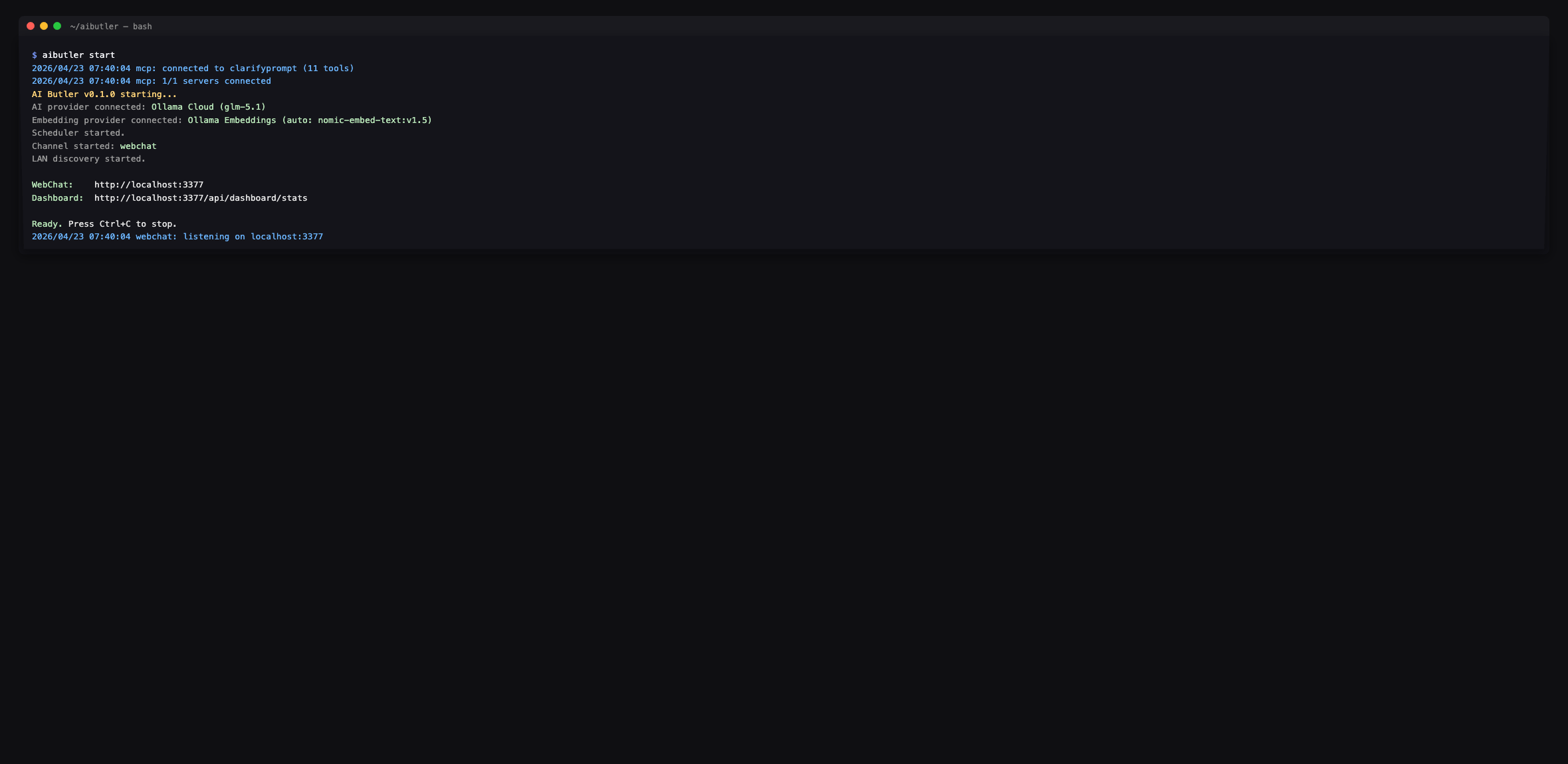
Restart AI Butler. The boot log confirms the tools are wired in:
The agent enumerates the full surface on request — every tool prefixed
with clarifyprompt.:
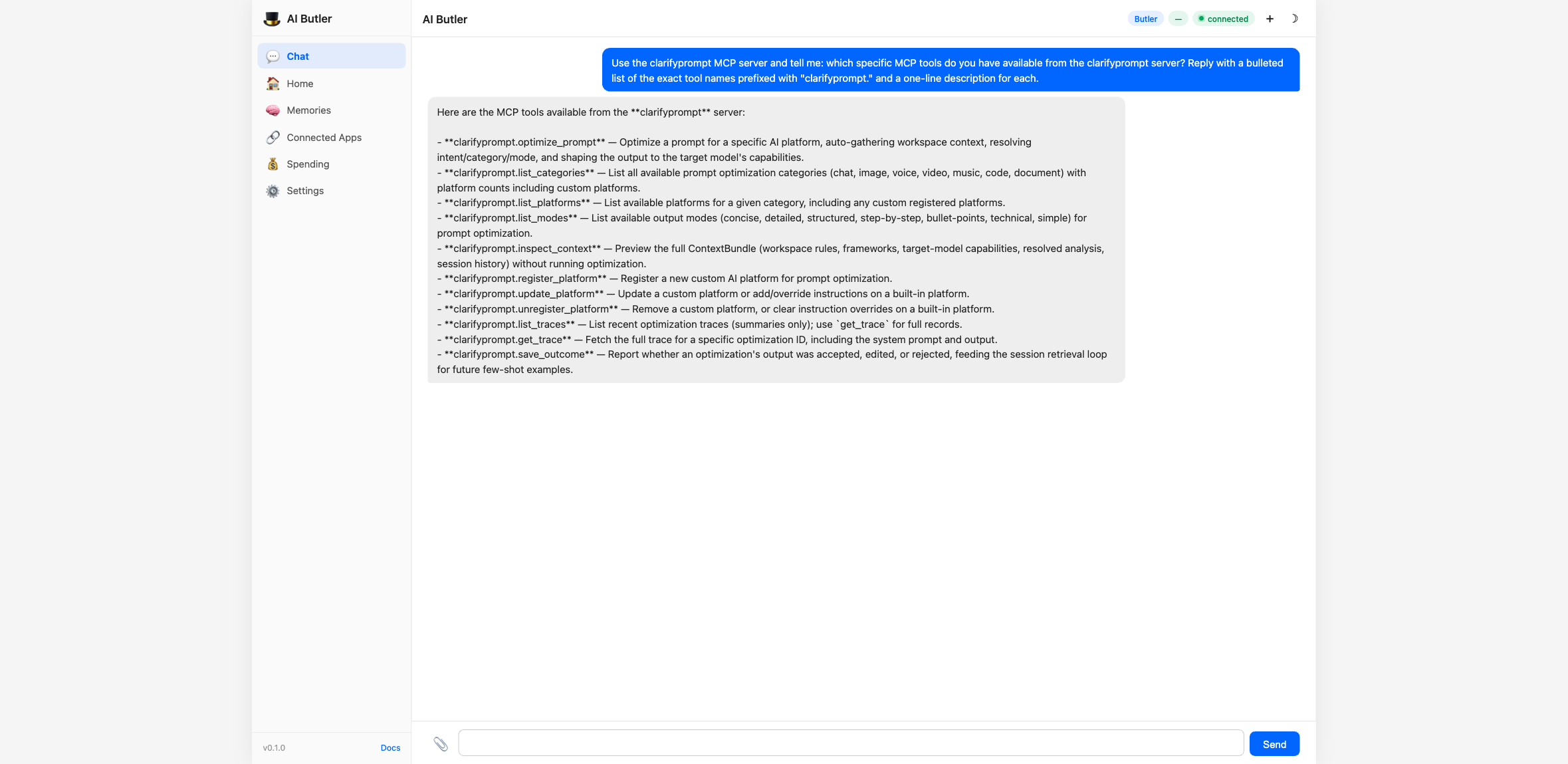
📸 Screenshots above are from a 1.2-era integration (11 tools). Current
1.6.xexposes 23 tools —optimize_prompt,clarify_with_user,ground_prompt,critique_prompt,compose_prompt, plus the management / inspection / memory tools (memory_search,memory_remember,memory_forget,memory_list_facts, knowledge-pack tools, traces, custom platforms, etc.). AI Butler picks them up automatically via the MCPtools/listdiscovery; no config changes needed.
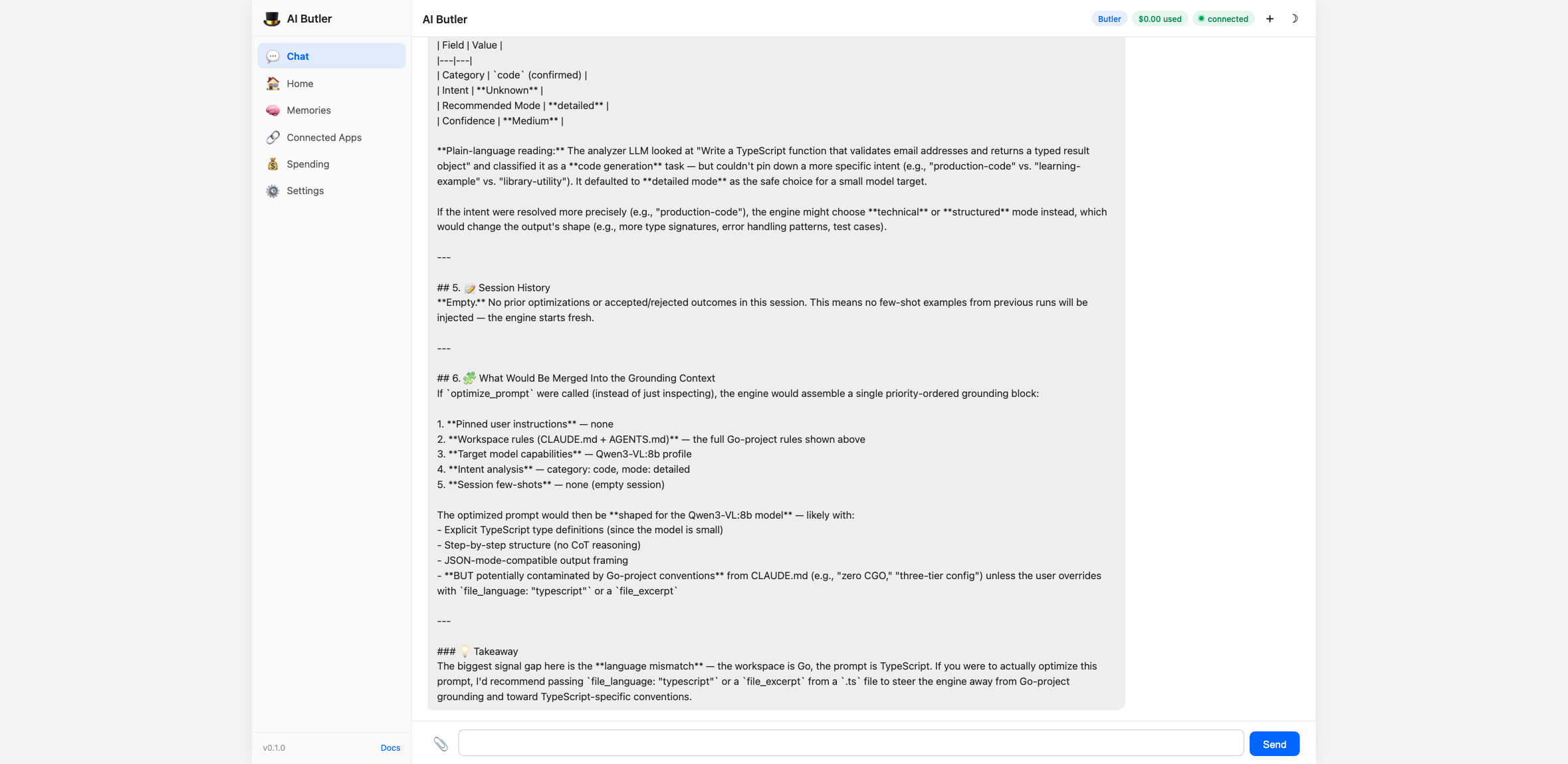
Drive the Context Engine end-to-end
You can preview what the engine would gather (without running the
optimization) using inspect_context:
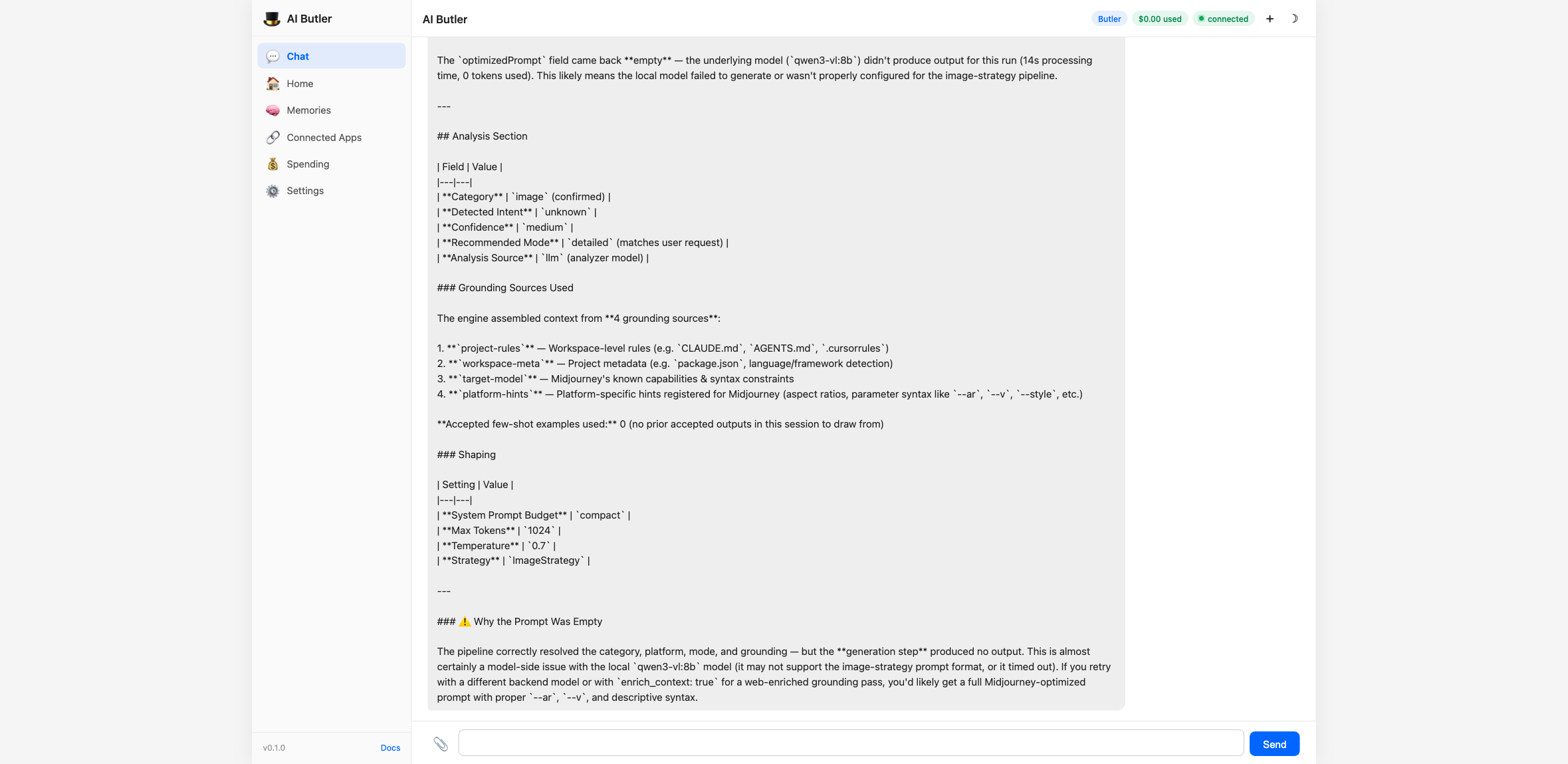
Then run the actual optimizer for any of the 60+ supported platforms:
Every optimization gets a single JSONL line in
~/.clarifyprompt/traces/YYYY-MM-DD.jsonl — strictly local, never
uploaded. The list_traces tool turns that into a queryable summary
with replay support via get_trace:
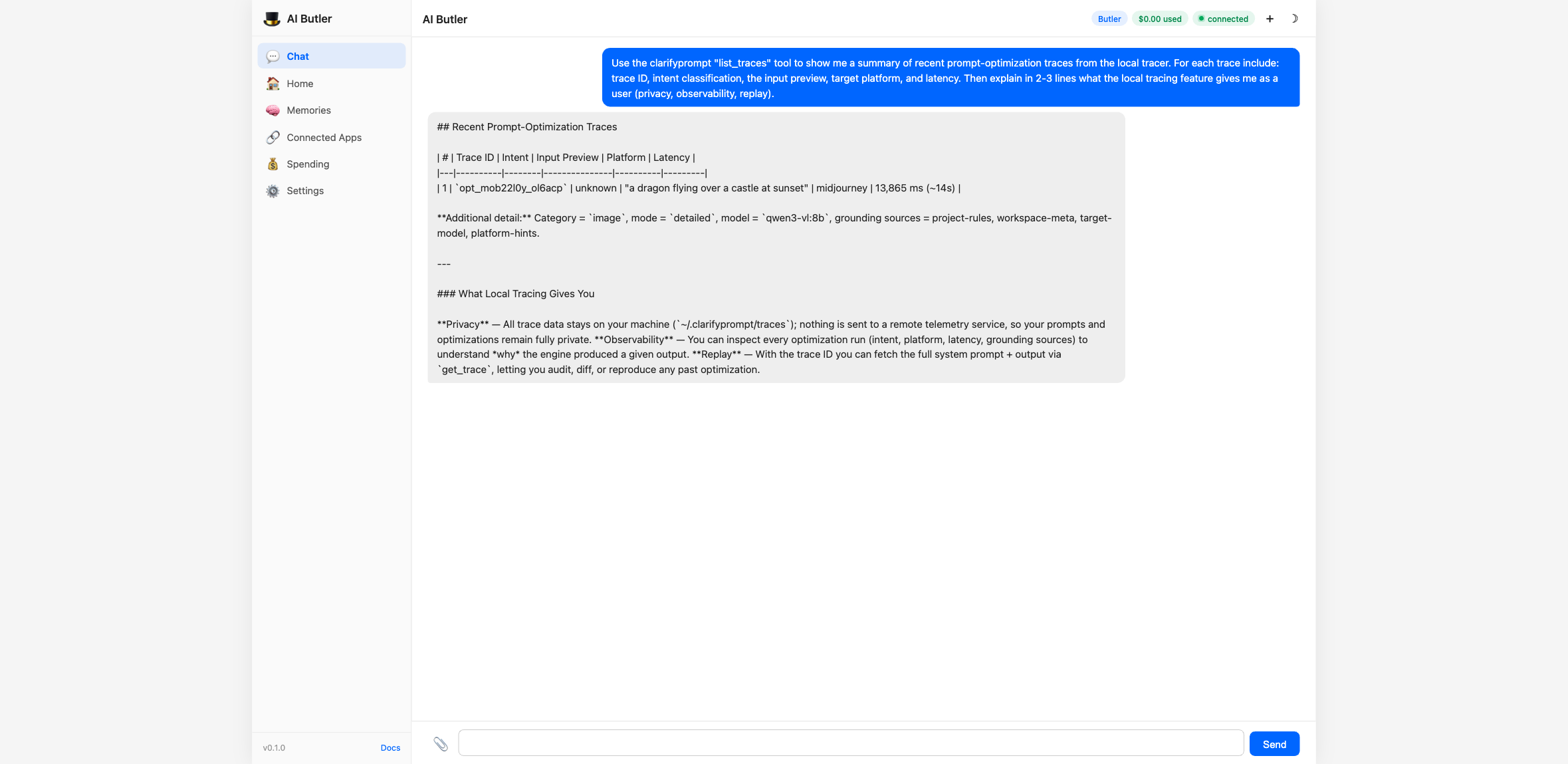
The full integration walkthrough — including all 11 tools driven from chat, configuration options, and natural-language usage examples — is in the AI Butler docs: Integrate an MCP Server.
Configuration & the compose panel
Everything you need to run the full pipeline and (in supporting hosts) see the interactive result panel.
The model that does the work
ClarifyPrompt calls one OpenAI-compatible or Anthropic endpoint, set via env:
LLM_API_URL=http://localhost:11434/v1     # Ollama shown; any OpenAI-compatible URL works
LLM_API_KEY=                              # empty for local Ollama; a key for hosted providers
LLM_MODEL=qwen2.5:7b                      # the model that rewrites and judges
Output is model-dependent — the structure (a platform's syntax, the critique dimensions) is consistent across models; the exact wording and scores vary by model.
Run the whole pipeline in one call
compose_prompt({
  "prompt": "write a product update email about our new dashboard",
  "platform": "claude",     // target a platform's tuning; omit for portable, neutral output
  "pre_clarify": "never",   // "auto" | "always" | "never"
  "post_critique": true     // adds the LLM-as-judge pass (verdict + the six score dimensions)
})
Returns { optimization: { id, sessionId, originalPrompt, platform, … }, finalPrompt, critique: { verdict, overallScore, dimensions[] }, stages[] }.
Targeting a platform
platform: (on optimize_prompt or compose_prompt) selects a platform's tuning — e.g. midjourney, dall-e, veo, suno, claude, chatgpt, cursor (61 built-in, verifiedAt-dated, + any you register). For chat, the platforms are the models (claude, chatgpt, gemini, llama, deepseek, …). Text categories (chat/document/code) produce portable, platform-neutral output when you omit platform — name one to opt into that platform's specific idioms.
Per-stage models (e.g. a stronger model as the critic)
compose_prompt can route each stage to a different model name:
compose_prompt({
  "prompt": "…",
  "optimize_model": "qwen2.5:14b",   // rewrite on a cheaper model
  "critique_model": "gpt-4o",        // judge on a stronger one
  "clarify_model":  "qwen2.5:7b"
})
Important: all per-stage names hit the same
LLM_API_URL— the override changes only the model name, not the endpoint. So withLLM_API_URLpointed at Ollama, every per-stage model must be an Ollama model; pointed at OpenAI, every model must be an OpenAI model. To genuinely mix providers (e.g. a local model to optimize +gpt-4oto critique), pointLLM_API_URLat a gateway that serves both names — OpenRouter, a LiteLLM proxy, or any OpenAI-compatible router. (optimize_prompton its own has no per-call model override; it usesLLM_MODEL.)
The interactive compose panel (MCP Apps)
In hosts that support the io.modelcontextprotocol/ui extension — Claude Desktop, Cursor, VS Code, … — compose_prompt renders a live panel next to the result: your original prompt, the optimized output (with a show changes diff toggle), a for <platform> / general purpose badge, the six critique score bars, and Accept / Revise actions. Accept records the outcome via save_outcome (feeding the few-shot memory loop); Revise sends your feedback back into the chat. Hosts without the extension are unaffected — they get the same text + structuredContent result and no panel.
Supported Platforms (61 built-in, verifiedAt-dated, unlimited custom)
| Category | Platforms | Default |
|---|---|---|
| Image (12) | Midjourney (V8.x), OpenAI image (GPT Image 2/DALL-E 3), Stable Diffusion, Flux (2), Ideogram, Leonardo AI, Adobe Firefly, Grok Aurora, Google Imagen (4), Nano Banana, Recraft, Higgsfield | Midjourney |
| Video (12) | Runway (Gen-4.5), Pika (2.2), Kling (3.0/Omni), Luma (Ray 2), Minimax/Hailuo (2.3), Google Veo (3.1), Seedance (2.0/2.5), Wan (2.6), HeyGen, Synthesia, CogVideoX, Higgsfield | Runway |
| Chat (9) | Claude, ChatGPT, Gemini, Llama, DeepSeek, Qwen, Kimi, GLM, Minimax | Claude |
| Code (9) | Claude, ChatGPT, Cursor, GitHub Copilot, Windsurf, DeepSeek Coder, Qwen Coder, Codestral, Gemini | Claude |
| Document (8) | Claude, ChatGPT, Gemini, Jasper, Copy.ai, Notion AI, Grammarly, Writesonic | Claude |
| Voice (7) | ElevenLabs (v3), OpenAI TTS (gpt-4o-mini-tts), Fish Audio, Sesame, Google TTS, PlayHT, Kokoro | ElevenLabs |
| Music (6) | Suno (v6), Udio, ElevenLabs Music (v2.5), Google Lyria (3.5), Stable Audio, MusicGen | Suno |
Tools
optimize_prompt
The main tool. Optimizes a prompt for a specific AI platform.
{
  "prompt": "a cat sitting on a windowsill",
  "category": "image",
  "platform": "midjourney",
  "mode": "concise"
}
All parameters except prompt are optional. When category and platform are omitted, ClarifyPrompt auto-detects them from the prompt content.
Three calling modes:
| Mode | Example |
|---|---|
| Zero-config | { "prompt": "sunset over mountains" } |
| Category only | { "prompt": "...", "category": "image" } |
| Fully explicit | { "prompt": "...", "category": "image", "platform": "dall-e" } |
Parameters:
| Parameter | Required | Description |
|---|---|---|
prompt | Yes | The prompt to optimize |
category | No | chat, image, video, voice, music, code, document. Auto-detected when omitted. |
platform | No | Platform ID (e.g. midjourney, dall-e, veo, claude). Uses category default when omitted. |
mode | No | Output style: concise, detailed, structured, step-by-step, bullet-points, technical, simple. Default: detailed. |
enrich_context | No | Set true to use web search for context enrichment. Default: false. |
session_id | No | Stitches related optimizations together so session memory can bias subsequent calls. Auto-generated when omitted. |
file_path | No | Active file path — infers language and shapes platform hints. |
file_language | No | Explicit language override for the active file. |
file_excerpt | No | Short excerpt (≤2 KB) of the active file to ground the rewrite. |
cwd | No | Working directory to scan for CLAUDE.md / AGENTS.md / .cursorrules / package.json. Defaults to server cwd. |
user_locale | No | Locale hint (e.g. en-US, ar-EG) to inform tone and language. |
user_pinned_instructions | No | Pinned, always-applied user instructions (short core-memory block). |
include_bundle | No | Include the resolved ContextBundle summary in the response. Default: false. |
skip_intent_resolution | No | Skip the intent classifier LLM call (faster; loses intent signal). Default: false. |
Response (1.2.0):
{
  "id": "opt_mo9vlg9i_foohjx",
  "sessionId": "sess_mo9vlfn3_abc123",
  "originalPrompt": "a dragon flying over a castle at sunset",
  "optimizedPrompt": "a majestic dragon flying over a medieval castle at sunset --ar 16:9 --v 8.2 --style raw --q 2 --s 700",
  "category": "image",
  "platform": "midjourney",
  "mode": "concise",
  "modeSource": "analyzer",
  "analysis": {
    "category": "image",
    "intent": "creative-media",
    "recommendedMode": "detailed",
    "confidence": "high",
    "source": "llm"
  },
  "grounding": {
    "sources": ["project-rules", "workspace-meta", "target-model", "platform-hints"],
    "acceptedExamplesUsed": 0
  },
  "shape": {
    "systemPromptBudget": "standard",
    "maxTokens": 2048,
    "temperature": 0.9
  },
  "metadata": {
    "model": "qwen2.5:14b-instruct-q4_K_M",
    "processingTimeMs": 3911,
    "strategy": "ImageStrategy"
  },
  "detection": { "autoDetected": true, "detectedCategory": "image", "detectedPlatform": "midjourney", "confidence": "high" },
  "intent": { "detected": "creative-media", "confidence": "high" }
}
The canonical classification field is analysis. The detection and intent fields are deprecated aliases kept for 1.x back-compat; they will be removed in 2.x.
modeSource tells you how the final mode was decided (user if you passed one, analyzer if intent-driven, default if neither).
grounding.sources lists which Grounding Context sections contributed, in priority order. grounding.acceptedExamplesUsed tells you how many few-shot examples the engine pulled from save_outcome history.
shape tells you how the system prompt was sized for your target model.
clarify_with_user (new in 1.4.0)
Given an ambiguous draft prompt, returns 1–3 targeted clarifying questions instead of guessing. Use it as a pre-stage before optimize_prompt when you can't tell whether the user's request will produce a good rewrite.
{
  "prompt": "make it better",
  "force": true
}
Response:
{
  "clarificationNeeded": true,
  "reason": "Clarification recommended (analyzer confidence=low; intent=unknown; prompt is short (12 chars); caller passed force=true).",
  "questions": [
    {
      "question": "What outcome do you want from this prompt — what does success look like?",
      "reasoning": "The draft is ambiguous on the goal/audience dimension; pinning this typically resolves most downstream ambiguity.",
      "suggestedAnswer": "Make the email shorter, clearer, and more action-oriented.",
      "options": ["Make it shorter", "Make it more formal", "Make it more persuasive"],
      "dimension": "goal"
    }
  ],
  "analysis": { "category": "chat", "intent": "unknown", "confidence": "low" }
}
suggestedAnswer is always populated — the caller can accept it verbatim and keep moving. options is optional; UI clients can render it as quick-pick buttons. The dimension tag classifies which axis the question addresses.
Short-circuit: when the analyzer's confidence is high AND the prompt is non-trivially long, the tool returns clarificationNeeded: false with no LLM call beyond the analyzer — so you can pipeline it in front of optimize_prompt without a latency tax on every call. Pass force: true to disable the short-circuit.
ground_prompt (new in 1.4.0)
Strict, retrieval-augmented variant of optimize_prompt. Caller-provided sources are pinned at the highest priority — above project rules and pinned instructions — so the rewrite is grounded in the material you provided rather than whatever the curator decides is relevant.
{
  "prompt": "rewrite the launch announcement to match our voice",
  "category": "document",
  "platform": "claude",
  "sources": [
    {
      "label": "Brand Voice Rules",
      "body": "Tone: warm, plain-spoken, no jargon. Always lead with the user benefit. Avoid 'leverage', 'synergy', 'robust'. Max sentence length: 18 words.",
      "kind": "rules"
    },
    {
      "label": "Launch Draft",
      "body": "Today we're launching FlowSync Pro — a tool to leverage AI synergy for robust team coordination...",
      "kind": "draft"
    }
  ]
}
Returns the same shape as optimize_prompt plus usedSources (which sources actually landed in the curated grounding) and droppedSources (sources that were empty or dropped). Sources appear in the trace as user-source:0, user-source:1, etc.
Strict mode: zero non-empty sources → error, not silent fall-through. Per-source body cap is 4000 chars so a single huge paste can't dominate the budget.
critique_prompt (new in 1.4.0)
LLM-as-judge. Scores a candidate prompt 0–10 across 6 default dimensions and (when below threshold) returns an improved rewrite.
{
  "prompt": "make it good",
  "revise_threshold": 7
}
Response:
{
  "overallScore": 2.0,
  "verdict": "reject",
  "summary": "Reject — substantial rewrite required.",
  "dimensions": [
    { "name": "clarity", "score": 1, "rationale": "...", "suggestions": ["Specify what 'it' refers to", "..."] },
    { "name": "specificity", "score": 0, "rationale": "...", "suggestions": [...] },
    { "name": "intent_alignment", "score": 3, "rationale": "...", "suggestions": [...] },
    { "name": "format_fitness", "score": 2, "rationale": "...", "suggestions": [...] },
    { "name": "length_appropriateness", "score": 1, "rationale": "...", "suggestions": [...] },
    { "name": "plain_language", "score": 4, "rationale": "...", "suggestions": [...] }
  ],
  "improvedPrompt": "Improve the README's getting-started section: shorten...",
  "improvements": ["Specified the artifact (README's getting-started section)", "Added concrete success criteria", "..."],
  "judgeModel": "qwen2.5-coder:7b-instruct-q4_K_M"
}
Parameters:
| Parameter | Default | Description |
|---|---|---|
prompt | — | Candidate prompt to score. |
original_prompt | — | When critiquing an optimized version, the user's original ask. Used for the intent_alignment dimension. |
criteria | 6 defaults | Custom dimensions: [{ name, description }, ...]. Up to ~8 dimensions. |
revise_threshold | 7.0 | Overall score below this triggers the rewrite pass. |
skip_rewrite | false | Skip the rewrite pass entirely (faster; just returns scores). |
Sanity-check: if the judge inflates overall more than 2.5 points above the per-dimension mean, the engine corrects it.
compose_prompt (new in 1.4.0)
The canonical pipeline. One call runs clarify → ground/optimize → critique → optional auto-revise.
{
  "prompt": "Write a TypeScript function that takes an array of email strings and returns only those that match RFC 5322 syntax. Include unit tests using Vitest with at least 6 test cases.",
  "pre_clarify": "auto",
  "post_critique": true,
  "auto_revise": true
}
Response (truncated):
{
  "stages": [
    { "name": "clarify",  "ranAt": "...", "durationMs":  541, "summary": "no clarification needed (short-circuit)" },
    { "name": "optimize", "ranAt": "...", "durationMs": 3128, "summary": "5 grounding source(s) selected" },
    { "name": "critique", "ranAt": "...", "durationMs": 3422, "summary": "verdict=accept, score=8.4" }
  ],
  "finalPrompt": "Write a TypeScript function `validateEmails(emails: string[]): string[]` that...",
  "clarificationRequired": false,
  "clarification": { "clarificationNeeded": false, ... },
  "optimization": { "id": "opt_...", "optimizedPrompt": "...", ... },
  "critique": { "overallScore": 8.4, "verdict": "accept", ... }
}
finalPrompt is what you should send downstream. It equals optimization.optimizedPrompt (or grounding.optimizedPrompt) unless auto_revise: true AND the critique verdict isn't accept AND there's an improvedPrompt — in which case finalPrompt is the rewrite and revised: true.
Branching:
| Inputs | Path |
|---|---|
no sources | optimize_prompt branch (auto-curated grounding) |
non-empty sources | ground_prompt branch (strict, caller-provided sources pinned) |
pre_clarify: "auto" (default) | clarify runs; short-circuits without surfacing questions on confident prompts |
pre_clarify: "always" | clarify always runs and STOPS the chain if questions surface |
pre_clarify: "never" | skip clarify entirely |
post_critique: true | critique runs after optimize/ground |
auto_revise: true (with post_critique: true) | when verdict !== accept and there's an improvedPrompt, replace finalPrompt |
Hard stop: if clarify surfaces questions (only happens when pre_clarify: "always", or auto on a low-confidence prompt), the chain stops and returns clarificationRequired: true. Caller answers the questions, edits the prompt to incorporate the answers, and re-calls (typically with pre_clarify: "never" to skip the second clarify pass).
1.6.0 additions
-
max_iterations(1–5, default 1) — agentic revise loop. Withauto_revise: trueANDpost_critique: true, each iteration'simprovedPromptfeeds back through optimize+critique until verdict=accept, no improvedPrompt is available, or the cap is reached. Pre-clarify only fires once. Response includesiterationsshowing how many ran. -
clarify_model/optimize_model/critique_model— per-stage model routing. Each overrides the envLLM_MODELfor that stage. Use it to route compose across cost/quality tiers — e.g. cheap-local clarify, frontier-hosted optimize, cheap critique:{ "prompt": "...", "post_critique": true, "clarify_model": "qwen2.5-coder:7b-instruct-q4_K_M", "optimize_model": "claude-sonnet-5", "critique_model": "gpt-4o-mini" }optimization.metadata.modelandcritique.judgeModelin the response reflect the actual model that ran each stage.
inspect_context (new in 1.2.0)
Preview the ContextBundle ClarifyPrompt would assemble for a given prompt — workspace rules, frameworks, target-model capabilities, resolved intent, and session history — without running the full optimization. Useful for debugging why an optimization turned out the way it did.
{
  "prompt": "Write an email to finance explaining the Q2 spend variance",
  "category": "document",
  "cwd": "/path/to/your/project"
}
Returns the full ContextBundle as JSON.
list_traces (new in 1.2.0)
Summary list of recent optimization traces captured by the local tracer (when CLARIFYPROMPT_TRACE=local, the default).
{ "day": "2026-04-22", "limit": 50 }
Returns trace IDs, inputs previews, resolved intents, target families, and latencies — never the full system prompt (use get_trace for that). Omit day to get the most recent day with data.
get_trace (new in 1.2.0)
Fetch the full trace for a single optimization by ID, including the exact system prompt, bundle summary, and output.
{ "id": "opt_xxx", "lookback_days": 7 }
save_outcome (new in 1.2.0)
Tell ClarifyPrompt whether a past optimization was accepted, edited, or rejected. Accepted outputs become few-shot examples for similar future prompts in the same session. In 1.3+ this will also feed the persistent memory layer. The IDE / agent / caller is expected to invoke this after the user acts on the optimization.
{
  "optimization_id": "opt_xxx",
  "session_id": "sess_yyy",
  "verdict": "accepted",
  "diff": "optional: the user's edited version or a patch"
}
list_categories
Lists all 7 categories with platform counts (built-in and custom) and defaults.
list_platforms
Lists available platforms for a given category, including custom registered platforms. Shows which is the default and whether custom instructions are configured.
list_modes
Lists all 7 output modes with descriptions.
register_platform
Register a new custom AI platform for prompt optimization.
{
  "id": "my-llm",
  "category": "chat",
  "label": "My Custom LLM",
  "description": "Internal fine-tuned model",
  "syntax_hints": ["JSON mode", "max 2000 tokens"],
  "instructions": "Always use structured output format",
  "instructions_file": "my-llm.md"
}
| Parameter | Required | Description |
|---|---|---|
id | Yes | Unique ID (lowercase, alphanumeric with hyphens) |
category | Yes | Category this platform belongs to |
label | Yes | Human-readable platform name |
description | Yes | Short description |
syntax_hints | No | Platform-specific syntax hints |
instructions | No | Inline optimization instructions |
instructions_file | No | Path to a .md file with detailed instructions |
update_platform
Update a custom platform or add instruction overrides to a built-in platform.
For built-in platforms (e.g. Midjourney, Claude), you can add custom instructions and extra syntax hints without modifying the originals:
{
  "id": "midjourney",
  "category": "image",
  "instructions": "Always pin the current version (--v 8.2), prefer --style raw",
  "syntax_hints_append": ["--no plants", "--tile for patterns"]
}
For custom platforms, all fields can be updated.
unregister_platform
Remove a custom platform or clear instruction overrides from a built-in platform.
{
  "id": "my-llm",
  "category": "chat"
}
For built-in platforms, use remove_override_only: true to clear your custom instructions without affecting the platform itself.
Custom Platforms & Instructions
ClarifyPrompt supports registering custom platforms and providing optimization instructions — similar to how .cursorrules or CLAUDE.md guide AI behavior.
How It Works
- Register a custom platform via
register_platform - Provide instructions inline or as a
.mdfile - Optimize prompts targeting your custom platform — instructions are injected into the optimization pipeline
Instruction Files
Instructions can be provided as markdown files stored at ~/.clarifyprompt/instructions/:
~/.clarifyprompt/
  config.json                    # custom platforms + overrides
  instructions/
    my-llm.md                   # instructions for custom platform
    midjourney-overrides.md     # extra instructions for built-in platform
Example instruction file (my-llm.md):
# My Custom LLM Instructions

## Response Format
- Always output valid JSON
- Include a "reasoning" field before the answer

## Constraints
- Max 2000 tokens
- Temperature should be set low (0.1-0.3) for factual queries

## Style
- Be concise and technical
- Avoid filler phrases
Override Built-in Platforms
You can add custom instructions to any of the 61 built-in platforms using update_platform. This lets you customize how prompts are optimized for platforms like Midjourney, Claude, or Veo without modifying the defaults.
Config Directory
The config directory defaults to ~/.clarifyprompt/ and can be changed via the CLARIFYPROMPT_CONFIG_DIR environment variable. Custom platforms and overrides persist across server restarts.
Knowledge packs
A knowledge pack is a markdown document with optional YAML frontmatter that teaches ClarifyPrompt something durable — a brand voice, a coding convention, a compliance regime, a domain-specific prompting pattern. Packs get chunked at H2 boundaries, embedded, and made available for semantic retrieval in every subsequent optimize_prompt / compose_prompt call. The Context Curator scores their chunks alongside workspace signals, instruction files, and grounding sources, then fits the highest-utility selection into the target model's remaining token window.
Bundled starter packs
Four packs ship in every npm tarball under packs/:
| Pack | What it teaches |
|---|---|
anthropic-brand-voice | Anthropic's public-facing tone, register, and word choices |
higgsfield-creative-handbook | Higgsfield model selection, prompt structure, camera moves, Soul ID workflow |
nextjs-14-best-practices | Server-first Next.js 14 App Router conventions |
sox-compliance | Sarbanes-Oxley 404 guardrails for AI-assisted financial work |
Loading a pack
load_knowledge_pack({
  source: "https://raw.githubusercontent.com/LumabyteCo/clarifyprompt-mcp/main/packs/nextjs-14-best-practices.md",
  scope: "user"
})
Or load locally — by absolute path, or relative to the installed package:
load_knowledge_pack({ source: "/path/to/my-team-style-guide.md", scope: "project" })
load_knowledge_pack({ source: "./node_modules/clarifyprompt-mcp/packs/sox-compliance.md", scope: "session" })
Scopes
user— persisted in$CLARIFYPROMPT_HOMEand available across every project on this machine.project— persisted, but scoped to the current working tree's identity (project-id derived fromcwd+ git remote when present).session— scoped to the current MCP session; not retrieved after the server restarts.
Packs of all three scopes are scored together at retrieval time; the curator decides which chunks survive the token budget.
Authoring + contributing
Pack authoring rules (frontmatter schema, chunk-boundary guidance, the quality bar that gets PRs merged) live in packs/README.md. Contributions land via PR against this repo. Apache-2.0 unless dual-licensed in frontmatter.
Why packs live in the engine repo (and not a separate registry)
Briefly: they used to. From 1.3 through 1.6.3 there was a separate LumabyteCo/clarifyprompt-packs registry. In 1.6.4 it was archived and consolidated back into clarifyprompt-mcp/packs/ because the dual-repo discipline was paying maintenance cost for an external-contributor audience that hadn't materialized — and the higgsfield-creative-handbook pack shipped in 1.6.2 without ever making it to the registry, exhibit A of the drift. The split makes sense once there's a real forcing function (community PR queue, pack count >20, divergent licensing/governance). Until then the single-repo model keeps the source of truth singular and unambiguous.
LLM Configuration
ClarifyPrompt uses an LLM to optimize prompts. It works with any OpenAI-compatible API and with the Anthropic API directly.
Environment Variables
| Variable | Required | Description |
|---|---|---|
LLM_API_URL | Yes | API endpoint URL |
LLM_API_KEY | Depends | API key (not needed for local Ollama) |
LLM_MODEL | Yes | Model name/ID |
LLM_TIMEOUT_MS | No | Per-call LLM request timeout in ms. Default 30000 (30s). Bump this for big local models — e.g. a 50 GB qwen3-next:80b can take ~120s per call, which exceeds the default and would surface as a timeout. LLM_TIMEOUT_MS=180000 is a safe value for large local models. |
LLM_REASONING_EFFORT | No | (1.12.1+) Reasoning level for thinking-channel models (gpt-oss, glm, *-thinking, deepseek-r, qwq): low | medium | high. Default low. These models also get a max_tokens floor so their reasoning trace can't starve the final answer (#3). Ignored for non-reasoning models. |
CLARIFYPROMPT_HOME | No | Canonical (1.2.0+) root for everything ClarifyPrompt writes — custom platforms, instruction .md files, traces, memory DB, and knowledge packs. Default: $XDG_DATA_HOME/clarifyprompt or ~/.clarifyprompt. |
CLARIFYPROMPT_TRACE | No | off | local | otel. Default: local. Traces are strictly local JSONL; nothing is uploaded. |
EMBED_API_URL | No | (1.3.0+) Embedding endpoint for memory + knowledge-pack retrieval. Any OpenAI-compatible /v1/embeddings endpoint. Defaults to LLM_API_URL when unset — Ollama users just work. |
EMBED_API_KEY | No | (1.3.0+) Embedding API key. Defaults to LLM_API_KEY when unset; not needed for local Ollama. |
EMBED_MODEL | No | (1.3.0+) Default: nomic-embed-text:v1.5 (768-dim, pull with ollama pull nomic-embed-text). Swap to text-embedding-3-small for OpenAI, voyage-3 for Voyage, embed-english-v3.0 for Cohere. |
EMBED_DIMENSION | No | (1.3.0+) Embedding output dimension. Default: 768. Must match your embedding model (1536 for OpenAI text-embedding-3-small, 1024 for Voyage, etc.). |
SEARCH_PROVIDER | No | Optional web-search enrichment provider when enrich_context: true. One of tavily (default) | brave | serper | serpapi | exa | searxng. |
SEARCH_API_KEY | No | API key for the configured SEARCH_PROVIDER. Not needed for self-hosted SearXNG. |
SEARCH_API_URL | No | Search endpoint URL. Only needed for self-hosted SearXNG (point at your instance). |
CLARIFYPROMPT_SUPPRESS_LEGACY_WARN | No | Set to 1 to silence the one-line deprecation hint when CLARIFYPROMPT_CONFIG_DIR / CLARIFYPROMPT_DATA_DIR are used. |
CLARIFYPROMPT_CONFIG_DIR | No | Legacy alias for CLARIFYPROMPT_HOME. Still works; will be removed in 2.x. |
CLARIFYPROMPT_DATA_DIR | No | Legacy alias for CLARIFYPROMPT_HOME. Still works; will be removed in 2.x. |
Provider Examples
Ollama (local, free):
LLM_API_URL=http://localhost:11434/v1
LLM_MODEL=qwen2.5:7b
Ollama — cloud models via local passthrough (recommended):
If your local Ollama is signed in to Ollama Cloud, any :cloud model routes through it transparently — same URL, no separate API key. The capability table auto-detects reasoning / thinking variants (gpt-oss, kimi-k2-thinking, qwen3-thinking, deepseek-r1, etc.) and bumps maxTokens so they finish thinking and actually produce content.
LLM_API_URL=http://localhost:11434/v1
LLM_MODEL=gpt-oss:20b-cloud        # or kimi-k2.6:cloud, qwen3-next:80b-cloud, glm-4.6:cloud, etc.
Ollama — direct cloud endpoint (no local install):
LLM_API_URL=https://ollama.com/v1
LLM_API_KEY=your-ollama-cloud-key
LLM_MODEL=qwen2.5:7b
OpenAI:
LLM_API_URL=https://api.openai.com/v1
LLM_API_KEY=sk-...
LLM_MODEL=gpt-4o
Reasoning models (
gpt-5,o3,o4-mini) work too — the client handles theirmax_completion_tokensandtemperaturerequirements automatically. They think extensively, so bumpLLM_TIMEOUT_MS(e.g.180000); the 30s default is often too short.
Anthropic Claude:
LLM_API_URL=https://api.anthropic.com/v1
LLM_API_KEY=sk-ant-...
LLM_MODEL=claude-sonnet-5
Google Gemini:
LLM_API_URL=https://generativelanguage.googleapis.com/v1beta/openai
LLM_API_KEY=your-gemini-key
LLM_MODEL=gemini-flash-latest
Use a model your key can access — older ids (e.g.
gemini-2.0-flash,gemini-2.5-flash) return404 "no longer available to new users"on newer keys.gemini-flash-latesttracks the current flash model. (Note:gemini-2.5-flash-image— "Nano Banana" — is an image model; it can't beLLM_MODEL, which must be a text model. Target it as an image platform instead.)
Groq:
LLM_API_URL=https://api.groq.com/openai/v1
LLM_API_KEY=gsk_...
LLM_MODEL=llama-3.3-70b-versatile
DeepSeek:
LLM_API_URL=https://api.deepseek.com/v1
LLM_API_KEY=your-deepseek-key
LLM_MODEL=deepseek-chat
OpenRouter (any model):
LLM_API_URL=https://openrouter.ai/api/v1
LLM_API_KEY=your-openrouter-key
LLM_MODEL=anthropic/claude-sonnet-4
See .env.example for the full list of 20+ supported providers including Together AI, Fireworks, Mistral, xAI, Cohere, Perplexity, LM Studio, vLLM, LocalAI, Jan, GPT4All, and more.
Web Search (Optional)
Enable context enrichment by setting enrich_context: true in your optimize_prompt call. ClarifyPrompt will search the web for relevant context before optimizing.
Supported search providers:
| Provider | Variable | URL |
|---|---|---|
| Tavily (default) | SEARCH_API_KEY | tavily.com |
| Brave Search | SEARCH_API_KEY | brave.com/search/api |
| Serper | SEARCH_API_KEY | serper.dev |
| SerpAPI | SEARCH_API_KEY | serpapi.com |
| Exa | SEARCH_API_KEY | exa.ai |
| SearXNG (self-hosted) | — | github.com/searxng/searxng |
SEARCH_PROVIDER=tavily
SEARCH_API_KEY=your-key
Before and After
Image (Midjourney)
Before: "a cat sitting on a windowsill"

After:  "a tabby cat sitting on a sunlit windowsill, warm golden hour
         lighting, shallow depth of field, dust particles in light beams,
         cozy interior background, shot on 35mm film, warm amber color
         palette --ar 16:9 --v 8.2 --style raw --q 2"
Video (Veo 3.1)
Before: "a timelapse of a city"

After:  "Cinematic timelapse of a sprawling metropolitan skyline
         transitioning from golden hour to blue hour to full night.
         Camera slowly dollies forward from an elevated vantage point.
         Light trails from traffic appear as the city illuminates.
         Clouds move rapidly overhead. Ambient city soundscape builds
         as the lights come on (native audio). Duration: 8s, extendable.
         Style: documentary cinematography, 4K, 16:9."
Code (Claude)
Before: "write a function to validate emails"

After:  "Write a TypeScript function `validateEmail(input: string): boolean`
         that validates email addresses against RFC 5322. Handle edge cases:
         quoted local parts, IP address domains, internationalized domain
         names. Return boolean, no exceptions. Include JSDoc with examples
         of valid and invalid inputs. No external dependencies."
Music (Suno)
Before: "compose a chill lo-fi beat for studying"

After:  "Compose an instrumental chill lo-fi beat for studying.
         [Tempo: medium] [Genre: lo-fi] [Length: 2 minutes]"
Context Engine (1.2.0)
Every optimization runs through five integrated passes that flow one bundle of context end-to-end:
- Analysis — a single
analyzePrompt()LLM call producescategory,intent, andrecommendedModetogether so they can't disagree. Intent beats surface keywords when they conflict (e.g."validate emails"→codenotdocument). - Mode reconciliation — explicit user
modewins; otherwise the analyzer's intent-derived recommendation applies;modeSourcein the response tells you which. - Prompt shaping — target-model capability signal drives
systemPromptBudget(compact for small local models, rich for 100K+ ctx models),maxTokens,temperature(intent-aware), and whether examples are included. - Intent overlay — a short overlay per intent (
production-code: demand error handling + tests;data-extract: demand strict schema;brand-voice: lead with tone; etc.) folded into the strategy's system prompt. - Grounding Context — a single priority-ordered block that merges user pinned instructions → project rules → active file → session few-shot examples → web search → workspace metadata → target-model hints → custom platform instructions → built-in syntax hints.
What's collected (ContextBundle)
- Project — first matching file from
CLAUDE.md,AGENTS.md,.cursorrules,.clinerules,clarify.md,.clarify/rules.md.package.jsonplus sibling manifests (pyproject.toml,Cargo.toml,go.mod,Gemfile,composer.json, …) drive framework + language detection. - File — optional
file_path/file_language/file_excerptinputs. - Session — ring buffer (20 ops/session) of recent optimizations and outcomes. Accepted outputs get retrieved as few-shot examples for similar future prompts.
- Target model — the LLM doing the rewrite, matched against a capability table.
- User — locale, preferred mode, pinned instructions (highest-priority grounding).
Inspecting what the engine sees
Use the inspect_context tool to preview the full bundle without running an optimization. Same shape as optimize_prompt returns when include_bundle: true.
Extending context
Drop an AGENTS.md / clarify.md / CLAUDE.md at your project root. Next optimization picks it up automatically. To feed accepted outputs back into future rewrites, call save_outcome after the user acts on the result.
Tracing
$CLARIFYPROMPT_HOME/traces/YYYY-MM-DD.jsonl
Every optimization writes one JSONL line capturing {id, ts, sessionId, category, platform, mode, input, bundleSummary, systemPrompt, output, model, strategy, latencyMs, shape, groundingSources, error}. Use list_traces for summaries and get_trace for full records.
Privacy posture:
- Traces are strictly local. No outbound network calls to any ClarifyPrompt-owned infrastructure.
- Only calls out to the LLM endpoint you configured (
LLM_API_URL) and optional search provider (SEARCH_API_KEY). - Disable tracing entirely with
CLARIFYPROMPT_TRACE=off. - There is no telemetry in this release. When a telemetry option ships it will be opt-in, anonymous, and documented before the build includes it.
Known limitations & roadmap
Memory persistence (shipped)
The save_outcome + few-shot retrieval loop persists to SQLite + sqlite-vec under $CLARIFYPROMPT_HOME — sessions, optimizations, outcomes, facts, and pack chunks all survive restarts. An in-memory ring buffer remains only as a same-session fast path. Session-scoped entries are keyed to their session id, so they're not retrieved by later sessions.
Intent quality scales with the model running the analyzer
The analyzer runs on the same LLM_MODEL that does the rewrite. In the integration battery:
- Qwen 2.5 7B and 14B → correct on every well-formed prompt tested.
- Llama 3.2 3B → occasionally over-commits on ambiguous prompts (e.g. tagged
"make it better"asbrand-voice/highwhenunknown/lowis the right answer). Larger models on the same prompt correctly returnedunknown/low.
Guidance: prefer a 7B+ local model (or any frontier hosted model) as LLM_MODEL. Latency-sensitive callers can set skip_intent_resolution: true to skip the analyzer; the engine falls back to user-hint category and default mode, losing intent-driven mode + overlay but keeping grounding + shape. The bundled eval harness (evals/, npm run eval) ships a public fixture set so you can score the analyzer against your own fixtures and detect regressions across model or classifier changes.
Recommended models
Score yourself with the bundled matrix runner: npm run matrix -- --models <a>,<b>,…. A recent run (2026-06, the 30-fixture suite, pass threshold 0.85, score = mean fixture score):
| Model | Where | Suite score | Notes |
|---|---|---|---|
glm-5.2:cloud | cloud · reasoning | 99% | Top overall. Thinking-budget handled automatically (1.12.1). |
gpt-oss:20b-cloud | cloud · reasoning | 98% | OpenAI open-weights; reasoning_effort applied automatically (1.12.1). |
qwen2.5-coder:7b | local | 97% | A small local model handles nearly the whole suite — the validated local-first default. |
gemma4:31b-cloud | cloud | 92% | Solid all-rounder. |
The handful of sub-threshold fixtures in any run are the subjective analyzer-* intent/mode classification and grounding-phrasing cases (content-variance across models), not pipeline errors — the deterministic pipeline fixtures (clarify, ground, critique, compose, memory, packs) pass on every model. The default stays local-first (qwen2.5:7b); reach for a frontier/reasoning model when you want the last few points of intent accuracy. Reasoning models (gpt-oss, glm, *-thinking, …) are auto-tuned (a max_tokens floor + reasoning_effort) so they don't return empty content — see LLM_REASONING_EFFORT.
Capability table is not exhaustive
Entries today: Claude, GPT-4/o-series, Gemini, Grok, DeepSeek (chat + reasoning), Qwen, Llama, Mistral/Codestral, Mixtral, Gemma, Phi, Cohere Command, Aya, Kimi, GLM, Minimax, GPT-OSS, Yi, Nemotron. Unknown models fall back to capabilities: {} and standard prompt-shape — still functional, just without model-aware sizing. Adding entries is a data-only edit to src/engine/context/targetModelSignals.ts.
Reasoning / chain-of-thought models
Supported as a first-class case. The engine auto-detects reasoners at family level (o1/o3/o4, deepseek-reasoner, gpt-oss) and at variant level (anything whose ID matches /\b(thinking|reasoner|reasoning)\b/ or /\br[12]\b/: kimi-k2-thinking:cloud, qwen3-thinking:72b, qwen-r1-distill, etc.). For these, maxTokens is automatically bumped to ≥ 8192 so the model has room to think AND produce content. The reasoning field is never surfaced as the optimized prompt — only content is.
Architecture
clarifyprompt-mcp/
  src/
    index.ts                           MCP server entry point (23 tools, 6 resources: 1 static + 4 templates + 1 ui panel)
    apps/                              MCP Apps compose panel (panel.html template + panel.ts, bundled at build time)
    engine/
      config/
        categories.ts                  CategoryConfig type + CATEGORIES const (loaded from YAML in 1.5.0)
        platformLoader.ts              (1.5.0) YAML pack loader — reads packs/platforms/*.yaml at boot
        paths.ts                       Unified $CLARIFYPROMPT_HOME resolver (1.2.0)
        persistence.ts                 ConfigStore — JSON config + .md file loading
        registry.ts                    PlatformRegistry — merges built-in + custom
      context/                         Context Engine (1.2.0)
        types.ts                       ContextBundle + signal types + AnalysisSignal
        projectSignals.ts              CLAUDE.md / AGENTS.md / .cursorrules / manifests scan
        fileSignals.ts                 Active-file path + language + excerpt
        sessionSignals.ts              In-memory per-session ring buffer + outcome retrieval
        targetModelSignals.ts          Model → capabilities mapping
        promptAnalyzer.ts              Unified analyzer: category + intent + recommendedMode
        gitSignals.ts                  (1.6.0) branch + HEAD + dirty + recent commits
        environmentSignals.ts          (1.6.0) nowIso + weekday + timezone
        bundle.ts                      Bundle orchestrator
      trace/                           Local tracing (1.2.0)
        types.ts                       TraceEntry schema (shape, groundingSources, error)
        writer.ts                      JSONL + OTel-stub writer, reader, lookup
      memory/                          Persistent memory + knowledge packs (1.3.0)
        store.ts                       SQLite + sqlite-vec; bi-temporal facts, outcomes, packs
        packs.ts                       Knowledge-pack loader (local / URL / inline)
        reflection.ts                  LLM fact extraction on save_outcome
      llm/client.ts                    Multi-provider LLM client (OpenAI + Anthropic)
      search/client.ts                 Web search (6 providers; results merge into Grounding Context)
      optimization/
        engine.ts                      Core orchestrator — analyzer, shape, grounding, retrieval, trace
        curator.ts                     Token-budget grounding curator (1.3.0)
        groundingContext.ts            Priority-ordered context assembly + mode/shape helpers
        types.ts                       OptimizationContext + result shape (UserProvidedSource)
        strategies/
          base.ts                      Bundle-aware base strategy (intent overlay + shape-aware sizing)
          chat.ts                      9 platforms
          image.ts                     12 platforms
          video.ts                     11 platforms
          voice.ts                     7 platforms
          music.ts                     4 platforms
          code.ts                      9 platforms
          document.ts                  8 platforms
      clarification/clarify.ts         (1.4.0) clarify_with_user — targeted questions w/ defaults
      grounding/ground.ts              (1.4.0) ground_prompt — strict caller-provided grounding
      critique/critique.ts             (1.4.0) critique_prompt — LLM-as-judge + optional rewrite
      composition/compose.ts           (1.4.0) compose_prompt — canonical clarify→ground/opt→critique pipeline
  evals/                                Eval harness v0 (1.3.0; setup: multi-call in 1.5.0)
    run.mjs                            YAML fixtures → MCP server → scored HTML report
    fixtures/*.yaml                    33 deterministic fixtures
    schema.json                        Fixture schema
  scripts/build-panel.mjs               (1.14.0) bundles the MCP Apps panel into dist/apps/
  packs/                                Knowledge packs + platform packs (single source of truth, 1.6.4+)
    README.md                          Pack authoring guide (frontmatter, chunks, quality bar)
    *.md                               Knowledge packs — 4 bundled, community-contributable via PR
    platforms/*.yaml                   (1.5.0) built-in AI platform declarations — 7 files, 58 platforms
  docs/adoption/                        (1.5.0) launch-post drafts + catalog submission specs
Docker
docker build -t clarifyprompt-mcp .
docker run -e LLM_API_URL=http://host.docker.internal:11434/v1 -e LLM_MODEL=qwen2.5:7b clarifyprompt-mcp
Development
git clone https://github.com/LumabyteCo/clarifyprompt-mcp.git
cd clarifyprompt-mcp
npm install
npm run build
Test with MCP Inspector:
npx @modelcontextprotocol/inspector node dist/index.js
Set environment variables in the Inspector's "Environment Variables" section before connecting.
Tests + evals
| Command | What it does |
|---|---|
npm run test:integration | Day-1 integration battery (intent + grounding + shape) |
npm run test:day2 | Day-2 memory + curator + reflection battery |
npm run test:reasoning | Reasoning-model coverage (chain-of-thought maxTokens bump) |
npm run test:wire | MCP-wire smoke test (server boots, tools list, initialize round-trips) |
npm run test:all | All four batteries in sequence |
npm run eval | Run the 20 deterministic eval fixtures + render evals/report.html |
npm run eval -- --filter <name> | Run only fixtures matching <name> (or a tag) |
npm run eval -- --quiet | Exit-code-only output (CI-friendly) |
Eval harness details, fixture format, and multi-model matrix instructions: evals/README.md.
CI / Quality gates
The repo ships a GitHub Actions workflow (.github/workflows/ci.yml) with five jobs:
| Job | Runs on | What it gates |
|---|---|---|
build | every push + PR | Typecheck + build + boot smoke-test on Node 18/20/22 across Linux + macOS |
secrets-audit | every push + PR | git-grep for known API-key prefixes in tracked files |
evals | every push + PR (opt-in) | npm run eval against gpt-4o-mini. Skips with success when OPENAI_API_KEY secret is unset; blocks publish when configured and any fixture regresses |
docker | every push + PR | docker build + container boot smoke-test |
publish | tag pushes only | npm publish --provenance when tag matches package.json#version, gated on all four jobs above |
To enable evals as a release gate on your fork:
- Repo → Settings → Secrets and variables → Actions → New repository secret
- Name:
OPENAI_API_KEY· Value: an OpenAI API key with access togpt-4o-mini - Push or re-run any workflow
Cost: ~$0.005 per CI run (17 active fixtures × ~1500 input tokens × ~600 output tokens at gpt-4o-mini pricing). The eval harness's HTML report is uploaded as a build artifact (30-day retention) so you can inspect any failure without re-running locally.
To enable npm-publish on tag pushes: add an NPM_TOKEN secret with a Granular Access Token scoped to clarifyprompt-mcp (bypass-2FA enabled). Same Settings flow.