MarsNMe
Agent-agnostic persistent memory backend. 13 MCP tools, Supabase + Jina embeddings, multi-profile isolation, semantic recall across sessions.
Documentation
English | 繁體中文(台灣) | 繁體中文(香港) | 简体中文
marsnme.com — Claude.md is for context. MarsNMe is for continuity.
Your AI tools should know you — not start from scratch every time. When Perplexity helps you decide, Claude should remember why. When Cursor ships a feature, Warp should know the context. That's not context sharing. That's continuity.
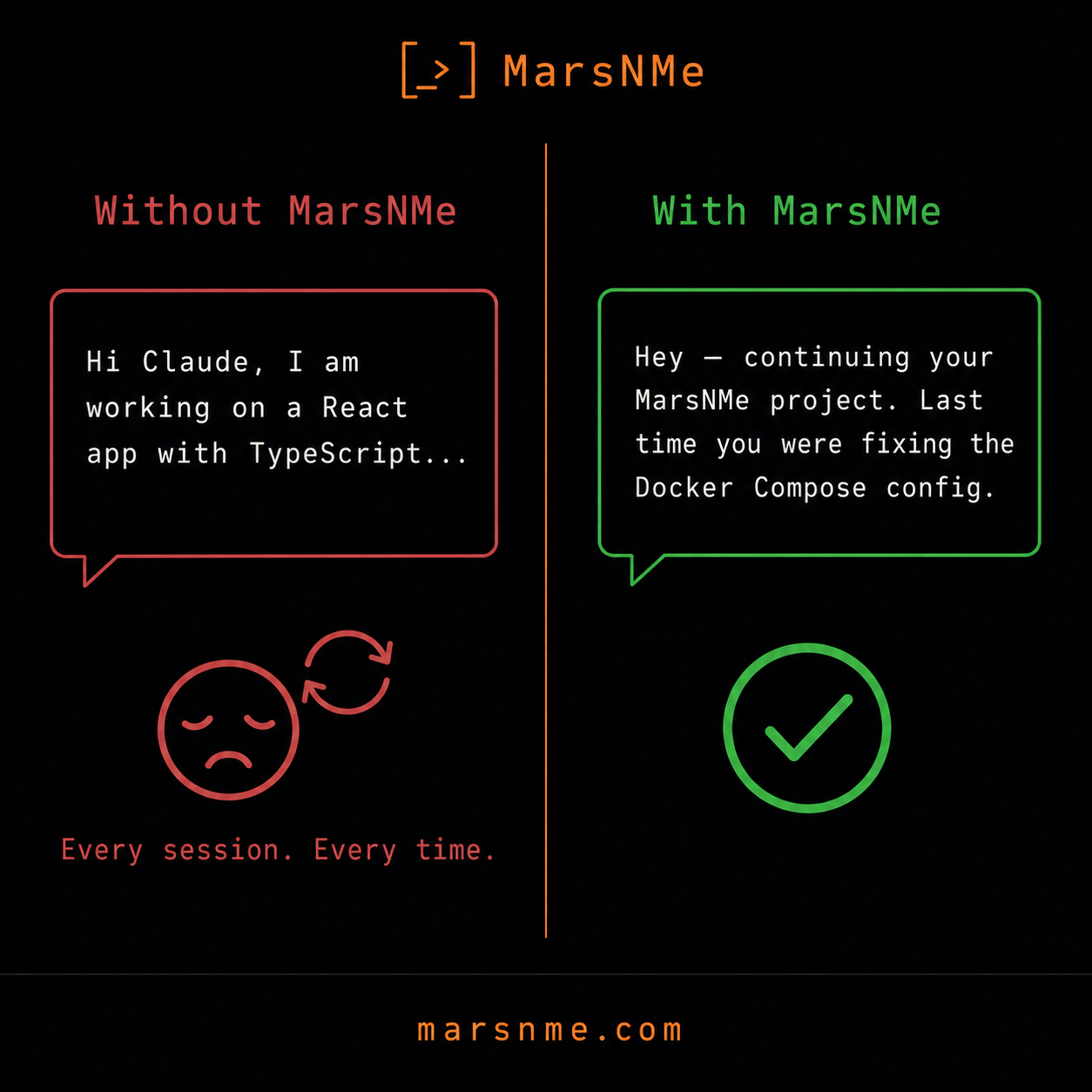
Most AI memory tools help AI remember you. MarsNMe helps you and your AI remember each other — across sessions, across tools, over time.
An agent-agnostic, LLM-agnostic memory backend for MCP-compatible tools.
curl -fsSL https://marsnme.com/install.sh | bash





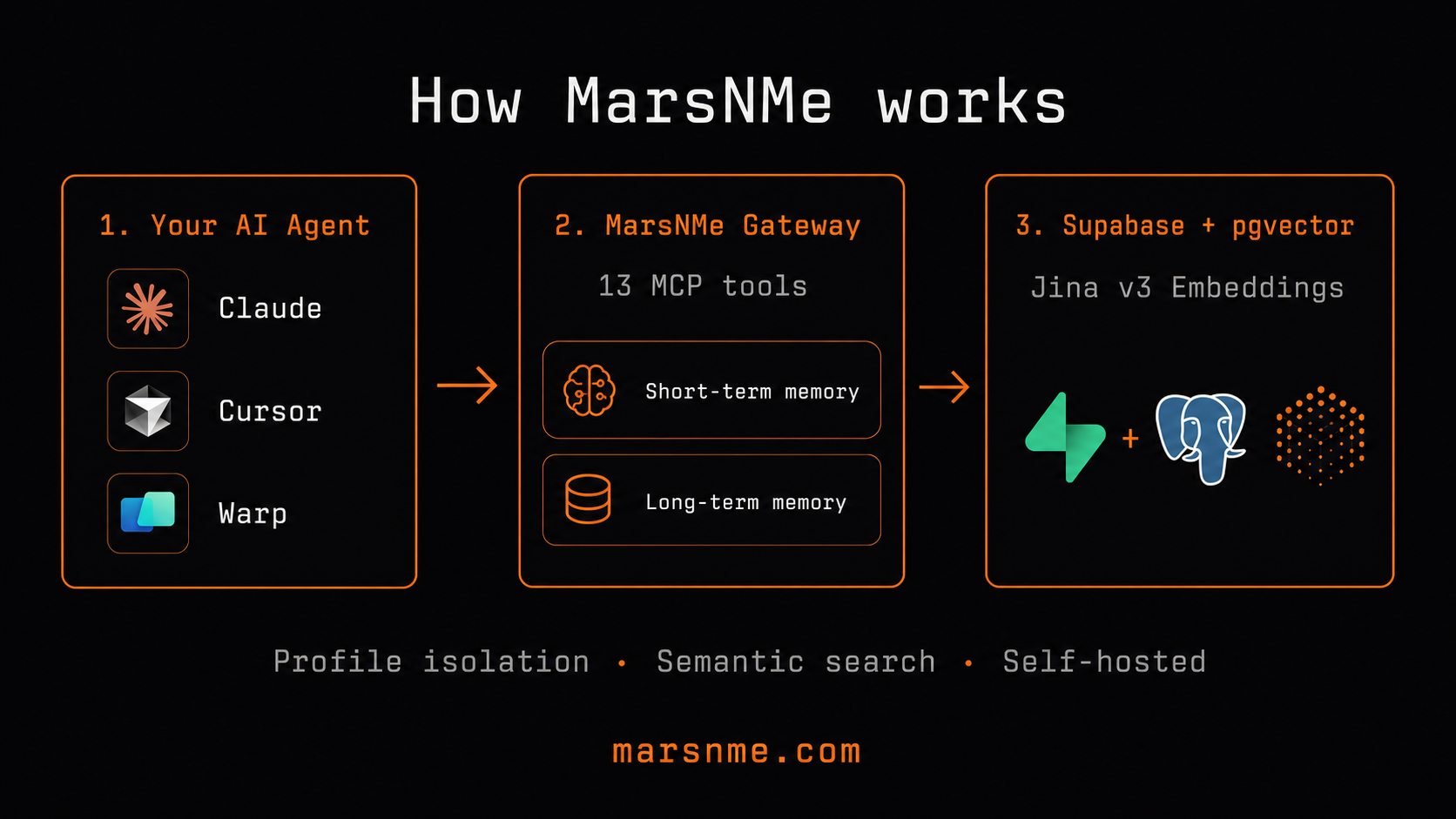
Real user story
I use Cursor to code, Warp to deploy, Perplexity to research, and Claude Code to manage my vault. Before MarsNMe, every tool started blank — I had to re-explain my project, my preferences, my decisions every single session. Now my AI across all four tools knows what we decided yesterday, what we tried last week, and why we chose this architecture over that one. It's not about injecting context. It's about having a relationship that compounds over time.
— Leo, MarsNMe creator (3 months of daily use across 4 AI tools)
Available MCP Tools (16)
| Tool | Description |
|---|---|
insert_memory | Store short-term memory |
list_memories | List recent memories |
search_memories | Semantic search via Jina embeddings |
recall | Long-term chunk recall — ~80-char preview per match |
get_summary | Medium excerpt (~300 chars) of a chunk by ID |
get_full | Complete text of a long-term chunk by ID |
memory_ingest | Ingest long-term insight chunks |
dream_ingest | Dream-mode long-term ingestion |
session_boot | Start a session with context pre-load |
session_close | Close session, summarize, auto-promote expiring memories |
health_check | Coverage, expiry, conflict diagnostics |
reload_source_registry | Refresh source whitelist at runtime |
demote_memory | Demote a memory to lower priority |
soft_forget | Soft-delete a memory |
explain_memory | Explain a memory's provenance |
batch_promote | Promote expiring short-term memories to long-term |
What's new in 0.3.0
- 3-layer recall:
recallreturns ~80-char previews, thenget_summary(~300 chars), thenget_full(complete). Avoids token-dumping full chunks on every recall; drill down only when a preview looks relevant. - Body-to-body note handoff:
session_close(to=<body>, note=...)leaves a note thatsession_boot(body=<target>)delivers and marks read — one agent can hand context to another. - Auto
batch_promoteonsession_close: closing a session automatically promotes soon-expiring short-term memories (48h window, up to 5) to long-term storage — no Hermes or manual promote needed. grok+draftsources: added to the source whitelist so the Grok body and Draft lifecycle hooks can write memories natively.- CoCo-only tool surface: PRD tools (
save_prd,get_prd,list_prds,score_prd,spawn_to_linear) removed from the Supabase gateway — idea/PRD/task execution now lives in Draft. MarsNMe = CoCo soul memory only.
MarsNMe
Why MarsNMe?
Most AI memory tools help AI remember you. MarsNMe helps you and your AI remember each other.
| MarsNMe | Typical memory tool | |
|---|---|---|
| Philosophy | Mutual continuity — human + AI both grow | AI-side context injection only |
| Agent support | Any MCP-compatible client | Often client-specific |
| Memory tiers | Short-term (TTL) + long-term (semantic) | Usually one layer |
| Profiles | Unlimited isolated profiles via MCP_PROFILE | Single-user only |
| Data ownership | Your own Supabase — zero vendor lock-in | Vendor-hosted |
| Search | Jina v3 semantic search (1024-dim pgvector) | Keyword or basic similarity |
| Self-hostable | ✅ Full control | Rarely |
When MarsNMe is the right fit
- You use multiple AI assistants (Claude, Cursor, Perplexity, Warp, custom agents) and want shared memory across all of them
- You want AI that remembers your projects, preferences, and decisions across sessions without re-explaining
- You care about data sovereignty — your memories stay in your own Supabase project
- You're building an AI agent and need a production-ready memory backend with semantic recall
When it might not be the right fit
- You only need single-session context (just use the system prompt)
- You want fully managed, zero-config memory with no setup (try a hosted solution)
Runtime packages
| Folder | Runtime | Who uses it |
|---|---|---|
marsnme-supabase/ | Supabase + Jina gateway (@marsnme/mcp-gateway) | Mars Group dogfood — Proxmox CT101 (CoCo / Toto soul memory) |
marsnme-cf/ | Cloudflare Workers + D1 + Vectorize | Self-host template; not the Proxmox deploy path |
marsnme-supabase/cloudflare-routing-worker/ | mcp.marsnme.com routing proxy | Public setup wizard → upstream gateway |
Product split (Mars Group): Idea / PRD / task execution → Draft + draft-mcp. MarsNMe Supabase = CoCo soul memory only (recall, session boot/close, ingest, lifecycle). As of @marsnme/mcp-gateway v0.3.0, PRD MCP tools (save_prd, get_prd, list_prds, score_prd, spawn_to_linear) are removed from the Supabase gateway — use Draft for idea/PRD/task workflows.
Proxmox deploy: private MarsNMe-lab — deploy/deploy-proxmox-ct101.sh or GitHub cd-selfhosted workflow. Not a single-script deploy like draft-mcp.
Repository Packages
| Package | Description |
|---|---|
marsnme-supabase/ | Core MCP gateway — agent-agnostic memory backend (this package is published to npm as @marsnme/mcp-gateway) |
marsnme-supabase/cloudflare-routing-worker/ | Cloudflare Worker for mcp.marsnme.com — username-based MCP routing proxy with setup wizard |
marsnme-cf/ | Self-hosted MCP memory server on Cloudflare Workers + D1 + Vectorize (no Supabase needed) |
Quick Setup (no install needed)
Go to mcp.marsnme.com/setup — create your personal MCP URL in 4 steps:
- Pick a username
- Enter your Supabase credentials (URL + anon key)
- Choose preferences
- Get your MCP URL:
https://mcp.marsnme.com/your-name
Then add it to any MCP client (Claude, Cursor, Perplexity, Warp).
Self-hosted? Deploy marsnme-cf/ to your own Cloudflare account — no Supabase needed, uses D1 + Workers AI + Vectorize.
Before You Start (External Dependencies)
- Create a Supabase project (free plan is enough):
- Sign up: https://supabase.com
- Create project: https://supabase.com/dashboard/new
- Open API settings (Project Settings → API):
- Project URL →
SUPABASE_BASE_URL service_rolekey →SUPABASE_SERVICE_ROLE_KEY
- Project URL →
- Keep
SUPABASE_SERVICE_ROLE_KEYprivate. Never commit it.
- Create a Jina API key (free tier available):
- Get key: https://jina.ai/api-key/
- Copy key to
JINA_API_KEY
Quick Start (15-20 minutes)
For the fastest path, use the one-line installer: curl -fsSL https://marsnme.com/install.sh | bash
The manual path below follows the same tools-first flow as docs/onboarding-a-mcp-zero-to-recall.md and docs/onboarding-b-platform-skill-install.md.
- Clone repository:
git clone https://github.com/Marsmanleo/MarsNMe.git
cd MarsNMe
- Verify Node.js version (20+ required):
node --version
- Copy environment template:
cp .env.example .env
- Fill required values in
.env:SUPABASE_BASE_URLSUPABASE_SERVICE_ROLE_KEYJINA_API_KEY
- Run required Supabase migrations before first start:
- Option A (recommended, Supabase CLI):
npx supabase db push --db-url "<your-supabase-db-connection-string>"
- Note:
--db-urlmust be the Postgres database connection string fromProject Settings → Database → Connection string. - It is not the same as
SUPABASE_BASE_URL(https://<project-ref>.supabase.co, REST API URL). - Use a role that can execute DDL on your target schemas.
- On Supabase-hosted Postgres this is typically
supabase_admin(notpostgres). - Option B (Supabase Dashboard SQL Editor):
- Open SQL Editor.
- Ensure the
vectorextension is enabled first (Database → Extensions). - Run migration files in filename order from
supabase/migrations/:20260504052744_semantic_vector_dual_profile.sql20260513213800_memory_lifecycle_tracking.sql20260513222500_health_check_detect_conflicts_v2.sql20260517183000_provenance_audit_trail.sql20260517194000_memory_scope_agent_body_environment.sql20260517200500_forget_demote_mechanism.sql20260517223500_usage_cost_telemetry_light.sql20260517231000_memories_source_constraint_regex.sql20260517232000_source_registry_table.sql
- Start gateway:
MCP_PROFILEseparates memory by agent or use case.- Use any profile name you want (for example:
default,my-agent,profile-a). - Legacy built-in profile IDs
cocoandtotoare still supported for compatibility. - If
PORTis omitted, default port is profile-based (coco=18790,toto=18791, other profiles deterministic in20000-29999).
MCP_PROFILE=profile-a PORT=18790 npx @marsnme/mcp-gateway
- Verify health:
curl -sS http://127.0.0.1:18790/health
- Connect your MCP client (next section), then run the first round-trip check.
Try In 30 Seconds (Docker, M1)
If you only want a local demo path, use Docker Compose.
One-line install (recommended):
curl -fsSL https://marsnme.com/install.sh | bash
Or manually:
- Set only the required key:
cp .env.example .env
# fill JINA_API_KEY in .env
- Start local stack:
docker compose up
This starts:
- PostgreSQL + pgvector
- SQL migrations from
supabase/migrations/ - PostgREST + rest-proxy
- MarsNMe gateway (
http://127.0.0.1:18790/mcp)
- Verify health:
curl -sS http://127.0.0.1:18790/health
M2 Cloudflare Tunnel Profile (Demo)
When you need a temporary public endpoint for remote AI tools:
docker compose --profile tunnel up
Expected output (from tunnel logs):
https://xxxx.trycloudflare.com
Get MCP endpoint:
docker compose --profile tunnel logs tunnel | grep -Eo 'https://[^ ]+trycloudflare.com' | head -n1
# append /mcp
Notes:
trycloudflare.comURL is temporary (demo only).- Local endpoint remains:
http://127.0.0.1:18790/mcp. - For production/stable URL, use named tunnel (outside M2 scope).
- Optional env:
MCP_TUNNEL_PROFILE(defaultcoco)MCP_TUNNEL_REQUIRE_BEARER(defaultfalsefor demo convenience)
MCP Client Connection Guide
Local endpoint:
http://127.0.0.1:18790/mcp
If bearer auth is enabled (MCP_REQUIRE_BEARER=true), include:
Authorization: Bearer <your-token>
Claude Desktop
- Open
claude_desktop_config.json(macOS default path:~/Library/Application Support/Claude/claude_desktop_config.json). - Add/update:
{
  "mcpServers": {
    "marsnme-cf": {
      "url": "http://127.0.0.1:18790/mcp"
    }
  }
}
- Restart Claude Desktop.
Cursor
- Open Cursor Settings and search for MCP.
- Add a new server:
- Name:
marsnme-cf - URL:
http://127.0.0.1:18790/mcp - Headers: optional bearer header if enabled
- Name:
- Reconnect MCP in Cursor.
Warp
- Open
Settings > Agents > MCP servers. - Add a server pointing to:
- URL:
http://127.0.0.1:18790/mcp
- URL:
- Add optional bearer header if required, then reconnect.
Perplexity
- Open a Space in Perplexity and go to Space Settings.
- Under MCP servers, add:
- URL:
http://127.0.0.1:18790/mcp
- URL:
- Save and start a new conversation in that Space.
Any MCP client (generic HTTP/SSE)
Use a streamable HTTP/SSE MCP entry:
{
  "marsnme-cf": {
    "url": "http://127.0.0.1:18790/mcp"
  }
}
First Connection Validation (Round Trip)
After client connection, verify this sequence once:
tools/list:
curl -sS http://127.0.0.1:18790/mcp \
  -H 'content-type: application/json' \
  -d '{"jsonrpc":"2.0","id":1,"method":"tools/list","params":{}}'
insert_memory:
curl -sS http://127.0.0.1:18790/mcp \
  -H 'content-type: application/json' \
  -d '{"jsonrpc":"2.0","id":2,"method":"tools/call","params":{"name":"insert_memory","arguments":{"body":"quickstart memory check","source":"warp","session_id":"quickstart-smoke"}}}'
recall:
curl -sS http://127.0.0.1:18790/mcp \
  -H 'content-type: application/json' \
  -d '{"jsonrpc":"2.0","id":3,"method":"tools/call","params":{"name":"recall","arguments":{"query":"quickstart memory check","limit":3}}}'
What this repository is
mars-memory-mcp is the core MCP gateway repository behind the public-facing MarsNMe release.
One codebase (marsnme-supabase/server.mjs) serves multiple profile schemas through MCP_PROFILE.
This public repository currently keeps two built-in legacy profile IDs (coco, toto) for backward compatibility.
Current capabilities
- MCP methods:
initialize,notifications/initialized,tools/list,tools/call,ping - Profiles: configurable profile IDs (legacy built-ins:
coco,toto) - Memory tools (16):
insert_memory(short-term memory)list_memoriessearch_memories(Jina embedding search)recall(~80-char preview) thenget_summary(~300-char excerpt) thenget_full(complete text)memory_ingest/dream_ingest(long-term chunk ingestion)session_boot/session_close(daily rhythm lifecycle; close auto-promotes expiring memories + supports body-to-body note handoff)health_check(coverage, expiry, conflict diagnostics)reload_source_registry(refresh source whitelist at runtime)demote_memory/soft_forget/explain_memory(memory lifecycle management)batch_promote(promote expiring short-term memories to long-term)
- Sources:
perplexity,cursor,warp,openclaw,hermes,draft,grok - OAuth-protected MCP endpoint (configurable by environment variables)
Memory model
- Short-term memory table:
<profile>.memories - Long-term memory table:
<profile>.marsvault_chunks - Recommended usage:
- Keep daily interaction context in
insert_memory - Promote durable insights through ingest tools
- Keep daily interaction context in
Repository layout
marsnme-supabase/server.mjs— gateway entry pointmarsnme-supabase/scripts/hermes_digest_runner.py— optional digest runnermarsnme-supabase/scripts/dream_runner.py— public self-host dream runnermarsnme-supabase/deploy/systemd/— systemd templatesmarsnme-supabase/deploy/phase2/— build/deploy scriptsmarsnme-supabase/deploy/phase3/smoke_gate.sh— smoke gate scriptsupabase/migrations/— schema-as-code migrations
Environment setup
- Copy
.env.exampleto your local.env(do not commit real secrets). - Fill required values:
MCP_PROFILE(your profile identifier; this repo ships with legacycoco/toto)SUPABASE_BASE_URLSUPABASE_SERVICE_ROLE_KEYJINA_API_KEY
- Optional security flags:
MCP_REQUIRE_BEARER=trueMCP_CLIENT_IDMCP_CLIENT_SECRET
Optional Hermes digest runner
Hermes is optional and disabled by default:
HERMES_ENABLED=falseHERMES_DIGEST_MCP_URLHERMES_DIGEST_MCP_BEARER_TOKENHERMES_DIGEST_ORIGINHERMES_DIGEST_SOURCE_DIR
Optional Dream Runner (self-host)
Dream Runner is public-friendly and can run without Hermes private environment:
DREAM_ENABLED=trueDREAM_MODE=lite|standard|proDREAM_DIGEST_MCP_URLDREAM_MCP_BEARER_TOKEN(if required)DREAM_ENABLE_ISSUE_SIGNALS,DREAM_ENABLE_REPO_SCAN,DREAM_ENABLE_SOUL_CONTEXT(optional overrides)
Quick start:
DREAM_ENABLED=true DREAM_MODE=lite python3 marsnme-supabase/scripts/dream_runner.py
If you run this repository with bundled defaults and no profile remapping, use coco and toto.
See docs/dream-runner-self-host.md for full configuration.
Onboarding
- Zero-to-first-recall guide:
docs/onboarding-a-mcp-zero-to-recall.md - Platform install guide (optional skill layer):
docs/onboarding-b-platform-skill-install.md
Skill library
- Skill index and update workflow:
skills/README.md - Perplexity template:
skills/perplexity/memory-daily-boot/SKILL.md - Cursor template:
skills/cursor/memory-daily-boot/rule.mdc - Warp template:
skills/warp/memory-daily-boot/prompt.md
Local run (from cloned repo)
MCP_PROFILE=profile-a npx @marsnme/mcp-gateway
MCP_PROFILE=profile-b npx @marsnme/mcp-gateway
Health endpoints:
GET /healthPOST /mcp
Systemd deployment
Use marsnme-supabase/deploy/systemd/memory-mcp-gateway@.service with instances:
memory-mcp-gateway@profile-a.servicememory-mcp-gateway@profile-b.service
Recommended env files:
/opt/mars-memory-mcp/shared/.env/opt/mars-memory-mcp/shared/.env.profile-a/opt/mars-memory-mcp/shared/.env.profile-b
Release/deploy scripts
- Build artifact:
bash marsnme-supabase/deploy/phase2/build_release_artifact.sh
- Apply migrations with an explicit DDL-capable role:
npx supabase db push --db-url "<postgres://supabase_admin:<password>@<host>:5432/postgres>"
- Run pre-deploy schema gate (must pass before any service restart):
bash marsnme-supabase/deploy/phase2/pre_deploy_schema_gate.sh \
  --db-url "<postgres://supabase_admin:<password>@<host>:5432/postgres>" \
  --profiles coco,toto \
  --expected-role supabase_admin
- Run your platform-specific rollout/restart adapter.
- This repository ships generic artifact + gate scripts; rollout adapters are environment-specific.
- If schema gate exits non-zero, stop deployment and do not restart services.
- Smoke gate:
bash marsnme-supabase/deploy/phase3/smoke_gate.sh --spawn-local
- Automated npm + MCP Registry release (tag-driven):
- Workflow:
.github/workflows/publish-release.yml - Trigger: push tag
v* - Gate: tag version must match
marsnme-supabase/package.jsonversion - Optional local Fish helper:
- Workflow:
mrel patch
mrel minor
mrel major
mrel 0.1.2
The helper updates marsnme-supabase/package.json and server.json, commits, tags, and pushes.
Security and version control
- Never commit
.env, runtime tokens, oroauth-clients.json - Keep
.env.examplecommitted as the only environment template - Prefer bearer/OAuth for public exposure
License and policy
- License: Apache-2.0 (
LICENSE) - Notice:
NOTICE - Trademark policy:
TRADEMARK.md - Contribution guide:
CONTRIBUTING.md - Contributor agreement:
CLA.md - Release notes:
CHANGELOG.md