Spendlog
Track expenses, income, budgets, and invoices directly in Claude with PDF export and tax reports.
Documentation
Spendlog
Cost & expense tracking for solo entrepreneurs, right inside Claude Code. No apps. No spreadsheets. No account.
Track what your business spends, manage budgets, write invoices — all in natural language. Your data stays 100% local in SQLite. Nothing leaves your machine.




Works with
Claude Code | Claude Desktop | VS Code | Cursor
Quick Start
npx spendlog
Or one-click install:


The installer auto-configures Claude Desktop and Claude Code. Restart Claude, then try:
"Track 50€ for hosting"
That's it. Requires Node.js 20+.
Why Spendlog?
- Zero context-switching — log costs while you build, right where you already work
- Local-first — all data in
~/.spendlog/spendlog.db, no account, no cloud - Natural language — no forms, no menus, just tell Claude what you spent
- 38 tools — invoicing, budgets, recurring expenses, CSV export, multi-project tracking
- Multilingual — English and German (EN/DE), with i18n ready for more
Examples
Tracking:
You: "29€ for ChatGPT subscription"
Claude: Expense saved: 29.00 € — Category: IT & Software

You: "Export 2025 for my accountant"
Claude: 247 transactions written to ~/spendlog-export-2025.csv
Invoices:
You: "Create invoice for TechCorp, web development, 8h at 95€/h"
Claude: Invoice #2026-004 created — 760.00 €

You: "Mark it as paid"
Claude: Invoice #2026-004 marked as paid, income recorded.
Analysis:
You: "How much did I spend on software this quarter?"
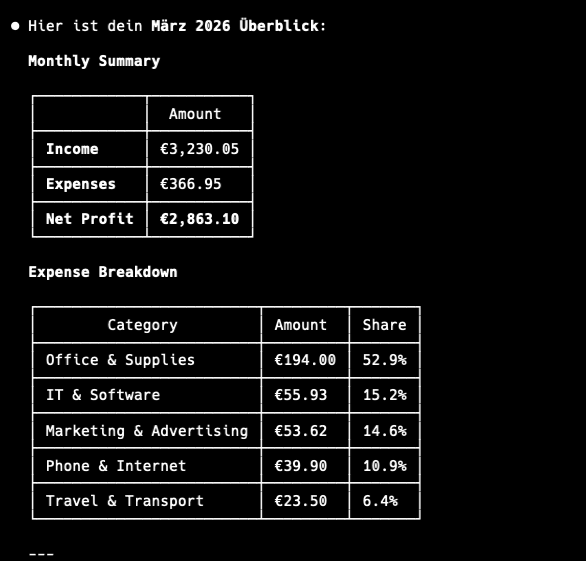
Claude: IT & Software: 287.00 € (12 transactions) — 23% of total expenses

You: "Compare January vs February"
Claude: Expenses up 15%. Biggest increase: Marketing (+120€)
Tools
38 tools across 9 categories:
| Category | Tools |
|---|---|
| Transactions | add_expense add_income list_transactions update_transaction delete_transaction |
| Analysis | get_summary get_category_breakdown compare_periods get_tax_summary |
| Invoices | create_invoice list_invoices get_invoice mark_invoice_sent mark_invoice_paid delete_invoice duplicate_invoice |
| Budgets | set_budget get_budget_status list_budgets update_budget delete_budget |
| Recurring | create_recurring list_recurring delete_recurring process_recurring |
| Projects | create_project list_projects rename_project delete_project |
| Categories | list_categories add_category delete_category |
| Export | export_transactions export_invoices export_for_tax_advisor |
| Settings | get_profile set_profile get_notifications |
Configuration
Manual setup (if the installer didn't work)
Claude Desktop — edit your config file:
{
  "mcpServers": {
    "spendlog": {
      "command": "npx",
      "args": ["-y", "--package=spendlog", "spendlog-mcp"]
    }
  }
}
Claude Code:
claude mcp add spendlog -- npx -y --package=spendlog spendlog-mcp
Environment variables
| Variable | Description | Default |
|---|---|---|
SPENDLOG_LANGUAGE | en or de | en |
SPENDLOG_DATA_DIR | Data directory path | ~/.spendlog |
DATABASE_PATH | Full path to SQLite database | $SPENDLOG_DATA_DIR/spendlog.db |
SPENDLOG_PROJECT | Default project for all transactions | none |
Privacy
All data stays on your machine, in a local SQLite file. No account, no cloud, no telemetry — nothing is ever sent anywhere.
Note: Spendlog is a cost tracker, not accounting software. Use it for your own insights, not official bookkeeping or tax filing.
Development
TypeScript (strict), Vitest for tests, TypeORM + SQLite for storage.
git clone https://github.com/makz81/spendlog.git
cd spendlog
npm install
npm run dev       # MCP server with watch mode
npm run test      # 382 tests
npm run typecheck # type check (no emit)
See CONTRIBUTING.md for architecture details and how to add new tools.