MIE - Memory Intelligence Engine
Persistent knowledge graph MCP server that gives AI agents shared memory across sessions and providers. Stores facts, decisions, entities, and events with typed relationships.
Documentation
MIE - Memory Intelligence Engine
Stop re-explaining yourself to every AI agent. MIE gives all your agents — Claude, ChatGPT, Cursor, Gemini — a shared, persistent knowledge graph they can read and write. Decisions, context, facts, and relationships survive across sessions, tools, and providers.
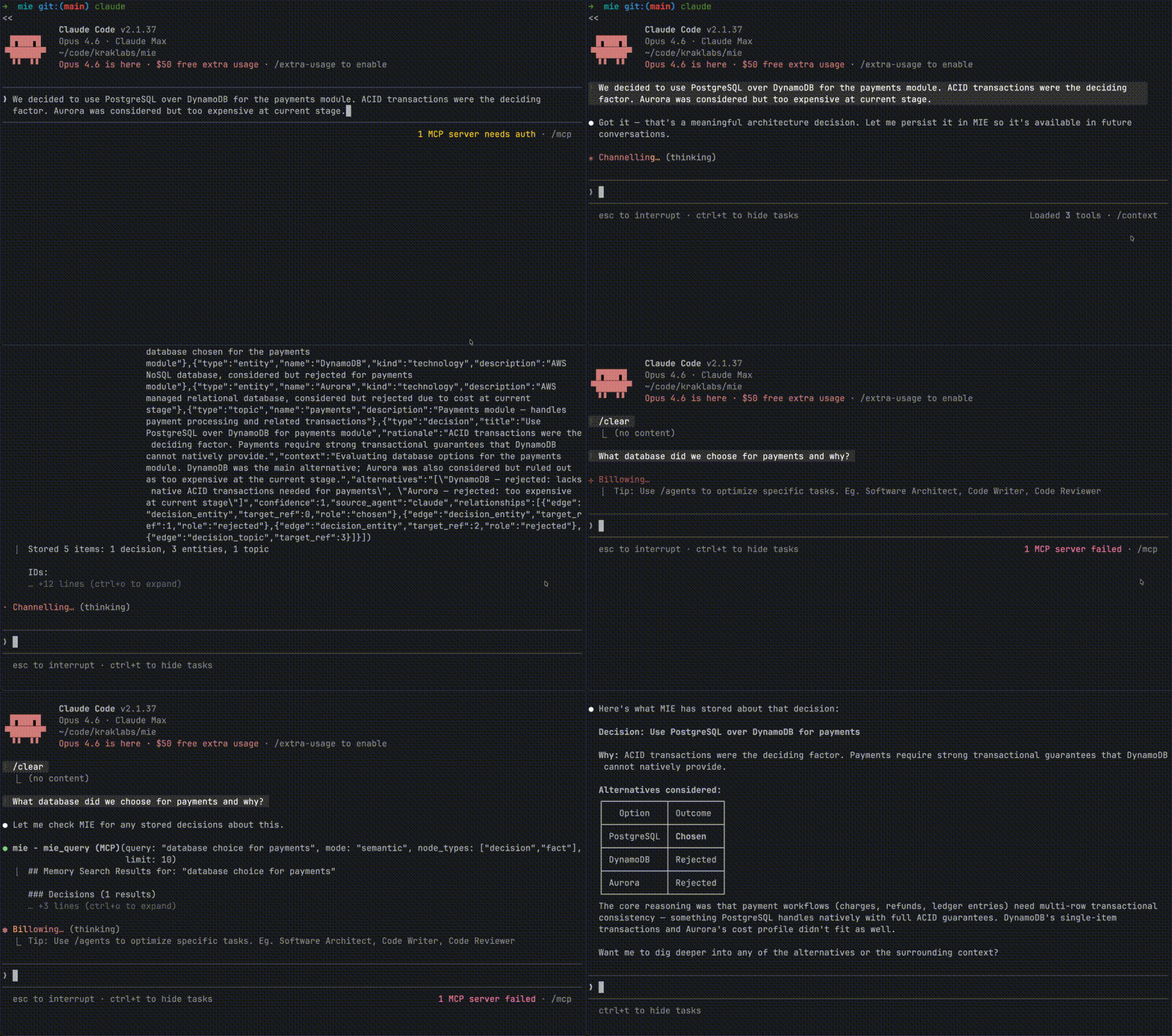


The Problem
You explained your entire architecture to Claude. Two hours of context, decisions, tradeoffs. Next day, new conversation — it knows nothing. So you explain it again. Then you switch to Cursor for implementation. Zero context. You open ChatGPT to brainstorm a different angle. Blank slate.
Every AI agent you use is brilliant but amnesiac. And none of them talk to each other.
MIE fixes this. One knowledge graph. Every agent reads from it. Every agent writes to it. Your decisions, your context, your rules — always available, everywhere.
How It Works
You: "We chose PostgreSQL over DynamoDB because we need ACID
      transactions for the payments module. Alternative was Aurora
      but too expensive at current stage."

          Claude stores this via MIE
                    ↓
┌─────────────────────────────────────────────┐
│              MIE Knowledge Graph             │
│                                              │
│  Decision: PostgreSQL over DynamoDB          │
│  Rationale: ACID transactions for payments   │
│  Alternatives: [DynamoDB, Aurora]            │
│  Entities: payments-module, PostgreSQL       │
│  Status: active                              │
└─────────────────────────────────────────────┘
                    ↓
    Next week, in Cursor, different project:
    "What database did we choose and why?"
    → Cursor queries MIE, gets full context instantly
No copy-pasting. No "as I mentioned before." No starting from zero.
Why Not Just Use Claude's Memory / ChatGPT's Memory?
| Platform Memory | MIE | |
|---|---|---|
| Cross-agent | ❌ Claude doesn't know what you told ChatGPT | ✅ All agents share the same graph |
| Structured | ❌ Flat text summaries | ✅ Typed nodes: facts, decisions, entities, events |
| Queryable | ❌ Basic keyword recall | ✅ Semantic search, graph traversal, conflict detection |
| Portable | ❌ Locked to one provider | ✅ Your data, your machine, exportable |
| Relationships | ❌ None | ✅ "This decision relates to this entity and was triggered by this event" |
| History | ❌ Overwrites silently | ✅ Invalidation chains — see what changed and why |
Quick Start
1. Install
brew tap kraklabs/mie
brew install mie
2. Initialize
mie init                    # Quick setup with defaults
mie init --interview        # Interactive — asks about your stack, team, and project
3. Connect to your AI agents
Claude Code (.mcp.json):
{
  "mcpServers": {
    "mie": {
      "command": "mie",
      "args": ["--mcp"]
    }
  }
}
Cursor (.cursor/mcp.json):
{
  "mcpServers": {
    "mie": {
      "command": "mie",
      "args": ["--mcp"]
    }
  }
}
That's it. Your agents now share a brain.
What Gets Stored
MIE isn't a chat log. It stores structured knowledge as a graph:
Facts — Things that are true about your world. "Our API uses JWT with RS256 signing." · "The team is 6 engineers across 3 timezones."
Decisions — Choices with rationale and alternatives. "Chose Go over Rust for CIE because of CGO CozoDB bindings. Alternatives: Rust, Python."
Entities — People, companies, projects, technologies. "Kraklabs — independent software and AI lab." · "CIE — Code Intelligence Engine."
Events — Timestamped occurrences. "Launched v0.4.0 on 2026-01-15." · "Client demo scheduled for March 10."
Topics — Recurring themes that connect everything. "Architecture" · "Security" · "Product Strategy"
These connect through typed relationships — a decision references entities, relates to topics, and may be triggered by events. When an agent queries "what do you know about our security decisions?", MIE traverses the graph and returns structured context, not keyword matches.
MCP Tools
MIE exposes 12 tools through the Model Context Protocol:
| Tool | What it does |
|---|---|
mie_analyze | Surfaces related context before storing — the agent decides what's worth remembering |
mie_store | Writes facts, decisions, entities, events, and relationships to the graph |
mie_bulk_store | Batch store up to 50 nodes with cross-references — ideal for importing knowledge from files or git history |
mie_get | Retrieve a single memory node by ID with full details |
mie_query | Semantic search, exact lookup, or graph traversal across all node types |
mie_list | List and filter nodes with pagination |
mie_update | Invalidate outdated facts, update statuses — with full history preserved |
mie_delete | Remove nodes with cascade (embedding + edges) or remove individual relationships |
mie_conflicts | Detect contradictions in stored knowledge |
mie_export | Export the full graph as JSON or Datalog |
mie_repair | Rebuild HNSW indexes and clean orphaned embeddings |
mie_status | Graph health, node counts, usage metrics |
Zero Server-Side Inference
Unlike other memory solutions that run an LLM on the server to classify what to store, MIE uses an agent-as-evaluator pattern. The server provides context; your agent (which is already running an LLM) decides what matters. This means zero additional inference cost — your memory layer doesn't burn tokens.
This philosophy extends to importing: when you ask your agent to "import knowledge from this repo", the agent reads your files, ADRs, or git history directly and uses mie_bulk_store to persist what it extracts. MIE stays as a pure storage engine — the connected agent IS the LLM.
Architecture
┌─────────────────────────────────────┐
│  Any MCP Client                     │
│  Claude · Cursor · ChatGPT* · etc   │
└──────────────┬──────────────────────┘
               │ MCP (JSON-RPC over stdio)
┌──────────────▼──────────────────────┐
│  MIE Server  (one per MCP client)   │
│  12 tools · semantic search ·       │
│  graph traversal · conflicts        │
└──────────────┬──────────────────────┘
               │ Unix domain socket
┌──────────────▼──────────────────────┐
│  MIE Daemon  (shared singleton)     │
│  Manages exclusive DB lock ·        │
│  Serves multiple clients            │
└──────────────┬──────────────────────┘
               │ Datalog queries
┌──────────────▼──────────────────────┐
│  CozoDB (embedded)                  │
│  Graph DB · HNSW vectors · ACID     │
└─────────────────────────────────────┘
       + Ollama (optional, local embeddings)
ChatGPT via custom GPT Actions pointing to MIE Cloud (coming soon).
Multiple MCP clients (Claude, Cursor, etc.) can run simultaneously — the daemon holds the exclusive database lock and multiplexes access. The daemon starts automatically on first use or can be managed manually via mie daemon.
Memory Lifecycle
 Store                    Query                     Evolve
 ─────                    ─────                     ──────
 Your agent learns   →    Next session, any    →    Facts change.
 something new.           agent queries MIE         Old ones get
 It stores a fact,        for context before        invalidated, not
 a decision, or an        responding. Full          deleted. The graph
 entity — with            graph of related          keeps history of
 confidence scores        knowledge returns         what was known
 and relationships.       in milliseconds.          and when.
Configuration
# .mie/config.yaml
version: "1"
storage:
  engine: rocksdb         # rocksdb, sqlite, or mem
embedding:
  enabled: true
  provider: ollama        # ollama, openai, or nomic
  model: nomic-embed-text
mcp:
  # Option A: only expose these tools (whitelist)
  include_tools:
    - mie_analyze
    - mie_store
    - mie_query
  # Option B: expose all except these (blacklist)
  # exclude_tools:
  #   - mie_export
  #   - mie_repair
All settings can be overridden with environment variables. Embeddings are optional — MIE works without them (exact search only).
The mcp section is optional. When omitted, all 12 tools are exposed. Use include_tools to whitelist specific tools, or exclude_tools to hide a few. If both are set, include_tools takes precedence. Filtered tools are also rejected on tools/call.
CLI
mie init                    # Create config with defaults
mie init --interview        # Interactive project bootstrapping
mie --mcp                   # Start as MCP server (auto-starts daemon)
mie daemon start            # Start daemon in background
mie daemon start --foreground  # Start daemon in foreground (for debugging)
mie daemon stop             # Stop running daemon
mie daemon status           # Check if daemon is running
mie status                  # Show graph statistics
mie export                  # Export memory graph
mie import -i backup.json   # Import from JSON or Datalog
mie reset --yes             # Delete all data
mie query "<cozoscript>"    # Raw Datalog query (debug)
Prerequisites
- Go 1.24+ (building from source)
- Ollama (optional, for semantic search) —
ollama pull nomic-embed-text
MIE works without Ollama. You get exact-match search and graph traversal. Add Ollama for semantic search ("find things related to deployment" instead of exact keywords).
Use With CIE
MIE pairs naturally with CIE (Code Intelligence Engine). Run both as MCP servers:
{
  "mcpServers": {
    "cie": { "command": "cie", "args": ["--mcp"] },
    "mie": { "command": "mie", "args": ["--mcp"] }
  }
}
CIE gives your agent deep understanding of your codebase. MIE gives it memory of everything else — decisions, architecture, people, events. Together, your agent knows your code and remembers why it's built that way.
Roadmap
- Import from ADRs, markdown, and git history (agent-driven self-import)
- Git post-commit hook — auto-capture decisions from commits
- Browser extension — auto-capture knowledge from claude.ai, chatgpt.com, gemini
- MIE Cloud — sync across devices, team shared memory
- ChatGPT integration via custom GPT Actions
- Web UI for exploring and managing your knowledge graph
Join the waitlist: kraklabs.com/mie
License
MIE is dual-licensed:
- AGPL-3.0 — Free for open-source use
- Commercial License — For proprietary use. Contact sales@kraklabs.com
Contributing
We welcome contributions. See contributing.md for guidelines.