pixelduet
Draw pixel art together with Claude. Watch it draw live in your browser, pause it, fix or recolor pixels, leave a note, and it keeps drawing around your changes.
Documentation
pixelduet
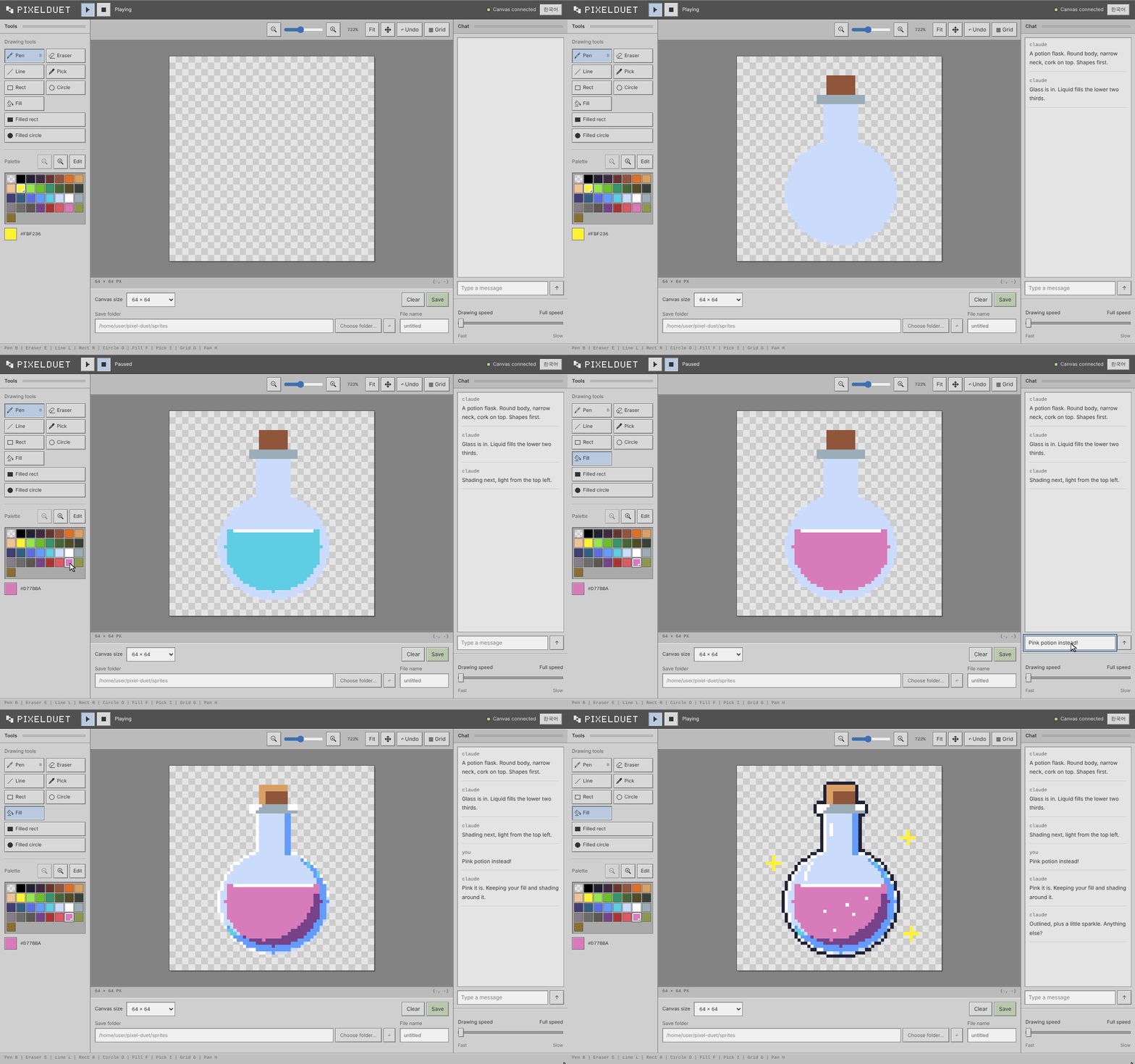
A pixel canvas shared by a model and a person. The model draws stroke by stroke while you watch in the browser. Pause it, take the brush, change things, leave a note, and hand the brush back. The reply to its next stroke tells it what you did.
Install
npx -y pixelduet version
or
go install github.com/kimjungminn24/pixel-duet@latest
or download a binary from the Releases page. Linux, macOS and Windows.
Quick start
npx -y pixelduet
starts the canvas server and the browser viewer and opens the viewer.
The browser is your side. Claude can't look at a web page, so it gets
its own way in: the bridge, an MCP server that hands it tools like
draw_line and read_pixels. Both reach the same canvas, and a stroke
from one side shows up on the other.
    you, in the browser             Claude Code
             |                           |
           HTTP                   MCP (pixelduet bridge)
             |                           |
             `-----> canvas server <-----'
Connect Claude Code once:
claude mcp add -s user pixelduet -- npx -y pixelduet bridge
-s user makes it available in every project. Without it the bridge
is only there in the folder you ran the command in.
If nothing is running when a session starts, the bridge starts the servers itself. Then ask Claude for a drawing:
Draw a frog on pixelduet.
Claude tells you the viewer's address if your browser is not open on it yet.
In a checkout of this repository, go run . replaces npx -y pixelduet
and Claude Code picks the bridge up from .mcp.json.
Other MCP clients
The bridge is an MCP server over stdio. Codex CLI:
codex mcp add pixelduet -- npx -y pixelduet bridge
or in ~/.codex/config.toml:
[mcp_servers.pixelduet]
command = "npx"
args = ["-y", "pixelduet", "bridge"]
On Windows use command = "cmd" and args = ["/c", "npx", "-y", "pixelduet", "bridge"].
Two things to check with a new client:
- The drawing rules are sent as the server's
instructions. If the client drops them,npx -y pixelduet rules >> AGENTS.mdrestores them. get_canvasreturns a PNG. A client that does not pass images through leaves the model withread_pixelsdigits only.
Without MCP, anything that can open a TCP socket can draw. The protocol is in internal/proto/proto.go.
The handoff
-
The model draws one stroke per call and narrates in the log.
-
You press pause. The model's next stroke is held.
-
You edit pixels, pick colors, leave a note. Your edits never wait.
-
You press resume. The held stroke lands and its reply says:
ok changed=1 waited=12s edits=5 box=9,8-13,10 note=make the eyes bigger -
The model reads the canvas, keeps your edits, and continues.
Talking
Type into the box under the log at any time.
- While the model is drawing, your words arrive on the reply to its next stroke.
- When it has nothing to draw, it calls
listen, which returns when you say something.
Notes queue up in order. The model answers in the same log with say.
The viewer
| Tools | pen B, eraser E, line L, rect R, circle O, filled rect U, filled circle P, fill F, pick I |
| Canvas | zoom slider, fit, pan H or Space+drag, pixel grid G, undo Ctrl+Z, size 32/64/128 |
| Palette | 32 DB32 slots; edit a slot and every pixel using it changes |
| Model | play/pause, a speed slider that adds up to 3s between strokes |
| Save | to the server's gallery folder, or to a folder you pick (Chrome, Edge) |
| Language | Korean or English, following the browser; a header button switches; ?lang=en forces one |
What the model gets
get_canvas: the canvas as a PNG, whole or a region, plus a count of pixels that differ from their mirror image.read_pixels: a region as digits, or as run-length rows when shorter.draw_pixels,draw_line,draw_rect,draw_ellipse,fill_area, each withmirrorto paint the reflection across the center line.shade,highlight,outline,dither: finishing passes on what is already painted.list_sprites,view_sprite,save_sprite,stamp: a gallery of saved grids insprites/.say,listen: the chat.- Drawing rules, sent on connect: plan proportions in numbers, silhouette first, check the picture after every step, one light source, ask before going on. See internal/bridge/rules.go.
Keeping it small
read_pixelscompresses with run-length encoding when that comes out shorter: a run of one color becomes4*16, and identical rows fold intoy3-9:. The 128x128 frog goes from 16,512 characters to 3,760, under a quarter.- Lines, rectangles and ellipses take two corners or a center and two radii. A filled circle can cover hundreds of pixels and the model still sends four numbers.
How it fits together
pixelduet serve            owns the canvas
  |- pixelduet web         browser <-> HTTP/SSE <-> line protocol
  `- pixelduet bridge      MCP client <-> tools <-> line protocol
pixelduet alone runs serve and web in one process. The bridge does
the same when no server answers.
The canvas is a grid of palette indices, one character per pixel
(0 empty, 1-w colors), the same on the wire, in save files, and
in what the model reads. The viewer is HTML, CSS and ES modules under
internal/web/static/, embedded in the binary.
Tests
go test ./...
node --test test/*.test.mjs
See CONTRIBUTING.md.
License
MIT. See LICENSE.