GasBuddy MCP Price Tracker
MCP server to get the cheapest gas prices in a particular city or zip code from gasbuddy.com
Documentation
GasBuddy MCP Price Tracker

The GasBuddy MCP Price Tracker is a Model Context Protocol (MCP) server that scrapes real-time gas prices on gasbuddy.com using Playwright. It finds the cheapest fuel in any US city or zip code.
[!NOTE] This project is for educational purposes only. GasBuddy reserves the right to modify their website structure at any time, which may break this script. The author provides no guarantee of functionality and is not liable for issues arising from its use. Community contributions and fixes are highly encouraged.
Requirements
- Python 3.10+
- Playwright
- Playwright-Stealth
- FastMCP
Installation & Setup
-
Clone the repository and navigate to the project directory.
-
Create and activate a virtual environment.
macOS/Linux
python3 -m venv venv
source venv/bin/activate
Windows
python -m venv venv .\venv\Scripts\activate -
Install dependencies:
pip install -r requirements.txt -
Install browser binaries:
playwright install chromium -
Test the standalone tool (CLI):
python gas_tool.py
Setup in Claude Desktop
To allow Claude Desktop to interact with the MCP server to get the cheapest gas prices, you will need to update your claude_desktop_config.json file and replace {absolute_path_to} with the absolute path to the cloned repository folder.
{
  "mcpServers": {
    "gas-buddy": {
      "command": "/{absolute_path_to}/venv/bin/python",
      "args": ["/{absolute_path_to}/gas_server.py"]
    }
  }
}
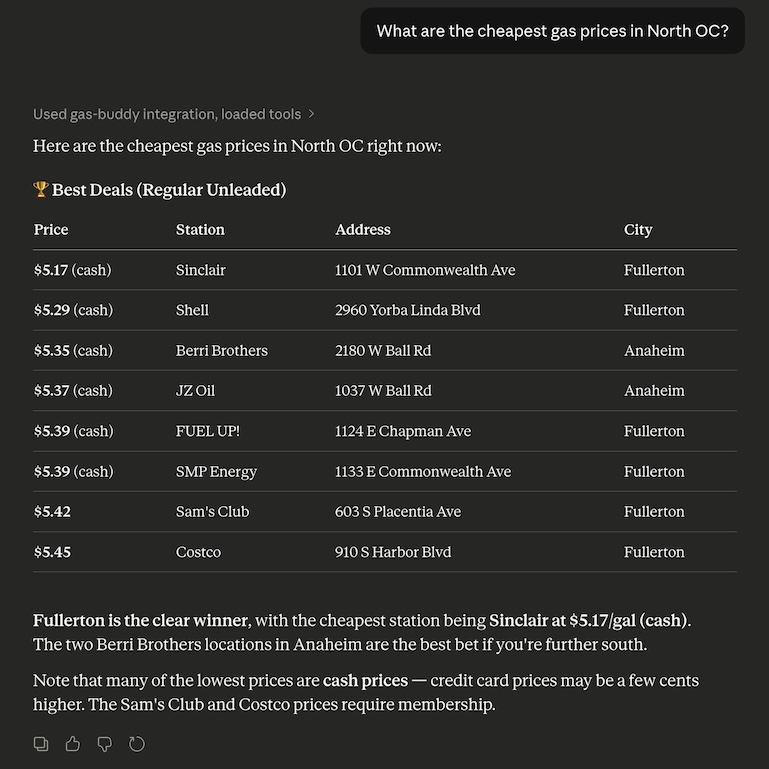
Example in Claude
License
This application is distributed under the MIT License.