OPC UA MCP Server
Connect AI assistants to OPC UA equipment and historians. Browse nodes, read live data and history, and monitor subscriptions, events and alarms. Runs locally over stdio and is read-only by default.
Documentation
🏭 OPC UA MCP Server
Let Claude, Codex, Gemini and any other MCP agent read sensors, browse the plant and — only when you allow it — control equipment on any OPC UA server.






▶ Try it without hardware — a simulated plant ships in this repository
Quick start · Connect your agent · Tools · Production · Docs · Contributing
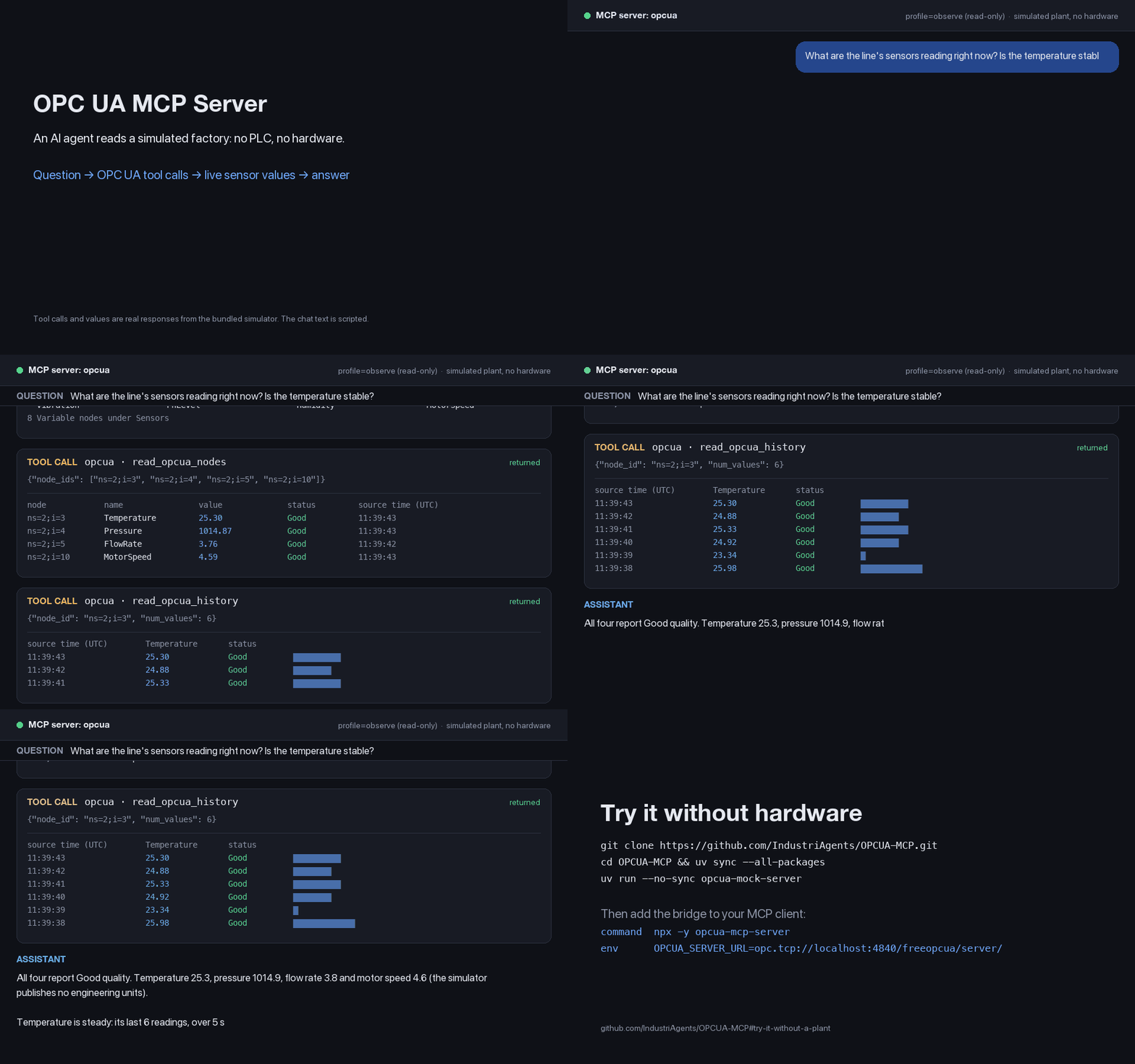
Every tool call and value above is a real response from the bundled simulator,
recorded through the Python bridge under the read-only observe profile; the
question and answer text are scripted. Rebuild it with
scripts/readme_demo.py.
This project is a bridge between an AI agent and an OPC UA server. OPC UA is the protocol used to expose industrial equipment and its data; MCP (Model Context Protocol) lets an agent call tools to work with that data. The bridge runs on your computer and connects to an existing OPC UA server, or to a local simulator for a first test.
Your MCP client starts the bridge as a local stdio process: it exchanges MCP messages over standard input and output. One process connects one client context to one OPC UA endpoint. Use a separate process for each endpoint. Remote MCP and shared multi-client operation are gated by the identity and isolation RFC.
Features
- 🔌 Any OPC UA server — PLC, SCADA gateway or historian. Nothing to install on the plant side.
- 🧰 The whole operator toolkit — read, browse, history and aggregates, subscriptions, events and alarms, writes and method calls.
- 🛡️ Read-only by default — writes and method calls need an explicit control profile and an authenticated server (pinned certificate or CA trust store). The
operatorprofile also requires allowlisted targets, and every control call is audited. - 🐍 Python or Node — two first-class runtimes with the same tool contract. Use whichever you have, accounting for the documented runtime differences.
- 📦 One-file Claude Desktop install — a
.mcpbbundle with nothing else to set up.
flowchart LR
    A["AI agent<br/>(Claude, Codex, Gemini, Cursor…)"] -->|MCP over stdio| B["OPC UA MCP Server<br/>(Python or Node)"]
    B -->|OPC UA| C["OPC UA server<br/>(PLC / SCADA / historian)"]
Quick start
Follow these steps in order: choose an installation, start or identify an OPC UA server, configure your MCP client, then check the connection. You need an MCP client such as one of the agents listed below.
1. Choose an installation
Choose one runtime; you do not need both. The package routes fetch the server on demand, so you do not need to clone this repository to use an existing OPC UA server.
| Route | Prerequisites | Command your MCP client launches |
|---|---|---|
| Node package | Node.js 22.13+, including npm and npx | npx -y opcua-mcp-server |
| Python package | Python 3.10+ and uv (which supplies uvx) | uvx opcua-mcp-server |
| Claude Desktop bundle | Claude Desktop; no separate Node or Python installation | Install the .mcpb file as described below |
| Single-file executable | Download for your platform; no Node or Python installation | Use its absolute path as the client command; see installation instructions |
For a package route, check that it can run from your terminal. Run the command for your chosen runtime:
# Node
npx -y opcua-mcp-server --version

# Or Python
uvx opcua-mcp-server --version
These commands print a version and exit. In normal use, your MCP client launches
the server without --version; you do not also start the bridge in a separate
terminal. A bridge started by itself waits for MCP messages, rather than showing
an interactive prompt or a web page.
2. Choose an OPC UA endpoint
For an existing server, get its endpoint URL, including any path, from its
administrator (for example opc.tcp://192.168.0.10:4840). The bridge reads it from
OPCUA_SERVER_URL, which you set in your MCP client's configuration in step 3.
If unset, the default is opc.tcp://localhost:4840.
The default profile is observe (read-only), and the default OPC UA connection is
unencrypted and anonymous. Use those defaults for the local mock. For real
equipment, prepare the security configuration before
connecting.
Try it without a plant
If you do not have an OPC UA server, start the bundled simulated plant. This optional route needs Git, Python 3.10+ and uv, even if you chose the Node bridge. Run these commands in a terminal:
git clone https://github.com/IndustriAgents/OPCUA-MCP.git
cd OPCUA-MCP
uv sync --all-packages
uv run --no-sync opcua-mock-server
Wait for Server is running and ready for connections, then leave this terminal
running. The mock listens on port 4840; use
opc.tcp://localhost:4840/freeopcua/server/ as your endpoint. Stop it with
Ctrl-C when finished. If the port is busy, choose another port with
uv run --no-sync opcua-mock-server --endpoint opc.tcp://127.0.0.1:14840/freeopcua/server/
and use that URL in your client configuration.
The plant supports browsing, sensor reads, data-change subscriptions, raw value history, plain events and event history. It also has writable actuators and methods, subject to the bridge's control policy. It does not implement processed aggregates or Alarms & Conditions: its plain alarm events cannot be listed as retained conditions, acknowledged or acted on with alarm-action tools. Use the separate mocks for those operations:
| Mock | Endpoint | Coverage |
|---|---|---|
| Plant | opc.tcp://localhost:4840/freeopcua/server/ | Sensors, actuators, methods, raw history, subscriptions and plain events |
| Aggregates | opc.tcp://localhost:4841/UA/Aggregate | Processed history, such as average buckets |
| Alarms | opc.tcp://localhost:4842/UA/Alarms | Active conditions and acknowledgement |
The separate mocks need Node and npm; their READMEs give installation and startup commands. The MCP Inspector walkthrough has more examples, and the compatibility matrix records tested coverage.
Connect your agent
3. Configure the client and launch the bridge
Pick one client below. The examples use the local plant endpoint from step 2;
replace opc.tcp://localhost:4840/freeopcua/server/ with your endpoint if needed.
For a secure connection, add the settings from Going to production
to the same env block (or the bundle's settings fields).
To use Python in a JSON configuration, set "command": "uvx" and
"args": ["opcua-mcp-server"]. In a CLI registration command, replace
npx -y opcua-mcp-server with uvx opcua-mcp-server. In TOML, use
command = "uvx" and args = ["opcua-mcp-server"].
Claude Desktop
Easiest — the bundle. Download opcua-mcp-server-<version>.mcpb from the
latest release,
drag it into Settings → Extensions, and fill in OPC UA endpoint. No
Node, no Python, no JSON.
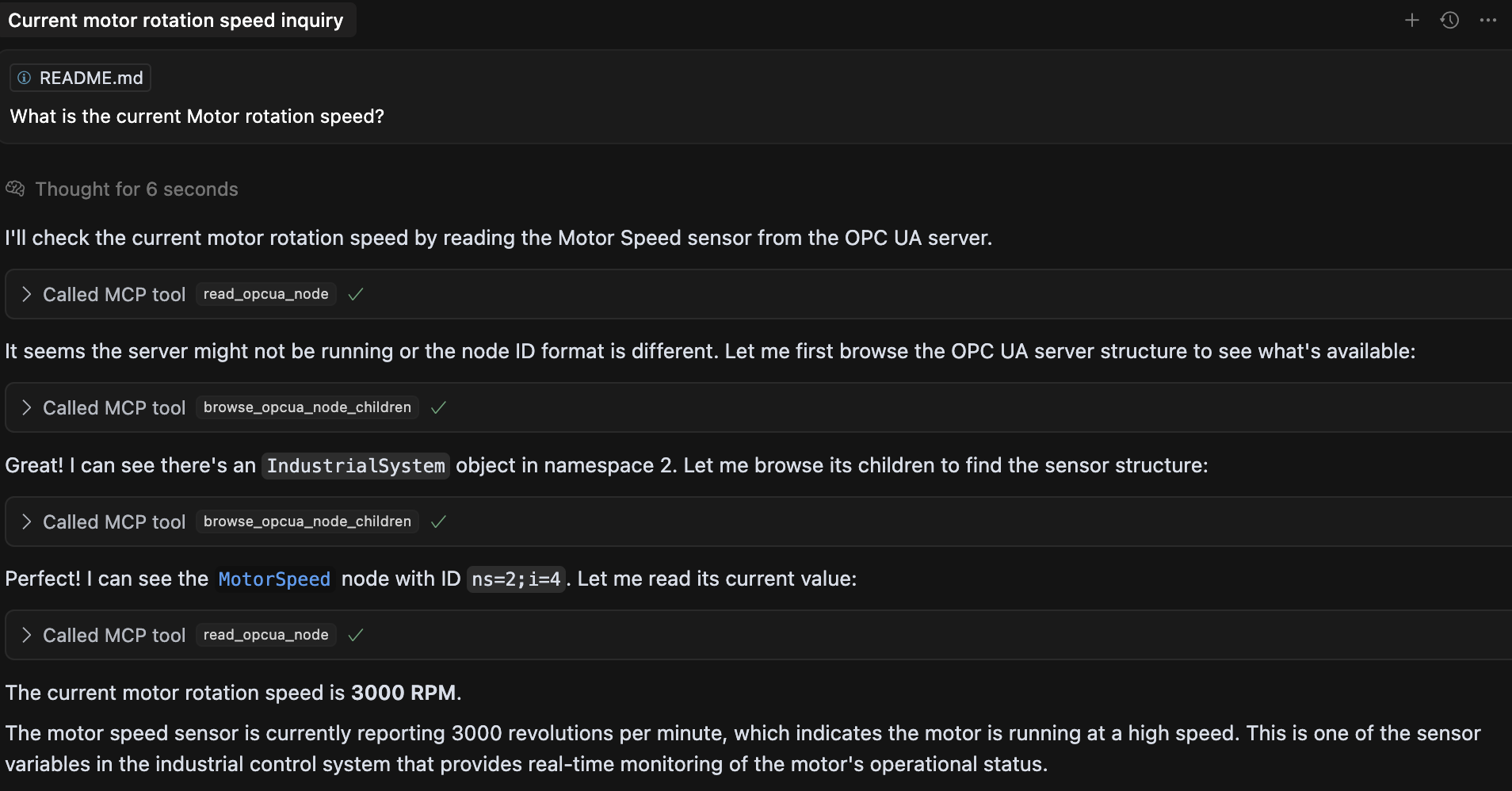
Or let the server write the config (needs Node or Python):
npm install -g opcua-mcp-server      # or: uv tool install opcua-mcp-server
opcua-mcp-server --install claude-desktop --url opc.tcp://localhost:4840/freeopcua/server/ --dry-run
It checks the config with the server's own startup validation and writes absolute
paths, because Claude Desktop does not inherit your shell's PATH. The profile
defaults to read-only; encryption, a pinned server certificate, a control profile,
a policy file and an audit file are all flags, and passwords are never taken as
flags. Check the preview, then repeat the command without --dry-run to write
the configuration and restart Claude Desktop. Every flag and safety rule, editing
claude_desktop_config.json by hand, and fixing a server that fails to start:
docs/install.md.
Claude Code
claude mcp add opcua -e OPCUA_SERVER_URL=opc.tcp://localhost:4840/freeopcua/server/ -- npx -y opcua-mcp-server
Add --scope project to share it with your team through .mcp.json.
OpenAI Codex
codex mcp add opcua --env OPCUA_SERVER_URL=opc.tcp://localhost:4840/freeopcua/server/ -- npx -y opcua-mcp-server
Or add it to ~/.codex/config.toml:
[mcp_servers.opcua]
command = "npx"
args = ["-y", "opcua-mcp-server"]
env = { OPCUA_SERVER_URL = "opc.tcp://localhost:4840/freeopcua/server/" }
Or let the server write that entry, with the same checks as for Claude Desktop:
opcua-mcp-server --install codex --url opc.tcp://localhost:4840/freeopcua/server/ --dry-run.
This installer command requires a permanent package installation first:
npm install -g opcua-mcp-server or uv tool install opcua-mcp-server.
Check the preview and repeat without --dry-run to write it.
Gemini CLI
Add to ~/.gemini/settings.json, or .gemini/settings.json in a project:
{
  "mcpServers": {
    "opcua": {
      "command": "npx",
      "args": ["-y", "opcua-mcp-server"],
      "env": { "OPCUA_SERVER_URL": "opc.tcp://localhost:4840/freeopcua/server/" }
    }
  }
}
Google Antigravity
In the agent panel, open ⋯ → MCP Servers → Manage MCP Servers → View raw
config, add the entry below to mcp_config.json, and restart Antigravity:
{
  "mcpServers": {
    "opcua": {
      "command": "npx",
      "args": ["-y", "opcua-mcp-server"],
      "env": { "OPCUA_SERVER_URL": "opc.tcp://localhost:4840/freeopcua/server/" }
    }
  }
}
Cursor
Add to ~/.cursor/mcp.json, or .cursor/mcp.json in a project:
{
  "mcpServers": {
    "opcua": {
      "command": "npx",
      "args": ["-y", "opcua-mcp-server"],
      "env": { "OPCUA_SERVER_URL": "opc.tcp://localhost:4840/freeopcua/server/" }
    }
  }
}
VS Code (GitHub Copilot)
Add to .vscode/mcp.json — note the top-level key is servers:
{
  "servers": {
    "opcua": {
      "type": "stdio",
      "command": "npx",
      "args": ["-y", "opcua-mcp-server"],
      "env": { "OPCUA_SERVER_URL": "opc.tcp://localhost:4840/freeopcua/server/" }
    }
  }
}
Windsurf
Add to ~/.codeium/windsurf/mcp_config.json:
{
  "mcpServers": {
    "opcua": {
      "command": "npx",
      "args": ["-y", "opcua-mcp-server"],
      "env": { "OPCUA_SERVER_URL": "opc.tcp://localhost:4840/freeopcua/server/" }
    }
  }
}
Any other MCP client
Most clients accept this mcpServers entry. The server speaks MCP over stdio.
{
  "mcpServers": {
    "opcua": {
      "command": "npx",
      "args": ["-y", "opcua-mcp-server"],
      "env": { "OPCUA_SERVER_URL": "opc.tcp://localhost:4840/freeopcua/server/" }
    }
  }
}
[!TIP] No Node or Python on the machine? Download a single-file executable from the latest release and use its path as the
command— see docs/install.md. Several PLCs? Each entry talks to one endpoint, so add one entry per PLC (why).
4. Check the connection
Restart your desktop client or start a new CLI client session after configuring
it, then enable or approve the opcua server if your client asks. The client
starts the bridge automatically.
Ask: "Use get_server_status to check the OPC UA connection." A working
connection reports connected: true. Then ask: "Browse the OPC UA variables
and read the current temperature." Against the plant mock, this works with the
default read-only profile.
If it fails, check that the OPC UA server is still running and that
OPCUA_SERVER_URL matches its endpoint. If the bridge cannot launch, check its
logs and the client command's path; desktop clients may need absolute paths.
The installation guide explains
client command paths, and testing troubleshooting
covers startup, connection and tool errors.
What you can ask
- "Show me all the variables in the system."
- "What was the temperature over the last hour? Give me the hourly average."
- "Watch the tank level and tell me what it does over the next minute."
- "What alarms are active right now?"
- "Set the valve position to 80%." — needs the
operatorprofile - "Start production on line 1 at 100 units/hour." — needs the
operatorprofile
These prompts depend on the connected server's nodes and capabilities. Server-computed
averages need processed aggregate support, and active alarms need Alarms &
Conditions; see the mock coverage above. Writes and
method calls also need allowlisted targets and the security settings
below, in addition to the operator profile.
Every reading comes back with its data type, status, timestamps and engineering units — never a bare number. What a result looks like.
Tools
15 tools, identical on both runtimes and defined once in contract/tools.json. Arguments, results and limits: docs/tools.md.
| Access | Offered under | Tools |
|---|---|---|
| read | every profile, including the default observe | read_opcua_nodes · browse_opcua_nodes · read_opcua_history † · read_event_history † · get_server_status · list_subscriptions · list_active_alarms |
| monitor | every profile, including the default observe | subscribe_opcua_nodes · unsubscribe_opcua_nodes · subscribe_events · read_events |
| alarm-action | operator with OPCUA_ALLOW_ACKNOWLEDGE_ALARMS, or full | acknowledge_alarm · act_on_alarm |
| control | operator, for allowlisted targets only, or full | write_opcua_nodes · call_opcua_method |
Control and alarm tools also need a verified server (a secured channel and a pinned OPCUA_SERVER_CERT or an OPCUA_SERVER_TRUST_STORE) unless a lab override is set. † Works only on a server that advertises the feature it needs, such as historical access.
Going to production
[!WARNING] Out of the box the agent can only read, but the OPC UA channel is unencrypted and anonymous — fine for the mock or a lab, not for real equipment. Secure the channel before connecting to anything that matters.
1. Secure the channel and pin the server — add these settings to your MCP
client's env block, using paths to your actual certificate files. The following
blocks show environment names and values; in JSON, enter them as quoted key/value
pairs. Generate certificates and arrange trust with the OPC UA administrator as
described in docs/certificates.md.
OPCUA_SECURITY_POLICY=Basic256Sha256     # implies SignAndEncrypt
OPCUA_CLIENT_CERT=/etc/opcua/client.pem  # this client's identity
OPCUA_CLIENT_KEY=/etc/opcua/client_key.pem
OPCUA_SERVER_CERT=/etc/opcua/server.pem  # pin the server you meant to reach
Choose one user authentication method alongside those channel settings. For username/password authentication, provide both:
OPCUA_USERNAME=mcp-operator
OPCUA_PASSWORD=<your-password>
Supply the real password through your client's secret storage or environment; the installer never accepts a password flag. See password handling for client-specific setup.
Alternatively, for X.509 user authentication, leave OPCUA_USERNAME and
OPCUA_PASSWORD unset and provide both of these instead:
OPCUA_USER_CERT=/etc/opcua/user.pem
OPCUA_USER_KEY=/etc/opcua/user_key.pem
The user certificate and key identify the user; they are separate from
OPCUA_CLIENT_CERT and OPCUA_CLIENT_KEY, which secure the channel. Keep the
channel settings in either case: X.509 user authentication requires a security
policy other than None.
Instead of pinning with OPCUA_SERVER_CERT, you can use
OPCUA_SERVER_TRUST_STORE together with OPCUA_SERVER_APPLICATION_URI for CA
trust-store verification; see the certificate guide.
2. Decide what the agent may do with OPCUA_PROFILE:
| Profile | What the agent can do |
|---|---|
observe (default) | Read, browse, history, subscriptions, events. No writes, no method calls. |
operator | The above, plus only the nodes and methods you allowlist in OPCUA_ALLOWED_WRITE_NODES / OPCUA_ALLOWED_METHODS. |
full | Every tool. Only for a tightly scoped OPC UA account. |
3. Keep a record — set OPCUA_AUDIT_FILE for an append-only log of every
control call.
Misconfiguration stops the server at startup with a message naming the variable, rather than failing later against live equipment. The MCP policy is defence in depth, not a replacement for OPC UA authorisation: scope the OPC UA account to the same nodes and methods.
Every setting, value bounds on writes and allowlists that survive a server restart: docs/configuration.md. Threat model: SECURITY.md. Certificates: docs/certificates.md.
Documentation
| Guide | What's inside |
|---|---|
| Install | The .mcpb bundle, single-file executables, choosing a runtime, troubleshooting |
| Configuration | Every setting, profiles, allowlists, value bounds, secure connections, reconnection |
| Tools | Full tool reference, result shapes, request limits, partial results |
| Examples | Every tool with real calls and responses against the mock plant |
| Security | What is and is not verified, the audit trail, reporting a vulnerability |
| Certificates | Generating a client certificate a server will accept |
| Compatibility | Servers tested, and where the Python and Node runtimes differ |
| Architecture | How it fits together, and why |
| Testing | The test suite, MCP Inspector and agent walkthroughs |
| Roadmap · Changelog | What is next, and what has landed |
Contributing
Contributions are welcome — see CONTRIBUTING.md for the project layout, local development and adding a tool to both runtimes.
New here? The good first issues are small and scoped to one pull request: a setup guide for another MCP client, or a sample application built on the simulated plant. None needs OPC UA hardware.
The most useful thing you can send is a result from a real OPC UA server: open a compatibility report saying which server, which version and which tools worked. Test only on equipment you are authorised to use, and keep writes and method calls to a simulator or lab.
License
MIT — see LICENSE.
Tool inputs and structured results use JSON Schema draft 2020-12 with generated TypeScript/Python types and CI drift checks. See contract generation for the authoring workflow.