Garmin Personal MCP
MCP server for the official Garmin Connect Personal API.
Documentation
 garmin-personal-mcp
Ask Claude, Codex or another AI assistant about your Garmin training, and get a training dashboard, also inside the chat. Official Personal API, read-only, nothing to install.
🌐 Website · 👉 Try the live demo







Quick start · What you can ask · Tools · Dashboard · Dashboard in the chat · Guide
An MCP server: a small program that your AI app starts on your computer, so that the assistant can read your Garmin data. Activities, laps, strength sets, sleep, HRV and more. Ask questions in your own words, or get a training dashboard: as a page file, or inside the chat in Claude Desktop.
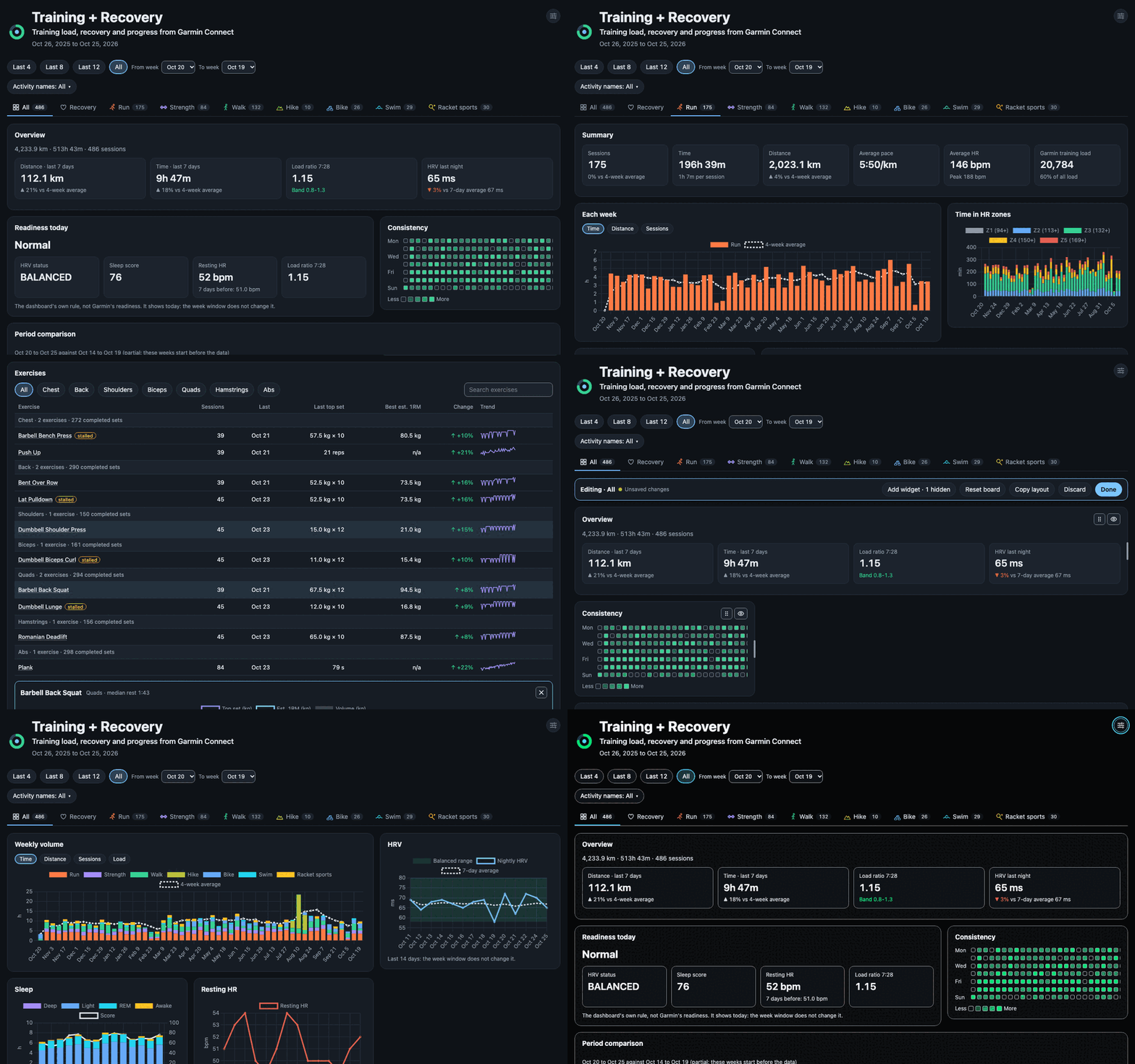
One thing you can build: the training dashboard, with demo data.
What you can ask
Ask your assistant anything about your Garmin data, in your own words and in any language. The assistant chooses the tools and can combine their data. Some examples:
- Activities: "List my last 5 activities, with pace and heart rate."
- Activities: "How much time did I spend in each HR zone on my runs this month?"
- Activities: "How did my sessions named Tempo 5k and Long run change over the last 2 months?"
- Laps: "Show the laps of my last run."
- Strength: "Compare my sets of this week with the week before."
- Strength: "Which muscles did I train most this week?"
- Strength: "What was my heaviest squat set this month, and what 1RM does it suggest?"
- Strength: "Which of my lifts have stalled over the last 6 weeks?"
- Strength: "How long did I rest between sets in my last strength session?"
- Strength: "How much weight did I lift in total in each strength session this month?"
- Workouts: "Did I do the reps and rests my workout planned?"
- Recovery: "How did I sleep this week, and how was my HRV?"
- Recovery: "Show my steps, stress and Body Battery for the last 7 days."
- Recovery: "Did my Body Battery recover overnight this week, and which days drained it most?"
- Body: "How has my weight changed over the last 3 months?"
- All together: "My run on Saturday felt hard. Compare it with my sleep and HRV of the nights before."
Features
- Official and read-only: uses the Garmin Connect Personal API, writes nothing back, and runs
with
npx. - All of your data: laps and strength sets from the original .FIT files, with the muscles of
each set; HRV, sleep, heart rate, stress and Body Battery;
garminGetfor the other endpoints. - All stdio clients: Claude Desktop, Claude Code, Codex and the other MCP clients that use stdio. Tested with Claude Desktop and Claude Code.
- A dashboard in less than a minute: your training load next to recovery, for you or for your coach, with your own widgets and languages. See Dashboard.
- The dashboard in the chat: in Claude Desktop, ask "show my training dashboard" and the page opens in the reply, with new data. See Dashboard in the chat.
- Coach prompts: a review of one run or one strength session against its planned workout, and a readiness check before a race. See Coach prompts.
Quick start
You need Node.js 22 or later (node --version shows the version) and a Garmin Connect account
with access to the Personal API.
1. Create a personal API key
- Open Garmin Connect web at https://connect.garmin.com/app/settings/personalApiToken.
- Select Create Key, accept the terms, select the expiry (1 year at most) and select Create.
- Garmin shows the key only one time. Save it in a file that only you can read:
mkdir -p ~/.config/garmin-mcp
nano ~/.config/garmin-mcp/api-key      # paste the key and save
chmod 600 ~/.config/garmin-mcp/api-key
You can also give the key in the environment variable GARMIN_PERSONAL_API_KEY.
2. Connect your client
Claude Desktop: select Settings → Developer → Edit Config. Add a top-level mcpServers key
next to the keys that the file has, not in preferences:
{
  "mcpServers": {
    "garmin-personal": {
      "command": "npx",
      "args": ["-y", "@indaco/garmin-personal-mcp@latest"]
    }
  }
}
Then quit Claude Desktop fully, including the tray icon, and start it again.
Claude Code: this command adds the server to all your projects:
claude mcp add garmin-personal --scope user -- npx -y @indaco/garmin-personal-mcp@latest
claude mcp list          # garmin-personal: ... ✔ Connected
Use --scope project to write a .mcp.json file that you can share in the current repository.
Codex: this command adds the server:
codex mcp add garmin-personal -- npx -y @indaco/garmin-personal-mcp@latest
You can also add it to ~/.codex/config.toml. The first npx download can take longer than the
default start time, so set a longer one:
[mcp_servers.garmin-personal]
command = "npx"
args = ["-y", "@indaco/garmin-personal-mcp@latest"]
startup_timeout_sec = 60
Codex does not send your shell environment to the server. Use the key file, or add
env = { GARMIN_PERSONAL_API_KEY = "..." } to the table.
Other clients (Gemini CLI, VS Code, Cursor and others): in the MCP configuration of the client,
set the command npx and the arguments -y @indaco/garmin-personal-mcp@latest. Some clients do not
show MCP prompts. In these clients, ask for the dashboard in your own words. The tools are the same.
3. Ask your assistant
Ask "list my last 5 activities". The first time that a garmin-personal tool asks for permission, answer
Allow always in Claude Desktop. In Claude Code, use /permissions and add mcp__garmin-personal.
Tools
| Tool | What it gives |
|---|---|
listActivities | each activity with pace, HR, load and effect, by date, type or name |
getActivity | the details of one activity |
getActivityLaps | the laps of an activity, from its .FIT file |
getActivitySets | the strength sets of an activity, with the muscles, from its .FIT file |
getActivityWorkouts | the planned workout of an activity: steps, targets and notes |
downloadActivityFit | saves the .FIT file of an activity in the data folder |
getHrvRange | HRV during the night |
getDailyHeartRate | the heart rate of a day, with the resting HR |
getSleep | the sleep of a night, or of up to 14 nights: hours, phases, score and need |
getWeight | weight and body composition for a range of dates |
getBodyBattery | how Body Battery charged and drained, for up to 14 days |
getHeartRateZones | your HR zones |
getFitnessAge | fitness age against actual age |
getDailySummary | steps, stress and Body Battery, for a day or a range |
getDashboardData | all the dashboard data in one call, with the server's totals and a local cache |
writeDashboard | writes the dashboard page |
editDashboard | changes the layout, the custom widgets and the languages of the page |
showDashboard | shows the dashboard inside the chat, in Claude Desktop |
scheduleDashboardRefresh | updates a dashboard page automatically, at the times you say in your own words |
garminGet | all other GET endpoints of the Personal API |
Tools gives the endpoints, the details of each tool and the data that the Personal API does not have.
Dashboard
The server makes a training dashboard with these prompts. In Claude Desktop, the prompts are in
the + menu of the message box, under garmin-personal. In Claude Code, they are slash commands:
use the full name, /mcp__garmin-personal__<prompt>. The short form /garmin-personal:<prompt> can
reach the assistant as the command name only, without the prompt.
| Prompt | What it does | Claude Code example |
|---|---|---|
| training-dashboard | makes the page | /mcp__garmin-personal__training-dashboard 8 |
| training-dashboard-update | adds the new data, your layout stays | /mcp__garmin-personal__training-dashboard-update |
| dashboard-setup | makes a page for you or for your coach, with only the sports and the data that you select | /mcp__garmin-personal__dashboard-setup |
| dashboard-widget | makes a new widget from your idea | /mcp__garmin-personal__dashboard-widget my longest ride |
| dashboard-language | adds a language to the page | /mcp__garmin-personal__dashboard-language German |
The prompts remove all spaces around an argument, also the no-break space from a phone keyboard.
training-dashboard
The server writes the dashboard page from its template, and the assistant writes the coach notes.
The page is one HTML file, garmin-dashboard.html in the data folder. It works offline.
| Argument | Values | Default |
|---|---|---|
weeks | 1 to 52 (a larger value gives 52) | 12 |
layout | preset, blank or freeform | preset |
presetgives the built-in widgets on each board.blankgives empty boards: you add the widgets that you want.freeformlets the assistant design the whole page. This takes much longer, and each page looks different.
In Claude Code, the arguments are in order and separated by spaces: first weeks, then layout.
You can also give only the layout: /mcp__garmin-personal__training-dashboard freeform.
The assistant gives you the path of the page and the command to open it. The page has a board for all your training, a Recovery board and a board for each sport. A missing value shows as "n/a".
When your runs repeat a name, for example the "Tempo Run" of a training plan, the assistant asks whether to compare those workouts across weeks. The default is no. A yes adds the Workout trend widget. The server downloads the laps of the last 8 runs of each workout once and keeps them, so the comparison grows with each update. See Page settings.
The dashboard guide tells about the title and the headline, the boards, the themes and languages, the units and the activity-name filter, and how to change the layout. The widget catalogue lists every widget.
training-dashboard-update
This prompt replaces the data and the coach notes of the page. Your layout, your custom widgets and your languages stay. Reload the page to see the new data.
| Argument | Values | Default |
|---|---|---|
weeks | the weeks to cover | the weeks of the page |
path | the dashboard file, for example garmin-dashboard-coach.html (.html) | garmin-dashboard.html |
In Claude Code: /mcp__garmin-personal__training-dashboard-update coach.html updates coach.html. A
value that ends in .html is the file, also in the first place.
To update the page automatically, tell your assistant when, in your own words, for example "update my dashboard every Monday at 7". See Update the dashboard on a schedule.
dashboard-setup
The assistant asks you some questions, then writes a page with your answers. First, it asks who the page is for:
- Personal: a page for you, with all your data.
- Shared: a page for your coach or personal trainer. You select each type of data to include, for example HR zones yes, fitness age and sleep no.
Then the assistant asks for the file (any name or path), the title, the headline, the sports, the
languages and the themes, and whether to compare the workouts that your runs repeat. The server writes only the data that you select into the file. Other data
is not in the file, so you can send the file safely. A personal page and a shared page can be two
files side by side. Each page keeps its settings on each update. The argument weeks is optional
(default 12).
Page settings tells more.
dashboard-widget
This prompt makes a new widget from your idea, for example "my longest ride of each month". The
assistant writes a small widget, and editDashboard stores it in the page and in your widget
library (widgets.json in the data folder). The widget stays after each update, and each new page
gets it too. The argument idea is required. The argument path is optional: it is the file of the
page, for example coach.html. In Claude Code:
/mcp__garmin-personal__dashboard-widget my longest ride each month coach.html. Reload the page to see
the widget.
Custom widgets tells more.
dashboard-language
This prompt adds a language to the dashboard. The assistant translates the texts of the page, and
editDashboard stores them in the page. The argument language is optional: the default is the
language of the conversation. The argument path is optional: it is the file of the page, for
example coach.html. In Claude Code: /mcp__garmin-personal__dashboard-language German coach.html. A
text without a translation shows in English. To remove an added language, ask your assistant to
remove it: editDashboard with removeLanguages.
Languages tells more.
Presets or freeform
In many setup guides for Claude and Garmin, Claude reads the data and writes the whole dashboard page. With a preset, the server writes the page from a tested template, and Claude writes only the coach notes. My measurements for a first build, with Claude Code and Opus (other clients and models give other times and costs):
| First build | Time | Cost |
|---|---|---|
| Preset | 34 s | $0.16 |
| Claude writes the page | 24 to 35 min | $6.6 to $9.2 |
For a design of your own, use layout = freeform: Claude writes the page, as in those guides.
Presets or freeform gives the measurements and the limits of the presets.
Dashboard in the chat
In Claude Desktop, the dashboard can open inside the chat, with its boards, charts and themes. You do not open a file or a browser. There is no prompt to run: ask in your own words, for example:
- "Show my training dashboard in the chat."
- "Show my dashboard in the chat for the last 26 weeks."
- "Show garmin-dashboard-coach.html in the chat."
The assistant calls showDashboard. The tool reads new data from Garmin and shows your saved page,
with its layout, custom widgets, languages and settings. It writes no file, and the page has no
coach notes.
| Client | What you get |
|---|---|
| Claude Desktop | the page in the chat (tested) |
| Claude Code, the Codex CLI and other terminal clients | a short text reply. Run training-dashboard to write the page as a file |
| Codex in the ChatGPT desktop app | not tested yet |
| The ChatGPT chat, Claude on the web | not available: they connect only to servers on the internet |
The page in the chat is an MCP App. Other clients that show MCP Apps can also work, but they are not tested. Show the dashboard in the chat gives the limits.
Coach prompts
These prompts answer in the chat. They do not change a dashboard.
| Prompt | What it does | Claude Code example |
|---|---|---|
| run-review | reviews one run as a coach | /mcp__garmin-personal__run-review |
| race-readiness | tells if you are ready for a race, with a plan for its pace | /mcp__garmin-personal__race-readiness 2026-11-15 half 1:45:00 |
| strength-review | reviews one strength session as a coach | /mcp__garmin-personal__strength-review |
A missing value shows as "n/a": the assistant does not estimate it.
run-review
The assistant compares the steps of the planned workout with the laps of the run: the target, what the lap did, and hit or miss. For intervals, it gives the fade from the first rep to the last. For a steady run, it gives the HR drift: the drop in distance per heartbeat from the first half to the second half. It ends with the sleep and HRV of the night after the run, and a short coach note.
| Argument | Values | Default |
|---|---|---|
activity | an activity id, or words of the activity name (Long Run) | the last run |
race-readiness
The assistant reads the server's summary of 12 weeks (a writeDashboard preview, which writes
nothing) and the laps of your long runs. It gives the days to the race, the weekly run distance and
load, the long runs with their pace split and HR drift, and whether your load drops in the last 2
weeks (the taper). It predicts your race time from your best efforts of 5 km or more (Riegel, an
estimate: the fastest prediction counts), compares it with your goal, and checks the HRV and sleep of
the last 7 nights. It ends with a target pace for each quarter of the race.
| Argument | Values | Default |
|---|---|---|
date | the race date, yyyy-MM-dd | none: the assistant asks |
distance | 5k, 10k, half, marathon, or a distance | none: the assistant asks |
goal | your goal time, for example 1:45:00 | no goal: prediction only |
In Claude Code, give the values in any order: a value in the form yyyy-MM-dd is the date, a value
in the form 1:45:00 is the goal, and the other words are the distance. For example
/mcp__garmin-personal__race-readiness half marathon 2026-11-15.
strength-review
The assistant compares the planned workout with the sets you did: the planned sets and reps of each exercise, what you did, and hit or miss. Garmin plans no weights, so the plan shows none. For each exercise it gives the top set and its estimated 1RM against the previous session of the same name, and the rep drop from the first set to the last at the same weight. It compares your rest with the planned rest, and ends with the sleep and HRV of the night after the session, and a short coach note.
| Argument | Values | Default |
|---|---|---|
activity | an activity id, or words of the activity name (Upper Body) | the last strength session |
Configuration
All the settings are environment variables, and all of them are optional.
| Variable | Default | Meaning |
|---|---|---|
GARMIN_PERSONAL_API_KEY | not set | the personal API key. It has priority over the key file. |
GARMIN_API_KEY_FILE | ~/.config/garmin-mcp/api-key | the file with the API key |
GARMIN_DATA_DIR | ~/workspace/garmin-data | the data folder |
GARMIN_BASE_URL | https://personal.connectapi.garmin.com | the Personal API host |
To set a variable in Claude Desktop, add an env object next to args:
"env": { "GARMIN_DATA_DIR": "/absolute/path/to/garmin-data" }
In Claude Code, add --env GARMIN_DATA_DIR=/path/to/garmin-data to claude mcp add.
The data folder lists the files that the server keeps and its log.
Security
The server is read-only. It sends the API key only to the Garmin token endpoint, and it never logs
or returns the key or the access token. It refuses a key that has spaces or line breaks in it, and
it removes the key and the token from network error messages. If you saw your API key in a chat,
revoke the key on the API key page and
create a new one. No tool result has your Garmin user id, name or profile image, or the ids of
your devices and daily records, also with raw and garminGet. Your .FIT files can have your GPS
track, so keep the data folder private.
SECURITY.md tells how the server protects your data and how to report a vulnerability. Do not open a public issue for a vulnerability.
The Personal API is for personal use that is not commercial, under the terms of Garmin. Garmin does not endorse this project, and the project has no affiliation with Garmin.
Problems and solutions
| Problem | Solution |
|---|---|
| The server does not start | Make sure that Node.js is version 22 or later: node --version. |
Claude Desktop does not find npx | GUI apps do not read your shell profile. Use the absolute path of npx (which npx) as the command. |
| Changes have no effect | The client keeps the old server process. Restart the client: a new Claude Code session, or quit and start Claude Desktop again. |
| Which version runs | npx -y @indaco/garmin-personal-mcp@latest --version (or -v) prints the version and stops. --help (or -h) lists the commands. |
Problems and solutions has more problems, the log files, and commands that test the key and the server.
Contributing
Read CONTRIBUTING.md. It tells how to run the server from source, and it has the commands, the test rules and the code map.
To build the website with its demo dashboard (a year of sample data), run pnpm build:all. The
site is in dist-site/, and the demo in dist-site/demo/index.html.
Credits
The idea comes from apratico/garmin-mcp by Alessandro
Praticò: a Java MCP server for the Garmin Personal API, where Claude writes the dashboard. I
tested it in a fork, indaco/garmin-mcp, and then made this
server as a different solution. It runs with npx, without Java, and it writes the dashboard page
from a tested template.
This server uses the same key file as indaco/garmin-mcp and can share its data folder.
How this was built
AI agents in Claude Code wrote the code, tests and docs of this project. I chose the design, reviewed each change and tested the server with my own Garmin data. The rules that the agents follow are in AGENTS.md.
License
This project uses the MIT License. dist/index.js and the dashboard page include
other libraries with their own licenses: THIRD-PARTY-NOTICES.md lists them.