podium-mcp
Unified mobile E2E MCP — 28 tools (mobile-mcp + Maestro + RN-debugger parity)
Documentation
podium-mcp
One baton. Every instrument.
A single MCP stdio endpoint with 51 tools for iOS (simulator + real) and Android device control, native UI automation, end-to-end flows, trustworthy assertions, React Native debugging, WebView DOM + network inspection, and a no-vision canvas/WebGL brain for Pixi/Konva/Fabric/Phaser/Three/Babylon (validated live in WebKit) — plus an experimental engine bridge for instrumented Unity/GL builds (AltTester) — one connection instead of half a dozen servers.



-2ea44f.svg)





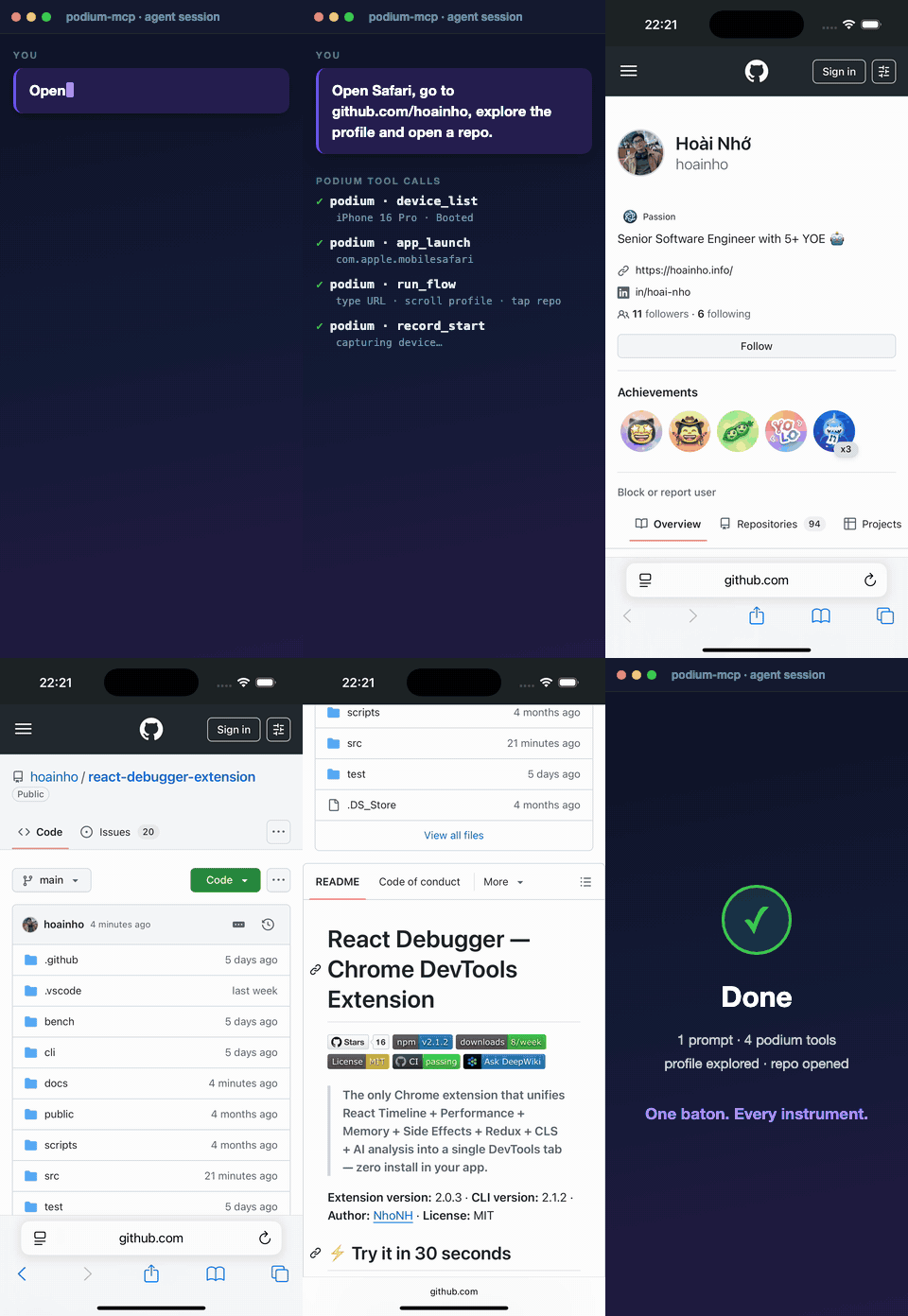
One prompt → podium drives Safari live → types the URL → explores the profile → opens a repo. Footage captured on a live iPhone 16 Pro simulator.
A podium is where a maestro stands — one place to conduct the whole orchestra. This MCP server unifies eight capability sets behind a single stdio endpoint:
- Device & app management — iOS simulators (
simctl), real iPhones (devicectl), and Android (adb) behind one platform-tagged device model. - Native UI inspection & gestures — route through
idb/mobilecliwith a Maestro fallback (no per-gesture JVM spin-up). - End-to-end flows & batch automation — declarative Maestro flows, ordered action batches, and an engineer→QA flow exporter.
- Trustworthy assertions — an oracle ladder (WebView-DOM › native a11y › Maestro) that returns falsifiable, evidenced verdicts and fails closed.
- WebView DOM + network — resolve
WKWebViewDOM to tap coordinates, evaluate JS, drive navigation, and capture in-page HTTP traffic as JSON/HAR. - React Native debugging — Metro console logs, network requests, and in-app state over CDP, plus host/simulator crash reports.
- Real devices — Android emulator/device via
adb(gestures +uiautomatorhierarchy); real iOS viadevicectllifecycle + an opt-in WebDriverAgent backend. - Canvas & game-engine automation, no vision — a canvas/WebGL brain drives Pixi/Konva/Fabric/Phaser/Three/Babylon UIs as addressable objects (validated live in WebKit). An experimental engine bridge drives Unity/GL via an AltTester-instrumented build (or a
window.__podiumEngineWebGL bridge) — code-complete + mock-tested, not yet run against a live Unity build.
Rather than wiring several MCP servers into every client config, podium-mcp exposes everything behind one connection, with a shared execFile layer (no shell), consistent structured errors, automatic retry around Maestro's iOS-driver flakiness, and a single health-check tool to confirm what's available on the host.
Table of contents
- Why
- Benchmarks
- Requirements
- Install
- Usage
- Quick start
- The 51 tools
- The oracle ladder — trustworthy assertions
- Native-first gesture backend
- WebView & RN network introspection
- Documented limits
- Architecture
- Development & testing
- Roadmap & contributing
- Releasing
- Prompt playbook & references
- Design ideas
- Contributing · Security · License
Why
Driving a React Native app end-to-end usually means juggling several MCP servers — one for device/app control, one for UI flows, one for Metro/debugger logs, another for WebView inspection — each with its own config entry, quirks, and failure modes. podium-mcp collapses that into one server with:
- a single
execFile-based command runner (no shell — arguments are passed verbatim), - consistent structured errors (a tool never crashes the server),
- automatic retry around Maestro's known iOS-driver flakiness,
- graceful degradation when a toolchain (e.g.
adb) is absent, - evidenced verdicts so an agent knows when a flow actually worked.
Benchmarks
Podium is built on two choices that make it fast and cheap: it drives UIs as structured data — never screenshots — and routes gestures through a native backend with no per-action JVM spin-up.
Token economics — no-vision is ~5× cheaper
A screenshot-driven agent sends an image to a vision model on every step. Podium returns a compact structured element list instead. On an equivalent 8-step mobile flow (1179×2556 screenshots vs ~20-element lists):
| Approach | Per step | 8-step flow |
|---|---|---|
| Screenshot / vision loop | ~2,070 tokens | 16,557 tokens |
| Podium — no-vision, structured | ~390 tokens | 3,117 tokens |
| Savings | 5.3× | −13,440 tokens (−81%) |
vision loop  ████████████████████████████████  16,557 tokens
Podium       ██████  3,117 tokens   (5.3× cheaper, −81%)
The gap compounds with every step — a 30-step session runs roughly 62k vs 12k input tokens. On top of per-step cost, the full 51-tool schema travels with every request (~3,612 tokens, ~71/tool); Podium keeps tool descriptions lean so the tool block never dominates the context window.
For canvas / WebGL UIs the advantage is structural, not just cheaper: the Canvas Brain addresses objects by name and text, where a screenshot-only agent must re-analyze pixels on every frame.
Speed — native-first gesture backend
Gestures route through idb / mobilecli instead of spinning up Maestro's JVM
per action (measured on a live iPhone 16 Pro simulator):
| Operation | Maestro (per-call JVM) | Podium native | Speedup |
|---|---|---|---|
tap_on | ~14.7 s | ~0.6 s | ~24× |
inspect_screen | ~8.9 s | ~0.9 s | ~10× |
One connection, not six
All 51 tools — device & app control, UI automation, declarative Maestro flows, evidenced assertions, WebView DOM + network capture, React Native / Metro debugging, and no-vision canvas/WebGL automation (plus an experimental engine bridge for instrumented Unity/GL) — sit behind a single stdio endpoint, replacing the usual stack of half a dozen separate MCP servers.
Token figures are heuristic estimates (~4 chars/token; Anthropic's ~750 px/token image formula) — reproduce with
npm run token-bench, or swap in the Anthropiccount_tokensAPI for exact counts. Speed figures were measured on a live iPhone 16 Pro simulator (npm run benchmark).
Requirements
- macOS with Xcode command-line tools (
xcrun,simctl) - Node.js ≥ 22 (uses native
fetchandWebSocket;.npmrcsetsengine-strict=true) mobilecli— bundled automatically as an npm dependency; the default native gesture + WebView backend (no separate install)- (optional)
idb(idb+idb_companion) — preferred native gesture backend when both are present; auto-detected - (optional) Maestro on
PATH(or at~/.maestro/bin) — therun_flowengine and the gesture fallback path - (optional) a running Metro bundler for the
metro_*debugging tools - (optional) Android SDK +
adb— adb paths are detection-only and degrade gracefully when absent
Platform scope (v0.3.0): podium automates iOS simulators, real iPhones (
devicectllifecycle + opt-in WebDriverAgent), and Android emulators/devices (adbgestures +uiautomatorhierarchy).device_listtags each target with its platform and the backend is selected per target. When a toolchain (e.g.adb) is absent, those paths degrade to an informative result instead of failing.
Install
Claude Code plugin (recommended)
No manual config — one-time marketplace setup, then install:
/plugin marketplace add github:hoainho/podium-mcp
/plugin install podium-mcp@podium
The plugin auto-starts the MCP server (all 51 tools) and ships five skills:
| Skill | Invoke | What it does |
|---|---|---|
| Device info | /podium-mcp:device-info <UDID> [<BUNDLE_ID>] | Health check, screen size, orientation, app list |
| E2E flow | /podium-mcp:e2e <UDID> <BUNDLE_ID> [path or description] | Run or author a Maestro flow |
| Bug repro | /podium-mcp:bug-repro <UDID> <BUNDLE_ID> <description> | Video + logs + crash evidence capture |
| RN debug | /podium-mcp:rn-debug [UDID] [logs|apps|crash|all] | Metro logs, connected apps, crash reports |
| Canvas brain | /podium-mcp:canvas <UDID> <intent> | Inspect / resolve / tap canvas-WebGL UIs, no vision |
npx (zero install)
{
  "mcpServers": {
    "podium": { "command": "npx", "args": ["-y", "podium-mcp"] }
  }
}
Manual (from source)
git clone git@github.com:hoainho/podium-mcp.git
cd podium-mcp
npm install
npm run build
Usage
Register the built server with any MCP client. Claude Code (.mcp.json):
{
  "mcpServers": {
    "podium": {
      "type": "stdio",
      "command": "node",
      "args": ["/absolute/path/to/podium-mcp/dist/index.js"]
    }
  }
}
Quick manual smoke test over raw stdio (lists the 51 registered tools):
printf '%s\n' \
  '{"jsonrpc":"2.0","id":1,"method":"initialize","params":{"protocolVersion":"2024-11-05","capabilities":{},"clientInfo":{"name":"smoke","version":"0"}}}' \
  '{"jsonrpc":"2.0","method":"notifications/initialized"}' \
  '{"jsonrpc":"2.0","id":2,"method":"tools/list"}' | node dist/index.js
Always call podium_health first to confirm which toolchain is available on the host.
Quick start (order of use)
podium_health— confirmxcrun/maestro/ native backend availability.device_list— pick a booted simulatorudid.- Read state —
app_list,app_state,screen_size,orientation_get. - Drive the device —
app_launch, thentap_on/input_text/swipe/press_key, plusset_locationandorientation_set. Batch several withrun_steps. - Author & verify —
inspect_screento discover elements,run_flowfor declarative checks, thenassert_visible/validate_flowfor an evidenced verdict. - Inspect WebViews —
webview_inspect→ tap coordinates,webview_eval,webview_navigate,webview_network. - Capture & debug —
screenshot/record_start→record_stop;metro_logs/metro_network/metro_state;crash_list/crash_get.
The 51 tools
Every tool returns structured JSON and never throws — failures come back as MCP tool errors. See
docs/tool-catalog.mdfor the authoritative per-parameter reference.Platform support (v0.3.0): the gesture / inspect / lifecycle tools below run on iOS simulators, real iPhones (
devicectl+ opt-in WebDriverAgent viaPODIUM_WDA_URL), and Android (emulator/device viaadb; hierarchy fromuiautomator).device_listtags each device with its platform and the backend is selected per target.
Game engine — Unity / GL via AltTester, no vision · experimental (4)
| Tool | Key params | Backing engine | Behavior |
|---|---|---|---|
engine_inspect | udid, by?, value | AltTester (TCP) / WebGL CDP bridge | Lists engine objects (by name/path/component/text) with absolute screen coords — no screenshots |
engine_tap | udid, by?, value | AltTester / CDP | Resolves the object and taps its screen coordinates |
engine_swipe | udid, fromX/Y, toX/Y, durationMs? | AltTester / CDP | Swipe inside the engine view |
engine_call | udid, by?, value, component, method, parameters? | AltTester / CDP | Invokes a C# component method by reflection (the engine analog of a DOM event handler) |
Status: experimental. The wire shapes are unit-tested against mocks; the AltTester path has not yet been validated against a live Unity build (
engine-smokeskips until an instrumented build is provided), and Unity-WebGL needs the app to exposewindow.__podiumEngine. Engine tools require an AltTester-instrumented build (dev/staging) or that WebGL bridge; on a non-instrumented build they fail closed with an actionable error — never a vision fallback. For canvas/WebGL apps using a JS framework, the canvas brain below is the validated path.
Canvas brain — Pixi/Konva/Fabric/Phaser/Three/Babylon, no vision (3)
| Tool | Key params | Backing engine | Behavior |
|---|---|---|---|
canvas_inspect | udid, by?, value?, webviewId? | injected scene-graph bridge (CDP eval) | Lists canvas objects with tap-ready CSS-px coords — no screenshots |
canvas_resolve | udid, intent, webviewId? | bridge + semantic resolver | Maps a fuzzy intent ("close", "✕") to a ranked, evidenced target; fail-closed confidentEnough |
canvas_tap | udid, intent, bundleId?, webviewId? | resolver + native tap | Resolves + taps the confident match at absolute screen coords (else fails closed) |
Validated live: all six frameworks pass a Playwright-WebKit (≈ WKWebView) suite at DPR 1 + 3 (
npm run test:canvas, 19 tests). Canvas tools require an inspectable WKWebView hosting a supported framework with its root reachable (commonly onwindow, or Pixi's__PIXI_APP__). No framework / no inspectable WebView → fails closed with an actionable error — never a vision fallback.
Diagnostics (1)
| Tool | Key params | Backing engine | Behavior |
|---|---|---|---|
podium_token_report | steps?, screenshotWidth?, screenshotHeight?, elementsPerStep?, toolCount? | token estimators | No-vision vs screenshot/vision-loop input tokens, the savings ratio, and the per-request tool-definition overhead |
Health & toolchain (1)
| Tool | Key params | Backing engine | Behavior |
|---|---|---|---|
podium_health | — | which probes | Never fails; reports toolchain { xcrun, maestro, adb }, native backend, and platforms: [ios-sim, ios-real, android] |
Device & simulator (6)
| Tool | Key params | Backing engine | Behavior |
|---|---|---|---|
device_list | — | simctl list -j + adb devices | Merged iOS inventory; adb absent → android: { available: false } (detection-only) |
device_boot | udid | simctl boot | Idempotent — already-booted → alreadyBooted: true; waits up to 30 s |
screen_size | udid | simctl io screenshot + sips | { widthPx, heightPx } (real pixels) |
orientation_get | udid | native query → screenshot heuristic | { orientation, basis } (exact when native) |
set_location | udid, latitude, longitude | simctl location set | Codifies the QA geo-spinner fix |
open_url | udid, url | simctl openurl | Deep links + https:// |
Apps (6)
| Tool | Key params | Backing engine | Behavior |
|---|---|---|---|
app_install | udid, path (.app/.zip) | simctl install | Structured tool error |
app_launch | udid, bundleId | simctl launch | Explicit 30 s timeout (cold RN launches no longer mis-report failure) |
app_terminate | udid, bundleId | simctl terminate | Structured tool error |
app_uninstall | udid, bundleId | simctl uninstall | Structured tool error |
app_list | udid | simctl listapps + plutil | { count, apps: [{ bundleId, name, type }] } |
app_state | udid, bundleId | simctl listapps + launchctl | { installed, running } — exact bundle-id match |
Capture (3)
| Tool | Key params | Backing engine | Behavior |
|---|---|---|---|
screenshot | udid, saveTo? | simctl io screenshot | Returns path + byteSize (no base64 bloat) |
record_start | udid, saveTo? (.mp4) | detached simctl io recordVideo | { ok, path, pid }; timestamped path + duration watchdog (PODIUM_MAX_RECORDING_MS); one per udid |
record_stop | udid | SIGINT recorder + flush | { ok, path, sizeBytes } |
UI inspection & gestures (8)
| Tool | Key params | Backing engine | Behavior |
|---|---|---|---|
inspect_screen | udid, compact? | native flat AX list → maestro hierarchy | compact:true (default) returns only meaningful nodes |
tap_on | udid, bundleId, text|id|x+y, double?, long? | native tap → Maestro fallback | text/id resolved via the element list; reports backend |
input_text | udid, bundleId, text, submit? | native → Maestro fallback | reports backend |
swipe | udid, bundleId, direction, start/end? | native → Maestro fallback | %/pixel overrides resolved vs logical screen size |
press_key | udid, bundleId, key | native → Maestro fallback | back/power/tab are Android-only |
orientation_set | udid, bundleId, value | native → Maestro fallback | PORTRAIT / LANDSCAPE_LEFT / LANDSCAPE_RIGHT / UPSIDE_DOWN |
tap_with_fallback | udid, x, y, maxRetries?, offsetStep? | native tap + before/after oracle | For WebGL/Canvas overlays; no blind walk (offsetStep opt-in) |
notification_bar_clear | udid, bundleId? | native tap + oracle | Dismisses the RN debug notification bar |
Flows & batch automation (4)
| Tool | Key params | Backing engine | Behavior |
|---|---|---|---|
run_steps | udid, bundleId, steps[] | native backend (idb/mobilecli) | Ordered action batch in one call; per-step results |
run_flow | udid + exactly one of yaml/files/dir(+tags), env? | maestro test | Exactly-one-of validated before exec; per-step pass/fail |
export_flow | steps[], output path | flow generator | Exports a run_steps batch to a reusable Maestro flow (engineer→QA bridge) |
cheat_sheet | — | bundled assets/maestro-cheat-sheet.yaml | Fully offline Maestro syntax reference |
Assertions & verdicts — the oracle ladder (5)
| Tool | Key params | Backing engine | Behavior |
|---|---|---|---|
assert_visible | udid, text|id, … | oracle ladder (WebView-DOM › a11y › Maestro) | Evidenced pass/fail; reports which oracle proved it |
assert_text | udid, text | oracle ladder | by-text shorthand for assert_visible |
assert_not_visible | udid, text|id | oracle ladder | Fails closed — if absence can't be verified, it fails |
wait_for_element | udid, text|id, timeoutMs? | oracle ladder (polling) | Polls until visible or times out |
validate_flow | udid, flow + assertions | oracle ladder + flow run | Trustworthy, falsifiable verdict on whether a just-built flow works |
WebView DOM & network (4)
| Tool | Key params | Backing engine | Behavior |
|---|---|---|---|
webview_inspect | udid, selector?, webviewId?, max? | mobilecli (CDP) | Resolves a CSS selector to DOM elements with absolute tapX/tapY |
webview_eval | udid, expression, webviewId? | mobilecli (CDP) | Runs JS in the page context; gated by PODIUM_DISABLE_WEBVIEW_EVAL=1 |
webview_navigate | udid, action (goto/back/forward/reload), url? | mobilecli (CDP) | Drives WebView navigation |
webview_network | udid, durationMs?, format (json/har)?, saveTo?, redact?, includeResources? | CDP + in-page fetch/XHR shim + Resource Timing | Captures in-WebView HTTP traffic; exports redacted JSON or HAR 1.2 |
React Native debugging — Metro CDP (4)
| Tool | Key params | Backing engine | Behavior |
|---|---|---|---|
metro_apps | port? (8081) | GET http://localhost:<port>/json | Differentiated errors (timeout vs not-running vs other) |
metro_logs | wsUrl?/port?, durationMs?, maxLogs? | WebSocket + CDP Runtime.enable | Auto-discovers first app when URL omitted |
metro_network | wsUrl?/port?, durationMs?, maxEntries? | CDP Network.enable | Requests (url/method/status/mimeType/ts) |
metro_state | expression?/wsUrl?/port?, timeoutMs? | CDP Runtime.evaluate | Reads in-app state (default: globally-exposed Redux store) |
Crash diagnostics (2)
| Tool | Key params | Backing engine | Behavior |
|---|---|---|---|
crash_list | processName?, sinceHours?, udid? | host + sim DiagnosticReports | Newest-first; tagged source: host | simulator |
crash_get | id, udid? | same | Path-traversal-safe (basename only); truncates honestly |
The oracle ladder — trustworthy assertions
"It works" is operationalized as a falsifiable, evidenced verdict — never "looks ok". Assertions and validate_flow resolve visibility through a three-rung ladder, using the strongest available signal:
- WebView DOM — when an inspectable
WKWebViewis present, query the real DOM. - Native accessibility — the native AX element set (via
idb/mobilecli). - Maestro —
assertVisible/assertNotVisibleas the fallback.
assert_not_visible fails closed: if absence can't be positively verified (e.g. a WebView is unreadable), it reports failure rather than a false pass. Every verdict names the oracle that produced it, so an agent can weight its confidence.
Native-first gesture backend
Imperative gestures (tap_on, input_text, swipe, press_key, orientation_set, run_steps) and inspect_screen route through the fastest available backend, probed once and cached (with a short negative-cache TTL so a backend that starts after launch is picked up):
idb— when bothidbandidb_companionare installed (native, fastest).mobilecli— the bundled npm dependency (prebuilt Go binary). Default; no install.- Maestro fallback — when no native backend resolves, or for actions it can't express (double/long-press,
UPSIDE_DOWN). The gesture generates a minimal flow withlaunchApp: { stopApp: false }, foregrounding the app without restarting so state is preserved.
Each result reports the backend it used. Set PODIUM_DISABLE_NATIVE=1 to force Maestro. Eliminating the per-gesture JVM spin-up cut tap_on ~14.7 s → ~0.6 s and inspect_screen ~8.9 s → ~0.9 s on an iPhone 16 Pro simulator. Run npm run benchmark for a full pass/fail sweep.
Maestro flakiness retry: when the fallback runs, its iOS driver intermittently fails with Failed to connect to 127.0.0.1:<port>. Flows retry up to 2× with 2 s / 5 s backoff and report the retries count; a persistent failure returns the raw output with remediation hints.
WebView & RN network introspection
Two distinct network layers, two tools:
metro_networkcaptures requests on the RN/Hermes target via the CDP Network domain — the right tool for a native RN app's ownfetch.webview_networkcaptures traffic inside aWKWebView: it injects afetch/XHRrecorder (rich — method/status/headers/body for calls after capture starts) and reads the browser's Performance Resource Timing buffer (includeResources, default on) — every request since navigation, including pre-capture ones (URL/timing/size). The merge yields a near-complete request list, exported as redacted JSON or HAR 1.2.
For an RN shell that hosts its UI in a WebView, the app's API calls run in the web layer — so metro_network sees nothing and webview_network is the tool to reach for. WebView tools require WKWebView.isInspectable = true (default in debug/staging builds; off in production); when none is found they return an actionable error.
Documented limits (by design, not bugs)
- Canvas/WebGL needs a cooperating JS framework — the canvas brain automates Pixi/Konva/Fabric/Phaser/Three/Babylon UIs by selector when the app exposes its scene-graph root (validated live). A raw/custom WebGL canvas, an opaque/production build, or Unity without an AltTester /
window.__podiumEnginebridge is not selector-addressable — fall back totap_with_fallbackwith screenshot-derived coordinates, or instrument the build. - WebView tools are dev/QA only — production App Store builds typically set
isInspectable = false; tools return an actionable error and fall back to coordinate taps. - WebView content-process memory is unreadable from the app sandbox (platform limit) — use indirect signals (memory warnings, process terminations).
- Maestro
text:matcher is full-string regex (IGNORE_CASE) — partial strings don't match; copy hierarchytextverbatim or anchor with.*. - Android requires
adbonPATH— gestures / inspect / screenshot work onceadbis present; when it's absent every Android path degrades to a structured "adb not found" result. orientation_getis a screenshot-aspect heuristic when no native backend is present — iOS simulators expose no direct orientation query.record_start/record_stopkeep state in-process — serializestart→ … →stopon one connection; one active recording per udid (a watchdog finalizes one that's never stopped).
Architecture
src/
  index.ts          # MCP server entry — registers every tool group, warms caches
  lib/
    exec.ts         # execFile-based runner (NO shell) + timeout/timedOut flag
    result.ts       # shared ok/error MCP content helpers
    simctl.ts       # xcrun simctl wrappers + device-list TTL cache
    native.ts       # gesture/inspect backend: idb → mobilecli → null (re-probe TTL)
    idb.ts          # idb gesture/inspect adapter
    gesture.ts      # unified native→Maestro executors (shared by screen + steps)
    oracle.ts       # the oracle ladder: WebView-DOM › a11y › Maestro
    maestro.ts      # Maestro engine: flow runner, idb retry, hierarchy
    export-maestro.ts # run_steps → reusable Maestro flow
    har.ts          # HAR 1.2 export for webview_network
    webview.ts      # mobilecli CDP — WebView list/inspect/eval/navigate/network
    metro.ts        # Metro CDP — app discovery, logs, network, state
    crash.ts        # DiagnosticReports crash listing/reading
    recording.ts    # detached screen recording lifecycle + watchdog (platform-aware)
    device-target.ts # DeviceTarget model + PlatformDriver registry (v0.3.0)
    drivers/        # per-platform lifecycle: ios-sim, android, ios-real
    adb.ts          # Android adb driver (list/install/launch/screenshot/wm size)
    adb-backend.ts  # adb gesture/inspect (input + uiautomator → AX elements)
    iosreal.ts      # real iOS via devicectl (list/install/launch) + capture
    wda.ts          # opt-in WebDriverAgent backend (/source + tap/swipe/keys)
    engine.ts       # no-vision engine client (AltTester + WebGL-in-WebView)
    engine-transport.ts # WebSocket transport for the AltTester bridge
    canvas-types.ts # Canvas Brain shared contract (CanvasObject, selectors)
    canvas-adapters.ts  # in-page bridge: detect + walk Pixi/Konva/Fabric/Phaser/Three/Babylon
    canvas-resolver.ts  # semantic "close brain": intent → ranked, evidenced target
    canvas-a11y.ts  # Flutter/ARIA fallback reader → CanvasObject (scaffolding, not wired — #9)
    canvas-vision.ts # opt-in vision fallback scaffolding (not wired — #9)
    token-report.ts # token estimators + no-vision vs vision-loop comparison
  tools/            # one file per group:
                    #   health, device, screen, steps, flow, assert, validate,
                    #   webview, debug, engine, canvas, token
assets/             # bundled offline Maestro cheat sheet + demo.gif
scripts/            # benchmark.ts, compare-mcps.ts, token-bench.mjs
e2e/                # smoke suites (smoke / full-smoke / webview-network-live / android-smoke / engine-smoke)
test/canvas-e2e/    # live Playwright-WebKit canvas bridge suite (6 frameworks)
docs/               # tool catalog, e2e transcript, roadmap, token-economics
Development & testing
npm run build       # tsc
npm run typecheck   # tsc --noEmit
npm test            # vitest run — 359 unit/integration tests (exec/network mocked, no sim needed)
npm run test:canvas # live canvas bridge suite in Playwright WebKit — 19 tests (run `npx playwright install webkit` first)
npm run benchmark   # spawn a fresh server over stdio and sweep the tool suite
node e2e/smoke.e2e.mjs        # real E2E against a booted simulator (macOS + Xcode)
node e2e/full-smoke.e2e.mjs   # drives the iOS-sim tool handlers (happy + structured-error paths)
node e2e/android-smoke.e2e.mjs # Android emulator/device smoke (story A3)
node e2e/engine-smoke.e2e.mjs  # AltTester engine smoke; skips without an instrumented build (story C4)
359 unit/integration tests across 31 files, plus 19 live canvas-bridge tests (378 total), all passing — including the v0.3.0 device-target registry, the Android adb driver + uiautomator parser, the AltTester engine client + WebGL bridge, the devicectl/WDA real-iOS parsers, plus the v0.2.0 oracle ladder, recording watchdog, gesture-parity, HAR export, WebView, and Metro paths.
Standards: TypeScript strict, no as any / @ts-ignore, no shell execution (all commands via lib/exec.ts), tools return structured errors instead of throwing. See CONTRIBUTING.md for the "add a new tool" checklist.
E2E on CI: the E2E (simulator) workflow boots a real iOS simulator on a macOS runner and runs the smoke suites nightly + on demand (not a PR gate — simulator runs are slow). full-smoke.e2e.mjs asserts the happy path where a target exists and the real structured-error path where a dependency is absent (a debug isInspectable app for WebView; a connected RN app for metro_*).
Roadmap & contributing
podium-mcp is production-ready for iOS/Android UI automation and no-vision canvas/WebGL (Pixi/Konva/Fabric/Phaser/Three/Babylon — validated live). The frontier, where a contributor can make a real dent, lives in open issues:
High-impact — help wanted
- #1 — validate the AltTester/Unity engine path against a live instrumented Unity build (the biggest gap to real Unity automation).
- #2 — real-device WKWebView e2e for the canvas brain (today validated in Playwright WebKit).
- #3 — Unity-WebGL adapter: auto-detect + a drop-in
window.__podiumEnginebridge.
Good first issues — good first issue
- #4 — more canvas adapters (PlayCanvas, Cocos Creator, p5.js).
- #5 — expose
canvas_hittest/canvas_object_recttools. - #7 — exact token counts via the Anthropic
count_tokensAPI. - #6 — address Konva Group/Container targets.
Adding a tool follows one checklist in CONTRIBUTING.md: TypeScript strict, no shell, structured-errors-never-throw, a vitest test, and a row in the tool catalog. PRs welcome.
Releasing
server.json is the official MCP Registry manifest. Pushing a v* tag runs
Publish to npm then
Publish to MCP Registry (GitHub OIDC for the
io.github.hoainho/* namespace — no long-lived token). Both workflows run typecheck → build → test
as a gate first; the registry publish only succeeds once the matching npm version is live, and
versions are immutable.
Prompt playbook & references
prompts/— copy-paste prompts for e2e flows, test cases, feature verification, bug fixing, and device control. Each names the podium tools it drives and was validated on a real simulator. Start withprompts/README.md.docs/tool-catalog.md— authoritative tool-by-tool reference.docs/e2e-demo.md— a real transcript against a booted iPhone 16 Pro simulator running a production RN app.
Design ideas
- One podium, one connection. A single server fronts every mobile capability so an agent configures one endpoint and discovers all 51 tools at once.
- Safe by construction. Every external command runs through an
execFilelayer with an explicit argument array — never a shell string. - Never crash the conductor. Tools return structured results and errors instead of throwing; one bad call can't take the server down.
- Degrade, don't fail. A missing toolchain (e.g. Android's
adb) yields an informative result rather than a hard error. - Prove it, don't guess. Assertions return evidenced verdicts via the oracle ladder and fail closed when they can't verify.
Contributing
Contributions welcome — see CONTRIBUTING.md and the Code of Conduct. Use the issue templates for bugs and feature requests.
Security
Please report vulnerabilities privately per SECURITY.md — do not open a public issue.
SECURITY.md also documents the webview_eval / run_flow trust boundary and the PII-in-transcript caveat.
License
MIT © 2026 hoainho