flutter-skill
AI-powered E2E testing for 10 platforms. 253 MCP tools. Zero config. Test Flutter, React Native, iOS, Android, Web, Electron, Tauri, KMP, .NET MAUI from natural language.
Documentation
flutter-skill
Give any AI agent eyes and hands inside any running app.
10 platforms. Zero test code. One MCP server.


Demo • Quick Start • AI Platforms • Platforms • vs Others • Docs
🚀 Zero config. Zero test code. Just talk to your AI.
If this saves you time, please consider starring the repo ⭐ — it helps others find it!
30-Second Demo
https://github.com/user-attachments/assets/d4617c73-043f-424c-9a9a-1a61d4c2d3c6
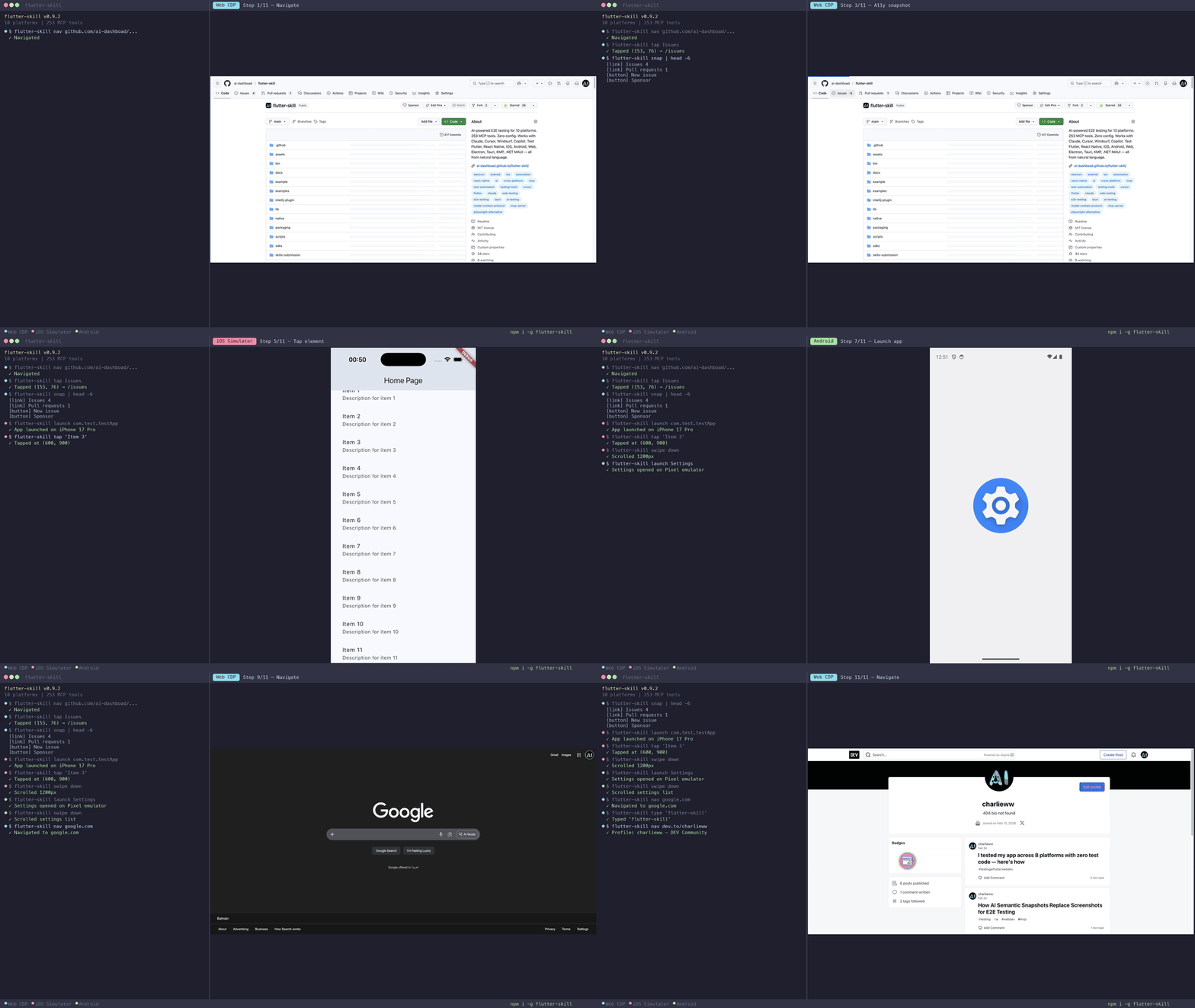
One prompt. 28 AI-driven actions. Zero test code. The AI explores a TikTok clone, navigates tabs, scrolls feeds, tests search, fills forms — all autonomously.
Why This Exists
Writing E2E tests is painful. Maintaining them is worse. flutter-skill takes a different approach:
- 🔌 Connects any AI agent (Claude, Cursor, Windsurf, Copilot, OpenClaw) directly to your running app via MCP
- 👀 The agent sees your screen — taps buttons, types text, scrolls, navigates — like a human tester who never sleeps
- ✅ Zero test code — no Page Objects, no XPath, no brittle selectors. Just plain English
- ⚡ Zero config — 2 lines of code, works on all 10 platforms
You: "Test the checkout flow with an empty cart, then add 3 items and complete purchase"

Your AI agent handles the rest — screenshots, taps, text entry, assertions, navigation.
No Page Objects. No XPath. No brittle selectors. Just plain English.
Quick Start
1. Install (30 seconds)
npm install -g flutter-skill
2. Add to your AI (copy-paste into MCP config)
{
  "mcpServers": {
    "flutter-skill": {
      "command": "flutter-skill",
      "args": ["server"]
    }
  }
}
Works with Claude Desktop, Cursor, Windsurf, Copilot, Cline, OpenClaw — any MCP-compatible agent.
3. Add to your app (2 lines for Flutter)
import 'package:flutter_skill/flutter_skill.dart';

void main() {
  if (kDebugMode) FlutterSkillBinding.ensureInitialized();
  runApp(MyApp());
}
4. Test — just talk to your AI:
"Launch my app, explore every screen, and report any bugs"
That's it. Zero configuration. Zero test code. Works in under 60 seconds.
📦 More install methods (Homebrew, Scoop, Docker, IDE, Agent Skill)
| Method | Command |
|---|---|
| npm | npm install -g flutter-skill |
| Homebrew | brew install ai-dashboad/flutter-skill/flutter-skill |
| Scoop | scoop install flutter-skill |
| Docker | docker pull ghcr.io/ai-dashboad/flutter-skill |
| pub.dev | dart pub global activate flutter_skill |
| VSCode | Extensions → "Flutter Skill" |
| JetBrains | Plugins → "Flutter Skill" |
| Agent Skill | npx skills add ai-dashboad/flutter-skill |
| Zero-config | flutter-skill init (auto-detects & patches your app) |
Use with AI Platforms
MCP Server Mode (IDE Integration)
Works with any MCP-compatible AI tool. One config line:
{
  "mcpServers": {
    "flutter-skill": {
      "command": "flutter-skill",
      "args": ["server"]
    }
  }
}
| Platform | Config File | Status |
|---|---|---|
| Cursor | .cursor/mcp.json | ✅ |
| Claude Desktop | claude_desktop_config.json | ✅ |
| Windsurf | ~/.codeium/windsurf/mcp_config.json | ✅ |
| VSCode Copilot | .vscode/mcp.json | ✅ |
| Cline | VSCode Settings → Cline → MCP | ✅ |
| OpenClaw | Skill or MCP config | ✅ |
| Continue.dev | .continue/config.json | ✅ |
HTTP Serve Mode (CLI & Automation)
For standalone browser automation, CI/CD pipelines, or remote access:
# Start server
flutter-skill serve https://your-app.com

# Use CLI client commands
flutter-skill nav https://google.com
flutter-skill snap                    # Accessibility tree (99% fewer tokens)
flutter-skill screenshot /tmp/ss.jpg
flutter-skill tap "Login"
flutter-skill type "hello@example.com"
flutter-skill eval "document.title"
flutter-skill tools                   # List all available tools
| Command | Description |
|---|---|
nav <url> | Navigate to URL |
snap | Accessibility tree snapshot |
screenshot [path] | Take screenshot |
tap <text|ref|x y> | Tap element |
type <text> | Type via keyboard |
key <key> [mod] | Press key |
eval <js> | Execute JavaScript |
title | Get page title |
text | Get visible text |
hover <text> | Hover element |
upload <sel> <file> | Upload file |
tools | List tools |
call <tool> [json] | Call any tool |
Supports --port=N, --host=H flags and FS_PORT/FS_HOST env vars.
Two Modes Compared
server (MCP stdio) | serve (HTTP) | |
|---|---|---|
| Use case | IDE / AI agent integration | CLI / automation / CI/CD |
| Protocol | MCP (JSON-RPC over stdio) | HTTP REST |
| Tools | 253 (dynamic per page) | 246 (generic) |
| Browser | Auto-launches Chrome | Connects to existing Chrome |
| Best for | Cursor, Claude, VSCode | OpenClaw, scripts, pipelines |
Full CLI client reference: docs/CLI_CLIENT.md
10 Platforms, One Tool
Most testing tools work on 1-2 platforms. flutter-skill works on 10.
| Platform | SDK | Test Score |
|---|---|---|
| Flutter (iOS/Android/Web) | flutter_skill | ✅ 188/195 |
| React Native | sdks/react-native | ✅ 75/75 |
| Electron | sdks/electron | ✅ 75/75 |
| Tauri (Rust) | sdks/tauri | ✅ 75/75 |
| Android (Kotlin) | sdks/android | ✅ 74/75 |
| KMP Desktop | sdks/kmp | ✅ 75/75 |
| .NET MAUI | sdks/dotnet-maui | ✅ 75/75 |
| iOS (Swift/UIKit) | sdks/ios | ✅ 19/19 |
| Web (any website) | sdks/web | ✅ |
| Web CDP (zero-config) | No SDK needed | ✅ 141/156 |
Total: 656/664 tests passing (98.8%) — each platform tested against a complex social media app with 50+ elements.
⚡ Performance
Real benchmarks from automated test runs against a complex social media app:
| Operation | Web (CDP) | Electron | Android |
|---|---|---|---|
connect | 93 ms | 55 ms | 103 ms |
tap | 1 ms | 1 ms | 2 ms |
enter_text | 1 ms | 1 ms | 2 ms |
inspect | 3 ms | 12 ms | 10 ms |
snapshot | 2 ms | 8 ms | 29 ms |
screenshot | 31 ms | 80 ms | 88 ms |
eval | 1 ms | — | — |
Token efficiency: snapshot() returns a structured element tree instead of an image — 87–99% fewer tokens than sending screenshots to your AI agent.
How fast is that? A tap takes 1–2 ms end-to-end. Browser automation tools like Playwright and Selenium typically take 50–100 ms for the same operation. That's 50–100× faster, because flutter-skill talks directly to the app runtime instead of going through WebDriver or CDP indirection.
Heavy DOM Sites (Real-World)
Tested 15 MCP tools against production websites — 75/75 passed, zero timeouts:
| Site | Tools | Total Time | snapshot | screenshot | count_elements |
|---|---|---|---|---|---|
| YouTube | 15/15 ✅ | 6.9s | 43 ms | 30 ms | 4 ms |
| Amazon | 15/15 ✅ | 14.2s | 1 ms | 5 ms | 2 ms |
| 15/15 ✅ | 17.9s | 6 ms | 32 ms | 51 ms | |
| Hacker News | 15/15 ✅ | 4.8s | 53 ms | 188 ms | 1 ms |
| Wikipedia | 15/15 ✅ | 7.8s | 15 ms | 336 ms | 1 ms |
Total time includes page load. Tool execution is consistently sub-100ms even on heavy DOM sites.
Why Not Playwright / Appium / Detox?
| flutter-skill | Playwright MCP | Appium | Detox | |
|---|---|---|---|---|
| MCP tools | 253 | ~33 | ❌ | ❌ |
| Platforms | 10 | 1 (web) | Mobile | React Native |
| Setup time | 30 sec | Minutes | Hours | Hours |
| Test code needed | ❌ None | ✅ Yes | ✅ Yes | ✅ Yes |
| AI-native (MCP) | ✅ | ✅ | ❌ | ❌ |
| Self-healing tests | ✅ | ❌ | ❌ | ❌ |
| Monkey/fuzz testing | ✅ | ❌ | ❌ | ❌ |
| Visual regression | ✅ | ❌ | ❌ | ❌ |
| Network mock/replay | ✅ | ❌ | ❌ | ❌ |
| API + UI testing | ✅ | ❌ | ❌ | ❌ |
| Multi-device sync | ✅ | ❌ | Partial | ❌ |
| Accessibility audit | ✅ | ❌ | ❌ | ❌ |
| i18n testing | ✅ | ❌ | ❌ | ❌ |
| Performance monitoring | ✅ | ❌ | ❌ | ❌ |
| Natural language | ✅ | ❌ | ❌ | ❌ |
| Flutter support | ✅ Native | Partial | Partial | ❌ |
| Desktop apps | ✅ | ✅ | ❌ | ❌ |
| AI page understanding | ✅ AX Tree | ❌ Screenshots | ❌ | ❌ | | Boundary/security test | ✅ 13 payloads | ❌ | ❌ | ❌ | | Batch actions | ✅ 5+/call | 1/call | 1/call | 1/call |
flutter-skill is the only AI-native E2E testing tool that works across mobile, web, and desktop — with 7× more tools than the nearest competitor.
CLI Commands
# 🤖 AI autonomous exploration — finds bugs automatically
flutter-skill explore https://my-app.com --depth=3

# 🐒 Monkey/fuzz testing — random actions, crash detection
flutter-skill monkey https://my-app.com --actions=100 --seed=42

# 🚀 Parallel multi-platform testing
flutter-skill test --url https://my-app.com --platforms web,electron,android

# 🌐 Zero-config WebMCP server — any website becomes testable
flutter-skill serve https://my-app.com
🧠 AI-Native: 95% Fewer Tokens
Most AI testing tools send screenshots to the LLM — each one costs ~4,000 tokens.
flutter-skill uses Chrome's Accessibility Tree to give your AI a compact semantic summary of any page:
// page_summary → ~200 tokens (vs ~4,000 for a screenshot)
{
  "title": "Shopping Cart",
  "nav": ["Home", "Products", "Cart", "Account"],
  "forms": [{"input:Coupon Code": "text"}],
  "buttons": ["Apply", "Checkout", "Continue Shopping"],
  "features": {"search": true, "pagination": true},
  "links": 47, "inputs": 3
}
Then batch multiple actions in one call:
// explore_actions → 5 actions per call (vs 5 separate tool calls)
{"actions": [
  {"type": "fill", "target": "input:Coupon Code", "value": "SAVE20"},
  {"type": "tap", "target": "button:Apply"},
  {"type": "tap", "target": "button:Checkout"},
  {"type": "fill", "target": "input:Email", "value": "test@example.com"},
  {"type": "tap", "target": "button:Continue"}
]}
Result: Your AI agent tests faster, costs less, and understands pages better than screenshot-based tools.
| flutter-skill | Screenshot-based tools | |
|---|---|---|
| Tokens per page | ~200 | ~4,000 |
| Actions per call | 5+ | 1 |
| Understands semantics | ✅ roles, names, state | ❌ pixels only |
| Works with Shadow DOM | ✅ | ❌ |
What It Can Do
👀 See
|
👆 Interact
|
🔍 Inspect (v0.8.0)
|
🚀 Control
|
253 tools — full reference
AI Explore: page_summary, explore_actions, boundary_test, explore_report
Launch & Connect: launch_app, scan_and_connect, connect_cdp, hot_reload, hot_restart, list_sessions, switch_session, close_session, disconnect, stop_app
Screen: screenshot, screenshot_region, screenshot_element, native_screenshot, inspect, inspect_interactive, snapshot, get_widget_tree, find_by_type, get_text_content, get_visible_text
Interaction: tap, double_tap, long_press, enter_text, set_text, clear_text, swipe, scroll_to, drag, go_back, press_key, type_text, hover, fill, select_option, set_checkbox, focus, blur, native_tap, native_input_text, native_swipe
Smart Testing: smart_tap, smart_enter_text, smart_assert (self-healing with fuzzy match)
Assertions: assert_text, assert_visible, assert_not_visible, assert_element_count, assert_batch, wait_for_element, wait_for_gone, wait_for_idle, wait_for_stable, wait_for_url, wait_for_text, wait_for_element_count
Visual Regression: visual_baseline_save, visual_baseline_compare, visual_baseline_update, visual_regression_report, visual_verify, visual_diff, compare_screenshot
Network Mock: mock_api, mock_clear, record_network, replay_network, intercept_requests, clear_interceptions, block_urls, http_request
API Testing: api_request, api_assert
Coverage & Reliability: coverage_start, coverage_stop, coverage_report, coverage_gaps, retry_on_fail, stability_check
Data-Driven: test_with_data, generate_test_data
Multi-Device: multi_connect, multi_action, multi_compare, multi_disconnect, parallel_snapshot, parallel_tap
Accessibility: accessibility_audit, a11y_full_audit, a11y_tab_order, a11y_color_contrast, a11y_screen_reader
i18n: set_locale, verify_translations, i18n_snapshot
Performance: perf_start, perf_stop, perf_report, get_performance, get_frame_stats, get_memory_stats
Session: save_session, restore_session, session_diff
Recording & Export: record_start, record_stop, record_export (Playwright, Cypress, XCUITest, Espresso, Detox, Maestro, +5 more), video_start, video_stop
Auth: auth_inject_session, auth_biometric, auth_otp, auth_deeplink
CDP Browser: navigate, reload, go_forward, get_title, get_page_source, eval, get_tabs, new_tab, switch_tab, close_tab, get_cookies, set_cookie, clear_cookies, get_local_storage, set_local_storage, clear_local_storage, generate_pdf, set_viewport, emulate_device, throttle_network, go_offline, set_geolocation, set_timezone, set_color_scheme
Debug: get_logs, get_errors, get_console_messages, get_network_requests, diagnose, diagnose_project, reset_app
Platform Setup
Flutter (iOS / Android / Web)
dependencies:
  flutter_skill: ^0.9.37
import 'package:flutter_skill/flutter_skill.dart';

void main() {
  if (kDebugMode) FlutterSkillBinding.ensureInitialized();
  runApp(MyApp());
}
React Native
npm install flutter-skill-react-native
import FlutterSkill from 'flutter-skill-react-native';
FlutterSkill.start();
Electron
npm install flutter-skill-electron
const { FlutterSkillBridge } = require('flutter-skill-electron');
FlutterSkillBridge.start(mainWindow);
iOS (Swift)
// Swift Package Manager: FlutterSkillSDK
import FlutterSkill
FlutterSkillBridge.shared.start()

Text("Hello").flutterSkillId("greeting")
Android (Kotlin)
implementation("com.flutterskill:flutter-skill:0.8.0")

FlutterSkillBridge.start(this)
Tauri (Rust)
[dependencies]
flutter-skill-tauri = "0.8.0"
KMP Desktop
Add Gradle dependency — see sdks/kmp for details.
.NET MAUI
Add NuGet package — see sdks/dotnet-maui for details.
Example Prompts
Just tell your AI what to test:
| Prompt | What happens |
|---|---|
| "Test login with wrong password" | Screenshots → enters creds → taps login → verifies error |
| "Explore every screen and report bugs" | Systematically navigates all screens, tests all elements |
| "Fill registration with edge cases" | Tests emoji 🌍, long strings, empty fields, special chars |
| "Compare checkout flow on iOS and Android" | Runs same test on both platforms, compares screenshots |
| "Take screenshots of all 5 tabs" | Taps each tab, captures state |
Contributing
See CONTRIBUTING.md for guidelines.
git clone https://github.com/ai-dashboad/flutter-skill
cd flutter-skill
dart pub get
dart run bin/flutter_skill.dart server  # Start MCP server
Links
| 📦 pub.dev | 🧩 VSCode |
| 📦 npm | 🧩 JetBrains |
| 🍺 Homebrew | 📖 Docs |
| 🤖 Agent Skill | 📋 Changelog |
⭐ If flutter-skill saves you time, star it so others can find it too!
MIT License © 2025