WordPress Block MCP
Block MCP is the WordPress MCP built for the way agents actually edit: one block at a time, across multiple turns, without corrupting the page.
Documentation
Block MCP
Block MCP is the WordPress MCP built for the way agents actually edit — one block at a time, across multiple turns, without corrupting the page. It's an MCP server plus WordPress plugin that exposes Gutenberg content as a structured, addressable block tree instead of raw HTML, so an agent can change a single heading without rewriting the page. Every block carries a stable gk_ref UUID that survives sibling shifts (no other WordPress MCP has this), so multi-turn edit chains don't re-fetch the page between calls. Every write creates a WordPress revision for rollback, ETag/If-Match guards against concurrent overwrites, and a server-side tier policy stops legacy blocks from ever hitting disk. Backed by 326 PHP tests, 249 TypeScript tests, CI on PHP 8.2/8.3 + Node 20, and translations to 20 languages.
Why agents pick Block MCP
- Edits one block, not the whole page. Change a heading's level without touching the surrounding HTML. Standard MCPs force a full page rewrite on every edit; Block MCP touches just the one heading.
- Editor-safe round-trips.
<!-- wp:* -->block markers are preserved exactly. No "this block contains unexpected or invalid content" warnings on reopen. - Stable block refs no other WordPress MCP has. Quickly chain inserts, deletes, and updates across turns from a single read.
- Atomic batch edits. Fix N independent blocks in one revision with
update_blocks— all-or-nothing validation, so a stale ref or out-of-range index aborts the whole batch before anything hits disk. Keeps revision history clean instead of 6 entries for one logical change. - Tier policy enforced server-side. Decide what blocks you want to allow or reject before they are saved, with suggested replacements.
- Optimistic concurrency built in. Two agents working on the same post can't silently overwrite each other.
- Yoast SEO support built in. Read and write Yoast meta (titles, descriptions, focus keywords, canonical URLs, schema types, primary terms, Open Graph / Twitter cards) the moment Yoast SEO is active on the site.
Table of Contents
- At a glance
- Why this MCP
- Compared to other WordPress MCPs
- Features
- How It Works
- Quick Start
- MCP Tools
- Templates
- Stable Refs
- Configuration
- Security
- Examples
- Testing
- Requirements
- Limitations
- Error Codes
- Translations
- License
- Contributing
At a glance
Here's where Block MCP wins. Most other WordPress MCPs are wrappers around the standard WordPress REST API — fine for writing, but wrong for editing. "Change a heading, then add a button, then fix the next paragraph" could result in your post needing major rehab to get back to correct syntax. Block MCP is the answer to an WordPress block editor MCP that just works.
| What the agent can do | Standard WP REST API | Block MCP |
|---|---|---|
| Edit one heading without touching the rest of the page | ❌ Rewrites the entire page on every edit | ✅ Updates just the one heading |
| Make 5 edits in a row without re-sending the whole page each time | ❌ Sends the full page body 5× | ✅ Sends only what changed |
| Find which block contains "Pricing" without scanning rendered HTML | ❌ No structured search — agent has to regex through HTML | ✅ Built-in search by text or block type |
| Stop legacy/deprecated blocks from being saved in the first place | ❌ Writes any HTML, valid or not | ✅ Server rejects legacy blocks, suggests modern replacements |
| Edit a page and have it still open cleanly in the block editor afterward | ❌ Edits as raw HTML — expect many blocks with "This block contains unexpected or invalid content" because the original block markers got stripped | ✅ Block markup is preserved exactly. |
| Keep editing the right block after adding or removing other blocks above it | ❌ Re-reads the whole page after each edit | ✅ AI can keep working without re-reading |
| Fix N typos across one page in a single revision | ❌ N round-trips, N revisions cluttering history | ✅ One update_blocks call, one revision, atomic — partial failure rolls back the whole batch |
When you actually ask an AI to edit a page
What matters is whether the page is correct after the agent finishes. So we put Claude in front of each MCP, typed a real instruction — "change the H2 heading 'Code samples' to H3" — then re-opened the page and inspected it.
27 runs total: three MCP servers × Haiku, Sonnet, Opus × 3 trials each.
| Model | Block MCP | AI Engine Pro | InstaWP/mcp-wp |
|---|---|---|---|
| Haiku | ✅ 3 / 3 · 10 s avg | ⚠️ 2 / 3 · 44 s avg | ❌ 0 / 3 · 20 s avg |
| Sonnet | ✅ 3 / 3 · 9 s avg | ✅ 3 / 3 · 14 s avg | ❌ 0 / 3 · 36 s avg |
| Opus | ✅ 3 / 3 · 9 s avg | ✅ 3 / 3 · 13 s avg | ⚠️ 2 / 3 · 38 s avg |
| Total | ✅ 9 / 9 | 8 / 9 | 2 / 9 |
Three takeaways:
Block MCP works on the cheapest model — and finishes fastest. Haiku passes every trial in 10 seconds. The agent doesn't need to think hard about the page because the API is shaped exactly like the task. AI Engine Pro on Haiku takes 44 seconds when it works at all; InstaWP never does.
InstaWP's wp/v2 wrapper fails 7 out of 9 times — even Opus only gets it right 2/3. When the agent reports success, it's technically right that the heading text changed. But the whole-page round-trip through update_page strips every <!-- wp:* --> block marker. Reopen the page in the block editor and you'll see "This block contains unexpected or invalid content" warnings on most blocks. The standard REST API isn't broken — it does exactly what it's documented to do — but its data shape lets the AI corrupt content without realizing it.
AI Engine Pro is competitive with Sonnet and Opus but stumbles on Haiku. Its wp_alter_post tool is block-aware (the post markup stays valid), but on the failed Haiku trials the rendered HTML and the block's declared attributes drift out of sync — e.g., the comment marker still says level: 2 while the inner tag is <h3>. The block editor flags that as broken too. Sonnet and Opus retry until consistent (2–3 tool calls); Haiku sometimes gives up after declaring success.
Reproduce with scripts/mcp-agent-bench.mjs.
Now try the structural ops agents actually need
A single heading-level change is the easy case. The interesting work is when an agent has to move a block, drop a paragraph inside an existing container, modify a table, or delete a block — the kind of multi-step structural editing real content workflows demand.
Five harder scenarios. Same matrix: three MCPs × Claude Haiku.
| Scenario | Block MCP | AI Engine Pro | InstaWP/mcp-wp |
|---|---|---|---|
| Move a block to a new sibling position | ✅ 15 s · 2 calls | ✅ 25 s · 3 calls | ❌ structural fail · 29 s |
Insert a paragraph inside a core/group | ✅ 15 s · 2 calls | ✅ 20 s · 4 calls | ❌ structural fail · 32 s |
| Add a row to a comparison table | ✅ 13 s · 2 calls | ✅ 25 s · 4 calls | ❌ structural fail · 32 s |
| Delete a column from a table | ✅ 12 s · 2 calls | ✅ 24 s · 4 calls | ❌ structural fail · 26 s |
| Delete a heading block | ✅ 12 s · 3 calls | ✅ 16 s · 3 calls | ❌ structural fail · 24 s |
| Total | ✅ 5 / 5 | ✅ 5 / 5 | ❌ 0 / 5 |
Block MCP averages 13 seconds and two tool calls per scenario. The agent reads the page once, finds the target block by ref or path, calls one mutation, done.
AI Engine Pro keeps the page intact and finishes correctly, about 2× slower. Its wp_alter_post tool asks the agent to supply both the block-comment markup and the rendered HTML, so most scenarios spend an extra round-trip generating the right shape.
InstaWP/mcp-wp fails every scenario with a "structural fail": the agent (Haiku, given update_page) writes the page back as plain HTML — <h1>...</h1><p>...</p><ol>... — with no <!-- wp:* --> block markers. WordPress accepts the save, parse_blocks() collapses the entire page into one freeform chunk, and every distinctive block on the page disappears as a structured entity. The agent thinks it succeeded; the page is broken in the block editor on reopen. That's the penalty of wrapping the standard wp/v2 REST surface and trusting the agent to reconstruct block markup by hand.
Reproduce with scripts/mcp-agent-bench.mjs.
Why Block MCP
Block MCP is the only WordPress MCP designed from the ground up for the way agents actually edit pages: one block at a time, across multiple turns, without corrupting anything along the way. The agent-loop bench reflects that — 9 of 9 across every Claude tier, including the cheapest.
Most WordPress MCPs wrap the default REST API. That gives an agent post-level CRUD, but it stops there — to change one heading on a page, the agent has to read the entire post_content HTML, parse it, find the right tag, mutate it, and write the whole thing back. Block boundaries dissolve, structure breaks subtly, and there's no undo path.
Block MCP is built around the block tree itself. The agent sees a structured, addressable, well-typed view of the page — and writes through purpose-built endpoints that know what blocks are.
What that gets you in practice:
- Block-aware editing. Change a heading's level, swap a button's URL, reorder columns — without touching surrounding HTML. The agent works in JSON; the plugin handles parse/serialize.
- Stable block refs. Every block carries a persistent ID. An agent can fetch a page once, capture the refs of every block it intends to edit, then chain inserts/deletes/updates against those refs without re-reading. Sibling shifts don't invalidate the addresses.
- Path-based structural ops. Nine operations (
update-attrs,replace-block,wrap-in-group,unwrap-group,move,duplicate,insert-child,remove-block,update-html) work on any nesting depth via integer paths or refs. - Auto-transforms. Change a heading's
levelattribute and the<h2>/<h3>tag updates with it. Toggle a list to ordered and<ul>becomes<ol>. The plugin keeps attributes and innerHTML in sync for the common patterns so agents don't have to. - Site policy enforcement. Per-site preference tiers reject inserts of blocks you've marked as legacy and surface suggested replacements. An agent can't write blocks your site doesn't want.
- Revision-backed undo. Every write returns
before_revision_idandrevision_id.revert_to_revisionrolls back to either side of any edit. - Discovery tools. Browse registered block types with preference scoring, search patterns, query site-wide block/pattern usage, resolve URLs to post IDs. The agent can plan with knowledge of what your site actually contains.
- Static-block safety guards. Warns when an attribute change would leave rendered markup stale, so the agent knows when to also pass innerHTML.
The combination — block-aware, ref-stable, revision-tracked, policy-enforcing — is what existing REST-API-wrapping MCPs don't give you.
Compared to other WordPress MCPs
The WordPress MCP space is small, and Block MCP is the only one operating at the block-tree layer. The other projects work at different layers and target different workflows — they're often complementary rather than head-to-head, but the agent-loop bench above shows they don't all produce correct results when asked to edit a block.
InstaWP/mcp-wp — A REST-API-wrapping MCP that operates on whole posts, plus broad coverage of users, comments, media, plugins, and plugin-repo search. Standout feature: multi-site management from one MCP instance. Reach for it when you need post-level CRUD across many sites or general-purpose WordPress administration. Not block-aware: editing a single heading inside a long page means reading and rewriting the entire post, and the round-trip through wp/v2's update_page strips every <!-- wp:* --> block marker. In our bench it failed validation on 7 of 9 trials across Haiku/Sonnet/Opus.
AI Engine Pro — Self-hosted MCP server inside WordPress (Streamable HTTP at /wp-json/mcp/v1/http), built by Meow Apps and the most-installed WordPress AI plugin (100K+). Free tier exposes posts/comments/users/media as MCP tools; Pro adds an Editor Assistant sidebar and additional MCP plumbing. Its wp_alter_post tool is block-aware — block-comment markers survive — but it can desync the block's declared attributes from its innerHTML (e.g., comment marker still says level: 2 while the inner tag is <h3>), and the block editor flags that as broken too. Sonnet and Opus retry until consistent and pass; Haiku sometimes gives up at 7–12 tool calls. 8 of 9 in the bench.
Block MCP (this project) — Operates one layer below: inside a single post's block tree. Path- and ref-based addressing, auto-transforms that keep attributes and innerHTML in sync server-side, preference-tier enforcement, per-block revisions. None of those exist in the other three. Reach for it when an agent needs to edit blocks — change a heading level, swap a column layout, insert a CTA after the third paragraph — without rewriting the surrounding content. 9 of 9 in the bench, perfect across all three Claude models, including the cheapest.
These can coexist. Block MCP could (and likely will) be exposed through the official adapter as registered abilities once that path matures — same logic, blessed plumbing. See issues for the roadmap.
Features
Read
- Full block tree as structured JSON: paths, names, attributes, refs,
text_previewof each block's content - Page summary in one call: block type counts, headings with paths, section markers, max nesting depth
- Outline mode for fast page structure inspection
- Search blocks by text or block name
- Render mode expands shortcodes, resolves synced patterns, marks dynamic blocks
Write — by index, by ref, or by path
update_block— flat-index OR refupdate_blocks— atomic N-update batch in ONE revision; all-or-nothing validation, max 50 items, counts as one write against the rate limitdelete_block— top-level counter OR refinsert_blocks— anchor onafter_top_level/before_top_levelORafter_ref/before_refedit_block_tree— 9 path-based or ref-based structural ops:update-attrs,update-html,replace-block,remove-blockwrap-in-group,unwrap-group,insert-child,duplicate,move
rewrite_post_blocks— full page rewritedry_runparameter to validate any mutation without writing
Safety
- Auto-transform keeps innerHTML in sync when attributes change (heading level, list ordered, group tagName, button URL, image src, spacer height, etc.)
- Static block guards warn when an attribute change may leave rendered markup stale
- Configurable preference tiers: legacy blocks rejected on insert, avoid-tier blocks return warnings with suggested replacements
- Per-post rate limiting (10 writes/min, 2 full rewrites/min)
- Every write creates a WordPress revision;
revert_to_revisionundoes any edit
Discover
- List block types filtered by namespace, category, or preference tier
- Browse patterns (synced + registered) scored by recency, reference count, and legacy content
- Site-wide block/pattern usage analytics (cached)
- Resolve any URL or slug to its post ID, type, and edit link
How It Works
AI Agent ←stdio→ MCP server (your machine) ←HTTPS→ WordPress plugin (your site)
WordPress plugin (wordpress-plugin/gk-block-mcp/) — REST API at gk-block-api/v1. Handles block parsing, serialization, safety checks, preference scoring, rate limiting, revisions. Works with any post type that stores Gutenberg blocks in post_content.
MCP server (src/) — TypeScript stdio server that exposes the REST API as MCP tools. Authenticates as a normal WordPress user via Application Password. No special privileges, no direct DB access from the MCP side.
Quick Start
1. Install the WordPress plugin
Easiest — download the latest ZIP: gk-block-mcp.zip (auto-built from main on every push).
Then in WordPress: Plugins → Add New → Upload Plugin and pick the ZIP.
Or copy wordpress-plugin/gk-block-mcp/ to your site's wp-content/plugins/ and activate manually. Or via WP-CLI:
wp plugin install https://github.com/GravityKit/block-mcp/releases/download/latest/gk-block-mcp.zip --activate
2. Connect your AI assistant
The fastest path provisions everything for you — a dedicated block-mcp service
account, a minimal-capability role, and an Application Password — from inside
WordPress. Go to Settings → Block MCP → Connect and pick your client.
Claude Desktop (one-click). Download the generated .mcpb file and open it;
Claude Desktop installs the server and stores the credential in your OS keychain.
The .mcpb is self-contained — it bundles the server, so there's nothing else to
install.
Cursor, Claude Code, ChatGPT Desktop (browser approve). Run the connector and click Approve in the browser that opens:
npx -y @gravitykit/block-mcp connect --site https://example.com
It writes your client's MCP config for you (owner-only, mode 0600), so the
site-wide password never lands in your shell history or a hand-edited file. Add
--client cursor|claude-code|claude-desktop|print to target a specific client.
Each site you connect gets its own server entry, so one assistant can point at
several sites.
Runtime: the common path runs the server with
npx -y @gravitykit/block-mcp— nothing to clone or build. The Claude Desktop.mcpbembeds the same bundle.
3. Manual setup (advanced)
Prefer to wire it up by hand? Create an Application Password and register the server yourself.
In WordPress admin: Users → Profile → Application Passwords. Or via CLI:
wp user application-password create <username> "Block MCP" --porcelain
Read endpoints require the edit_posts capability; write endpoints require
edit_post on the specific post being changed. Then build and register the
server:
git clone https://github.com/GravityKit/block-mcp
cd block-mcp
npm install   # auto-builds dist/index.cjs via the prepare script
Register the server in your MCP client. Example for Claude Code's ~/.claude.json:
{
  "mcpServers": {
    "block-mcp": {
      "command": "node",
      "args": ["/absolute/path/to/block-mcp/dist/index.cjs"],
      "env": {
        "WORDPRESS_URL": "https://example.com",
        "WORDPRESS_USER": "your-wp-username",
        "WORDPRESS_APP_PASSWORD": "xxxx xxxx xxxx xxxx xxxx xxxx"
      }
    }
  }
}
Restart your MCP client. Run npm run inspect to test the tools interactively.
4. (Optional) Tune the settings
When the plugin is active, an admin page appears at Settings → Block MCP. The defaults work out of the box, but it's worth a look — this is where you decide which blocks AI agents are allowed to write, what to suggest as replacements, and which post types create_post can target.
See the Configuration section below for the full breakdown.
MCP Tools
Content I/O
| Tool | Purpose |
|---|---|
get_page_blocks | Read a post's blocks. Supports outline, summary_only, search, block_name, render, fields, persist_refs |
update_block | Update one block's attributes/innerHTML (by flat_index or ref) |
update_blocks | Apply N independent updates atomically in ONE revision (max 50). All-or-nothing validation — any stale ref / out-of-range index / dual-storage rejection / duplicate target aborts the batch with itemized errors before anything hits disk |
insert_blocks | Insert blocks at a position (by counter or ref) |
delete_block | Remove block(s) (by counter or ref) |
replace_block_range | Atomic single-revision swap of N blocks for M blocks |
rewrite_post_blocks | Full page rewrite |
edit_block_tree | 9 path-or-ref-based structural ops |
insert_pattern | Insert a pattern, synced or inline |
create_pattern | Create a synced pattern from structured blocks or raw content, with sync-status control |
revert_to_revision | Roll back to a prior revision ID |
Posts & taxonomies
| Tool | Purpose |
|---|---|
create_post | Create a post or page (draft, publish, future) — accepts blocks or HTML |
update_post | Update post metadata, status, terms — covers publish/trash/untrash transitions |
list_terms | List taxonomy terms (categories, tags, custom) for ID lookup |
find_posts / post_info / resolve_url | Locate posts by search, ID, slug, or URL |
Media
| Tool | Purpose |
|---|---|
upload_media | Upload via local path, URL sideload (with SSRF guard), or base64. Returns attachment ID + URL |
Discovery
| Tool | Purpose |
|---|---|
list_block_types | Browse registered block types with preference tiers, style variations, and nesting constraints (parent/ancestor/allowed_blocks). Pass include_supports:true for each block's full supports object (opt-in, default false) |
list_patterns / get_pattern | Search and inspect patterns with scoring; filter by category and browse the registered category vocabulary |
get_site_usage | Block/pattern usage analytics |
list_binding_sources | Registered block bindings sources (e.g. core/post-meta, core/pattern-overrides) a block's metadata.bindings can reference |
SEO (when Yoast SEO is active)
| Tool | Purpose |
|---|---|
yoast_get_seo | Read SEO metadata: title, description, robots, OG, Twitter, schema, scores |
yoast_update_seo / yoast_bulk_update_seo | Update SEO fields on one or many posts |
Templates (block themes only)
| Tool | Purpose |
|---|---|
list_templates | Browse a block theme's templates and template parts (filter by type, area, post_type, slug, source) |
get_template | A single template's metadata, raw content, and parsed blocks |
update_template | Replace a template/part's entire content, gated by a site setting (off by default) |
reset_template | Delete a template's database override, reverting it to the theme file |
Templates
list_templates / get_template are read-only tools for browsing a block theme's templates (page layouts like single, archive) and template parts (reusable regions like header, footer), the same content the Site Editor's template list shows.
Each row's wp_id tells you whether a database override currently shadows the theme file: null means the id resolves to the theme file itself; a number means a customization exists and that post ID is the override. On a classic (non-block) theme, list_templates returns an empty list with a note explaining why, rather than an error.
Templates are index-addressed only. get_template's blocks field is formatted like get_page_blocks. Whether the per-block write tools (update_block, edit_block_tree by ref) apply depends on the wp_id: a template that still resolves to the theme file (wp_id: null) is not writable by them, while a template with a database override (a numeric wp_id) is an ordinary post they edit like any other. Use update_template (see Editing templates below) to materialize the override for a theme-file-only template.
Editing templates
update_template / reset_template write to templates. Both are off by default. Enable "Let the assistant edit theme templates and template parts" under Settings → Block MCP first, or every call returns a 403 with an actionable message. Turning the toggle on grants the Block MCP agent account a dedicated gk_block_mcp_edit_templates capability (nothing else it can do changes); a human's own "self" connection can edit templates too, since it already carries edit_theme_options.
update_templatereplaces a template's entire content: whole-template replacement, likerewrite_post_blocks, not a per-block edit. Provide exactly one ofcontent(raw markup) orblocks(structured; validated against the block registry and preference tiers, same as any other structured-block write). If the id currently resolves to the theme file, a database override is created automatically (override_created: true); the theme file itself is never touched. Writing again reuses the same override.reset_templatedeletes the override, reverting the id back to the theme file. Appearance → Editor → Reset does the same thing from the WordPress admin.
Once an override exists, its wp_id is a normal post ID — update_block, get_page_blocks, and the rest of the per-block tool surface work against it like any other post.
Stable Refs
Every block in a get_page_blocks response includes a ref field:
{
  "index": 5,
  "path": [0, 2, 1],
  "ref": "blk_a3f2c1q9",
  "name": "core/heading",
  "attributes": { "level": 2, "content": "Hello" }
}
Refs are stored in attrs.metadata.gk_ref inside post_content, so they survive across sessions and across mutations that shift sibling positions. Pass ref to update_block, delete_block, or edit_block_tree to address the same block reliably even after inserts or deletes elsewhere on the page.
The first read of a post lazily assigns + persists refs via a direct DB write that skips revision creation (refs are editor-only metadata, not content). Pass persist_refs: false to read without that side effect.
Configuration
Everything in this section is editable at Settings → Block MCP in WordPress admin. Defaults are sensible — none of this is required to get started.
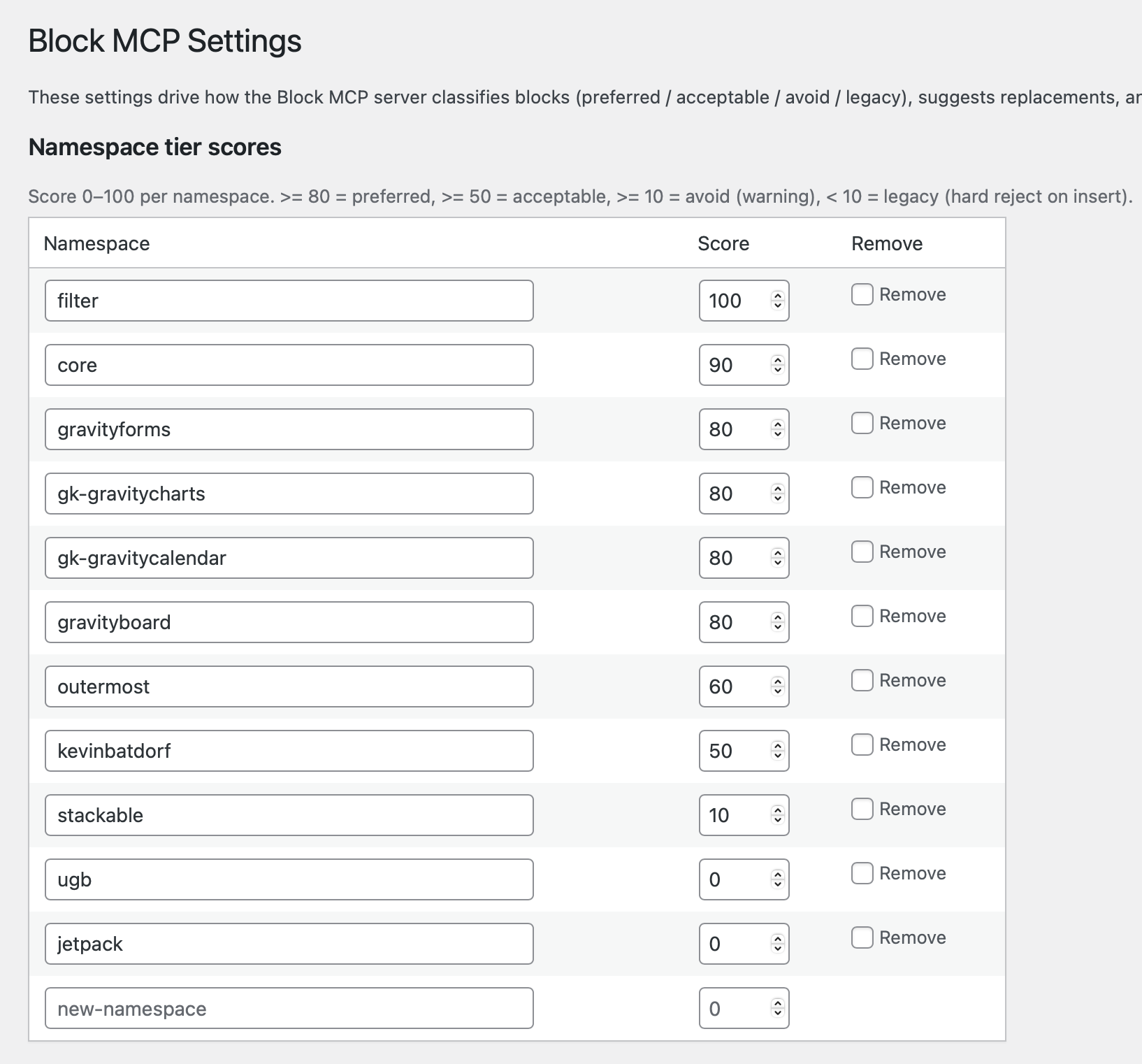
Namespace tier scores
Block preferences are stored as a WordPress option (gk_block_api_preferences) and configurable per-site. Each block namespace gets a score 0–100, which maps to a tier:
| Tier | Score | Policy |
|---|---|---|
| preferred | ≥ 80 | Use freely |
| acceptable | 50–79 | Use if preferred unavailable |
| avoid | 10–49 | Warn, return suggested replacement |
| legacy | < 10 | Reject on insert |
Defaults ship with core/* preferred and a starter set of known-deprecated namespaces marked legacy. Add new namespaces by typing into the bottom row — a fresh blank row appears as soon as you start typing.
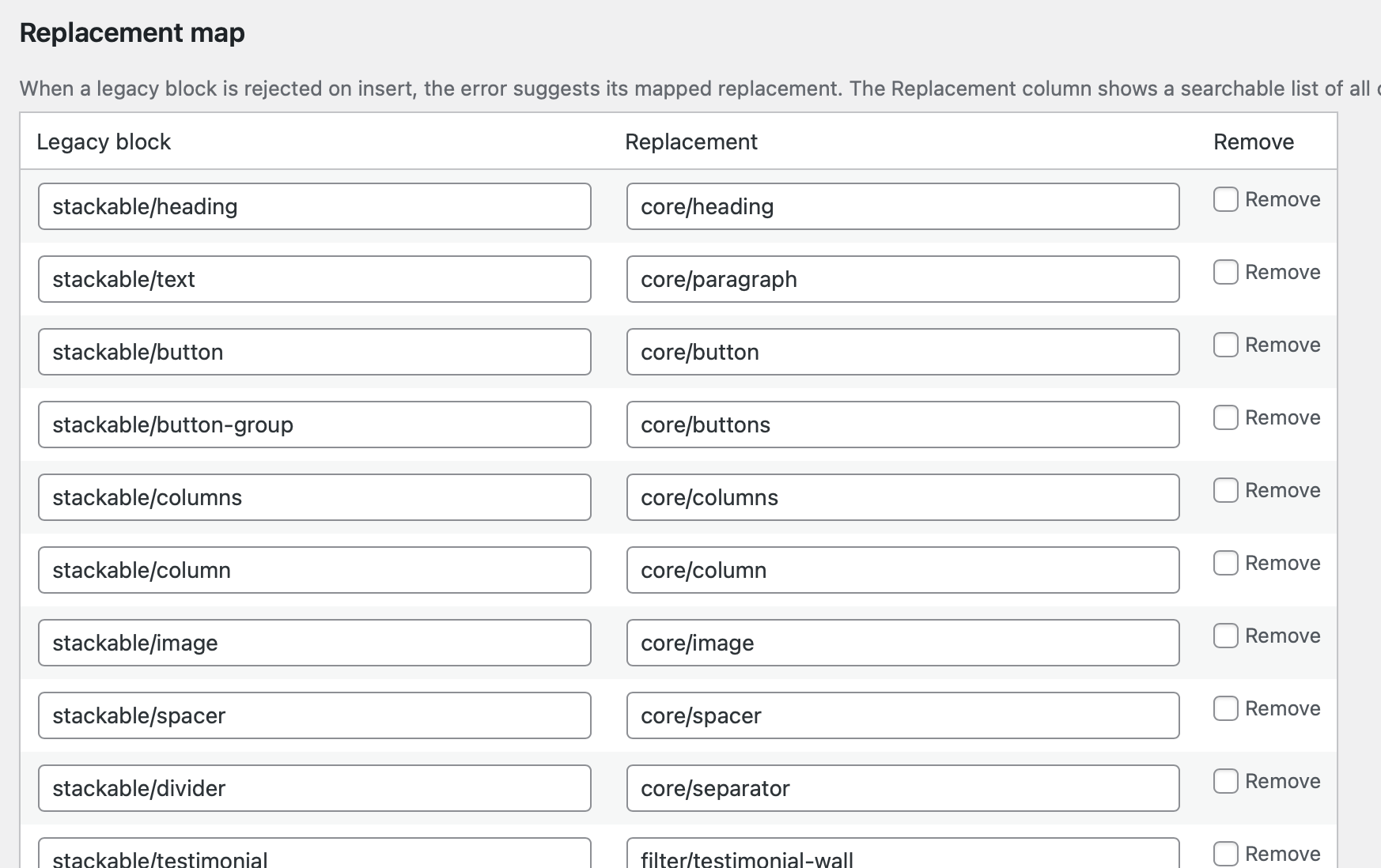
Replacement map
When an agent attempts to insert a legacy block, the rejection error includes a suggested replacement from this map. Both columns are searchable dropdowns of every block currently registered on your site (you can also type a block name that isn't currently registered).
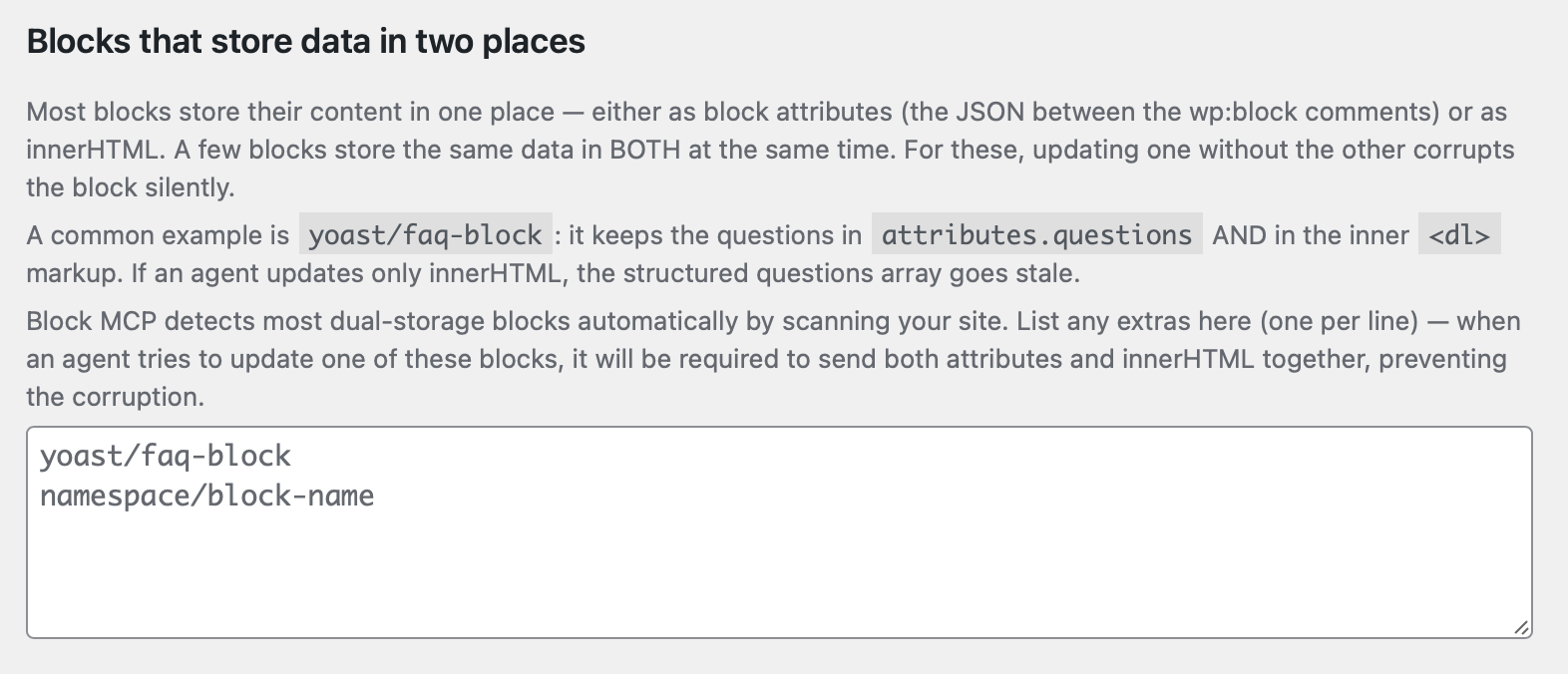
Blocks that store data in two places
A few blocks (notably yoast/faq-block) keep the same data in both their attributes and their innerHTML. Updating one without the other corrupts the block silently. Block MCP detects most automatically by scanning your site; list any extras here so the API forces agents to send both fields together.
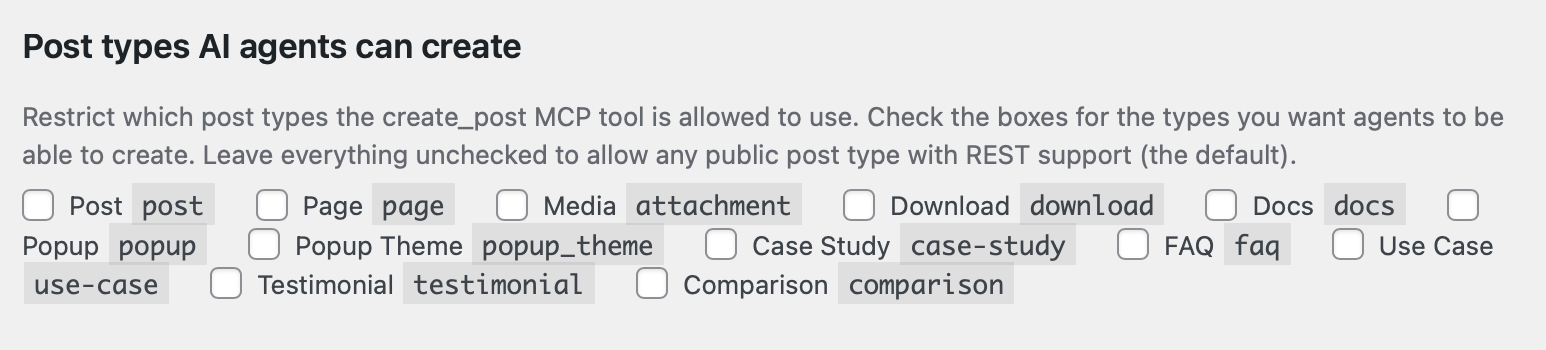
Post types AI agents can create
Restrict create_post to specific post types. Leave everything unchecked to allow any public post type with REST support (the default).
Storage-mode scan + reset
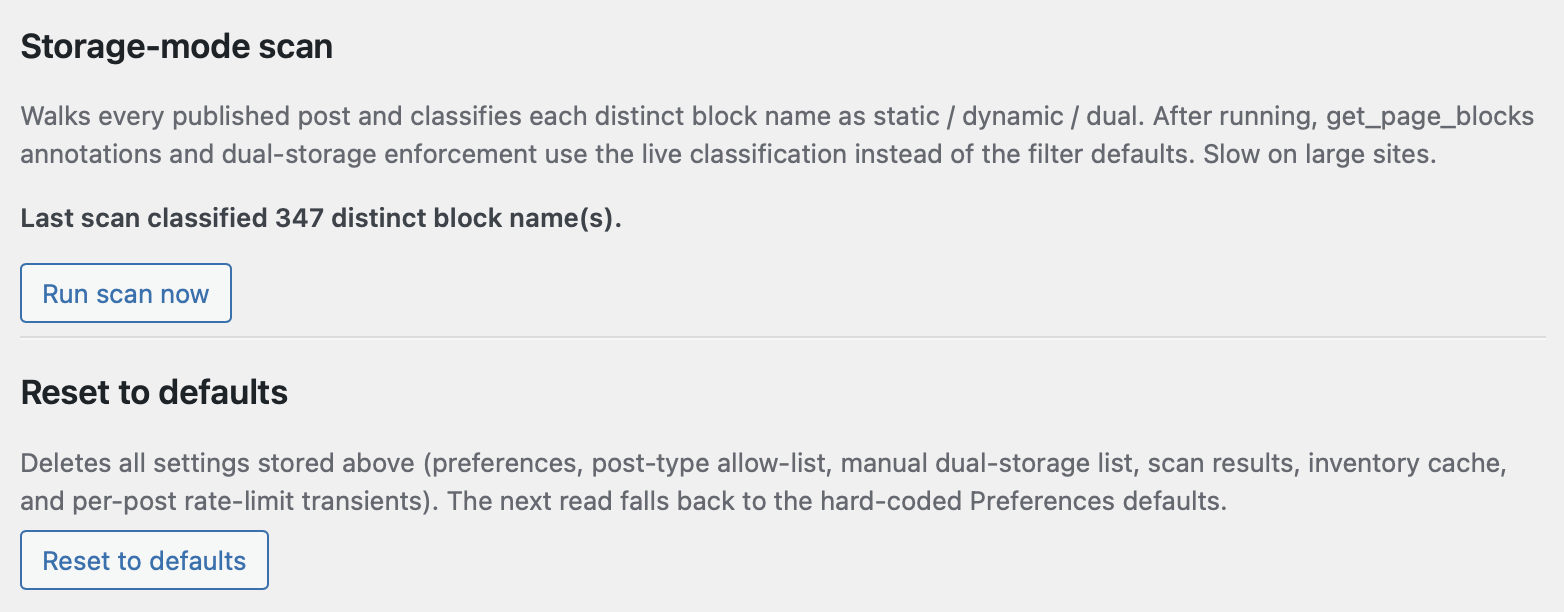
The scan walks every published post and classifies each distinct block as static / dynamic / dual, replacing the filter defaults with live data from your site. Slow on large sites; the result is cached. The Reset button below it clears every option this plugin owns and restores hard-coded defaults.
Security
Block MCP gives an AI assistant exactly the access it needs to edit content — and nothing more.
- A separate, limited account. Connecting creates a dedicated account just for the assistant. It can write and edit your posts, pages, and media, but it can't change site settings, delete other people's content, or sign in to your dashboard — and disconnecting it removes all of that access at once. (You can connect through your own account instead; it's clearly marked as the higher-access option, and a site owner can turn that option off entirely.)
- Your password stays private. It's never shown in a web address or saved to your browser history, and the connection is set up locally on your own computer. Any config files written are readable only by you.
- Stored secrets are encrypted. Any credential held between setup steps is encrypted (AES‑256‑GCM) before it's saved, and cleared once it's used — never kept as plain text.
- The assistant can't inject code. Everything it writes is sanitized, so it can't slip scripts or trackers into your pages.
Seal mode (Claude Desktop)
The one-click Claude Desktop installer can either include your credential or leave it out:
| Mode | What happens |
|---|---|
prefill (default) | The installer includes the password, so setup is one click; Claude Desktop saves it to your OS keychain. |
paste | The installer leaves the password out — you paste it in yourself, so it never lands in a downloaded file. |
Developers can force paste mode with a filter, or by defining GK_BLOCK_MCP_FORCE_PASTE_SECRET as true in wp-config.php:
add_filter( 'gk/block-mcp/credential/seal-mode', fn() => 'paste' );
Examples
Update a heading by URL
"Change the H2 'Welcome' on
/about/to 'About Us'."
resolve_url({ url: "/about/" })→ post IDget_page_blocks({ post_id, outline: true })→ finds heading atpath: [4], refblk_a3f2c1q9edit_block_tree({ post_id, op: "update-attrs", ref: "blk_a3f2c1q9", attributes: { content: "About Us" } })
Auto-transform updates both the content attribute and the inner <h2> text. Revision created.
Chained edit workflow (where refs shine)
"On the homepage: delete the third paragraph, change the next H2 to H3, and add a CTA button after it."
get_page_blocks({ post_id })once — capture refs for all three target blocksdelete_block({ post_id, ref: <para-ref> })edit_block_tree({ post_id, op: "update-attrs", ref: <heading-ref>, attributes: { level: 3 } })insert_blocks({ post_id, after_ref: <heading-ref>, blocks: [{ name: "core/buttons", … }] })
With path-based addressing, the agent would need to re-fetch between every step. With refs, one read covers the whole chain.
Author and publish a doc
list_terms({ taxonomy: "category", search: "Documentation" })→ category IDcreate_post({ title: "Getting Started", status: "draft", categories: [<id>], blocks: [...] })→ post IDupload_media({ path: "/tmp/screenshot.png", alt_text: "...", post_id })→ attachment ID + URLinsert_blocks({ post_id, after_top_level: 0, blocks: [{ name: "core/image", attributes: { id: <atch>, url, alt: "..." } }] })yoast_update_seo({ post_id, title: "...", description: "...", focus_keyword: "..." })update_post({ post_id, status: "publish" })
Testing
Run all suites locally:
# TypeScript (Vitest): 885 tests
npm test

# PHP (PHPUnit, stub WP bootstrap): 1,440 tests
cd wordpress-plugin/gk-block-mcp && phpunit -c tests/phpunit.xml
The PHP suite uses a minimal WordPress stub layer (no full WP install required) to exercise validation, error paths, mutation engine, ref resolution, HTML auto-transforms, post lifecycle, term listing, media validation, and REST summary/outline.
An end-to-end smoke script is included under scripts/ for live-WordPress validation; point it at any WordPress site by setting WORDPRESS_URL, WORDPRESS_USER, and WORDPRESS_APP_PASSWORD.
Requirements
- Node.js ≥ 20
- WordPress ≥ 6.0 with Application Passwords enabled
- PHP ≥ 7.4
- HTTPS (required by WordPress for Application Password authentication)
Limitations
Scope
- Edits work on posts stored as blocks. Block-theme templates (
wp_template,wp_template_part) and widget areas are not yet supported. - Custom post types must declare
show_in_rest: true(or be in the configured allow-list) to be writable. - innerHTML passes through
wp_kses_poston every write —<script>, inline event handlers, and other disallowed markup are stripped. Whitelist additional tags with thewp_kses_allowed_htmlfilter if needed.
Tier policy
- Legacy-tier blocks (score < 10) are hard-rejected on insert,
replace-block,insert-child,wrap-in-group, andreplace_all_blocks. The error includes a suggested replacement when one is mapped. - Avoid-tier blocks (score 10–49) write through with warnings, not errors.
- Tier policy is insert-only —
update-attrsandupdate-htmlcan mutate a legacy block that's already on the page (so existing pages aren't bricked).
Structural caps
- Block nesting depth is capped at 32 levels (
MAX_BLOCK_DEPTH). Trees deeper than that reject withblock_depth_exceeded. Not filterable. - Batch writes (
update_blocks) cap at 50 items per call (MAX_BATCH_SIZE). One batch counts as one write against the rate limit regardless of N.
Rate limits
- Per-post, per-minute, transient-backed. 10 writes/min for
update_*/delete_*/insert_*/mutate_*/update_post; 2/min for full-rewritePUT /blocks. - Buckets are per-post, not per-user — multiple agents editing the same post share the budget.
- Returns HTTP 429
rate_limit_exceeded; resets naturally after 60 s.
Static block innerHTML
- WordPress has no PHP equivalent of the React
savefunction, so the server cannot regenerate the rendered markup of a static block from its attributes alone. Auto-transforms cover heading level, list ordered, grouptagName, button URL, imagesrc/alt, video/audio booleans, spacer height/width, detailsopen, and quote citation. For anything else, sendinnerHTMLalong withattributes(update_blockwill refuse dual-storage writes that omit either side).
Dual-storage blocks
- A small set of blocks (notably
yoast/faq-block) duplicate state acrossattributesandinnerHTML. The API requires both fields together on update (dual_storage_requires_botherror otherwise) and the dual-storage list is configurable at Settings → Block MCP.
Block Bindings API
- Requires WordPress 6.5+ on the target site.
- Attributes listed in
attrs.metadata.bindingsare write-locked by default — a write that targets a bound attribute returns 400bound_attribute. Passallow_bound_writes: trueon the update to override. - Reads surface the binding map as a top-level
bindingsfield and abound_attributesarray; binding resolution (rendering the dynamic value) happens only inrendermode.
Schema-aware attribute extraction
- Reads merge attributes sourced via
block.json(source: attribute | html | rich-text | text) into the response. source: 'query'is not yet supported — it returns the delimiter attrs only with a TODO.source: 'meta'is deprecated and ignored.
Patterns
- Registered patterns are always inlined on insert. Only synced patterns (
wp_blockCPT entries) can be inserted as acore/blockreference.
Media uploads
- URL sideload is capped at 25 MB and uses a 10 s timeout.
- SSRF guard rejects RFC1918 / loopback / link-local / cloud-metadata (
169.254.0.0/16) hosts before download. The block list is extensible via thegk_block_api_url_sideload_blocked_rangesfilter. - Uploads can be disabled site-wide with the kill-switch at Settings → Block MCP.
Render mode
?render=trueresolves dynamic blocks, expands shortcodes, and follows synced pattern references. Disabled by default — read paths return raw block markup so an agent sees what the editor sees.
Error Codes
Every REST endpoint returns errors as JSON in the standard WordPress shape { code, message, data: { status, … } }. The MCP server forwards the HTTP status and code through to the tool result so the agent can dispatch on code directly.
Auth & permissions (HTTP 403)
| Code | When it fires | How to recover |
|---|---|---|
rest_forbidden | Caller lacks edit_posts capability on the request | Use an Application Password for a user with edit_posts |
rest_cannot_edit | Caller lacks edit_post for the specific post | Reassign the post or elevate the user's capability |
rest_cannot_create | Caller lacks edit_posts (or post-type-specific create cap) for create_post | Same |
rest_cannot_publish | create_post / update_post requested publish but caller lacks publish_posts | Lower status to draft/pending, or elevate the user |
rest_cannot_upload | upload_media called without upload_files cap | Elevate the user |
rest_cannot_assign_author | create_post / update_post set author to another user without edit_others_posts | Drop the author field or elevate |
uploads_disabled | Site admin flipped the uploads kill-switch off at Settings → Block MCP | Re-enable in admin or stop calling upload_media |
Not found (HTTP 404)
| Code | When it fires | How to recover |
|---|---|---|
post_not_found | post_id doesn't resolve to a post | Re-run resolve_url or find_posts |
block_not_found | flat_index / path / ref doesn't address an existing block | Re-fetch get_page_blocks |
ref_stale | gk_ref no longer exists in the post (deleted or replaced) | Re-fetch and re-bind |
pattern_not_found | pattern_id doesn't match a synced or registered pattern | Use list_patterns |
revision_not_found | revert_to_revision got an ID that isn't a revision of the target post | Use update_post history or query the post's revisions |
not_found | Generic resource-not-found for endpoints that don't have a specific code | Inspect message for which resource |
Precondition / concurrency (HTTP 412)
| Code | When it fires | How to recover |
|---|---|---|
stale_revision | If-Match header / if_match body field didn't match the current revision ID (someone else edited the post) | Re-fetch, re-apply changes against fresh state, retry |
Validation (HTTP 400)
| Code | When it fires | How to recover |
|---|---|---|
legacy_block | Inserting a block in the legacy tier | Use the suggested replacement returned in data.suggested_replacement |
dual_storage_requires_both | Updating a dual-storage block with only attributes or only innerHTML | Send both fields together |
bound_attribute | Update targets an attribute listed in attrs.metadata.bindings | Resolve the binding upstream, or pass allow_bound_writes: true |
batch_too_large | update_blocks payload exceeds MAX_BATCH_SIZE (50) | Split into multiple batches |
batch_validation_failed | One or more items in a batch failed validation; the whole call was rejected before any disk write | Inspect data.errors[] for the per-item codes and retry valid items |
empty_batch | update_blocks called with updates: [] | Skip the call |
block_depth_exceeded | Tree depth would exceed 32 levels after the write | Flatten the block structure |
invalid_path / invalid_destination / invalid_target | Path array is not non-negative integers, or doesn't address a block | Re-fetch and use a fresh path |
invalid_ref | Ref isn't a valid blk_XXXXXXXX shape | Re-fetch and use a returned ref |
ref_not_top_level | Operation requires a top-level block (e.g. replace_block_range) but ref points into a nested block | Pass the top-level ancestor's ref |
invalid_op | edit_block_tree op not in the 9-op enum | Use one of update-attrs, update-html, replace-block, remove-block, wrap-in-group, unwrap-group, insert-child, duplicate, move |
invalid_block | Block definition is malformed (missing name, name not registered, etc.) | Check the block name with list_block_types |
missing_attributes / missing_html / missing_block / missing_blocks / missing_destination / missing_target / missing_data / missing_lookup / missing_file / missing_title | Required field omitted | Include the field |
invalid_count / invalid_range / invalid_index / invalid_limit / invalid_cursor | Numeric arg out of range or wrong shape | See message for the expected bounds |
invalid_updates | update_blocks updates array malformed | Re-shape per the update_blocks schema |
invalid_post_type / invalid_status / invalid_taxonomy / invalid_term / invalid_author / invalid_parent / invalid_featured_media | create_post / update_post field validation | Check the value against the relevant WordPress registry |
cycle_parent | Parent assignment would create a hierarchy loop | Pick a different parent |
mixed_trash_payload | update_post mixed status: trash with other fields | Trash first, then update separately |
invalid_if_match | Header is present but not a positive integer | Send If-Match: <revision_id> |
revision_mismatch | Internal — captured revision ID didn't match before save | Retry; if persistent, file an issue |
no_inner_blocks | unwrap-group on a block that has none | Either remove the wrapper differently or insert children first |
no_file / missing_file | upload_media got no multipart payload | Send a file field, url, or data_base64 |
multiple_inputs / mutually_exclusive | upload_media got more than one of file / url / data_base64 | Send exactly one |
invalid_filename / disallowed_mime / file_too_large / invalid_base64 / invalid_url | upload_media payload rejected | See message for which gate failed |
upload_error | WordPress' upload handler returned an error | Inspect message |
empty_pattern | insert_pattern got a pattern with no parsed blocks | Pick a different pattern |
invalid_body | Request JSON body could not be parsed | Validate JSON shape |
Rate limit (HTTP 429)
| Code | When it fires | How to recover |
|---|---|---|
rate_limit_exceeded | Per-post write budget exhausted (10 writes/min, or 2 full-rewrites/min) | Wait up to 60 s and retry; consider batching with update_blocks |
scan_rate_limited | Settings-page scan triggered too frequently | Wait; this affects admin-side scans only |
Method not allowed (HTTP 405)
Not a plugin error: a 405 comes from the host's firewall or web server, ahead of WordPress. Some managed hosts reject PUT, PATCH, and DELETE outright, which is why reads and create_post succeed on such a host while every editing tool fails.
The client handles this on its own. When one of those verbs is rejected, it replays the request as a POST carrying an X-HTTP-Method-Override header (the form WordPress core accepts), and remembers the host, so later edits go through on the first attempt. Hosts that accept the real verbs never see the header.
| Symptom | What it means | How to recover |
|---|---|---|
Block API Error (405) with an HTML body (e.g. nginx) on an editing tool | The firewall rejected both the real verb and the override replay | Ask the host to allow PUT, PATCH, and DELETE, or to stop stripping X-HTTP-Method-Override, on the WordPress REST path |
| Reads work, edits fail immediately after install | The host rejects editing verbs; the fallback could not complete | Same as above; confirm with curl -X PATCH against /wp-json/gk-block-api/v1/... |
Upstream (HTTP 502)
| Code | When it fires | How to recover |
|---|---|---|
url_fetch_failed | upload_media URL sideload failed at HTTP layer (DNS, TLS, non-2xx, or SSRF block) | Verify the URL is publicly reachable and not in a blocked IP range |
Server error (HTTP 500)
| Code | When it fires | How to recover |
|---|---|---|
internal_error | Uncaught exception bubbled up to the REST envelope | File an issue with the message + reproduction |
wp_insert_post_failed | wp_insert_post returned a WP_Error | Inspect message; often a missing required field at the DB layer |
duplicate_failed | edit_block_tree op duplicate could not JSON-clone the block (only fires on truly malformed input — resources, invalid UTF-8) | File an issue with the block definition |
sideload_failed | upload_media URL passed SSRF + HTTP layers but media_handle_sideload failed | Inspect message; often disk-quota or MIME registration |
attachment_missing | upload_media created the attachment but couldn't find it for metadata | File an issue |
trash_failed / untrash_failed | wp_trash_post / wp_untrash_post returned false | Retry; if persistent, check for filter conflicts |
Translations
The WordPress plugin ships with translations for the 20 most-used WordPress locales: Arabic, Chinese (simplified), Czech, Danish, Dutch, Finnish, French, German, Hungarian, Indonesian, Italian, Japanese, Korean, Polish, Portuguese (BR), Romanian, Russian, Spanish, Swedish, Turkish.
The translations were generated with Potomatic — an open-source CLI for AI-translating .pot files at scale.
License
- WordPress plugin: GPL-2.0-or-later
- MCP server: MIT
Contributing
Issues and PRs welcome at github.com/GravityKit/block-mcp. Run the test suites before submitting; new mutations should ship with PHPUnit + Vitest coverage.