AI Browser
AI-native Electron browser agents drive through a semantic accessibility tree — 17 browse_* MCP tools, no screenshots/OCR/coordinate guessing. Trusted CDP input, action verification via snapshots/diffs, and a human/AI shared window that never steals focus. Local stdio via npx.
Documentation
AI Browser
A real browser whose only operator is your agent.
It reads pages as a semantic tree instead of screenshots, acts through trusted browser input —
and because it is a normal, visible Electron window, a human can reach for the mouse at any time.





-f5b23b)
One agent, no coordinates: open Bing → type through trusted key events (live suggestions) → scroll the results → open page 2 → back to page 1 → open the project site in a new tab → keep scrolling there. Every target was found in the semantic tree by role/label.
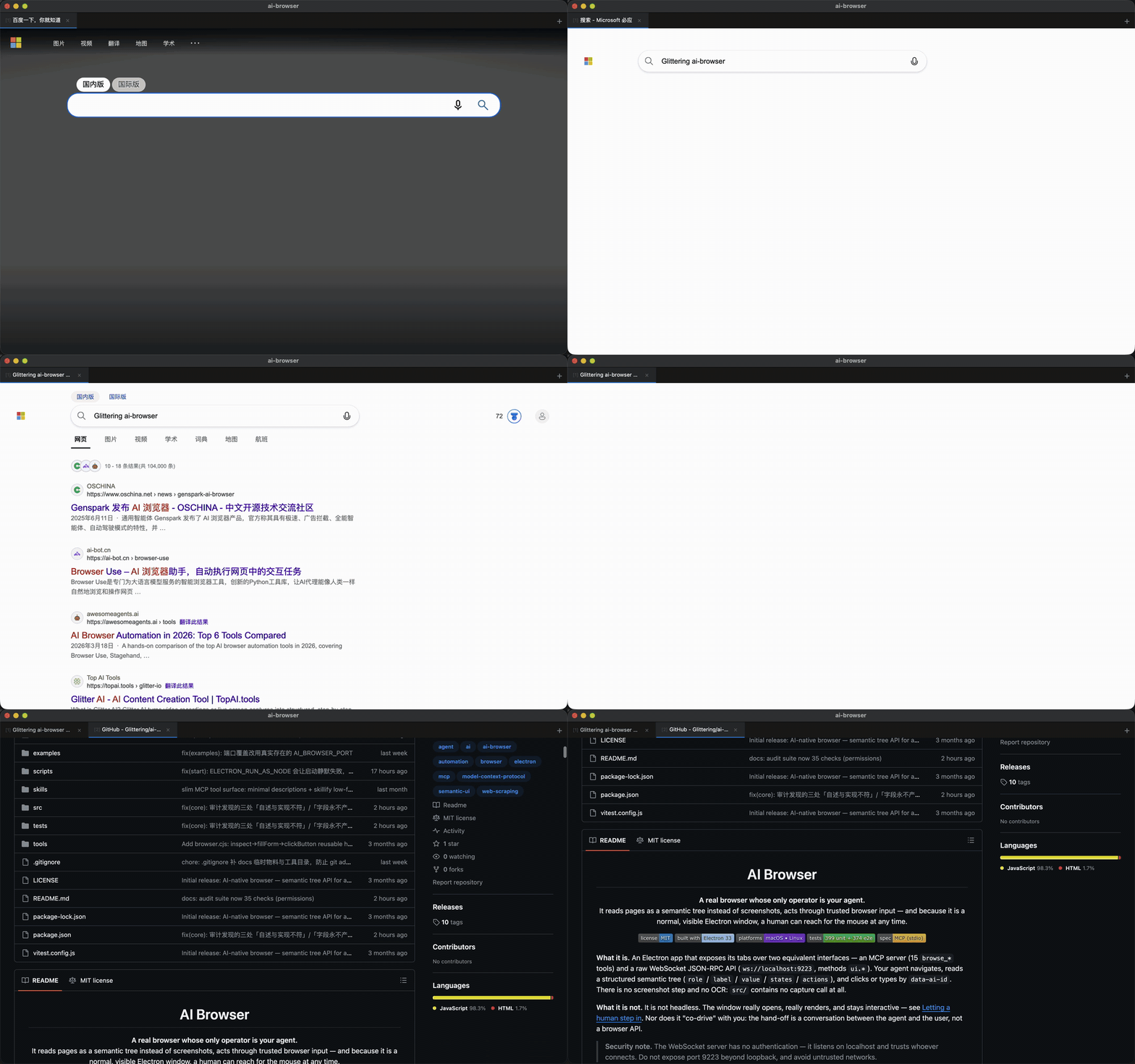
Reproduce: npm start then node examples/demo.mjs
What it is. An Electron app that exposes its tabs over two equivalent interfaces — an MCP server
(17 browse_* tools) and a raw WebSocket JSON-RPC API (ws://localhost:9223, methods ui.*). Your
agent navigates, reads a structured semantic tree (role / label / value / states / actions),
and clicks or types by data-ai-id. There is no screenshot step and no OCR: src/ contains no
capture call at all.
What it is not. It is not headless. The window really opens, really renders, and stays interactive — see Letting a human step in. Nor does it "co-drive" with you: the hand-off is a conversation between the agent and the user, not a browser API.
Security note. The WebSocket server has no authentication — it listens on localhost and trusts whoever connects. Do not expose port 9223 beyond loopback, and avoid untrusted networks.
Install
Requires Node ≥ 18 and a desktop session (this is a GUI app).
Option A — npx (recommended for MCP users)
The package is published as @glittering0717/ai-browser; no clone needed:
npx -y @glittering0717/ai-browser --help
To open the visible browser window directly:
npx -y @glittering0717/ai-browser start
The first launch prepares the Electron engine (~100 MB, downloaded once). npm ≥ 11 blocks dependency install scripts by default — the launcher detects that and runs Electron's own downloader itself, so nothing extra is needed. If the download from GitHub releases is slow or blocked (common on mainland-China networks), point it at a mirror:
ELECTRON_MIRROR=https://npmmirror.com/mirrors/electron/ npx -y @glittering0717/ai-browser start
Option B — from source
git clone https://github.com/Glittering/ai-browser.git
cd ai-browser
npm install
If the Electron binary download is slow or fails outright, use the mirror:
ELECTRON_MIRROR=https://npmmirror.com/mirrors/electron/ npm install
Or make it sticky by creating a .npmrc in the project root:
electron_mirror=https://npmmirror.com/mirrors/electron/
Confirm the binary actually landed before blaming anything else — a missing binary still leaves you with an "install that succeeded":
ls node_modules/electron/dist
To check the install end to end:
npm start
A 1280×800 window opens and the terminal prints AI Browser WS server listening on ws://localhost:9223.
(The first tab opens on the default start page; ignore it and navigate away.)
Connect your agent
Add this to your MCP client's config file — Claude Desktop's config, ~/.cursor/mcp.json, or a
project-level .mcp.json:
{
  "mcpServers": {
    "ai-browser": {
      "command": "npx",
      "args": ["-y", "@glittering0717/ai-browser", "mcp"]
    }
  }
}
A ready-made copy sits in examples/mcp-config.json. From-source users
can instead point command: "node" at /absolute/path/to/ai-browser/src/main/mcp_server.js.
You do not need to start the browser yourself. On the first browse_* call the MCP server probes
port 9223; if nothing is listening it spawns Electron detached and waits up to 30 seconds for the
WebSocket server (the very first call may additionally spend time preparing the engine). If you would
rather keep one long-lived window shared by every client, run npx -y @glittering0717/ai-browser start
(or npm start from source) in a terminal — a second launch just focuses the existing window.
examples/AGENT_INSTRUCTIONS.md has a copy-paste prompt you can drop into a CLAUDE.md, Cursor Rule,
or any system prompt; it teaches the tool loop, the token-saving params, and when to ask a human.
Agents installing this themselves (Cline, etc.) can read the short machine-oriented
llms-install.md instead of this README.
The MCP tools
Source of truth: src/main/mcp_tools.js. There are 17 — a deliberately
small surface, since every tool schema is injected into your agent's context on every turn.
| Tool | One line |
|---|---|
browse_navigate | Load a URL in the active (or given) tab. |
browse_get_tree | Read the page as a semantic tree + page context (modals, messages, stats). |
browse_act | click / type (append at caret) / setContent (replace all) / clear / focus / hover / scroll_to / upload / get_value (read-only) / drag / press / wheel on a data-ai-id. |
browse_diff | snapshot a baseline, then diff to get added / removed / changed paths with before/after values. This is how you prove an action did anything. |
browse_capabilities | Probe what a page affords and which route to take on it (see below). |
browse_repaint | Force the compositor to redraw the tab when the window shows a stale page; returns repaint_count. |
browse_downloads | List a tab's downloads with their on-disk paths. Downloads are asynchronous — poll this after clicking an export button. |
browse_canvas | Read <canvas> through captured draw calls: list / read / configure / capture. Experimental — see the canvas section below. |
browse_evaluate | Run a JS expression in page context (5000-char cap, Node identifiers rejected). |
browse_scroll | Scroll the page, or scroll an element into view. |
browse_wait | Poll until button_enabled / modal_appeared / text_contains / url_contains. |
browse_list_tabs | List open tabs (id, url, title, active). |
browse_new_tab | Open a new tab, optionally at a URL. |
browse_close_tab | Close a tab by id. |
browse_set_active_tab | Switch which tab subsequent calls act on. |
browse_network | Chrome-DevTools-style network inspection: list (filter by method / URL / status / type), get (request + response headers and bodies), clear, configure. |
browse_quit | Shut the whole browser down and release the process. |
Prove it happened: browse_diff
A tool reporting success is not evidence that anything changed — the browser will happily
tell you a click landed on an element that ignored it, a drag completed when the app snapped the
node somewhere else entirely, or a keystroke went into a field that then cleared itself. Every
write should be wrapped in a snapshot/diff pair:
const base = await browse_diff({ operation: "snapshot", js: "app.graph.serialize()" });
await browse_act({ action: "click", target: "e:button-25" });
const d = await browse_diff({ operation: "diff", snapshot: base.snapshot });
// d.verdict === "changed"
// d.changed_paths → [{ path: "nodes[7].widgets.steps", from: 20, to: 21, reason: "value" }]
verdictis an explicit"changed"/"unchanged", so "nothing happened" is never inferred from an empty array you might have built wrong.- Every entry carries a
pathplus both values, so you can check why it changed. - Arrays are compared element-wise by index, not as sets: a moved node reads as changed entries, never as "one removed + one added" (which would look like two events instead of one reorder).
- Float noise is tolerated (
201354.48743718592vs...1859is not a change), but a real 22-unit coordinate shift is. - Omit
jsfor a site-agnostic DOM snapshot — role / label / value / disabled / size per element plus the page's visible text. No per-site JS required, and plain<div>status text changes are caught. - Omit
jsand it also fingerprints the app's own data model when the page hangs one offwindow. A canvas-rendered app's DOM is a still photograph — dragging a node or editing a widget repaints<canvas>and moves nothing the element walk can see, so a DOM-only diff answersunchangedto a write that demonstrably happened. ComfyUI's documented write path (node.widgets[].value) moved the DOM by exactly zero bytes. With the fingerprint, that same write shows up asmodel.fp(andmodel.countwhen the node count moved). It is read-only (loadGraphDatais a loader and is never called), it picks whichever candidate can actually be read back rather than whichever looks most promising, and a library namespace — which scores well on names and has no model to hand back — is skipped. rearm: truemoves the baseline forward for the next diff, so you can loop "assert nothing changed" across many steps;forget: truedrops it.- A throwing expression, a missing id, or a cross-tab comparison all return an explicit error. They never degrade into an empty snapshot, which would make every subsequent diff report "unchanged" — the one failure mode that turns all verification into false green.
Which route on this page? browse_capabilities
Before improvising on an unfamiliar site, ask. One call reports the semantic-tree size and its
role/action histogram, canvas count, same-origin iframes and their internal size, objects the app
hangs off window (auto-detected by shape: has .graph / ._nodes / getState / serialize),
the JSON endpoints it has already called, and a recommended route with the evidence for it:
L1_structured_data— the app exposes its own model; read and write the whole graph as JSON.L2_semantic_tree— enough elements to find targets by role/label and drive them bydata-ai-id.L3_pointer_gestures— only for what has no structured path (drag a node, draw a connection, wheel pan/zoom). Always follow withbrowse_diff.
It also flags traps explicitly: "the body is in a same-origin iframe" or "there are 7 canvases but only 17 semantic elements — stop trying to hit canvas-drawn items with coordinates and go find the data model instead".
Notes that save round-trips:
browse_get_treeacceptssubset: "interactive"to drop layout-only branches,mode: "diff"to return only nodes that appeared/disappeared since the last read, andax: trueto read through the accessibility layer (links then carryurl).typeappends;setContentreplaces. They used to be identical (both replaced the whole content), which made incremental editing impossible — insert a Weibo-style topic tag and the nexttypewiped it. Nowtypewrites at the caret (params.at:end(default) /start/cursor), so "insert a topic, then keep writing the body" works. To refill a field, usesetContent(orclearfirst).browse_actalso takesaction: "get_value"— a read-only way to fetch an element's full text, which matters becausebrowse_get_treetruncates long values at 200 characters (see below).- Pointer gestures are first-class:
drag,pressandwheel. Canvas / board / sortable UIs are built on them, and no amount ofevaluatecan substitute — syntheticPointerEvents do not move a framework that uses Pointer Capture (measured on a React Flow canvas: the node's position changed by exactly 0,0), so these go through CDP trusted input.drag:dx/dy,to_x/to_y, orto_target(drop onto another element).from_anchor/to_anchor(left/right/top/bottom/center) grab a side — a side prefers that element's connection handle, but only if the handle is actually hit-testable (see the note below).from_x/from_ystart from a bare point (panning empty canvas), in which case notargetis needed.press:key(Delete,Escape,ArrowRight,Enter, … or a combo like"Meta+a"), orkeysfor a sequence. Deleting a node, undo, deselection — all keyboard-only.wheel:delta_x/delta_yplushold: ["Control"]for canvas zoom.browse_scrollcannot do this — it callswindow.scrollBy, which an infinite canvas ignores entirely.- The drag result reports
drag_from/drag_toand which element actually sits at each point (from_at_id), pluswarning+start_hit_target: falsewhen the press landed on a different element — visual overlap otherwise looks exactly like "drag does nothing".
actionsis inferred from behaviour, not fromrole. An element whose computedcursoris a drag cursor, or that hasdraggable="true"/cursor: pointer/ anonclick, now advertisesdrag/clickin the tree even when its role isgroup. Without this, a canvas full ofrole: groupnodes reportedactions: []and the agent could not tell they were interactive at all.
browse_networkcaptures requests from the moment a tab opens, including POST request bodies — no subscription needed. Request headers are redacted by default (authorization/cookie→[REDACTED]); passinclude_sensitive_headers: trueto see them.- Most tools take an optional
tabfor multi-tab work; without it they target the active tab.
Letting a human step in
It does not steal your focus
The agent works fine while the window is in the background. CDP trusted input
(Input.dispatchKeyEvent / Input.dispatchMouseEvent) does not need the window to be frontmost, and
the app already runs with disable-backgrounding-occluded-windows, disable-renderer-backgrounding
and disable-background-timer-throttling, so a background window is neither throttled nor losing
events.
That was already true for act / get_tree / evaluate / peek / scroll — but two paths used to
drag the window to the front on every call: new_tab and set_active_tab (they called
webContents.focus(), which activates the whole window). On top of that the window was shown with
show() at boot even when the agent launched it. Both are fixed:
new_tab/set_active_tabno longer take window focus. The page still thinks it is focused —Emulation.setFocusEmulationEnabledkeepsdocument.hasFocus()and focus-dependent lazy-loading behaving normally — while the keyboard focus stays wherever you left it.- When the agent launches the browser (over MCP), the window appears via
showInactive(): visible, but not stealing focus. When you runnpm start, it comes up in front as usual.
So the window stays visible — that is the whole point — but it is not dragged to the front while the agent drives. You can keep working.
AI_BROWSER_FOCUS=always npm start   # pre-1.2 behaviour: show + moveTop + focus on every action
AI_BROWSER_FOCUS=never npm start    # never change focus (the window is still shown)
Default is auto: keep the window visible (restore it if it was minimised or hidden), but never steal
focus. Whatever the value, the window is always displayed — that is a product invariant.
npm run focus asserts all of this from the outside (macOS lsappinfo, no accessibility
permission needed) and includes a deliberate control group configured to steal focus — so the suite
would go red if the measurement ever stopped working, instead of passing vacuously.
It also proves the stronger claim — that the window does not need to be in the foreground at all.
With another app holding the foreground, it runs a representative slice of the API and checks the real
result of each one: typing lands, a click fires exactly once, get_tree returns a tree, canvas
getImageData returns real pixels, network_list sees the request, navigate completes — and after
sitting in the background for 10 seconds it still does all of the above without ever coming forward.
Note on
document.hasFocus(): it returnstrueeven when the window is in the background, becauseEmulation.setFocusEmulationEnabledis deliberately on — that is what keeps focus-dependent lazy-loading and animations from stalling. So it is not a valid way to detect "am I in the foreground"; the test uses the external observer instead.
This is the part most easily misunderstood, so plainly: the agent drives the browser, and the human can always take over the window.
Because it is a real Electron window, a person can click, type, scroll, and log in exactly as they would in Chrome — with the mouse and keyboard, at any moment, with no permission to request. That covers the things an agent genuinely cannot do:
- Login / SSO and anything behind a password the agent shouldn't have
- QR-code scans (app-to-web authorization)
- Slider and image CAPTCHAs, SMS or email codes
- Payment confirmation, risk-control interstitials, OTP screens
- Anything where continuing would mean fabricating credentials
How the hand-off works: there isn't one — in the browser. Nothing coordinates it on AI Browser's side, and nothing needs to. It is a conversation between the agent and its user:
- The agent hits something it cannot do.
- It says so in chat, plainly: "Please scan the QR code in the browser window, then reply 'done'."
- It stops and waits for the reply — no retry loops on clicks that cannot work.
- After "done" it re-reads with
browse_get_treeto confirm the new state, then continues.
See examples/with-human.mjs for the scripted equivalent: it prints a
prompt and waits for Enter over readline. The browser has no idea any of that happened.
Two practical consequences for the agent:
- Never call
browse_quitwhile a human is working in the window. It tears down the window and exits the process — anything half-solved is lost. Quit when the task is finished, not before. - Login state persists. Tabs live in the
persist:ai-browsersession partition, so cookies and sessions survive a restart; usually a human only has to step in once per site per machine.
Raw WebSocket API
MCP is a thin stdio adapter. Anything MCP can do is reachable directly over JSON-RPC 2.0 at
ws://localhost:9223 from any language. Source of truth: the method switch in
src/main/ws_server.js.
| Method | Purpose | Maps to |
|---|---|---|
ui.get_tree | Semantic tree (+ context). Params: focusedOnly, ax, subset, mode, tab | browse_get_tree |
ui.act | params.action + params.target; per-action args nested under params.params | browse_act |
ui.navigate | Load a URL (params.url, optional tab). Returns {ok, error?} — {ok:false} always carries a reason. | browse_navigate |
ui.snapshot / ui.diff | Capture a baseline (params.js, optional label) and diff against it (params.snapshot, rearm, forget) | browse_diff |
ui.capabilities | Probe the page: tree histogram, canvas, iframes, app globals, endpoints, recommended route | browse_capabilities |
ui.repaint | Force the compositor to redraw a tab; returns repaint_count so a repaint is provable | browse_repaint |
ui.evaluate | Run JS in page context, same guard as MCP | browse_evaluate |
ui.scroll | Scroll page or element (direction, amount, target). Document scrolling only — for canvas apps use ui.act{action:'wheel'}. | browse_scroll |
ui.wait | Poll until a condition or timeout | browse_wait |
ui.new_tab / ui.close_tab / ui.list_tabs / ui.set_active_tab | Tab management | browse_*_tab |
ui.subscribe / ui.unsubscribe | Event subscription; params.events, "*" for all | — (WS only — see below) |
ui.downloads | This tab's downloads with on-disk paths (state, received_bytes, dir) | browse_downloads |
ui.get_focused | The focused element subtree | — |
ui.peek | Hover a folded/hover-only affordance and return the diff, without committing | — |
ui.network_body | Response body by URL substring (url_pattern) | — (superseded by browse_network) |
ui.quit | Graceful shutdown | browse_quit |
Note two differences from the MCP spelling, both visible in the switch above: it is focusedOnly
(camelCase), not focused_only; and ui.act nests its per-action arguments under params.params.
ui.subscribe / ui.unsubscribe are also valid as notifications with no id.
ui.subscribe is deliberately not exposed as an MCP tool: MCP's stdio path drops
server→client notifications, so an MCP caller would subscribe and then never receive a single
event. Real-time events are a raw-WebSocket capability only. For anything pull-based, use
browse_network instead.
import WebSocket from 'ws';

const ws = new WebSocket('ws://localhost:9223');
let id = 0;
const call = (method, params) => new Promise((resolve, reject) => {
  const myId = ++id;
  const onMsg = (raw) => {
    const m = JSON.parse(raw.toString());
    if (m.id === myId) { ws.off('message', onMsg); m.error ? reject(new Error(m.error.message)) : resolve(m.result); }
  };
  ws.on('message', onMsg);
  ws.send(JSON.stringify({ jsonrpc: '2.0', id: myId, method, params }));
});

ws.on('open', async () => {
  await call('ui.navigate', { url: 'https://example.com' });
  const { tree } = await call('ui.get_tree', { subset: 'interactive' });
  console.log(tree.role, tree.children?.length);
  ws.close();
});
Error codes follow JSON-RPC: -32700 parse error, -32601 unknown method, -32602 invalid params
(the ui.evaluate guard returns this), -32603 internal error.
How it works
   agent ── MCP stdio (17 browse_*) ──┐
   agent ── WS JSON-RPC :9223 (ui.*) ─┤
                                      ▼
 ┌──────────────────────────────────────────────────┐
 │ Electron main                                    │
 │   index.js        window · tab strip · watchdog  │
 │   ws_server.js    JSON-RPC routing, event stream │
 │   page_manager.js tabs · id-matched IPC · CDP    │
 └───────────────┬──────────────────────────────────┘
                 │ IPC (request-id matched)
 ┌───────────────▼──────────────────────────────────┐
 │ preload (contextIsolation:true, nodeIntegration:false)
 │   bridge.cjs · extractor.cjs · actions.cjs ·     │
 │   watcher.cjs  (captcha / message / state scan)  │
 └───────────────┬──────────────────────────────────┘
                 ▼
              live DOM → semantic tree
Reading. Each node in the returned tree carries a data-ai-id — the element's own DOM id when it
has one, otherwise a generated e:tag-N. Ids are stable across reads: an element that already
carries one keeps it, and generated ids come from a monotonic counter, so inserting an element above
others does not renumber them. (It used to: a stale id then silently resolved to a different element,
and the act reported success while hitting the wrong thing.) They reset on navigation. Alongside the id
come role, label, value, states, and actions, plus a context block — open modals, transient
messages, required-field hints, coarse stats. Two read paths exist: the default preload extractor, and
the accessibility layer behind ax: true (which additionally gives links their url).
The first read of a page annotates elements with data-ai-id; that is the one write a read performs,
and it is what makes later acts resolvable. Repeat reads write nothing. An attribute is only set
when its value actually changes, because real Chromium delivers a MutationObserver record even when
you set an attribute to the value it already holds — measured at 4001 records per read on a
4000-element page before this guard existed. A read that spams the page's own observers is a read that
perturbs the thing it is measuring.
Writing. Actions are trusted browser input, not synthesized JS. The main process drives the
page over the Chrome DevTools Protocol — Input.dispatchMouseEvent for clicks, and per-character
Input.dispatchKeyEvent (rawKeyDown → char → keyUp) for typing — then validates that the click
actually landed via elementFromPoint. Because the events arrive as real keyboard and mouse input,
Draft.js, ProseMirror, CKEditor, Quill, and plain <textarea> all work through the same path without
per-framework branches.
Where it is thin. extractor.cjs is a heuristic over the DOM, not a clean-room specification: it
handles ordinary pages well and will mislabel exotic ones. The window runs with hardware acceleration
off plus three Chromium switches
(--disable-backgrounding-occluded-windows, --disable-renderer-backgrounding,
--disable-background-timer-throttling) so that an IDE window on top of the browser doesn't cause
injected input to be silently dropped.
Examples
Runnable scripts live in examples/ and connect straight to ws://localhost:9223:
| File | What it shows |
|---|---|
mcp-config.json | Minimal MCP client config; replace the placeholder path. |
AGENT_INSTRUCTIONS.md | Copy-paste instructions for your agent, incl. the human hand-off protocol. |
raw-ws.mjs | Smallest possible raw WebSocket client. |
read-page.mjs | Load one page, print its interactive elements. |
with-human.mjs | Full flow for when a human has to step in. |
node examples/read-page.mjs
Troubleshooting
The page updated but the window still shows the old one. This used to require clicking tabs
back and forth, because the only thing that forced the compositor to redraw a BrowserView was
setActiveTab doing removeBrowserView + addBrowserView + setBounds — navigation never did it.
Now every navigation signal triggers it: did-navigate, did-navigate-in-page (SPA route changes
fire no load event at all), did-frame-finish-load (a canvas editor inside an iframe boots long
after the top document finished), plus window show / restore / focus — which matters here
because this window is designed never to steal your focus, so it sits behind your editor for
minutes at a time. If it still looks stale, ui.repaint forces it on demand and returns
repaint_count so you can confirm a repaint actually happened.
An action reported success but nothing changed. Two causes worth knowing:
- Over raw WS,
ui.actnests its per-action arguments underparams.params—{action:"type", target:"<id>", params:{text:"…"}}. Flattening it to{text:"…"}passes an empty string, which used to hit the idempotent short-circuit and reportsuccesswith nothing typed. It now returns an explicit error instead. - Sometimes the action genuinely did nothing (an overlay ate the click, the app reverted the
change). That is what
browse_diffis for — wrap the write in a snapshot/diff pair rather than trusting the return value.
An action never returns at all. Every path that goes into the page is bounded by a deadline, so a
page whose main thread is blocked (a heavy recompute, a huge JSON.parse, a third-party script in a
loop) can never hang your tool call. Measured against a page that occupies its main thread for 120s:
| Call | Behaviour |
|---|---|
ui.get_tree / ui.get_focused | errors at 5s (getTree timeout) |
ui.evaluate | errors at 10s (CDP 5s, then the preload fallback's 5s) |
ui.act | returns at 15s with success:false, timed_out:true |
ui.capabilities | returns normally (~15s) |
ui.list_tabs / ui.network_list | instant — they never touch the page |
ui.act's budget scales with the work requested, so a legitimate long operation is not killed: type
/setContent budget text.length × interval_ms, drag budgets duration_ms + steps, press
budgets repeat × interval_ms, clear gets 20s. Override with params.params.timeout_ms
(1s floor, 300s cap) or globally with AI_BROWSER_ACTION_TIMEOUT_MS. A timeout explicitly warns that
the action may have partially applied — pointer already down, half the characters typed — so
re-read before retrying rather than firing the same write twice.
The app restarts itself. Electron's NetworkService can wedge as a whole: the port still listens,
every navigation fails with ERR_FAILED, and curl works fine. A watchdog probes from the main
process every 30s; after 5 consecutive failed sweeps it broadcasts network_wedged and relaunches
(the MCP client reconnects on its own). With a 5s per-request deadline that puts a genuine wedge at
roughly two minutes.
- Change what it probes:
AI_BROWSER_WATCHDOG_URLS=https://www.baidu.com/,https://example.com/(comma-separated). The default isexample.compluswww.baidu.com, and that plurality is deliberate — the network counts as alive if any target answers, so one flaky or geo-blocked host can't trigger a reboot loop. Never set a single target that your network can't reach. - Turn it off entirely:
AI_BROWSER_WATCHDOG=0(also acceptsoff/false/no).
Port 9223 is already busy. Another instance — often a stale one from an earlier session — owns the port, or something else does. Either quit that instance, or move AI Browser off it:
AI_BROWSER_PORT=9224 npm start
Keep the port consistent across every client; both the app and the MCP server read
AI_BROWSER_PORT from src/shared/config.js.
Electron is missing or launch fails immediately. The ~100 MB engine never landed. With the npm
package, just launch again — the launcher downloads it itself (set ELECTRON_MIRROR for a slow
network, see Install). From source, check ls node_modules/electron/dist and re-run
npm install with the mirror. Setting AI_BROWSER_PORT will not help here — this is a missing
binary, not a port conflict.
Input is accepted but nothing happens. Usually the window is occluded. The three
disable-*-backgrounding switches above exist to prevent it, but if you still see clicks that report
success while nothing moves, bring the AI Browser window to the front and try again.
Login state keeps getting lost. Sessions persist under ~/.ai-browser. If you override it, note
that separate AI_BROWSER_USER_DATA directories are separate session stores — "logged in" in one is
not "logged in" in another:
AI_BROWSER_USER_DATA=~/.ai-browser-work npm start
Test & dev
npm test             # vitest — 411 tests across 27 files
npm run smoke        # Electron contract layer, offline fixture      — 31 checks
npm run capabilities # text fields, canvas, page source, network, DOM editing — 54 checks
npm run richtext     # rich-text editors, nested menus, forms, errors, tags, upload — 117 checks
npm run network      # request log, POST bodies, headers, pagination, redaction — 41 checks
npm run value        # value truncation contract + read-only get_value — 15 checks
npm run canvas       # canvas draw-call capture — 13 checks
npm run modeldiff    # canvas app data-model diff (the "unchanged" false green) — 12 checks
npm run audit        # every advertised action must exist; wait/downloads/permissions/quit — 35 checks
npm run focus        # no focus stealing + full capability while backgrounded — 32 checks
npm run interact     # trusted drag / key press / wheel (pointer gestures) — 31 checks
npm run view         # viewport repaint + snapshot/diff verification — 28 checks
npm run realsites    # navigate/read/act against a matrix of real sites
All e2e suites boot a genuine Electron against offline fixtures and exit non-zero on failure.
Together they cover what jsdom structurally cannot: preload integrity, ui.evaluate under a strict
CSP, CDP click hit-testing, multi-tab lifecycle, event fan-out, and the evaluate guard rails.
They all need the WS port free — stop a running npm start first, or point them elsewhere:
AI_BROWSER_PORT=9333 npm run smoke
They boot their own Electron in an isolated profile (/tmp/ai-browser-e2e-<port> by default), so
they never touch your real ~/.ai-browser profile — the one holding your logged-in sessions. They
also clean up their Electron on exit, including on Ctrl-C / timeout / crash: an orphaned process
would otherwise hold the port and the single-instance lock, and you would find npm start refusing
to launch with "another AI Browser instance is already running".
What each capability suite proved
npm run view — the suite for the two things that quietly produce false confidence.
Viewport. A BrowserView can be fully loaded and still show stale pixels, and the only thing
that forced a repaint was switching tabs — which is exactly why "click the tabs a few times" used to
fix it. It now fires on every navigation signal and on window show/restore/focus. The suite
proves it from the cumulative repaint counter, not from a screenshot: a screenshot needs eyes, a
counter falsifies. It also proves the debounce doesn't self-trigger (a repaint loop would flicker
forever) and that repainting changes no page data.
Verification. ui.diff is only useful if it is right in both directions, so each assertion comes
in pairs: a real change must be reported and an unchanged page must not be. The negative
controls are the point — a diff that invented changes, or a snapshot that quietly became empty on
error (making every later diff report "unchanged"), would turn all verification into false green.
The suite also pins the failure mode where a mistyped parameter layer made type report success
without typing anything.
npm run richtext — the deepest suite. Rich-text editors and formatting, two- and three-level
nested menus, required vs optional fields (native required, aria-required, red asterisks),
error and warning surfaces (field-level, form-level, toasts, modal dialogs), radio / checkbox /
select / combobox, tag inputs and Weibo-style topic insertion, and image upload. Every
action assertion is checked against the real DOM, not just the semantic tree.
Two things it changed in the product:
- A click on a button that dismisses itself used to fire twice (the hit-test ran after the dispatch, found the target gone, and fell back to a second click). Duplicate submissions, duplicate mentions. Clicks now hit-test before dispatching and no longer fall back.
- Field-level errors used to be invisible — they are carried by bare
<span>s with no ARIA role and were pruned as layout. They now surface incontext.errors/context.field_errors, scanned across the whole document rather than only inside dialog containers. - Three reads used to depend on a container's class name. Red asterisks were scanned only
inside containers whose class happened to contain
modal/dialog/popup/…, so a plain-page form's required fields were invisible;modals[].fields[]entries carried noid, so an error read for one field could not be mapped back to it; and auxiliary text in bare<span>/<div>(character counters, format hints) was pruned from the semantic tree with no second path at all. All three now sit at the top level ofcontext:required_hintsis scanned across the whole document,fields[]entries are shaped identically inmodals[]andforms[](idincluded, verified against the real DOM), and form-adjacent bare-span text lands inhints— the semantic tree itself keeps its pruning, so the token cost is unchanged.
npm run capabilities — typing into every kind of text field (plain inputs, password,
number, textarea, contenteditable, plus readonly / disabled / maxlength — including
CJK input and 1000-character text), reading page source, capturing response bodies, and editing
the page through ui.evaluate.
npm run network — that a POST can be captured with its full request body, that headers are
redacted by default, and that bodies paginate instead of being silently truncated.
npm run modeldiff — the suite for the one place ui.diff used to lie. A canvas-rendered app's
DOM is a still photograph: dragging a node or editing a widget repaints <canvas> and moves
nothing the element walk can see, so the DOM-only default snapshot answered unchanged to a write
that demonstrably happened — including ComfyUI's documented write path, node.widgets[].value,
which moves the DOM by exactly zero bytes. The suite proves the model fingerprint on a self-built
fixture (never someone's live project, where snapping and quantization make "move it back" untrue):
- adding a node →
verdict: changed, and the diff paths are onlymodel.count/model.fp— zeronodes.*and zerotext*, which is how the test proves the credit belongs to the model rather than to the DOM happening to move; - the ComfyUI case — changing one widget value with the node count unchanged → still
changed, and specificallymodel.fpwithoutmodel.count; - both directions: an untouched page must stay
unchanged, and a plain page with no app object must never acquire amodelfield (no false reds from machinery that invented a candidate); - the model signal must not mask DOM changes — when both move, both are reported.
Two design points the suite pins, both learned the hard way:
- selection is by what can actually be read back, not by how promising the name looks. A library namespace scores well on names and has no model to hand back, so returning null is what disqualifies it;
- the rank comes from the strongest accessor the object has, while the read goes through
serialize()when one exists (it returns JSON-safe data; the live collections are usually circular). Collapsing the two makes every candidate reportserialize, they all tie, and a mere serializer can outrank the real model — that bug was caught by the tie-break test, not by review.
Canvas: read through draw calls, not pixels
The semantic tree reports a <canvas> as role: canvas and nothing more — no text, no pixels.
browse_canvas fixes that without taking a screenshot: a recorder is injected into the
page's main world and wraps the Canvas API, capturing the draw calls themselves.
The point is that a canvas is drawn by code, so the code already knows what it drew. fillText
hands us the literal string — text inside a canvas needs no OCR:
// browse_canvas(operation: "read", canvas_id: "canvas:nav-…:frame-main:1")
{
  "kind": "2d", "readability": "semantic",
  "texts": [
    { "seq": 2, "method": "fillText", "text": "确认支付",
      "bounds_canvas": { "x": 20, "y": 40, "width": 120, "height": 30 },
      "style": { "font": "20px sans-serif", "fill_style": "#000000" } }
  ],
  "regions": [ { "seq": 3, "kind": "rect", "method": "fillRect", "bounds_canvas": {…} } ]
}
The recorder is a tee, never a takeover: it calls the native API first
(Reflect.apply(original, …)) and only then records, inside its own try/catch. A recording
failure can never change a return value, an exception, this, or draw order.
Two limits you should know:
- The hook installs after a page's first load, so anything drawn during that initial load is
not recoverable.
browse_canvas(operation: "configure", reload: true)reloads with the hook in place and gives you the complete history. (Root cause: awaited CDP commands hang on a freshly-created tab in Electron, so installation has to wait fordid-finish-load.) - WebGL is opaque. Vertices, textures and shaders are not reversible to business meaning, and
text is usually a glyph atlas. Such canvases are marked
opaquerather than guessed at. For that case only,operation: "capture"returns a PNG of the canvas region — off by default, explicitly invoked, and it costs your agent's vision tokens.
Disable entirely with AI_BROWSER_CANVAS_HOOK=0.
Boundaries worth knowing before you rely on them
node.valueis truncated at 200 characters. That is our limit, not CDP's. When it truncates the node carriesvalue_truncated: true,value_full_length, and a ready-to-callvalue_fetchhint — usebrowse_act(action: "get_value"), which is read-only and paginates.- Password fields expose no value at all — only
value_sensitive: true. The semantic tree is fed wholesale into your agent's context, so it should not carry secrets. js_erroris broadcast for every tab (each event carriestabId), so ordering and indices are not guaranteed. Filter bytabId; do not rely on "the first error is the one I care about".- A "connection handle" is only used if a real pointer could hit it. Many sites render handles as
pointer-events: none+opacity: 0decorations (verified on the rhtv canvas: every handle ispe:none / op:0). Anchoring on such an element would press the node body instead — so the resolver self-checks withelementFromPointand falls back to the element's border midpoint, reportingvia: "edge". If you seevia: "edge"where you expected a handle, that is the honest answer: drag-to-connect is not available at that spot, and the site must wire nodes some other way. ui.scrollis document scrolling. It doeswindow.scrollBy, so it is a no-op on canvas-based editors, maps and charts. Useui.act{action:'wheel'}there.
npm run realsites is table-driven from e2e/realsites/sites.cjs, currently 17 sites across 8 buckets
(search, finance, media, dev, ecommerce, spa, editor, marketplace). The run prints two numbers, and
deliberately never blends them into one:
- 行为正确率 / behaviour rate — did the browser behave as expected? Sites that require login or answer with an anti-bot wall count as passing when the wall is correctly detected, because that means the detection works.
- 内容成功率 / content rate — did we actually read the content? This counts only sites where
the tree came back above the site's
minNodes; a wall is not content.
Reporting a single "success %" would let a correctly-detected login wall inflate the content number. The run also prints the corpus size, runs-per-site, run count and timestamp, so any percentage in a report can be re-derived rather than taken on faith.
Layout:
src/main/      Electron main — ws_server · page_manager (tabs, CDP) · mcp_server · mcp_tools · axExtractor
src/preload/   bridge · extractor (semantic tree, data-ai-id) · actions · watcher
src/renderer/  tab bar UI
src/shared/    config (AI_BROWSER_* env) · guards (evaluate safety) · protocol · watchdog
e2e/           smoke_ws.cjs · realsites/
tests/         vitest unit suites
skills/        optional higher-level recipes built on the tools
src/shared/config.js is the single source for port, user-data dir, and UA overrides; guards.js is
the single source for evaluate limits, enforced identically on both transports.
Compatibility
| Dimension | Support |
|---|---|
| Agents | Any MCP stdio client; alternatively raw WS from any language |
| Node | ≥ 18 |
| OS | macOS and Linux — developed and tested on these. Windows: experimental and untested. It is plain Electron plus CDP, so it ought to build, but no one has run it; expect to debug npm install and the window layer yourself. Please report back either way. |
| Page frameworks | React / Vue / Angular / vanilla DOM — element locating is DOM-based, not framework-based |
| Editors | Rich editors driven through trusted input rather than per-framework code paths |
| Page types | Static and SPA; dynamic updates observable via the tree, dom_change / state_changed events |
Contributing
Issues and PRs are welcome, especially reproduction cases where the semantic tree gets a page wrong — those are the most useful bug reports this project can get.
What we try to hold the line on:
- Keep the core generic. Site-specific knowledge belongs outside
src/mainandsrc/preload. - IPC stays request-id matched, and CDP sessions stay reference-counted — tabs leak otherwise.
- No screenshots. If a change needs pixels to work, the design question is upstream of it.
evaluatestays guarded (length cap, no Node identifiers), on both transports at once.- Agent instructions change when behaviour changes. The MCP tool list,
ws_server.jsmethods, andexamples/AGENT_INSTRUCTIONS.mdmust agree; a doc that drifts frommcp_tools.jsis a bug.
License
MIT © Glittering