Douyin MCP Server
Extract watermark-free video links and copy from Douyin.
GitHub
1.3k
Try this MCPSponsoredDocumentation
短视频文案提取器



从短视频分享链接下载无水印视频,AI 自动提取语音文案。
✨ 功能特性
- 🎬 无水印视频 - 获取高质量无水印视频下载链接
- 🎙️ AI 语音识别 - 使用硅基流动 SenseVoice 自动提取文案
- 📑 大文件支持 - 自动分段处理超过 1 小时或 50MB 的音频
- 🌐 WebUI - 现代化浏览器界面,无需命令行
- 🔌 MCP 集成 - 支持 Claude Desktop 等 AI 应用
📦 使用方式
| 方式 | 适用场景 | 特点 |
|---|---|---|
| WebUI | 普通用户 | 浏览器操作,最简单 |
| MCP Server | Claude Desktop 用户 | AI 对话中直接调用 |
| 命令行 | 开发者 | 批量处理,脚本集成 |
🌐 WebUI (推荐)
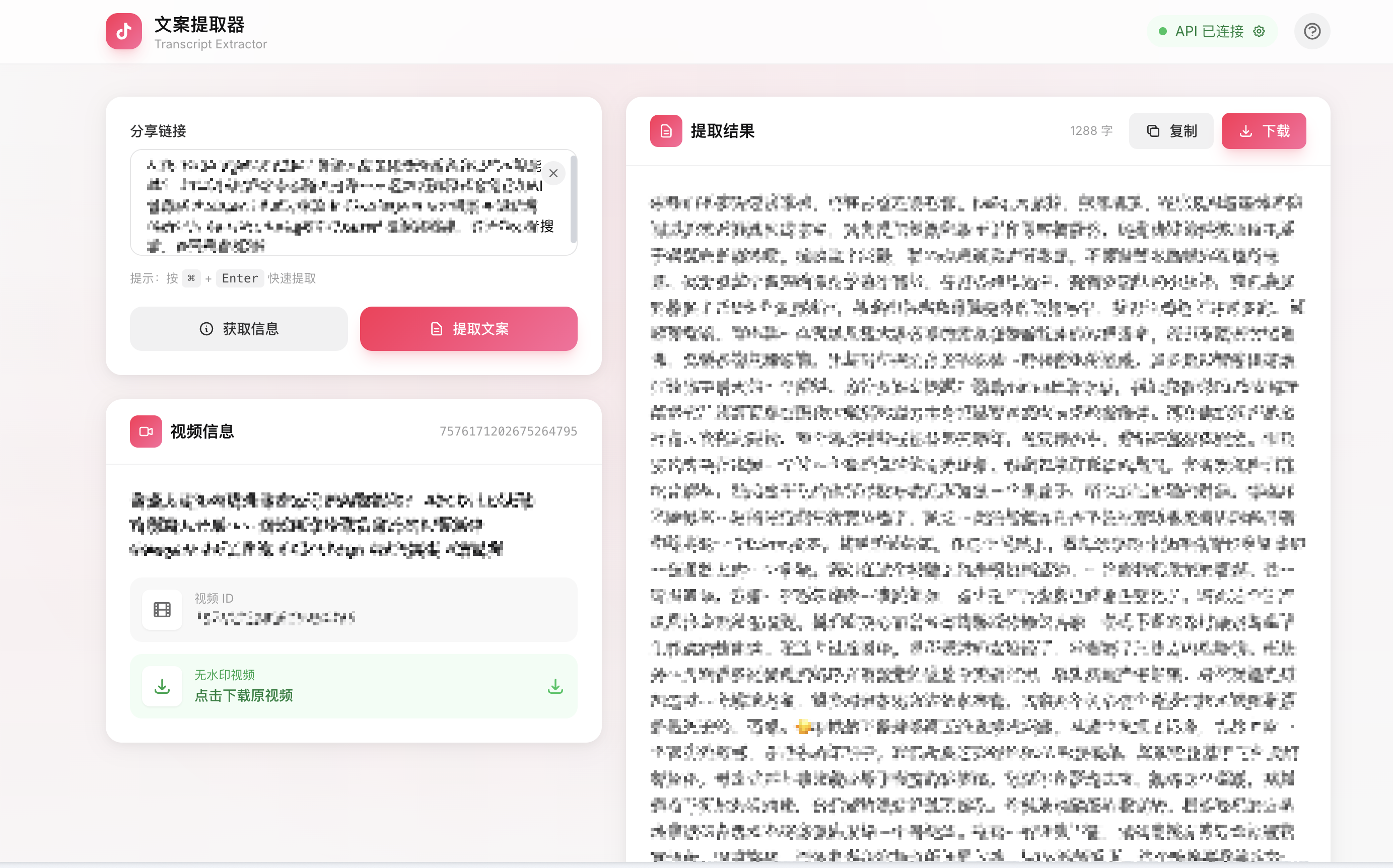
最简单的使用方式,打开浏览器即可使用。
快速开始
# 1. 克隆项目
git clone https://github.com/yzfly/douyin-mcp-server.git
cd douyin-mcp-server

# 2. 安装依赖
uv sync

# 3. 启动服务
uv run python web/app.py
打开浏览器访问 http://localhost:8080
配置 API Key
有两种方式配置 API Key:
方式一:浏览器内配置(推荐)
- 打开 WebUI 页面
- 点击顶部的「API 未配置」按钮
- 在弹窗中输入 API Key 并保存
- API Key 保存在浏览器本地,刷新页面后仍有效
方式二:环境变量
export API_KEY="sk-xxxxxxxxxxxxxxxx"
uv run python web/app.py
💡 获取免费 API Key:硅基流动(新用户有免费额度)
功能说明
| 操作 | 说明 | 需要 API |
|---|---|---|
| 获取信息 | 解析视频标题、ID,获取无水印下载链接 | ❌ |
| 提取文案 | 下载视频 → 提取音频 → AI 语音识别 | ✅ |
| 下载视频 | 点击下载链接保存无水印视频 | ❌ |
| 复制/下载文案 | 一键复制或下载 Markdown 格式文案 | - |
使用步骤
- 粘贴链接 - 将分享链接粘贴到输入框
- 点击按钮 - 选择「获取信息」或「提取文案」
- 查看结果 - 右侧显示视频信息和提取的文案
- 导出 - 复制文案或下载 Markdown 文件
🚀 MCP Server
在 Claude Desktop、Cherry Studio 等支持 MCP 的应用中使用。
配置方法
编辑 MCP 配置文件,添加:
{
  "mcpServers": {
    "douyin-mcp": {
      "command": "uvx",
      "args": ["douyin-mcp-server"],
      "env": {
        "API_KEY": "sk-xxxxxxxxxxxxxxxx"
      }
    }
  }
}
💡
API_KEY填写硅基流动的密钥。也兼容旧版配置:设置DASHSCOPE_API_KEY(阿里云百炼密钥)同样可用,两者设其一即可。
可用工具
| 工具名 | 功能 | 需要 API |
|---|---|---|
parse_douyin_video_info | 解析视频信息 | ❌ |
get_douyin_download_link | 获取下载链接 | ❌ |
extract_douyin_text | 提取视频文案 | ✅ |
recognize_audio_file | 识别本地音频文件 | ✅ (百炼) |
recognize_audio_url | 识别在线音频链接 | ✅ (百炼) |
对话示例
用户:帮我提取这个视频的文案 https://v.douyin.com/xxxxx/

Claude:我来帮你提取视频文案...
[调用 extract_douyin_text 工具]
提取完成,文案内容如下:
...
🛠️ 命令行工具
适合开发者和批量处理场景。
安装
git clone https://github.com/yzfly/douyin-mcp-server.git
cd douyin-mcp-server
uv sync
命令说明
# 查看帮助
uv run python douyin-video/scripts/douyin_downloader.py --help

# 获取视频信息(无需 API)
uv run python douyin-video/scripts/douyin_downloader.py -l "分享链接" -a info

# 下载无水印视频
uv run python douyin-video/scripts/douyin_downloader.py -l "分享链接" -a download -o ./videos

# 提取文案(需要 API_KEY)
export API_KEY="sk-xxx"
uv run python douyin-video/scripts/douyin_downloader.py -l "分享链接" -a extract -o ./output

# 提取文案并保存视频
uv run python douyin-video/scripts/douyin_downloader.py -l "分享链接" -a extract -o ./output --save-video
输出格式
output/
└── 7600361826030865707/
    ├── transcript.md    # 文案文件
    └── *.mp4            # 视频文件(可选)
transcript.md 内容:
# 视频标题

| 属性 | 值 |
|------|-----|
| 视频ID | `7600361826030865707` |
| 提取时间 | 2026-01-30 14:19:00 |
| 下载链接 | [点击下载](url) |

---

## 文案内容

这里是 AI 识别的语音文案...
📋 系统要求
| 依赖 | 说明 | 安装方式 |
|---|---|---|
| uv | Python 包管理 | curl -LsSf https://astral.sh/uv/install.sh | sh |
| Python | 3.10+ | uv python install 3.12 |
| FFmpeg | 音视频处理 | brew install ffmpeg (macOS) apt install ffmpeg (Ubuntu) |
🔧 技术说明
大文件处理
当音频文件超过 API 限制时(1 小时或 50MB),自动执行:
- 检测音频时长和文件大小
- 使用 FFmpeg 分割成 9 分钟的片段
- 逐段调用 API 转录
- 合并所有文本结果
API 说明
语音识别使用 硅基流动 SenseVoice API:
- 模型:
FunAudioLLM/SenseVoiceSmall - 限制:单次最大 1 小时 / 50MB(已自动处理)
- 费用:新用户有免费额度
📝 更新日志
v1.4.1 (最新)
- 🔧 MCP Server 修复 -
API_KEY现在正确对应硅基流动密钥,与文档一致;同时兼容旧版DASHSCOPE_API_KEY配置 - ♻️ 恢复工具 - 恢复
recognize_audio_file/recognize_audio_url工具及extract_douyin_text的context参数 - 🛡️ WebUI 安全加固 - 下载接口不再代理任意 URL,默认仅监听本机
- ⚡ WebUI 性能 - 提取文案不再阻塞其他请求
- 📦 依赖精简 - WebUI 依赖改为可选安装(
pip install "douyin-mcp-server[web]")
v1.4.0
- 🌐 WebUI - 新增浏览器可视化界面
- 🔑 浏览器配置 API Key - 无需环境变量
- 📑 大文件支持 - 自动分段处理长音频
v1.3.0
- ✨ Claude Code Skill 支持
- 📄 Markdown 格式输出
v1.2.0
- 🔄 API 升级
v1.0.0
- 🎉 首次发布
⚠️ 免责声明
- 本项目仅供学习和研究使用
- 使用者需遵守相关法律法规
- 禁止用于侵犯知识产权的行为
- 作者不对使用本项目产生的损失承担责任
📄 许可证
Apache License 2.0