MCP Pacemaker
Developer utility for local MCP process supervision and HTTP bridging, with isolated sessions, opt-in compatible sharing, and a web dashboard.
Documentation
mcp-pacemaker
A local process supervisor and transport bridge for your MCP servers. Manage server lifetime outside your editor or CLI, with opt-in pre-warming and compatible session sharing. The long-running bridge has no third-party runtime dependencies; the setup CLI and dashboards have their own dependencies.
Install from npm · Report a problem · Release notes
MCP hosts — editors (VS Code, Cursor, Claude Desktop) and CLIs (Claude Code, Copilot CLI,
Codex, Gemini) — run stdio MCP servers as child processes. When the host restarts, crashes, or
exits (every one-shot CLI run), those servers die. mcp-pacemaker runs your servers as
children of a small, long-lived bridge and exposes each over the MCP HTTP+SSE / Streamable HTTP
transport. Multiple hosts use one bridge, with an isolated child per session by default.
Opt into pre-warming or reuse one initialized child for compatible stateless tools sessions
with shared mode. Wire hosts to one bridge, or give each its own.
A cross-platform supervisor + OS auto-start keep the bridge itself alive across reboots and
sleep/wake, and a pluggable auth layer injects a fresh token per request for HTTP servers.
After a restart, a returning client can reuse a recorded session ID to re-establish its handshake against a fresh server. This does not restore arbitrary tool state or preserve TCP connections. Clients that stop retrying after a dropped connection may still need a reload; socket handoff is separate planned work.
Quick start
Install mcp-pacemaker 2.0.2 from npm. Use a maintained Node.js 22 or 24 release; Windows also needs PowerShell 7 and Windows Script Host. See installation requirements before setup.
npm install -g mcp-pacemaker@2.0.2
mcp-pacemaker --version
The version check prints 2.0.2 without running setup.
Before setup, have a readable JSON host configuration containing server definitions, or
prepare ~/.mcp-pacemaker/servers.json. Supported import sources are
vscode, cursor, claude (Claude Desktop), copilot-cli and gemini.
Codex and Claude Code are wiring destinations, not import sources.
Then run interactive setup:
mcp-pacemaker init
init detects supported hosts, imports one source host (or reuses servers.json),
asks for confirmation before wiring the selected hosts, registers OS auto-start and
starts the bridge. Reload or restart the selected hosts afterward.
Setup changes local configuration and auto-start. Importing can create or update
servers.json before the wiring confirmation. Existing JSON/TOML host files get a .bak
before replacement; native Claude Code registrations do not. Keep your own protected
configuration backup, especially before repeating setup.
--from chooses the import source; --client chooses wiring destinations. For example,
mcp-pacemaker init --from vscode --client codex imports VS Code's definitions and wires
Codex. Without --from, setup prefers the first detected JSON host; it does not merge
every detected host. Omit --yes to keep the confirmation prompt.
Check the running bridge:
mcp-pacemaker status     # status without entering first-run setup
mcp-pacemaker top        # live terminal dashboard
mcp-pacemaker doctor     # diagnose config, reachability, wiring
Prefer to drive it yourself? The same steps, one at a time
plan, install and emit accept any supported host as a wiring target.
import --from accepts the five JSON import sources listed above. Run import first unless
you already have servers.json; plan needs that file.
mcp-pacemaker import  --from <source>          # write servers.json from one JSON host config
mcp-pacemaker plan    --client <host>          # dry run: show what install would change
mcp-pacemaker install --client <host>          # wire one host (--port N gives it its own bridge)
mcp-pacemaker start                            # start the bridge
# e.g. import from Cursor, then wire three hosts to the same bridge
mcp-pacemaker import  --from cursor
mcp-pacemaker install --client cursor
mcp-pacemaker install --client claude-code
mcp-pacemaker install --client gemini
Run install once per host you want wired; repeat with --port N instead to give a host its
own bridge. emit prints the config entries without writing anything, if you'd rather paste
them in.
Which process-sharing mode?
Sharing a bridge does not automatically share a server process.
| Mode | Process behavior | Use when |
|---|---|---|
isolated (default) | One child per session | The server needs per-client workspace, account or conversation state |
pool (opt-in) | Pre-started, uninitialized children; each is assigned exclusively to one session | Startup is slow but sessions must remain separate |
shared (opt-in) | One initialized child for compatible sessions | Tools are stateless, inputs are explicit and the credential context is common |
Shared clients must send identical initialization parameters, including clientInfo, and
empty client capabilities. It is not automatic cross-editor sharing. See
shared-mode limits before enabling it.
Choosing a transport tool
Documentation checked September 27, 2026; this is a use-case guide, not a feature benchmark.
| Tool | Consider it when |
|---|---|
| Supergateway | You want command-line conversion between stdio and HTTP/SSE/WebSocket transports |
| mcp-proxy | You want a Python-based adapter between local stdio clients/servers and remote MCP transports |
| mcp-pacemaker | You want workstation process supervision, host wiring, auto-start, lifecycle diagnostics and explicit isolation/pooling/sharing policies |
These projects have overlapping capabilities. Reconnecting to a fresh server is not recovery of arbitrary application state, and a transport bridge is not a sandbox for untrusted tools.
Supported hosts
Editors and CLIs are auto-detected and wired to the bridge. Most hosts get Streamable HTTP
(/<name>/mcp); Cursor and Claude Desktop are wired over SSE (/<name>/sse) until Streamable
HTTP is verified there. The bridge centralizes auth, so hosts talk to it unauthenticated over
loopback.
| Host | Type | Config | Wiring | Transport |
|---|---|---|---|---|
| VS Code | editor | Code/User/mcp.json | direct edit | Streamable HTTP |
| Cursor | editor | ~/.cursor/mcp.json | direct edit | SSE |
| Claude Desktop | editor | claude_desktop_config.json | direct edit | SSE |
| Claude Code | CLI | ~/.claude.json | native claude mcp add | Streamable HTTP |
| Copilot CLI | CLI | ~/.copilot/mcp-config.json | direct edit | Streamable HTTP |
| Codex CLI | CLI | ~/.codex/config.toml | TOML (comment-preserving) | Streamable HTTP |
| Gemini CLI | CLI | ~/.gemini/settings.json | direct edit | Streamable HTTP |
Topologies: wire every host to one shared bridge (default), or give each host its own bridge
(install --client X --port N) — or any mix. status/doctor report all bridges + wired hosts.
Install
Use a maintained Node.js 22 or 24 release. Node 20 remains a compatibility target but is end-of-life, not a recommended secure runtime. The bridge has no npm runtime dependencies; the setup CLI and dashboard have their own dependencies.
Install the released package from npm.
Its repository link should point to
girishkvs/mcp-pacemaker.
Use an exact version for a repeatable installation:
npm install -g mcp-pacemaker@2.0.2
mcp-pacemaker --version
The current line uses the latest npm channel; the maintenance line uses legacy when that
channel has been published. Check the actual registry values before choosing a channel:
npm view mcp-pacemaker dist-tags --json
GitHub tags and npm publication are separate: a tag does not establish that the same
version or channel is available on npm, or that its package bytes are identical.
@1 and @2 are version ranges, not the maintained channels. They can select a version
withdrawn from a channel. upgrade --self resolves the installed major's channel and prints
an exact-version command; it never installs or downgrades anything.
Use a durable installation directory for a long-running service. Do not register autostart
from an npx cache: that cache may be removed later. Bare CLI invocation can enter the setup
wizard; use --version for a read-only installation check.
Windows setup also needs PowerShell 7 (pwsh) and Windows Script Host for its launcher.
Automatic configuration edits need .NET Framework 4.6.2 or newer. The bundled helper is
unsigned; npm provenance is not Authenticode signing or an application-control allowlist.
Windows ARM64 is not validated.
Version compatibility
This README describes 2.0.x. For 1.3.x immediate-save behavior, see the legacy documentation and support policy. Those documents do not establish that a legacy version is available on npm.
The historical baselines remain 1.3.0 / 2.0.0. The earlier 1.3.1 / 2.0.1 patch-pair evidence is not transferable to a new release. The selected 1.3.1 / 2.0.2 pair requires fresh exact-byte compatibility and service-replacement gates. A 2.x client handles legacy immediate saves. A 1.x client cannot write pooling settings to a 2.x bridge: update the CLI and refresh old dashboard tabs. Before downgrading, settle pending or interrupted transactions with 2.x. See the real-version gates for exact pairs; only the exact executed pairs are covered.
Command reference
| Command | What it does |
|---|---|
init [--from source] [--client a,b] [--yes] | Interactive setup: import one source, wire selected hosts, auto-start, launch |
status | Bridges, wired hosts, servers, and any server currently failing |
reload | Re-read servers.json into the running bridge without restarting it |
doctor | Diagnose config, bridge reachability, host wiring |
prewarm [--port N] [--json] | One view of stdio candidates, pools, shared-child state and measured process starts |
prewarm --enable <server> [--count N] | Explicitly enable warm slots; --disable <server> turns them off |
logs [--follow] [--since 2h] [--server name] [--grep text] | Read and filter durable logs, including retained rotation |
top / dashboard | Live terminal UI / web dashboard |
plan --client <host> | Dry run — show exactly what install would change |
import --from <source> | Build ~/.mcp-pacemaker/servers.json from one supported JSON host config |
install --client <host> [--port N] | Wire one host (its own --port gives it its own bridge) |
emit --client <host> | Print the config entries without writing anything |
start / stop | Start or stop bridges (--port for one, else all) |
upgrade [--self] | Re-wire hosts; --self only prints same-major, exact-version installation guidance |
update-check [--json] | Compare the installed version with its maintained npm channel |
uninstall | Stop managed bridges, remove auto-start, restore available host-file .bak copies; native entries are not restored |
Package installation does not upgrade a running backend.
upgraderewires host configuration; it does not replace package files, restart an adopted backend, or update its autostart path.
On start, pacemaker probes the port: it adopts an existing pacemaker bridge and refuses to collide with a foreign service (the wizard offers another port).
For a supervisor created by these patch releases, stop --port N verifies the matching
installation/configuration identity, waits for shutdown, and holds managed autostart until an
explicit start --port N. Normal OS shutdown does not create that hold. Use the matching
installation's CLI. Older or directly launched bridges have no managed stop record and are
refused rather than reported as stopped; disable their OS autostart and verify shutdown first.
On Linux/macOS the control socket lives beside the configuration, independent of TMPDIR.
Its complete path must fit within 103 UTF-8 bytes. install and init check this before
changing configuration or autostart; use a shorter configuration location rather than
relying on an implicit socket-location fallback.
Isolated and pooled stdio servers support HTTP+SSE (/<name>/sse) and Streamable HTTP
(/<name>/mcp). Shared mode requires Streamable HTTP.
install backs up an existing JSON/TOML host file to .bak; repeating it replaces that backup.
uninstall restores available host-file backups, leaves files without backups as-is, and
keeps servers.json. Native Claude Code registrations are not backed up or automatically
restored; record their original definitions separately and restore them through Claude Code.
Replacing or rolling back a running installation
Do not overwrite a package directory while its supervisor or bridge is running. Workers and native helpers can load later, and dashboard assets are read from disk: replacement can mix old and new code even when the original process still reports its old version.
Identify the selected port, installation directory, configuration directory and OS autostart entry first. Settle or cancel 2.x batches, recover interrupted transactions with 2.x, and keep a protected configuration backup. Disable the selected autostart entry and stop its supervisor and bridge before replacing files; prove they cannot restart during replacement. Keep the known-good installation until the new backend's version and instance identity are confirmed. Re-register the intended autostart path, refresh dashboard tabs, and confirm host wiring.
One global npm prefix holds one package version and its shared command names. Installing the
other major there replaces it. Separate ports do not isolate credentials, nonces, logs or
session files: manual side-by-side operation needs separate durable code roots and separate
configuration directories, plus separate host/HOME state for CLI-managed setup.
init/import --config selects a source host configuration, not an isolated runtime profile.
There is no package --profile or MCP_HOME switch. Do not use an unscoped stop/uninstall
operation when another instance must remain running.
Dashboards
Two views of the same live state. Neither is required — the bridge runs headless — but both are useful for answering "is this server actually up, and who is using it?"
Web dashboard
mcp-pacemaker dashboard, or open http://127.0.0.1:<port>/ui. It streams over SSE, so it
updates on its own without polling or a refresh.
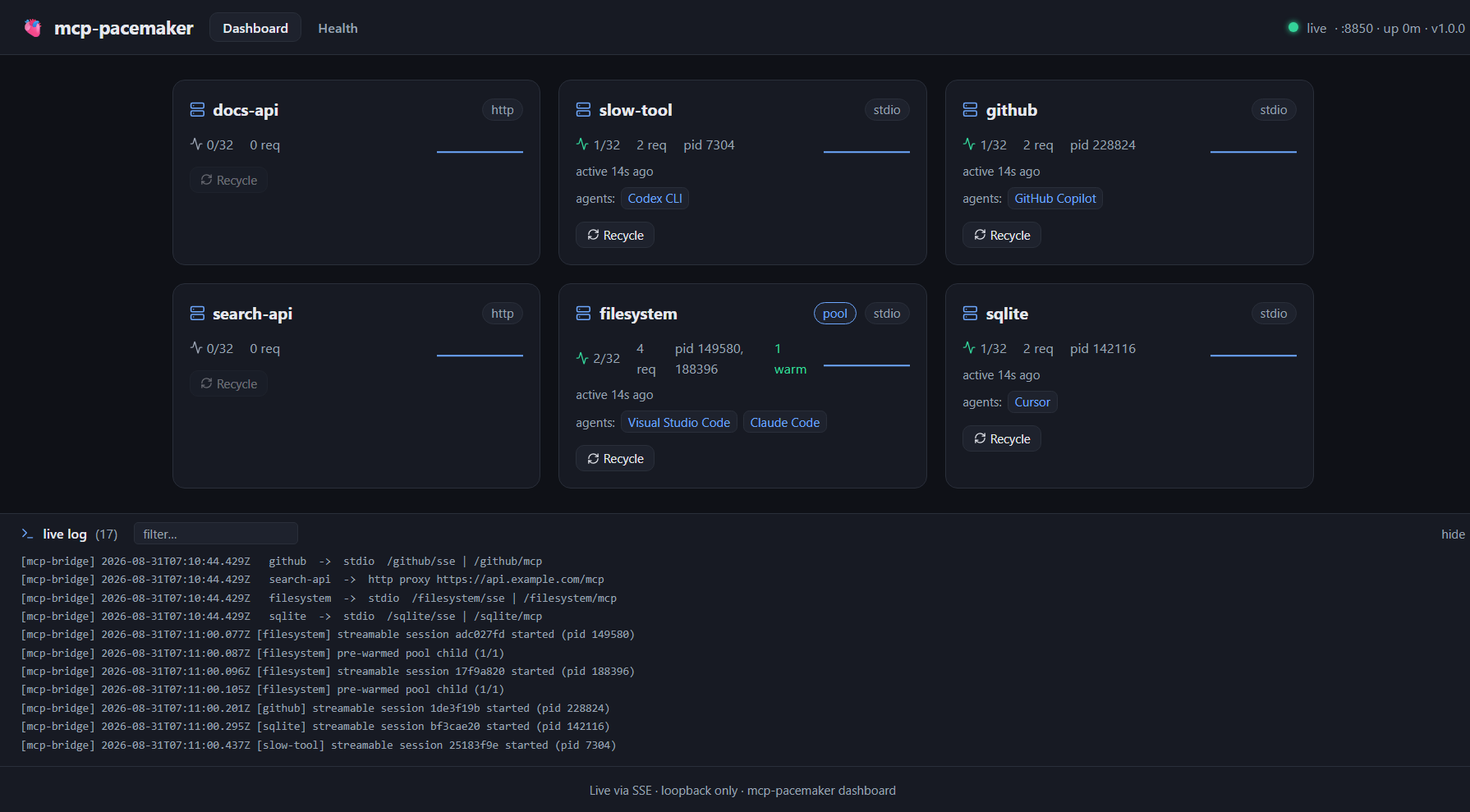
Per server it shows the transport (stdio / http), the sharing policy (pool when pre-warming),
live sessions against the cap, request count, the actual OS pids, the warm-pool count, how long
ago it was last used, and which clients are connected — above, one server is shared by
VS Code and Claude Code while others are held by Copilot, Cursor and Codex. Recycle restarts
that server's processes; it is disabled for servers with no session to restart. The live log at
the bottom is the bridge's own log, filterable.
Pre-warming controls
The Pre-Warming tab puts every stdio candidate, current pool and shared server in one table. It shows cold-start p50/p95, observed peak sessions, process starts, warm/target counts, shared-child state and pending work, and an action. HTTP proxies are excluded because the bridge does not launch their processes.
Choose Enable pre-warming (N) on a slow-server card or in the table. The button shows the exact warm count and the extra resident-process cost before you click. Nothing enables it automatically. Disable pre-warming removes idle warm children without killing active sessions after the change is applied.
Changes are batched in a complete pending copy of servers.json. Every accepted change
resets a five-second countdown. When editing stops, reload validates the pending copy, retains
the original as servers.previous.json, flips the pending file into place, and activates the
new settings. The dashboard shows Pending or Applying until that succeeds; active
mode and warm counts are not changed early. Reload now flushes the same batch immediately.
Cancel batch discards a pending batch without changing active settings. Undo batch stages the full previous configuration for another five-second batch, only if no intervening active-file edit has occurred. These actions affect the entire batch; the dashboard names all affected servers. An unrelated pending batch must be cancelled or applied before Undo.
The same controls are available without a browser:
mcp-pacemaker prewarm --port 8791
mcp-pacemaker prewarm --port 8791 --enable filesystem --count 2
mcp-pacemaker prewarm --port 8791 --disable filesystem
# Changes are queued; the printed command cancels a pending batch or undoes it after application.
Use --config <path> when the bridge's config and admin nonce are outside the default
directory. --json returns the measured snapshot. The CLI and UI use the same server
eligibility and recommendation data; a missing latency sample is not reported as a zero-cost
startup. The CLI returns after staging, so consecutive commands can join the same batch.
prewarm shows pending settings separately from active values. Config remains strict JSON,
not JSONC; the pending copy preserves unrelated JSON and requires a matching active revision.
Conflicts are reported rather than overwriting someone else's edit.
On Windows, saves run with the normal bridge account and use directory-inherited auditing. The dashboard gives a non-blocking notice: custom per-file audit rules may not carry forward to the new active copy. The retained original keeps its original metadata. No audit-read privilege, UAC prompt, or permanently elevated bridge is required.
This does not permit broader access to configuration data. Candidates must have appropriate access restrictions before any configuration bytes are written, and supported integrity protections must be retained. Actual source write denial or unsupported protection remains an error. Configuration operations run in a serialized worker so file inspection does not block MCP traffic.
Windows security inspection uses the bundled, own-source .NET Framework helper rather than starting PowerShell or compiling code on each write. Automatic edits require .NET Framework 4.6.2 or later; modern Windows includes it. The helper's source, build instructions and integrity metadata are included in the package. Windows ARM64 execution is not yet validated.
Staging requests and file commits each have a bounded execution budget; the acknowledged five-second batching delay does not keep the original HTTP request open. A commit already in progress can finish after its deadline. The result distinguishes a pre-commit failure from a committed or unknown outcome; it never automatically retries or claims a timed-out write was rolled back.
The two file moves are not an atomic exchange. Reload coordinates them with validated recovery state and non-replacing destination placement. Existing MCP traffic continues using the previous in-memory configuration during the flip; an external reader can briefly find the active path absent. Recovery must not overwrite a file created by an external editor. Reread the settings after an uncertain result.
Upgrading from 1.3.0
Version 2.0.0 changes the configuration-save protocol; it does not require a new servers.json
format. Update the bridge and CLI together, then reload any open dashboard pages. A 1.3.0
client with a current nonce gets HTTP 409 before staging, with an instruction to update the
client. An already-open tab retains the old nonce after a bridge restart and gets HTTP 401;
refresh it to load the new dashboard and admin session.
Custom API clients must send x-mcp-pooling-batch: 1. Treat HTTP 202 as acceptance, not
completion, and follow the returned batch ID in prewarm.batches until it is applied,
cancelled or failed. CLI scripts must likewise wait for application before relying on new
settings. Undo now restores the complete batch and may affect several servers.
Updated clients still understand the immediate HTTP 200 response from a 1.3.0 bridge.
Before downgrading, cancel or apply pending changes with 2.0 and resolve any interrupted transaction using 2.0 recovery. Stop that bridge before starting 1.3.0 with the active config. Do not use a 1.3.0 binary to recover 2.0 transaction files or delete those files to bypass a recovery error. Keep a protected backup of the configuration before changing versions. If the writer worker exits, further automatic edits are refused until the bridge restarts; existing MCP sessions continue.
Health
The Health tab runs the same checks as mcp-pacemaker doctor, so you can see them without a
terminal.
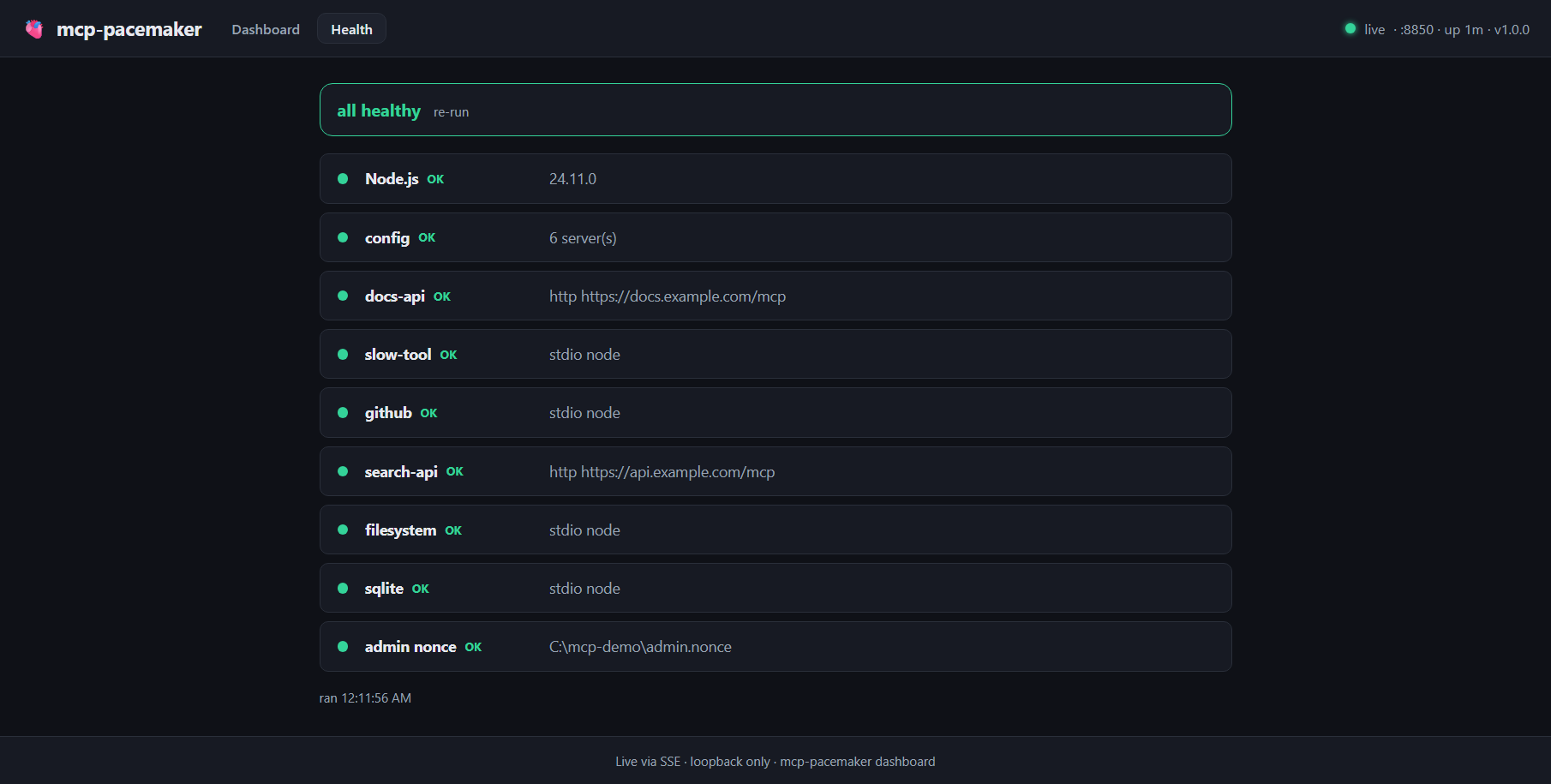
It checks the Node version, that the config parses, every server definition (including a stdio server whose relative path will not resolve from the directory it would run in — a failure that is otherwise silent until a client first calls it, and a server named after one of the bridge's own routes, which is unreachable), any server currently failing, and that the admin nonce file exists.
Terminal dashboard
mcp-pacemaker top is the same data as an Ink TUI, for when a browser is inconvenient:
🫀 mcp-pacemaker top                                     ● :8850 · up 176s · v1.1.0
SERVER            TYPE   HEALTH  SESS  WARM  REQ    PID       TOKEN   ERROR / CLIENTS
filesystem        stdio  ok      2     1/1   8      186276,12 -       ⇄ Visual Studio Code,Claude Code
github            stdio  ok      1     -     2      146436    -       ⇄ GitHub Copilot
sqlite            stdio  ok      1     -     2      102108    -       ⇄ Cursor
slow-tool         stdio  ok      1     -     2      103776    -       ⇄ Codex CLI
search-api        http   FAIL×3  0     -     4      -         42m     upstream rejected the crede
docs-api          http   ?       0     -     0      -         -
↑↓ select · r recycle · q quit
HEALTH is ok when the last request to that server succeeded, FAIL×n after n consecutive
failures, and ? when nothing has called it yet — deliberately not ok, since no evidence is not
the same as working. WARM shows warm/minWarm for pooled servers and - for the rest, TOKEN
the time left on a cached credential, and the last column either the connected clients or the last
error. ↑↓ selects a row and r recycles it.
Reading durable logs
mcp-pacemaker logs --since 2h --server filesystem
mcp-pacemaker logs --follow --grep timeout
mcp-pacemaker logs --config /path/to/servers.json --since 2026-09-07T12:00:00Z
logs reads bridge.log.1 then bridge.log beside the selected config, including when
the bridge is stopped. --since accepts durations in seconds/minutes/hours/days or an ISO
timestamp with timezone. --server matches the exact log-header server name; --grep is
a case-insensitive literal match, not a regular expression. Matching multiline records retain
their header and context.
--follow handles complete new lines, split UTF-8 writes, truncation and rollover until
interrupted. It warns if rotation has already discarded an unread generation. Only retained
history is available; it cannot recover logs the bridge has deleted. Individual lines over
1 MiB fail explicitly rather than being silently truncated.
Editing servers.json while it runs
Save the file and the bridge picks it up. Servers whose definition did not change are left completely alone — same processes, same live sessions — so adding one server does not cost you the fourteen that were already working:
$ mcp-pacemaker reload           # or just save the file; the bridge watches it
✓ reloaded /Users/you/.mcp-pacemaker/servers.json on :8850
·   added:   postgres
·   changed: github
·   2 session(s) restarted; untouched servers kept theirs
A file that does not parse, or a server with neither command nor url, is rejected whole —
the bridge logs why and keeps serving the last good config, so a half-written save cannot take your
servers down. Set MCP_CONFIG_WATCH=0 to require an explicit reload instead of watching.
Server health
Every server carries a health verdict in /api/status, doctor, top and the dashboard:
| State | Meaning |
|---|---|
ok | The last request to this server succeeded |
failing | Recent requests are failing, with a count of how many in a row |
unknown | Nothing has called it yet |
This is passive and free — it is derived from traffic the bridge is already proxying. A JSON-RPC error from the server counts as healthy (it answered); a 401/403, a 5xx, a spawn failure or a non-zero exit counts as failing, and the state clears the moment a request succeeds again.
A server nobody calls stays unknown forever, which is honest but not much help if its credential
quietly expires overnight. MCP_HEALTH_INTERVAL_MS adds a periodic probe for HTTP servers so they
get a verdict without waiting for a client:
MCP_HEALTH_INTERVAL_MS=300000 mcp-pacemaker start # probe every 5 minutes
It is off by default because a probe is a real request to somebody else's service. Set
"healthIntervalMinutes": 0 on a server to exclude just that one, or a number to give it its own
interval. stdio servers are not probed: a probe would mean spawning a process, which costs more
than the request it is meant to pre-empt.
HTTP API
Everything the dashboards show is plain HTTP on the same loopback port, so you can script it. Read endpoints need no auth; administrative writes require a nonce.
| Endpoint | Method | Returns |
|---|---|---|
/status | GET | Tiny liveness probe: ok, service, version, port and the server names. Used to tell a pacemaker bridge apart from a foreign service on the same port |
/api/status | GET | Full snapshot — every server with sessions, pids, warm count, request count, health, lastError, connected clients |
/api/doctor | GET | The health checks, as JSON |
/api/events | GET (SSE) | The same snapshot pushed every 2s — what the dashboard consumes |
/api/logs | GET (SSE) | Bridge log: replays the last 100 lines, then streams. For anything older, read bridge.log next to your config |
/admin/recycle/<name> | POST | Restart a server's processes. Omit <name> to recycle everything |
/admin/reload | POST | Flush a pending configuration batch, or re-read an externally edited servers.json. Only changed definitions are reconfigured |
/admin/servers/<name>/pooling | POST | Stage enable/disable or batch cancel/undo with admin nonce, bounded input and a matching config revision |
/<name>/mcp | POST/GET/DELETE | Streamable HTTP transport for that server |
/<name>/sse | GET | HTTP+SSE transport for that server |
/.well-known/oauth-protected-resource/<name> | GET | OAuth discovery relayed from the upstream, for HTTP servers where the client authenticates |
Pooling mutations require x-mcp-pooling-batch: 1. A staged change returns HTTP 202 with
pending: true, a batch ID, a private cancel/undo receipt, and the public snapshot. Acceptance
is not activation. prewarm.batches in the snapshot reports bounded pending, applying and
completed outcomes; it does not expose receipt tokens or full configurations.
Clients without the batch header are rejected before a change is queued, rather than letting
an older client report a queued save as already enabled.
Rich snapshots carry an instance-scoped snapshotVersion so a delayed HTTP response or older
SSE frame cannot replace newer active settings or prematurely expire a batch receipt.
# is a server actually running, and who is using it?
curl -s http://127.0.0.1:8850/api/status | jq '.servers[] | {name, sessions, pids, clients}'

# watch the bridge log
curl -N http://127.0.0.1:8850/api/logs

# force a restart of one server (nonce is written next to servers.json)
curl -X POST http://127.0.0.1:8850/admin/recycle/filesystem \
  -H "x-mcp-nonce: $(cat ~/.mcp-pacemaker/admin.nonce)"
/admin/* is guarded twice: the request must arrive on loopback, and carry the nonce that the
bridge writes to admin.nonce next to your config at startup. The nonce is new on every start, so
only same-box tooling that can read that file — the CLI, and the dashboard the bridge itself
served — can change anything.
servers.json
Config lives at ~/.mcp-pacemaker/servers.json. import fills it from your existing client
config and carries over audience/auth/headers, so HTTP servers usually need no hand-editing.
See examples/servers.example.json.
{
  "filesystem": { "command": "npx", "args": ["-y", "@modelcontextprotocol/server-filesystem", "."] },

  "my-api": {
    "type": "http",
    "url": "https://my-service.example.com/mcp",
    "auth": { "type": "command", "command": "my-cli print-token", "refreshMinutes": 50 }
  }
}
Auth options (per HTTP server):
auth.type | Behavior |
|---|---|
command | Runs any command that prints a token on stdout; the result is cached and auto-refreshed (refreshMinutes). Provider-agnostic — see below. |
env | Uses process.env[var]. |
static | Fixed header + value. |
none | No header is added — the client authenticates, and the bridge relays OAuth discovery and challenges for it. |
auth.type: "command" is deliberately just "run this and use what it prints", so it works with
whatever issues tokens in your environment. Some examples — none of these are special-cased:
// Azure
{ "type": "command", "command": "az account get-access-token --resource api://<id> --query accessToken -o tsv" }
// Google Cloud
{ "type": "command", "command": "gcloud auth print-access-token" }
// AWS (e.g. a signed token from your own helper)
{ "type": "command", "command": "aws-token-helper --profile prod" }
// HashiCorp Vault
{ "type": "command", "command": "vault read -field=token secret/my-api" }
// 1Password / any secret manager
{ "type": "command", "command": "op read op://vault/my-api/token" }
// A plain script
{ "type": "command", "command": "./scripts/get-token.sh" }
By default the token is sent as Authorization: Bearer <token>; set header to send it
somewhere else (for example { "header": "X-Api-Key" }).
How long a credential is cached. If the command returns a JWT, its exp claim decides —
refreshMinutes is only an upper bound and a fallback for opaque credentials. This matters
because token CLIs serve from their own cache: az account get-access-token will hand back a
token it minted earlier that may be nearly spent, and trusting a flat window would keep a dead
token in play. If the upstream rejects a credential the bridge supplied, that 401 is reported on
the server (doctor, /api/status → lastError) and the credential is discarded rather than
reused — the client is never asked to log in for a server the bridge authenticates.
Azure shorthand. A bare
"audience": "<res>"expands toaz account get-access-token --resource <res> …. That is a convenience for Azure users only — every other provider usesauth.commandabove.
Security
- The bridge binds
127.0.0.1only (local loopback) — not reachable off-box. - Tokens are minted from your own already-authenticated CLI and cached in memory; never written to disk.
- The bridge (the process that runs 24/7) has zero third-party dependencies; the setup CLI uses
commander/@clack/prompts/picocolors/smol-toml, and the TUI addsink/react.
Multi-agent & resource controls
Multiple hosts/agents can share one bridge — each gets its own isolated session by default,
and HTTP servers share the cached token across all of them. The dashboard, top, and
mcp-pacemaker status show which agents are connected to each server.
| Control | Env / config | Default | Effect |
|---|---|---|---|
| Idle reaper | MCP_IDLE_TIMEOUT_MS | 1800000 (30 min) | free Streamable HTTP children idle past the timeout. Safe by default because a returning client's session is transparently re-established. 0 disables |
| Concurrency cap | MCP_MAX_SESSIONS_PER_SERVER, or per-server maxSessions | 0 (unlimited) | reject new sessions past the cap (HTTP 503) |
| Queue at the cap | MCP_QUEUE_TIMEOUT_MS | 10000 (10s) | at the cap, wait this long for a slot before returning 503, so a burst is absorbed rather than failed. 0 rejects immediately |
| Sharing policy | per-server sharing (+ minWarm) | isolated | isolated = one child per session; pool pre-starts exclusive children; shared reuses one initialized child for compatible stateless tools sessions. Both alternatives require explicit activation |
| Cold-start gate | MCP_MAX_CONCURRENT_SPAWNS, MCP_SPAWN_GATE_WAIT_MS | 2, 15000 | how many package-manager-backed servers may cold-start at once. npx, uvx, dnx and friends share one cache, and starting several together can corrupt it — this queues them. Detected from the command, or forced either way with per-server sharedPackageCache. Servers that use no package manager are never gated. If no slot frees within the wait, the spawn proceeds ungated rather than hold a client request. 0 disables |
| Pooling advice | MCP_POOL_ADVICE_MS, MCP_WARM_MAX | 2s, 8 | recommend pooling once a server's measured cold start passes this, and cap the suggested (and auto-sized) pool here. Advice only — the bridge never enables pooling on its own |
| Session resume | MCP_RESUME, MCP_RESUME_TTL_MS | on, 24h | re-establish a session id the bridge has not seen — after a restart, recycle or idle reap. MCP_RESUME=0 disables |
| Scheduled recycle | per-server recycleMinutes, or MCP_RECYCLE_MINUTES | off | restart a server periodically, for servers holding a credential they can only refresh interactively |
| Request timeouts | MCP_REQUEST_TIMEOUT_MS / MCP_INIT_TIMEOUT_MS | 30s / 180s | initialize also pays for spawning the server, so it gets a longer budget than ordinary calls |
| Credential refresh | MCP_TOKEN_REFRESH_LEAD_MS | 300000 (5 min) | renew a cached token before it expires instead of discovering the expiry on a request. A JWT's own exp still caps how long it is cached |
| Durable log | MCP_LOG_MAX_BYTES | 5242880 (5 MB) | bridge.log next to your config, rolled to bridge.log.1 at this size. 0 disables. The dashboard only keeps the last few hundred lines in memory, which a chatty client fills in minutes |
| Config watching | MCP_CONFIG_WATCH | on | reload servers.json when it is saved. 0 requires an explicit mcp-pacemaker reload. Either way, only servers whose definition changed are restarted, and an unparseable file is rejected without disturbing anything |
| Health probing | MCP_HEALTH_INTERVAL_MS, or per-server healthIntervalMinutes | off | periodically call an HTTP server so it has a health verdict before a client needs it. Passive health from real traffic is always on and costs nothing |
Measuring process churn
For stdio servers, /api/status reports spawn.total (successful process launches),
spawn.attempts, spawn.failures, spawn.warmAdoptions, spawn.sessionStarts, and
spawn.sessionResumes. Launches include classic SSE, Streamable HTTP, warm-pool refill,
and replacements after recycle or resume. Adopting an existing warm child does not count
as another launch. The unit is one bridge-launched process, not all of its descendants.
These cumulative counters do not share the 50-sample latency limit. They reset when the
bridge process restarts; compare snapshots only within the same instanceId. startedAt
identifies that interval. Save the final snapshot before a planned restart for a before/after
comparison. HTTP-proxied servers have no local process counters (spawn: null).
spawn.samples and p50/p95/max still describe the latest 50 directly observed, successful
cold initializations, not all launches. Latencies are null until observed; a warm child's
idle lifetime is not a cold-start sample. The existing requests count covers routed HTTP
requests, not just tools/call; do not label it as a tool-call count.
Shared mode
Set "sharing": "shared" on a stdio server only when its tools are stateless, operate on
explicit inputs and use one common credential context. This is an operator assertion, not
something latency or matching capabilities can prove. Leave workspace-, conversation- or
client-account-dependent servers isolated.
Compatible sessions have identical full initialization parameters, including clientInfo,
and empty client capabilities. One child receives one real initialization; each virtual session
gets its own IDs, progress, cancellation and tools-list cursors. Only the upstream's actual
tools capability is exposed. Roots, sampling, elicitation, tasks, resource subscriptions and
other stateful methods are not supported. Incompatible clients fail explicitly, without
silently falling back to a different mode.
Deleting one session leaves the others running. The initialized child is retained between
compatible reconnects for up to sharedLingerMs (30 minutes by default). Recycle drains work,
then replaces the generation on later use. A timeout or child exit never triggers automatic
replay of a potentially executed tool call.
The server keeps its existing credential provider and configured recycleMinutes. Shared
mode does not promise silent credential renewal. The dashboard and prewarm CLI show the
actual shared-child state, members, queued work and cumulative process launches.
See the shared-session contract for limits and failure semantics.
Uninstall
mcp-pacemaker uninstall # use the CLI from the matching installed version
This stops managed bridges, removes auto-start entries and restores available host-file
backups. It leaves files without backups and native Claude Code registrations unchanged.
It is not scoped to one port; review replacement and rollback
first if another instance must remain running. Do not fetch a different CLI with npx
to remove an existing installation.
After the installed service has been removed successfully, remove the global npm package:
npm uninstall -g mcp-pacemaker
Project
- CHANGELOG.md — release notes
- CONTRIBUTING.md — development setup and how regression tests are expected to be proven
- SECURITY.md — threat model and how to report a vulnerability
License
MIT © Girish Konda