Garmin MCP by geekist.co
Connect Garmin data to your AI assistant through a secure hosted MCP server.
Hosted MCP Server
npx add-mcp 'https://garmin.geekist.co/mcp'Installs into Claude Code, Codex, Cursor and more
Documentation
Get more from every run.
Your watch records the miles. Ask your AI assistant what they mean: explore your Garmin activities, see how your running is changing and plan a workout for what comes next.
Free to use. Review and confirm before a workout is saved to Garmin.
Free to useExplore your Garmin historyYou approve changes
Your data, in a conversation.
Ask a question and explore what comes back. These screens show a real ChatGPT conversation using Garmin data.
Watch ChatGPT work with Garmin data
A real mobile session, sped up with pauses shortened.
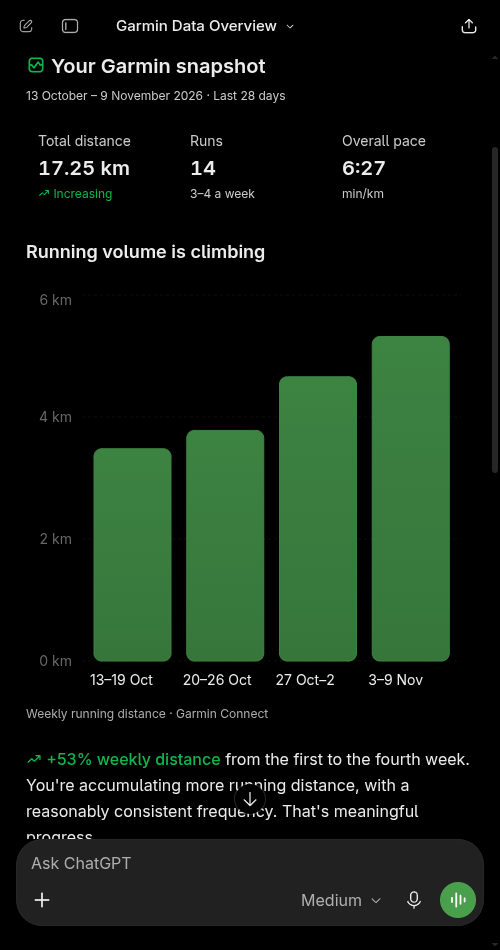
A running summary and weekly distance chart from ChatGPT.
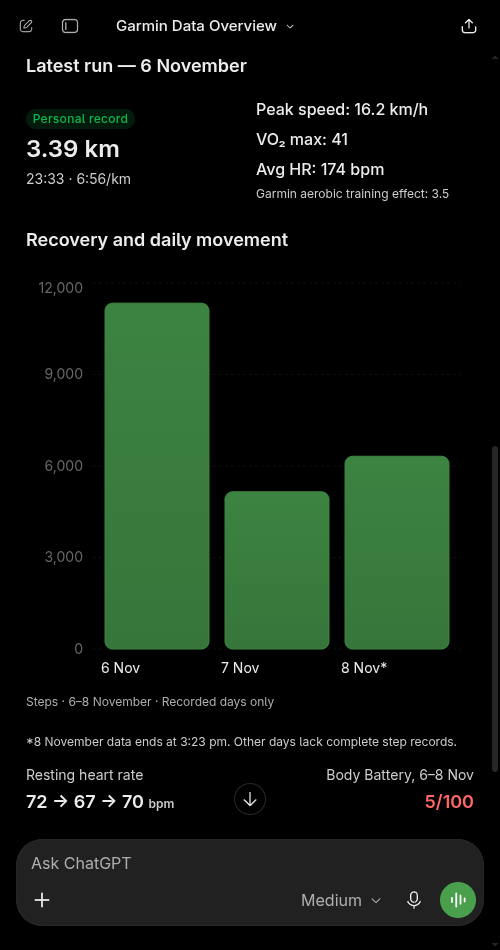
A recent run and daily movement from the same conversation.
Three steps to your first question.
Connect your accounts, then ask about your running in your own words.
Connect Garmin
Connect your Garmin account to let your assistant work with your activity data.
Connect your assistant
Add Garmin MCP to your assistant. Our setup guides walk you through the connection.
Ask a question
Try “How has my running changed this month?” or ask for help planning your next workout.
The details are already there. Ask better questions.
Look back at an activity and its laps, compare running trends, or explore your personal records. Your assistant can also bring in a Google Sheet you connect separately.
Creating a workout requires separate permission and your confirmation before it is saved to Garmin.
Your running, your questions.
From a single run to weeks of training, use your own words to explore the details that matter to you. Garmin Connect remains the home of your activities and workouts.
Ready to ask your first question?
Connect Garmin, open your assistant and start with a recent run.