TaskBounty Check
Local-only MCP, CLI, and GitHub Action that checks GitHub Actions and CI maintenance risks without modifying code or making outbound requests by default.
Documentation
taskbounty-check
A local check for GitHub Actions and CI maintenance hygiene (third-party action pinning, workflow token permissions, and update automation), built for apps shipped with Lovable, Bolt, Replit, Cursor, or v0.
Local by default. No uploads. No telemetry. It reads only your workflow files, on your machine.
The default code path makes no outbound network requests, writes its report locally, and sends
nothing anywhere. There is no analytics or phone-home of any kind. Only the opt-in --gh-org mode
uses the network (through your own gh session).
Works with Cursor, Claude Code, and Codex (local MCP server, below).
Three ways to use it
1. GitHub Action — add a maintenance check to CI that writes a summary to the run (no PR comments, no source upload):
permissions:
  contents: read
steps:
  - uses: actions/checkout@v4
  - run: npx taskbounty-check@0.1.6 . --github-summary --no-network
Want a human to interpret or fix what the Action surfaces? Request a free launch-safety review. TaskBounty gets no access to your repo, source, or workflows unless you submit that form.
2. Agent / MCP — a local stdio server for Cursor, Claude Code, and Codex:
npx -y taskbounty-check@0.1.6 mcp
3. One-off CLI — scan the current repo locally and write a report:
npx -y taskbounty-check@0.1.6 .
Pin a version (
@0.1.6) in committed config and CI for reproducibility.@latestis convenient for a quick one-off, but a pinned version is the reproducible choice.
The GitHub job summary
The Action writes a counts-only maintenance summary to the workflow run (categories and next steps, no filenames, line numbers, or repo source). Below is that exact summary, rendered from this repo's own CI output:
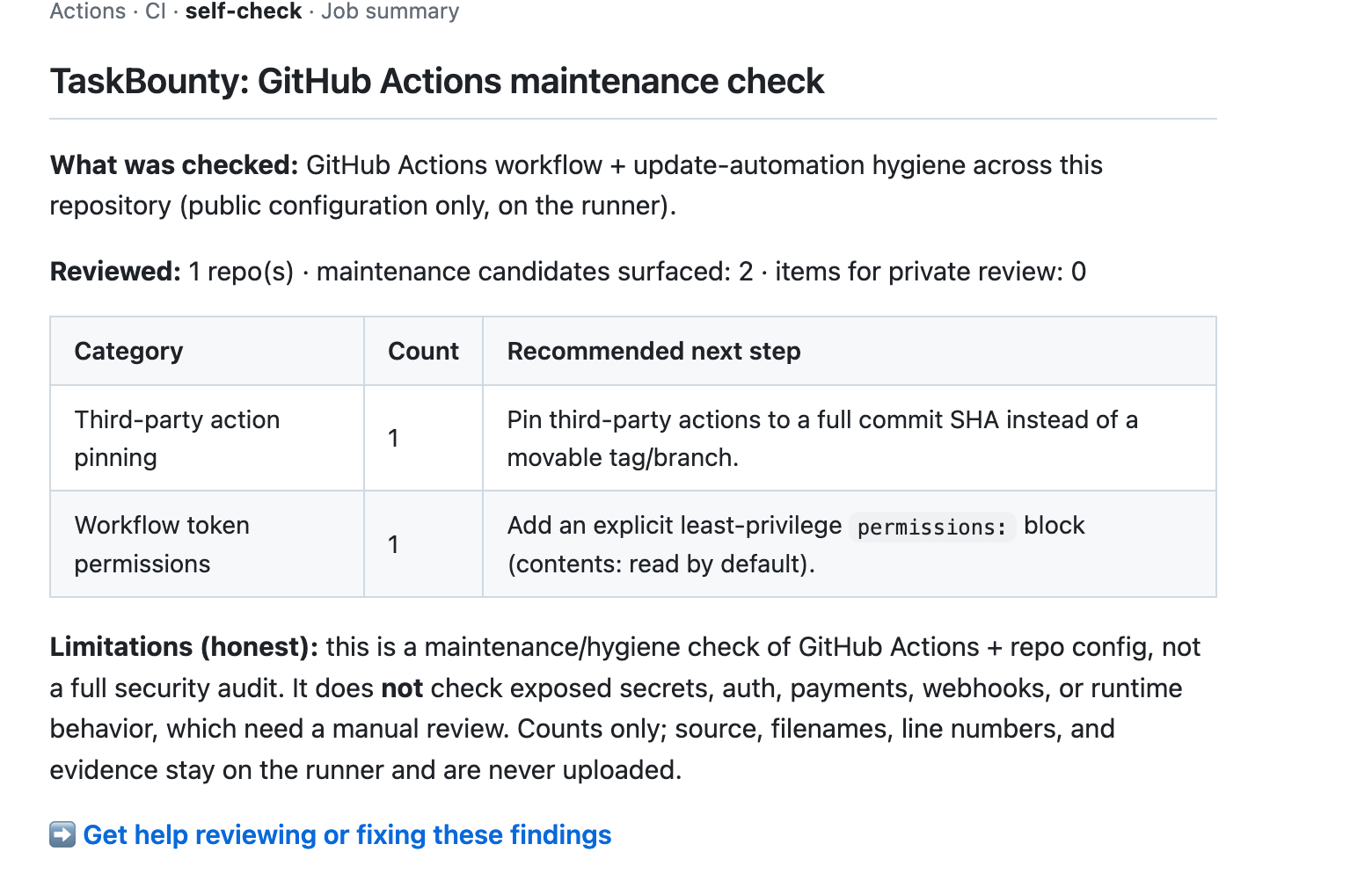
See it produced live by the self-check job in this repository's Actions runs.
Prefer a guided walkthrough? Follow the five-minute real-repository quickstart.
Learn more
- Methodology — exactly what it reviews and how findings are labeled.
- Privacy and scope — local-by-default data handling.
- Limitations — what it does NOT check (below).
Supported checks (and honest limitations)
Checks (GitHub Actions + CI maintenance hygiene):
- Third-party actions pinned to a movable tag/branch instead of a commit SHA
- Broad (write-all) workflow token permissions
- Missing explicit
permissions:block - Update automation (Dependabot/Renovate) presence
- Context-dependent workflow patterns flagged for private review (e.g.
pull_request_target, script injection)
Does NOT check (these need a manual review): exposed secrets, auth/authorization, payments, webhooks, runtime behavior. It is a maintenance/hygiene check, not a full security audit or a penetration test.
What it does
- Reads only your GitHub Actions workflow files and update-automation config, scans them in-process with a deterministic ruleset (the same rules as the public checker), and writes a local HTML + JSON report. It does not execute workflows, install dependencies, or run any repository code.
Modes
| Mode | Command | Network |
|---|---|---|
| Single repo | npx taskbounty-check . | none |
| Directory of repos | npx taskbounty-check ./all-repos | none |
| Explicit paths | npx taskbounty-check --manifest repos.json | none |
GitHub org (your gh session) | npx taskbounty-check --gh-org <org> | yes, opt-in |
--gh-org uses your existing gh CLI session to fetch each repo's workflow files to this
machine (read-only). Your GitHub token is never read by this tool and never sent to TaskBounty.
What is read, written, transmitted
Run --explain-data to print this at any time.
- Reads (allowlist — nothing else is opened):
<repo>/.github/workflows/*.yml|*.yamland update-automation config (dependabot.yml/renovate.json*). Never source files,.env, secrets, SSH keys, credential stores, or anything outside the selected repository roots. Symlinks that escape a root are skipped, never followed. - Writes (local only):
<out>.json(full detail) and<out>.html. - Transmits: nothing by default.
--shareuploads nothing — it writes a sanitized, counts-only file (scan id, label, candidate counts by category, private-review count, scanner version, timestamps; repo names only with--include-repo-names) for you to submit manually. Network stays off under--share. Only--gh-orgintentionally uses the network.
Flags
--share · --gh-org <org> · --manifest <file> · --org-label <label> ·
--include-repo-names · --dry-run · --explain-data · --delete-local-report ·
--no-network (default everywhere except --gh-org) · --out <basename> · --version · --help
Want help interpreting or fixing these results?
Request a free 20-minute launch-safety review: https://www.task-bounty.com/ai-app-security-check/review?utm_source=npm&utm_medium=npm_readme&utm_campaign=workflow_security
TaskBounty receives nothing unless you submit that form. The scan runs locally and the full report stays on your machine; the review form gives us no access to your repositories, source, workflows, or secrets.
GitHub Code Scanning (SARIF)
Emit SARIF 2.1.0 and surface findings in your repo's Security → Code scanning tab:
npx taskbounty-check@latest . --format sarif --output taskbounty.sarif
The SARIF carries deterministic rule ids (taskbounty/<rule>), severity levels, and file/line
references — no source contents, secrets, or environment values, and no network access.
Confirmed findings are emitted as kind: fail; lower-confidence items as kind: review.
Help interpreting SARIF results: https://www.task-bounty.com/ai-app-security-check/review?utm_source=github&utm_medium=sarif_docs&utm_campaign=workflow_security
Upload it with the official action (full example in examples/code-scanning.yml):
permissions:
  contents: read
  security-events: write
steps:
  - uses: actions/checkout@v4
  - run: npx taskbounty-check@0.1.6 . --format sarif --output taskbounty.sarif
  - uses: github/codeql-action/upload-sarif@v3
    with:
      sarif_file: taskbounty.sarif
Local agent (MCP)
Run a local stdio MCP server so Codex, Claude Code, or Cursor can scan and reason about findings
in your editor. It runs locally, makes zero outbound network requests, uploads no source, and
never modifies files — generate_fix_plan returns a plan as text for you to apply yourself.
npx taskbounty-check@latest mcp
Tools: scan_repo (local scan summary), explain_finding (plain-language explanation), generate_fix_plan (text fix plan).
Want a human to review the plan? https://www.task-bounty.com/ai-app-security-check/review?utm_source=mcp&utm_medium=mcp_docs&utm_campaign=workflow_security
Cursor — .cursor/mcp.json:
{ "mcpServers": { "taskbounty-check": { "command": "npx", "args": ["-y", "taskbounty-check@latest", "mcp"] } } }
Claude Code:
claude mcp add taskbounty-check -- npx -y taskbounty-check@latest mcp
Codex — in ~/.codex/config.toml:
[mcp_servers.taskbounty-check]
command = "npx"
args = ["-y", "taskbounty-check@latest", "mcp"]
Security
Zero runtime dependencies. Published to npm with provenance (verify on the package's npm page). The default run makes no outbound requests and uploads nothing; see the methodology for the full data-handling and scope boundaries.