FeedHive
Create, schedule and analyze social media posts across your connected accounts with FeedHive.
Hosted MCP Server
npx add-mcp 'https://mcp.feedhive.com'Installs into Claude Code, Codex, Cursor and more
Documentation
MCP
Connect an MCP-compatible AI client to FeedHive to find social accounts and posts, create drafts, manage your content plan, and read analytics. FeedHive exposes its documented public REST API as MCP tools, alongside your configured automation triggers.
Connect your MCP client to https://mcp.feedhive.com using a FeedHive API key.
Create an API key
In FeedHive, go to Settings > Account, then scroll to API Key and copy your key.
Connecting a workspace instead? Create its key under Settings > Workspace. The key determines which workspace resources you can access.
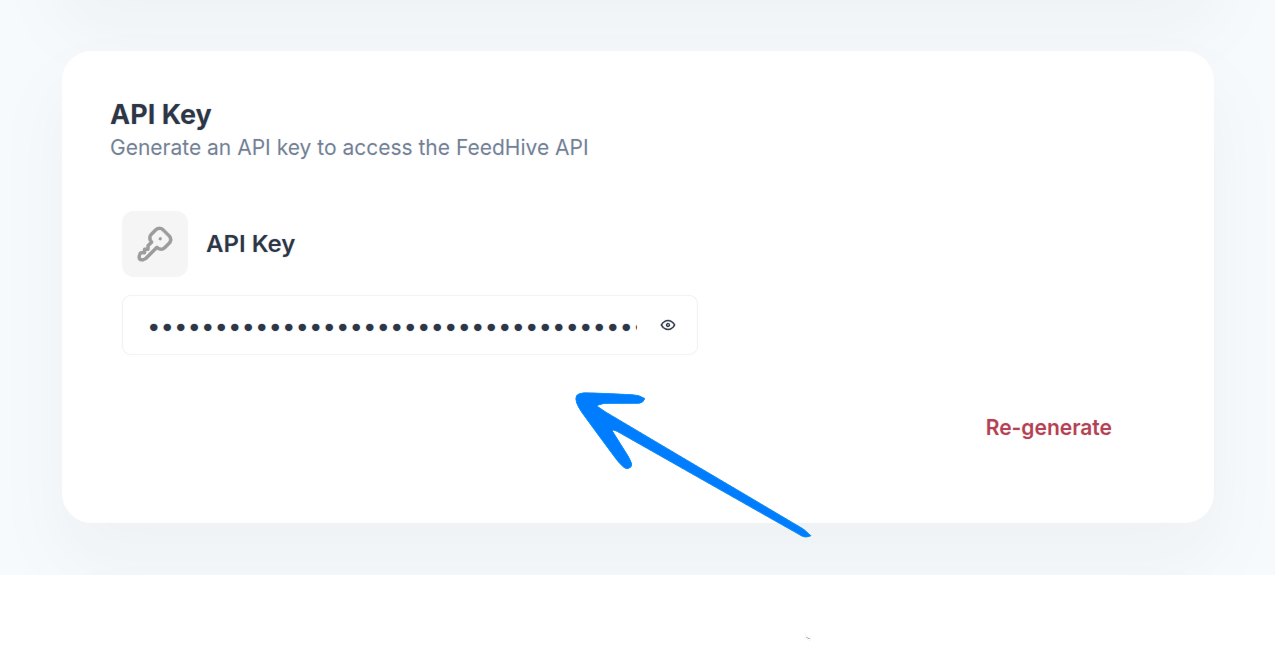
Add FeedHive to your MCP client
Configure an HTTP MCP server at https://mcp.feedhive.com and set its authentication header to Authorization: Bearer YOUR_FEEDHIVE_API_KEY.
Your client must send the key even when listing tools. Keep it in the client's private credential settings—not in a chat, tool argument, or public URL.
Check the connection
List the available tools in your client, then try a read-only call such as feedhive_socials_list or feedhive_posts_list. Tools named feedhive_{resource}_{action} use the public REST API; configured automation triggers appear as trigger_{id}.
Examples
List two drafts with the feedhive_posts_list tool:
{"limit":2,"status":"draft"}
Create a draft with feedhive_posts_create (this does not publish):
{"text":"Draft example","status":"draft"}
Read back the returned data.id with feedhive_posts_get before editing or scheduling it.
Available tools
FeedHive's MCP tools cover posts, labels, media, plan slots, social accounts, analytics, and API status. You can list and inspect resources, create drafts, manage labels and slots, and schedule posts with confirmation. Your configured automation triggers also appear as trigger_{id} tools; their input fields depend on your trigger configuration.
View all tool names
Posts
feedhive_posts_list·feedhive_posts_getfeedhive_posts_create·feedhive_posts_update·feedhive_posts_delete
Labels
feedhive_labels_list·feedhive_labels_getfeedhive_labels_create·feedhive_labels_update·feedhive_labels_delete
Media
feedhive_media_upload_start·feedhive_media_upload_completefeedhive_media_list·feedhive_media_get·feedhive_media_delete
Plan slots
feedhive_slots_list·feedhive_slots_getfeedhive_slots_create·feedhive_slots_update·feedhive_slots_deletefeedhive_plan_assign_next
Analytics and social accounts
feedhive_analytics_post·feedhive_analytics_socialfeedhive_socials_list·feedhive_socials_get
Status and configured triggers
feedhive_status·trigger_{id}
Each named REST tool corresponds to a documented public REST API operation. The REST API controls permissions, plan access, validation, and rate limits; it does not provide publish-now, uploading media bytes, or workspace management through these tools. Use feedhive_analytics_post for post-ID analytics rather than the legacy publication-ID route. Trigger tools may publish content; get explicit consent before calling a publishing trigger.
Before changing content
⚠️
An existing scheduled post can publish changed text or lose its schedule during an update, even when the update omits scheduling fields. Review the target post and obtain approval before changing it.
- Schedule a post: Supply a future ISO
scheduled_at, social account IDs fromfeedhive_socials_list,status: "scheduled", andconfirm_scheduling: true. Approval-required workspaces may store it pending approval instead. - Assign to plan slots:
feedhive_plan_assign_nextrequiresconfirm_scheduling: true. It can partially succeed: inspect eachdata.items[]result and read back affected posts. - Update a post: Every
feedhive_posts_updatecall requiresconfirm_update: true, including draft edits. If you setstatus: "scheduled"or a non-nullscheduled_at, also supplyconfirm_scheduling: true. - Delete a resource: Delete tools require
confirm: true.
These confirmation flags are MCP safeguards; they are not sent to the REST API.
Media, results, and errors
feedhive_media_upload_start returns a signed PUT URL valid for 10 minutes. Upload the bytes with a separate HTTP client using the declared Content-Type, then call feedhive_media_upload_complete with the upload ID. Do not share signed URLs. Social IDs, media IDs (including IDs containing /), slot timezones, and provider-specific post fields follow the REST API documentation.
Successful REST tools return {"success":true,"data":...} in both structured and text content. Lists include items, total, has_more, and next_cursor; pass next_cursor as cursor while has_more is true. Social accounts return their full collection instead. Analytics vary by provider and may be stale; a missing metric is not zero.
Writes are not automatically retried, and the public REST API does not advertise an idempotency key. After a timeout, check the affected post, label, or slot before trying again to avoid duplicates.
Common errors: 400 means check field rules; 401 means a missing or invalid key; 402/403 means plan or access restrictions; 404 means the resource is not found for this key; 429 means wait before retrying; 5xx means a temporary API failure. Tool errors do not echo upstream API bodies, post text, or signed URLs.
Raw HTTP protocol (advanced)
If your client needs raw protocol details, send JSON-RPC over POST with Content-Type: application/json and your bearer key. The server supports initialize, tools/list, and tools/call:
{"jsonrpc":"2.0","id":1,"method":"initialize","params":{"protocolVersion":"2024-11-05","capabilities":{},"clientInfo":{"name":"your-client","version":"1.0.0"}}}
{"jsonrpc":"2.0","id":2,"method":"tools/list"}
{"jsonrpc":"2.0","id":3,"method":"tools/call","params":{"name":"feedhive_posts_list","arguments":{"limit":2,"status":"draft"}}}
Discovery includes input schemas, REST output schemas, and read/mutation annotations so your client can present the tools appropriately.
REST API
MCP tools are built around FeedHive's public REST API. For the precise request and response fields, see the REST API documentation.