Deep Blue Alpha Ethereum Whale Data
Free remote MCP server for Ethereum whale data, no key. Ask Claude, ChatGPT or Cursor which tokens 20,000+ tracked whale wallets moved on or off exchanges, per-token whale activity, recent large moves, the Whale Sentiment Index and the daily whale report.
Hosted MCP Server
npx add-mcp 'https://deepbluealpha.io/mcp'Installs into Claude Code, Codex, Cursor and more
Documentation
AI whale tracking assistant for
In short: Deep Blue Alpha's AI connector is a free MCP server that plugs into Claude, ChatGPT, Cursor and other AI assistants. Once added, you can ask things like “What are Ethereum whales doing with LINK today?” and the assistant answers with live data from the 20,000+ whale wallets Deep Blue Alpha tracks — exchange withdrawals and deposits, DEX swaps, top tokens and the Whale Sentiment Index.
Connector address
https://deepbluealpha.io/mcp
Transport: MCP Streamable HTTP. No authentication. Limit: 120 questions per 10 minutes per user. Also listed in the official MCP Registry as io.deepbluealpha/whale-data.
Need the full data API?
This connector covers Deep Blue Alpha's free data. The full read-only API — whale wallet leaderboard, per-token flows, paginated transaction history and your watchlist, with 25,000 calls a day for your own apps, bots and dashboards — is included on the Whale plan. API docs · Plans & pricing
How do I add the whale tracking connector to Claude?
- In Claude (claude.ai or the desktop app), open Settings → Connectors.
- Choose Add custom connector and paste
https://deepbluealpha.io/mcp. - Start a chat and ask about whales — Claude calls the connector when it needs data.
Custom connector availability depends on your Claude plan. In Claude Code: claude mcp add --transport http deep-blue-alpha https://deepbluealpha.io/mcp
How do I add Deep Blue Alpha to ChatGPT?
It takes about two minutes and works on a free ChatGPT account. ChatGPT adds custom apps through developer mode:
- Turn on developer mode. In ChatGPT open Settings → Security and login and switch on Developer mode. ChatGPT marks it “elevated risk” because it allows apps OpenAI hasn't reviewed; this one only reads public whale data and can't change anything in your account.
- Add the app. Open Plugins in the left sidebar, click + (top right) → Add custom MCP server → Create MCP App.
- Fill in three fields: Name
Deep Blue Alpha, Server URLhttps://deepbluealpha.io/mcp, Authentication No Auth. Tick “I understand and want to continue” and click Create. - Ask a question. In a new chat click +, pick Deep Blue Alpha, and ask, for example, “Which tokens have Ethereum whales pulled off exchanges this week?”
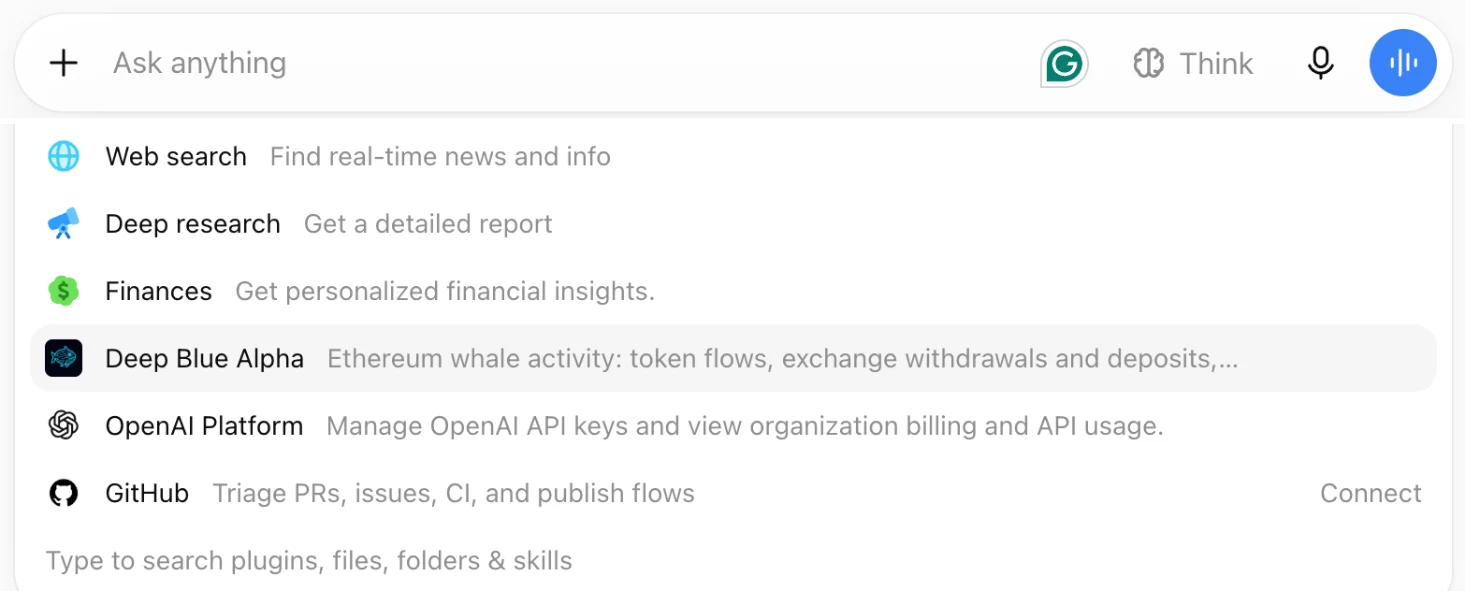
Once added, Deep Blue Alpha appears in ChatGPT's + menu.
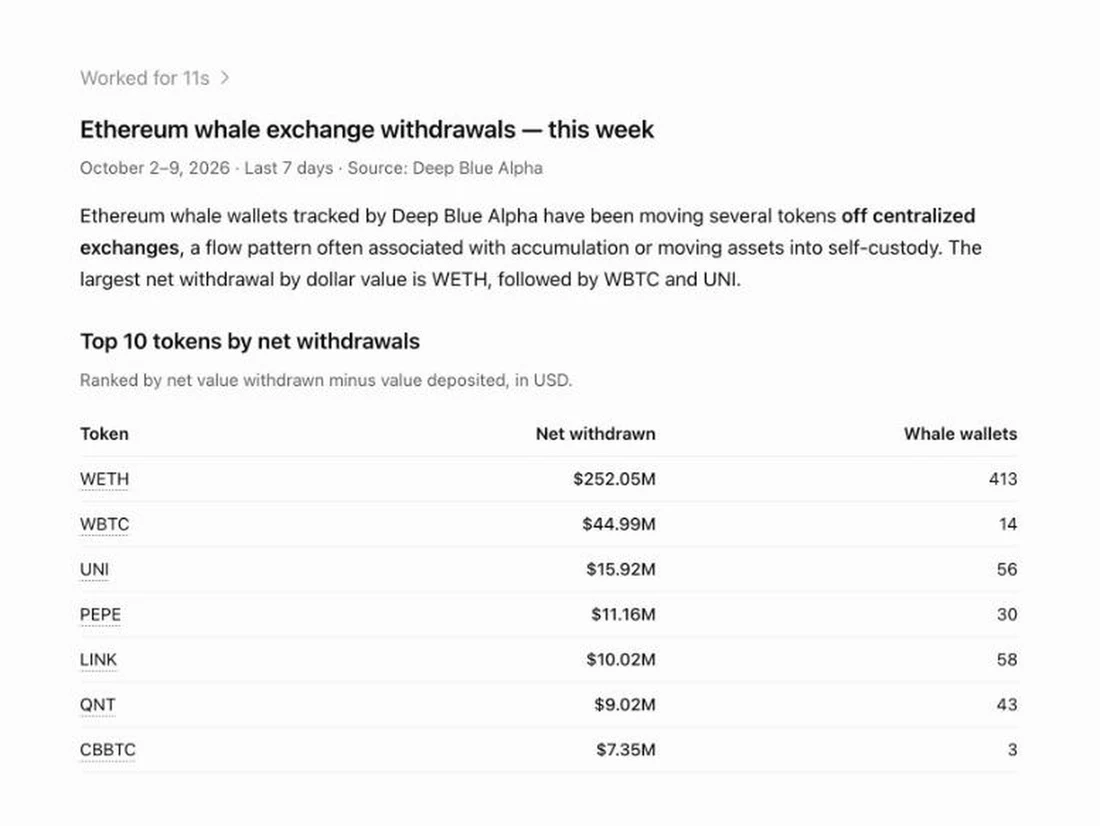
ChatGPT answering with live Deep Blue Alpha data.
Menu names can change as ChatGPT updates its settings. You can switch developer mode off at any time; the app then disappears from your + menu.
Cursor, VS Code and other MCP clients
Add this to your MCP configuration:
{
  "mcpServers": {
    "deep-blue-alpha": { "url": "https://deepbluealpha.io/mcp" }
  }
}
What can I ask my AI assistant about crypto whales?
- “What have Ethereum whales done with LINK in the last 24 hours?”
- “Which tokens have whales pulled off exchanges this week?”
- “What have whales done with PEPE over the last 30 days?”
- “Which tokens had the most whale volume today?”
- “Show me the latest large whale moves for PEPE.”
- “What's the Whale Sentiment Index right now, and how has it changed this week?”
- “Summarize today's daily whale report.”
What does an answer look like?
Ask “Which tokens have Ethereum whales pulled off exchanges this week?” and the assistant gets live data like this (the real answer right now, from the last 7 days):
1. WETH: $290,356,417 net withdrawn from exchanges (2000 moves by 564 tracked whale wallets)
2. LIT: $16,560,002 net withdrawn from exchanges (55 moves by 25 tracked whale wallets)
3. CBBTC: $12,388,053 net withdrawn from exchanges (65 moves by 15 tracked whale wallets)
Coins leaving exchanges are read as the accumulation side; neither direction is a confirmed purchase or sale. Past activity only, not a prediction. Source: Deep Blue Alpha.
The assistant then explains it in plain language and links each token’s page, for example /token/WETH.
Tools the assistant can use
get_token_whale_activity
Tracked Ethereum whale moves for one token over the last 24 hours, 7 days or 30 days: value withdrawn from exchanges, deposited to exchanges, DEX swaps, net flow, accumulation-side share, number of whale wallets and the largest move.
get_top_whale_tokens
The Ethereum tokens with the most tracked whale volume in the last 1 or 24 hours (up to 10), with net flow and accumulation-side share for each.
get_exchange_flow_leaders
The Ethereum tokens with the largest net tracked-whale flow off exchanges (withdrawn) or onto exchanges (deposited) over the last 24 hours or 7 days, up to 10, with withdrawn and deposited totals and the number of whale wallets. Stablecoins and tokens moved by a single wallet are excluded.
get_recent_whale_moves
The most recent large moves by tracked Ethereum whale wallets (up to 15), at or above a minimum size (default $100K), optionally filtered to one token. Each move is labelled as an exchange withdrawal, exchange deposit or DEX swap.
get_whale_sentiment_index
Deep Blue Alpha's daily Whale Sentiment Index (0-100) with its components, the flow mix (exchange transfers vs DEX swaps) and the last 7 days.
get_daily_whale_report
Summary of the most recent daily Ethereum whale report: total tracked volume, accumulation-side share, top tokens, notable moves and watch list.
get_platform_stats
How many whale wallets and tokens Deep Blue Alpha tracks, plus 24h exchange-flow totals.
Where does the whale data come from?
Deep Blue Alpha monitors 20,000+ Ethereum whale wallets block by block. Most whale flow is tokens moving onto or off centralized exchanges, not trades, so the connector reports it that way: tokens withdrawn from exchanges are read as accumulation-side flow, and tokens deposited to exchanges as distribution-side flow. DEX swaps are reported separately. Everything describes past on-chain activity — no predictions. The same data powers the free live whale feed, token board and Whale Sentiment Index.
Comparing data sources for agents? See on-chain data for AI agents: MCP servers & APIs compared.
Frequently asked questions
Is there a Claude connector for tracking Ethereum whales?
Yes — this one. Add https://deepbluealpha.io/mcp under Settings → Connectors → Add custom connector, then ask Claude what Ethereum whales are moving.
Can ChatGPT track crypto whales?
Yes, once you add Deep Blue Alpha as a custom app in developer mode (steps above, about two minutes, works on a free account). ChatGPT then answers with live Ethereum whale data instead of guessing.
Is it free?
Yes. The connector is free, read-only and needs no account or API key. For your own apps and bots, the full data API is on the Whale plan.
What is an MCP server?
MCP (Model Context Protocol) is an open standard that lets AI assistants call outside data sources. An MCP server gives the assistant tools it can use — here, tools for looking up whale activity.
Do you see my conversations?
No. The connector only receives the specific lookup the assistant makes (for example, a token symbol). We keep anonymous usage counts to see which tools are used.
Is this financial advice?
No. It reports past on-chain activity only, with no price predictions or trading recommendations.
Data licensed CC-BY-4.0 — please credit Deep Blue Alpha (deepbluealpha.io). Not financial advice.