DecisionTune
DecisionTune: a local 395M decision model as an MCP server. Tools: decide (pick one option or answer yes/no about text), run_recipe (run a recipe on a file, folder or rows) and list_recipes. Runs offline. Apache-2.0.
Documentation





Website • Demo • Model card • PyPI
decision-tune
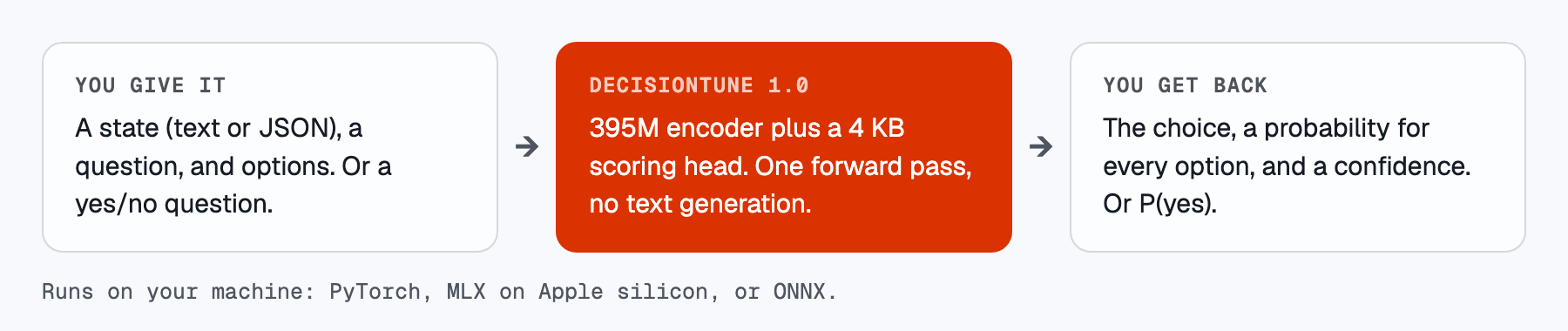
DecisionTune 1.0 is a 395M decision model. You give it a state, a question and options. It selects one option and gives a probability for each option. You can also ask a yes/no question. Then it gives P(yes). It does one encoder pass and does not generate text. It runs on a laptop CPU. It scores 29.57 on Decision Index 0.2.1.
Key features
- 29.57 on Decision Index 0.2.1. This is from one complete run. A second seed scored 29.13.
- Select an option, or get P(yes). You get a probability for each option from one encoder pass. It does not generate text.
- Fast on a laptop. The median time for one request in our index run is 25.9 ms. You do not need a GPU server.
- Runs on your computer. Use PyTorch, MLX on Apple silicon, or ONNX. The weights are under Apache-2.0.
The package is small. On first use, it asks Download DecisionTune 1.0 (1.58 GB, Apache-2.0) from Hugging Face? [Y/n]. It keeps the files in your Hugging Face cache. Before it loads a file, it checks the file against a SHA-256 manifest.
Install
pip install decision-tune               # PyTorch backend (the default)
pip install "decision-tune[mlx]"        # adds MLX on Apple silicon; the package selects it automatically
pip install "decision-tune[onnx]"       # adds onnxruntime; use --backend onnx
MLX needs Python 3.11 or newer.
Docker (CPU):
docker run --rm -p 8000:8000 -v dt-cache:/root/.cache/huggingface ghcr.io/decision-tune/decision-tune serve --host 0.0.0.0 --yes
The MLX backend uses laya-mlx (Apache-2.0).
Quick start (no code)
-
Open Terminal.
-
Install DecisionTune. Paste this line:
curl -LsSf https://decisiontune.com/install.sh | shOr install it yourself. On a Mac with Apple silicon, use one of these:
uv tool install "decision-tune[mlx]" pip install "decision-tune[mlx]" -
Start the app:
decisiontune app
The app opens in your browser. The first time, it asks before it downloads the model (1.58 GB). Everything runs on your computer. On a Mac with Apple silicon (MLX), a short decision takes about 10 ms.
Both command names work: decision-tune and decisiontune. This page uses decisiontune in the new sections.
Python
[!TIP] Describe your options. Short descriptions ("Shipping: delivery, lost or damaged packages") give much better results than labels only ("shipping").
from decision_tune import DecisionModel

m = DecisionModel.from_pretrained("decision-tune/decisiontune-1.0")
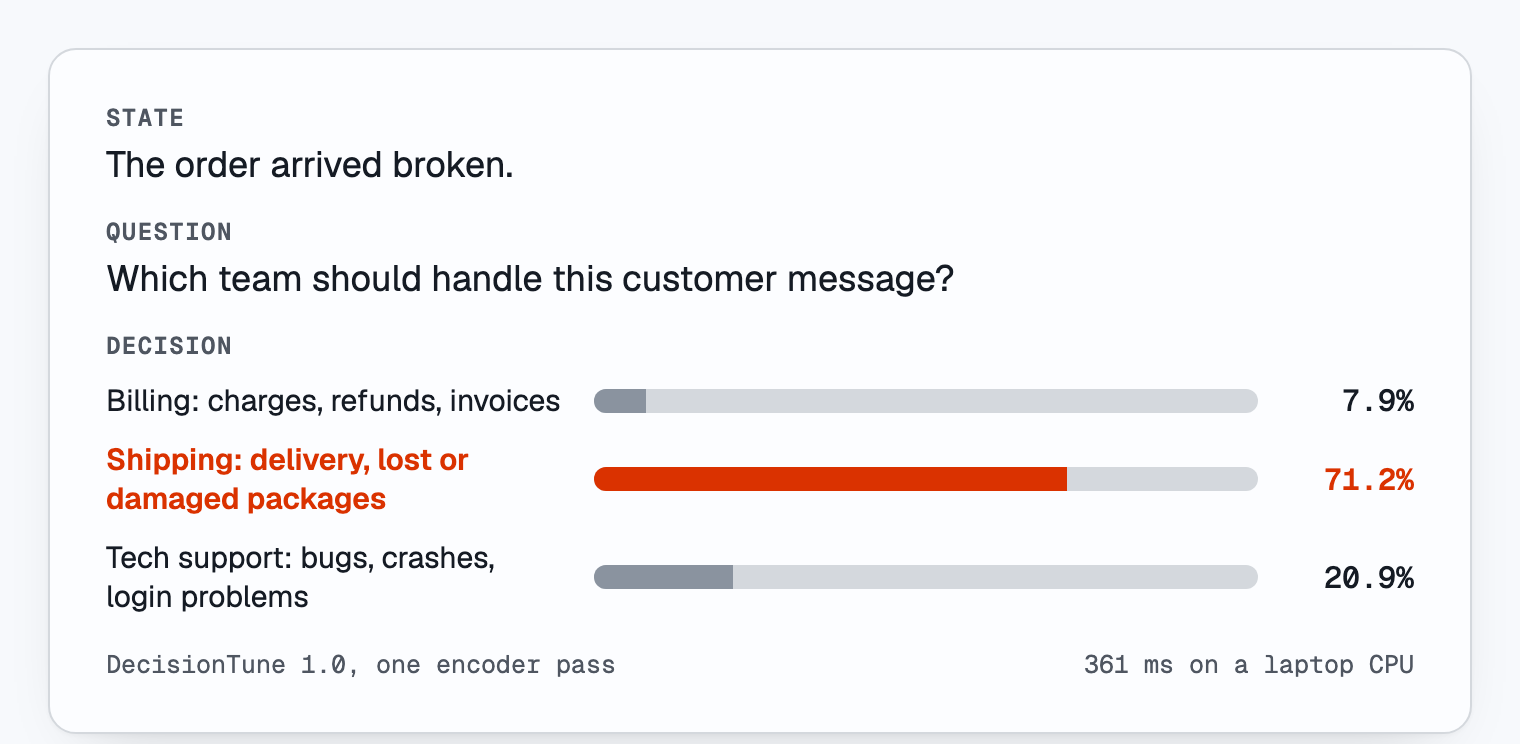
m.choose("The order arrived broken.", "Which team should handle this customer message?",
         {"billing": "Billing: charges, refunds, invoices",
          "shipping": "Shipping: delivery, lost or damaged packages",
          "tech": "Tech support: bugs, crashes, login problems"})
# {'choice': 'shipping', 'probabilities': {'billing': ..., 'shipping': ..., 'tech': ...}, 'confidence': ...}
m.yes_no("The order arrived broken. I want my money back.", "Is the customer asking for a refund?")
# P(yes): here, a float near 1
Options can also be a dict of {key: description}. The model reads the description. You get the key back. A state can be a string or a JSON object.
Tip: describe your options. Short descriptions ("Shipping: delivery, lost or damaged packages") give much better results than labels only ("shipping"). Vague questions with no criteria, such as "Is this urgent?", give weak results. Write down the criteria.
How it works
For the full results, training data and limits, see the model card.
Command line
uvx decision-tune ask "Is the customer asking for a refund?" --state "The order arrived broken. I want my money back."
decision-tune ask "Which team handles this?" --state "I was charged twice this month." --option billing --option shipping --option "tech support"
decision-tune download --yes     # download without a prompt (or set DECISION_TUNE_YES=1)
--backend auto|torch|mlx|onnx selects the backend. auto selects MLX on Apple silicon if MLX is installed. If not, it selects PyTorch. --json prints JSON.
Run on many items (recipes)
A recipe is a small JSON file. It lists the columns to read, the questions to ask, and when to flag a row for a person. The same recipe works in the app, on the command line, over HTTP, in MCP and in Python. support-triage is built in. It has three questions (team, refund, tone). This is the first one:
{
  "name": "support-triage",
  "read": ["subject", "message"],
  "questions": [
    {"name": "team", "type": "choose", "question": "Which team should handle this customer message?",
     "options": {"billing": "Billing: charges, refunds, invoices",
                 "shipping": "Shipping: delivery, lost or damaged packages",
                 "tech": "Tech support: bugs, crashes, login problems"}}
  ],
  "review_below": 0.6
}
Question types: choose (needs options), yes_no, and scale (needs levels). levels defines the keys and their descriptions. The answer is the key.
Run a recipe on a .csv or .xlsx file, or on a folder of .txt and .md files:
decisiontune run support-triage tickets.csv                  # writes tickets-decided.csv
decisiontune run support-triage tickets.csv -o answers.xlsx  # .xlsx output; add --force to replace a file
decisiontune recipes                                         # list the recipes
decisiontune recipe show support-triage                      # print a recipe as JSON
decisiontune recipe new my-recipe                            # save a copy in ~/.decision-tune/recipes to edit
Your CSV needs the columns that the recipe reads (subject and message here). A folder of text files gives the columns file and text.
In Python:
from decision_tune import Recipe

rows = [{"subject": "Broken mug", "message": "The order arrived broken. I want my money back."}]
results = Recipe.load("support-triage").run(rows)   # one dict per row
Output columns. Each result row has your input columns, then these:
team,refund,tone: the answers (one column per question).team_confidence,refund_confidence,tone_confidence: the probability of each answer. A yes/no question also hasrefund_p_yes.needs_review: set when any confidence is belowreview_below, or when the row failed. A person should check these rows.error: the reason, if one row failed. The run goes on with the next row.
Formula guard. Spreadsheets run text that starts with =, +, - or @. DecisionTune puts an apostrophe in front of such a cell in the .csv and .xlsx output. A cell cannot run as a formula.
Claude Desktop, Cursor and other MCP clients
DecisionTune runs as an MCP server on your computer. Download the model once: decisiontune download. Then add this to the MCP settings of your client:
{
  "mcpServers": {
    "decisiontune": {"command": "decisiontune", "args": ["mcp"]}
  }
}
If the client cannot find the command, give the full path (which decisiontune shows it). Restart the client. It shows three tools:
decide: pick one option, or answer yes/no, about a piece of text.run_recipe: run a recipe on a file, a folder, or rows that you pass in. It can save all result rows to a.csvor.xlsxfile. It replaces an existing file only if the name ends with-decided.csvor-decided.xlsx.list_recipes: list the recipes.
Limit the folders. Add --allow to name the folders the assistant may use. It can then read and write only inside them. Without --allow, the tools can read any file you can.
{
  "mcpServers": {
    "decisiontune": {"command": "decisiontune", "args": ["mcp", "--allow", "/Users/you/Documents/decisions"]}
  }
}
Repeat --allow for more folders, or set DECISION_TUNE_ROOTS (folders separated by : on Mac and Linux). A path outside them gets a one-line error.
Local HTTP endpoint
decision-tune serve # app: http://127.0.0.1:8000/ endpoint: http://127.0.0.1:8000/decide
In a second terminal:
curl -s http://127.0.0.1:8000/decide -H 'Content-Type: application/json' -d '{"state": "What is the weather tomorrow in Paris?", "question": "Which tool should be called?", "options": ["get_weather", "send_email", "create_calendar_event"]}'
curl -s http://127.0.0.1:8000/decide -H 'Content-Type: application/json' -d '{"state": "The order arrived broken. I want my money back.", "question": "Is the customer asking for a refund?"}'
Send Content-Type: application/json with every JSON POST. The server also serves the app at http://127.0.0.1:8000/. To open the app in your browser, run decisiontune app (it tries the next 10 ports if 8000 is busy).
To run a recipe, POST rows as JSON to /recipes/<name>/run. To send a CSV text body, use Content-Type: text/csv:
curl -s http://127.0.0.1:8000/recipes/support-triage/run -H 'Content-Type: application/json' -d '{"rows": [{"subject": "Broken mug", "message": "The order arrived broken. I want my money back."}]}'
curl -s http://127.0.0.1:8000/recipes/support-triage/run -H 'Content-Type: text/csv' --data-binary @tickets.csv
The reply has columns, rows, count, needs_review, failed and ms. The server runs one model call at a time. By default, it listens only on localhost.
Use with AI coding agents
The skill in skills/decisiontune/ teaches a coding agent how to install, call and prompt DecisionTune. It follows the open Agent Skills format.
Install it with the skills CLI (it asks which agents to set up; add -g for all your projects):
npx skills add decision-tune/decision-tune --skill decisiontune
Or copy the skills/decisiontune folder into the skills folder of your agent:
| Agent | Project folder | User folder |
|---|---|---|
| Claude Code | .claude/skills/decisiontune/ | ~/.claude/skills/decisiontune/ |
| OpenAI Codex CLI | .agents/skills/decisiontune/ | ~/.agents/skills/decisiontune/ |
| pi | .agents/skills/decisiontune/ | ~/.agents/skills/decisiontune/ |
| Cursor | .cursor/skills/decisiontune/ or .agents/skills/decisiontune/ | ~/.cursor/skills/decisiontune/ |
Cursor can also use the rule in .cursor/rules/decisiontune.mdc. For any other agent that reads AGENTS.md, add a line there that points to the skill URL. Or tell your agent: "Read https://raw.githubusercontent.com/decision-tune/decision-tune/main/skills/decisiontune/SKILL.md and use DecisionTune."
Behavior
The package uses the same input format and readout as the published scores. Each question is one sequence: [CLS] question [SEP] [MASK] option ... [SEP] state [SEP]. A linear head scores each [MASK], and a softmax over the options gives the probabilities. There is no calibration temperature, no option filter and no truncation. The package refuses a sequence longer than 8,192 tokens. src/decision_tune/engine.py is all of the inference code. The model repo also contains it as engine.py.
Verify the model files
manifest.json is in this repo and in the model repo. It lists the SHA-256 of each model file. The package contains the SHA-256 of manifest.json. If a hash does not match, the package stops the load. For each release, GitHub Actions signs manifest.json with Sigstore (keyless, GitHub OIDC). It attaches manifest.json.sigstore.json to the release. To do the check yourself:
pip install sigstore
python -m sigstore verify github manifest.json --bundle manifest.json.sigstore.json \
  --cert-identity https://github.com/decision-tune/decision-tune/.github/workflows/release.yml@refs/tags/v1.0.0
To use cosign: cosign verify-blob manifest.json --bundle manifest.json.sigstore.json --new-bundle-format --certificate-identity https://github.com/decision-tune/decision-tune/.github/workflows/release.yml@refs/tags/v1.0.0 --certificate-oidc-issuer https://token.actions.githubusercontent.com
Tests
pip install ".[test]" && pytest -q
DT_RESULTS=/path/to/results.jsonl DT_BACKEND=torch pytest -q -s tests/test_parity.py   # this test needs a recorded index run
Use responsibly
The model gives scores to options. It does not reason step by step. Its probabilities are not calibrated. Do not use it for high-risk decisions about people (hiring, credit, housing, health, legal) without independent validation. Also do all reviews that the law requires. We supply the model "as is" under Apache-2.0, without warranty.
License
Code and weights: Apache-2.0. The model card shows the licenses and known issues of the training data.