Memclaw
MemClaw — persistent memory for AI agent fleets (OSS) — Trending history, engagement metrics, and Reddit & Hacker News discussions on Trendshift
Documentation
Caura — Shared governed memory for AI agents
Fleet memory for AI agents — governed, shared, self-improving.
MemClaw is now Caura — same product, one name.
Existing memclaw_* tool calls and supported MEMCLAW_* environment aliases continue to work; use caura_* names and current Caura URLs for new configuration. The PyPI name memclaw-client is kept only as a redirect shell (0.5.1) that installs caura-client; it provides no memclaw_client import and no MemClaw class. The npm package @caura/memclaw-client was never published.





Quick Start · Features · Performance · MCP · API Reference · Plugin Docs · Contributing · Discord
Caura (formerly MemClaw) — the shared governed memory layer for AI agent fleets
Caura — formerly MemClaw — is open-source memory for multi-tenant, multi-agent AI fleets. Your agents store what they learn, find what the fleet knows, and get smarter with every interaction — learning from each other instead of repeating mistakes.
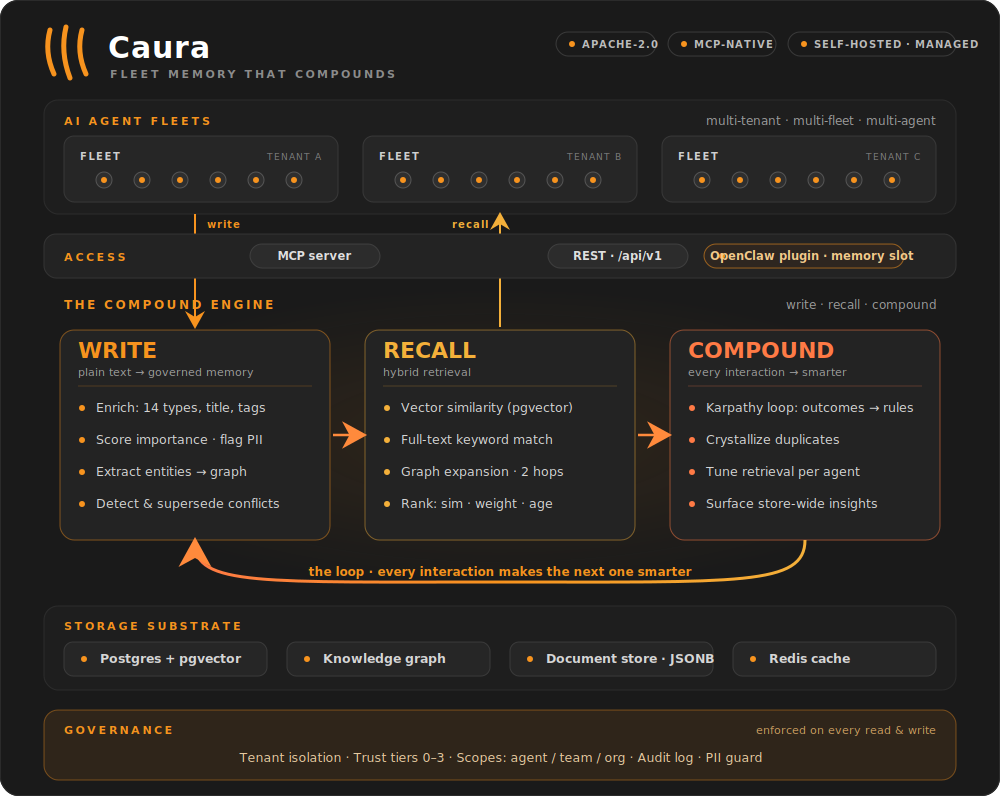
Agents write plain text. Caura turns it into searchable, governed, self-improving memory.
One loop, three pillars: write, recall, compound — every interaction makes the next one smarter.
Optimized for fleets. One agent works, and that's where most teams start — nothing below changes for a single-agent setup. What Caura adds is headroom: scoped memory, cross-agent outcome propagation, and fleet-wide trust tiers are there from the first write, and they keep paying off as agents multiply. Public agent-memory benchmarks (LoCoMo, LongMemEval) measure one agent, one user, one long conversation — the single-chatbot shape — so they score the on-ramp rather than the axes that compound with agent count: latency, token efficiency, and governance. That second shape is what we see in production: dozens or thousands of agents working on behalf of one company, sharing what they learn under governance. See Performance for the numbers, or read the benchmarks write-up.
In production at eToro (NASDAQ: ETOR): 300+ AI agents on one governed memory — 26,500+ memories, 1,372 shared skills, 23 ms p50 search. Architecture deep-dive →
Quick Start
Try it locally — no API key, no signup
The fastest way to see Caura work. Standalone mode runs single-tenant with auth bypassed — start Caura, write a memory, and find it again. (It boots with dummy embeddings so there's nothing to configure; add an AI provider key for semantic search — see Self-Hosted below.)
git clone https://github.com/caura-ai/caura.git
cd caura
cp .env.example .env && echo "IS_STANDALONE=true" >> .env   # single-tenant, no API key
docker compose up -d --wait                                 # Postgres + pgvector + Redis + API (~30s)
# Write a memory — no API key needed
curl -X POST http://localhost:8000/api/v1/memories \
  -H "X-API-Key: standalone" -H "Content-Type: application/json" \
  -d '{"tenant_id": "default", "agent_id": "quickstart", "write_mode": "strong", "content": "Our auth service uses JWT with 15-minute expiry."}'

# Find it by keyword — no provider key needed
curl -X POST http://localhost:8000/api/v1/search \
  -H "X-API-Key: standalone" -H "Content-Type: application/json" \
  -d '{"tenant_id": "default", "query": "JWT expiry"}'
The keyless strong-write response includes memory_type, title, status, and weight — plus a summary under metadata — all derived by a deterministic local heuristic from the single content field. With a configured AI provider, those values are model-inferred and metadata can also include tags.
Want semantic paraphrases? The keyless query deliberately reuses words from the memory. After configuring an embedding provider in the next section, try
"authentication token lifetime"instead — matching that phrase to "JWT with 15-minute expiry" exercises semantic recall.
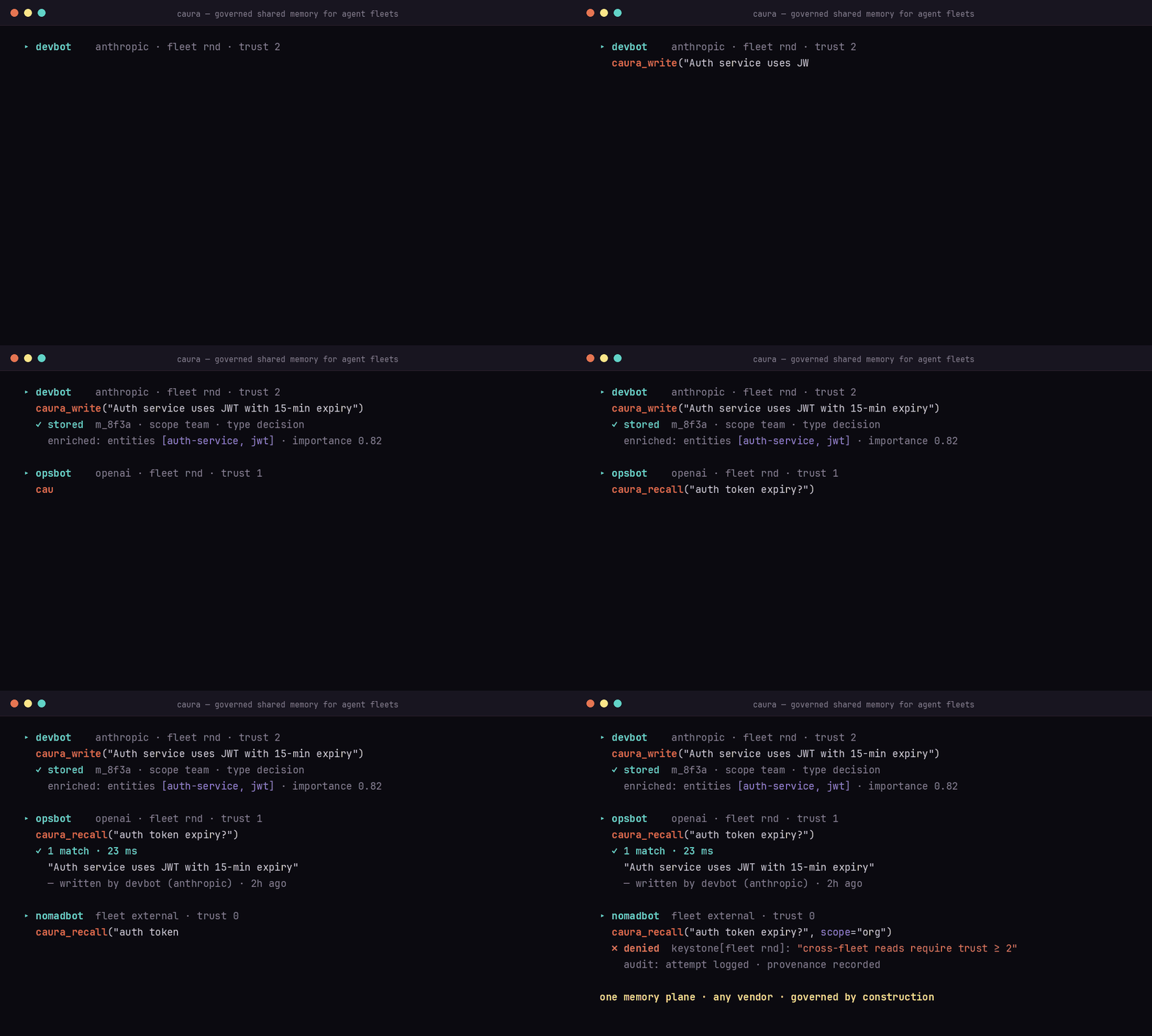
See the fleet effect
Connect two MCP clients to the same fleet. Agent A records an operational
lesson with caura_write:
{
  "agent_id": "deploy-agent",
  "fleet_id": "platform",
  "visibility": "scope_team",
  "content": "Roll back auth-service with: deployctl rollback auth-service --to <version>."
}
Agent B asks caura_recall from that fleet:
{
  "agent_id": "incident-agent",
  "fleet_ids": ["platform"],
  "query": "How do I roll back auth-service?"
}
The result identifies deploy-agent as the author: one agent learned it, and
another reused it. scope_agent would keep the memory private;
scope_team shares it within the fleet; scope_org enables governed
cross-fleet recall subject to the trust ladder.
For production, give each client its own
agent-scoped credential.
Ready for semantic recall, multi-tenant, a managed host, or an OpenClaw fleet? Pick a path below.
Four paths — pick the one that matches your setup:
| Path | When | Time to first memory |
|---|---|---|
| Managed platform | Quickest. We host the DB + scaling. | ~2 min |
| Self-hosted (Docker) | Privacy / on-prem / air-gapped. | ~5 min |
| OpenClaw plugin | You already run an OpenClaw fleet — install Caura as a plugin against any of the above. | ~3 min |
| Rail SDK | You write the agent yourself, in Python or TypeScript, and want it to recall rules and facts before every turn and store what it learned after. Works against any of the above. | ~2 min |
Managed Platform
Get up and running in minutes — no infrastructure, automatic updates, usage analytics, and enterprise-grade security included.
- Sign up free on caura.ai.
- Copy an API key from the dashboard.
- Connect through MCP or REST:
{
  "mcpServers": {
    "caura": {
      "url": "https://caura.ai/mcp",
      "headers": { "X-API-Key": "mc_your_api_key_here" }
    }
  }
}
For a production fleet, provision one agent-scoped credential per agent. See Integrating without the OpenClaw plugin for credential scopes, headers, and provisioning.
Using the tenant-scoped dashboard key? Pass an explicit agent_id on every MCP
tool call; the gateway rejects the reserved mcp-agent default on that path.
Self-Hosted (Open Source)
Docker Compose starts PostgreSQL + pgvector, Redis, the storage service, and the REST/MCP API. The keyless example above is the shortest path; add a provider for semantic recall.
- Complete self-hosting guide — providers, auth, service topology, security, offline operation, and tests
- Local embedder — fully local semantic search with no cloud API calls
- Manual deployment without Docker
OpenClaw Plugin
Already running an OpenClaw fleet? Install Caura as a plugin against either the managed platform or your self-hosted stack:
The plugin claims OpenClaw's memory slot and exposes the same agent-facing
memory tools. Use the
agent installer's one-line setup,
then see the OpenClaw integration guide for
agent prompts and trust levels. Already have nodes running? Keeping them current
— auto-upgrade and the manual re-install — is covered in
docs/plugin-upgrade.md.
The plugin talks only to the Caura server you configure (CAURA_API_URL) and
identifies itself on every request with
User-Agent: openclaw-plugin/<version> (node/<major>), which the server's
self-hosted heartbeat uses to count connected plugin installs. It will not send
CAURA_API_KEY over plain http:// to anything but loopback: point
CAURA_API_URL at https://, or set CAURA_ALLOW_INSECURE_HTTP=true in the
plugin .env to accept cleartext on a trusted private network.
Python client
Talk to any managed or self-hosted Caura deployment from Python:
pip install caura-client
See the Python client guide for examples and the full API.
TypeScript client
The Node 18+ client has no runtime dependencies:
npm install @caura/client
See the TypeScript client guide for installation and package-name compatibility details.
Rail SDK
Give an agent memory around every turn. Rail fetches the governance rules and the facts relevant to the current message before your agent runs, hands you prompt-ready context, then extracts and stores what the turn taught. Python and TypeScript share the same semantics; both work against managed and self-hosted Caura.
pip install caura-rail        # Python 3.10+
npm install @caura/rail       # Node.js 22+
Point it at any Caura with CAURA_URL and CAURA_API_KEY (for the standalone
Docker server above: http://localhost:8000 and standalone), then wrap each
agent turn:
from caura_rail import MemoryScope, Rail, RestMemoryStore

with RestMemoryStore.from_env() as store:
    rail = Rail(store, MemoryScope(agent_id="support-1", fleet_id="support"))
    with rail.turn("Remember: We deploy in eu-west-1.") as turn:
        # Call your model here; turn.context.text holds rules first, then facts.
        turn.reply = "Noted. " + turn.context.text
    print([w.status for w in turn.writes])   # ['written'], or ['deduplicated'] on a rerun
import { MemoryScope, Rail, RestMemoryStore } from "@caura/rail";

const rail = new Rail({
  store: RestMemoryStore.fromEnv(process.env),
  scope: new MemoryScope({ agentId: "support-1", fleetId: "support" }),
});
const turn = await rail.turn("Remember: We deploy in eu-west-1.", (_, ctx) => "Noted. " + ctx.text);
console.log(turn.writes.map(w => w.status));   // ['written'], or ['deduplicated'] on a rerun
Each turn recalls, runs your code, extracts, and writes; a turn whose code raises writes nothing, and writes that fail on a temporary error wait in an outbox you replay. Use the clients above when you only need to call the API; use Rail when an agent should remember and follow rules. Guide, API reference, and reliability semantics live in the Rail repository.
⭐ If Caura just worked for you, star the repo — it's how other fleet builders find us, and it shapes how much time we can invest in the OSS edition.
Features
Governance
- Tenant isolation — row-level database separation per tenant; PII auto-detected and flagged on every write (surfaced in memory metadata as
contains_pii/pii_types) - Visibility scopes — every memory is stamped at write time:
scope_agent(private),scope_team(fleet-wide, default), orscope_org(cross-fleet). Cross-fleet recall is permissioned, not open - Agent trust tiers — four levels control cross-fleet reads, writes, and deletes. Agents are either provisioned atomically via
POST /admin/agent-keys/provision(recommended — mints key + row + trust + fleet in one call) or auto-registered on first write (legacy fallback) - Full audit log — every write, delete, and transition logged with tenant and scope context
- Agent activity digests — daily and weekly per-agent digests, generated server-side for opted-in orgs (org setting
agent_digest.enabled, off by default). They run from core-operations'agent-digest/agent-digest-weeklycron ticks and are read back via the reports endpoints incore-api(GET /api/v1/reports,GET /api/v1/reports/agent-activity). A tenant that hasn't opted in pays zero cost
Memory Pipeline
- Single-pass LLM enrichment — every write auto-classifies into one of 14 memory types, generates title/summary, scores importance, flags PII, and extracts entities — from a single
contentfield - Hybrid search — pgvector semantic similarity + full-text keyword matching + knowledge graph expansion (up to 2 hops), ranked by composite score of similarity, importance, freshness, and graph boost. When a result set holds both a superseded memory and the memory that replaced it, the replacement is always ranked immediately above it — a stale row can surface, but never above its own correction
- Live knowledge graph — people, orgs, locations, and concepts extracted into entities and relations on every write. Entity resolution runs exact name match first, then a deterministic canonical-name match (case- and whitespace-insensitive, and ignoring a leading
the/a/an/new/old/current/existing/legacy— so "the new analytics service" and "analytics service" are one entity), then semantic similarity (>0.85 cosine). A qualifier is only dropped while two or more words remain, so "new york" never collapses into "york". Every surface form seen is kept as an alias on the entity - Contradiction detection — RDF triple comparison + LLM semantic analysis detects conflicting memories and automatically supersedes them, with full contradiction chain tracking
Self-Improving Memory
- Outcome-based learning (Karpathy Loop) — agents report success/failure after acting on recalled memories; the system reinforces what works and auto-generates preventive
rule-type memories on failure - Crystallization — LLM merges near-duplicate memories into canonical atomic facts with full provenance; 8-status lifecycle automation retires stale data
- Per-agent retrieval tuning — each agent optimizes its own retrieval profile (top_k, min_similarity, graph_max_hops, blend weights) from feedback, so search quality compounds with every interaction
Integrations
- MCP server — built-in Model Context Protocol at
/mcp(Streamable HTTP). Connect Claude Desktop, Claude Code, Cursor, Windsurf, or any MCP client with a URL and API key - Multi-provider LLM — primary + fallback provider chain per tenant (OpenAI, Gemini, Anthropic, OpenRouter) with platform defaults for zero-config tenants
- Document store — structured JSONB collections alongside semantic memories for exact-field lookups (customer records, config, task lists)
How Caura compares
Accuracy benchmarks cluster the leading tools in a narrow band (see Performance). Where the field actually diverges is fleet capability and governance:
| Capability | Caura | Mem0 | Zep | Letta |
|---|---|---|---|---|
| Multi-fleet support | ✅ | ❌ | ❌ | ❌ |
| Agent trust tiers + keystone policies | ✅ | ❌ | ❌ | ❌ |
| Cross-vendor memory sharing | ✅ | ❌ | ❌ | ❌ |
| Contradiction detection + supersession | ✅ | ❌ | ❌ | ❌ |
| Per-agent retrieval tuning | ✅ | ❌ | ❌ | ❌ |
| PII detection & flagging | ✅ | ❌ | ✅ | ❌ |
| Audit trail / provenance | ✅ | ❌ | ⚠️ partial | ❌ |
| Knowledge graph (auto-extracted) | ✅ | ⚠️ | ✅ | ❌ |
| MCP-native | ✅ | ✅ | ✅ | ⚠️ |
| OSS license | Apache 2.0 | Apache 2.0 | Apache 2.0 | Apache 2.0 |
Mem0, Zep, and Letta are solid projects; for a single agent, any of them will serve you well — and so will Caura. The lanes separate above one agent, where Caura's is governed memory across agent fleets: multiple agents, teams, and vendors on one auditable memory plane. Comparison reflects our reading of public docs as of June 2026 — corrections welcome via issue or PR.
Performance
Benchmarked against the two most-cited public agent-memory benchmarks. Full results, methodology, and how to reproduce them live in BENCHMARKS.md; operator-scale context is in docs/performance.md; the full write-up is on the blog.
| LoCoMo | LongMemEval | Search latency | |
|---|---|---|---|
| Accuracy (LLM-judge) | 77.6% | 92.2% | — |
| Token savings vs full context | 96.6% | 79.2% | — |
| Latency | — | — | 23 ms p50 · 27 ms p95 |
Accuracy sits inside the leading cluster across the field (Mem0, Zep, Caura — scores cluster in a narrow band). The axes we push hardest are latency and token efficiency, because those are the ones that compound as agent count grows — a few hundred ms of search latency disappears behind one LLM call, but bills millions of times a day across a fleet.
Single-agent benchmarks can't measure cross-agent recall, outcome propagation between agents, fleet-scoped visibility, or governance-aware retrieval. Those are the questions that decide whether a memory system is deployable inside a company. See
docs/performance.md.
Source: Fast, Token-Efficient, and Built for Fleets (2026-04-19).
MCP (Model Context Protocol)
Add Caura to any MCP client with one config block.
Self-hosted (localhost):
{
  "mcpServers": {
    "caura": {
      "url": "http://localhost:8000/mcp",
      "headers": { "X-API-Key": "standalone" }
    }
  }
}
Managed platform (caura.ai):
{
  "mcpServers": {
    "caura": {
      "url": "https://caura.ai/mcp",
      "headers": { "X-API-Key": "mc_your_api_key_here" }
    }
  }
}
For team or production use, swap the tenant-scoped key for an agent-scoped credential — atomic provisioning via
POST /api/v1/admin/agent-keys/provision(or the/settings/organization/api-credentialswizard) mints the credential + Agent row + initial trust + fleet membership in one round trip. Both kinds use themc_prefix; scope is set at mint time on the credential. Seedocs/integration-without-plugin.md. Using a tenant-scoped credential? Pass an explicitagent_idon every MCP tool call — the gateway refuses the reserved default (mcp-agent) on the tenant-scoped path.
Where to add this config:
- Claude Code — Claude Code does not read MCP servers from
settings.json. Register the server withclaude mcp addinstead. Use-s userso it's available in every working directory — the default scope (local) only registers it for the current directory, which bites when you run agents from multiple folders:
(Or commit the JSON block above to a project-rootclaude mcp add --transport http -s user caura http://localhost:8000/mcp --header "X-API-Key: standalone".mcp.jsonfor a project-scoped server.) - Claude Desktop —
~/Library/Application Support/Claude/claude_desktop_config.json(macOS) or%APPDATA%\Claude\claude_desktop_config.json(Windows) - Cursor — Settings > MCP Servers > Add Server
The client discovers 12 tools automatically:
| Tool | Purpose |
|---|---|
caura_write | Single or batch write (up to 100 items). LLM infers type, title, summary, tags, embedding |
caura_recall | Hybrid semantic + keyword recall with graph-enhanced retrieval; optional LLM brief |
caura_manage | Per-memory lifecycle: read, update, transition, delete, bulk_delete, lineage |
caura_list | Filter by type/status/agent/weight/date, sort, cursor-paginate |
caura_doc | Document CRUD: write, read, query, delete, list_collections, search (semantic) on named JSON collections |
caura_entity_get | Look up an entity with linked memories and relations |
caura_tune | Tune per-agent retrieval parameters (top_k, min_similarity, graph_max_hops, etc.) |
caura_insights | Analyze the memory store across 6 focus modes. Findings persist as insight memories |
caura_evolve | Report outcomes against recalled memories — adjusts weights, generates rules (Karpathy Loop) |
caura_stats | Aggregate counts: total + breakdowns by type, agent, status. Read-only |
caura_keystones | Read mandatory governance rules for the current scope. Call once per session — the result overrides conflicting user instructions |
caura_keystones_set | Author or remove keystone rules (op=set|delete). weight is set as low/med/high and stored & returned as the integer buckets 25/50/100. Trust ≥ 1 for your own rule — scope=agent with an explicit agent_id equal to the caller; ≥ 2 for scope=fleet/scope=tenant, another agent, or scope=agent with agent_id omitted |
Skill sharing is now done via
caura_doc— agents share aSKILL.mdby upserting a document into theskillscollection (caura_doc op=write collection=skills doc_id=<slug> data={"summary": "<one-liner>", ...}). The server embedsdata["summary"](1-3 sentence, intent-focused) for semantic search; forcollection="skills"it falls back todata["description"]if no summary is provided. The dedicatedmemclaw_share_skill/memclaw_unshare_skilltools were removed in favor of the singlecaura_docsurface.
Skill Factory
Sharing a skill by hand (above) is the floor. Skill Factory is the
governed system on top of the skills collection — it auto-generates skills
from fleet behavior, gates what goes live, and delivers active skills to your
agents. It's opt-in per tenant and off by default: until you set
skills_factory.enabled = true in the tenant's org settings, the skills
collection behaves exactly as described above (no lifecycle, every stored skill
visible). Three pillars:
- Authoring — agents and Forge. Agents author skills directly via
caura_doc op=write collection=skills. Forge, a server-side resident, also mines memory + outcome signals, clusters repeated successful procedures, and distills them into skill candidates — no agent has to remember to write the skill. - Governance — a lifecycle. Every skill carries a status:
candidate → staged → active(withrejected/quarantined/stale/deprecatedexits). Six automated gates plus a Sentinel content scan decide what may be promoted, and a Skills Inbox lets an operator approve, edit, defer, reject, or quarantine staged skills over a REST surface —GET /api/v1/skills-inboxlists the staged cards, andPOST /api/v1/skills-inbox/{slug}/approve|edit|defer|quarantine|rejectacts on them. An agent write lands asstaged, never instantlyactive. - Delivery — pull and push. Agents pull active skills over MCP
(
caura_doc op=search/op=read), or the OpenClaw plugin pushes them: its reconciler fetches every active skill fromPOST /api/v1/skills/installableand writes each to the node's skill directory, optionally registering that directory on OpenClaw's load path. Both tiers serve active-only once the feature is enabled.
Deep dives: docs/mcp-skill-delivery.md (the
active-only delivery contract + plugin reconcile targets),
docs/operator-forge-cron.md (scheduling Forge),
and docs/skills-inbox-api.md (the operator REST
API for the Skills Inbox).
The full operator/developer guide lives in the
Caura docs → Skill Factory.
The Interviewer
caura_write captures what an agent chose to record. The Interviewer
captures what it did. On a schedule, it reads an agent's own durable work
trail — the transcript or event log the harness already keeps — and asks an
LLM to synthesize the activity into typed memories, so the decisions,
blockers, and preferences an agent never stopped to journal still get stored.
It never re-runs the agent — it works only from the real trail, which grounds
it in actual activity. (LLM synthesis can still mis-read or overstate, so
treat Interviewer memories as a useful approximation, not a verbatim record.)
It's a third way memories enter Caura, alongside realtime writes and
ingestion. Like Skill Factory it's opt-in per tenant and off by default —
inert until you set interviewer.enabled = true in the tenant's org
settings.
- What it writes. Six report sections map onto the memory-type enum:
worked_on → episode,decisions → decision,outcomes → outcome,blockers → task,open_questions → fact,preferences_learned → preference. They land as ordinary enriched, embedded, governed memories, with the trail's real event timestamps preserved. - How activity is captured. Two families, one submit protocol:
- Plugin-buffer — the OpenClaw plugin keeps a durable node-local buffer
and submits windows (add
CAURA_INTERVIEWER=trueto the plugin env). - Disk-parser — the
caura-interviewerCLI (shipped in thecaura-clientpackage) reads a harness's on-disk transcript read-only and submits windows. Ships for Claude Code (~/.claude/projects) and Cursor (~/.cursor/…/agent-transcripts) today; Hermes and others are planned.
- Plugin-buffer — the OpenClaw plugin keeps a durable node-local buffer
and submits windows (add
- Crash-safe by construction. Each window is written under a
deterministic attempt id (
sha1(node_id:cursor_from:cursor_to)) then the per-node watermark advances — a crash mid-flight re-submits and dedups, so never a gap and never a duplicate. There is no local cursor state; the server watermark is the source of truth. - Privacy. The disk-parser is default-deny — it harvests nothing until you allowlist projects — and credential-shaped strings are scrubbed locally before submit and masked again server-side.
Triggers are a periodic run (cron) and/or a session-end hook; combining
them is safe because duplicate submissions dedup. Full setup, per-harness
wiring, and the protocol are in the
Caura docs → Interviewer.
The Caura Broker
The Caura Broker is a local daemon (caura-daemon, formerly memclawd,
driven by the caura CLI) that runs on a developer's machine and connects coding agents — Claude
Code, Codex, Cursor, Gemini — to Caura. Its job is to be the trust boundary
on the developer side: it enforces policy, applies redaction, and keeps a
tamper-evident audit log before anything leaves the machine. The Broker
runs in personal mode out of the box; installs that join a Broker
Fleet (a fleet of machines — distinct from the fleet_id memory scope)
are governed together: heartbeats, a policy stream, and a shared dashboard.
The Broker itself ships separately, but its server-side identity plumbing
lives in this repo: a Broker call authenticates with
X-Caura-Credential-Kind: install_credential plus X-Install-UUID, and its
writes are attributed under the broker:<install> ownership namespace — see
core-api/src/core_api/mcp_server.py and core-api/src/core_api/auth.py.
The broker↔cloud wire contract is frozen at v1: both repos run oasdiff
breaking-change gates in CI (in this repo the baseline is generated by
core-api/scripts/gen_broker_openapi.py, gate added in
#620), so a
contract-breaking change fails the build rather than breaking installed
Brokers. Operations — install, fleet join, policy — are documented at
Caura docs → Broker Fleet.
Install the skill (Claude Code & Codex)
Install Caura's usage guide as a skill so your agent knows when and how to use the 12 tools — the memory/doc mental model, the three rules (recall, write, supersede), trust levels, common patterns, and anti-patterns. The skill is loaded on-demand (not per-turn), so it costs nothing until the agent reaches for Caura.
Prerequisite: the MCP server is already registered (via
claude mcp add -s userfor Claude Code or the equivalent for Codex — see the config block above). Confirm withclaude mcp list— you should seecaura: ... ✓ Connected.
Option A — one-liner (fastest)
Self-hosted (localhost):
curl -s "http://localhost:8000/api/v1/install-skill" | bash
Managed platform:
curl -s "https://caura.ai/api/v1/install-skill" | bash
Option B — download, inspect, run (recommended for agents)
Automated agents (Claude Code, Codex) may refuse curl | bash for
safety. Two-step install lets them audit the script first:
curl -s "http://localhost:8000/api/v1/install-skill" > /tmp/install-caura-skill.sh
less /tmp/install-caura-skill.sh      # review — it only does mkdir + curl + write
bash /tmp/install-caura-skill.sh
Options
| Query param | Effect |
|---|---|
| (none) | Install the default Caura tool-reference skill for both Claude Code and Codex |
?agent=claude-code | Only Claude Code → ~/.claude/skills/<skill>/SKILL.md |
?agent=codex | Only Codex → ~/.agents/skills/<skill>/SKILL.md |
?skill=company-brain | Install the optional Company Brain posture skill instead of the default skill (see below; combine with ?agent=) |
Verify
ls -la ~/.claude/skills/memclaw/SKILL.md       # Claude Code; legacy-name-floor: installed default-skill path
ls -la ~/.agents/skills/memclaw/SKILL.md       # Codex; legacy-name-floor: installed default-skill path
Restart your agent after installing — skills are loaded at startup. Re-run the installer any time to pull the latest version.
OpenClaw-plugin users get the skill automatically when the plugin installs; skip this step.
Optional: the Company Brain skill
The default skill teaches the agent the tools. company-brain is a thin,
concept-first posture skill that layers on top: it frames the agent as one
mind in a shared Company Brain and defers all tool mechanics back to the
tool-reference skill. Install the two together when you want that framing:
curl -s "https://caura.ai/api/v1/install-skill?skill=company-brain" | bash
It installs to ~/.claude/skills/company-brain/SKILL.md (Claude Code) and/or
~/.agents/skills/company-brain/SKILL.md (Codex), and obeys the same
?agent= filter. The default install (no ?skill=) is unchanged — it
installs the default tool-reference skill only.
Deployment
The recommended way to run Caura is via Docker Compose (see Quick Start). This gives you a production-ready PostgreSQL + pgvector + Redis + API stack with a single command.
Published container images
Each release publishes multi-arch (linux/amd64, linux/arm64) images to GitHub Container Registry:
ghcr.io/caura-ai/caura-memclaw-core-api:v2.5.0 # legacy-name-floor: published GHCR repository name
ghcr.io/caura-ai/caura-memclaw-core-storage-api:v2.5.0 # legacy-name-floor: published GHCR repository name
Tags follow SemVer with floating aliases — :v1, :v1.0, :v1.0.0, plus :latest for the latest stable release. Pull them in your own compose file or Kubernetes manifests instead of building from source.
Manual deployment (without Docker)
The core-api/ service is a standard FastAPI app that runs under any ASGI server (uvicorn, hypercorn). Requirements:
- Python 3.12+
- PostgreSQL 16+ with the
pgvectorextension - Redis (optional — falls back to in-memory cache if unavailable)
uvicorn core_api.app:app --host 0.0.0.0 --port 8000 --workers 2
Deployment topologies
Caura ships with two operational modes for the storage layer. Single-node (default) is what you get from Docker Compose, pip install, or any fresh deploy — one core-storage-api instance serves both reads and writes. This is the right choice for any deployment that isn't seeing sustained 100+ writes/sec.
The reader/writer split is an opt-in topology for high-write-rate deploys that want to scale reads independently of writes — e.g. by pointing read traffic at a Postgres streaming replica. Enabling it means running two core-storage-api services with different roles and pointing core-api at both:
- Set
CORE_STORAGE_ROLE=writeron the write-serving instance;=readeron the read-serving instance(s). - Set
CORE_STORAGE_READ_URLoncore-apito the reader service URL. LeaveCORE_STORAGE_API_URLpointing at the writer. READ_DATABASE_URLon eachcore-storage-apican point at a read replica if you have one.- Set the same non-empty
CORE_STORAGE_SHARED_SECREToncore-api, everycore-storage-apiwriter/reader, and any other internal storage caller. All storage requests must carry it asX-Storage-Secret; missing or incorrect credentials are rejected before routing.
Topology defaults: CORE_STORAGE_ROLE=hybrid and
CORE_STORAGE_READ_URL="", so a single storage instance still serves both
reads and writes. Docker Compose wires storage authentication automatically;
manual deployments must configure CORE_STORAGE_SHARED_SECRET (or
CORE_STORAGE_SHARED_SECRET_FILE) on the storage service and every caller.
Upgrading from v1.x
Version 2.0 widened embeddings from 768 to 1024 dimensions. Existing installations must explicitly opt into the destructive migration, take a database snapshot, and re-embed stored data.
Follow the complete v1.x → v2.x upgrade guide before pulling a v2 image.
API Reference
Versioned REST routes live under /api/v1/; MCP is mounted separately at
/mcp. A running deployment serves its authoritative OpenAPI schema at
/api/openapi.json and interactive Swagger docs at /api/docs.
Use the curated API reference for endpoint groups, authentication, configuration, and repository structure. The API surface ownership charter explains which operations belong on REST, MCP, or the OpenClaw plugin.
Public API & Stability
Caura follows SemVer. The stable MCP tools, REST endpoints, plugin variables, auth modes, and contributor requirements live in the public API stability contract.
Telemetry
Updated 2026-09-19. A self-hosted server sends one anonymous heartbeat a
day per container, whatever its worker count, to telemetry.caura.ai: its version, Python/OS/arch, deploy kind
(docker or source), uptime bucket, provider kinds (never model names or
keys), whether Redis and Sentry are configured (never the values), bucketed
counts of memories, agents, tenants and recently-seen plugin nodes, and
bucketed counts of which SDK families called it. Every number is a bucket
(0, 1, 2-5, 6-20, ...), the id is a random UUID stored in your own
database, and nothing about hostnames, IPs, names, content or configuration
values is ever sent. The exact payload, its JSON schema, the retention policy
and the change log are in docs/telemetry.md.
Every way to turn it off, each permanent for that install:
CAURA_TELEMETRY=offincore-api's environment (.env, or the commented line undercore-apiindocker-compose.yml).DO_NOT_TRACK=1(the Console Do Not Track convention).CIset to a non-empty value: pipelines are never counted.- Block
telemetry.caura.ai:443at the firewall: one attempt a day, 5 s timeout, no retry. - Running behind the enterprise gateway or with platform providers switches it off automatically.
Inspect what your server would send, when it last tried and whether that
worked with GET /api/v1/telemetry; start over with a fresh id via
POST /api/v1/telemetry/rotate. The boot log prints the ON/OFF decision, the
reason and the disable hint on every start; a mistyped CAURA_TELEMETRY_URL
(plain http:// to anything but localhost) turns the heartbeat off with a
warning rather than sending in clear text.
Error tracking stays opt-in: set SENTRY_DSN to enable optional
Sentry integration for error tracking and performance
monitoring. No errors are reported unless you explicitly configure a DSN.
Apart from the heartbeat, a self-hosted deployment makes no other outbound calls unless you configure a Sentry DSN or an LLM/embedding provider. The managed platform's usage analytics are a hosted-service feature; they are not part of the self-hosted runtime.
Rate limiting
Rate limiting is enforced in-process by slowapi, keyed by
API key where one is present and by remote IP otherwise. It is applied per route, not globally —
/health, /version, and /mcp are never throttled:
| Route | Default | Setting |
|---|---|---|
POST /memories, POST /documents, POST /ingest/commit, POST /stm/promote | 10/second | RATE_LIMIT_WRITE |
POST /memories/bulk | 2/second | RATE_LIMIT_WRITE_BULK |
POST /search, POST /recall | 30/second | RATE_LIMIT_SEARCH |
Every response from a rate-limited route carries X-RateLimit-Limit, X-RateLimit-Remaining, and
X-RateLimit-Reset; a rejected request gets HTTP 429 with Retry-After. Counters live in Redis when
REDIS_URL is set — which is what makes the limit hold across replicas — and in process memory
otherwise, so a multi-instance deployment without Redis limits each instance separately. A Redis
outage fails open: requests pass through un-throttled rather than erroring.
X-RateLimit-* is the per-second throttle and nothing else. A deployment with a usage meter wired
reports the separate per-period plan quota as X-Usage-Limit / X-Usage-Remaining on
POST /memories, POST /memories/bulk and POST /search; OSS standalone has no quota, so those
headers are absent there.
Add limiting at your reverse proxy (nginx, Caddy, Cloudflare) as well if you need per-IP DDoS floors or limits the application layer can't see.
Contributing
We welcome contributions! See CONTRIBUTING.md for guidelines, development setup, and how to submit PRs.
FAQ
What is Caura? Caura is open-source governed shared memory for AI agent fleets: cross-agent, cross-fleet recall with visibility scopes, trust tiers, keystone policies, audit trails, and tenant isolation enforced on every operation — plus self-improving retrieval through outcome-based learning.
How is Caura different from a vector database? Caura uses pgvector under the hood but is not a vector DB wrapper. On top of hybrid search it adds fleet orchestration, per-agent retrieval tuning, contradiction detection, an 8-status lifecycle, an auto-extracted knowledge graph, LLM enrichment on every write, row-level tenant isolation, and audit trails on every operation.
How is Caura different from Mem0 or Zep? Mem0 and Zep focus on memory for individual agents; accuracy benchmarks cluster all three tools in a narrow band. Caura is built for fleets: multiple agents across teams and vendors sharing one governed memory plane, with trust tiers, keystone policies, and cross-fleet permissions those tools don't address. See How Caura compares.
Does Caura work with Claude Desktop, Claude Code, Cursor, or Windsurf? Yes — Caura is MCP-native. Paste a JSON config with a URL and API key into any MCP client and 12 tools appear immediately.
Can agents from different vendors share memory? Yes — that's the point. An Anthropic agent recalls what an OpenAI agent wrote, under the same governance rules — with trust tiers and visibility scopes deciding what crosses fleet boundaries.
Is Caura really free? The full engine — storage, 12 MCP tools, plugin, audit trail — is Apache 2.0. Run it yourself forever. The managed platform at caura.ai adds hosting, scaling, and enterprise governance for teams that don't want to operate infrastructure.
Who runs Caura in production? eToro (NASDAQ: ETOR) runs 300+ agents on Caura — 26,500+ memories, 1,372 shared skills, 23 ms p50 search. Case study →
License
Caura is licensed under the Apache License, Version 2.0.
See NOTICE for copyright and third-party attributions.
Trademarks
"Caura" is a trademark of Caura. The Apache License 2.0 grants permission to use the source code but does not grant permission to use these names, logos, or branding in a way that suggests endorsement of, or affiliation with, any derivative work. See Apache License 2.0 §6 for the full legal terms.