cxpak
Spends CPU cycles so you don't spend tokens. The LLM gets a briefing packet instead of a flashlight in a dark room.
Documentation
cxpak





Context plane · Active — under development; the surface still moves. See the component map for how this fits the rest.
Spends CPU cycles so you don't spend tokens.
cxpak indexes your codebase using tree-sitter across 44 languages, builds a typed dependency graph, and produces token-budgeted context bundles that give LLMs a briefing packet instead of a flashlight in a dark room. It understands your code's architecture, conventions, risk profile, and data layer -- then packs exactly what the LLM needs, nothing more.
What it looks like
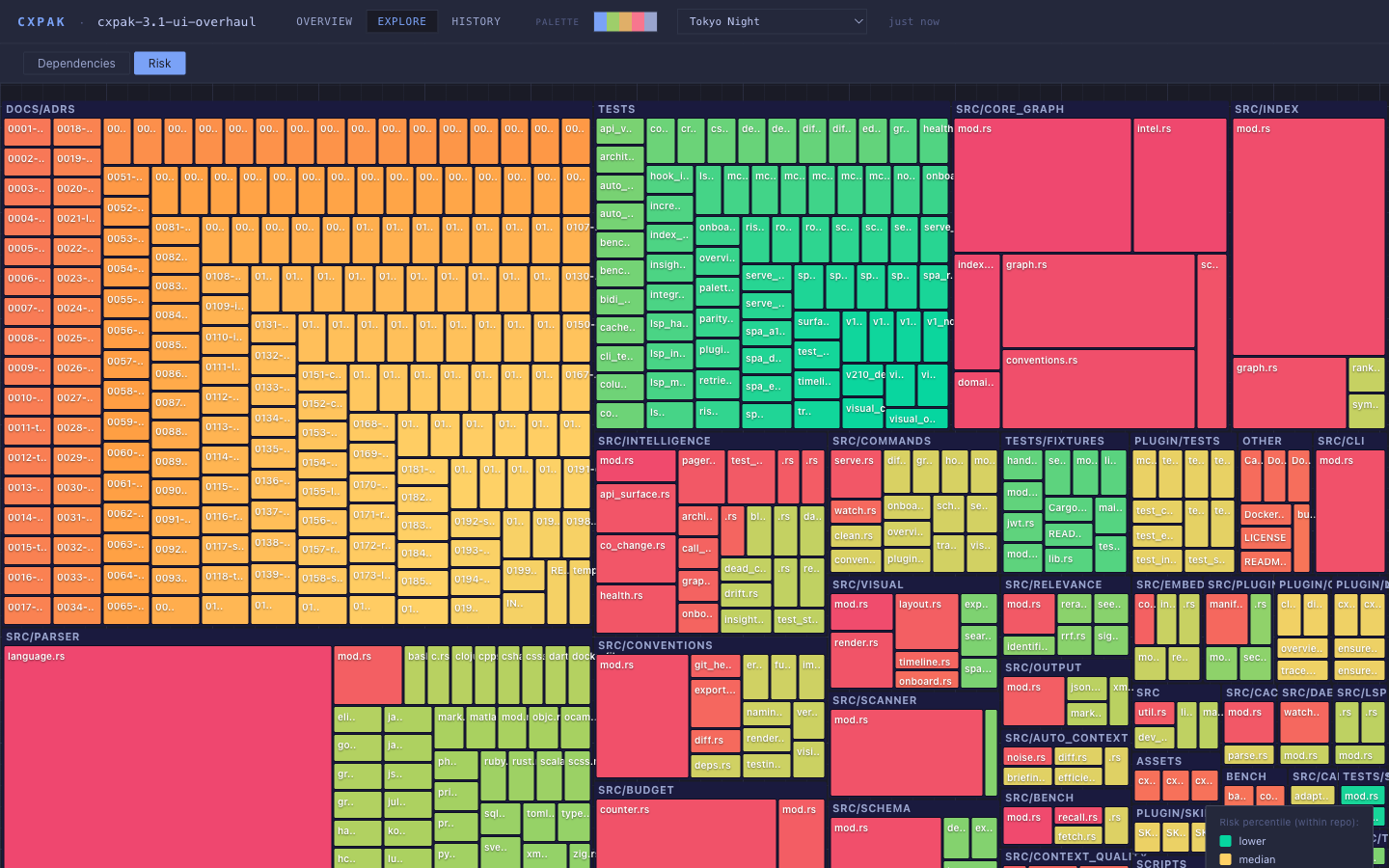
cxpak visual renders a self-contained single-page dashboard -- three modes, inlined D3, zero external assets, works offline. Nineteen built-in colour palettes and a Cmd+K command palette over every file, symbol, and view. Every number on the page traces to a real computation; click any risk to see its exact derivation.
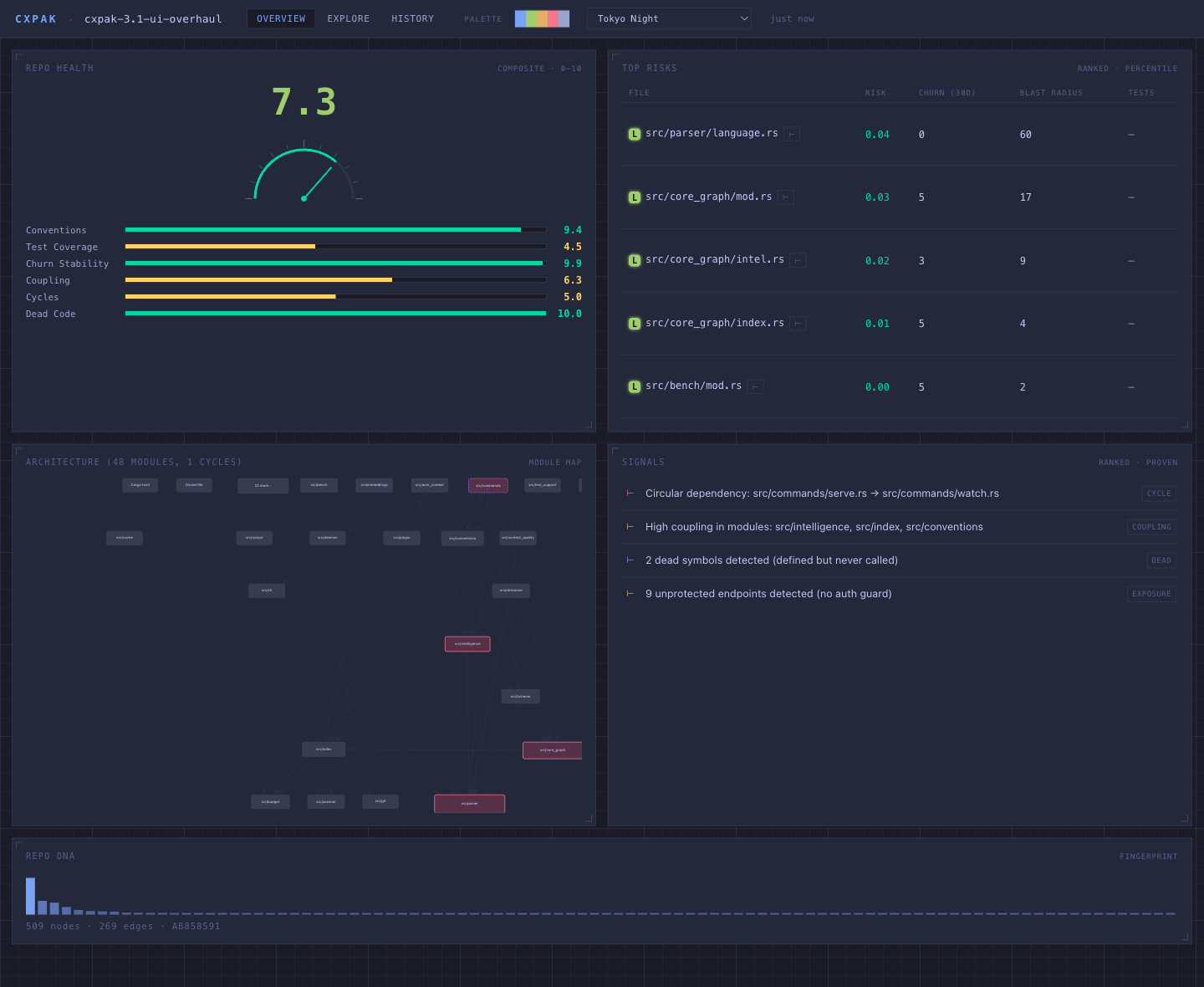
Overview -- a needle health dial and genome bars, ranked top risks, a proven Signals feed, and the Repo-DNA fingerprint barcode.
Explore -- one spatial canvas, Dependencies and Risk lenses
History -- the architecture timeline, scrubbed commit by commit

Install
brew tap Barnett-Studios/tap && brew install cxpak   # macOS/Linux
cargo install cxpak                                   # any platform, incl. Windows
On Windows, cargo install cxpak works, or download the prebuilt
cxpak-x86_64-pc-windows-msvc.zip from the latest release.
Docker
Docker is a first-class deployment option — useful anywhere you want a reproducible, isolated install without managing a Rust toolchain: CI pipelines, sandboxed servers, Windows machines, or air-gapped environments.
Official image (recommended)
Multi-arch (amd64 / arm64) images are published to GitHub Container Registry on every release — no build, no Rust toolchain, no source checkout:
docker run --rm -v "$(pwd):/repo" ghcr.io/barnett-studios/cxpak overview .
Pin a tag or an immutable digest for reproducible deploys:
docker run --rm -v "$(pwd):/repo" ghcr.io/barnett-studios/cxpak:3.1.0 overview .
docker run --rm -v "$(pwd):/repo" ghcr.io/barnett-studios/cxpak@sha256:<digest> overview .
Images are signed with cosign (keyless) and carry SBOM + build-provenance attestations. Verify before deploying:
cosign verify ghcr.io/barnett-studios/cxpak:3.1.0 \
  --certificate-identity-regexp '^https://github.com/Barnett-Studios/cxpak/' \
  --certificate-oidc-issuer https://token.actions.githubusercontent.com
From source
docker build -t cxpak .
Builds the full default feature set from your local checkout. First build is slow (candle ML deps); subsequent builds reuse a cached dependency layer.
Self-hosted / air-gapped
Dockerfile.standalone fetches the pre-built release binary, verifies its SHA-256 checksum, and packages it into an ubuntu:24.04 runtime — no source checkout or Rust toolchain required. All base images and the downloaded binary are digest-pinned for reproducible builds.
All three build-args are required — the build fails immediately if any is omitted, so you can never accidentally produce a stale or mismatched image. Checksums are available on the releases page.
# SHA-256 values are per-release — copy the two for VERSION from the releases page.
docker build -f Dockerfile.standalone \
  --build-arg VERSION=3.1.0 \
  --build-arg SHA256_AMD64=<cxpak-x86_64-unknown-linux-gnu checksum> \
  --build-arg SHA256_ARM64=<cxpak-aarch64-unknown-linux-gnu checksum> \
  -t cxpak:3.1.0 .
Usage
The container runs as a non-root user; the embedding model weights (~30 MB, downloaded on first use) live under /home/cxpak/.cxpak — mount a named volume there to persist them across runs.
macOS / Linux:
# One-shot command
docker run --rm -v "$(pwd):/repo" ghcr.io/barnett-studios/cxpak overview .

# HTTP server (--bind 0.0.0.0 required to reach the container from the host;
# --token is mandatory when binding to a non-loopback address)
docker run -d -p 3000:3000 \
  -v "$(pwd):/repo" \
  -v cxpak-models:/home/cxpak/.cxpak \
  ghcr.io/barnett-studios/cxpak serve --bind 0.0.0.0 --token mysecret .

# MCP — stdio only, one repo per instance (see note below)
docker run --rm -i -v "$(pwd):/repo" ghcr.io/barnett-studios/cxpak serve --mcp .
Windows (PowerShell):
# One-shot command
docker run --rm -v ${PWD}:/repo ghcr.io/barnett-studios/cxpak overview .

# HTTP server
docker run -d -p 3000:3000 `
  -v ${PWD}:/repo `
  -v cxpak-models:/home/cxpak/.cxpak `
  ghcr.io/barnett-studios/cxpak serve --bind 0.0.0.0 --token mysecret .

# Verify (use curl.exe — PowerShell's curl alias does not work here)
curl.exe http://localhost:3000/health

# MCP — stdio only, one repo per instance (see note below)
docker run --rm -i -v ${PWD}:/repo ghcr.io/barnett-studios/cxpak serve --mcp .
Replace mysecret with any non-empty secret of your choice. /health is open (GET) as a liveness probe; every other endpoint requires the bearer token when one is set (with no --token, on a loopback bind, all routes are open):
curl http://localhost:3000/health                                        # no auth required
curl -X POST -H "Authorization: Bearer mysecret" http://localhost:3000/v1/conventions
HTTP vs MCP: These are two separate transports — you cannot use the HTTP server as an MCP endpoint.
MCP scope: Each MCP instance indexes exactly one repository — the path passed at startup (
.in the examples above, which maps to the mounted/repo). To serve multiple repos simultaneously, run one container per repo and register each in your MCP client config. The HTTP server has the same single-repo scope.
Quick start
# See your codebase the way an LLM should
cxpak overview .

# Trace a symbol through the dependency graph
cxpak trace "handle_request" .

# Generate an interactive dashboard
cxpak visual --visual-type dashboard .

# Get a guided reading order for onboarding
cxpak onboard .
Use with AI tools
Claude Code / Cursor (MCP)
Add to .mcp.json in your project root:
{
  "mcpServers": {
    "cxpak": {
      "command": "cxpak",
      "args": ["serve", "--mcp", "."]
    }
  }
}
Your AI tool gets five intent-parameterized tools; each selects a capability via a required op argument. cxpak_context (op: "context") is the main entry point -- one call, optimal context:
| Intent tool | Capabilities (via op) |
|---|---|
cxpak_context | context, retrieval, search, overview, stats, briefing, pack_context, context_for_task |
cxpak_graph | graph (nodes/node/neighbors/path/subgraph), trace, blast_radius, call_graph, dead_code, api_surface, data_flow, cross_lang, predict |
cxpak_data | data (indexed / live schema) |
cxpak_review | review, diff, verify |
cxpak_insight | health, risks, architecture, conventions, security_surface, drift, visual, onboard |
The v2.x per-tool names (cxpak_auto_context, cxpak_health, ...) remain callable as deprecated aliases; tools/list does not advertise them, so a client that builds its callable set from the advertised surface will not find them. No removal release is set. See docs/MIGRATION-3.0.md.
On large repositories, cxpak serve --mcp answers the MCP initialize handshake immediately and builds the index in the background -- fixing the startup timeout. Tool calls that arrive before the index is ready get a graceful retry status, then byte-identical results once it is built.
Claude Code Plugin
/plugin install cxpak
Auto-triggers on architecture questions and change reviews. Slash commands: /cxpak:overview, /cxpak:trace, /cxpak:diff, /cxpak:clean.
HTTP Server
cxpak serve .                          # port 3000
cxpak serve --token my-secret .        # with Bearer auth on /v1/ endpoints
cxpak watch .                          # file watcher with hot index
LSP
cxpak lsp . # stdio, works with any LSP client
CodeLens, hover, diagnostics, workspace symbols, plus 16 custom cxpak/* methods. Supports didOpen/didChange/didClose for in-editor reactivity.
Core capabilities
Auto Context
cxpak_context (op: "context") is the primary entry point. Give it a task and token budget; it returns exactly what the LLM needs.
The pipeline: query expansion with domain-specific synonyms, relevance scoring over 6 deterministic signals (keyword, symbol, path, domain, import proximity, PageRank) fused with Reciprocal Rank Fusion (RRF) -- the default ranking as of 3.0.0, measured +164% recall over the prior weighted-sum on a 31-PR benchmark and deterministic across processes -- then seed selection, noise filtering, test/schema/blast-radius enrichment, progressive degradation (Full > Trimmed > Documented > Signature > Stub), and per-file annotations explaining why each file was included. Embeddings are an optional 7th signal (see Embeddings).
Every response starts with a Repository DNA section -- a ~1000 token convention summary so the LLM knows how your team writes code before it sees any.
Intelligence
| Feature | What it does |
|---|---|
| Health Score | Composite metric across conventions, test coverage, churn stability, coupling, cycles, dead code |
| Risk Ranking | Files ranked by churn x blast radius x test gap -- the ones most likely to cause problems |
| Architecture | Per-module coupling, cohesion, circular dependencies, boundary violations, god files |
| Blast Radius | Change impact: direct dependents, transitive dependents, test files, schema dependents, each with risk scores |
| Change Prediction | Structural + historical (180-day co-change) + call-graph signals, confidence 0.3--0.9 |
| Architecture Drift | Compare against stored baselines; auto-saves snapshots for trend tracking |
| Dead Code | Symbols with zero callers, ranked by importance (PageRank x visibility) |
| Call Graph | Cross-file call edges with Exact/Approximate confidence levels |
| Security Surface | Unprotected endpoints, secrets, SQL injection, validation gaps, exposure scores across 12 frameworks |
| Data Flow | Trace values source-to-sink through the call graph; reports module/language/security boundary crossings |
| Cross-Language | HTTP, FFI, gRPC, GraphQL, shared schema, and exec bridges between languages |
Visual Intelligence
Six interactive views, self-contained HTML with D3.js. No build step, no CDN.
cxpak visual --visual-type dashboard .
cxpak visual --visual-type architecture .
cxpak visual --visual-type risk .
cxpak visual --visual-type flow --symbol handle_request .
cxpak visual --visual-type timeline .
cxpak visual --visual-type diff --files "src/api.rs,src/db.rs" .
Export formats: HTML, Mermaid, SVG, PNG, C4 DSL, JSON.
Layout engine: Sugiyama method with SCC condensation, barycenter crossing minimization, Brandes-Kopf coordinate assignment, and 7+/-2 cognitive clustering.
Conventions
Extracts a quantified convention profile from what your team actually does: naming, imports, error handling, dependencies, testing, visibility, function length, git health. Each pattern has counts, percentages, and strength labels (Convention >= 90%, Trend >= 70%, Mixed).
cxpak_review (op: "verify") checks code changes against observed conventions -- only flags violations in changed lines. cxpak conventions export/diff enables CI drift detection with SHA256 checksums.
Onboarding
cxpak onboard .
Generates a dependency-ordered reading guide: files topologically sorted, grouped into phases by module, ordered by PageRank. Each file lists key symbols to focus on and an estimated reading time.
Language support (44)
Full extraction (functions, classes, methods, imports, exports): Rust, TypeScript, JavaScript, Python, Java, Go, C, C++, Ruby, C#, Swift, Kotlin, Bash, PHP, Dart, Scala, Lua, Luau, Elixir, Zig, Haskell, Groovy, Objective-C, R, Julia, OCaml, MATLAB, Clojure
Structural extraction (selectors, keys, blocks): CSS, SCSS, Markdown, JSON, YAML, TOML, Dockerfile, HCL/Terraform, Protobuf, Svelte, Makefile, HTML, GraphQL, XML
Database DSLs: SQL, Prisma
Data layer awareness
cxpak understands your data layer and uses it to build a richer dependency graph:
- Schema detection -- SQL DDL, Prisma, Django, SQLAlchemy, TypeORM, ActiveRecord
- Migration sequences -- Rails, Alembic, Flyway, Django, Knex, Prisma, Drizzle
- Embedded SQL linking -- inline SQL in application code creates edges to table definitions
- Column-level lineage -- impact traced at column granularity: "alter
users.email" resolves to the specific queries, ORM models, endpoints, and tests that reference that column, and a different column's blast excludes the email-only files - Live database introspection -- connect to a running Postgres or MySQL and index the live schema, then compute drift against the schema the code declares. Pure-Rust rustls drivers (no OpenSSL), read-only, and the DSN is never logged or persisted. Off by default; enabled with the
data-introspectbuild feature - Typed edge types -- Import, ForeignKey, ViewReference, EmbeddedSql, OrmModel, MigrationSequence, ColumnReference, CrossLanguage, and more. Each edge carries a confidence marker; heuristic (inferred) edges are labeled so a regex guess is never mistaken for a structurally proven dependency
Graph query and export
Query the typed dependency graph directly -- five primitives (nodes, node, neighbors, path, subgraph), identical across MCP, HTTP, LSP, and CLI. Edges carry a typed edge_type and a confidence marker; inferred (heuristic) edges are surfaced as such. nodes enumerates every valid id with no arguments -- the way to discover ids (they're repo-relative file paths) before calling the others; subgraph reports any seed that isn't a real node in unknown_seeds rather than echoing it back as one.
cxpak graph nodes .
cxpak graph neighbors --id src/index/graph.rs .
cxpak graph path --from src/main.rs --to src/output/mod.rs .
cxpak graph subgraph --seeds src/scanner/mod.rs,src/parser/mod.rs --depth 2 .
Export the graph to Cypher (Neo4j) or GraphML (Gephi, yEd, NetworkX) with the same honest typed edges and per-edge confidence:
cxpak visual --format cypher .
cxpak visual --format graphml .
Embeddings
Semantic similarity is an optional 7th scoring signal, opt-in via .cxpak.json. Without that config the default 6 deterministic signals are used and no model is downloaded. When configured, cxpak uses either local inference with all-MiniLM-L6-v2 (~30 MB, downloaded on first use) or a remote provider -- OpenAI, Voyage AI, or Cohere with your own key. On cxpak serve --mcp the embedding index is built in the background, off the startup path, so it never delays the MCP handshake; if it fails, cxpak falls back to the 6 deterministic signals.
Minimal local config:
{ "embeddings": { "provider": "local" } }
WASM plugin loader — a skeleton, not a working SDK
You cannot extend cxpak with a WASM plugin today. PluginLoader::load() verifies the module's
checksum, compiles it, instantiates it, and then returns guest function binding not yet implemented. The WIT bridge that would make a guest function callable does not exist, so no plugin
code has ever run.
The plugins feature is therefore excluded from default — a stock cargo install cxpak does not
build it, and the plugin management commands are behind the same gate. What is built out is the
loading path: a manifest with SHA-256 verification before compilation, a 10 MiB module cap, a 64 MiB
memory limiter, and a 10 s epoch deadline. Treat none of it as a security boundary until the bridge
lands and the gaps in SECURITY.md are
closed — #42.
Workspace support
For monorepos: --workspace packages/api scopes scanning to a subdirectory while keeping the full repo as the git root.
Excluding files
Scanning honours .gitignore and, on top of it, an optional .cxpakignore at the
repository root. It takes the same syntax as .gitignore:
# Generated code
generated/
*.generated.ts

# Large test fixtures
tests/fixtures/large/
Use it for files that belong in the repository but not in the context pack —
generated output, vendored trees, fixtures — or to skip a single file that a
grammar parses badly. .cxpakignore.example in this repo is a starting point.
Caching
Parse results cached in .cxpak/cache/ keyed on file mtime and size. Cache invalidates automatically when tree-sitter grammar versions change. Atomic writes with advisory locking for concurrent process safety. cxpak clean . to reset.
Rust client (non-default client feature)
Rust callers can talk to a cxpak MCP server through the official client rather than
hand-rolling an rmcp session. It is off by default, so cargo install cxpak still builds
an indexer and pulls no rmcp:
[dependencies]
cxpak = { version = "3.1", features = ["client"] }
If you want the client without the 44 bundled grammars, default-features = false, features = ["client", "daemon"] builds the library — daemon is currently the floor, not client alone.
CxpakClient is one method, and its return type is the contract:
use cxpak::client::{CxpakClient, RmcpCxpakClient};
use serde_json::json;

let client = RmcpCxpakClient::new(std::env::current_dir()?);
match client.call("cxpak_context", json!({"op": "overview"})).await {
    Some(bundle) => use_it(bundle),
    // NOT "the server looked and found nothing" — the tool was unavailable, errored,
    // or degraded. Map it to a skipped observation, never to a verdict.
    None => skip(),
}
RmcpCxpakClient is lazy: no child process is spawned until the first call, spawns are
backed off after repeated failures, and the child's stderr is nulled so a server banner can
never contaminate a caller that must not write to stderr (a hook, for instance).
For your own tests, RecordedCxpakClient replays a name → response map with no I/O, and
from_dir loads a directory of committed <tool>.json recordings. A missing directory is an
error, not an empty client — a mis-pathed fixture set reporting a clean run over nothing
is the failure this constructor refuses to have.
use cxpak::client::RecordedCxpakClient;
let client = RecordedCxpakClient::from_dir(std::path::Path::new("recordings/cxpak"))?;
The feature adds rmcp, and only rmcp, to what gets built (async-trait is already in the
default tree transitively). CI asserts both directions — that the client compiles and its
tests run, and that rmcp stays out of the default dependency tree.
Stable API
v2.0.0 establishes semver for the MCP API. Tool names, parameters, and response structures are stable across 2.x.
3.0.0 consolidates the 26 MCP tools into 5 intent-parameterized tools (cxpak_context, cxpak_graph, cxpak_data, cxpak_review, cxpak_insight), each selecting a capability via a required op argument. This is the one breaking change in 3.0.0 and affects MCP clients only -- the CLI, the HTTP /v1/* API, and the LSP cxpak/* methods are unchanged. The 26 old tool names remain callable as deprecated, undiscoverable aliases for one release. See docs/MIGRATION-3.0.md.
Architecture decisions
Every architecturally significant decision is recorded as an ADR in docs/adrs/ -- what was chosen, the options considered, and the conditions under which to revisit it. The records span parsing, the typed dependency graph, relevance scoring, token budgeting, the MCP/HTTP/LSP surfaces, and distribution. Records 0001-0162 were reconstructed across v0.1.0 -> v2.2.1; 0163 onward are written at decision time, now through 0199 (v3.1.0). Start with the index.
License
Licensed under either of MIT or Apache-2.0 at your option. Unless you explicitly state otherwise, any contribution you intentionally submit for inclusion in the work shall be dual-licensed as above, without any additional terms.
Built by Barnett Studios -- building products, teams, and systems that last.