awaBerry device as a service
awaBerry Agentic allows for secure remote access to any terminal based device for workflows allowing any Agent and Large Language Model based routine to execute commands on your devices for getting access to required data - and to also write genrated data back.
Documentation
awaberry Remote MCP Server
A Node.js based Model Context Protocol (MCP) server to remote connect to devices without the need for SSH, VPN and open ports to manage files, connect to databases and execute terminal commands in a persistent long running terminal session.
This is a JavaScript-based MCP server that provides remote device access through the awaBerry platform. It demonstrates core MCP concepts by providing:
Device as a service
- Integration with the awaberry Agentic platform
- Secure device connection management
- Remote terminal command execution
- Session-based authentication
This allows for powerful workflows allowing any Agent and Large Language Model based routine to execute commands on your devices for getting access to required data - and to also write genrated data back.
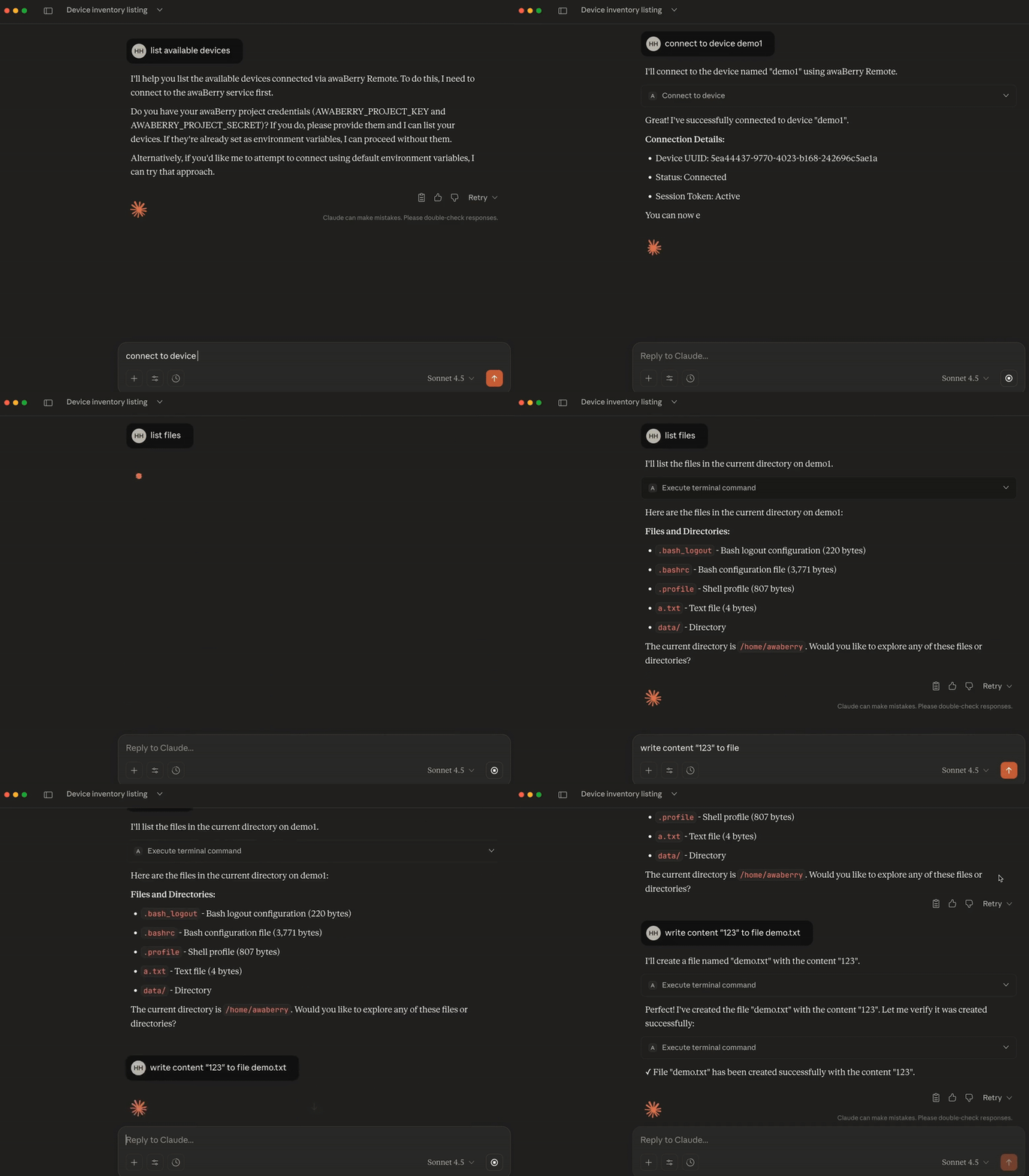
Getting credentials.
Access to the awaBerry platform via an MCP Server is provided via project key and project secret. Either setup own projects for your own devices or receive the credentials.
Create an own project
An account at app.awaberry.com and a device linked to awaBerry Remote.
- Sign up at awaberry Remote.
- Add one or more devices.
- Create a new project under section awaBerry Agentic.
- Register your devices with the project.
- Copy your project key and secret from the project settings.
Read more about awaBerry at www.awaberry.com
Received project credentials
You have received project key and secret, e.g. via company IT or a friend.
Demo access
To connect to a demo project, use the following credentials
- project key: demokey
- project secret: demosecret
- name of the device: demodevice
Features
Tools
The awaBerry mcp consists of the following tools:
connect_to_device
Connects to a remote device (Mac, Linux, Windows, or Docker) registered in your awaberry project.
-
Parameters:
projectKey(optional): Project authentication key (defaults toAWABERRY_PROJECT_KEYenv var).projectSecret(optional): Project authentication secret (defaults toAWABERRY_PROJECT_SECRETenv var).deviceName(required): Name of the device to connect to.
-
Returns:
sessionToken(string): Authentication token for the session.status(string): Connection status ("connected" or "notconnected").deviceuuid(string): Unique identifier for the device.
The sessionToken is valid for 30 minutes from connection start.
execute_terminal_command
Executes terminal commands on a connected device to manage files, connect to databases and execute terminal commands in a persistent long running terminal session.
On reconnecting to the device, the last state of the terminal is available - this allows also to start long running commands and get the results ones available.
-
Parameters:
sessionToken(required): Session token from the device connection.deviceuuid(required): Device UUID to execute the command on.command(required): Terminal command to execute.
-
Returns:
success(boolean): Indicates if the command was accepted for execution.result.commandResult(string): Output from the command.result.lastCommandEndedOnTerminal(boolean): Indicates if the command process has completed.
Installation
Prerequisites
Download
Open a terminal and optionally create a folder for the awaBerry mcp server
# optionally
cd $HOME
mkdir awaberry
cd awaberry

# Clone the repository
git clone https://github.com/awaberry/mcp_server_awaberry.git
cd mcp_server_awaberry

# Install dependencies
npm install

PWD
# outputs the absolute path to mcp_server_awaberry which will be required in the later configuration setup
Setup of an awaBerry MCP Server in company environments
Please read the file MCPSERVER.md for setup instructions of an awaBerry MCP Server in local environments or as a Cloudflare worker.
Setup in Claude Desktop
To use awaBerry with Claude Desktop, add the server configuration to your claude_desktop_config.json file.
- On macOS:
~/Library/Application Support/Claude/claude_desktop_config.json - On Windows:
%APPDATA%/Claude/claude_desktop_config.json
{
  "mcpServers": {
    "awaberry": {
      "command": "node",
      "args": [
        "/absolute/path/to/mcp_server_awaberry/mcp_server_awaberry/mcpclients/start-awaberry-mcp.js"
      ]

    }
  }
}
Important: Replace /absolute/path/to/mcp_server_awaberry with the actual absolute path to your installation (e.g., /Users/username/projects/mcp_server_awaberry).
Configuration of the MCP server and credentials
To the awaBerry MCP server, add the following configurations
To setup of server url, project key and project secret, copy the file awaberry-config.json.example to awaberry-config.json.
In a terminal type
  cd /absolute/path/to/mcp_server_awaberry/mcp_server_awaberry/mcpclients
  cp awaberry-config.json.example awaberry-config.json
Edit the file awaberry-config.json.
{
  "serverUrl": "<serverUrl>",
  "env": {
    "AWABERRY_PROJECT_KEY": "<AWABERRY_PROJECT_KEY>",
    "AWABERRY_PROJECT_SECRET": "<AWABERRY_PROJECT_KEY>"
  }
}
Important: Replace
- serverUrl: with the server your company IT team has installed for you or your local mcp server. Start your local mcp server as follow:
For connecting via a local mcp server, use http://localhost:3000/mcp. For starting the mcp server do in a terminal
  cd /absolute/path/to/mcp_server_awaberry/mcp_server_awaberry/
   npm run start:mcp:json
To monitor the mcp server log open another terminal and type
  cd /absolute/path/to/mcp_server_awaberry/mcp_server_awaberry/
  tail -f activitylog.log
- AWABERRY_PROJECT_KEY: the received project key for an awaBerry Agentic project
- AWABERRY_PROJECT_SECRET: the received project secret.
Usage Examples
Once configured, restart Claude Desktop and use natural language to interact with your devices:
-
Connect to a device:
Connect to my device "laptop-macos"
-
List files:
Show me all files in my home directory
-
Read a file:
Read the contents of file
-
Execute complex commands:
Find all text files files modified in the last 7 days in my home directory
-
Run scripts:
Execute the backup script at ~/scripts/backup.sh
Logging
All activity is logged to activitylog.log in the project root directory. Logs include:
- Tool invocations with timestamps
- Connection attempts and results
- Command executions and outputs
- Errors and warnings
Example log output:
2025-01-15 10:30:45 [INFO]: 📥 [Tool] connect_to_device called
2025-01-15 10:30:45 [INFO]: 📋 [Tool] Device name: laptop-macos
2025-01-15 10:30:46 [INFO]: ✅ [Tool] connect_to_device successful - Session: a1b2c3d4...
Rate Limits
Rate limits are enforced by the awaberry platform:
- Connection attempts: As needed.
- Command executions: Based on the plan tier of awaBerry.
Check your plan details at awaberry Agentic for specific limits.
Troubleshooting
Server doesn't start
- Ensure Node.js >= 18 is installed:
node --version - Check that all dependencies are installed:
npm install - Verify the file path in
claude_desktop_config.jsonis absolute and correct. - Check for syntax errors in the config JSON file.
Connection fails
- Allow Claude Desktop to execute requests to awaBerry, it it asks for permissions.
- Verify your project key and secret are correct in the environment variables.
- Ensure the device name matches exactly (it is case-sensitive).
- Check that the device is online and connected to awaberry.
- Review
activitylog.logfor detailed error messages. - Confirm the device is registered in your awaberry project.
Commands don't execute
- Check that the device is still connected.
- Ensure the command syntax is correct for the target OS.
- Review command output in
activitylog.log. - Check device permissions for the command you're trying to run.
Claude Desktop doesn't show the MCP server
- Restart Claude Desktop after modifying the config file.
- Check the JSON syntax in
claude_desktop_config.json. - Ensure the file path uses forward slashes (
/) or properly escaped backslashes (\\). - Look for errors in Claude Desktop's logs.
Security Considerations
- Store your
AWABERRY_PROJECT_KEYandAWABERRY_PROJECT_SECRETsecurely. - Never commit credentials to version control.
- Use environment variables for sensitive configuration.
- Session tokens are temporary and expire automatically.
- All communication with awaberry servers uses HTTPS.
License
Contributing
Contributions are welcome! Please feel free to submit a Pull Request or contact us.
- Contact us: www.awaberry.com/contact
Support
For documentation and questions:
- awaberry Documentation: www.awaberry.com/manual
- awaberry Support: www.awaberry.com/support