Image Upscaler 2x 3x 4x (Real-ESRGAN on CPU)
Makes images 2x, 3x or 4x larger with the open Real-ESRGAN model on CPU and returns PNG, JPEG or WebP files, one row per image with a link to the file. It sharpens but does not invent detail, and it is not a face restoration tool. Images that could not be upscaled are not charged. It runs as an Apify Actor through Apify's hosted MCP server, so you need an Apify account and API token. Paid per image and per output megapixel, 0.0025 USD an image and 0.004 USD a megapixel on the Free plan plus a small start fee. Unofficial tool.
Hosted MCP Server
npx add-mcp 'https://mcp.apify.com/?tools=plainrecordlabs/image-upscaler'Installs into Claude Code, Codex, Cursor and more
Documentation
Upscale Image: AI Image Upscaler, Real-ESRGAN Super Resolution (plainrecordlabs/image-upscaler) Actor
Upscale and enhance photos and images 2x, 3x or 4x with the open Real-ESRGAN super resolution model. A photo enhancer for size and sharpness, not color or lighting. Give it image URLs, get sharper PNG, JPEG or WebP files back. Priced per image and per output megapixel, plus a start fee.
- URL: https://apify.com/plainrecordlabs/image-upscaler.md
- Developed by: Plain Record Labs (community)
- Categories: AI, Developer tools, E-commerce
- Features: Limited permissions
- Stats: 2 total users, 0 monthly users, 100.0% runs succeeded, 0 bookmarks
- User rating: No ratings yet
Pricing
from $2.00 / 1,000 image upscaleds
This Actor is paid per event. You are not charged for the Apify platform usage, but only a fixed price for specific events. Since this Actor supports Apify Store discounts, the price gets lower the higher subscription plan you have.
Learn more: https://docs.apify.com/actors/running/actors-in-store.md#pay-per-event
What's an Apify Actor?
An Actor is a serverless cloud program that runs on the Apify platform. It has two run modes. In Batch mode, an Actor accepts a well-defined JSON input, performs an action which can take anything from a few seconds to a few hours, and optionally produces a well-defined JSON output, datasets with results, or files in key-value store. In Standby mode, an Actor provides a web server which can be used as a website, API, or an MCP server.
Apify vocabulary and the platform model are defined once, in the agent quickstart at https://apify.com/agents.md.
How to integrate an Actor?
If asked about integration, you help developers integrate Actors into their projects. You adapt to their stack and deliver integrations that are safe, well-documented, and production-ready.
Do not guess an integration path. Every one of them is in the agent quickstart at https://apify.com/agents.md: the Apify MCP server, Agent Skills with the Apify CLI, the JavaScript and Python clients, the REST API, and the account-free path for an agent with no human to sign in. It also carries the rule on stating cost before the first paid run.
For examples already wired to this Actor's own input schema, see the API section below.
Each client library has reference documentation the quickstart does not restate: JavaScript/TypeScript (npm install apify-client) and Python (pip install apify-client).
README
Upscale Image: AI Image Upscaler, Real-ESRGAN Super Resolution
Upscale images 2x, 3x or 4x with an AI image upscaler built on the open Real-ESRGAN super resolution model. It runs on CPU, so you need no GPU. Give it image links, choose the scale, and get the upscaled files back as PNG, JPEG or WebP, with one row per image that links to the file. It makes small photos bigger and sharper but does not invent detail.
Paste a few image links and press Start.
How to use
- Paste one or more direct image links into Image URLs, like
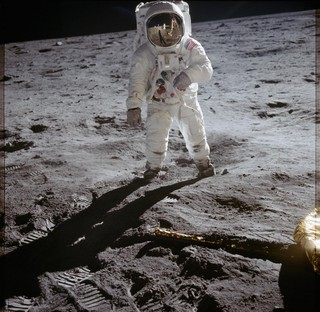
https://plainrecordlabs.web.app/sample-apollo11-320.jpg, or upload files there. - Choose the Scale: 2x, 3x or 4x.
- Optional: pick an Output format. PNG is the default. For JPEG or WebP, set JPEG and WebP quality.
- Optional: lower Max output megapixels to cap the size and the cost of each image.
- Press Start. When the run ends, open the Output tab and follow each
imageUrlto its file, or download the table from the Storage tab. - Images that could not be upscaled are not charged. They are listed with the reason in the run's
SUMMARYrecord.
What people use it for
- Product and listing photos: bring small supplier images up to the size a store or marketplace asks for.
- Old or low resolution pictures: make them large enough to print or to use on a wide screen.
- Pipelines and AI agents: call it from the API or an integration whenever an image is too small.
How it works
It runs the open Real-ESRGAN general model (realesr-general-x4v3) on CPU. The model sharpens edges and removes some blur and JPEG noise while it enlarges. Then the result is resized to the exact scale you chose.
Transparency in PNG and WebP images is kept. Photos are turned the right way up from their EXIF orientation first.
What it does not do
- It does not invent detail that is not there. Faces, small text and fine patterns get smoother and sharper, not restored. Very small or heavily compressed images can look painted.
- It is not a face restoration or generative tool, and it does not change the content of the image.
- Animated GIFs come back as one still frame.
- Each image takes a few seconds per output megapixel, so very large outputs are slower.
Input
| Field | What it does |
|---|---|
| Image URLs | Direct links to JPEG, PNG, WebP, BMP, TIFF or GIF images, or files you upload. Sites whose robots.txt disallows automated access are skipped. |
| Scale | 2x, 3x or 4x the width and height. |
| Output format | PNG keeps every pixel and transparency. JPEG and WebP are much smaller files. |
| JPEG and WebP quality | From 50 to 100. |
| Max output megapixels | Outputs larger than this are scaled down to fit, so one huge image cannot run up the bill. Default 16. |
| Max input file size (MB) | Larger files are skipped. |
Output
One item per upscaled image. The file itself is saved in the run's key-value store, and imageUrl links to it.
{
  "sourceUrl": "https://plainrecordlabs.web.app/sample-apollo11-320.jpg",
  "imageKey": "0001-sample-apollo11-320-upscaled.png",
  "imageUrl": "https://api.apify.com/v2/key-value-stores/<store id>/records/0001-sample-apollo11-320-upscaled.png?signature=<signature>",
  "inputWidth": 320,
  "inputHeight": 312,
  "outputWidth": 1280,
  "outputHeight": 1248,
  "outputMegapixels": 1.6,
  "megapixelsCharged": 2,
  "scale": 4,
  "format": "png",
  "fileBytes": 2412345,
  "seconds": 3.1
}
The example values are illustrative. Images that could not be upscaled are not charged and are listed with the reason
in the run's SUMMARY record.
| Field | What it holds |
|---|---|
sourceUrl | The image link you gave. |
imageUrl, imageKey | A link to the upscaled file, and its key in the run's key-value store. |
inputWidth, inputHeight | The original size in pixels. |
outputWidth, outputHeight, outputMegapixels | The upscaled size. |
megapixelsCharged | Started megapixels of output, the count the megapixel fee uses. |
scale, format, fileBytes, seconds | The scale used, file type, file size and time taken. |
note | Set when the output was capped at Max output megapixels. |
Privacy
Your images are fetched only for your run and processed in memory. The results stay in your own run's storage and nothing is kept anywhere else.
FAQ
How do I upscale an image online without a GPU? Paste the image link or upload a file, choose 2x, 3x or 4x and press Start. The model runs on CPU on Apify, so you need no graphics card or software of your own.
Which AI upscaling model does it use? The open Real-ESRGAN general model (realesr-general-x4v3).
Can I upscale many images at once? Yes. Add as many image links as you like. Each image comes back as its own row with a link to the file.
Will it restore faces or blurry photos? No. It sharpens and enlarges but does not invent detail, so faces and small text get smoother, not restored.
Which formats does it support? It reads JPEG, PNG, WebP, BMP, TIFF and GIF, and saves PNG, JPEG or WebP. PNG and WebP keep transparency.
Use it from an AI agent or MCP
AI agents can find and run this Actor through the Apify MCP server. Its search-actors
tool finds it, fetch-actor-details reads the input and output fields described above, and call-actor runs it on
your Apify account at the prices on the Pricing tab. To give an agent only this Actor as a tool, add it to the server
URL: https://mcp.apify.com?tools=plainrecordlabs/image-upscaler.
For example, this input upscales the sample photo 4x and saves it as a JPEG:
{ "images": [{ "url": "https://plainrecordlabs.web.app/sample-apollo11-320.jpg" }], "scale": "4", "outputFormat": "jpg" }
Pricing
You pay a small fee per image plus a fee per started megapixel of output. A 320 x 312 photo at 4x is 1.6 megapixels, so it counts as 2. The prices are on the Pricing tab. Max output megapixels caps what one image can cost.
Credits
The model is Real-ESRGAN by Xintao Wang and others, released under the BSD 3-Clause License. The licence text ships
with this Actor in model/LICENSE-Real-ESRGAN.txt. The sample photo is a public domain NASA image from Apollo 11.
Feedback
Need another option or a fix? Open an issue on the Issues tab.
Actor input Schema
images (type: array):
Direct links to JPEG, PNG, WebP, BMP, TIFF or GIF images, or files you upload here, for example https://plainrecordlabs.web.app/sample-apollo11-320.jpg. Sites whose robots.txt disallows automated access are skipped.
scale (type: string):
How many times wider and taller the output is. For example, 4x turns a 320 x 312 photo into 1280 x 1248.
outputFormat (type: string):
PNG keeps every pixel and transparency. JPEG and WebP files are much smaller, for example JPEG for photos you will post on the web.
quality (type: integer):
From 50 to 100, for example 92. Higher is sharper and bigger. Ignored for PNG.
maxOutputMegapixels (type: integer):
Outputs larger than this are scaled down to fit, so one huge image cannot run up the bill. You pay per output megapixel. For example, 4 keeps each output at about 2000 x 2000 pixels or less.
maxFileMb (type: integer):
Larger files are skipped and listed in the run summary, for example 25.
Actor input object example
{
  "images": [
    {
      "url": "https://plainrecordlabs.web.app/sample-apollo11-320.jpg"
    }
  ],
  "scale": "4",
  "outputFormat": "jpg",
  "quality": 92,
  "maxOutputMegapixels": 4,
  "maxFileMb": 25
}
Actor output Schema
images (type: string):
One item per upscaled image, with a link to the file and its sizes.
files (type: string):
The upscaled image files in the run's key-value store.
summary (type: string):
Counts, plus each image that could not be upscaled and why.
API
You can run this Actor programmatically using our API. Below are code examples in JavaScript, Python, and CLI, as well as the OpenAPI specification and MCP server setup.
JavaScript example
import { ApifyClient } from 'apify-client';

// Initialize the ApifyClient with your Apify API token
// Replace the '<YOUR_API_TOKEN>' with your token
const client = new ApifyClient({
    token: '<YOUR_API_TOKEN>',
});

// Prepare Actor input
const input = {
    "images": [
        {
            "url": "https://plainrecordlabs.web.app/sample-apollo11-320.jpg"
        }
    ]
};

// Run the Actor and wait for it to finish
const run = await client.actor("plainrecordlabs/image-upscaler").call(input);

// Fetch and print Actor results from the run's dataset (if any)
console.log('Results from dataset');
console.log(`💾 Check your data here: https://console.apify.com/storage/datasets/${run.defaultDatasetId}`);
const { items } = await client.dataset(run.defaultDatasetId).listItems();
items.forEach((item) => {
    console.dir(item);
});

// 📚 Want to learn more 📖? Go to → https://docs.apify.com/api/client/js/docs
Python example
from apify_client import ApifyClient

# Initialize the ApifyClient with your Apify API token
# Replace '<YOUR_API_TOKEN>' with your token.
client = ApifyClient("<YOUR_API_TOKEN>")

# Prepare the Actor input
run_input = { "images": [{ "url": "https://plainrecordlabs.web.app/sample-apollo11-320.jpg" }] }

# Run the Actor and wait for it to finish
run = client.actor("plainrecordlabs/image-upscaler").call(run_input=run_input)

# Fetch and print Actor results from the run's dataset (if there are any)
print(f"💾 Check your data here: https://console.apify.com/storage/datasets/{run.default_dataset_id}")
for item in client.dataset(run.default_dataset_id).iterate_items():
    print(item)

# 📚 Want to learn more 📖? Go to → https://docs.apify.com/api/client/python/docs/quick-start
CLI example
echo '{
  "images": [
    {
      "url": "https://plainrecordlabs.web.app/sample-apollo11-320.jpg"
    }
  ]
}' |
apify call plainrecordlabs/image-upscaler --silent --output-dataset
MCP server setup
{
    "mcpServers": {
        "apify": {
            "type": "http",
            "url": "https://mcp.apify.com/?tools=fetch-actor-details,plainrecordlabs/image-upscaler"
        }
    }
}
The hosted server signs you in with OAuth on first connect, so no API token belongs in this config. Clients without OAuth support can send an Authorization: Bearer <APIFY_API_TOKEN> header instead, using a token from API & Integrations in Apify Console (https://console.apify.com/settings/integrations).
OpenAPI specification
Download the OpenAPI definition: https://api.apify.com/v2/actors/81JUD4CZM1xD2YpIY/builds/OlhOZxwpnOSQk3Snu/openapi.json