MYSTIQUE Hiring & Jobs Data MCP Server
Live ATS hiring velocity and job openings MCP server querying Greenhouse, Lever, Ashby, Workable, SmartRecruiters, Workday career boards, and Bluesky signals via Streamable HTTP.
Hosted MCP Server
npx add-mcp 'https://mystique-lab--hiring-data-mcp.apify.actor/mcp'Installs into Claude Code, Codex, Cursor and more
Documentation
Jobs MCP Server: Greenhouse, Lever & Workday (mystique-lab/hiring-data-mcp) Actor
Job search MCP server that gives Claude, Cursor and other AI agents live job and hiring data: open jobs from Greenhouse, Lever, Ashby, Workable, SmartRecruiters and Workday, per-company hiring signals, and Bluesky search. Pay per tool call, no login.
- URL: https://apify.com/mystique-lab/hiring-data-mcp.md
- Developed by: Mystique Lab (community)
- Categories: MCP servers, Jobs, AI
- Stats: 1 total users, 0 monthly users, 0.0% runs succeeded, 0 bookmarks
- User rating: No ratings yet
Pricing
from $5.00 / 1,000 tool calls
This Actor is paid per event and usage. You are charged both the fixed price for specific events and for Apify platform usage.
Learn more: https://docs.apify.com/actors/running/actors-in-store.md#pay-per-event
What's an Apify Actor?
An Actor is a serverless cloud program that runs on the Apify platform. It has two run modes. In Batch mode, an Actor accepts a well-defined JSON input, performs an action which can take anything from a few seconds to a few hours, and optionally produces a well-defined JSON output, datasets with results, or files in key-value store. In Standby mode, an Actor provides a web server which can be used as a website, API, or an MCP server.
Apify vocabulary and the platform model are defined once, in the agent quickstart at https://apify.com/agents.md.
How to integrate an Actor?
If asked about integration, you help developers integrate Actors into their projects. You adapt to their stack and deliver integrations that are safe, well-documented, and production-ready.
Do not guess an integration path. Every one of them is in the agent quickstart at https://apify.com/agents.md: the Apify MCP server, Agent Skills with the Apify CLI, the JavaScript and Python clients, the REST API, and the account-free path for an agent with no human to sign in. It also carries the rule on stating cost before the first paid run.
For examples already wired to this Actor's own input schema, see the API section below.
Each client library has reference documentation the quickstart does not restate: JavaScript/TypeScript (npm install apify-client) and Python (pip install apify-client).
README
Jobs MCP Server: Greenhouse, Lever & Workday
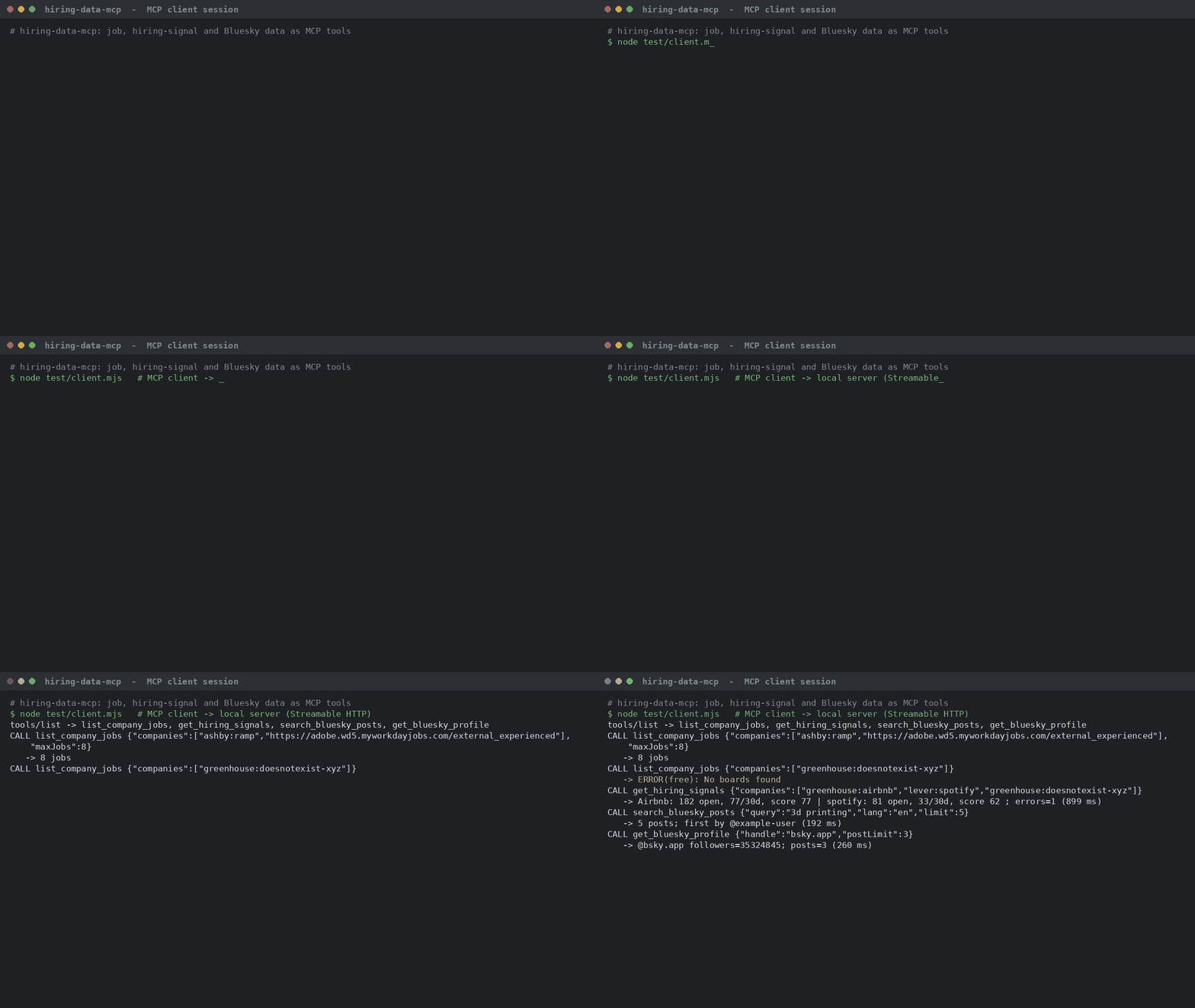
Give your AI assistant (Claude, Cursor, n8n or any MCP client) live job and hiring data.
Who it's for
Developers building recruiting, sales-intel or research agents; anyone who wants to ask an AI "who is hiring?" and get real, current data.
Tools
| tool | inputs | returns |
|---|---|---|
list_company_jobs | companies (1–10), keywords, locations, remoteOnly, postedWithinDays, includeDescription, maxJobs (1–200, default 25) | Jobs: ats, company, title, department, location, isRemote, employmentType, salary, postedAt, url, description (≤1,500 chars) + per-board counts |
get_hiring_signals | companies (1–25), monitorName | Per company: open roles, posted 7/30/90 days, department mix, hiring score 0–100, signal flags; new/closed roles since your last call with the same monitorName |
search_bluesky_posts | query, sort (latest/top), since, until, lang, limit (1–100, default 25) | Public Bluesky posts |
get_bluesky_profile | handle, postLimit (0–100, default 10), includeReplies | Profile stats + recent posts |
Companies: careers URL, ats:slug (ashby:ramp) or bare slug. Workday: paste the myworkdayjobs.com URL.
Connect
{ "mcpServers": { "hiring-data": {
    "url": "https://mystique-lab--hiring-data-mcp.apify.actor/mcp",
    "headers": { "Authorization": "Bearer <YOUR_APIFY_API_TOKEN>" } } } }
Or Apify's hosted MCP: https://mcp.apify.com/?tools=mystique-lab/hiring-data-mcp.
New to Apify? Sign up for Apify
Output sample (get_hiring_signals, real local test Oct 20, 2026, trimmed)
{ "company": "Airbnb", "ats": "greenhouse", "openRoles": 182, "postedLast30Days": 77, "hiringScore": 77, "signals": ["hiring_surge_30d", "..."] }
Pricing (pay per event)
| event | price |
|---|---|
| tool-call | $0.005 per successful call (calls that find nothing are free) |
| job | $0.001 per job returned |
| company-checked | $0.005 per company in get_hiring_signals |
| bluesky-item | $0.0008 per Bluesky post or profile |
| Examples: 25 jobs = $0.0425; signals for 10 companies = $0.055; 25 Bluesky posts = $0.025. | |
| Apify platform usage while the server runs in Standby is billed on top. Set a max cost per run; tools stop cleanly at the cap. |
Example prompts
- "Which of these companies are hiring the most salespeople right now? ashby:ramp, greenhouse:airbnb, lever:spotify"
- "List remote engineering jobs posted this week at Stripe and NVIDIA (https://nvidia.wd5.myworkdayjobs.com/NVIDIAExternalCareerSite)."
- "What are people on Bluesky saying about 'Apify' this week?"
FAQ
- Do I need input in the Console? No. It's a server; connect your MCP client with your Apify token.
- Which companies work? Any public board on the 6 supported ATS.
- Where are monitor diffs stored? In a key-value store in your own Apify account.
Limits
- 6 ATS only. Keyword filter matches title/department (not description). No exclude-keyword filter.
- Max 10 companies per jobs call, 25 per signals call, 200 jobs per call.
- Bluesky search: up to 100 posts per call (public API limit).
- Job text belongs to the employer; link back to the original post if you republish.
- Not affiliated with Greenhouse, Lever, Ashby, Workable, SmartRecruiters, Workday or Bluesky.
Actor input Schema
selfCheckSeconds (type: integer):
How long a manual or scheduled run (not the MCP URL) keeps the server up before it stops on its own. Enter a whole number of seconds, from 10 to 3600. It's needed so a test run finishes cleanly instead of running until the timeout. The MCP URL above ignores it.
Actor input object example
{
  "selfCheckSeconds": 60
}
Actor output Schema
mcpEndpoint (type: string):
No description
API
You can run this Actor programmatically using our API. Below are code examples in JavaScript, Python, and CLI, as well as the OpenAPI specification and MCP server setup.
JavaScript example
import { ApifyClient } from 'apify-client';

// Initialize the ApifyClient with your Apify API token
// Replace the '<YOUR_API_TOKEN>' with your token
const client = new ApifyClient({
    token: '<YOUR_API_TOKEN>',
});

// Prepare Actor input
const input = {
    "selfCheckSeconds": 60
};

// Run the Actor and wait for it to finish
const run = await client.actor("mystique-lab/hiring-data-mcp").call(input);

// Fetch and print Actor results from the run's dataset (if any)
console.log('Results from dataset');
console.log(`💾 Check your data here: https://console.apify.com/storage/datasets/${run.defaultDatasetId}`);
const { items } = await client.dataset(run.defaultDatasetId).listItems();
items.forEach((item) => {
    console.dir(item);
});

// 📚 Want to learn more 📖? Go to → https://docs.apify.com/api/client/js/docs
Python example
from apify_client import ApifyClient

# Initialize the ApifyClient with your Apify API token
# Replace '<YOUR_API_TOKEN>' with your token.
client = ApifyClient("<YOUR_API_TOKEN>")

# Prepare the Actor input
run_input = { "selfCheckSeconds": 60 }

# Run the Actor and wait for it to finish
run = client.actor("mystique-lab/hiring-data-mcp").call(run_input=run_input)

# Fetch and print Actor results from the run's dataset (if there are any)
print(f"💾 Check your data here: https://console.apify.com/storage/datasets/{run.default_dataset_id}")
for item in client.dataset(run.default_dataset_id).iterate_items():
    print(item)

# 📚 Want to learn more 📖? Go to → https://docs.apify.com/api/client/python/docs/quick-start
CLI example
echo '{
  "selfCheckSeconds": 60
}' |
apify call mystique-lab/hiring-data-mcp --silent --output-dataset
MCP server setup
{
    "mcpServers": {
        "apify": {
            "type": "http",
            "url": "https://mcp.apify.com/?tools=fetch-actor-details,mystique-lab/hiring-data-mcp"
        }
    }
}
The hosted server signs you in with OAuth on first connect, so no API token belongs in this config. Clients without OAuth support can send an Authorization: Bearer <APIFY_API_TOKEN> header instead, using a token from API & Integrations in Apify Console (https://console.apify.com/settings/integrations).
OpenAPI specification
Download the OpenAPI definition: https://api.apify.com/v2/actors/lhq1ltq38FkgizVnE/builds/Oks6TQkdbnvGCZEbP/openapi.json