LinkedIn Data MCP
officialLook up people, companies, jobs and posts, and find and verify work emails.
What can you do with LinkedIn Data MCP?
- Profile lookups — Ask your assistant to pull up a person's details, contact info, or full work history from a LinkedIn profile URL.
- Company research — Get a company's overview, open jobs, recent posts, or list of employees to prep for outreach or calls.
- People and job search — Find candidates or decision-makers by keyword, or search for open roles and filter results by team or location.
- Post and comment analysis — Summarize a LinkedIn post's comments or reactions to gauge sentiment and engagement on a topic.
- Email discovery and verification — Find or verify a professional's work email address on a company domain before reaching out.
- Lead list enrichment — Enrich a CSV of LinkedIn URLs with job titles, companies, and other profile data in bulk.
Hosted MCP Server
npx add-mcp 'https://api.envoapi.com/mcp'Installs into Claude Code, Codex, Cursor and more
Documentation

LinkedIn Data MCP Server
Look up people, companies, jobs and posts from the AI assistant you already use.
One hosted LinkedIn MCP server for Claude, ChatGPT, Perplexity, Cursor, Claude Code, Codex and any other MCP client.




Website · Docs · Get API key · Pricing · Status
⚡ Quick start
1. Get your API key. Create a free account at envoapi.com/signup. You get 100 free credits, and no card is needed. Your keys live at Dashboard → API keys.
2. Add the server to your client. Use this one URL everywhere:
https://api.envoapi.com/mcp
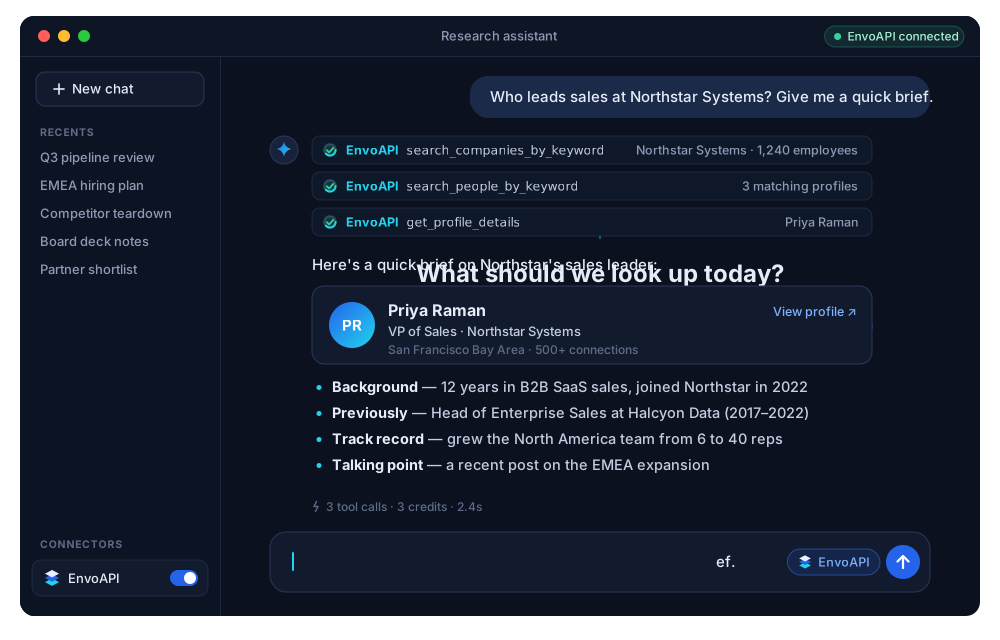
3. Ask in plain words. For example: "Find the VP of Sales at Northstar Systems and summarize their background." The assistant picks the right tools.
| Server URL | https://api.envoapi.com/mcp |
| Transport | Streamable HTTP (remote, nothing to install) |
| Auth | OAuth sign-in in the browser, or the header Authorization: Bearer <ENVO_API_KEY> |
| Data | Public profile, company, job and post data from the EnvoAPI LinkedIn Data API |
| Tools | 40, all read-only |
| Cost | No MCP fee. Calls use the same credits as the REST API. |
[!TIP] OAuth or API key? Clients with sign-in support (Claude, ChatGPT, Perplexity, Claude Code, Codex, Cursor, VS Code and others) open a browser window. You sign in to EnvoAPI and approve, and no key is stored. Use your API key for clients without OAuth, for servers and for CI jobs.
🔌 Connect your client
One-click install





Step-by-step. Click your client to expand it.
Chat apps
Claude (web, desktop and mobile)
- Open Customize → Connectors → + → Add custom connector, or use this direct link.
- Enter these values, then click Add:
- Name:
EnvoAPI - Remote MCP server URL:
https://api.envoapi.com/mcp
- Name:
- Claude sends you to EnvoAPI. Sign in and approve the connector.
- In a chat, open + → Connectors and switch EnvoAPI on.
Connectors you add on the web also appear in the desktop and mobile apps. On Team and Enterprise plans, an owner may need to add the connector for the organization first.
Claude Desktop with an API key (no OAuth)
Use this only if you can't use the connector flow above. It needs Node.js 18+, because Claude Desktop reaches the server through the mcp-remote bridge.
Open Settings → Developer → Edit Config and add:
{
  "mcpServers": {
    "envoapi": {
      "command": "npx",
      "args": [
        "-y",
        "mcp-remote",
        "https://api.envoapi.com/mcp",
        "--header",
        "Authorization:${ENVO_AUTH_HEADER}"
      ],
      "env": {
        "ENVO_AUTH_HEADER": "Bearer YOUR_ENVO_API_KEY"
      }
    }
  }
}
The config file lives at ~/Library/Application Support/Claude/claude_desktop_config.json on macOS and %APPDATA%\Claude\claude_desktop_config.json on Windows. Restart Claude Desktop afterwards.
ChatGPT
- Turn on developer mode once per account: Settings → Security and login → Developer mode. The Create MCP App option stays hidden until you do.
- Open ChatGPT plugins and choose Add → Create MCP App.
- Fill in the form:
- Name:
EnvoAPI - Connection:
https://api.envoapi.com/mcp - Authentication:
OAuth
- Name:
- Tick I understand and want to continue, then click Create.
- Sign in to EnvoAPI, approve access, and enable EnvoAPI in your conversation.
Perplexity
Custom remote connectors are available on Perplexity's paid plans, on web and desktop.
- Open Settings → Connectors and click + Custom connector, then choose Remote.
- Fill in the form:
- Name:
EnvoAPI - MCP server URL:
https://api.envoapi.com/mcp - Authentication:
OAuth - Transport:
Streamable HTTP
- Name:
- Accept the notice and save. Then click the EnvoAPI card to sign in and approve.
- In a thread, open + → Connectors and sources and tick EnvoAPI.
On Enterprise, an admin may need to turn on Allow members to add custom connectors first.
Coding agents and CLIs
Claude Code
claude mcp add --transport http envoapi https://api.envoapi.com/mcp
Start Claude Code, run /mcp, select envoapi and approve in your browser. Check it with claude mcp list. The tools appear as mcp__envoapi__*.
With an API key:
claude mcp add --transport http envoapi https://api.envoapi.com/mcp \
  --header "Authorization: Bearer $ENVO_API_KEY"
Add --scope user to make EnvoAPI available in every project.
Codex (CLI, IDE extension and app)
codex mcp add envoapi --url https://api.envoapi.com/mcp
codex mcp login envoapi
Approve in the browser, then run /mcp in Codex to check the connection.
With an API key, add this to ~/.codex/config.toml and export ENVO_API_KEY in your shell:
[mcp_servers.envoapi]
url = "https://api.envoapi.com/mcp"
bearer_token_env_var = "ENVO_API_KEY"
Gemini CLI
gemini mcp add --transport http envoapi https://api.envoapi.com/mcp
Then, inside Gemini CLI, run /mcp auth envoapi to sign in.
With an API key, use ~/.gemini/settings.json:
{
  "mcpServers": {
    "envoapi": {
      "httpUrl": "https://api.envoapi.com/mcp",
      "headers": {
        "Authorization": "Bearer $ENVO_API_KEY"
      }
    }
  }
}
OpenCode
Add this to opencode.json in your project, or to ~/.config/opencode/opencode.json for all projects:
{
  "$schema": "https://opencode.ai/config.json",
  "mcp": {
    "envoapi": {
      "type": "remote",
      "url": "https://api.envoapi.com/mcp",
      "enabled": true
    }
  }
}
Sign-in opens on the first tool call. If it doesn't, run opencode mcp auth envoapi, then check with opencode mcp list.
With an API key, add "headers": { "Authorization": "Bearer {env:ENVO_API_KEY}" } to the envoapi entry.
Editors
Cursor
Click to install, or merge this into ~/.cursor/mcp.json (global) or .cursor/mcp.json (project):
{
  "mcpServers": {
    "envoapi": {
      "url": "https://api.envoapi.com/mcp"
    }
  }
}
Enable envoapi in Cursor's MCP settings and sign in when prompted.
With an API key:
{
  "mcpServers": {
    "envoapi": {
      "url": "https://api.envoapi.com/mcp",
      "headers": {
        "Authorization": "Bearer ${env:ENVO_API_KEY}"
      }
    }
  }
}
VS Code (GitHub Copilot agent mode)
Click to install, run
code --add-mcp '{"name":"envoapi","type":"http","url":"https://api.envoapi.com/mcp"}'
or merge this into .vscode/mcp.json:
{
  "servers": {
    "envoapi": {
      "type": "http",
      "url": "https://api.envoapi.com/mcp"
    }
  }
}
Run MCP: List Servers from the Command Palette, start envoapi and sign in.
With an API key. VS Code prompts for the key once and stores it securely:
{
  "inputs": [
    { "type": "promptString", "id": "envo-api-key", "description": "EnvoAPI API key", "password": true }
  ],
  "servers": {
    "envoapi": {
      "type": "http",
      "url": "https://api.envoapi.com/mcp",
      "headers": { "Authorization": "Bearer ${input:envo-api-key}" }
    }
  }
}
Windsurf
Add this to ~/.codeium/windsurf/mcp_config.json, then click Refresh in the MCP panel:
{
  "mcpServers": {
    "envoapi": {
      "serverUrl": "https://api.envoapi.com/mcp"
    }
  }
}
With an API key, add "headers": { "Authorization": "Bearer ${env:ENVO_API_KEY}" } next to serverUrl.
Zed
Add this to your Zed settings.json. Zed starts the OAuth sign-in when no Authorization header is set:
{
  "context_servers": {
    "envoapi": {
      "url": "https://api.envoapi.com/mcp"
    }
  }
}
With an API key, add "headers": { "Authorization": "Bearer YOUR_ENVO_API_KEY" }.
Cline
Open Cline's MCP Servers panel, choose Configure MCP Servers and add:
{
  "mcpServers": {
    "envoapi": {
      "type": "streamableHttp",
      "url": "https://api.envoapi.com/mcp",
      "headers": {
        "Authorization": "Bearer YOUR_ENVO_API_KEY"
      }
    }
  }
}
Local apps and automation
LM Studio
Open the Program tab in the right sidebar, choose Install → Edit mcp.json and add:
{
  "mcpServers": {
    "envoapi": {
      "url": "https://api.envoapi.com/mcp",
      "headers": {
        "Authorization": "Bearer YOUR_ENVO_API_KEY"
      }
    }
  }
}
n8n (AI Agent node)
- In your AI Agent node, add the tool MCP Client Tool.
- Set Endpoint to
https://api.envoapi.com/mcpand Server Transport toHTTP Streamable. - Set Authentication to
Bearer Authand create a credential with your EnvoAPI API key. - Under Tools to Include, pick All or just the tools your workflow needs.
Any other MCP client
Add https://api.envoapi.com/mcp as a remote server over Streamable HTTP.
- If the client supports OAuth, leave auth empty and it will open the EnvoAPI sign-in.
- If it doesn't, send the header
Authorization: Bearer <ENVO_API_KEY>. - For a client that only supports local (stdio) servers, bridge it with
npx -y mcp-remote https://api.envoapi.com/mcp --header "Authorization:Bearer <ENVO_API_KEY>".
💬 Try these prompts
| Goal | Ask your assistant |
|---|---|
| Find a decision maker | "Find the VP of Sales at Northstar Systems and summarize their background." |
| Prep for a call | "Brief me on Northstar Systems: size, HQ, open roles and recent posts." |
| Track hiring | "Show me the jobs Northstar Systems has open right now, grouped by team." |
| Map a market | "List 10 companies similar to Northstar Systems with headcount and HQ." |
| Read the room | "Summarize the comments on this post and group them by theme: <post URL>" |
| Reach out | "Find the work email for Northstar's Head of Marketing and verify it." |
| Enrich a list | "Enrich every LinkedIn URL in leads.csv with job title and current company." (agents with file access) |
🧰 What's inside: 40 tools
All tools are read-only. They can't post, message, connect or change anything.
| Group | Tools |
|---|---|
| Profiles (13) | get_profile_details · get_profile_contact · get_profile_full_experience · get_profile_education · get_profile_skills · get_profile_certifications · get_profile_courses · get_profile_company_interests · get_profile_volunteer_experience · get_profile_posts · get_profile_comments · get_profile_reactions · get_similar_profiles |
| Companies (6) | get_company_details · get_company_people · get_company_posts · get_company_products · get_company_jobs · get_similar_companies |
| Search (11) | search_people_by_keyword · search_companies_by_domain · search_companies_by_keyword · search_schools_by_keyword · search_all_results_by_keyword · search_posts_by_hashtag · search_posts_by_keyword · search_locations_by_keyword · search_industries_by_keyword · search_service_categories · get_search_typeahead |
| Jobs (2) | search_jobs · get_job_details |
| Posts (3) | get_post · get_post_comments · get_post_reactions |
| Emails (2) | find_email · verify_email |
| Websites (3) | get_website_content · get_website_text · search_website_emails |
Each call returns one page of results. People search, combined search and hashtag post search return 3 per page. Most other lists return 10. Ask for "the next page" to keep going.
Need the same data in your own code? See the LinkedIn Profile API, LinkedIn Company Data API and LinkedIn Jobs API.
💳 Credits
There's no separate MCP fee. Calls use your plan's credits and rate limits, the same as the REST API.
| Lookup | Example tools | Credits per call |
|---|---|---|
| Profile, company, post, job, search | get_profile_details, search_jobs | 1 |
| Profile contact | get_profile_contact | 2 |
| Verify an email | verify_email | 2 |
| Read a web page | get_website_content, get_website_text | 2 |
| Collect a site's emails | search_website_emails | 5 |
| Find a work email | find_email | 10 |
- Bad input is rejected before any credits are taken.
- Failures caused by EnvoAPI or its providers are refunded.
- Finished contact, email-finder and website-email lookups are charged even when they return nothing.
New accounts get 100 free credits. See pricing for paid plans.
🔒 Security and access
- OAuth connections: open the MCP page in your dashboard, find Connected clients and choose Disconnect. Access stops right away.
- API keys: revoke a key in Dashboard → API keys. This stops every client that uses it.
- Keep keys in your client's settings or environment variables. Never paste them into a chat or commit them to source control.
- One API key works for both MCP and the REST API, with the same credits.
🩺 Troubleshooting
| Problem | Fix |
|---|---|
| No sign-in prompt appears | Check the URL is exactly https://api.envoapi.com/mcp. If your client can't do OAuth but supports custom headers, use your API key. |
401 / "access credential is missing or invalid" | Re-run the sign-in (/mcp in Claude Code, codex mcp login envoapi, opencode mcp auth envoapi), or check the Bearer key. |
| Tools are missing or never used | Enable EnvoAPI for the conversation, refresh the client's tool list, or reconnect. Mention "use EnvoAPI" in your prompt. |
| A lookup failed | Check your account status and available credits. If you hit the rate limit, wait and retry. See the docs. |
| ChatGPT has no Create MCP App | Turn on Developer mode first (Settings → Security and login). |
❓ FAQ
What's the difference between EnvoAPI MCP and the REST API?
They return the same data at the same prices. MCP suits lookups from chat and editors. The REST API and the SDKs for Python, TypeScript and Go suit scheduled jobs, bulk work and product code. For a side-by-side guide, read MCP vs REST API for B2B data enrichment.
Is this the official LinkedIn API?
No. EnvoAPI is an independent service that returns public LinkedIn data. You sign in to EnvoAPI, not to LinkedIn, so you never connect your own LinkedIn account. Read LinkedIn API: official vs unofficial to see how the options compare.
Do I need an API key if I use OAuth?
No. OAuth clients only need an EnvoAPI account. You sign in once and approve. The API key is for clients that can't do OAuth.
Does the email finder work for Gmail or Yahoo addresses?
It works on company domains. Yahoo-family addresses can't be checked, so those calls are refunded. Catch-all domains are charged but return no address.
Can it post, message or change anything?
No. All 40 tools are read-only.
📚 About EnvoAPI
EnvoAPI is a real-time data enrichment API for people and companies. The MCP server, the REST API and the SDKs share one account and one credit balance.
EnvoAPI is an independent service. It is not affiliated with, endorsed by or sponsored by LinkedIn Corporation. LinkedIn is a trademark of LinkedIn Corporation. Use the data in line with applicable laws and the EnvoAPI terms.