Crunchbase Scraper: Companies, Funding, News, No Login (Apify Actor)
Export public Crunchbase company profiles, search results, funding and news: name, description, location, categories and website, to JSON or CSV. Get only new records on a schedule. No login or cookies; hidden fields come back empty. Price: $7.20 per 1,000 page checks, $7.20 per 1,000 new articles, plus $0.002 per run start. Runs as an Apify Actor, callable from MCP clients via the Apify MCP server (https://mcp.apify.com/?tools=cliqtomedia/crunchbase-companies).
Hosted MCP Server
npx add-mcp 'https://mcp.apify.com/?tools=cliqtomedia/crunchbase-companies'Installs into Claude Code, Codex, Cursor and more
Documentation
Crunchbase Scraper: Companies, Funding, News, No Login (cliqtomedia/crunchbase-companies) Actor
Crunchbase scraper for public company profiles, company search, funding signals and news. Find leads, track target companies and get only new records on a schedule. Export JSON or CSV. No login or cookies.
- URL: https://apify.com/cliqtomedia/crunchbase-companies.md
- Developed by: Cliqto Media (community)
- Categories: Business, Lead generation
- Features: Limited permissions
- Stats: 3 total users, 2 monthly users, 100.0% runs succeeded, 0 bookmarks
- User rating: No ratings yet
Pricing
from $5.04 / 1,000 public page checks
This Actor is paid per event. You are not charged for the Apify platform usage, but only a fixed price for specific events. Since this Actor supports Apify Store discounts, the price gets lower the higher subscription plan you have.
Learn more: https://docs.apify.com/actors/running/actors-in-store.md#pay-per-event
What's an Apify Actor?
An Actor is a serverless cloud program that runs on the Apify platform. It has two run modes. In Batch mode, an Actor accepts a well-defined JSON input, performs an action which can take anything from a few seconds to a few hours, and optionally produces a well-defined JSON output, datasets with results, or files in key-value store. In Standby mode, an Actor provides a web server which can be used as a website, API, or an MCP server.
Apify vocabulary and the platform model are defined once, in the agent quickstart at https://apify.com/agents.md.
How to integrate an Actor?
If asked about integration, you help developers integrate Actors into their projects. You adapt to their stack and deliver integrations that are safe, well-documented, and production-ready.
Do not guess an integration path. Every one of them is in the agent quickstart at https://apify.com/agents.md: the Apify MCP server, Agent Skills with the Apify CLI, the JavaScript and Python clients, the REST API, and the account-free path for an agent with no human to sign in. It also carries the rule on stating cost before the first paid run.
For examples already wired to this Actor's own input schema, see the API section below.
Each client library has reference documentation the quickstart does not restate: JavaScript/TypeScript (npm install apify-client) and Python (pip install apify-client).
README
Crunchbase scraper for public company profiles, company search, funding signals and Crunchbase News: give it a company link or a search, and get clean JSON or CSV rows with no login or cookies. Use it to find leads, track target companies and get only new records on a schedule; one company takes 3 to 15 seconds and costs about $0.0092 on the Free plan.
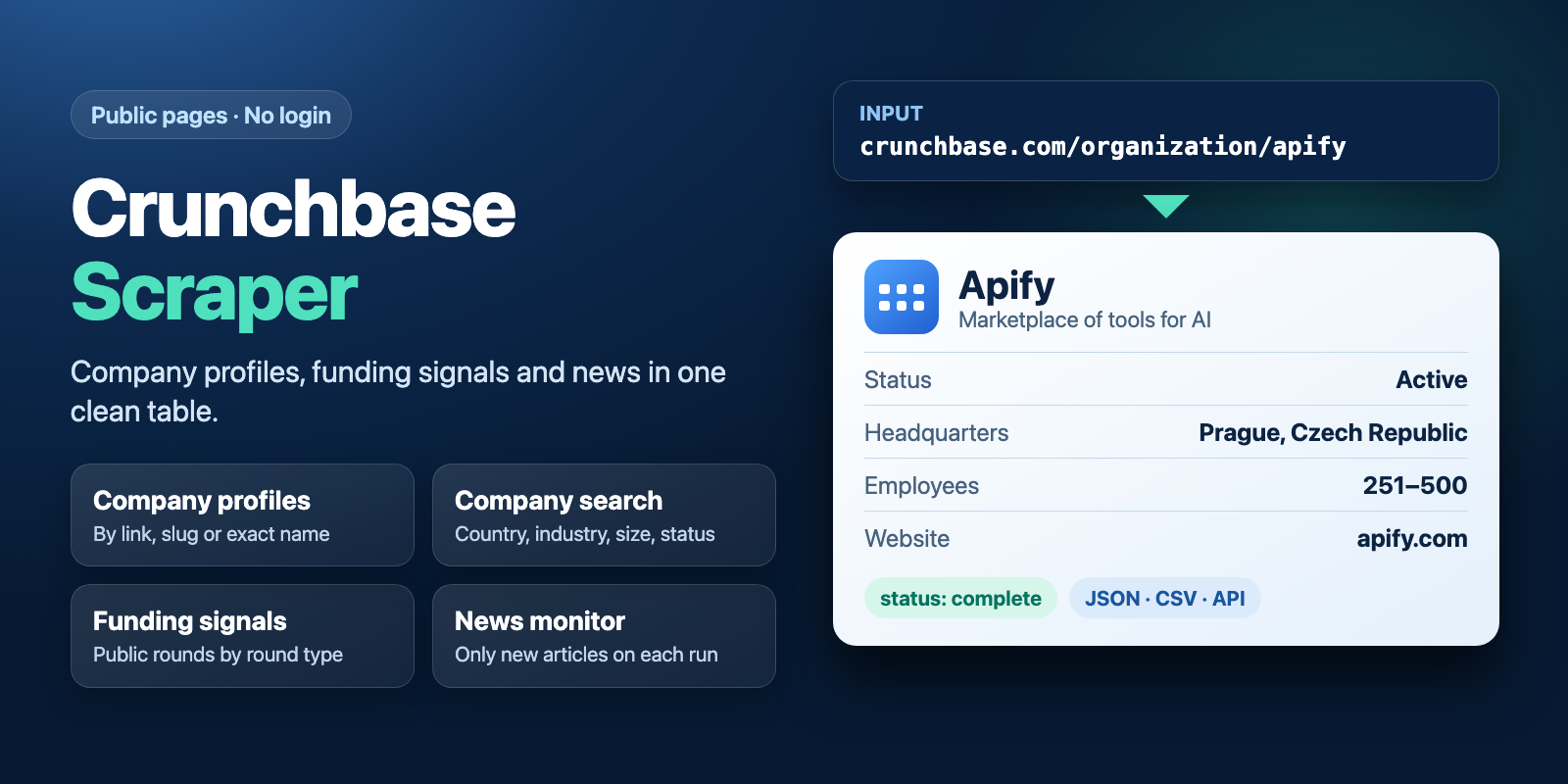
Table of contents
- What it does
- How it works
- Quick start
- Use cases
- Input
- Output
- Pricing
- Limits
- API, export and integrations
- Troubleshooting
- FAQ
- Related Actors
- Support
What it does
This Actor reads what anyone can see on Crunchbase without an account. It has four jobs:
- Company profiles: full public profile for each company link, slug or exact name.
- Company search: up to 15 companies by name, country, industry, size or status.
- Public funding signals: up to 15 funding rounds by name or round type.
- Crunchbase News: public articles with full text, by search, category, tag or date.
It does not use a login, Crunchbase Pro or private contacts. Fields that Crunchbase hides from anonymous visitors, such as the founding date or total funding, come back as null.
Good fit
- You have a list of companies and want location, size, industries, website and public people in one table.
- You build a lead list by country, industry and size, and 15 matches per search are enough.
- You watch Crunchbase News or target companies and want only new records on a schedule.
How it works
- The Actor reads the public Crunchbase pages or Crunchbase News articles for your input.
- It turns each page into one clean row, and skips a bad company without stopping the rest.
- It saves the rows to a Dataset and a short report with the status and skipped items to
RUN_SUMMARY.
Quick start
-
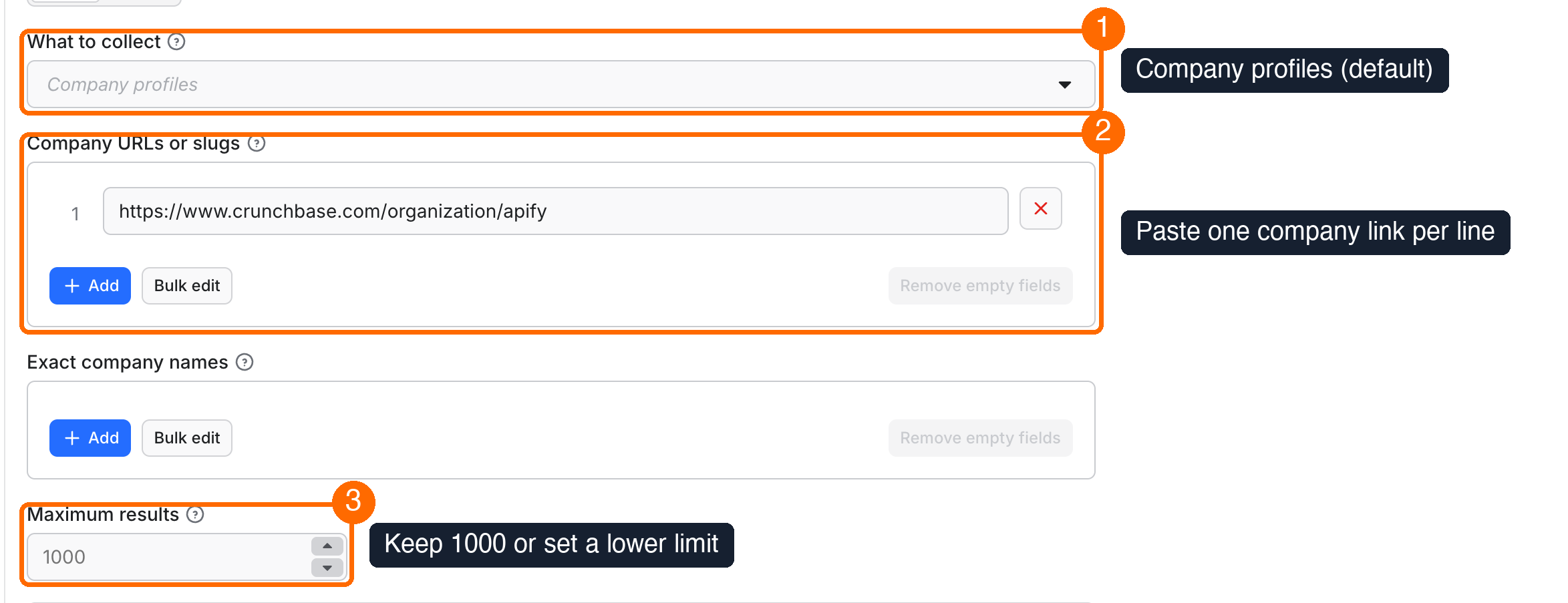
Open the Input tab. Keep What to collect on Company profiles (box 1 in the picture).
-
In Company URLs or slugs, keep the sample link or paste your own companies, one per line (box 2).
-
Keep Maximum results at 1000 or set a lower limit (box 3).
-
Click Start.
-
Open the Output tab and the Company profiles view. Check the location, size, industries and website columns (box 5).
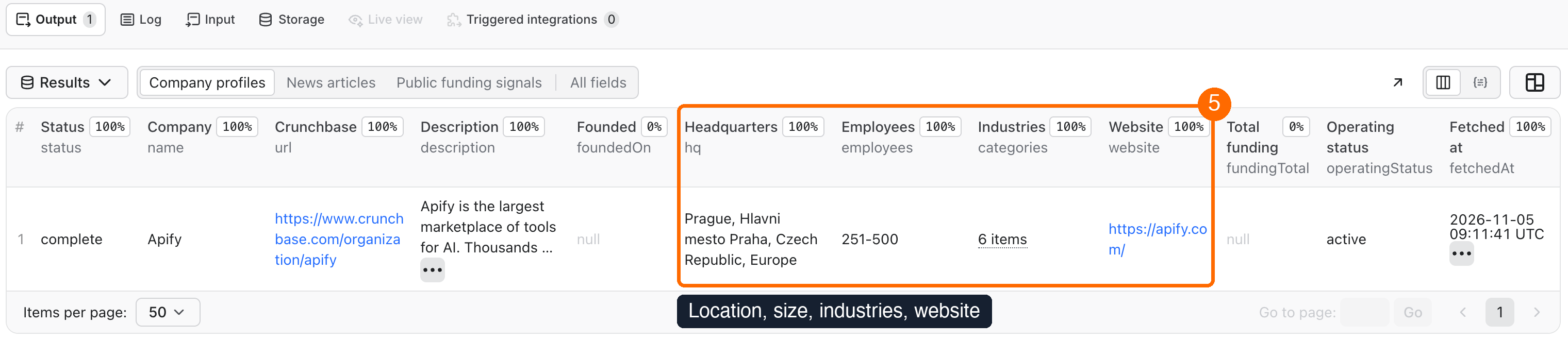
Expected result: one company row with status set to complete, in 3 to 15 seconds.
Use cases
| Buyer job | Input path | Output entity | Key fields | Next integration |
|---|---|---|---|---|
| Enrich a list of target accounts | companyUrls or companyNames | Company | hq, employees, categories, website | CRM import through CSV or API |
| Find leads by market | mode: search with country, category, employeeRange | Company | name, website, operatingStatus, people | Lead list or sales sheet |
| Spot companies with recent funding news | mode: funding with roundType | Funding round | name, company, companyUrl, roundType | Alert to Slack or Notion |
| Monitor startup and venture news | mode: news with onlyNew and a schedule | News article | title, url, publishedAt, companyPermalinks | Digest in Slack or Notion |
Input
Input fields
| Field | Plain name | Type | Required | Default / prefill | Allowed values | Effect | Example | Recommendation |
|---|---|---|---|---|---|---|---|---|
mode | What to collect | String | No | companies | companies, search, funding, news | Picks the job | search | Start with companies |
companyUrls | Company URLs or slugs | Array of strings | For profiles, this or companyNames | Prefill: Apify link | Crunchbase company link or slug | Companies to read | https://www.crunchbase.com/organization/apify, apify | Best way to name a company |
companyNames | Exact company names | Array of strings | For profiles, this or companyUrls | Empty | Exact name | Finds the single company with this name | Apify | Use a link for a common name |
maxItems | Maximum results | Integer | No | 1000 | 1 or more | Stops after this many saved rows | 50 | Set it for your first runs |
query | Name contains | String | No | Empty | Text | Search words for company search and funding | robotics | Keep it short |
country | Country | String | No | Empty | Country name on Crunchbase | Company search filter | United States | Write it in full |
category | Industry | String | No | Empty | Industry name on Crunchbase | Company search filter | Artificial Intelligence | Write it in full |
employeeRange | Employee range | String | No | any | any, or bands from 1–10 to 10,001+ | Company search filter | c_00051_00100 | Pick it in the form list |
operatingStatus | Operating status | String | No | any | any, active, closed | Company search filter | active | Use active for leads |
roundType | Funding round type | String | No | any | any, pre_seed, seed, angel, series_a to series_g, debt_financing, grant, private_equity, post_ipo_debt, post_ipo_equity, series_unknown | Funding filter | series_a | Pick it in the form list |
includeDetails | Read full company profiles | Boolean | No | true | true, false | On: full profile per match. Off: search cards only | false | Off for a cheap first look |
onlyNew | Return only new records | Boolean | No | false | true, false | Saves only records this history has not seen | true | Use it on schedules |
stateName | History store name | String | With onlyNew | Empty | Starts with crunchbase-companies- | Where the history is kept | crunchbase-companies-sales | One name per job |
newsQuery | News search | String | No | Empty | Text | Finds articles by words | robotics | Leave empty for the newest |
newsCategory | News categories | String | No | Empty | Names or slugs, comma separated | News filter | venture | Use one or two |
newsTag | News tags | String | No | Empty | Names or slugs, comma separated | News filter | unicorn | Use one or two |
newsDateFrom | News from date | String | No | Empty | YYYY-MM-DD | Articles on or after this date | 2026-01-01 | Set it for a backfill |
newsDateTo | News through date | String | No | Empty | YYYY-MM-DD | Articles on or before this date | 2026-12-31 | Set it for a backfill |
newsFullText | Include article text | Boolean | No | true | true, false | On: full text. Off: description only | false | The price is the same |
deliveryConnector | Send results to | String | No | Empty | Your MCP connector | Posts a short summary after the run | Pick in the form | Optional |
deliveryTarget | Notion page or channel | String | No | Empty | Notion page link or Slack channel ID | Where the summary goes | C01234567 | Optional |
Empty and repeated values:
- With no input at all, the run reads the sample company, Apify.
- With an empty
companyUrlslist and no names, the run saves no rows and charges only the start fee. - Repeated companies are read once. A link with extra text after the address works: only the company slug is used.
- A line that is not a Crunchbase company is skipped and listed in
failedItems. If no valid company is left, the run fails with no page charge.
Interacting settings
| When | Input A | Input B | Effective behavior | Example | Cost/result effect |
|---|---|---|---|---|---|
| Company list | companyUrls | companyNames | Both are read, and repeats are read once | One link and one name for different companies | One page check per company |
| Search size | mode: search or funding | maxItems above 15 | At most 15 rows, status partial with SOURCE_WINDOW if more matches exist | maxItems: 100 | A larger value adds no rows |
| Cheap search | mode: search | includeDetails: false | Saves search cards, not full profiles | 15 cards | One page check for the search page |
| Monitoring | onlyNew: true | stateName | Saves only records this history has not seen | crunchbase-companies-sales | Seen company pages still pay a page check |
| News monitoring | mode: news | onlyNew: true | Newest first; stops at the first page that reaches a seen article | Daily schedule | Page with no new article pays the small news page fee |
| Long jobs | maxItems large | Run timeout | The default 300 s stops the run early with useful rows saved | 1,000 articles: set 600 s | You pay only for what was read |
Input examples
One company
{
  "companyUrls": ["https://www.crunchbase.com/organization/apify"]
}
Expected behavior: reads one public company page.
Expected output: one row with status: complete.
Limit or cost note: 3 to 15 seconds and $0.0092 on the Free plan.
Company search with filters
{
  "mode": "search",
  "query": "software",
  "operatingStatus": "active",
  "maxItems": 15
}
Expected behavior: finds matching companies and reads each public profile.
Expected output: up to 15 company rows.
Limit or cost note: one page check per company. Anonymous search shows at most 15 matches.
Daily news monitor
{
  "mode": "news",
  "newsCategory": "venture",
  "onlyNew": true,
  "stateName": "crunchbase-companies-vc-news",
  "maxItems": 100
}
Expected behavior: the first run saves up to 100 articles, and later runs save only new ones.
Expected output: one row per new article with full text.
Limit or cost note: you pay per new article, plus a small fee for a page with no new article.
Output
Output fields
| Field | Meaning | Type | Can be empty? | Example / enum | Source / notes |
|---|---|---|---|---|---|
recordType | Kind of row | String | No | company, news, funding_round | All rows |
status | Result of this row | String | No | complete, not_found, partial | All rows |
source | Source used | String | No | crunchbase, crunchbase-news | All rows |
url | Public page | String | No | https://www.crunchbase.com/organization/apify | All rows |
fetchedAt | When it was read, UTC | String | No | 2026-11-05T09:11:41.916Z | All rows |
name | Company or round name, or article title | String | Yes | Apify | Empty when not found |
description | Full company description or article summary | String | Yes | Apify is the largest… | Companies, news |
foundedOn | Founding date | String | Yes | null | Often hidden; see unavailableFields |
hq | Headquarters | String | Yes | Prague, Hlavni mesto Praha, Czech Republic, Europe | Also city, region, country, continent |
employees | Size band, not an exact count | String | Yes | 251-500 | Companies |
categories | Industries or news categories | Array | Yes | ["Developer APIs","Software"] | Companies, news |
website | Company website | String | Yes | https://apify.com | Companies |
fundingTotal | Total funding | Number | Yes | null | Hidden is null, not zero |
operatingStatus | Active or closed | String | Yes | active | Companies |
people | Public founders and people with job titles | Object | Yes | {"founders":["Jakub Balada"]} | No private emails or phones |
funding | Public round count, investors and round list | Object | Yes | {"numFundingRounds":5} | Amounts may be hidden |
socials | Public social links | Object | Yes | {"linkedin":{…}} | Companies |
products, similar, techStack | Public products, similar companies and technologies | Array | Yes | [{"name":"Actors"}] | Companies |
signals, predictions, ma, investor | Public traffic, prediction, deal and investor blocks | Object | Yes | {"technology":{…}} | As Crunchbase shows them |
unavailableFields | Fields hidden in this row | Array | Yes | ["foundedOn","fundingTotal"] | Companies, funding |
fieldErrors | Fields that could not be read | Array | Yes | ["aliases"] | Only on partial rows |
title, publishedAt, text | Article title, date and full text | String | Yes | 2026-11-04T19:47:54Z | News |
companyPermalinks | Companies linked in the article | Array | Yes | ["apify"] | News |
company, companyUrl | Funded company | String | Yes | SpaceX | Funding |
roundType | Type of round | String | Yes | post_ipo_debt | Funding |
amountUsd, announcedOn | Round amount and date | Number, String | Yes | null | Often hidden for anonymous visitors |
Output entities and surfaces
| Situation | Dataset/API/KVS/live view | Result shape | User action |
|---|---|---|---|
| Normal item | Dataset views Company profiles, News articles, Public funding signals | One row per record, status: complete | Export or read through API |
| Domain-empty result | Dataset row, RUN_SUMMARY | Missing company: status: not_found. Search with no matches: no rows, run succeeds | Check the slug or filters |
| Partial result | Dataset, RUN_SUMMARY with status: partial, stopReason, failedItems, unprocessed | Rows saved so far, and a list of what was not read | Run again with the unprocessed items |
| Technical failure or retry | RUN_SUMMARY, OUTPUT, run status Failed | No rows, with stopReason | Check the input, then run again |
Output example
{
  "recordType": "company",
  "status": "complete",
  "source": "crunchbase",
  "name": "Apify",
  "url": "https://www.crunchbase.com/organization/apify",
  "foundedOn": null,
  "hq": "Prague, Hlavni mesto Praha, Czech Republic, Europe",
  "employees": "251-500",
  "categories": ["Developer APIs", "E-Commerce", "Enterprise Software", "Information Technology", "Internet", "Software"],
  "website": "https://apify.com",
  "fundingTotal": null,
  "operatingStatus": "active",
  "unavailableFields": ["foundedOn", "fundingTotal"],
  "fetchedAt": "2026-11-05T09:11:41.916Z"
}
Send results to Slack or Notion
Pick your connector in the optional deliveryConnector field. After the run saves its data, the Actor posts a short summary (up to 25 rows and a link to the full dataset) there. Put a Notion page link or a Slack channel ID in deliveryTarget: in Notion every run is added on top of that one page, so your workspace does not fill up with new pages. A delivery error never fails the run and costs nothing extra. Connect a service once in Apify Console → MCP connectors.
Use case → fields
| Buyer job | Input path | Output entity | Key fields | Next integration |
|---|---|---|---|---|
| Account enrichment | companyUrls | Company | hq, employees, categories, website | CRM import |
| Market lead list | mode: search | Company | name, website, people | Sales sheet |
| Funding watch | mode: funding | Funding round | company, roundType, url | Slack alert |
| News digest | mode: news, onlyNew | News article | title, publishedAt, text | Notion page |
Pricing
Pricing unit
You pay per event. Platform usage is included in the price: the developer pays for it, not you.
| Event | What it covers | Free | Bronze | Silver | Gold and higher |
|---|---|---|---|---|---|
| Public page check | One company page read, or one search page | $7.20 / 1,000 | $6.48 / 1,000 | $5.76 / 1,000 | $5.04 / 1,000 |
| New article | One new article saved | $7.20 / 1,000 | $6.48 / 1,000 | $5.76 / 1,000 | $5.04 / 1,000 |
| News page with no new articles | One news page read with nothing new | $1.30 / 1,000 | $1.17 / 1,000 | $1.04 / 1,000 | $0.91 / 1,000 |
| Actor start | One run | $0.002 | $0.002 | $0.002 | $0.002 |
- The start fee is for the default 256 MB run. It scales with run memory (per GB).
- Companies: a checked company costs one page check, even when it is not found, already seen in
onlyNew, or a name with no single match. - Search and funding: with
includeDetailson, you pay one page check per company. With it off, and for funding, you pay one check per search page. A search with no matches pays one check whenincludeDetailsis off, and nothing beyond the start fee when it is on. - News: no new articles means one small page fee. An empty news result has no event charge.
- Failed requests: a request that fails at the source has no page charge. A partial run pays only for what was read.
Cost examples
Measured on real runs. Prices are for the Free plan.
| Scenario | Input scope | Expected item/event count | Base charge | Optional charge | Stop/cap behavior |
|---|---|---|---|---|---|
| One company | 1 link | 1 check | $0.0092 with start | None | 3 to 15 s |
| 50 companies | 50 links | 50 checks | $0.362 with start | None | 199 to 284 s, close to the default 300 s timeout |
| Company search | 15 matches with profiles | 15 checks | $0.110 with start | None | At most 15 matches, 66 to 93 s |
| Funding signals | Up to 15 rounds | 1 check | $0.0092 with start | None | At most 15 rounds |
| 1,000 new articles | News with full text | 1,000 new articles | $7.20 + $0.002 start | None | Estimate, not a full run: about 6 minutes, from 341 articles in 123 s. Set the timeout to 600 s |
| Unchanged news monitor | News, nothing new | 1 page | $0.0033 with start | None | Stops after the first page |
Set Maximum cost per run in Run options to cap your spend. The run stops before going over it, and rows saved so far stay.
Limits
- Only public data: fields hidden from anonymous visitors are
nulland listed inunavailableFields. - Company search and funding show at most 15 matches per search. Split a large market into smaller filters.
- A bad company does not stop the batch: it goes to
failedItems. Three failures in a row stop the run, and the rest goes tounprocessed. If every company fails, the run fails. A list of names where no name has a match also fails, and it still pays one check per name, because the lookup was made. - Each request waits up to 25 seconds. A refused page (HTTP 403) gets up to 6 attempts. Rate limits, server errors and network errors get up to 3. A slow response or a retried refused page can make a one-company run longer than 15 seconds.
- If the source asks to wait more than 10 seconds (
Retry-After), that request fails at once and the Actor does not wait. - A response can be up to 4 MiB, or 8 MiB from Crunchbase News. One larger page stops the whole run at once with
RESPONSE_TOO_LARGE, even in a batch, and the rest of the list goes tounprocessed. If only an extra block of a company page is too large, the row is saved aspartialwithfieldErrors. - A row with one unreadable block is saved as
partialwithfieldErrors. - When the timeout is near, the run stops and keeps the rows it saved. With useful rows the run succeeds with
status: partial; with no rows it fails. - The default 300 s timeout fits about 50 companies. For more, set a longer timeout or split the list.
- History with
onlyNewkeeps the newest 100,000 records. Use a separate name for each job, and do not run two jobs on one name at the same time. - A news monitor reads newest first and stops at the first seen article. To load older articles, use a new history name, or date filters with
onlyNewoff. - The Actor does not read remote files or arbitrary Crunchbase Discover links. Its output does not follow the format of other Crunchbase scrapers, so check your field names when you switch.
- Rows can include public names and job titles. Private emails and phones are not collected.
- Crunchbase terms restrict automated collection. Check that your use fits them and the laws that apply to you. This Actor is not connected to Crunchbase.
API, export and integrations
- API: start a run with the JSON input from this page, and read rows from the Dataset items endpoint.
- Export: download the Dataset as JSON, CSV, Excel or XML from the Output tab.
- Scheduling: create an Apify schedule with
onlyNewand astateName, and each run saves only new records. - Webhooks / no-code: start your next step when a run ends, and read
urlandnamefrom the Dataset. - SDK / MCP / agent: use the Apify SDK or client with the same input, or the MCP server below.
Use with AI agents (MCP)
MCP server URL with only this Actor: https://mcp.apify.com?tools=cliqtomedia/crunchbase-companies
Smallest useful input:
{
  "companyUrls": ["https://www.crunchbase.com/organization/apify"]
}
Key output fields:
name: company name.hq: public headquarters.employees: size band, not an exact count.website: company website.status:complete,not_foundorpartial.
One company takes 3 to 15 seconds and costs about $0.0092 on the Free plan. Search and funding return at most 15 matches. Hidden fields are null, not zero.
Troubleshooting
A company is missing from the results
- Symptom: you added a company, but it has no row.
- Likely reason: the line is not a Crunchbase company link, or the name has no single match.
- Check:
failedItemsinRUN_SUMMARY. The reason isINVALID_COMPANY_URL,COMPANY_NAME_NOT_FOUNDorAMBIGUOUS_COMPANY_NAME. - Action: use the link from the company's Crunchbase page.
A row says not_found
- Symptom: the row has
status: not_foundand an emptyname. - Likely reason: this company page does not exist on Crunchbase.
- Check: open the
urlfrom the row in a browser. - Action: fix the slug and run again.
Search returned only 15 rows
- Symptom:
stopReasonisSOURCE_WINDOWandsourceTotalis much larger. - Likely reason: anonymous visitors see at most 15 matches.
- Check:
sourceTotalinRUN_SUMMARY. - Action: narrow the search by country, industry, size or status, and run several searches.
The run failed with FILTER_NOT_FOUND
- Symptom: the run fails and has no rows.
- Likely reason: the country, industry, category or tag name is not on Crunchbase.
- Check: how Crunchbase writes this name on its site.
- Action: write the full name, for example
United States.
The run stopped with BLOCKED or RATE_LIMITED
- Symptom:
stopReasonor a reason infailedItemsisBLOCKED,RATE_LIMITED,SOURCE_ERRORorNETWORK_ERROR. - Likely reason: Crunchbase refused the request or did not answer after all attempts. In a company list, or when search loads full profiles, three failures in a row stop the run. If the search, funding or news request itself fails, the run stops at once.
- Check:
failedItemsandunprocessedinRUN_SUMMARY. - Action: run those items again later. A request that fails at the source has no page charge.
The run stopped with RESPONSE_TOO_LARGE
- Symptom:
stopReasonisRESPONSE_TOO_LARGE, and the rest of the list has no rows. - Likely reason: one page was above the size limit, so the run stopped to protect your cost.
- Check:
failedItemsshows which company it was, andunprocessedshows what is left. - Action: remove that company and run the
unprocesseditems again.
Status is partial with ITEM_ERRORS
- Symptom: the run succeeded,
statusispartialandstopReasonisITEM_ERRORS. - Likely reason: some companies failed or have an unreadable block, and the other rows are saved.
- Check:
failedItems,partialCountandfieldErrorsin the rows. - Action: run the failed items again.
The run stopped with CHARGE_LIMIT
- Symptom:
stopReasonisCHARGE_LIMIT, and there are fewer rows than you asked for. - Likely reason: the maximum cost you set for the run does not cover the next paid item.
- Check:
savedCountandunprocessedinRUN_SUMMARY. - Action: raise the maximum cost per run, or run the
unprocesseditems again.
The run stopped with DEADLINE
- Symptom:
stopReasonisDEADLINE, and only part of the list has rows. - Likely reason: the list needs more time than the run timeout.
- Check:
unprocessedinRUN_SUMMARY. - Action: set a longer timeout in Run options, or run the
unprocesseditems again.
FAQ
Do I need a Crunchbase account or cookies?
No. The Actor reads public pages only, and you do not need a login, cookies or an API key.
Why are the founding date and funding total empty?
Crunchbase often hides them from anonymous visitors. These fields are null, not zero, and unavailableFields lists them for that row.
Can I get more than 15 search results?
Not from one search. Anonymous search shows at most 15 matches. Run several narrower searches, or list the companies by link.
Do I pay when a company is not found?
Yes, one page check, because the page was read. A link to a missing page gives a not_found row and the run succeeds. A name with no match goes to failedItems, and if no name in the list has a match, the run fails. A request that fails at the source has no page charge.
How fresh is the data?
Each row shows what the public page had at fetchedAt. The Actor reads the page live on each run. It does not use a saved copy.
Related Actors
- YC Companies Scraper: Y Combinator companies, founders and jobs.
- Product Hunt Launches Scraper: new product launches.
- Website Tech Stack Detector: what a company website runs on.
- Website Contact Scraper: contacts and social links from company websites.
Support
Use the Issues tab on this page. Include the run ID, the input mode and a non-sensitive error message. Never send tokens, cookies, private source data or billing data.
Changelog
This Actor's version history is a separate document: https://apify.com/cliqtomedia/crunchbase-companies/changelog.md
Actor input Schema
mode (type: string):
Pick one job. Company profiles reads the companies you list. Company search and Public funding signals return at most 15 matches for anonymous visitors. Crunchbase News reads public articles. Default: Company profiles.
companyUrls (type: array):
Used by Company profiles. Add one link or slug per line, for example https://www.crunchbase.com/organization/apify or apify. A link without https:// also works. Duplicates are read once. A line that is not a Crunchbase company is skipped and listed in failedItems.
companyNames (type: array):
Used by Company profiles. Add the exact company name, for example Apify. A name with no match or with several matches is skipped, listed in failedItems and counts as one page check. Use the company URL when the name is common.
maxItems (type: integer):
The run stops after this many saved rows. Any whole number from 1. Default: 1000. Company search and funding signals return at most 15 matches, so a larger value does not add rows there.
query (type: string):
Used by Company search and Public funding signals. Words in the name, for example robotics. Leave empty to use only the filters below.
country (type: string):
Used by Company search. The country name as Crunchbase writes it, for example United States.
category (type: string):
Used by Company search. The industry name as Crunchbase writes it, for example Artificial Intelligence.
employeeRange (type: string):
Used by Company search. Keep only companies in this public employee band. Default: Any size.
operatingStatus (type: string):
Used by Company search. Keep only active or only closed companies. Default: Any status.
roundType (type: string):
Used by Public funding signals. Keep only this round type. Amounts and dates are often hidden for anonymous visitors, so those fields can be empty. Default: Any round type.
includeDetails (type: boolean):
Used by Company search. On: read the public page of each match, with one page check per match. Off: save the search cards only, with one page check per search page. Default: on.
onlyNew (type: boolean):
Used by all jobs. Saves only records this history has not seen. Checked company pages and search pages still count as page checks. Needs a history store name. Default: off.
stateName (type: string):
Needed when Return only new records is on. Must start with crunchbase-companies-, for example crunchbase-companies-sales. Use a separate name for each job, and do not run two jobs on one name at the same time.
newsQuery (type: string):
Used by Crunchbase News. Words to find, for example robotics. Leave empty for the newest articles.
newsCategory (type: string):
Used by Crunchbase News. Category names or slugs separated by commas, for example venture-capital.
newsTag (type: string):
Used by Crunchbase News. Tag names or slugs separated by commas, for example unicorn.
newsDateFrom (type: string):
Used by Crunchbase News. Articles published on or after this date, in the form YYYY-MM-DD, for example 2026-01-01.
newsDateTo (type: string):
Used by Crunchbase News. Articles published on or before this date, in the form YYYY-MM-DD, for example 2026-12-31.
newsFullText (type: boolean):
Used by Crunchbase News. On: save the full public article text. Off: save the short description only. The price does not change. Default: on.
deliveryConnector (type: string):
Your Slack, Notion or other MCP connector. After the run the Actor posts a short summary there. Connect services once in Apify Console → MCP connectors.
deliveryTarget (type: string):
Where to post the summary: a Notion page link (each run is added on top of that page) or a Slack channel ID. Leave empty to let the connector decide.
Actor input object example
{
  "mode": "companies",
  "companyUrls": [
    "https://www.crunchbase.com/organization/apify"
  ],
  "maxItems": 1000,
  "employeeRange": "any",
  "operatingStatus": "any",
  "roundType": "any",
  "includeDetails": true,
  "onlyNew": false,
  "newsFullText": true
}
Actor output Schema
dataset (type: string):
No description
summary (type: string):
No description
API
You can run this Actor programmatically using our API. Below are code examples in JavaScript, Python, and CLI, as well as the OpenAPI specification and MCP server setup.
JavaScript example
import { ApifyClient } from 'apify-client';

// Initialize the ApifyClient with your Apify API token
// Replace the '<YOUR_API_TOKEN>' with your token
const client = new ApifyClient({
    token: '<YOUR_API_TOKEN>',
});

// Prepare Actor input
const input = {
    "companyUrls": [
        "https://www.crunchbase.com/organization/apify"
    ]
};

// Run the Actor and wait for it to finish
const run = await client.actor("cliqtomedia/crunchbase-companies").call(input);

// Fetch and print Actor results from the run's dataset (if any)
console.log('Results from dataset');
console.log(`💾 Check your data here: https://console.apify.com/storage/datasets/${run.defaultDatasetId}`);
const { items } = await client.dataset(run.defaultDatasetId).listItems();
items.forEach((item) => {
    console.dir(item);
});

// 📚 Want to learn more 📖? Go to → https://docs.apify.com/api/client/js/docs
Python example
from apify_client import ApifyClient

# Initialize the ApifyClient with your Apify API token
# Replace '<YOUR_API_TOKEN>' with your token.
client = ApifyClient("<YOUR_API_TOKEN>")

# Prepare the Actor input
run_input = { "companyUrls": ["https://www.crunchbase.com/organization/apify"] }

# Run the Actor and wait for it to finish
run = client.actor("cliqtomedia/crunchbase-companies").call(run_input=run_input)

# Fetch and print Actor results from the run's dataset (if there are any)
print(f"💾 Check your data here: https://console.apify.com/storage/datasets/{run.default_dataset_id}")
for item in client.dataset(run.default_dataset_id).iterate_items():
    print(item)

# 📚 Want to learn more 📖? Go to → https://docs.apify.com/api/client/python/docs/quick-start
CLI example
echo '{
  "companyUrls": [
    "https://www.crunchbase.com/organization/apify"
  ]
}' |
apify call cliqtomedia/crunchbase-companies --silent --output-dataset
MCP server setup
{
    "mcpServers": {
        "apify": {
            "type": "http",
            "url": "https://mcp.apify.com/?tools=fetch-actor-details,cliqtomedia/crunchbase-companies"
        }
    }
}
The hosted server signs you in with OAuth on first connect, so no API token belongs in this config. Clients without OAuth support can send an Authorization: Bearer <APIFY_API_TOKEN> header instead, using a token from API & Integrations in Apify Console (https://console.apify.com/settings/integrations).
OpenAPI specification
Download the OpenAPI definition: https://api.apify.com/v2/actors/QuH0ZZFBEoPgTuo6z/builds/a7lBapq3pS0J0XdyL/openapi.json