Avito.ru Listings Scraper: Prices & Details (Apify Actor)
Scrape public Avito.ru listings by search words, regions or links: price, location, seller rating, photos and full listing details. Track new and changed ads for resale and market research. No phone numbers, no login. Export JSON or CSV. Price: $3.60 per 1,000 listings, $2.10 per 1,000 detail pages, plus $0.003 per run start. Runs as an Apify Actor, callable from MCP clients via the Apify MCP server (https://mcp.apify.com/?tools=cliqtomedia/avito-scraper).
Hosted MCP Server
npx add-mcp 'https://mcp.apify.com/?tools=cliqtomedia/avito-scraper'Installs into Claude Code, Codex, Cursor and more
Documentation
Avito.ru Listings Scraper: Prices, Details and New Ads (cliqtomedia/avito-scraper) Actor
Scrape public Avito.ru (Авито) listings by search words, regions or links into clean rows with prices, locations, seller rating, photos and full details. Track new and changed ads for resale and market research. No phone numbers.
- URL: https://apify.com/cliqtomedia/avito-scraper.md
- Developed by: Cliqto Media (community)
- Categories: E-commerce, Real estate
- Features: Limited permissions
- Stats: 10 total users, 2 monthly users, 82.6% runs succeeded, 0 bookmarks
- User rating: No ratings yet
Pricing
from $2.52 / 1,000 listings
This Actor is paid per event. You are not charged for the Apify platform usage, but only a fixed price for specific events. Since this Actor supports Apify Store discounts, the price gets lower the higher subscription plan you have.
Learn more: https://docs.apify.com/actors/store.md#pay-per-event
What's an Apify Actor?
An Actor is a serverless cloud program that runs on the Apify platform. It has two run modes. In Batch mode, an Actor accepts a well-defined JSON input, performs an action which can take anything from a few seconds to a few hours, and optionally produces a well-defined JSON output, datasets with results, or files in key-value store. In Standby mode, an Actor provides a web server which can be used as a website, API, or an MCP server.
Apify vocabulary and the platform model are defined once, in the agent quickstart at https://apify.com/agents.md.
How to integrate an Actor?
If asked about integration, you help developers integrate Actors into their projects. You adapt to their stack and deliver integrations that are safe, well-documented, and production-ready.
Do not guess an integration path. Every one of them is in the agent quickstart at https://apify.com/agents.md: the Apify MCP server, Agent Skills with the Apify CLI, the JavaScript and Python clients, the REST API, and the account-free path for an agent with no human to sign in. It also carries the rule on stating cost before the first paid run.
For examples already wired to this Actor's own input schema, see the API section below.
Each client library has reference documentation the quickstart does not restate: JavaScript/TypeScript (npm install apify-client) and Python (pip install apify-client).
README
Avito.ru Listings Scraper reads public Avito (Авито) search results and listing pages and saves clean rows with prices, locations, seller type and rating, photos and optional full details.
It suits price researchers, resellers, real estate and car analysts, and the smallest run is one search word with 10 listings in about 8–60 seconds for about $0.04–$0.07 on the FREE tier, with no Avito login.
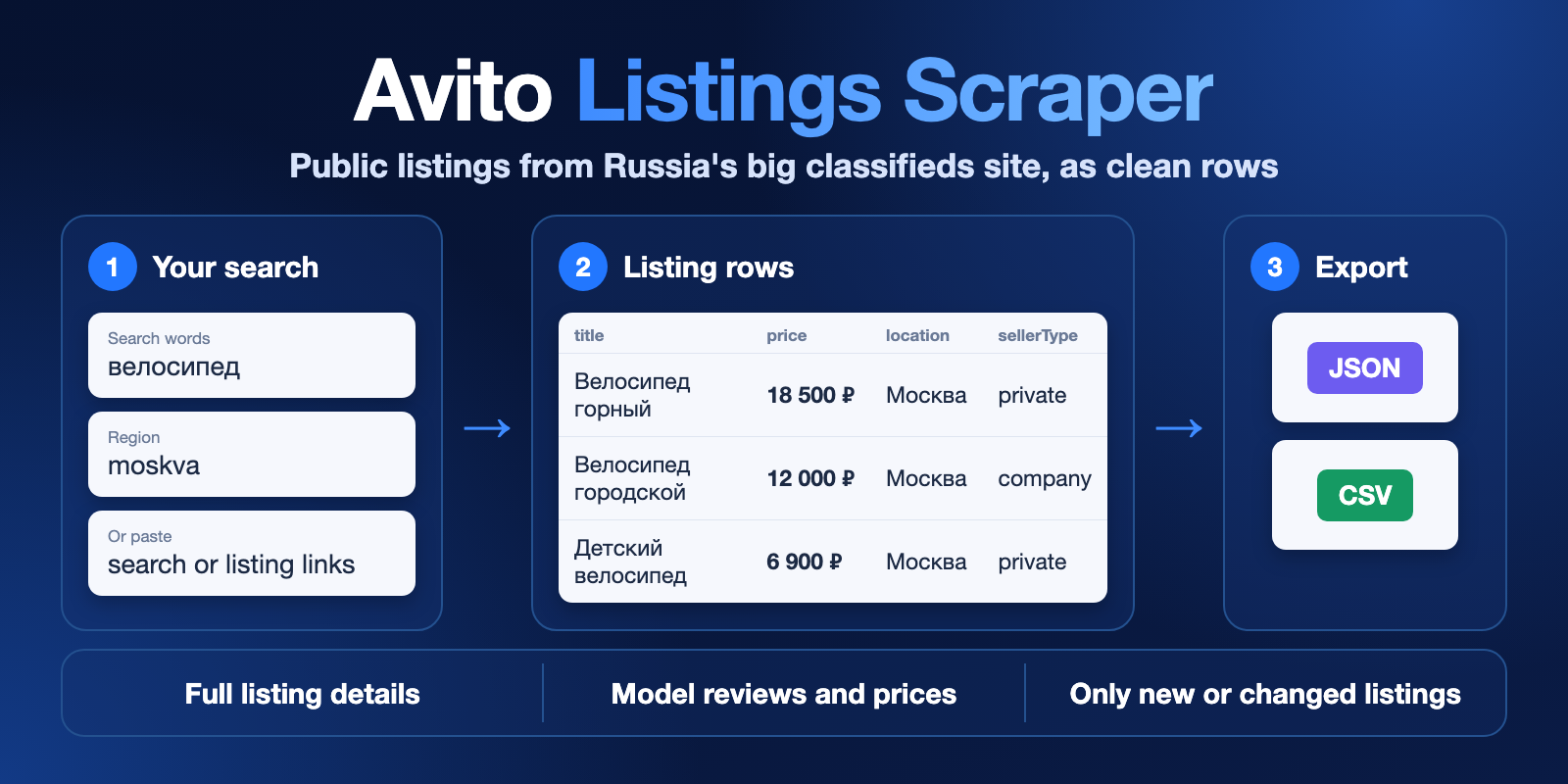
Table of contents
- What it does
- How it works
- Quick start
- Use cases
- Input
- Output
- Pricing
- Limits
- API, export and integrations
- Troubleshooting
- FAQ
- Related Actors
- Support
What it does
The Actor takes search words, Avito search links or listing links from Avito.ru. It returns one row for each listing, with the title, price, location, category, publication time, seller type and link. You can add full details, public model reviews, model price statistics and only-new monitoring. It does not return phone numbers or personal email addresses, and it needs no Avito login.
Good fit
- Track prices of a product or a car in a region.
- Collect homes for sale with Avito's price estimate and the building's listing history.
- Get only the new listings of a saved search each day.
- Read public reviews and price statistics of a product model.
- Find short-term rentals for exact dates and guests.
How it works
- The Actor opens the public Avito searches or listing pages that you give it.
- It removes duplicates, applies your filters and reads the extra data that you turned on.
- It saves one Dataset row for each listing and writes a run summary with the stop reason.
Quick start
-
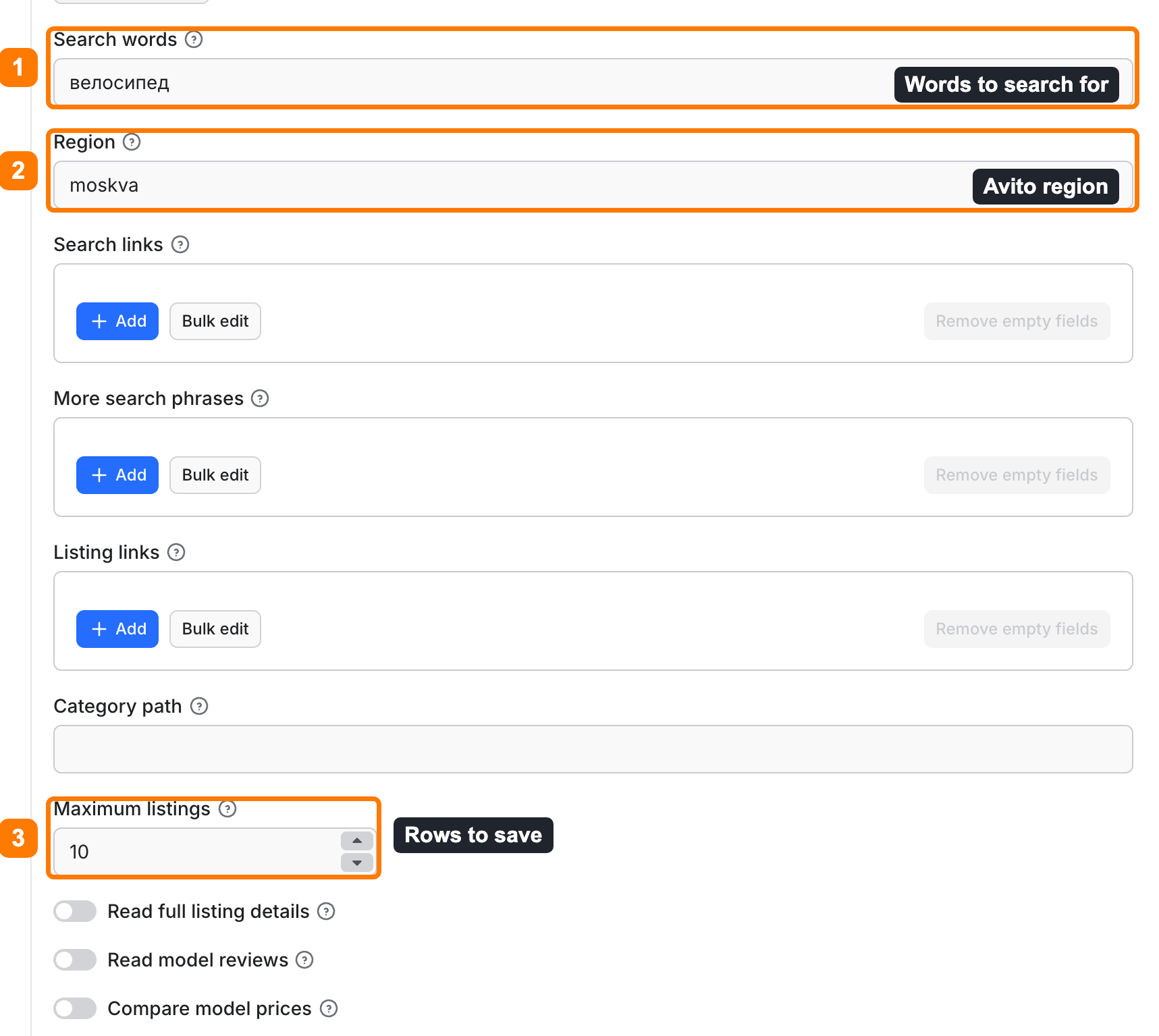
Open the input form. Keep the prefilled
велосипедin Search words or type your own words (box 1 in the picture). -
Keep
moskvain Region or paste a region from an Avito link, such assankt-peterburg(box 2). -
Keep
10in Maximum listings for a first test (box 3). -
Click Start.
-
Open the Output tab and check
title,priceandlocation(box 5).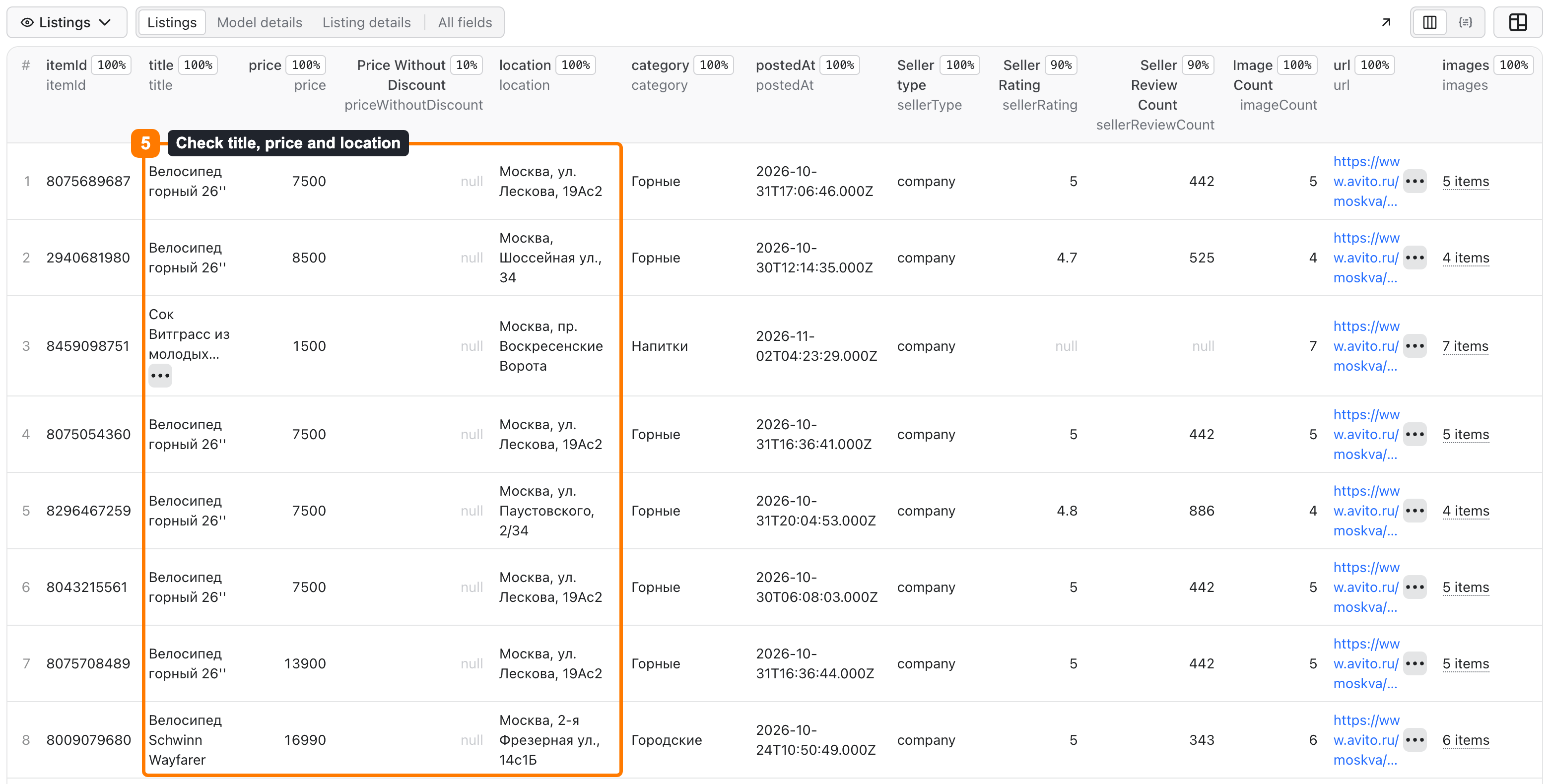
Expected result: 10 rows, each with a title, a price, a location and a link to the listing.
Use cases
| Buyer job | Input path | Output entity | Key fields | Next integration |
|---|---|---|---|---|
| Compare prices of a product in a region | query, region, sort | Listing row | title, price, location, url | CSV or Excel export |
| Get new listings from a saved search | searchUrls, onlyNew, stateName | New listing row | itemId, changeType, price, url | Schedule and Slack or Notion summary |
| Watch price changes | searchUrls, trackChanges, stateName | Changed listing row | changeType, price, priceText, postedAt | Schedule, API or webhook |
| Value a home for sale | listingUrls, includeDetails | Detailed listing row | marketValuation, realtyReport, buildingListingHistory | JSON export |
| Study a product model | listingUrls, includeReviews, includeComparables | Listing row with model data | productReviews, modelRating, modelComparables | JSON export or API |
Input
Input fields
| Field | Plain name | Type | Required | Default / prefill | Allowed values | Effect | Example | Recommendation |
|---|---|---|---|---|---|---|---|---|
query | Search words | string | One search input is required | Prefill велосипед | Any text | Searches these words | велосипед | Use for one simple search |
region | Region | string | No | Default and prefill moskva | City name or Avito region path; rossiya for all of Russia | Sets the search region | sankt-peterburg | Use rossiya for wide searches |
regions | Several regions | array of strings | No | Default [] | Up to 50 city or region names (Москва, Kazan) or region paths | One search per region and phrase; replaces region | ["Москва", "Казань"] | An unknown name stops with INPUT_REGION_UNKNOWN |
searchUrls | Search links | array of strings | One search input is required | Default [] | Public Avito search links | Keeps the link's category and filters | https://www.avito.ru/moskva/velosipedy | Best when you need Avito's own filters |
queries | More search phrases | array of strings | One search input is required | Default [] | Any text | Runs several phrases in region | ["велосипед", "самокат"] | Use for large volumes |
listingUrls | Listing links | array of strings | One search input is required | Default [] | Public listing links or numeric IDs | Reads these listings | 8075689687 | Use for exact listings |
categoryPath | Category path | string | One search input is required | Empty | Path after the region in an Avito link | Limits the search to a category | kvartiry/prodam | Copy it from an Avito link |
maxItems | Maximum listings | integer | No | Default and prefill 10 | 1–20000 | Limits saved rows across all inputs | 500 | Start small, then raise it |
includeDetails | Read full listing details | boolean | No | false | true, false | Adds descriptions, photos, parameters and coordinates | true | Slower and costs more per row |
includeReviews | Read model reviews | boolean | No | false | true, false | Adds public model reviews for supported products | true | Use with listing links of products |
includeComparables | Compare model prices | boolean | No | false | true, false | Price statistics, up to 35 offers (10 if limited) | true | Check modelComparables.region |
maxReviews | Maximum reviews per listing | integer | No | 1000 | 1–10000 | Limits reviews for each listing | 100 | Lower it to control cost |
minPrice | Minimum price (RUB) | integer | No | Empty | 0 or more | Keeps listings at or above this price | 5000 | Not above maxPrice |
maxPrice | Maximum price (RUB) | integer | No | Empty | 0 or more | Keeps listings at or below this price | 20000 | Not below minPrice |
sort | Sort order | string | No | relevance | relevance, newest, cheapest, expensive | Sets the Avito order | newest | Use newest for monitoring |
sellerType | Seller type | string | No | any | any, private, company | Filters by seller | private | None |
localOnly | Prefer the selected region | boolean | No | false | true, false | Asks Avito to prioritize region | true | Avito can still show nearby listings |
includeKeywords | Only listings with these words | array of strings | No | Default [] | Any words | Keeps rows whose title has one of them; with details, the description too | ["горный"] | Case and ё/е do not matter |
excludeKeywords | Skip listings with these words | array of strings | No | Default [] | Any words | Drops rows whose title has one of them; with details, the description too | ["детский"] | Dropped rows are not charged |
onlyWithPhotos | Only listings with photos | boolean | No | false | true, false | Drops rows without photos | true | None |
minSellerRating | Minimum seller rating | number | No | Empty | 0–5 | Drops rows with a lower or hidden seller rating | 4.5 | Hidden ratings are dropped too |
onlyNew | Only new listings | boolean | No | false | true, false | Skips listing IDs from earlier runs | true | Keep the same input or stateName |
trackChanges | Track changed listings | boolean | No | false | true, false | Returns new and changed listings | true | Keep the same input or stateName |
stateName | History name | string | No | Empty | Letters, digits, -, _; up to 64 characters | Names a shared listing history | bikes-moscow | Use for scheduled runs |
excludeListingIds | Skip listing IDs | array of strings | No | Default [] | Numeric IDs | Skips these listings | ["8075689687"] | None |
skipFromDataset | Skip listings from an earlier run | string | No | Empty | Dataset ID | Skips listings already in that dataset | nrLbzp7dj0NeUAPsl | Reads up to 200,000 rows |
skipNegotiablePrice | Skip listings without a numeric price | boolean | No | false | true, false | Drops rows with no numeric price | true | Useful for price statistics |
flagUnderpriced | Flag low prices in search results | boolean | No | false | true, false | Compares each row with its search read so far | true | Needs at least 10 prices |
maxPagesPerSearch | Maximum pages per search | integer | No | 100 | 1–100 | Stops a search after this many pages | 5 | Lower it to control cost |
deliveryConnector | Send results to | connector | No | Empty | Your Slack, Notion or other MCP connector | Posts a short summary after the run | Your connector | Optional |
deliveryTarget | Notion page or channel | string | No | Empty | Notion page link or Slack channel ID | Sets where the summary goes | C0123456789 | Optional |
checkIn | Check-in date | string | With checkOut | Empty | YYYY-MM-DD | First night of a short-term rental | 2026-12-10 | Leave query empty |
checkOut | Check-out date | string | With checkIn | Empty | YYYY-MM-DD, after checkIn | Departure date | 2026-12-13 | Leave query empty |
guests | Adult guests | integer | With childAges | Empty | 1–50 | Sets the number of adults | 2 | Leave query empty |
childAges | Children ages | array of integers | No | Default [] | 0–17 | Adds children to the rental search | [4, 9] | Also set guests |
Empty input: the run stops with INPUT_SEARCH_REQUIRED and saves nothing. Give one of query, queries, searchUrls, listingUrls or categoryPath.
Region names: about 40 large cities and regions are known by name in Russian or English, such as Москва, Saint Petersburg or Казань. For other places, copy the region path from an Avito link, such as tver. An unknown name stops the run with INPUT_REGION_UNKNOWN before Avito is read; only the start event is charged; a wrong path stops with SOURCE_SEARCH_PARAMETERS_INVALID.
Arrays hold plain strings, one item per line in the form. The form accepts up to 20,000 saved rows per run, see Limits for what was tested. A listing that appears in several searches is saved once and counted once.
Interacting settings
| When | Input A | Input B | Effective behavior | Example | Cost/result effect |
|---|---|---|---|---|---|
| You give links and words | searchUrls or listingUrls | query, queries | Links run. The words are ignored. | A link and query | Only the link is read |
| You give phrases and words | queries | query | queries runs. query is ignored. | Two phrases and query | Two searches |
| Your link has a sort | searchUrls | sort | The sort in the link wins. | Link with s=104 | None known |
| You set filters and a link | searchUrls | minPrice, maxPrice, sellerType | The filters also apply to the link. | Link and maxPrice | Fewer rows |
| You set word or photo filters | Any search | includeKeywords, excludeKeywords, onlyWithPhotos, minSellerRating | Skipped rows are dropped before saving. With details or listing links, filters other than excluded words are checked after the details are read. | excludeKeywords ["детский"] | Skipped rows are not charged as listings; reads already made count as source-read |
| You set a price range | listingUrls or any search | minPrice, maxPrice | Rows outside the range are skipped, even when Avito returned them. | Link and maxPrice | Skipped rows are not charged |
| You turn on model data | includeReviews, includeComparables | includeDetails | Full details are also read. | Reviews on | detail-enriched is charged |
| You give regions and a region | regions | region | regions runs. region is ignored. | Two regions and region | One search per region |
| You give links and regions | searchUrls or listingUrls | region, regions | Links keep their own region. The regions are ignored. | A link and regions | Only the link is read |
| You turn on both monitors | onlyNew | trackChanges | trackChanges wins: new and changed rows return. | Both on | More rows than onlyNew |
| You search rentals by date | checkIn, checkOut, guests | query | With words, the run stops with SOURCE_RENTAL_FILTERS_UNCONFIRMED. | Dates and query | No rows, only small charges |
Input examples
Quick test
{
  "query": "велосипед",
  "region": "moskva",
  "maxItems": 10
}
Expected behavior: the Actor reads one search and stops at 10 rows.
Expected output: listing rows with title, price, location and url.
Limit or cost note: about $0.04–$0.07 on the FREE tier.
Several searches across Russia
{
  "queries": ["велосипед", "самокат", "ноутбук"],
  "region": "rossiya",
  "maxItems": 450
}
Expected behavior: the Actor runs the phrases in order until it has 450 unique rows. Expected output: 450 listing rows. Limit or cost note: about 9 minutes, so set the run timeout to at least 900 seconds; $1.66–$1.96 on the FREE tier.
Several regions with word filters
{
  "query": "велосипед",
  "regions": ["Москва", "Санкт-Петербург"],
  "excludeKeywords": ["детский"],
  "onlyWithPhotos": true,
  "maxItems": 40
}
Expected behavior: the Actor searches each region and skips children's bikes and rows without photos. Expected output: up to 40 listing rows from both cities. Limit or cost note: skipped rows are not charged.
One product with reviews and price statistics
{
  "listingUrls": [
    "https://www.avito.ru/moskva/telefony/iphone_17_256_gb_8095557352"
  ],
  "includeDetails": true,
  "includeReviews": true,
  "includeComparables": true,
  "maxReviews": 100
}
Expected behavior: the Actor reads the listing, its model reviews and its price comparison.
Expected output: one row with productReviews, modelRating and modelComparables.
Limit or cost note: about 10–45 seconds and $0.03–$0.05 on the FREE tier. Avito does not always return price statistics, so modelComparables can be null.
Daily new listings
{
  "searchUrls": ["https://www.avito.ru/moskva/velosipedy"],
  "maxItems": 100,
  "sort": "newest",
  "onlyNew": true,
  "stateName": "bikes-moscow"
}
Expected behavior: the first run saves up to 100 rows. Later runs save only IDs that were not delivered before. They also go further down the search, so they can return older listings until the search has no unseen IDs left.
Expected output: rows with changeType set to new.
Limit or cost note: a run with nothing unseen saves 0 rows and pays only the start and source reads. Lower maxItems if you want fewer older rows per run.
Short-term rental for exact dates
{
  "query": "",
  "categoryPath": "kvartiry/sdam/posutochno",
  "region": "moskva",
  "maxItems": 3,
  "checkIn": "2026-12-10",
  "checkOut": "2026-12-13",
  "guests": 2
}
Expected behavior: the Actor checks that Avito accepted the dates and guests, then saves the rentals.
Expected output: rental rows with title, price, location and url.
Limit or cost note: use only with an empty query.
Output
Output fields
| Field | Meaning | Type | Can be empty? | Example / enum | Source / notes |
|---|---|---|---|---|---|
itemId | Avito listing ID | string | No | 8075689687 | Unique within a run |
url | Listing link | string | No | https://www.avito.ru/moskva/... | Public page |
title | Listing title | string | Yes, for not_found | Велосипед горный 26'' | As shown on Avito |
price | Price as a number | number | Yes | 7500 | null means no numeric price, not zero |
priceText | Price as shown | string | Yes | 7 500 ₽ | Keeps the unit, such as per day |
currency | Currency | string | Yes | RUB | |
priceWithoutDiscount | Price before discount | number | Yes | 9900 | Only when Avito shows it |
discountPercent | Discount size | number | Yes | 24 | Only when Avito shows it |
location | Place of the listing | string | Yes | Москва, ул. Лескова, 19Ас2 | |
address | Address as shown | string | Yes | Москва, ул. Лескова, 19Ас2 | Public text only |
latitude, longitude | Coordinates | number | Yes | 55.894085 | Often needs details |
districtId, metroId, verticalId | Avito location and section IDs | number | Yes | 625 | Avito's own IDs |
category | Category name | string | Yes | Горные | |
categoryId | Category ID | number | Yes | 34 | |
breadcrumbs | Category path | array | Yes | ["Хобби и отдых", "Велосипеды"] | |
postedAt | Publication time | string | Yes | 2026-10-31T17:06:46.000Z | ISO date in UTC |
sellerType | Seller type | string | Yes | private, company | |
sellerRating | Seller rating | number | Yes | 5 | |
sellerReviewCount | Seller review count | number | Yes | 442 | |
sellerVerified | Verified seller mark | boolean | Yes | false | |
description | Listing text | string | Yes | Text | Phone numbers and emails are removed |
descriptionPreview | Short listing text | string | Yes | Text | Phone numbers and emails are removed |
listingSummary | Short summary | string | Yes | Text | Built from public fields |
images | Photo links | array | Yes | ["https://..."] | |
imageCount | Number of photos | number | Yes | 5 | |
imageAlt | Photo text | string | Yes | Велосипед горный 26'', Москва | Often empty in search rows |
parameters | Listing parameters | array | Yes | [{"name": "Состояние", "value": "Новое"}] | Guaranteed with includeDetails |
viewsTotal, viewsToday | View counts | number | Yes | 16248 | Guaranteed with includeDetails when Avito shows them |
isNegotiable | Negotiable price mark | boolean | Yes | null | Only when Avito shows it |
isDeliveryAvailable | Delivery mark | boolean | Yes | false | |
hasInstallments | Installments mark | boolean | Yes | null | |
badges | Listing badges | array | Yes | [] | |
modelRating, modelReviewCount | Product model rating | number | Yes | 4.8 | Supported products |
productSpecs | Product model specs | array | Yes | Array | Supported products |
productReviews | Public model reviews | array | Yes | Array | includeReviews; author names are excluded |
modelComparables | Model price statistics | object | Yes | {"offersCount": 78, "region": "chelyabinsk", "sampleSize": 35, "priceMedian": 68390} | includeComparables; Avito chooses the region |
vehicleHistory | Public vehicle history | object | Yes | Object | Car listings with details |
carMarketPrice | Avito car price estimate | object | Yes | Object | Car listings with details |
marketValuation | Avito home price estimate | object | Yes | {"estimatedPrice": 8640000, "comparableCount": 392} | Supported homes with details |
realtyReport | Home report | object | Yes | Object | Supported homes with details |
buildingListingHistory | Listing history of the building | array | Yes | Array | Supported homes with details |
priceHistory | Price history | array | Yes | Array | Only when Avito shows it |
isUnderpriced | Low price mark | boolean | Yes | true | flagUnderpriced |
priceVsMedian | Price against the search median | number | Yes | -0.24 | flagUnderpriced |
priceComparisonMedian | Median used for the comparison | number | Yes | 12000 | flagUnderpriced |
priceComparisonSampleSize | Prices in the comparison | number | Yes | 25 | At least 10, not counting the row |
priceComparisonScope | What was compared | string | Yes | search-so-far | source-page on the first page of a search |
changeType | Monitor result | string | Yes | new, changed | onlyNew or trackChanges |
status | Row status | string | No | ok, not_found | not_found means a closed or missing listing |
enrichmentStatus | Extra data status | string | Yes | partial | Some requested data did not arrive |
enrichmentError | Why data is missing | string | Yes | Code | Read with enrichmentStatus |
source | Data source | string | No | avito.ru | |
sourceUrl | Page that gave the row | string | No | Link | |
fetchedAt | Time of the read | string | No | 2026-11-07T03:22:15.474Z | ISO date in UTC |
Output entities and surfaces
| Situation | Dataset/API/KVS/live view | Result shape | User action |
|---|---|---|---|
| Normal item | Dataset views Listings, Model details and Listing details; RUN_SUMMARY in the Key-value store | One row for each listing | Open, export or use itemId as the key |
| Domain-empty result | Empty Dataset; RUN_SUMMARY with savedItems 0; status SUCCEEDED | No rows | Check words, region, price range and filters |
| Partial result | Dataset row with enrichmentStatus set to partial; RUN_SUMMARY.partial and stopReason | Saved rows with some empty fields | Read enrichmentError, then run those links again |
| Closed listing | Dataset row with status set to not_found | Row with itemId and url | Remove it from your list |
| Technical failure or retry | FAILED when no row was saved; after saved rows a source refusal ends SUCCEEDED with RUN_SUMMARY.partial | Rows saved before the stop | Read the code in Troubleshooting, then retry |
Output example
{
  "itemId": "8075689687",
  "url": "https://www.avito.ru/moskva/velosipedy/velosiped_gornyy_26_8075689687",
  "title": "Велосипед горный 26''",
  "price": 7500,
  "priceText": "7 500 ₽",
  "priceWithoutDiscount": null,
  "discountPercent": null,
  "currency": "RUB",
  "location": "Москва, ул. Лескова, 19Ас2",
  "latitude": 55.894085,
  "longitude": 37.616457,
  "category": "Горные",
  "categoryId": 34,
  "breadcrumbs": ["Хобби и отдых", "Велосипеды", "Горные"],
  "postedAt": "2026-10-31T17:06:46.000Z",
  "sellerType": "company",
  "sellerRating": 5,
  "sellerReviewCount": 442,
  "sellerVerified": false,
  "imageCount": 5,
  "isDeliveryAvailable": false,
  "isNegotiable": null,
  "parameters": [
    { "name": "Состояние", "value": "Новое", "attributeId": 110399 }
  ],
  "viewsTotal": 16248,
  "viewsToday": 4,
  "source": "avito.ru",
  "fetchedAt": "2026-11-07T03:22:15.474Z",
  "status": "ok"
}
This example is trimmed and shows one row from the Quick test input. null or a missing field means Avito did not show that value in this read. Detail fields can appear without includeDetails when the Actor has to read the listing page, but only includeDetails guarantees that it tries to read them.
Send results to Slack or Notion
Pick your connector in the optional deliveryConnector field. After the run saves its data, the Actor posts a short summary (up to 25 rows and a link to the full dataset) there. Put a Notion page link or a Slack channel ID in deliveryTarget: in Notion every run is added on top of that one page, so your workspace does not fill up with new pages. A delivery error never fails the run and costs nothing extra. Connect a service once in Apify Console → MCP connectors.
Use case → fields
| Buyer job | Input path | Output entity | Key fields | Next integration |
|---|---|---|---|---|
| Compare prices | query, region | Listing row | price, location | CSV or Excel |
| New-listing alerts | searchUrls, onlyNew | New listing row | itemId, changeType | Slack or Notion summary |
| Price change log | searchUrls, trackChanges | Changed listing row | changeType, price | API or webhook |
| Home valuation | listingUrls, includeDetails | Detailed row | marketValuation, realtyReport | JSON export |
| Model research | listingUrls, includeReviews | Row with reviews | productReviews, modelRating | JSON export |
Pricing
Pricing unit
The Actor uses pay-per-event pricing. Platform usage is included: you pay only for these events.
| Event | What it pays for | FREE | BRONZE | SILVER | GOLD and above |
|---|---|---|---|---|---|
listing-scraped | One saved listing row | $0.0036 | $0.00324 | $0.00288 | $0.00252 |
source-read | One unit of reading the source | $0.0003 | $0.00027 | $0.00024 | $0.00021 |
detail-enriched | One listing with full details | $0.0021 | $0.00189 | $0.00168 | $0.00147 |
review-scraped | One saved model review | $0.0005 | $0.00045 | $0.0004 | $0.00035 |
apify-actor-start | One run start, per GB of memory | $0.003 | $0.003 | $0.003 | $0.003 |
The start fee scales with run memory (per GB). At the default 512 MB it is one event, $0.003.
source-read depends on what Avito returns, so the same input can use a different count in two runs. Measured counts: 0.3–10 per row for search rows, 8–14 per row with includeDetails. A monitoring run with few new rows uses more per row, because it also reads the rows that it skips: 8–23 per row in our tests.
Runs with no results still pay. A valid search with no matches, a filter with no matches and a monitoring run with no new listings save 0 rows and pay the start and source-read. An invalid input stops before it reads the source and pays only the start. A partial or failed run pays for the work done before the stop, and its saved rows stay. detail-enriched is charged only when the Actor read details at your request. The maximum cost per run setting is respected: the run stops with CHARGE_LIMIT, and its status stays SUCCEEDED. The smallest allowed limit is $0.02.
Cost examples
Amounts are for the FREE tier, from real runs. Base charge = start + saved rows + source reads. Rows marked "earlier build" were measured on an earlier build of this Actor and priced at the current rates.
| Scenario | Input scope | Expected item/event count | Base charge | Optional charge | Stop/cap behavior |
|---|---|---|---|---|---|
| Quick test | One search, 10 rows | 10 rows, 15–99 reads | $0.044–$0.069 | None | Stops at maxItems |
| Several searches | 3 phrases, 450 rows | 450 rows, 123–1,137 reads | $1.66–$1.96 | None | Stops at maxItems |
| Large search, earlier build | 6 phrases, 5,000 rows | 5,000 rows, 3,893 reads | $19.17 | None | Set a timeout of about 2 hours |
| Form maximum, earlier build | 40 phrases, 20,000 rows | 20,000 rows, 21,496 reads | $78.45 | None | Set a timeout of about 7 hours |
| Details | One search, 20 rows | 20 rows, 274 reads | $0.157 | $0.042 details | Stops at maxItems |
| Details, larger | One search, 190 rows | 190 rows, about 1,600 reads | $1.16–$1.17 | $0.399 details | Stops at maxItems |
| Home with valuation | One listing | 1 row, 47 reads | $0.021 | $0.0021 details | Stops after the listing |
| Model with reviews | One listing, 38 reviews | 1 row, 17–88 reads | $0.012–$0.033 | $0.021 details and reviews | Stops after the reviews |
| No matches | One search | 0 rows, 16–24 reads | $0.0078–$0.0102 | None | Ends when Avito has no more results |
| Monitor, nothing new | Same listing links | 0 rows, 0 reads | $0.003 | None | Ends after the history check |
| No matches, wide | 40 phrases | 0 rows, 567 reads | $0.173 | None | Ends when all phrases finish |
| Cost cap | Maximum cost $0.03 | 4 rows, 38 reads | $0.03 or less | None | Stops with CHARGE_LIMIT |
Limits
- The Actor reads only public pages. It does not return phone numbers or personal emails, and it does not log in.
- One search returns up to about 2,000 listings, because Avito stops showing results after about 31 pages. Avito can also start repeating or stop a search after about 500–800 listings. Use several phrases, regions, categories or price ranges for more.
- The default timeout of 300 seconds usually fits about 250–300 search rows (measured: 450 rows in 534 seconds). When Avito answers slowly, even 50 rows can take 4–5 minutes; the run then stops on time and keeps the rows it already saved. Set a longer timeout for more. Rows with details take about 1 second more each.
- The current version was tested up to 450 search rows in one run. Larger runs were measured on an earlier build. Plan about 20 minutes per 1,000 search rows, and start a large job with a smaller run.
- The form accepts up to 20,000 rows per run. Set the maximum cost per run high enough: 20,000 rows cost about $78 on the FREE tier.
- Avito can refuse some reads. A refused search page is retried through other connections, which can make the run slower. Rows already found are kept, with
SOURCE_BLOCKEDin the summary if a search still fails. - If Avito refuses listing details several times in a row, the rest of the listings are saved from search results without details (
enrichmentStatusispartial). - Avito can widen a narrow search with other regions and loosely related listings. The Actor checks the price range again, but it keeps Avito's choice of words and region.
onlyNewremembers the latest 50,000 delivered IDs.flagUnderpricedcompares a row with the listings of the same search and category read so far: rows of the first page compare with that page, later pages with all earlier pages too. Listings removed by your filters still count, and rows already saved are not recalculated. A row needs at least 10 other prices;priceComparisonSampleSizeshows how many. It is not a market estimate.modelComparablesholds up to 35 offers from a region that Avito chooses, or up to 10 when Avito limits the direct route.sampleSizeshows the real number. Avito does not always return it.- Results reflect Avito at the time of the read. The Actor does not promise that it finds every listing.
API, export and integrations
- API: start a run with the Apify API and the same JSON input. Rows arrive in the default Dataset. Use
itemIdas the key. - Export: download the Dataset as JSON, CSV, Excel, XML or HTML. Table systems read
title,price,locationandurl. - Scheduling: run a search on a schedule with
onlyNewortrackChangesand onestateName. The next system readschangeType. - Webhooks / no-code: send the run-finished event to your system, then read the Dataset by its ID.
RUN_SUMMARY.stopReasontells how the run ended. - Slack or Notion: set
deliveryConnectorto get a short summary with a link to the full Dataset.
Use with AI agents (MCP)
MCP server URL with only this Actor: https://mcp.apify.com?tools=cliqtomedia/avito-scraper
Smallest useful input:
{
  "query": "велосипед",
  "region": "moskva",
  "maxItems": 10
}
Key output fields:
title: the listing title.price: the price in rubles, ornullwhen no numeric price is shown.location: the place of the listing.url: the public listing link.status:ok, ornot_foundfor a closed listing.
A run of 10 rows takes about 8–60 seconds and costs about $0.04–$0.07 on the FREE tier. The form accepts up to 20,000 rows per run, the current version was tested up to 450, and the default 300-second timeout usually fits about 250–300 rows (fewer when Avito answers slowly). No phone numbers are returned.
Troubleshooting
The run failed with INPUT_SEARCH_REQUIRED
Symptom: the run fails at once and saves no rows.
Likely reason: the input has no search words, links or category.
Check: look at query, queries, searchUrls, listingUrls and categoryPath.
Action: fill at least one of them.
The run failed with another INPUT_ code
Symptom: the run fails at once with INPUT_INVALID, INPUT_URL_INVALID, INPUT_LISTING_URL_INVALID, INPUT_PRICE_RANGE, INPUT_RENTAL_DATES or INPUT_RENTAL_GUESTS.
Likely reason: a link is not an Avito link, minPrice is above maxPrice, or a date or guest field is wrong.
Check: read the status message of the run.
Action: fix the field and start again.
The run failed with INPUT_REGION_UNKNOWN
Symptom: the status is FAILED and the status message says the region name is unknown.
Likely reason: the region name is not in the built-in list of large cities and regions.
Check: open the same search on Avito and look at the region part of the link, for example tver in avito.ru/tver/....
Action: put that region path in region or regions.
The run failed with SOURCE_SEARCH_PARAMETERS_INVALID
Symptom: the status is FAILED with no rows, sometimes after a few minutes while Avito slows requests.
Likely reason: Avito did not accept the region path, category path or search link.
Check: open the same link or avito.ru/<region>/<categoryPath> in a browser.
Action: copy the region and category from a working Avito link.
The run stopped with REQUEST_BUDGET, SOURCE_PROTECTED_TIMEOUT or SOURCE_RESPONSE_TOO_LARGE
Symptom: the status message names one of these codes; saved rows stay in the Dataset.
Likely reason: Avito blocked or slowed many requests in a row, so the run stopped to avoid spending more.
Check: read stopReason and savedItems in RUN_SUMMARY.
Action: run again later or with a smaller maxItems. Rows already saved are not charged twice if you pass the earlier Dataset in skipFromDataset.
The run saved 0 rows
Symptom: the status is SUCCEEDED and the Dataset is empty.
Likely reason: Avito has no listings for this search, or filters removed all of them.
Check: open the same search on Avito and read examinedItems and excludedItems in RUN_SUMMARY.
Action: use wider words, another region or wider filters.
The run stopped with SOURCE_BLOCKED
Symptom: the run has status SUCCEEDED and fewer rows than maxItems. If no rows were saved, the status is FAILED with this code.
Likely reason: Avito refused some searches or listing pages after the retries. A long run can also end early, when a stretch of failed reads uses up its traffic limit.
Check: read warnings and completedInputs in RUN_SUMMARY.
Action: keep the saved rows and run the rest later.
The run failed with SOURCE_HTTP_403, SOURCE_HTTP_429 or SOURCE_SEARCH_FAILED
Symptom: the status is FAILED and no rows were saved. Likely reason: Avito refused every search at its start, so there is nothing to return. Check: read the status message of the run. Action: run it again later. The run pays only for what it read.
The run ended with SOURCE_DETAILS_PARTIAL
Symptom: the status is SUCCEEDED and some rows have enrichmentStatus set to partial.
Likely reason: Avito did not return the details of some listings, or limited the reads of a model. After three refused listing pages in a row, the rest of the rows are saved from search results without details. A model row can then have fewer reviews than asked and no modelComparables. Reviews already read stay in the row.
Check: read enrichmentError in those rows.
Action: run those listings again through listingUrls.
The run stopped with MEMORY_LIMIT
Symptom: the status is SUCCEEDED and the run saved fewer rows than maxItems.
Likely reason: the run came close to its memory limit.
Check: read warnings in RUN_SUMMARY.
Action: split the job into several runs. If you lowered memory to 256 MB, go back to 512 MB.
Rows do not match my words or region
Symptom: some rows are from another city or about something else.
Likely reason: Avito widens a narrow search when it has few exact matches.
Check: open the same search on Avito.
Action: use a category in categoryPath, turn on localOnly or filter by location after the run.
The run stopped with SOURCE_RENTAL_FILTERS_UNCONFIRMED
Symptom: a rental run fails with no rows.
Likely reason: dates and guests work only in a rental category without search words.
Check: look at query and categoryPath.
Action: leave query empty and use kvartiry/sdam/posutochno or a rental search link.
The run stopped with CHARGE_LIMIT
Symptom: the run has status SUCCEEDED and fewer rows than maxItems.
Likely reason: it reached your maximum cost per run.
Check: read stopReason in RUN_SUMMARY.
Action: raise the limit or lower maxItems.
The run ended with SOURCE_PAGE_LIMIT
Symptom: one search gave fewer rows than maxItems.
Likely reason: the search reached maxPagesPerSearch.
Check: read pageLimitedInputs in RUN_SUMMARY.
Action: raise maxPagesPerSearch or split the search into narrower ones.
The run timed out
Symptom: the status is TIMED-OUT.
Likely reason: the timeout is too short for maxItems.
Check: compare the saved rows with maxItems. Saved rows stay in the Dataset.
Action: set a longer timeout. Allow about 20 minutes per 1,000 search rows.
Some rows have enrichmentStatus set to partial
Symptom: the row exists, but details or model data are missing.
Likely reason: Avito did not return this part.
Check: read enrichmentError in the row.
Action: run this listing again through listingUrls.
FAQ
Do I need an Avito account or proxies?
No. You need only an Apify account. The Actor reads public pages and handles access itself.
Does it return phone numbers?
No. Phone numbers and personal emails are not collected, and they are removed from descriptions. Author names of model reviews are also excluded.
Why did I pay for a run with 0 rows?
The Actor still has to read Avito to learn that nothing matches. A run like this pays the start and source-read, about $0.01 on the FREE tier for one search.
Why is price empty?
The listing shows no numeric price. price is null, not zero. Turn on skipNegotiablePrice to drop these rows.
Can I get more than 2,000 rows from one search?
Not from one search. Avito stops showing results after about 31 pages. Add more phrases, regions, categories or price ranges in one run.
How fresh and complete is the data?
Each row shows Avito at the time in fetchedAt. Avito decides what a search shows, so the Actor does not promise every listing.
Is isUnderpriced a market valuation?
No. It compares a price only with rows of the same search and category read so far. Avito's own estimates for homes and cars are in marketValuation and carMarketPrice.
Related Actors
- Cian.ru Real Estate Listings Scraper - No Login: Russian flats and houses for sale and rent, with prices.
- Yandex Market Scraper: Prices, Sellers, Reviews & Offers: new-product prices in Russia to compare with Avito asking prices.
- OLX Listings Scraper: Poland, Ukraine, Romania & More: classifieds with prices in other countries.
- Kleinanzeigen Scraper: Listings, Prices & Photos (No Login): German classifieds with prices and photos.
Support
For a bug, question or feature request, open the Issues tab of this Actor on Apify. Include the run ID, the input mode and the error text or stopReason. Never send tokens, cookies, private data or billing data.
⭐ Found it useful? Rate this Actor.
Something wrong? Report a problem — we fix reported problems.
Changelog
This Actor's version history is a separate document: https://apify.com/cliqtomedia/avito-scraper/changelog.md
Actor input Schema
query (type: string):
Words to find in public Avito listings. Used when no search links or listing links are given.
region (type: string):
City or region name (Москва, Saint Petersburg) or region path from an Avito search link (moskva, sankt-peterburg). Use rossiya for all of Russia.
regions (type: array):
Search in several regions at once, one search per region and search phrase. Use city or region names in Russian or English (Москва, Saint Petersburg, Казань) or Avito region paths (moskva, kazan). When filled, it is used instead of Region. Ignored for search links and listing links, which carry their own region.
searchUrls (type: array):
Public Avito search links. Their category and filters are kept. Search words are used only when this list is empty.
queries (type: array):
Run several phrases in the selected region. Used instead of Search words when no links are given.
listingUrls (type: array):
Public Avito listing links or numeric listing IDs. No phone numbers or personal email addresses are returned.
categoryPath (type: string):
Optional path after the region, such as velosipedy or kvartiry/prodam. Copy it from an Avito search link.
maxItems (type: integer):
Maximum number of listings saved across all inputs. Duplicate listing IDs are saved once.
includeDetails (type: boolean):
Add descriptions, photos, parameters, coordinates and publication times. For supported secondary homes for sale, also read Avito’s price estimate. Slower than search results alone.
includeReviews (type: boolean):
For supported products, add public reviews about the model. Names and contacts of review authors are excluded. Full details are also read.
includeComparables (type: boolean):
For supported products, add price statistics from up to 35 matching offers, or up to 10 when Avito limits the direct route. Avito chooses the region of these offers, so check modelComparables.region. Full details are also read.
maxReviews (type: integer):
Maximum public model reviews to save for each listing. Used only when model reviews are enabled.
minPrice (type: integer):
Only listings at or above this price.
maxPrice (type: integer):
Only listings at or below this price.
sort (type: string):
Avito search order. A sort in a pasted search link takes priority.
sellerType (type: string):
Choose all sellers, private sellers or businesses.
localOnly (type: boolean):
Ask Avito to prioritize results from the selected region.
includeKeywords (type: array):
Keep a listing only if its title contains at least one of these words; with Include details the full description is checked too. Capital letters and ё/е do not matter. Listings that do not match are not returned and not charged.
excludeKeywords (type: array):
Drop a listing if its title contains any of these words; with Include details the full description is checked too. Capital letters and ё/е do not matter. Dropped listings are not returned and not charged.
onlyWithPhotos (type: boolean):
Skip listings that have no photos. Search results show whether a listing has a photo; the full photo count comes with Include details.
minSellerRating (type: number):
Skip listings whose seller rating is below this value (0 to 5) or not shown in the search results.
onlyNew (type: boolean):
Remember delivered IDs and skip them in later runs with the same searches. The latest 50,000 delivered IDs are kept.
trackChanges (type: boolean):
Return new listings and changes to their title, price, publication time or category. View counts, model statistics and the amount of optional detail data do not count as changes. Unseen records stay in the history.
stateName (type: string):
Optional name for a shared listing history in your private Actor storage. Leave empty to use a history for these searches.
excludeListingIds (type: array):
Do not return these listing IDs.
skipFromDataset (type: string):
Dataset ID from an earlier run; its listings are not returned, not charged and not counted toward the maximum. Up to 200,000 listings are read. If the dataset cannot be read, the run continues and a warning is shown.
skipNegotiablePrice (type: boolean):
Exclude listings that do not show a numeric price.
flagUnderpriced (type: boolean):
Compare each ad with other priced ads of the same search and category read so far (the first page alone, later pages together with earlier ones). Ads removed by your filters still count in the comparison. Rows already saved are not recalculated. At least 10 other prices with the same price unit are needed. Flag ads priced 20% or more below the median. Model comparisons are not required.
maxPagesPerSearch (type: integer):
Stop a search after this many source pages. A source page cap is recorded in the run summary.
deliveryConnector (type: string):
Your Slack, Notion or other MCP connector. After the run the Actor posts a short summary there. Connect services once in Apify Console → MCP connectors.
deliveryTarget (type: string):
Where to post the summary: a Notion page link (each run is added on top of that page) or a Slack channel ID. Notion needs a page here; without it the summary is not sent and the run summary says why.
checkIn (type: string):
For daily rentals, the first night in YYYY-MM-DD format. Also set Check-out date and leave the search phrase empty.
checkOut (type: string):
For daily rentals, the departure date in YYYY-MM-DD format. It must be after Check-in date.
guests (type: integer):
Number of adults for daily rentals. Leave the search phrase empty. Children are added separately.
childAges (type: array):
Ages of children staying in a daily rental, from 0 to 17. The source must confirm these filters before results are saved.
Actor input object example
{
  "query": "велосипед",
  "region": "moskva",
  "regions": [],
  "searchUrls": [],
  "queries": [],
  "listingUrls": [],
  "maxItems": 10,
  "includeDetails": false,
  "includeReviews": false,
  "includeComparables": false,
  "maxReviews": 1000,
  "sort": "relevance",
  "sellerType": "any",
  "localOnly": false,
  "includeKeywords": [],
  "excludeKeywords": [],
  "onlyWithPhotos": false,
  "onlyNew": false,
  "trackChanges": false,
  "excludeListingIds": [],
  "skipNegotiablePrice": false,
  "flagUnderpriced": false,
  "maxPagesPerSearch": 100,
  "childAges": []
}
Actor output Schema
listings (type: string):
Open the listing results.
runSummary (type: string):
Counts, limits and source errors.
API
You can run this Actor programmatically using our API. Below are code examples in JavaScript, Python, and CLI, as well as the OpenAPI specification and MCP server setup.
JavaScript example
import { ApifyClient } from 'apify-client';

// Initialize the ApifyClient with your Apify API token
// Replace the '<YOUR_API_TOKEN>' with your token
const client = new ApifyClient({
    token: '<YOUR_API_TOKEN>',
});

// Prepare Actor input
const input = {
    "query": "велосипед",
    "region": "moskva",
    "maxItems": 10
};

// Run the Actor and wait for it to finish
const run = await client.actor("cliqtomedia/avito-scraper").call(input);

// Fetch and print Actor results from the run's dataset (if any)
console.log('Results from dataset');
console.log(`💾 Check your data here: https://console.apify.com/storage/datasets/${run.defaultDatasetId}`);
const { items } = await client.dataset(run.defaultDatasetId).listItems();
items.forEach((item) => {
    console.dir(item);
});

// 📚 Want to learn more 📖? Go to → https://docs.apify.com/api/client/js/docs
Python example
from apify_client import ApifyClient

# Initialize the ApifyClient with your Apify API token
# Replace '<YOUR_API_TOKEN>' with your token.
client = ApifyClient("<YOUR_API_TOKEN>")

# Prepare the Actor input
run_input = {
    "query": "велосипед",
    "region": "moskva",
    "maxItems": 10,
}

# Run the Actor and wait for it to finish
run = client.actor("cliqtomedia/avito-scraper").call(run_input=run_input)

# Fetch and print Actor results from the run's dataset (if there are any)
print(f"💾 Check your data here: https://console.apify.com/storage/datasets/{run.default_dataset_id}")
for item in client.dataset(run.default_dataset_id).iterate_items():
    print(item)

# 📚 Want to learn more 📖? Go to → https://docs.apify.com/api/client/python/docs/quick-start
CLI example
echo '{
  "query": "велосипед",
  "region": "moskva",
  "maxItems": 10
}' |
apify call cliqtomedia/avito-scraper --silent --output-dataset
MCP server setup
{
    "mcpServers": {
        "apify": {
            "type": "http",
            "url": "https://mcp.apify.com/?tools=fetch-actor-details,cliqtomedia/avito-scraper"
        }
    }
}
The hosted server signs you in with OAuth on first connect, so no API token belongs in this config. Clients without OAuth support can send an Authorization: Bearer <APIFY_API_TOKEN> header instead, using a token from API & Integrations in Apify Console (https://console.apify.com/settings/integrations).
OpenAPI specification
Download the OpenAPI definition: https://api.apify.com/v2/actors/wjpOAjINvpPSDF21f/builds/MuUfeLiMnbho55bsa/openapi.json