Walmart Products & Reviews Scraper (Apify Actor)
Scrape Walmart products by search term, category link or item ID. Rows include price, stock, seller offers and customer reviews, with ZIP code for local prices and stock. Optional change tracking costs extra. No login. Price: $2.75 per 1,000 products or offers, $0.27 per 1,000 reviews, plus $0.0012 per run start. Runs as an Apify Actor, callable from MCP clients via the Apify MCP server (https://mcp.apify.com/?tools=cliqtomedia/walmart-scraper).
Hosted MCP Server
npx add-mcp 'https://mcp.apify.com/?tools=cliqtomedia/walmart-scraper'Installs into Claude Code, Codex, Cursor and more
Documentation
Walmart Products & Reviews Scraper - No Login (cliqtomedia/walmart-scraper) Actor
Collect Walmart products, prices, stock, seller offers and customer reviews to track prices and compare stores by ZIP code. Use search terms, category links or item IDs. No login or API key.
- URL: https://apify.com/cliqtomedia/walmart-scraper.md
- Developed by: Cliqto Media (community)
- Categories: E-commerce
- Features: Limited permissions
- Stats: 2 total users, 0 monthly users, 83.3% runs succeeded, 0 bookmarks
- User rating: No ratings yet
Pricing
from $1.93 / 1,000 search products
This Actor is paid per event. You are not charged for the Apify platform usage, but only a fixed price for specific events. Since this Actor supports Apify Store discounts, the price gets lower the higher subscription plan you have.
Learn more: https://docs.apify.com/actors/running/actors-in-store.md#pay-per-event
What's an Apify Actor?
An Actor is a serverless cloud program that runs on the Apify platform. It has two run modes. In Batch mode, an Actor accepts a well-defined JSON input, performs an action which can take anything from a few seconds to a few hours, and optionally produces a well-defined JSON output, datasets with results, or files in key-value store. In Standby mode, an Actor provides a web server which can be used as a website, API, or an MCP server.
Apify vocabulary and the platform model are defined once, in the agent quickstart at https://apify.com/agents.md.
How to integrate an Actor?
If asked about integration, you help developers integrate Actors into their projects. You adapt to their stack and deliver integrations that are safe, well-documented, and production-ready.
Do not guess an integration path. Every one of them is in the agent quickstart at https://apify.com/agents.md: the Apify MCP server, Agent Skills with the Apify CLI, the JavaScript and Python clients, the REST API, and the account-free path for an agent with no human to sign in. It also carries the rule on stating cost before the first paid run.
For examples already wired to this Actor's own input schema, see the API section below.
Each client library has reference documentation the quickstart does not restate: JavaScript/TypeScript (npm install apify-client) and Python (pip install apify-client).
README
Add search terms, category links, or Walmart item IDs and get rows with products, prices, stock, seller offers, or customer reviews from Walmart.com. No Walmart login or API key is needed, and the prefilled run of 10 products costs about $0.03 on the Free plan.
Use it to track prices, compare stores by ZIP code, check marketplace sellers, and study reviews. The prefilled search air fryer finished in under a minute in all our test runs.
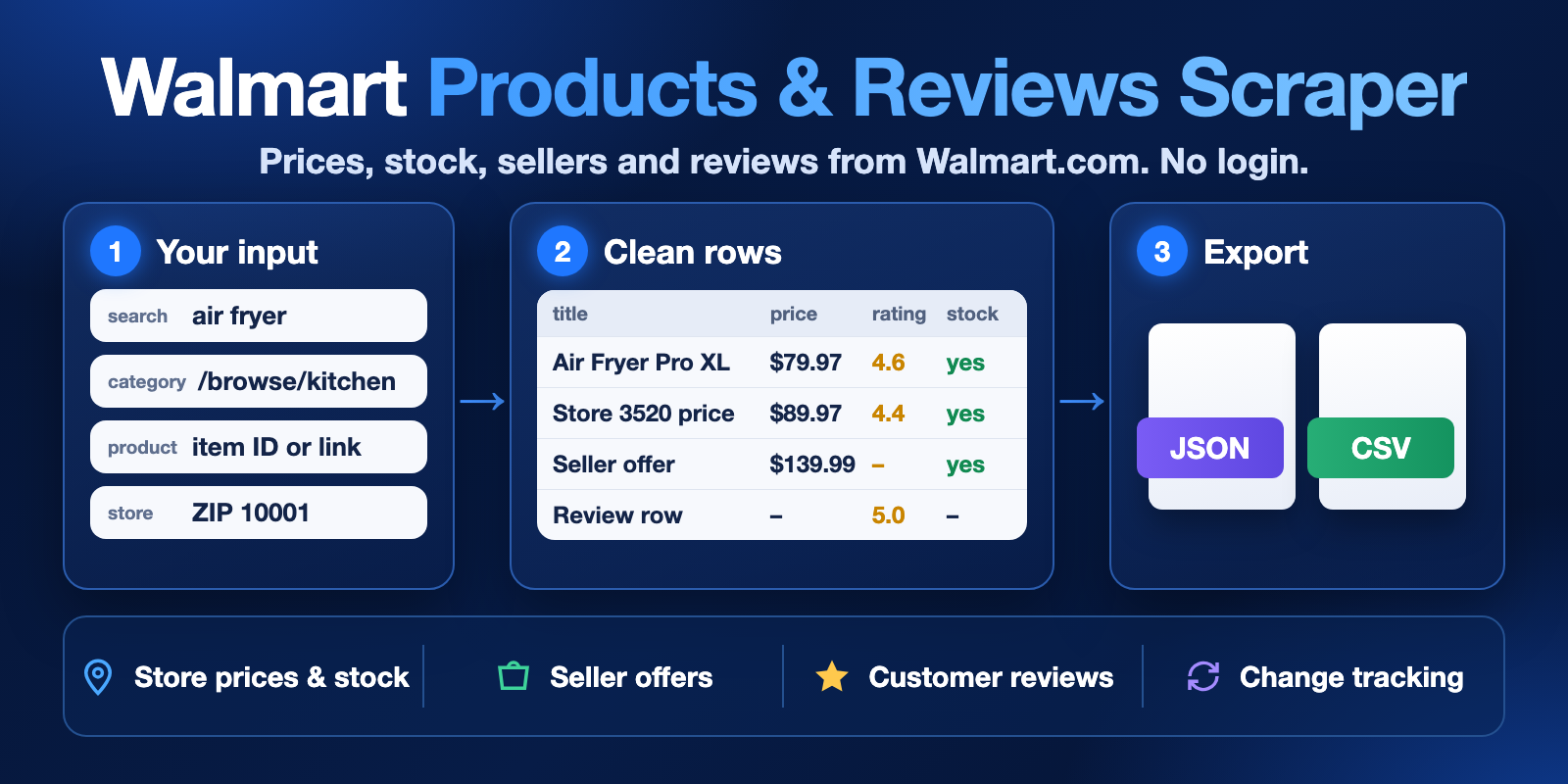
Table of contents
- What it does
- How it works
- Quick start
- Use cases
- Input
- Output
- Pricing
- Limits
- API, export and integrations
- Troubleshooting
- FAQ
- Related Actors
- Support
What it does
The Actor reads public pages of Walmart.com in the United States. Choose one mode for each run:
- Search results: products for your search terms.
- Category products: products from Walmart browse links.
- Product details: full product data for links or item IDs, with brand, UPC, specifications, variants, and images.
- Customer reviews: review text, stars, date, verified purchase, and helpful votes.
- Seller offers: every seller listed for a product, with price, condition, shipping, and returns.
You can also read prices and stock for one store by ZIP code, store number, or state. Turn on change tracking to get only new or changed rows in later runs.
The Actor does not save reviewer names or profiles. It does not buy, add to cart, or sign in.
Good fit
- You need Walmart.com prices and stock as a table or through an API.
- You want to compare the same product in two stores.
- You want to see which sellers offer a product and at what price.
- You want reviews for product research.
- You want a scheduled price check that returns only changes.
Not a good fit
- You need another country's Walmart site. The Actor reads only walmart.com in the US.
- You need data from a signed-in account, such as orders or your Marketplace listings.
How it works
- You choose a mode and add search terms, links, or item IDs.
- The Actor opens the public Walmart pages and reads the data each page shows. If you set a location, it first checks the store on Walmart.
- You get rows in a dataset. Open them as a table, export them, or read them by API.
Quick start
-
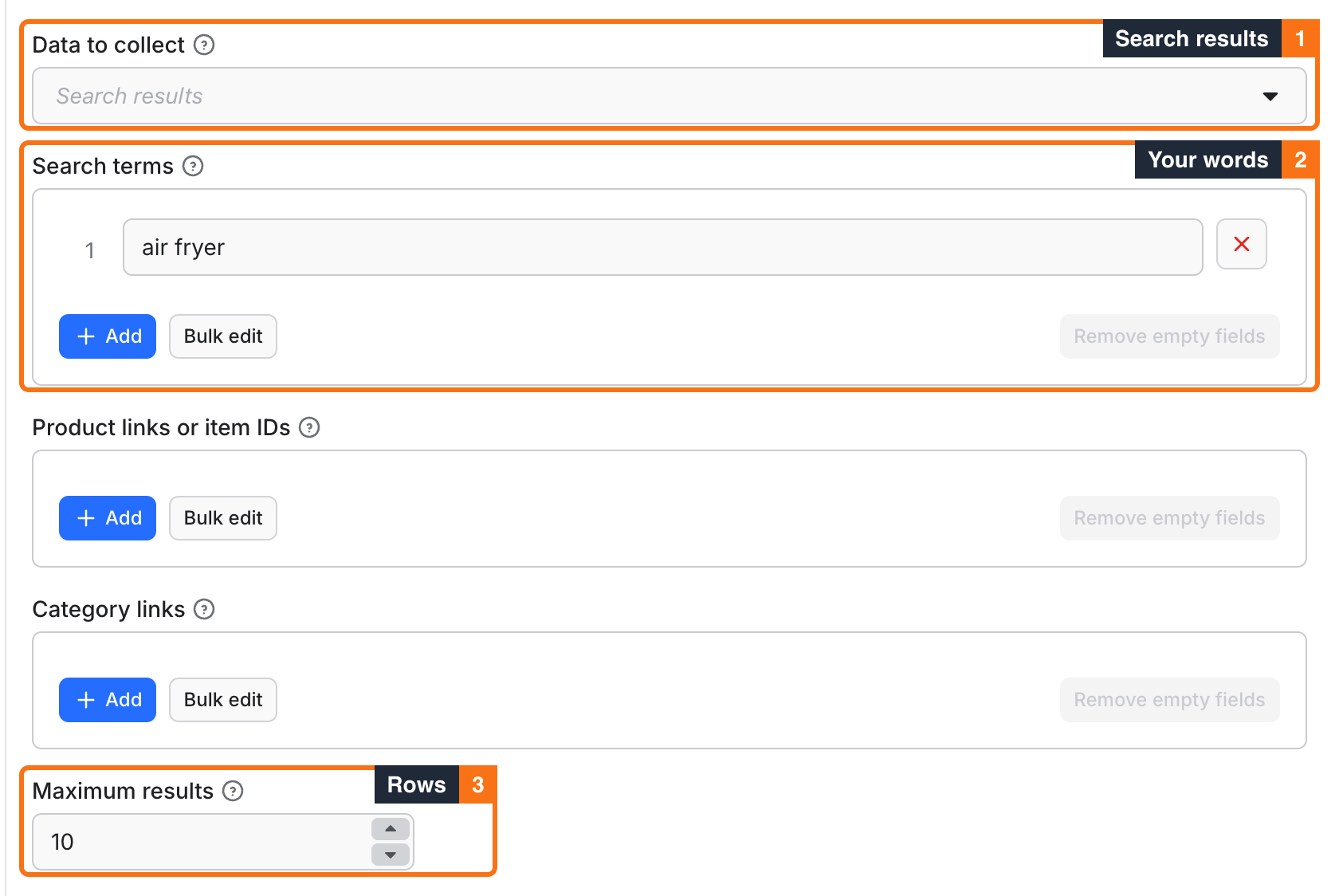
In Data to collect, leave Search results.
-
In Search terms, keep
air fryeror add your own words. -
In Maximum results, keep
10. -
Click Start.
-
When the run ends, go to the Output tab. Check
title,price,rating,seller, andinStock.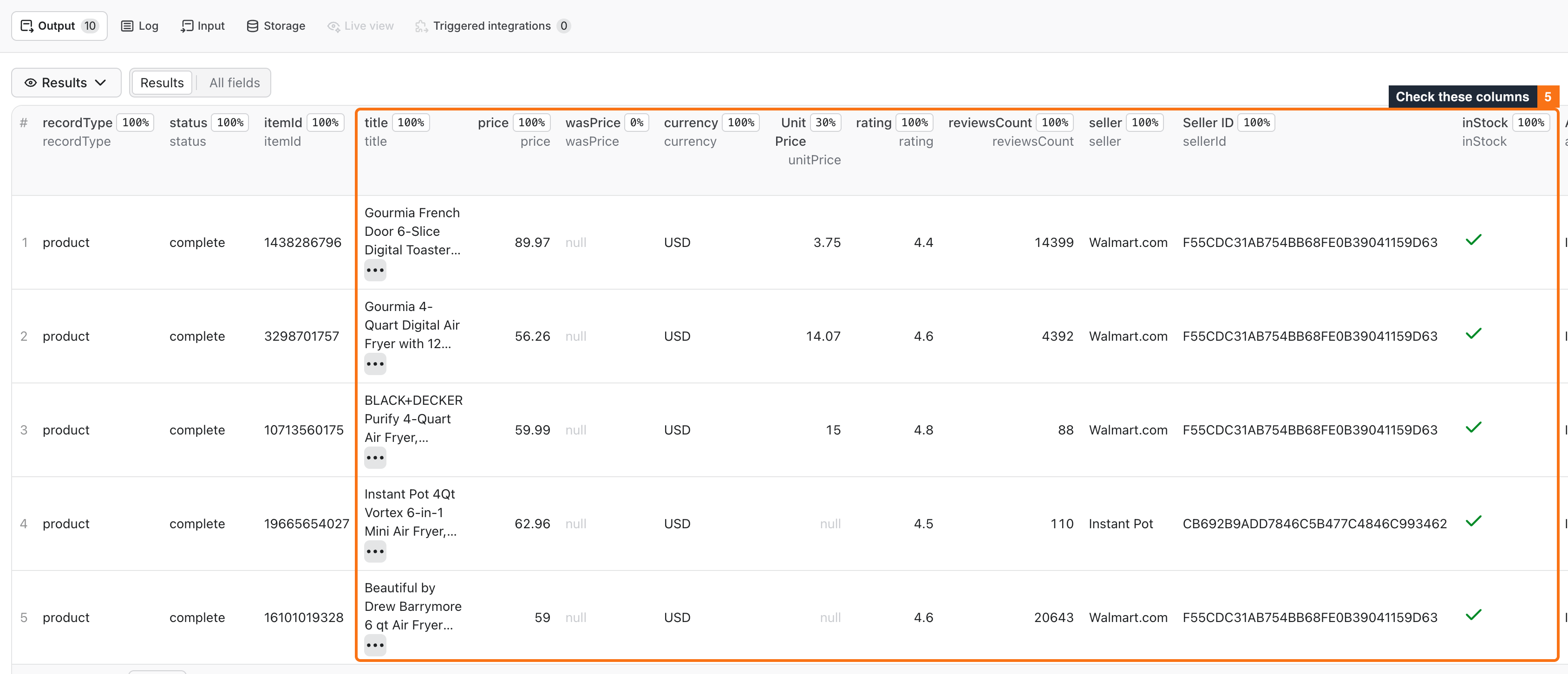
The first run returns 10 rows like the one in Output example. To use your own data, change the search term or pick another mode.
Use cases
| Buyer job | Input path | Output entity | Key fields | Next integration |
|---|---|---|---|---|
| Track prices of a product group | mode: search, queries, onlyChanges | Changed products | itemId, price, wasPrice, changeType, previousValues | Schedule with a webhook or Slack summary |
| Compare prices and stock between stores | mode: product, productUrls, storeId or postalCode, one run per store | Store-specific product | price, inStock, fulfillment, location | Google Sheets or a database |
| Check marketplace sellers | mode: offers, productUrls | Seller offers | seller, sellerType, price, condition, freeShipping, returnPolicy | Export to CSV for a seller review |
| Study customer feedback | mode: reviews, productUrls, reviewRating, reviewsAfter | Reviews | rating, text, date, verifiedPurchase, helpfulVotes | Text analysis or an AI agent |
| Build a product catalog list | mode: category with categoryUrls, includeDetails | Detailed products | title, brand, upc, specifications, images | Your catalog or matching tool |
Input
Input fields
An empty form in search mode uses the search term air fryer. The other modes need a link or item ID and stop with a clear error without one. List fields take up to 100 entries of up to 2000 characters. Duplicates are removed.
| Field | Plain name | Type | Required | Default / prefill | Allowed values | Effect | Example | Recommendation |
|---|---|---|---|---|---|---|---|---|
mode | Data to collect | string | No | search | search, category, product, reviews, offers | Sets what the run collects | reviews | Use one mode per run |
queries | Search terms | string list | In search mode, if you send an empty list | air fryer | Any words | Searches Walmart.com | robot vacuum | Use the words a shopper uses |
productUrls | Product links or item IDs | string list | In product, reviews, offers | none | walmart.com product links or numeric IDs | Sets the products to read | 1438286796 | Item IDs are shorter |
categoryUrls | Category links | string list | In category | none | walmart.com /browse/ links | Sets the categories to read | https://www.walmart.com/browse/home/4044 | Copy the link from Walmart |
maxItems | Maximum results | integer | No | 10 | 1 to 1000 | Limits rows in the run | 100 | Start small |
maxPages | Maximum pages per input | integer | No | 50 | 1 to 100 | Limits pages for each input | 5 | Use a low value with review filters |
startPage | First page | integer | No | 1 | 1 to 100 | Skips earlier pages | 3 | Leave at 1 for the first run |
sort | Product order | string | No | best_match | best_match, best_seller, price_low, price_high, customer_rating, new | Orders search and category lists | price_low | Use it with a price range |
minPrice, maxPrice | Minimum and maximum price | number | No | none | 0 to 1000000, US dollars | Filters search and category lists | 25, 150 | Minimum cannot be above maximum |
facet | Product filters | string | No | none | Walmart filter string, up to 1000 characters | Filters search and category lists | brand:Gourmia | Test with maxItems: 10 first |
includeDetails | Open each product | boolean | No | false | true, false | Adds description, UPC, specifications, and variants | true | Each product uses one request |
includeVariants | Open product variants | boolean | No | false | true, false | Reads linked variants in product mode | true | Variants count toward maxItems |
reviewSort | Review order | string | No | relevancy | relevancy, submission-desc, submission-asc, rating-desc, rating-asc, helpful-desc | Orders reviews | submission-desc | Use newest first with reviewsAfter |
includeReviews | Add reviews to products | boolean | No | false | true, false | Adds review rows in product mode | true | Reviews have their own price |
maxReviews | Reviews per product | integer | No | 10 | 1 to 1000 | Limits reviews for each product with includeReviews | 20 | Keep it small for many products |
reviewRating | Review stars | integer | No | none | 1 to 5 | Keeps one star rating | 1 | Lower maxPages first |
verifiedOnly | Verified purchases only | boolean | No | false | true, false | Keeps verified reviews | true | Lower maxPages first |
reviewsAfter | Reviews from date | string | No | none | YYYY-MM-DD | Keeps reviews from this date | 2026-01-01 | Use with reviewSort: submission-desc and low maxPages |
postalCode | Requested US ZIP code | string | No | none | Five digits | Finds a nearby store | 10001 | Check location in the result |
storeId | Requested Walmart store | string | No | none | Store number, up to 8 digits | Reads this store | 3520 | Use it to compare exact stores |
state | Requested US state | string | No | none | Two letters | Limits the store to one state | NY | Add a ZIP for a specific area |
onlyChanges | Only new or changed results | boolean | No | false | true, false | Returns only new or changed rows in later runs | true | Use with a schedule |
stateName | History name | string | No | default | Lowercase letters, digits, hyphens, up to 40 characters | Separates histories | air-fryer-prices | Use one name per task |
monitorFields | Fields to compare | string list | No | price, wasPrice, inStock, rating, reviewsCount | Output field names | Sets which changes return a row | price | Keep the list short |
proxyConfiguration | Proxy | object | No | Apify datacenter proxy | Apify proxy or your URLs | Sets the connection | {"useApifyProxy": true} | Keep the default. Our tests and prices are based on it. Other groups can be slower, and Unblocker failed in our test |
deliveryConnector | Send results to | string | No | none | Your MCP connector | Posts a short summary after the run | See Send results to Slack or Notion | Optional |
deliveryTarget | Notion page or channel | string | No | none | Notion page link or Slack channel ID | Sets where the summary goes | See Send results to Slack or Notion | Optional |
Interacting settings
| When | Input A | Input B | Effective behavior | Example | Cost/result effect |
|---|---|---|---|---|---|
| Search or category with a store | postalCode, storeId, or state | queries or categoryUrls | The Actor opens each product for store data | queries: ["milk"], storeId: "3520" | Rows use the product detail price, and each product uses one more request |
| Price filter with a store | minPrice, maxPrice | storeId | Filters use the store price after the product opens | maxPrice: 5, storeId: "3520" | Checked pages are charged even if no price matches |
| ZIP and store | postalCode | storeId | The store must be among Walmart's nearby stores for the ZIP | 10001, 3520 | Otherwise the run stops with LOCATION_MISMATCH |
| Location in other modes | postalCode, storeId, state | mode: reviews or offers | The run stops before it reads products | mode: offers, postalCode: "10001" | LOCATION_UNSUPPORTED_MODE, start fee only |
| Review filters | reviewRating, verifiedOnly, reviewsAfter | maxPages | The filter runs after a page opens | reviewsAfter: "2026-01-01", maxPages: 5 | Each checked page is charged, also without matches |
| Change tracking | onlyChanges | stateName | Compares with the earlier run of the same name and store | stateName: "air-fryer-prices" | Each checked page uses the change tracking price, and unchanged rows are free |
| Product mode with reviews | includeReviews | maxReviews | Adds reviews to each product | maxReviews: 20 | Reviews do not count toward maxItems |
Input examples
Prefilled search
{
  "mode": "search",
  "queries": ["air fryer"],
  "maxItems": 10
}
Expected behavior: the Actor reads one search page. Expected output: 10 product rows. Cost note: about $0.03 on the Free plan.
Store price by ZIP code
{
  "mode": "product",
  "productUrls": ["1438286796"],
  "postalCode": "10001",
  "maxItems": 1
}
Expected behavior: the Actor finds a store near ZIP 10001 and checks it on Walmart. Expected output: one product row, with location.requestedPostalCode set to 10001 and the ZIP of the store in location.postalCode. In our test, the store was in Secaucus, NJ. Cost note: about $0.005 on the Free plan.
Seller offers
{
  "mode": "offers",
  "productUrls": ["1438286796"],
  "maxItems": 10
}
Expected behavior: the Actor reads the seller list of one product. Expected output: one row per seller. Limit: the seller list has no store location. Cost note: three offers cost about $0.01 on the Free plan.
Recent reviews
{
  "mode": "reviews",
  "productUrls": ["1438286796"],
  "reviewSort": "submission-desc",
  "reviewsAfter": "2026-01-01",
  "maxItems": 50,
  "maxPages": 10
}
Expected behavior: the Actor reads up to 10 pages, newest first. Expected output: up to 50 reviews from 2026 on. Limit: a page has about 10 reviews, and checked pages are charged even with no match.
Price tracking
{
  "mode": "search",
  "queries": ["air fryer"],
  "maxItems": 50,
  "onlyChanges": true,
  "stateName": "air-fryer-prices"
}
Expected behavior: the first run returns all rows. Later runs return only new or changed rows. Limit: change tracking needs the same stateName and the same store in each run.
Output
The dataset has one row per product, offer, or review. recordType tells which one it is. null means Walmart did not give this value on the page the Actor read. Search rows have fewer fields. Product mode, includeDetails, or a store location fill in more.
Output fields
| Field | Meaning | Type | Can be empty? | Example / enum | Source / notes |
|---|---|---|---|---|---|
recordType | Kind of row | string | No | product, review, offer, status | All modes |
status | Row result | string | No | complete, not_found, error, invalid_input | not_found, error, and invalid_input rows are free |
errorCode, input | Why one input failed, and which one | string | Yes | SOURCE_HTTP_ERROR, air fryer | Only on error and invalid_input rows |
message | What is wrong with an invalid link, with an example | string | Yes | Not a Walmart.com product link or item ID, for example 1438286796. | Only on invalid_input rows |
itemId | Walmart item ID | string | Yes | 5144605607 | All modes |
title | Product name or review title | string | Yes | Ninja Air Fryer Pro XL 5-Qt | All modes |
price, wasPrice, unitPrice | Current, earlier, and per-unit price | number | Yes | 79.97 | US dollars when shown |
currency | Currency of the price | string | Yes | USD | From Walmart |
rating, reviewsCount | Average rating or review stars, and rating count | number | Yes | 4.6, 7740 | Stars for review rows |
seller, sellerId, sellerType | Seller name, ID, and type | string | Yes | Walmart.com, INTERNAL | Type on offer rows |
inStock, availability | Stock status | boolean, string | Yes | true, IN_STOCK | null if unknown |
fulfillmentType, fulfillment | Main type and the pickup, delivery, and shipping options that carry data | string, array | Yes | STORE | Aisle and dates in store runs when shown. storeId is null for shipping from a warehouse |
position | Rank among the cards read for one search term or category link, sponsored cards included | number | Yes | 1 | Counts from 1 and restarts for each term or link. A product shown twice keeps its first rank, so numbers can skip. null for rows opened from an item link |
sponsored, bestSeller | Paid placement and Best seller badge | boolean | Yes | true, false | From the search card |
freeShipping | Free shipping shown on the card or offer | boolean | Yes | true | null if the card has no shipping text |
shippingArrival | Arrival text on a search or category card | string | Yes | tomorrow, in 3+ days, Mon, Nov 9 | Walmart's words, read at run time |
twoDayShipping | The card promises arrival within two days | boolean | Yes | true | Worked out from shippingArrival; null if the card has no shipping text |
shippingAvailable, pickupAvailable, deliveryAvailable | Which ways to get the item are shown | boolean | Yes | true, false | From the offer, the product page, or the card text |
location | City, ZIP, state, and store reported by Walmart | object | Yes | {"city": "Secaucus", "state": "NJ", "storeId": "3520", "requestedPostalCode": "10001"} | See FAQ |
url, images | Page link and image links | string, array | Yes | https://www.walmart.com/ip/1438286796 | All modes |
brand, model, upc, manufacturerProductId | Product identifiers | string | Yes | Gourmia, GTF2440, 810002864285 | Details and store rows |
description, shortDescription | Product text | string | Yes | Plain text | Details and store rows |
specifications, categories, variants, variantProducts | Attributes, category names, variant choices, and linked variants | array | Yes | {"name": "Brand", "value": "Gourmia"} | Details rows |
additionalOfferCount, orderMinLimit, orderLimit, offerId, badges, ratingCounts, buyBoxSuppression, subscriptionEligible | Other product facts | mixed | Yes | 2, 37 | When shown |
offers | Other offers embedded on the product page | array | Yes | [] | Use offers mode for the seller list |
condition, shippingPrice, freeShipping, shippingDeliveryDate, shipsTo | Offer condition and shipping | mixed | Yes | New, true, Sacramento, 95829 | Offer rows |
soldByWalmart, fulfilledByWalmart, catalogSellerId, sellerUrl, sellerRating, sellerReviewCount | Seller facts | mixed | Yes | true | Offer rows when shown |
shippingAvailable, pickupAvailable, deliveryAvailable, returnPolicy | Ways to get the offer, and its return rules | boolean, object | Yes | {"returnable": true, "days": 90} | Offer rows |
reviewId, reviewReferenceId | Review IDs | string | Yes | 431304431 | Review rows |
text, date, language | Review text, date, and locale | string | Yes | 2026-07-06T00:00:00.000Z, en_US | Midnight when only a date is shown |
verifiedPurchase, recommended, helpfulVotes, unhelpfulVotes | Review signals | mixed | Yes | true, 0 | Review rows |
fulfilledBy, reviewAspects, productOptions | Who fulfilled the order, labeled aspects, and variant choices | mixed | Yes | Walmart | Review rows |
reviewSummary, totalReviewCount, reviewsWithTextCount, productRating | Facts about all reviews of the product | mixed | Yes | 14399, 4.4 | Review rows |
changeType, previousValues | New or changed row, with earlier values | string, object | Yes | changed, {"price": 89.97} | Only with onlyChanges |
query | Search term that found the row | string | Yes | air fryer | Search mode |
source, fetchedAt | Source site and time of collection in UTC | string | No | https://www.walmart.com | All modes |
Scope limits: the Actor does not save reviewer names or profiles. Filters and change tracking work on the values above.
Output entities and surfaces
| Situation | Dataset/API/KVS/live view | Result shape | User action |
|---|---|---|---|
| Normal item | Dataset and Output tab, RUN_SUMMARY record | Rows with status: complete | Use the data |
| Domain-empty (no product, no result) | Dataset may have a not_found row, RUN_SUMMARY has status: not_found | No paid rows | Check the term or ID |
| Partial (page limit, spending limit, time limit, or aborted run) | Saved rows stay in the dataset, RUN_SUMMARY has status: partial and stopReason | Run ends as SUCCEEDED (an aborted run shows ABORTED) | Raise the limit and run again |
| Max items reached | Saved rows stay, RUN_SUMMARY has limitReached: MAX_ITEMS | Run ends as SUCCEEDED | Raise Max items in the run options |
| Technical failure (Walmart blocks or changes a page) | Saved rows stay, RUN_SUMMARY has stopReason | FAILED. With saved rows, status: partial and stopReason: SOURCE_ERROR | Try again later, and see Troubleshooting |
Output example
{
  "recordType": "product",
  "status": "complete",
  "itemId": "790267220",
  "title": "K-Express Essentials Single Serve Coffee Maker - Cloud White",
  "price": 71.9,
  "wasPrice": null,
  "currency": "USD",
  "rating": 4.4,
  "reviewsCount": 65053,
  "seller": "Que Buy",
  "inStock": true,
  "availability": "IN_STOCK",
  "fulfillmentType": "FC",
  "badges": ["Best seller"],
  "position": 16,
  "sponsored": false,
  "bestSeller": true,
  "freeShipping": true,
  "shippingArrival": "tomorrow",
  "twoDayShipping": true,
  "shippingAvailable": true,
  "pickupAvailable": false,
  "deliveryAvailable": false,
  "location": {
    "postalCode": "95829",
    "storeId": "3081",
    "state": "CA",
    "city": "Sacramento"
  },
  "query": "coffee maker",
  "source": "https://www.walmart.com"
}
Send results to Slack or Notion
Pick your connector in the optional deliveryConnector field. After the run saves its data, the Actor posts a short summary there, with up to 25 rows and a link to the full dataset. Put a Notion page link or a Slack channel ID in deliveryTarget. In Notion, every run is added on top of that one page. A delivery error never fails the run, and delivery costs nothing extra. Connect your services once in Apify Console → MCP connectors.
Use case → fields
| Use case | Fields to read |
|---|---|
| Price tracking | itemId, price, wasPrice, changeType, previousValues, fetchedAt |
| Store comparison | itemId, price, inStock, fulfillment, location |
| Search rank | query, position, sponsored, bestSeller, price |
| Seller check | seller, sellerType, price, condition, freeShipping, returnPolicy |
| Review research | rating, text, date, verifiedPurchase, helpfulVotes, reviewSummary |
| Catalog list | title, brand, model, upc, specifications, images |
Pricing
Pricing unit
Each run costs one start fee, then you pay per row and per checked page. Platform usage (proxy and compute) is included in these prices.
| Event | Free | Bronze | Silver | Gold and up |
|---|---|---|---|---|
Run start (apify-actor-start) | $0.0012 | $0.0012 | $0.0012 | $0.0012 |
Search or category product (search-product) | $0.00275 | $0.00248 | $0.0022 | $0.00193 |
Product with details or store data (product-detail) | $0.00275 | $0.00248 | $0.0022 | $0.00193 |
Seller offer (offer) | $0.00275 | $0.00248 | $0.0022 | $0.00193 |
Review (review) | $0.00027 | $0.000243 | $0.000216 | $0.000189 |
New or changed product (changed-product) | $0.0009 | $0.00081 | $0.00072 | $0.00063 |
Checked page (data-check) | $0.00045 | $0.000405 | $0.00036 | $0.000315 |
Checked page with change tracking (monitor-page) | $0.0009 | $0.00081 | $0.00072 | $0.00063 |
- A search with no products costs the start fee and one checked page. Walmart was asked and answered.
- With a review filter or price filter, checked pages are charged even if no row matches.
- With change tracking, unchanged rows are free. Checked pages use
monitor-pageinstead ofdata-check. - A
not_found,error, orinvalid_inputstatus row is free. - In a partial or failed run, you pay for rows saved and pages checked before the stop. Errors from Walmart have no row charge.
- The start fee scales with run memory (per GB). The default 256 MB run pays one start event.
- In Console, the default spending limit is $0.20 per run, about 70 products on the Free plan. Raise Maximum cost per run in the run options for bigger runs. In an API run, the platform sets the limit, so pass
maxTotalChargeUsdyourself.
Cost examples
Free plan prices. Rows and pages come from our test runs.
| Scenario | Input scope | Expected item/event count | Base charge | Optional charge | Stop/cap behavior |
|---|---|---|---|---|---|
| Prefilled search | 1 term, maxItems: 10 | 10 products, 1 page | $0.02915 | none | Ends at 10 rows |
| Bigger search | 1 term, maxItems: 100 | 100 products, 3 pages | $0.27755 | none | Needs a spending limit above $0.28 |
| Largest search we tested | 2 terms, maxItems: 700 | 700 products, 19 pages | $1.93475 | none | Ends at 700 rows, needs a spending limit above $1.94 |
| One product in one store | 1 ID, storeId | 1 product, 2 checks | $0.00485 | none | Ends at 1 row |
| Seller offers | 1 ID | 2 offers, 1 check | $0.00715 | none | Ends when the list ends |
| Reviews | 1 ID, maxItems: 1000, maxPages: 100 | 999 reviews, 100 pages | $0.31593 | none | Ends as partial with PAGE_LIMIT, needs a spending limit above $0.32 |
| Review filter with no match | 1 ID, maxPages: 10 | 0 reviews, 10 pages | $0.0057 | none | Ends as partial with PAGE_LIMIT |
| Search with no results | 1 term | 0 products, 1 page | $0.00165 | none | Ends as not_found |
| Price check with no change | 1 term, onlyChanges | 0 rows, 1 page | $0.0021 | none | Ends with no rows |
| Price check with one change | 1 term, maxItems: 1, onlyChanges | 1 changed product, 1 page | $0.003 | none | Returns changed rows |
Limits
- Source: walmart.com in the US only.
- Results: up to 1000 rows per run. We tested 700 products from two search terms and 999 reviews of one product over 100 pages. That review run took about 4 minutes, close to the default timeout, so raise the timeout for several products.
- Pages: up to 100 per input. A search page has about 40 products, and a review page has about 10 reviews.
- Requests: up to 160 per run. A search with a store location or
includeDetailsuses one request per product, so plan for up to about 150 products per run. - Data size: up to 100 MB per run and 6 MB per page. A larger page fails only its own input with
PAGE_TOO_LARGE. - Category links: the Actor checks that a link is a walmart.com
/browse/link. Walmart can answer a wrong category path with other products, so look at the first rows. - Time: the Actor stops 40 seconds before the run timeout and keeps the rows it saved. The default timeout is 300 seconds. If no paid work starts in the first 60 seconds, the run stops with
DEADLINE. A run timeout under about 60 seconds can stop at once withINVALID_RESOURCES. - Attempts: up to 6 for each page link and up to 4 for each seller-offers or store-lookup request.
- Location: reviews and seller offers do not take a store location. Without a location, Walmart picks one. Our tests got Sacramento, CA.
- Change tracking history: up to 20,000 records or 4 MB per history name and store.
- Inputs: up to 100 per list field.
API, export and integrations
- API: start a run and read rows with the Apify API.
- Export: save rows from the dataset in JSON, CSV, Excel, or HTML.
- Scheduling: use Apify schedules for regular price checks with
onlyChanges. - Webhooks: use Apify webhooks to get a call when a run ends.
- SDK and MCP: use the Apify SDKs or the MCP server below.
Use with AI agents (MCP)
Connect this Actor to an AI agent with this MCP server URL:
https://mcp.apify.com?tools=cliqtomedia/walmart-scraper
Minimal input, the same as the prefilled search:
{
  "queries": ["air fryer"],
  "maxItems": 10
}
The agent gets rows with title, price, rating, seller, and inStock. This call took under a minute in our test runs and costs about $0.03 on the Free plan. Limits: 1000 rows per run and a $0.20 default spending limit.
Troubleshooting
The run has no rows
- Symptom: the dataset is empty or has one
not_foundrow. - Likely reason: Walmart has no result for the term, or the item ID does not exist.
- Check: open the term or ID on walmart.com.
- Action: change the term or ID, and run with
maxItems: 10.
The run stopped with CHARGE_LIMIT
- Symptom: fewer rows than
maxItems, withstatus: partial. - Likely reason: the run reached its spending limit. The default is $0.20.
- Check:
stopReasoninRUN_SUMMARY. - Action: raise Maximum cost per run and run again. Rows already saved stay in the dataset.
The run stopped with PAGE_LIMIT
- Symptom: few rows or no rows, with
status: partial. - Likely reason: a review or price filter did not match within
maxPages. - Check:
checkedPagesinRUN_SUMMARY. - Action: change the filter or raise
maxPages. Each page has a charge.
One input failed and the others went on
- Symptom: a free row with
status: error, andstopReason: INPUT_ERRORSinRUN_SUMMARY. If every input failed, the run ends asFAILEDwith the first code. - Likely reason: the code in
errorCodesays why.SOURCE_HTTP_ERROR,SOURCE_API_ERROR, andSOURCE_ERRORmean Walmart answered with an error.SOURCE_TIMEOUTandSOURCE_NETWORK_ERRORmean no usable answer came.SOURCE_FORMATmeans the page had no expected data.REDIRECT_LIMITmeans too many redirects,PAGE_TOO_LARGEmeans a page over 6 MB, andPAGINATION_STALLEDmeans a list stopped giving new pages. - Check:
inputin the row, andfailedInputsinRUN_SUMMARY. - Action: run that input again later. If it repeats, send us the run ID on the Issues tab.
The run stopped with SOURCE_BLOCKED
- Symptom: the remaining inputs were not read, and they are listed in
unprocessed. The run ends asFAILED. Rows saved before the block stay in the dataset, withstatus: partial,stopReason: SOURCE_ERROR, andsourceErrorCode: SOURCE_BLOCKEDinRUN_SUMMARY. - Likely reason: Walmart refused the connection, so more requests would not help.
- Check:
blockedandretriesinRUN_SUMMARY. - Action: run again later. If it repeats, send us the run ID on the Issues tab.
The run stopped with REQUEST_LIMIT, BYTE_LIMIT, DEADLINE, or CANCELLED
- Symptom: fewer rows than
maxItems. With saved rows, the run ends asSUCCEEDEDwithstatus: partial. With none, it ends asFAILED. An aborted run (CANCELLED) keeps its rows and showsABORTEDin Console. - Likely reason: the run reached a limit from Limits.
CANCELLEDmeans the run was aborted. - Check:
requests,bytes, andstopReasoninRUN_SUMMARY. - Action: split the input into smaller runs. For
DEADLINE, also raise the run timeout.
The run failed with LOCATION_MISMATCH or LOCATION_NOT_FOUND
- Symptom: the run stops. With no saved rows, it ends as
FAILED. - Likely reason: the store number does not exist, it is not near the ZIP, or Walmart served another store. No wrong price is saved.
- Check: the ZIP, store number, and state.
- Action: use only one of them first, then add the others.
The run stopped at Max items
- Symptom: the run ends as
SUCCEEDEDwith fewer rows thanmaxItems, andlimitReached: MAX_ITEMSinRUN_SUMMARY. - Likely reason: the Max items run option (or the API
maxItemsrun option) is lower than the inputmaxItems. The Actor uses the smaller of the two and never saves paid rows over it. - Check: the run options of the run, and
limitReachedinRUN_SUMMARY. - Action: raise or clear Max items in the run options.
A link got an invalid_input row
- Symptom: a free row with
status: invalid_inputand the bad link ininput. The other links are scraped. - Likely reason: the link is not a Walmart.com product or category link. If no link is valid, the run ends as
FAILEDand the message names the field. - Check:
messagein the row. - Action: fix the link, for example
https://www.walmart.com/ip/1438286796.
Some input fields were ignored
- Symptom: a warning in the log, and
ignoredInputFieldsinRUN_SUMMARY. - Likely reason: the field is not part of this Actor's input. Common fields from other scrapers are understood:
maxResults,limit,resultsLimit→maxItems;query,searchTerms,keywords→queries;startUrls,urls→ product, category, or search links. When both your own field and a synonym are set, your own field wins. - Check: Input fields.
- Action: rename the field.
The run failed before it read any page
- Symptom: an error code that starts with
INVALID_, or ends with_REQUIRED, orLOCATION_UNSUPPORTED_MODE.INVALID_RESOURCESmeans the run timeout is too short. - Likely reason: the input has a wrong value, or the mode needs another field.
- Check: Input fields and the run timeout.
- Action: fix the field or the timeout. The run pays only the start fee.
Change tracking returned all rows again
- Symptom: rows are not filtered, and
stateWarninginRUN_SUMMARYhas a value such asSTATE_UNAVAILABLE,STATE_READ_FAILED, orSTATE_WRITE_FAILED. - Likely reason: the Actor could not open or save the history. All rows return and are charged.
- Check:
stateWarningandstateName. - Action: run again, or use a new
stateName. A new name starts a new history.
FAQ
Do I need a Walmart account or API key?
No. The Actor reads public pages. You only need an Apify account.
Can I get the price in a specific store?
Yes. Add postalCode, storeId, or state. The Actor checks that Walmart served this store before it saves the row. In our test, the same milk product cost $2.65 in one store and $4.40 in another. For a ZIP, Walmart can pick a store in a neighboring state. location.requestedPostalCode shows your ZIP, and location.postalCode shows the store ZIP. With only a state, the Actor uses the first city in Walmart's directory.
Why are some fields null?
Walmart did not give this value on the page the Actor read. Search rows have no UPC or description. Turn on includeDetails or use product mode to get them.
Why are there fewer rows than maxItems?
Walmart shows a limited number of pages for each search. A filter, the spending limit, or a page limit can also stop a run. stopReason in RUN_SUMMARY shows which limit ended it. If it is empty, the list ended.
What does a run cost if nothing is found?
The start fee and one checked page, about $0.002 on the Free plan.
How fresh is the data?
The Actor reads the live page during the run. fetchedAt shows when. Walmart can change prices and stock at any time.
Is it legal to collect this data?
The Actor reads public pages and does not save reviewer names or profiles. Check the Walmart terms and the laws in your country for your use. This is not legal advice.
Related Actors
- Amazon Product Scraper: compare the same products, prices, and reviews on Amazon.
- Google Shopping Scraper: see which other stores sell a product and at what price.
- eBay Search Scraper: active eBay listings and prices for the same search.
- Temu Scraper: Temu products, prices, variants, and reviews.
- AliExpress Scraper: AliExpress products, prices, and reviews.
Support
For a bug, question, or feature request, open the Issues tab on this Actor page. Include the run ID, the input mode, and the error text if it has no private data. Never send tokens, cookies, or private data.
⭐ Found it useful? Rate this Actor. Something wrong? Report a problem — we fix reported problems.
Changelog
This Actor's version history is a separate document: https://apify.com/cliqtomedia/walmart-scraper/changelog.md
Actor input Schema
mode (type: string):
Choose what to collect: search results, category products, product details, customer reviews, or seller offers. One mode per run. Default: Search results.
queries (type: array):
Words to search on Walmart.com, one per line, for example air fryer. Used in Search results mode. Up to 100 terms. Duplicate terms are removed. Default: air fryer.
productUrls (type: array):
Walmart.com product links or numeric item IDs, one per line, for example 1438286796. Required for Product details, Customer reviews, and Seller offers modes. Up to 100 entries. Duplicates are removed.
categoryUrls (type: array):
Walmart.com browse links, one per line, for example https://www.walmart.com/browse/home/4044. Required for Category products mode. Up to 100 links.
maxItems (type: integer):
Total products, seller offers, or reviews in this run, from 1 to 1000. Default: 10. Rows and checked pages have separate charges.
maxPages (type: integer):
Stop each search, category, or review list after this many pages, from 1 to 100. Default: 50. Each checked page has a scan charge, including empty results. A page limit may leave partial results.
startPage (type: integer):
Start search, category, or review lists at this page, from 1 to 100. Default: 1.
sort (type: string):
Order of search and category results. Default: Best match.
minPrice (type: number):
Lowest price in US dollars, for example 25. From 0 to 1000000. Applied to search and category results. Leave empty for no limit.
maxPrice (type: number):
Highest price in US dollars, for example 150. From 0 to 1000000. Applied to search and category results. Leave empty for no limit.
facet (type: string):
Walmart filter string for search or category lists, for example brand:Gourmia. Up to 1000 characters. Leave empty for no filter.
includeDetails (type: boolean):
Open product pages from search or category results to add descriptions, UPCs, specifications, and variants. Off by default. Slower than listing results and uses the product detail price.
includeVariants (type: boolean):
In Product details mode, also open linked variants. Off by default. All variants count toward Maximum results.
reviewSort (type: string):
Order of customer reviews. Default: Most relevant.
includeReviews (type: boolean):
In Product details mode, also collect reviews for each product. Off by default. Reviews are separate rows and use the review price.
maxReviews (type: integer):
Review limit for each product when Add reviews to products is on, from 1 to 1000. Default: 10.
reviewRating (type: integer):
Keep only reviews with this star rating, from 1 to 5. Leave empty for all ratings. More pages may be needed.
verifiedOnly (type: boolean):
Keep only reviews marked as a verified purchase. Off by default. More pages may be needed.
reviewsAfter (type: string):
Keep reviews dated on or after this date, in YYYY-MM-DD format, for example 2026-01-01. Leave empty for all dates. Each checked page is charged, also without matches, so use a low Maximum pages value.
postalCode (type: string):
Five-digit US ZIP code, for example 10001. The Actor finds a nearby store and opens each product for store-specific details. Not available for reviews and seller offers. Results show the ZIP you entered and the store ZIP, which can be in a neighboring state.
storeId (type: string):
Walmart store number, for example 3520. The Actor reads product details for this store. If you also enter a ZIP, the store must appear among Walmart’s nearby stores for that ZIP. Not available for reviews and seller offers.
state (type: string):
Two-letter US state, for example NY. Limits store selection to this state. If you enter only a state, the Actor uses the first city in Walmart’s directory and selects a store there. Not available for reviews and seller offers.
onlyChanges (type: boolean):
Compare with earlier results in the same named history. Off by default. The first run returns all results. Later runs return only new or changed rows. Each checked page has a scan charge, including runs without changes. Changed products use the changed product price, changed reviews use the review price.
stateName (type: string):
Use a separate name for each monitoring task, for example air-fryer-prices. Lowercase letters, digits, and hyphens, up to 40 characters. Default: default. Used only when Only new or changed results is on.
monitorFields (type: array):
Output field names to compare, one per line, for example price. Default: price, wasPrice, inStock, rating, reviewsCount. A row returns when one of them changes. New item IDs and review IDs always return.
proxyConfiguration (type: object):
Uses Apify datacenter proxy by default. Keep it: tests and prices are based on it. Other groups can be slower, and Unblocker failed in our test.
deliveryConnector (type: string):
Your Slack, Notion or other MCP connector. After the run the Actor posts a short summary there. Connect services once in Apify Console → MCP connectors.
deliveryTarget (type: string):
Where to post the summary: a Notion page link (each run is added on top of that page) or a Slack channel ID. Notion needs a page here; without it the summary is not sent and the run summary says why.
Actor input object example
{
  "mode": "search",
  "queries": [
    "air fryer"
  ],
  "maxItems": 10,
  "maxPages": 50,
  "startPage": 1,
  "sort": "best_match",
  "includeDetails": false,
  "includeVariants": false,
  "reviewSort": "relevancy",
  "includeReviews": false,
  "maxReviews": 10,
  "verifiedOnly": false,
  "onlyChanges": false,
  "stateName": "default",
  "monitorFields": [
    "price",
    "wasPrice",
    "inStock",
    "rating",
    "reviewsCount"
  ],
  "proxyConfiguration": {
    "useApifyProxy": true
  }
}
Actor output Schema
dataset (type: string):
No description
summary (type: string):
No description
API
You can run this Actor programmatically using our API. Below are code examples in JavaScript, Python, and CLI, as well as the OpenAPI specification and MCP server setup.
JavaScript example
import { ApifyClient } from 'apify-client';

// Initialize the ApifyClient with your Apify API token
// Replace the '<YOUR_API_TOKEN>' with your token
const client = new ApifyClient({
    token: '<YOUR_API_TOKEN>',
});

// Prepare Actor input
const input = {
    "queries": [
        "air fryer"
    ],
    "maxItems": 10
};

// Run the Actor and wait for it to finish
const run = await client.actor("cliqtomedia/walmart-scraper").call(input);

// Fetch and print Actor results from the run's dataset (if any)
console.log('Results from dataset');
console.log(`💾 Check your data here: https://console.apify.com/storage/datasets/${run.defaultDatasetId}`);
const { items } = await client.dataset(run.defaultDatasetId).listItems();
items.forEach((item) => {
    console.dir(item);
});

// 📚 Want to learn more 📖? Go to → https://docs.apify.com/api/client/js/docs
Python example
from apify_client import ApifyClient

# Initialize the ApifyClient with your Apify API token
# Replace '<YOUR_API_TOKEN>' with your token.
client = ApifyClient("<YOUR_API_TOKEN>")

# Prepare the Actor input
run_input = {
    "queries": ["air fryer"],
    "maxItems": 10,
}

# Run the Actor and wait for it to finish
run = client.actor("cliqtomedia/walmart-scraper").call(run_input=run_input)

# Fetch and print Actor results from the run's dataset (if there are any)
print(f"💾 Check your data here: https://console.apify.com/storage/datasets/{run.default_dataset_id}")
for item in client.dataset(run.default_dataset_id).iterate_items():
    print(item)

# 📚 Want to learn more 📖? Go to → https://docs.apify.com/api/client/python/docs/quick-start
CLI example
echo '{
  "queries": [
    "air fryer"
  ],
  "maxItems": 10
}' |
apify call cliqtomedia/walmart-scraper --silent --output-dataset
MCP server setup
{
    "mcpServers": {
        "apify": {
            "type": "http",
            "url": "https://mcp.apify.com/?tools=fetch-actor-details,cliqtomedia/walmart-scraper"
        }
    }
}
The hosted server signs you in with OAuth on first connect, so no API token belongs in this config. Clients without OAuth support can send an Authorization: Bearer <APIFY_API_TOKEN> header instead, using a token from API & Integrations in Apify Console (https://console.apify.com/settings/integrations).
OpenAPI specification
Download the OpenAPI definition: https://api.apify.com/v2/actors/NWRBTpDVluHcTFnkd/builds/wNnIaeX8Mpa7PQ3ko/openapi.json