Alibaba Cloud RDS OpenAPI MCP Server
Manage Alibaba Cloud Relational Database Service (RDS) using the OpenAPI.
Documentation
English | 中文
Alibaba Cloud RDS OpenAPI MCP Server
MCP server for RDS Services via OPENAPI
Prerequisites
- Install
uvfrom Astral or the GitHub README - Install Python using
uv python install 3.12 - Alibaba Cloud credentials with access to Alibaba Cloud RDS services
Quick Start
Using cherry-studio (Recommended)
- Download and install cherry-studio
- Follow the documentation to install uv, which is required for the MCP environment
- Configure and use RDS MCP according to the documentation. You can quickly import the RDS MCP configuration using the JSON below. Please set ALIBABA_CLOUD_ACCESS_KEY_ID and ALIBABA_CLOUD_ACCESS_KEY_SECRET to your Alibaba Cloud AK/SK.
The following error may appear during import, which can be ignored: xxx settings.mcp.addServer.importFrom.connectionFailed
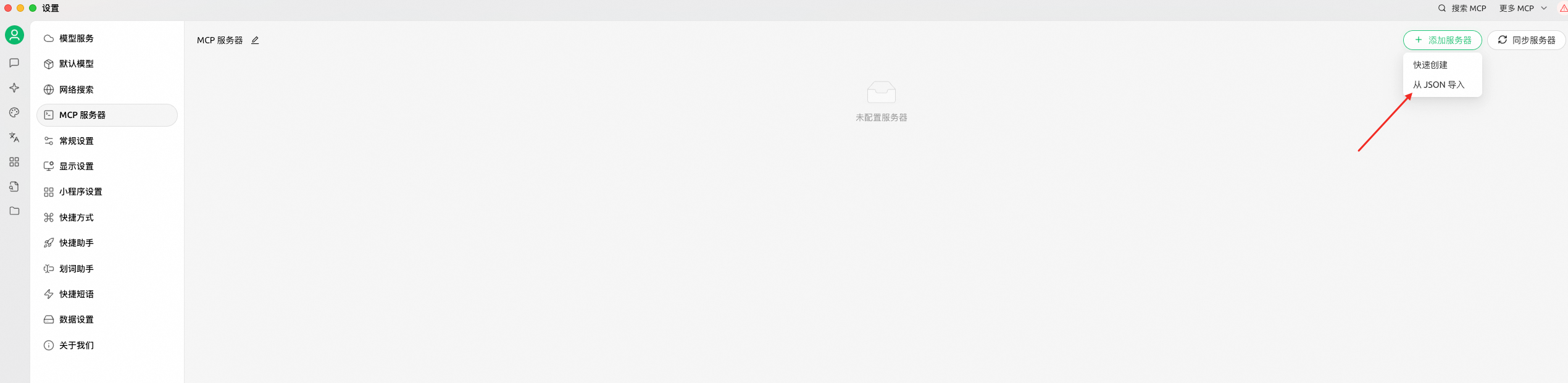
{
  "mcpServers": {
    "rds-openapi": {
      "name": "rds-openapi",
      "type": "stdio",
      "description": "",
      "isActive": true,
      "registryUrl": "",
      "command": "uvx",
      "args": [
        "alibabacloud-rds-openapi-mcp-server@latest"
      ],
      "env": {
        "ALIBABA_CLOUD_ACCESS_KEY_ID": "$you_access_id",
        "ALIBABA_CLOUD_ACCESS_KEY_SECRET": "$you_access_key"
      }
    }
  }
}
-
Finally, click to turn on MCP

-
You can use the prompt template provided below to enhance your experience.
Using Cline
Set you env and run mcp server.
# set env
export SERVER_TRANSPORT=sse;
export SERVER_HOST=127.0.0.1; # Default: 127.0.0.1. API_KEY is required when binding to a non-loopback host.
export ALIBABA_CLOUD_ACCESS_KEY_ID=$you_access_id;
export ALIBABA_CLOUD_ACCESS_KEY_SECRET=$you_access_key;
export ALIBABA_CLOUD_SECURITY_TOKEN=$you_sts_security_token; # optional, required when using STS Token
export API_KEY=$you_mcp_server_api_key; # Required when SERVER_HOST is not a loopback address.
export ENABLE_WRITE_TOOLS=false; # Set true only when intentionally exposing write-capable tools on a non-loopback host.
export ALLOW_HEADER_CREDENTIALS=false; # Default false. Set true only in trusted deployments that require per-request credentials.

# run mcp server
uvx alibabacloud-rds-openapi-mcp-server@latest
After run mcp server, you will see the following output:
INFO:     Started server process [91594]
INFO:     Waiting for application startup.
INFO:     Application startup complete.
INFO:     Uvicorn running on http://127.0.0.1:8000 (Press CTRL+C to quit)
And then configure the Cline.
remote_server = "http://127.0.0.1:8000/sse";
When API_KEY is configured, MCP clients must send Authorization: Bearer <API_KEY>.
If you encounter a
401 Incorrect API key providederror when using Qwen, please refer to the documentation for solutions.
Using Claude
Download from Github
git clone https://github.com/aliyun/alibabacloud-rds-openapi-mcp-server.git
Add the following configuration to the MCP client configuration file:
{
  "mcpServers": {
    "rds-openapi-mcp-server": {
      "command": "uv",
      "args": [
        "--directory",
        "/path/to/alibabacloud-rds-openapi-mcp-server/src/alibabacloud_rds_openapi_mcp_server",
        "run",
        "server.py"
      ],
      "env": {
        "ALIBABA_CLOUD_ACCESS_KEY_ID": "access_id",
        "ALIBABA_CLOUD_ACCESS_KEY_SECRET": "access_key",
        "ALIBABA_CLOUD_SECURITY_TOKEN": "sts_security_token",
        // optional, required when using STS Token
      }
    }
  }
}
Components
OpenAPI Tools
add_tags_to_db_instance: Add tags to an RDS instance.allocate_instance_public_connection: Allocate a public connection for an RDS instance.attach_whitelist_template_to_instance: Attach a whitelist template to an RDS instance.create_db_instance: Create an RDS instance.create_db_instance_account: Create an account for RDS instance.describe_all_whitelist_template: Query the whitelist template list.describe_available_classes: Query available instance classes and storage ranges.describe_available_zones: Query available zones for RDS instances.describe_bills: Query the consumption summary of all product instances or billing items for a user within a specific billing period.describe_db_instance_accounts: Batch retrieves account information for multiple RDS instances.describe_db_instance_attribute: Queries the details of an instance.describe_db_instance_databases: Batch retrieves database information for multiple RDS instances.describe_db_instance_ip_allowlist: Batch retrieves IP allowlist configurations for multiple RDS instances.describe_db_instance_net_info: Batch retrieves network configuration details for multiple RDS instances.describe_db_instance_parameters: Batch retrieves parameter information for multiple RDS instances.describe_db_instance_performance: Queries the performance data of an instance.describe_db_instances: Queries instances.describe_error_logs: Queries the error log of an instance.describe_instance_linked_whitelist_template: Query the whitelist template list.describe_monitor_metrics: Queries performance and diagnostic metrics for an instance using the DAS (Database Autonomy Service) API.describe_slow_log_records: Query slow log records for an RDS instance.describe_sql_insight_statistic: Query SQL Log statistics, including SQL cost time, execution times, and account.describe_vpcs: Query VPC list.describe_vswitches: Query VSwitch list.modify_security_ips: Modify RDS instance security IP whitelist.get_current_time: Get the current time.modify_db_instance_description: Modify RDS instance descriptions.modify_db_instance_spec: Modify RDS instance specifications.modify_parameter: Modify RDS instance parameters.restart_db_instance: Restart an RDS instance.
SQL Tools
The MCP Server will automatically create a read-only account, execute the SQL statement, and then automatically delete the account. This process requires that the MCP Server can connect to the instance.
explain_sql: ExecuteEXPLAINfor a singleSELECTstatement and return the execution plan.show_engine_innodb_status: Execute sqlshow engine innodb statusand return sql result.show_create_table: ExecuteSHOW CREATE TABLEfor validated database and table identifiers.show_largest_table: Query the top few tables with the highest space occupancy.show_largest_table_fragment: Query the tables with the largest table fragments.query_sql: Execute a single read-only SQL statement (SELECT,SHOW,DESCRIBE, orEXPLAIN) and return sql result.
Toolsets
Toolsets group available MCP tools so you can enable only what you need. Configure toolsets when starting the server using either:
- Command line:
--toolsetsparameter - Environment variable:
MCP_TOOLSETS
Available Toolsets
Here is a list of toolsets and their functions:
-
rds: Enables all tools for the standard, managed RDS service
-
rds_custom_read: Enables read-only tools for the RDS Custom.
-
rds_custom_all: Enables full read and write tools for the RDS Custom.
Format
Use comma-separated toolset names (no spaces around commas):
rds,rds_custom_all
Examples
# Single toolset
--toolsets rds

# Multiple tools
--toolsets rds,rds_mssql_custom

# Environment variable
export MCP_TOOLSETS=rds,rds_custom_all
Default Behavior
If no toolset is specified, the default rds group is loaded automatically.
Resources
None at this time
Skills
This project supports extending the capabilities of RDS Copilot through Skills. Two skills are available:
- alibabacloud-rds-copilot: Invokes the RDS AI Assistant API for intelligent Q&A, SQL optimization, and troubleshooting.
- alibabacloud-rds-instances-manage: Exposes this project's OpenAPI tools and SQL tools as a script/CLI for use with OpenClaw, Claude Code, and similar platforms. The model runs
alibabacloud-rds-instances-manage listandalibabacloud-rds-instances-manage run <tool_name> '<JSON args>'to manage RDS instances (query instances, monitoring, slow logs, parameters, run read-only SQL, etc.). After installing the package, thealibabacloud-rds-instances-managecommand is available; the skill directory isskill/alibabacloud-rds-instances-manage/.
For detailed information on using Skills, please refer to: Skills Documentation
Prompts
# Role
You are a professional Alibaba Cloud RDS Copilot, specializing in providing customers with efficient technical support and solutions for RDS (Relational Database Service). Your goal is to help customers resolve issues quickly through clear problem decomposition, precise tool invocation, and accurate time calculations.

## Skills

### Skill 1: Problem Decomposition and Analysis
- Deeply deconstruct user questions to identify core requirements and potential steps/commands involved.
- Provide clear task breakdowns to ensure each step contributes to the final solution.
- Please organize your answers in a table format as much as possible.

### Skill 2: RDS MCP Tool Invocation
- Proficiently invoke the RDS MCP tool to retrieve database information or execute operations.
- Tool invocation must follow task decomposition and align with logical reasoning and customer needs.
- Select appropriate MCP modules (e.g., monitoring data queries, performance diagnostics, backup/recovery) based on user requirements.

### Skill 3: Time Interpretation and Calculation
- Accurately parse relative time concepts like "today," "yesterday," or "the last hour."
- Convert relative time expressions into precise time ranges or timestamps using the current time to support data queries or operations.

## Constraints
- **Task Decomposition First**: Always provide detailed task breakdowns.
- **Tool Dependency Clarity**: All MCP tool invocations must be justified by clear task requirements and logical reasoning.
- **Time Precision**: Calculate exact time ranges for time-sensitive queries.
- **Professional Focus**: Discuss only Alibaba Cloud RDS-related technical topics.
- **Safety Awareness**: Ensure no operations negatively impact customer databases.
Security Deployment Guide
Do not expose the MCP endpoint to the public Internet. The server can invoke Alibaba Cloud RDS OpenAPI tools and may use sensitive cloud credentials, so an Internet-facing MCP endpoint can create serious security risks.
The strongly recommended deployment model is to run the MCP server only on the local loopback address:
export SERVER_HOST=127.0.0.1
If you must use a non-loopback address, restrict it to a trusted private network, enforce network access controls, configure API_KEY, and avoid enabling write-capable tools unless explicitly required.
Contributing
Contributions are welcome! Please feel free to submit a Pull Request.
- Fork the repository
- Create your feature branch (
git checkout -b feature/amazing-feature) - Commit your changes (
git commit -m 'Add some amazing feature') - Push to the branch (
git push origin feature/amazing-feature) - Open a Pull Request
License
This project is licensed under the Apache 2.0 License.
Contact Information
For any questions or concerns, please contact us through the DingTalk group:106730017609