FlowX
an mcp server help you to automate your daily work, build your own workflow by conversation
Documentation
FlowX
Generate, run, and refine AI agent workflows from natural language — via MCP, Python SDK, or A2A.
An open-source Generative Workflow layer: intent → workflow graph → node code → runnable FastAPI backend.
Quickstart · Why FlowX · Examples · MCP tools · Python SDK · A2A · Docs





FlowX is an MCP server and Python SDK that lets AI agents build workflows. Describe a process in plain language; FlowX generates the workflow graph (workflow.json), the node implementations, and a runnable FastAPI backend. The agent can then inspect, run, and change that workflow in the same conversation, so it becomes a reusable process instead of a one-off answer.
Describe → Generate → Inspect → Run → Refine → Reuse.
Original upstream: AIpRoBuilder/FlowX · Attribution notice · Source provenance and verification. FlowX remains Apache-2.0 licensed; compliant forks and reuse are welcome.
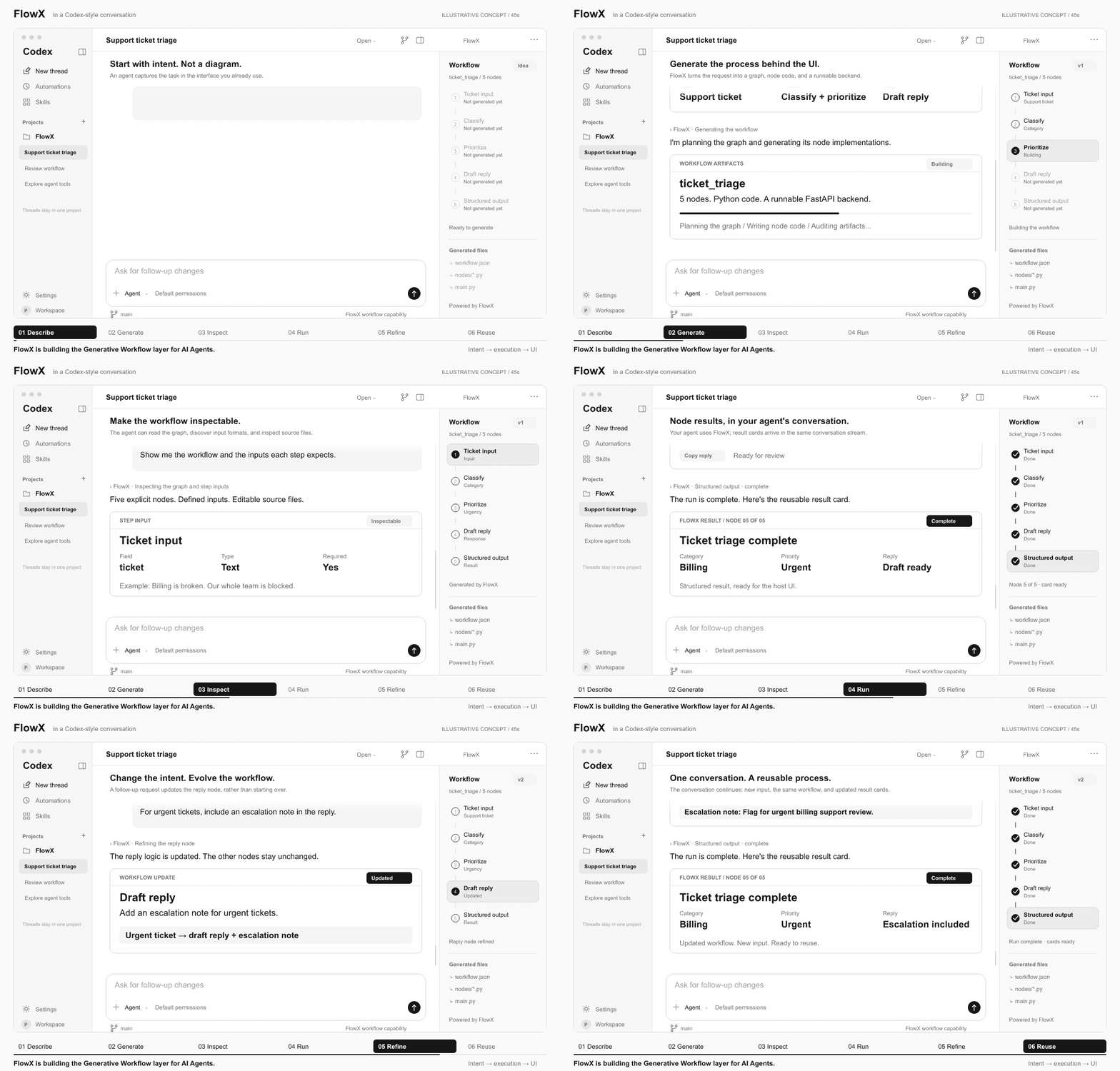
Illustrative walkthrough, not a live recording. Your existing agent remains the assistant; FlowX provides its workflow capability behind the conversation. Messages and per-node cards illustrate what the host UI can render, independent of transport. FlowX does not bundle this interface or automatically generate these card layouts. Generation and execution times are illustrative. See the storyboard and rendering instructions.
Why FlowX
| Instead of… | FlowX gives you… |
|---|---|
| A one-off chat answer | A reusable workflow stored on disk under workspace/workflows/<workflow_id> |
| A hand-drawn, static flow | A graph and node code generated from intent, audited, and editable |
| Re-prompting from scratch | Follow-up changes that rebuild only the affected nodes |
| A hosted black box | A local, Apache-2.0 engine usable from any MCP-capable client, the Python SDK, or A2A |
Quickstart in 5 minutes
python3.10 -m venv .venv && source .venv/bin/activate
python -m pip install -e .
cp .env.example .env   # set FLOWX_LLM_PROVIDER, FLOWX_LLM_MODEL, FLOWX_LLM_API_KEY, FLOWX_DEFAULT_WORKSPACE
flowx-mcp
Register flowx-mcp in your MCP client (config example), then ask:
Use flowx to build a workflow that accepts a support ticket, classifies its category, assigns a priority, and drafts a reply.
Other installers (Poetry, uv, conda, a local ag_ui_workflow checkout) are covered in Installation.
The workflow layer behind intelligent UIs
Generative UI shapes the interaction. Generative Workflow shapes the execution. FlowX focuses on the latter: the explicit process an agent can build, run, and change behind a chat, a task panel, or another intelligent interface.
| Layer | Responsibility |
|---|---|
| Intelligent UI / agent client | Capture intent and present progress, inputs, and results. The host application owns the interface. |
| FlowX: Generative Workflow | Turn intent into workflow artifacts; expose tools to inspect, execute, and refine them. |
| Workflow runtime | Execute generated nodes in a FastAPI backend using ag_ui_workflow; expose step events over AG-UI SSE. |
FlowX is model- and UI-agnostic. Connect an MCP-capable agent client, call the Python SDK, or delegate workflow generation over A2A. A custom frontend can consume the generated backend's events; rendering those events remains the frontend's responsibility. No dedicated integration with a particular model or intelligent UI is implied.
What ships today
| Capability | What the agent can do |
|---|---|
| Intent → executable workflow | Generate a workflow graph, node documentation, Python node code, and a backend entry point. |
| Inspectable artifacts | Read the graph, node inputs, source files, and execution results instead of relying on an opaque plan. |
| Conversational refinement | Apply a follow-up change prompt to the workflow, to specific nodes, or to the main entrypoint; unchanged nodes are reused. |
| A local execution loop | Run, rerun, and stop a built workflow as a service through MCP or the SDK. |
| Reusable workflow files | Keep generated artifacts on disk under workspace/workflows/<workflow_id> and reopen workflows for later updates. |
[!NOTE] The primary interactive path is local stdio MCP. MCP and the Python SDK expose the same engine: build or modify
workflow.jsonand requirements, nodes, the main entrypoint, or the whole workflow, then run it as a service. The A2A adapter currently exposes non-streaming workflow building. FlowX is a workflow layer, not a hosted UI product.
Installation
Add the Generative Workflow layer to your agent environment. FlowX requires Python 3.10 or later; one installation includes the shared core, MCP adapter, Python SDK, and A2A adapter.
Install from Git
pip
# Create and activate a virtual environment
python3.10 -m venv .venv
source .venv/bin/activate

# Install FlowX and its runtime dependencies
python -m pip install --upgrade pip
python -m pip install -e .
Poetry, uv, or conda
# Poetry
poetry env use python3.10
poetry install

# uv
uv sync

# conda
conda env create -f environment.yml
conda activate flowx
Install with a local AG-UI workflow checkout
The FlowX agent is vendored under packages/core/flowx_core. Only ag_ui_workflow remains an external workflow-runtime dependency. To use a local checkout instead of its Git dependency, install it first and then install FlowX without dependencies.
pip
python3.10 -m venv .venv
source .venv/bin/activate
python -m pip install --upgrade pip
python -m pip install -e ../ag_ui_worflow --no-deps
python -m pip install -e . --no-deps
Poetry, uv, or conda
# Poetry
poetry env use python3.10
poetry install
poetry run pip install -e ../ag_ui_worflow --no-deps

# uv
uv venv --python 3.10
uv pip install --python .venv/bin/python -e ../ag_ui_worflow --no-deps
uv pip install --python .venv/bin/python -e . --no-deps

# conda
conda env create -f environment.yml
conda activate flowx
pip install -e ../ag_ui_worflow --no-deps
pip install -e . --no-deps
For source-checkout execution, FlowX automatically discovers each packages/* component. Set FLOWX_EXTRA_PATHS only when the external ag_ui_workflow source is not installed.
Workflow runtime compatibility
FlowX targets the request-scoped ag_ui_workflow API, verified against upstream revision 3e1e15b (2026-10-13). Contract details for contributors are in docs/RUNTIME.md.
Setup and first workflow
The describe → generate → run → refine loop works through any local MCP-capable agent client.
1. Configure FlowX
cp .env.example .env
Set at least FLOWX_LLM_PROVIDER, FLOWX_LLM_MODEL, FLOWX_LLM_API_KEY, and FLOWX_DEFAULT_WORKSPACE.
FLOWX_LLM_PROVIDER=deepseek
FLOWX_LLM_MODEL=deepseek-flash
FLOWX_LLM_API_KEY=
FLOWX_DEFAULT_WORKSPACE=./.flowx_workspaces
FLOWX_CONFIG_ROOT lets an installed flowx-mcp resolve a .env file outside the repository checkout. FLOWX_EXTRA_PATHS can point at a local ag_ui_workflow source when it is not installed into the current environment.
2. Start the server
# Default local stdio entry point
flowx-mcp

# Verbose logging
flowx-mcp --verbose

# Source-checkout entry point
python3.10 run_server.py
For interactive terminal use, prefix with poetry run or uv run if the environment is not activated. For MCP client configuration, use the absolute executable path and arguments described below; an MCP host may not inherit your shell's PATH.
3. Register FlowX in an MCP client
{
  "mcpServers": {
    "flowx": {
      "command": "flowx-mcp",
      "env": {
        "FLOWX_LLM_PROVIDER": "deepseek",
        "FLOWX_LLM_MODEL": "deepseek-flash",
        "FLOWX_LLM_API_KEY": "<your key>",
        "FLOWX_DEFAULT_WORKSPACE": "/Users/user/Desktop/codes/flowx_workspaces"
      }
    }
  }
}
Python SDK
Embed workflow building directly in a Python agent or the backend behind your own intelligent UI, without an MCP transport. A complete walkthrough is in examples/sdk_quickstart.py.
from flowx_sdk import FlowXClient

with FlowXClient(workspace="./workflows") as flowx:
    created = flowx.build_workflow_json(
        "Build a workflow that categorizes and prioritizes support tickets.",
    ).raise_for_failure()                                  # workflow.json + requirements
    workflow_id = created.workflow_id
    flowx.build_nodes(workflow_id).raise_for_failure()     # all nodes, or {step_id: amendment}
    flowx.build_main_entrypoint(workflow_id).raise_for_failure()
    flowx.build_workflow("Also return a summary.", workflow_id=workflow_id)  # whole engine
    print(flowx.run_service(workflow_id))                  # run / rerun as a service
Each build call returns an AgentResult with per-stage outcomes, unresolved errors, logs and artifact paths; stage failures are reported there rather than raised.
To change an existing workflow, choose what to evolve with evolve(workflow_id, command, target=...). list_nodes returns each node's step id and node id to use as a target; without a target the engine decides what the command refers to. A runnable walkthrough is in examples/sdk_evolve.py.
from flowx_sdk import WORKFLOW_TARGET

nodes = flowx.list_nodes(workflow_id)   # [{"step_id": ..., "node_id": ..., "version": ...}]
flowx.evolve(workflow_id, "Add a language-detection step.", target=WORKFLOW_TARGET)  # the workflow
flowx.evolve(workflow_id, "Validate empty input.", target=nodes[0]["step_id"])       # one node (step id or node id)
flowx.evolve(workflow_id, "Also return a one-line summary.")                         # engine judges
A2A server
Let another agent delegate workflow generation to FlowX through the non-streaming Agent2Agent endpoint:
flowx-a2a --host 127.0.0.1 --port 8001
It serves an A2A agent card at /.well-known/agent-card.json and JSON-RPC at /a2a (also /). Supported methods are message/send, tasks/get, and tasks/cancel. Send an A2A text message to build a workflow; add metadata.workflowId to modify an existing one. The task is completed when every stage succeeded and otherwise failed; either way it carries the result, including the generated artifact paths.
4. Create a workflow from chat
Start with the same support-ticket intent shown in the walkthrough:
Use flowx to build a workflow.

Build a workflow that accepts a support ticket, classifies its category,
assigns a priority, and drafts a reply. Name the reply node draft_reply.
Return the category, priority, and draft reply as structured output.
5. Run, refine, and reuse
Follow up in the same conversation:
Run the workflow as a service.

Update the draft_reply node: for urgent tickets, include an escalation note.
Then rerun the service.
The client uses build_workflow (or build_workflow_json, build_nodes and build_main_entrypoint one stage at a time) to create and refine the workflow, and run_service to start or restart it. evolve_workflow changes an existing workflow or one node (target="workflow", a node step id or node id from list_nodes, or no target to let FlowX decide). list_workflows, list_nodes and get_workflow show the workflow ids, node ids and artifact locations. Exact step IDs come from the generated workflow—not from a fixed demo schema.
This is the distinction: the agent does not only answer the ticket. It builds and evolves the process for handling the next one.
Architecture
The Generative Workflow layer has one shared core and three agent-facing interfaces: flowx_core plans, generates, and audits artifacts; flowx_mcp, flowx_sdk, and flowx_a2a make those capabilities available to different agent hosts. The generated runtime sits beneath that layer; the intelligent UI sits above it.
flowchart TB
  UI["Intelligent UI / agent host"] --> MCP["Local MCP: build, modify, run"]
  UI --> SDK["Python SDK: build, modify, run"]
  PEER["Peer agent"] --> A2A["A2A: delegate generation"]
  MCP --> CORE["FlowX · Generative Workflow layer"]
  SDK --> CORE
  A2A --> CORE
  CORE --> FILES["Workflow graph + node code + backend"]
  FILES --> RUNTIME["FastAPI + ag_ui_workflow runtime"]
  MCP -->|"run / rerun as a service"| RUNTIME
  RUNTIME -.->|"AG-UI SSE to a custom frontend"| UI
  MCP -->|"follow-up changes"| CORE
Runtime topology
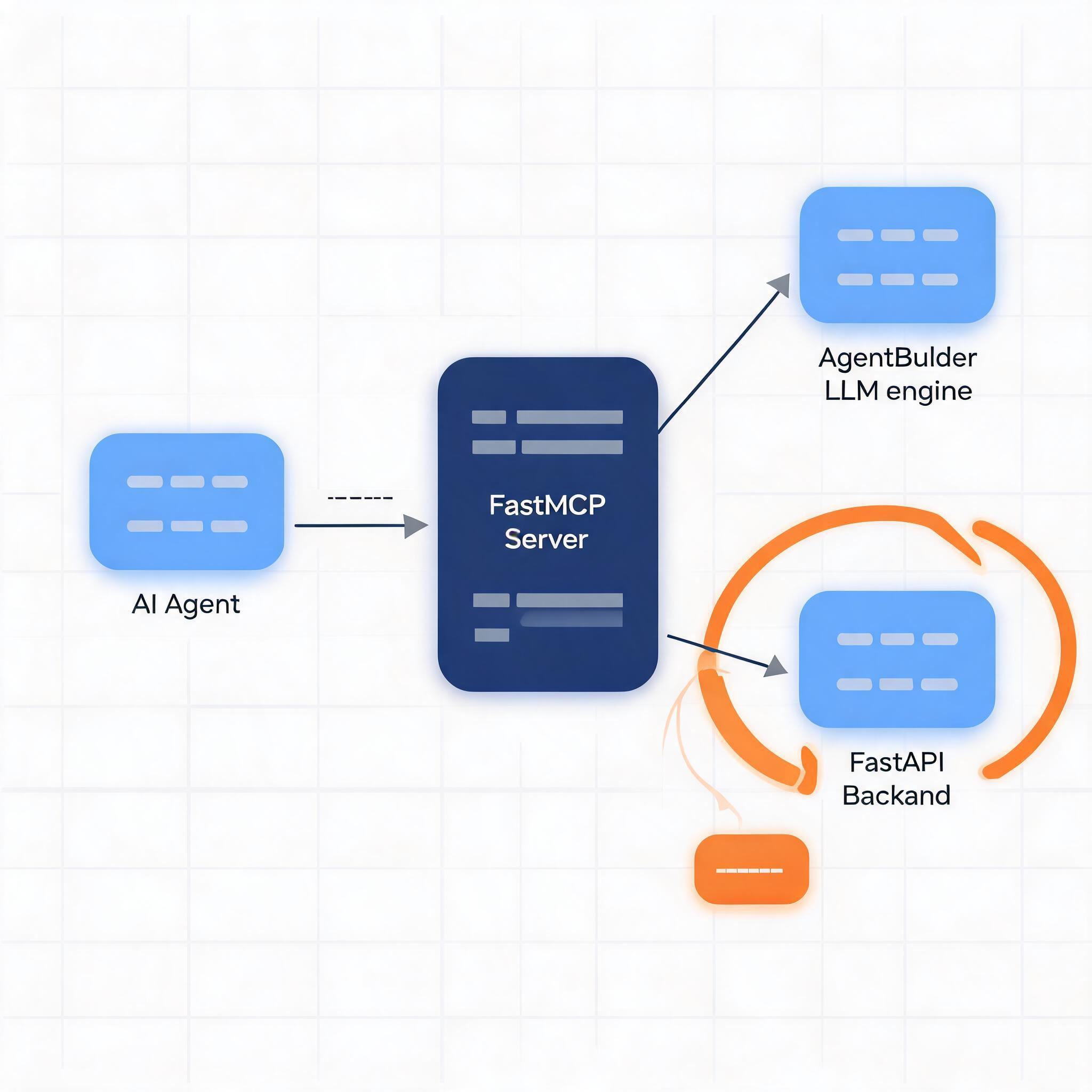
flowx_mcp.serverexposes the tool surface over stdio through FastMCP.flowx_core.AgentBuildercreates and updates workflow artifacts from prompts.flowx_sdk.FlowXClientandflowx_a2acall the same agent core without routing through MCP.- The generated
main.pyruns as a managed FastAPI subprocess per workflow. run_servicestarts or restarts the generatedmain.py; clients reach it over HTTP and AG-UI SSE.
From intent to workflow artifacts
Workflow compilation is the mechanism behind the Generative Workflow layer. Planning and code generation turn intent into artifacts; audits provide feedback during generation and runtime checks. The artifact flow below is mirrored from assets/architecture.mmd.
flowchart LR
    A[Raw requirement] --> B[requirement_analysis.md]
    B --> C[workflow.json]
    C --> D[node_docs/*.md]
    D --> E[nodes/*.py]
    E --> F[main.py]

    C --> G[Graph audit]
    E --> H[Node audit]
    F --> I[Entrypoint audit]
    F --> J[Runtime log audit]

    G -->|feedback| C
    H -->|feedback| E
    I -->|feedback| F
    J -->|feedback| E
Tool surface
These MCP tools let the host agent operate the workflow layer from the same conversation. UI rendering is deliberately left to the host.
| Category | Tool | Purpose |
|---|---|---|
| Build | build_workflow_json | Create (no workflow_id) or modify workflow.json together with its requirement analysis. |
| Build | build_nodes | Build a workflow's nodes, or amend specific nodes by step id; unchanged nodes are reused. |
| Build | build_main_entrypoint | Create or regenerate the main entrypoint from the latest nodes. |
| Build | build_workflow | Create or modify the whole workflow from a request and/or run logs; later stages follow earlier changes. |
| Build | evolve_workflow | Evolve an existing workflow (target="workflow") or one node (step id or node id) with a change command; without target the engine decides. |
| Runtime | run_service | Run a built workflow as a service; calling it again reruns the service with the latest files. |
| Runtime | stop_service | Stop a workflow's running service. |
| Inspection | list_workflows | List workflow ids with their node ids, versions and unresolved errors. |
| Inspection | list_nodes | List a workflow's nodes as step id, node id and version; use them as evolve_workflow targets. |
| Inspection | get_workflow | Locate a workflow's requirement, workflow.json, node versions and main entrypoint. |
Example workflows
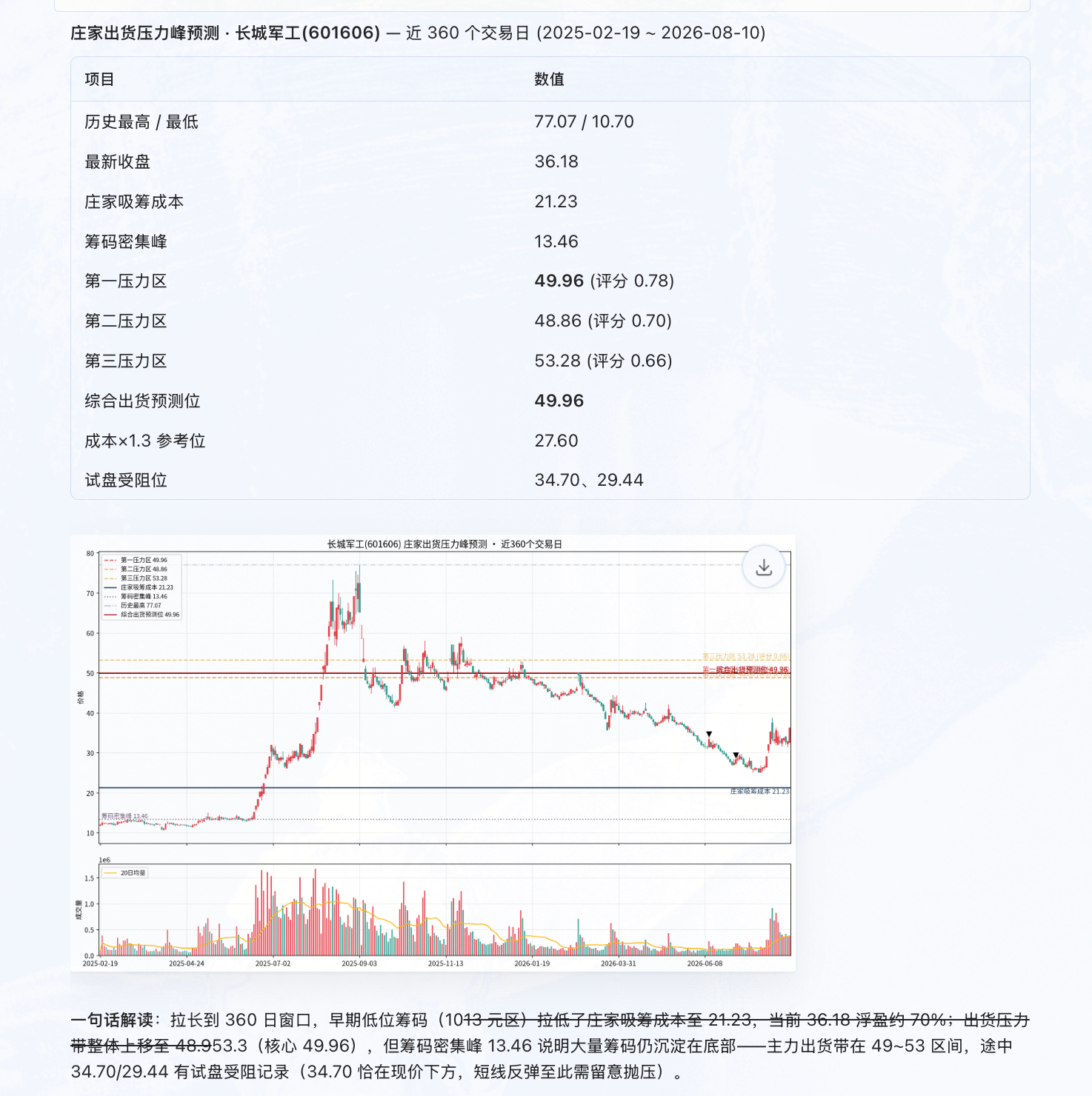
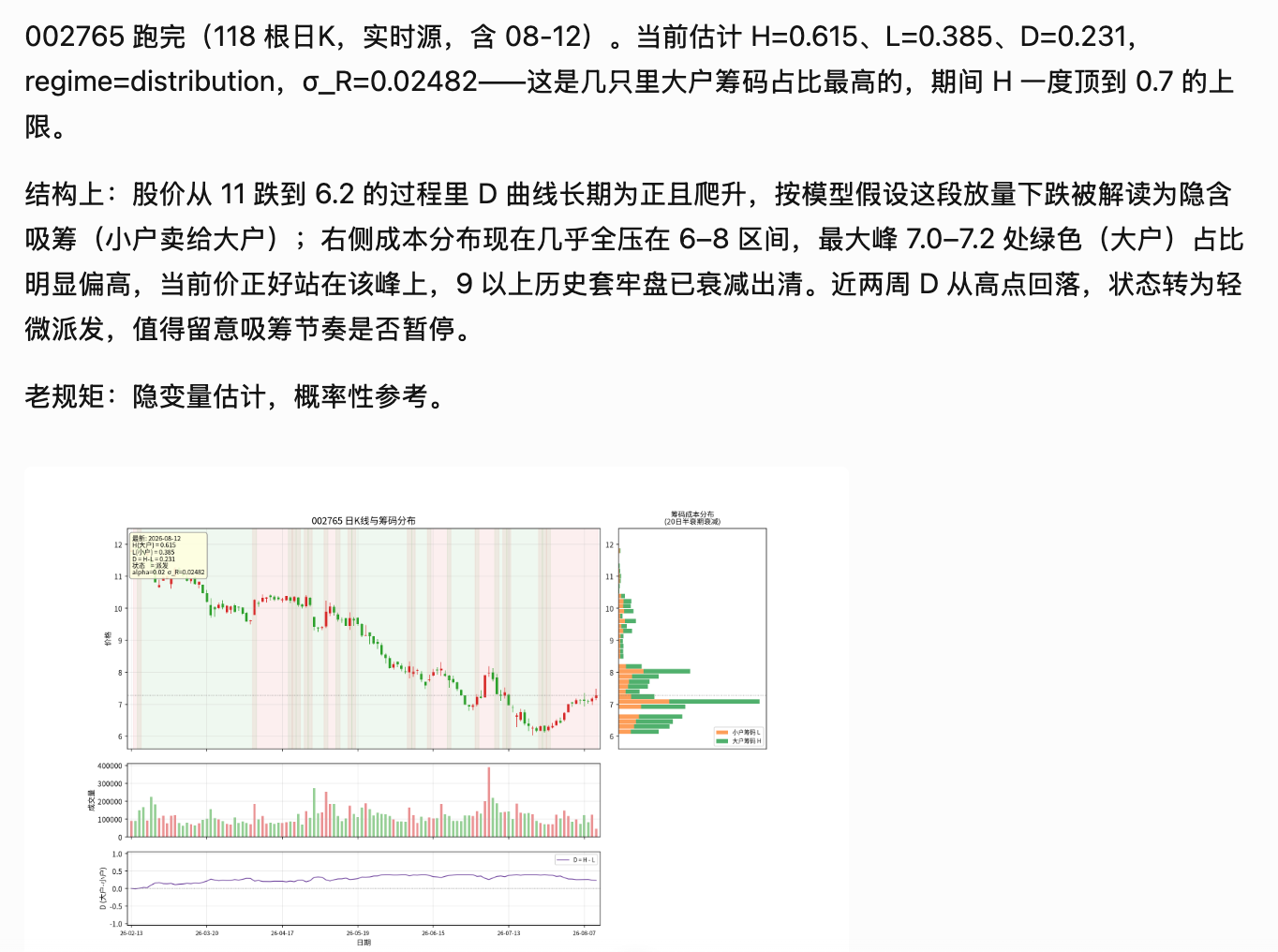
Different intents, the same workflow layer: analysis, file transformation, and information collection can each become an executable process. Paste the prompts below into an MCP client connected to your local flowx server, then inspect, run, and refine the generated workflow. The screenshots are example outputs, not a bundled FlowX UI; external data sources may require their own access and dependencies.
1. stock_pressure
Prompt
Use flowx to create a workflow named stock_pressure.

Build a workflow based on the following theory. Using the most recent n trading days, specified by the user, estimate the likely future distribution price levels for market makers in a user-specified stock and display them on a chart.

Market Maker Distribution Pressure Peak Forecasting Model

I. Model Goal

Use historical trading data, chip distribution, market-maker cost basis, and historical highs to identify future price regions that may form distribution pressure.

Core assumptions:
1. Market makers accumulate positions at low prices after a sharp decline.
2. The accumulation phase forms the market maker's average cost zone.
3. During subsequent rallies, market makers probe overhead sell pressure.
4. Historical high-volume trading zones and previous highs create dynamic resistance.
5. Distribution pressure points are determined by multiple factors together.

II. Input Data

Daily market data:
Date: date
Open: open price
High: high price
Low: low price
Close: close price
Volume: trading volume

III. Chip Distribution Model

Divide the price range into N price buckets.

For each price interval p:
C(p)=Σ Volume(t)

Where:
C(p) represents the cumulative traded chips in that price region.

Peak trading concentration:
P_peak = argmax C(p)

This represents the price zone with the highest cost concentration in the market.

IV. Estimating the Market-Maker Accumulation Cost

Select the accumulation phase using these conditions:
1. The stock experienced a sharp decline.
2. Trading volume expanded significantly.
3. Price entered a sideways consolidation range.

Average market-maker cost:
C_dealer = Σ(P_t × V_t) / ΣV_t

Where:
P_t: transaction price
V_t: volume

This yields the market maker's primary holding cost.

V. Historical Pressure Peak Calculation

Define the pressure score:
Pressure(p)= w1C(p) + w2High_Test(p) + w3Profit(p) + w4Gain(p)

Where:
1. Trading-density pressure C(p)
Represents the historical trading-chip volume accumulated in that price zone.

2. Historical-high pressure High_Test(p)
Measure:
- Whether historical highs occurred at this level
- Whether rallies failed multiple times near this level
- Whether the region formed a top structure

3. Profitable-position pressure Profit(p)
Calculate:
Profit(p)=ΣC(x), x<p

This indicates how many chips below the current price are already in profit.

The more profitable chips there are,
the greater the potential selling pressure.

4. Market-maker gain pressure Gain(p)
Gain(p)= (p-C_dealer)/C_dealer

This represents the market maker's theoretical return at price p.

VI. Pressure Peak Search Algorithm

Step 1:
Build a price-volume matrix:
price_bins = divide(min_price,max_price,N)

Step 2:
Aggregate:
volume_profile[p]

Step 3:
Compute the pressure score for each price level.

Step 4:
Sort:
The highest-scoring levels are the primary pressure peaks.

Output:
Pressure_1
Pressure_2
Pressure_3

Representing:
Primary pressure zone
Secondary pressure zone
Tertiary pressure zone

VII. Dynamic Probe Validation

Observe the market-maker's probing behavior during an upward move:

Case A:
Price rises while volume declines.
Meaning: overhead resistance is relatively weak.

Case B:
Price rises, volume expands sharply, a long upper shadow appears, and price then falls back.
Meaning: this price region contains substantial sell pressure.

Define:
P_pressure = the current failed test price

VIII. Integrated Distribution Price Model

Final prediction:
P_exit = argmax Pressure(p)

That is:
the price corresponding to the maximum pressure score.

Practical estimate:
P_exit ≈ market-maker cost × (1+r)

And:
it should also be close to a historical trading concentration peak.

Where:
r: target market-maker return.

IX. Python Implementation Outline

Input:
OHLCV DataFrame

Compute:
1. Compute volume distribution
2. Estimate market-maker cost
3. Detect historical highs
4. Compute the proportion of profitable chips
5. Compute pressure scores
6. Output pressure peaks

Pseudocode:
for price in price_bins:
    score = (
        w1 * volume_density(price)
        + w2 * historical_high(price)
        + w3 * profit_ratio(price)
        + w4 * dealer_gain(price)
    )

rank(score)

return top_pressure_prices

X. Final Interpretation

The future price at which market makers may distribute is not simply the historical high.
2. stock_distribution
Prompt
Use flowx to create a workflow named stock_distribution.

Build a workflow based on the following theory that estimates large-holder and retail chip distribution across current and historical price levels and visualizes it.

## Role
You are a quantitative researcher responsible for building an implicit large-holder versus retail-holder chip-state model from 1-hour OHLCV data, and for identifying accumulation, distribution, and potential price pressure peaks.

## Important Principles
1. With only price and volume, you cannot directly observe the true holdings of large and small accounts.
2. large_ratio / small_ratio are latent-state estimates of the model, not real account holdings.
3. "Price up = large holders sell to small holders, price down = small holders sell to large holders" is a hypothesis to test, not a fact.
4. All real-time features may use only current and past data; no future leakage is allowed.
5. Output probabilities and confidence levels, and do not present model results as certainty.

## Input
The CSV must contain at least:
datetime, open, high, low, close, volume

## Core State
H_t: estimated large-holder chip ratio
L_t: estimated retail-holder chip ratio
H_t + L_t = 1
D_t = H_t - L_t = 2H_t - 1

R_t = (P_t-P_{t-1})/P_{t-1}
V*_t = V_t / EMA(V_t)

## State Transition
Simplest calibratable model:

ΔH_t = -alpha * tanh(R_t / sigma_R) * V*_t

Constrain H_t ∈ [h_min, h_max].

Interpretation:
- High-volume upward moves push H lower, implying implicit dispersion from large holders to small holders.
- High-volume downward moves push H higher, implying implicit concentration from small holders to large holders.
- Small price moves or normal volume produce smaller state changes.
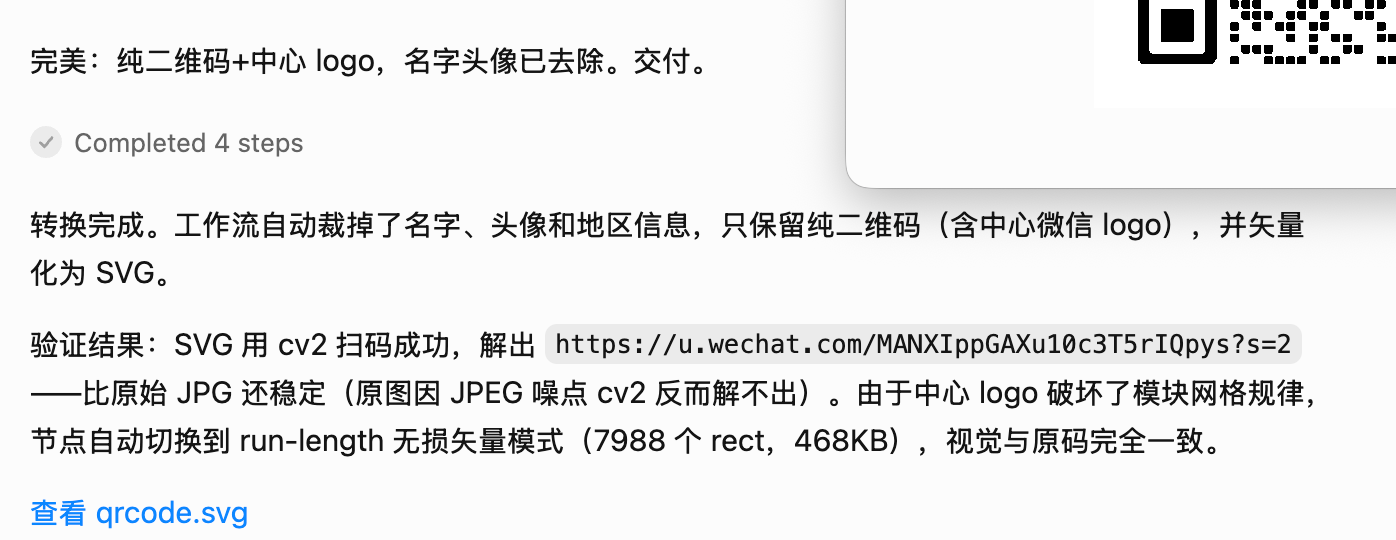
3. picture_to_svg
Prompt
Use flowx to create a workflow named picture_to_svg.

Create a workflow that uploads a WeChat QR code image, automatically removes personal name information, and converts it to SVG format.
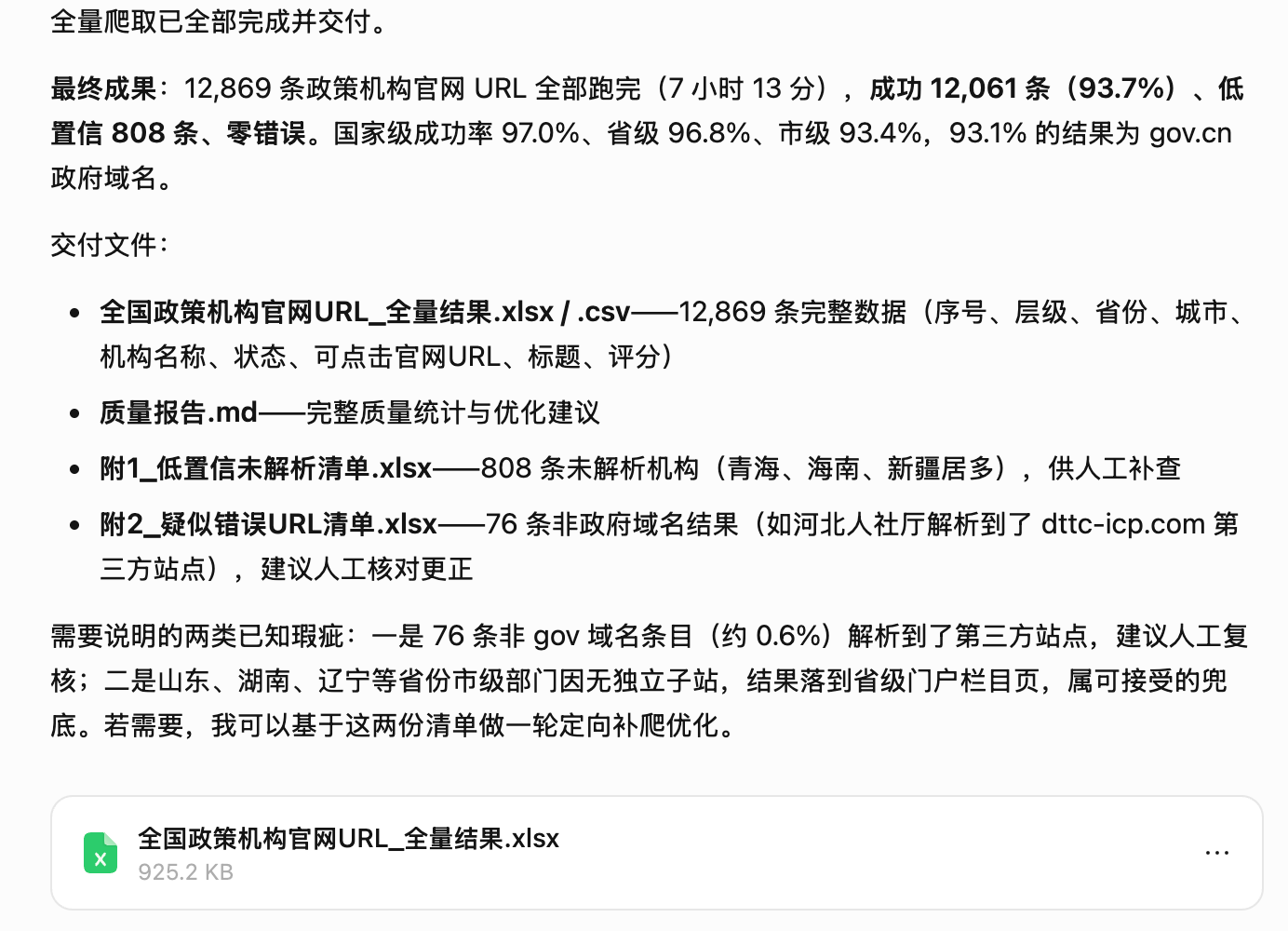
4. policy_scrawler
Prompt
Use flowx to create a workflow named policy_scrawler.

Requirements:
1. Obtain the institution-name templates you need from the national policy publishing institution directory.
2. Combine province, city, and county names across China to construct concrete search names for policy institutions nationwide.
3. Use Playwright to simulate a browser and search Baidu for the official website names of the target institutions.
4. Build a workflow that crawls the official website URLs of policy institutions nationwide.
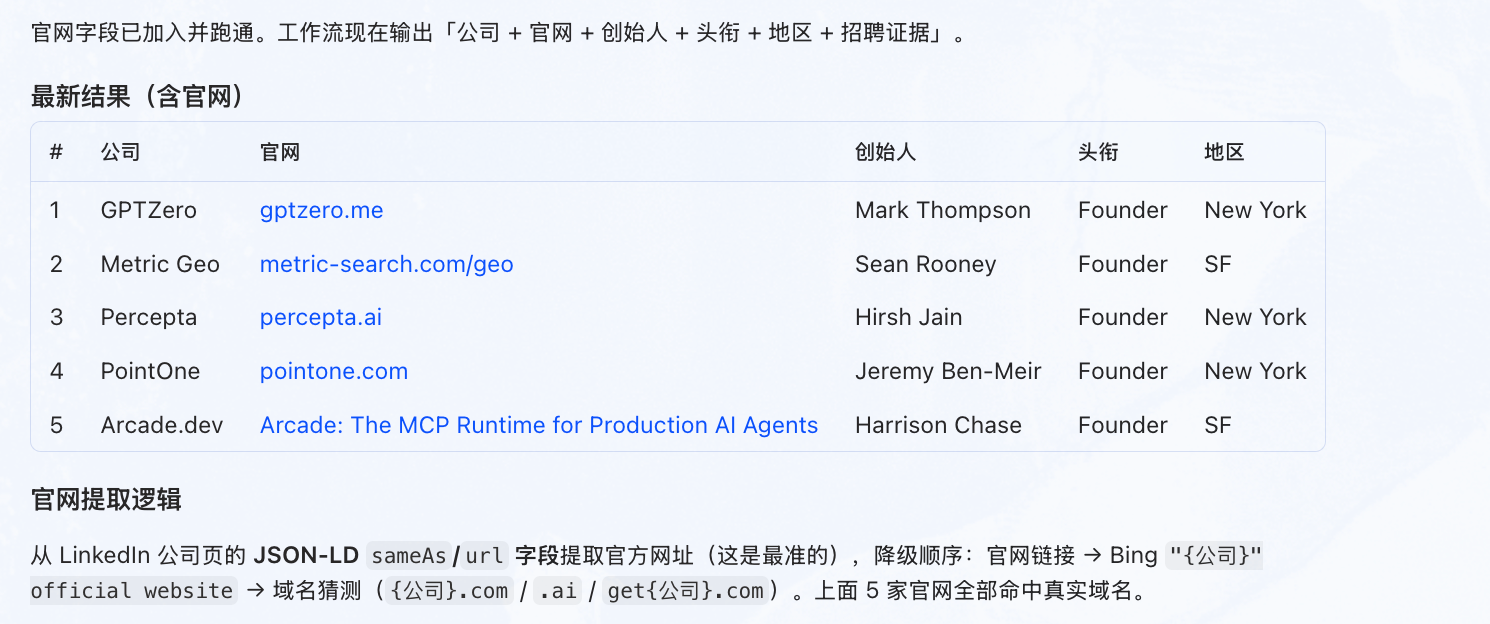
5. start-up-hiring
Prompt
Use flowx to build a crawler workflow that finds the founders of n AI startups that are currently hiring on LinkedIn.
Contributing
Issues and pull requests are welcome. If FlowX is useful to you, star the repo, share a workflow you generated, or open an issue describing an intent you want turned into a workflow. When you redistribute or modify FlowX, keep the LICENSE and NOTICE attribution (see docs/PROVENANCE.md).
Contact
Interested in building the Generative Workflow layer for AI Agents—or connecting it to an intelligent UI? Get in touch at peterxcx@gmail.com.
WeChat QR code: